Key takeaways
- Procore AI MCP supports enterprise Claude today, with other AI providers promised for 2027, so Google-first GCs have no first-party Gemini path yet.
- A governed Procore MCP server bridges the gap: every request goes Ask, Plan, Check, Fetch, Answer, and the model never holds Procore credentials.
- Hybrid mode with a GC persona shows Gemini 42 tools (15 read-only Procore tools plus 27 meta-tools) instead of 2,755, under Gemini Enterprise's 100-action cap.
- On a live Procore sandbox it returned 23 open RFIs (22 past due), $114,021 of change exposure and $261,050 projected over budget, and a write attempt was denied by policy.
- Reads flow, writes wait for a human, deletes never pass, all enforced by reviewable YAML policies in one dispatch path.
- In Google Cloud it fits under Gemini Enterprise or ADK agents, behind Agent Gateway, hosted on Cloud Run with logs in Cloud Logging and history in BigQuery.
50 seconds · From a Build Flows walkthrough
Ask, plan, check, fetch, answer: one governed request
How a question in Gemini becomes a Procore answer: the agent plans which tools it needs, a checkpoint confirms the user is allowed, the call is audited, and the result comes back cited and logged.
Read the clip transcript
with the agent. So when a user is interacting with their agent, they ultimately will go through and ask a question, and the agent will go through and plan a specific set of things that it needs to do in terms of what tools it needs to leverage. Ultimately, once this is then sent through a checkpoint, and so we need to go through and ensure that the user has the ability to do the access of whatever the tools are necessary, that there's an audit log of it, and that's validating that the tools are being referenced correctly. And then this is then fetched in our Procore account via the MCP, and then this is then returned back as a tool call reference that then is then cited, logged, and pulled into the MCP backlog. So all of these then are then queried,
Captions adapted from the source video; proper names may reflect automatic transcription. Original segment: 1:50–2:40. Watch at the source.
59 seconds · From a Build Flows walkthrough
Procore's own agents vs. your agents on the open API
Procore ships its own agents for key workflows, and its open API lets any MCP client, including Gemini, work with Procore under the same API limits.
Read the clip transcript
on their access to data. Procore now is shipping their own agents, and so they are delivering agent systems that they're delivering for specific key workflows that they've identified. You are having to purchase those each out of the box. And so they do have their open API now, which allows for anyone to develop an MCP from this and be able to interact and develop their workflows while leveraging their own agents, i.e. that being any type of client that leverages an MCP, that being Google Gemini in this instance, can be able to then interact with Procore, be able to do the different tooling. There are different limitations to the Procore API, but of course they abide by the same API limits for their agents as well. And so yeah, just there is one thing here with just being able to make sure that we're leveraging the different tooling.
Captions adapted from the source video; proper names may reflect automatic transcription. Original segment: 9:31–10:30. Watch at the source.
Your project managers already live in Google Workspace. They write in Docs, talk in Chat, and more and more of them ask Gemini first. The answers they actually need sit in Procore: which RFIs are late and who has the ball, what change exposure hasn't been priced, which cost codes are running over. Today that means opening Procore, clicking through three tools, exporting to Excel, and pasting a summary back into an email.
This guide shows a governed way to put Procore answers inside Gemini. A Procore MCP server sits between Gemini and Procore, shows the model 42 tools instead of 2,755 endpoints, checks every call against policy, and lets reads through while writes wait for a person. We ran it against a real Procore developer sandbox, and the numbers below come from those responses. You'll get the architecture, what's proven, where it fits in a Google Cloud stack, the use cases worth starting with, and a plan to try it.
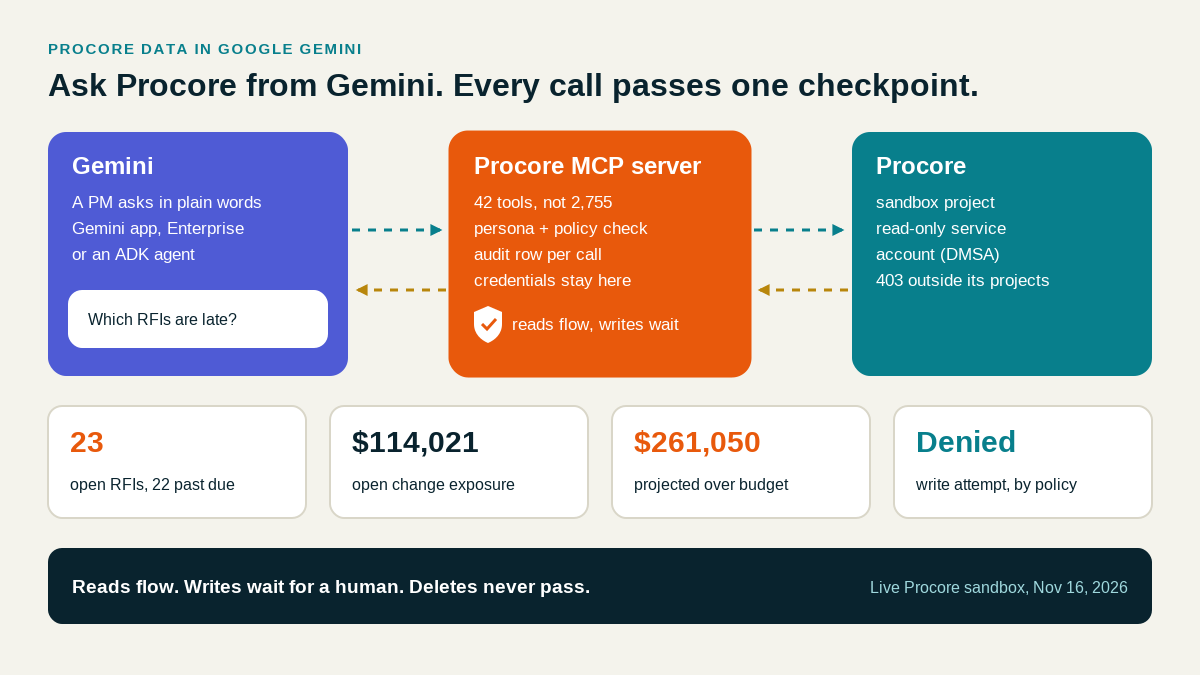 One governed path from a question in Gemini to an answer from Procore.
Why GCs want Procore answers inside Gemini
The case starts with time. In FMI and PlanGrid's 2018 Construction Disconnected study, construction professionals spent about 5.5 hours a week just looking for project data. The same study traced $31.3B of US rework, 48% of the total, to poor communication and bad project data. RFIs are a good example of where that time goes: the Navigant Construction Forum's study of more than a million RFIs put the median response time at 9.7 days and the cost of reviewing and answering one at about $1,080. Those figures are from 2018 and 2013, so treat them as direction, not today's price.
None of that is a Procore problem. Procore holds the data. The friction is that the person asking the question is somewhere else: in a meeting, on a walk, in an email thread with the owner. If Gemini is where your team already works, the useful move is to bring governed Procore answers to Gemini, not to train everyone to run more reports.
The gap: Procore's AI MCP starts with Claude
At Groundbreak 2026, Procore announced Procore AI MCP, which lets companies "securely connect their enterprise Claude environment to Procore AI," with "support for additional AI providers coming in 2027" (Procore blog, October 29, 2026). That's a good move, and if you run enterprise Claude you should look at it.
If your company standardized on Google, you have a gap until then. There's no first-party path from Gemini to your Procore data today, and the announcement doesn't name which providers come next or when in 2027. Charley covers this at 01:20 in the video.
The path in this guide doesn't replace Procore's own AI or agents. It's a bridge you control: open-source, running in your cloud, under your policies. It also opens work Procore's in-app agents aren't built for, like joining Procore with your ERP, schedule and BigQuery history inside Google-native agents.
How it works: Ask, Plan, Check, Fetch, Answer
Every request follows the same five steps.
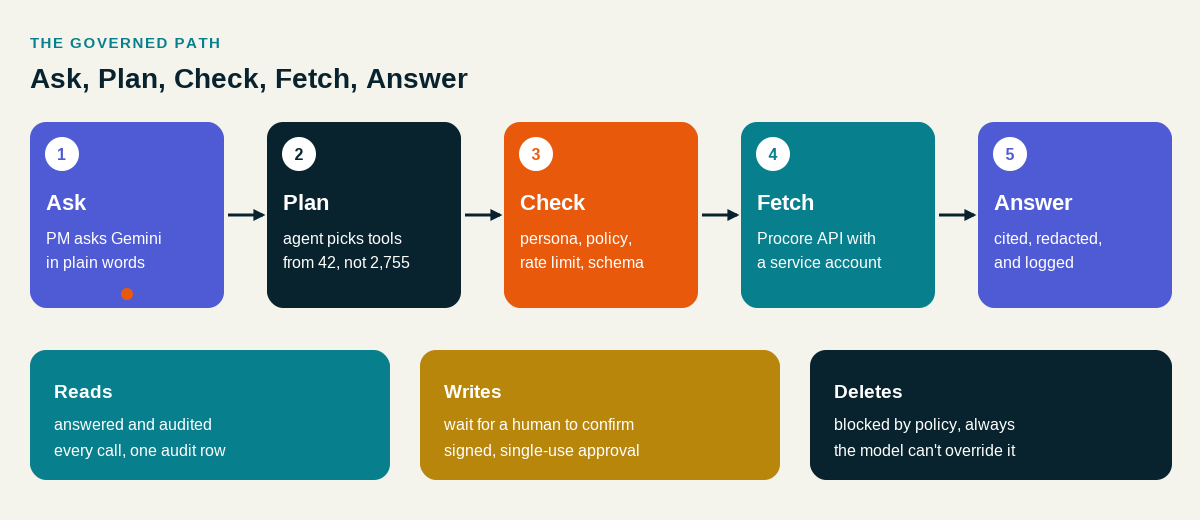 Every call takes the same governed path. The model never holds Procore credentials.
- Ask. A project manager asks Gemini a normal question: "Which RFIs are overdue on Skyrise, and who has the ball?"
- Plan. The agent picks the tools it needs from the small set the server shows it. For that question it's
list_project_rfi_rfis, maybe followed bylist_project_rfi_rfis_replies. - Check. Before anything reaches Procore, the server validates the arguments against the schema, applies rate limits, and evaluates the policies for this persona. A write tool on a read-only persona stops here.
- Fetch. The server calls the Procore API with its own service account. Gemini never sees a Procore credential.
- Answer. The result is shaped, PII fields can be redacted, an audit row is written, and the agent writes the answer with the tool calls it used.
Charley walks through this at 01:50 and in more depth, as one request traced end to end, at 13:05.
2,755 endpoints, 42 tools
Generating one MCP tool per Procore endpoint from Procore's OpenAPI spec produces 2,755 tools. Sending all of them to a model on every turn burns context, hurts tool selection and puts every write and delete in reach. The full story is in Routing 2,755 Procore API Tools Through MCP.
The server has three modes:
| Mode | What the model sees | Use it for |
|---|---|---|
| Expanded | All 2,755 tools | Almost never with a hosted chat client |
| Hybrid | A persona's exact tool allowlist plus the router meta-tools | Role-specific agents, demos, pilots |
| Router | Only the 27 meta-tools (search, describe, call, plan) | General agents that roam across Procore |
For the sandbox run we used hybrid mode with a GC persona: 15 read-only Procore tools (companies, projects, RFIs and replies, submittals, change events, potential change orders, budget views, commitments, daily logs) plus 27 meta-tools, for 42 in total. That's the number Gemini shows when you connect. It also sits under the 100 enabled-action limit Gemini Enterprise sets for a custom MCP server. Choosing a mode per agent is covered in Router, Hybrid or Expanded.
One honest note: we pin exact tools in hybrid mode on purpose. The router's fuzzy tool search works, but we don't yet have evaluation numbers we'd stand behind, so for a pilot the predictable choice is a short, named allowlist.
What is proven on the sandbox
On November 16, 2026 we pointed the server at a Procore developer sandbox project, The Sparkling Skyrise Project, through a client-credentials service account. These are the responses Procore returned:
| Question | Tool(s) | Result |
|---|---|---|
| Which RFIs are open and overdue? | list_project_rfi_rfis | 23 open, 22 past due, ball in court per RFI |
| What change exposure is open? | list_change_events, list_potential_change_orders | 5 open or pending change events, $114,021 ROM |
| Where are we over budget? | list_budget_views, list_budget_view_detail_rows | 3 lines over, $261,050 projected over in total |
| What's committed? | list_work_order_contracts | 5 approved subcontracts, $11,141,550 |
| Which submittals hold up procurement? | list_project_submittals_submittals | 15 submittals, with lead-time math |
| What happened on site Friday? | weather, manpower and notes logs | 32 workers across 4 crews, rain delay, one near miss |
| Can it write? | create_project_rfi_rfis (dry run) | Denied by policy readonly-by-default |
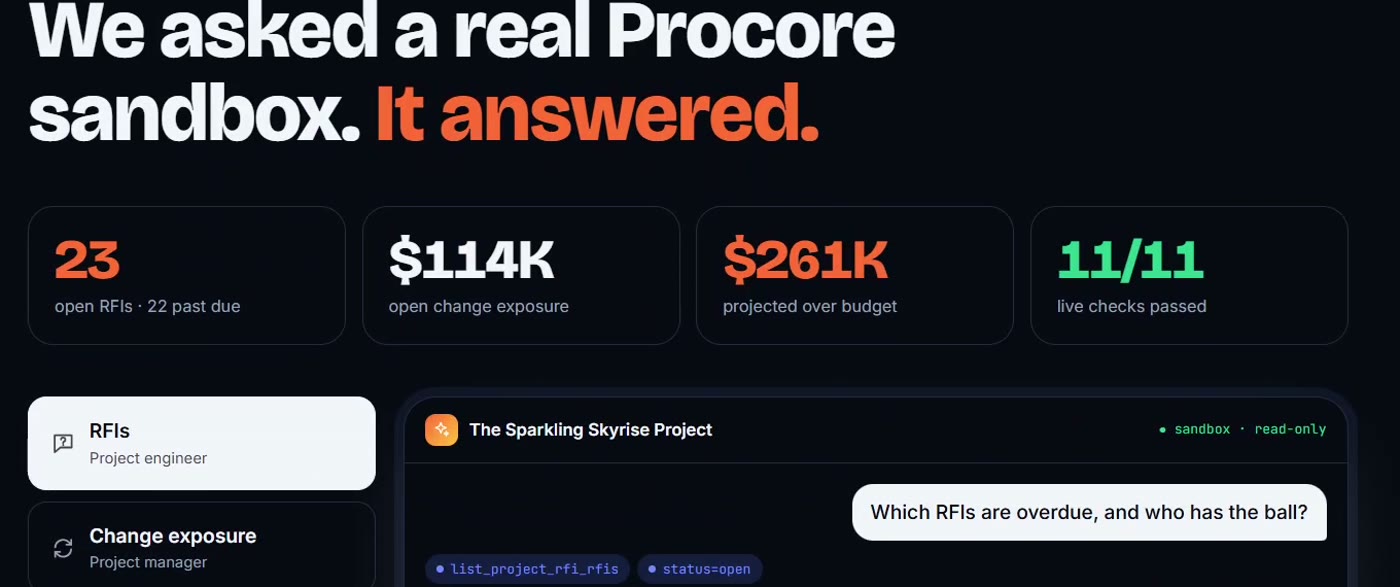 The live sandbox results, shown at 03:20 in the video. All 11 smoke-test checks passed.
The smoke test covers 11 checks, from server startup and auth through each data domain to the denied write and the router search, and all 11 passed. Two limits showed up, and both are features. The service account got 403 on projects where it isn't in the project directory, so Procore's own permissions still apply. And the sandbox rate limit was 25 requests per window, which the server handles with backoff on 429s.
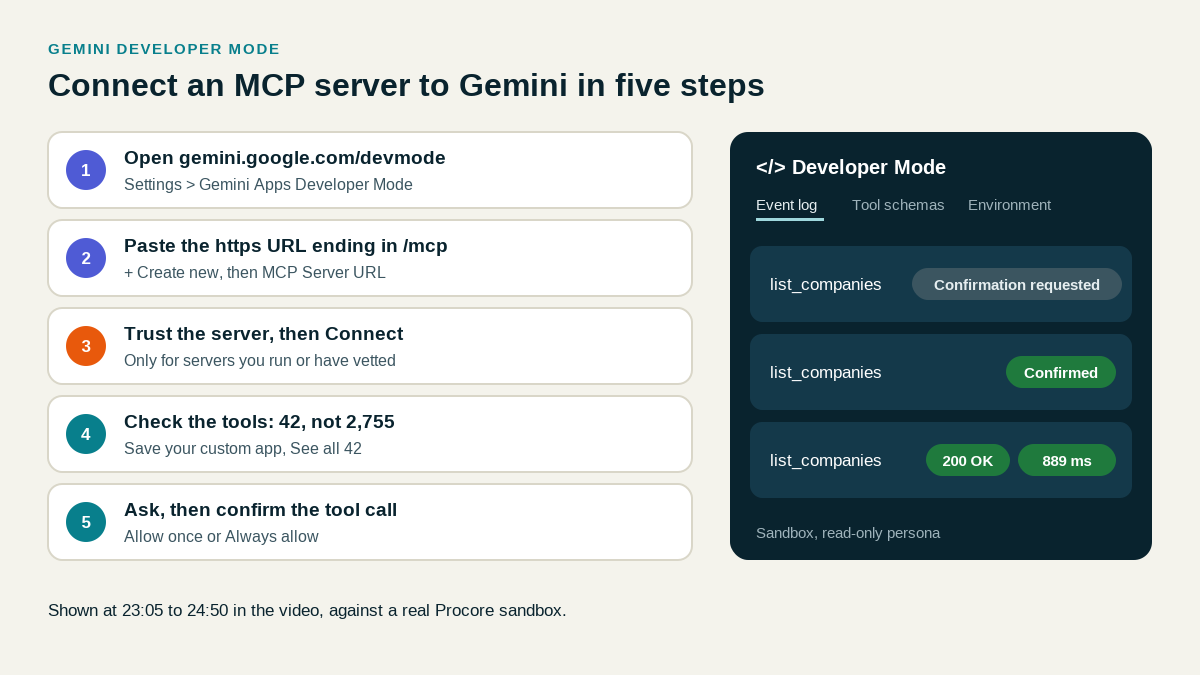
Then we connected the same server to Gemini. Gemini listed the 42 tools, asked for confirmation before the first call, and answered "What Procore projects am I working on?" with the 10 projects the service account can see. That's at 24:05 in the video, and the full walkthrough is in How to Connect a Procore MCP Server to Google Gemini.
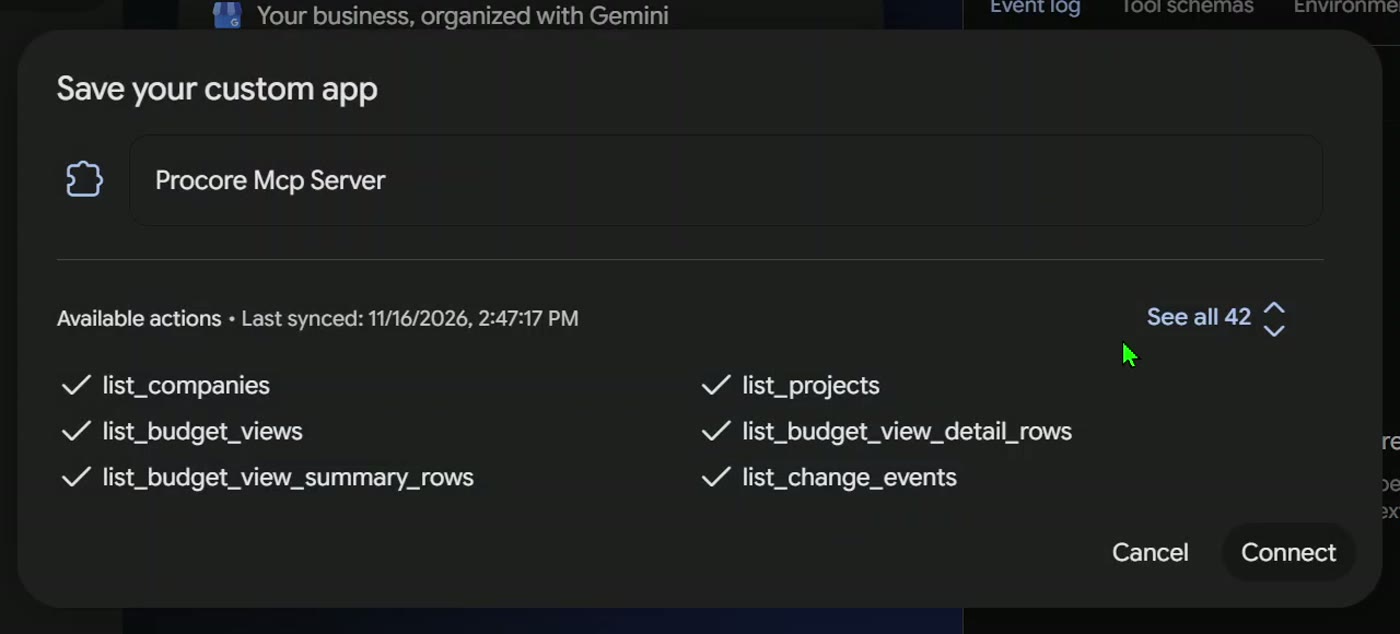 Gemini sees 42 tools, not 2,755. Shown at 23:50 in the video.
Caveat: this is sandbox data. Several RFIs are Procore's own seeded examples with due dates years in the past. The point is that the path works end to end on real Procore responses, not that these numbers describe a real job.
Governed by design: reads flow, writes wait
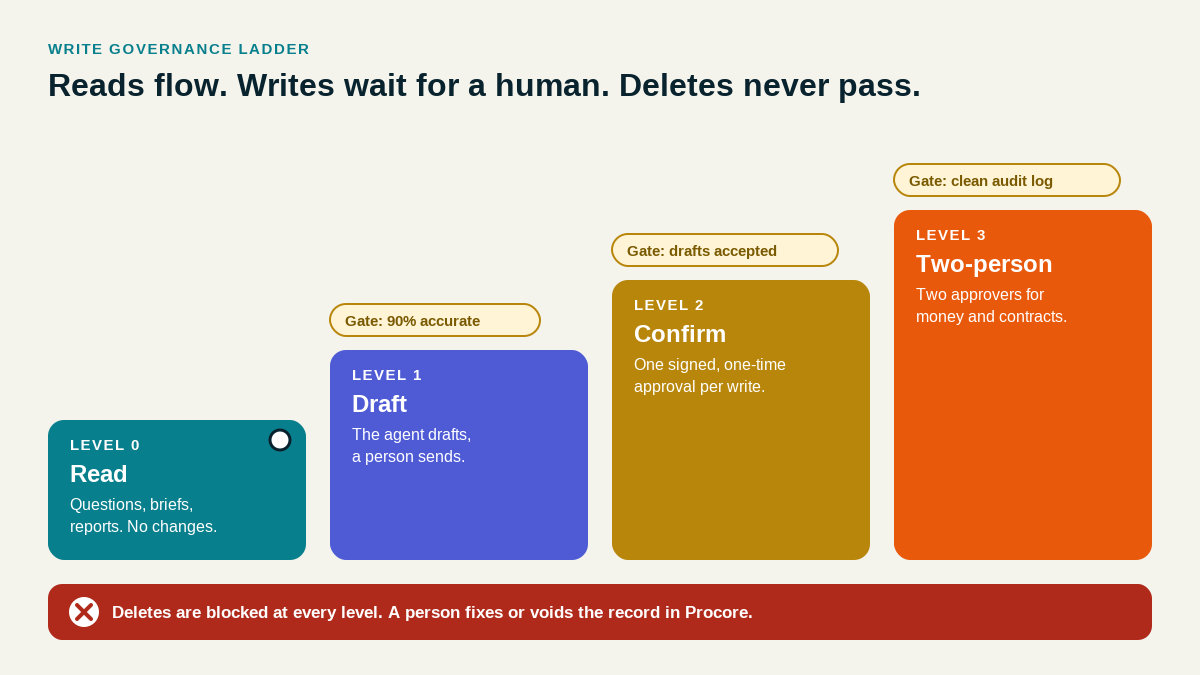
The rule in the video (04:10) is simple: reads flow, writes wait for a human, deletes never pass. The server enforces it in one dispatch path, so an agent can't talk its way around it. Policies are YAML files you can review:
| Rung | What the agent may do | Policies that enforce it |
|---|---|---|
| Read | Answer questions. Where every pilot starts | readonly-by-default, sandbox-only |
| Draft | Prepare an RFI or a note. A person sends it | Read-only server, draft lands outside Procore |
| Confirm | One-click signed approval per write | confirm-writes-on-create, require-dry-run-first |
| Two-person | Money and contracts need two approvers | two-person-approval |
Most policies are opt-in, so you choose them per persona. Deletes are blocked by deny-deletes and by the read-only default. The ladder, and when to climb it, is in The Write Governance Ladder for Procore AI Agents. For the general case, see Governing AI Agents in Construction and Two-Phase AI Agent Workflows.
Where it fits in a Google Cloud stack
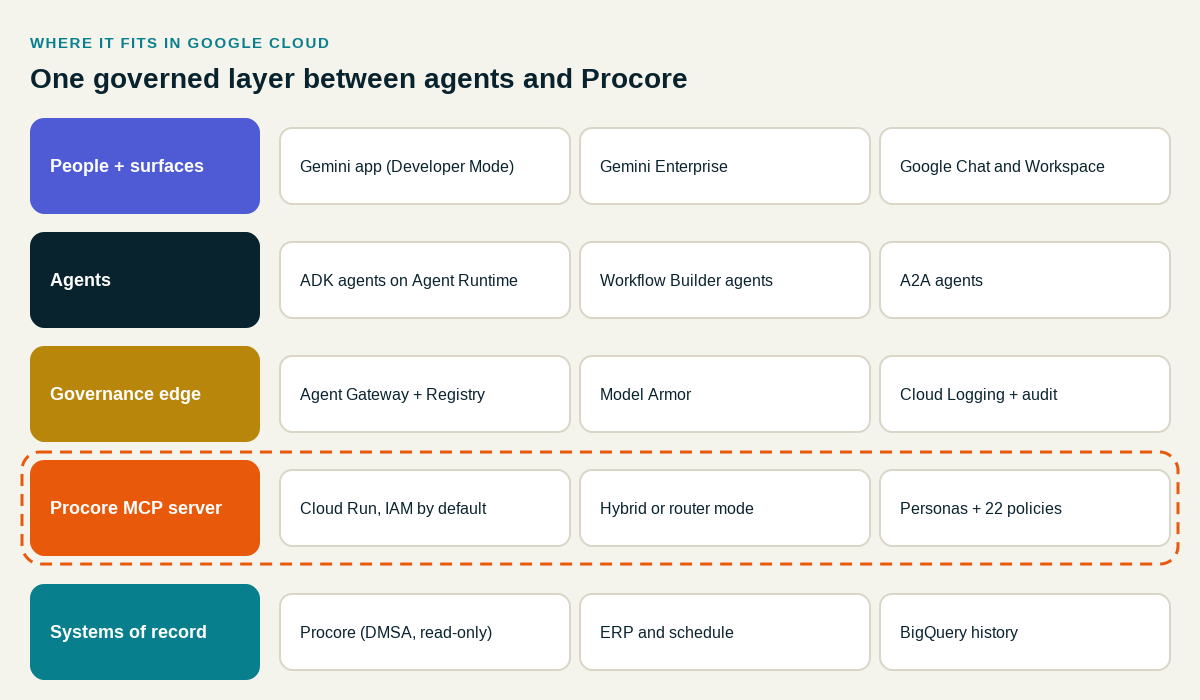 The Procore MCP server is one governed layer in a Google-native agent stack.
Google renamed and reorganized a lot of this in 2026, so here are the current names, checked against Google's docs in November 2026:
- Gemini app, Developer Mode. The fastest way to test. Connect an HTTPS MCP endpoint at gemini.google.com/devmode and watch every tool call in an event log. It's a developer test surface, not a rollout channel.
- Gemini Enterprise. The employee-facing app. Custom MCP server data stores became generally available on August 7, 2026. They support Streamable HTTP only, OAuth 2.0 or no auth, import every tool turned off, and allow up to 100 enabled actions. Read-only tools that declare
readOnlyHintskip the confirmation step, and tools withdestructiveHintkeep it. - Gemini Enterprise Agent Platform. Google describes it as "an evolution of Vertex AI." If your team still says Vertex AI Agent Builder, this is where those pieces live now: the Agent Development Kit (ADK), whose
McpToolsetconnects to remote Streamable HTTP servers and takes atool_filterso each agent sees only what it needs; Agent Runtime to host agents; Agent Registry to catalog agents and MCP servers; and Agent Gateway as the policy point for calls to external tools and remote MCP servers. - A2A. Registering A2A agents in Gemini Enterprise became generally available on August 17, 2026, so a Procore RFI agent built with ADK can show up next to your other agents.
- BigQuery. Keep Procore history in BigQuery for trends the live API can't answer cheaply. Google offers a managed BigQuery MCP server, announced in December 2025.
- Cloud Run and Cloud Logging. Host the MCP server on Cloud Run with IAM on by default. Its request and container logs go to Cloud Logging next to the server's own audit rows.
The architecture Charley walks through at 10:30 follows these layers. Securing the hop from Gemini to the server is covered in Expose a Dev MCP Server to Gemini Safely and Hosting Streamable HTTP MCP Servers.
Start with the work everyone hates
The best first agents take a report someone builds by hand every week and turn it into a question. Each of these has its own guide:
| Use case | What it answers | Guide |
|---|---|---|
| RFI radar | Which RFIs are late, who has the ball, what's next | RFI radar agent |
| Change exposure roll-up | Open exposure by status and age, what's unpriced | Change exposure agent |
| Budget variance narrative | Which cost codes moved, why, and the forecast | Budget variance agent |
| Submittal and procurement risk | Submittals that will make long-lead items late | Submittal risk agent |
| Superintendent morning brief | Yesterday's logs, weather, crews, open items | Morning brief agent |
| Weekly owner and executive report | The OAC brief, drafted from live data | Weekly OAC brief agent |
If change orders are your biggest leak, the change order aging report pairs well with the exposure agent. The full catalog, ranked by value and feasibility, is in the Procore Agent Playbook.
Prompts to paste
Once the server is connected, these work as written against the GC persona. Swap in your project name.
Which RFIs on The Sparkling Skyrise Project are overdue as of today?
Rank them by days late, show who has the ball in court, and lead
with the newest ones. One line on the older backlog.

What open or pending change events do we have, and what is the total
ROM exposure? Split out what's out of scope and should go to the owner.

Where are we projected over budget? List the cost codes, the amount
over, and whether the overrun is already committed.

Summarize Friday's daily log for the superintendent: weather, crews
and hours, delays, and any safety notes.
On the sandbox, the first prompt came back as a table of the newest overdue RFIs with days late and ball in court, plus a call list ("Call the Architect today about #22, #23 and #18, in that order"). The second split the $114,021 into real project events and Procore's placeholder events, and called out what was out of scope.
How to start
- Pick one use case and one project. RFI radar is the usual first choice. The data is clean and the win is easy to see.
- Set up a Procore service account. Use a Developer Managed Service Account in your sandbox first, with read-only tool permissions, and have a company admin pick the projects. See Procore DMSA setup and read-only API scopes.
- Run the server in hybrid mode with a persona. Start from the open-source repo at github.com/charley-forey/procore-mcp, keep
readonly-by-defaultandsandbox-onlyon, and keep the tool list short. - Connect it to Gemini. Developer Mode first, then a Gemini Enterprise custom MCP data store or an ADK agent for real users.
- Run a 90-day pilot with a scorecard. Median days to answer an RFI, unpriced exposure, hours saved per PM. The plan and ROI math are in the 90-day pilot plan.
Before production, read Hardening MCP Servers for Production. The Procore MCP and Gemini demo shows the whole run, and What is MCP? is the plain-English primer if your team is new to it.
Do it with us
BuildFlows sets this up with GCs: the Procore service account, the MCP server in your Google Cloud project, the personas and policies, the first two agents, and the pilot scorecard. If you want Procore answers in Gemini without waiting for 2027, email charley@buildflows.ai or visit /engage.
References
- Procore, "Groundbreak 2026: Putting the future of construction to work" (Oct 29, 2026): https://www.procore.com/blog/groundbreak-2026-putting-the-future-of-construction-to-work
- Autodesk / FMI and PlanGrid, Construction Disconnected (2018): https://www.autodesk.com/blogs/construction/survey-plangrid-fmi/
- PlanGrid and FMI press release on $177B and rework causes (2018): https://prnewswire.com/news-releases/new-research-from-plangrid-and-fmi-identifies-factors-costing-the-construction-industry-more-than-177-billion-annually-300689826.html
- Procore, RFI cost and response time (Navigant Construction Forum data, 2013): https://www.procore.com/library/rfi-construction
- Google, Set up a custom MCP server in Gemini Enterprise: https://docs.cloud.google.com/gemini/enterprise/docs/connectors/custom-mcp-server/set-up-custom-mcp-server
- Google, Gemini Enterprise release notes (custom MCP GA Aug 7, 2026; A2A registration GA Aug 17, 2026; Workflow Builder GA Sep 3, 2026): https://docs.cloud.google.com/gemini/enterprise/docs/release-notes
- Google, Gemini Enterprise Agent Platform overview: https://docs.cloud.google.com/gemini-enterprise-agent-platform/overview
- Google ADK, MCP tools: https://adk.dev/tools-custom/mcp-tools/
- Google Cloud blog, official MCP support for Google services (Dec 10, 2025): https://cloud.google.com/blog/products/ai-machine-learning/announcing-official-mcp-support-for-google-services
- Google, Gemini Apps Developer Mode overview: https://developers.google.com/connected-apps/mcp/dev-mode
- Google Cloud Run, Host MCP servers: https://docs.cloud.google.com/run/docs/host-mcp-servers
- Procore, Developer Managed Service Accounts FAQ: https://support.procore.com/faq/what-is-developer-managed-service-account
- Procore, Rate limiting: https://procore.github.io/documentation/rate-limiting
- Procore MCP server (open source): https://github.com/charley-forey/procore-mcp
- Video: Procore data in Google Gemini: https://youtu.be/wXAZCQnYIjA
Frequently asked questions
Can Google Gemini connect to Procore today?
Not through a first-party Procore connector. Procore AI MCP launched for enterprise Claude, with additional AI providers announced for 2027. Today a third-party MCP server, such as the open-source Procore MCP server, can connect Gemini to Procore through the Gemini app's Developer Mode, a Gemini Enterprise custom MCP data store, or an ADK agent.
Does this replace Procore AI or Procore's own agents?
No. It's a bridge for companies that standardized on Google. It runs in your cloud under your policies, and it also supports cross-system work, like joining Procore with ERP, schedule and BigQuery history, that in-app agents aren't built for.
Why does Gemini see 42 tools and not 2,755?
The server runs in hybrid mode with a GC persona. That exposes 15 named read-only Procore tools plus 27 router meta-tools. Sending all 2,755 generated tools would flood the model's context, hurt tool selection and put every write and delete in reach.
Can the agent change or delete Procore data?
Not in this setup. The readonly-by-default policy denies create, update and delete tools, sandbox-only blocks writes in production, and deny-deletes blocks deletes outright. When you're ready for writes, policies can require a signed confirmation or two approvers.
Which Google Cloud products does this use?
Gemini (Developer Mode for testing, Gemini Enterprise for employees), Gemini Enterprise Agent Platform pieces such as ADK, Agent Runtime, Agent Registry and Agent Gateway, A2A for agent registration, Cloud Run for hosting, Cloud Logging for logs, and BigQuery for history.
Is the sandbox data real?
The responses are real Procore API responses from a Procore developer sandbox project, captured on November 16, 2026. The project itself is demo data, so the numbers prove the path works end to end, not the state of a real job.
Next step
Have a workflow in mind?
Start with a readiness review: the task, the data and tools it needs, the access boundaries, and how a pilot would be evaluated.
Prefer email? charley@buildflows.ai
Keep learning
Integrations · November 16, 2026
How to Connect a Procore MCP Server to Google Gemini (Developer Mode)
A help guide that matches the video from 23:05 to 24:50: what Gemini Apps Developer Mode is, how to run the server on port 8123 at /mcp, how to build the URL with mode and persona, each Gemini screen in order, the confirmation prompts, the Tool schemas, Environment and Authentication tabs, and troubleshooting.

AI agents & MCP · May 10, 2026
Routing 2,755 Procore API Tools Through MCP Without Drowning the Model
A walkthrough of the Procore MCP server architecture: generated tools for every endpoint, router-mode meta-tools, hybrid retrieval, and a single dispatch chokepoint for safety and audit.
AI agents & MCP · November 16, 2026
The Write Governance Ladder for AI Agents on Procore: Read, Draft, Confirm, Two-Person
A practical ladder for AI agents that touch Procore. What each level allows, which Procore actions belong where, how the open-source Procore MCP server enforces it with policy YAMLs and signed confirmation tokens, the live write denial from the sandbox, and a policy table GCs can copy.