Key takeaways
- Run the pilot with one GC, one or two workflows and two or three well-kept projects.
- Capture 25 real questions in discovery. They become the evaluation set and the 90 percent accuracy gate.
- Build read-only and run two weeks of shadow mode before users see anything.
- Agree metrics up front: RFI median days to answer, change exposure age, hours saved, accuracy, adoption and zero unapproved writes.
- ROI math: users times hours saved per week times 48 times loaded rate, then divide by net margin for the revenue equivalent.
- With the estimator defaults (40 users, 2 hours, $95, 4 percent) that is 3,840 hours, $364,800 and about $9.1M of revenue. It is illustrative, not a forecast.
- Turn on confirmed writes only in the last phase, and only where users ask for them.
38 seconds · From a Build Flows walkthrough
Is it worth automating? The ROI estimator
Estimate the value of a workflow from hours saved, loaded hourly cost and net margin, and the revenue it would take to earn the same.
Read the clip transcript
into Procore. So this is ultimately, you know, it's worth the time being able to automate some of these systems, being able to save time and value. This ultimately just goes through and calculation based upon the number of times it brings based upon what your net margin is and what your loaded hourly cost is for each user. And you can ultimately start to reconcile to see how much time value it's bringing and what type of additional revenue you need to bring in to be able to accommodate for those costs. And so it's just something you need to play with. But all of this data is tested and leveraged within the sandbox environment of the Procore MCP, which I
Captions adapted from the source video; proper names may reflect automatic transcription. Original segment: 16:30–17:08. Watch at the source.
Most AI pilots at general contractors stall in the same place. Someone builds a clever demo, a few people try it, and three months later nobody can say whether it saved time or what it would take to roll out. The demo wasn't the problem. The pilot never had a baseline, a gate or a date.
This is the 90-day plan we use to put a Procore-connected agent in front of one GC's project teams and come out with a clear yes or no. It covers discovery, picking one or two workflows, the read-only build, shadow mode, a measured go-live, the gates between phases, the metrics, the risks, who does what, and the ROI math. At the end there's a checklist you can copy into your own plan.
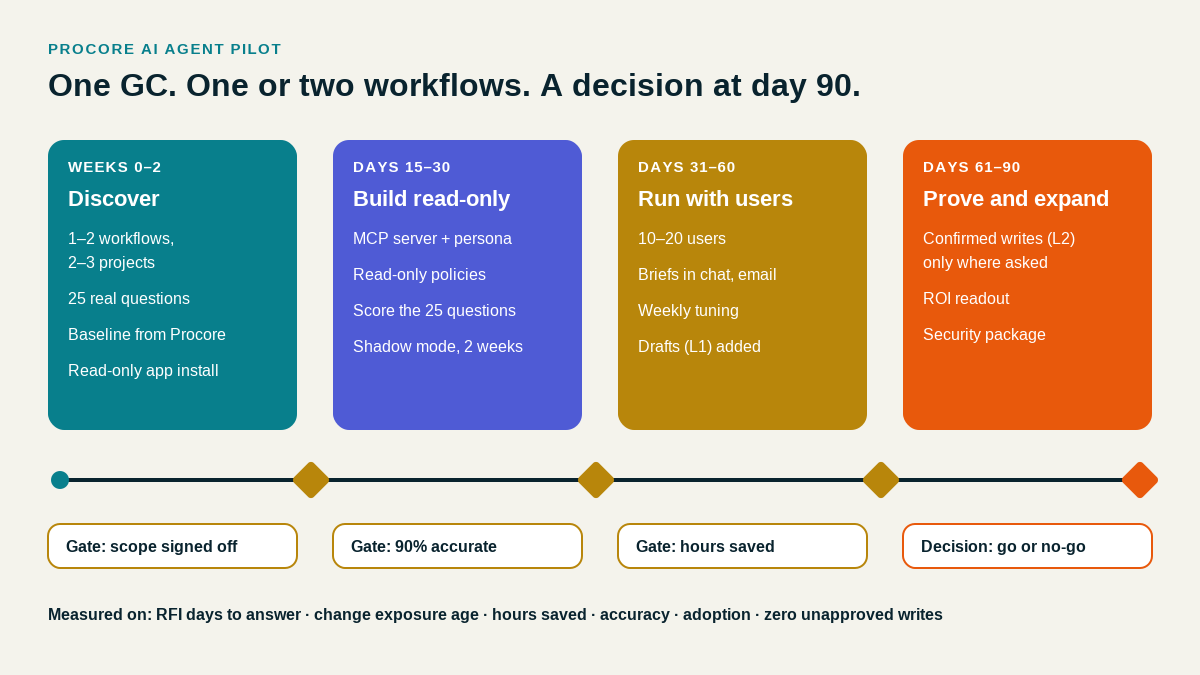 One GC, one or two workflows, four gates, one decision at day 90.
The shape of the pilot
The whole plan fits in one table. The rest of this article fills in each row.
| Phase | When | What happens | Gate to move on |
|---|---|---|---|
| Discover | Weeks 0–2 | Pick 1–2 workflows and 2–3 projects. Capture 25 real questions. Pull baseline numbers from Procore. Install a read-only app. | Workflow, metrics and data access signed off |
| Build read-only | Days 15–30 | Deploy the MCP server. Build the workflow agent. Score it on the 25 questions. Run in shadow mode next to the team. | 90%+ correct answers on the evaluation set |
| Run with users | Days 31–60 | 10–20 users on live projects. Briefs land in chat and email. Tune weekly. Add drafts (L1). | Measured hours saved and steady weekly use |
| Prove and expand | Days 61–90 | Turn on confirmed writes (L2) only where users ask. ROI readout. Security review package. | Go or no-go for production |
In the video, the playbook walks through this at 17:50, and the ROI estimator is at 16:30. The full version lives in the Procore Agent Playbook.
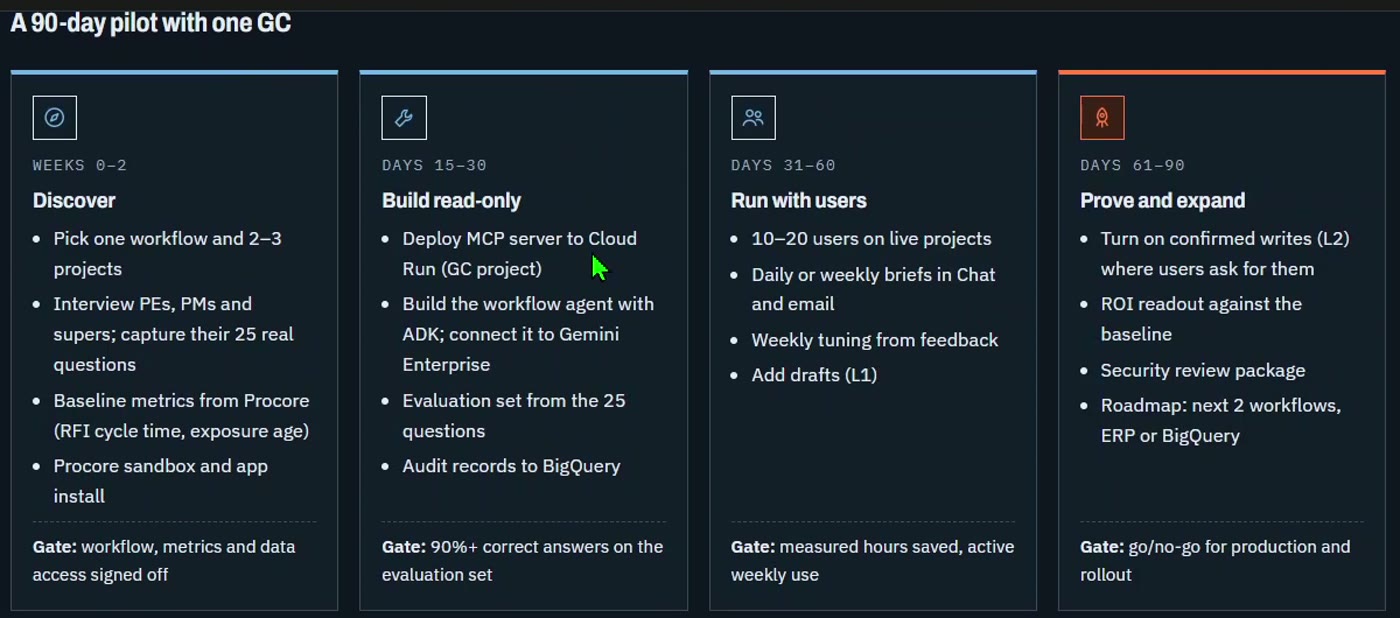 The four phases and their gates, from the playbook at 18:30 in the video.
Weeks 0–2: Discover
Discovery is where most of the value of the pilot is decided. Rushing it is the most common mistake.
- Pick one or two workflows. Choose work people already hate and that Procore already holds the data for. RFI aging and change exposure are the strongest first picks, because both have clean timestamps you can measure before and after. Good candidates: the RFI radar, the change exposure rollup, the superintendent morning brief, and the weekly owner report.
- Pick two or three projects. Choose well-kept projects with active teams. A messy project will make the agent look bad for reasons that have nothing to do with the agent.
- Capture 25 real questions. Sit with PEs, PMs and supers and write down the questions they actually ask in a week, in their words. These become the evaluation set.
- Baseline the metrics. Pull current numbers from Procore before anything changes: median days to answer an RFI, days from change event to owner submission, and a short survey on time spent hunting for information.
- Get read-only access. The GC's Procore admin installs a service-account app with read-only permissions on the chosen projects. With a developer-managed service account, the admin chooses which projects the app can run in during installation.
A discovery prompt that helps the team write good questions:
I'm a project engineer on a Procore job. List the 10 questions I ask most
often in a normal week about RFIs, submittals, change events and the budget.
Phrase each one the way I'd say it to a coworker, not as a report title.
Days 15–30: Build read-only, then shadow
The build is deliberately boring. The agent reads Procore and answers. It changes nothing.
- Deploy the MCP server in the GC's own cloud project, over Streamable HTTP, with credentials on the server. See hosting Streamable HTTP MCP servers and hardening MCP servers for production.
- Give the agent a small tool surface. Use a persona in hybrid mode, like the demo's
gc_demo, which exposed 15 read tools plus the meta-tools. The modes article explains why. - Keep the default policies on:
readonly-by-default,deny-deletes,redact-pii, plussandbox-onlywhile you build. The governance ladder article covers what each one does. - Send audit records somewhere the security team can see them from day one.
- Score the agent on the 25 questions. Each answer gets marked correct, partly correct or wrong by the person who asked the question.
Shadow mode is the last two weeks of this phase. The agent produces its RFI list or morning brief every day, but only the pilot lead and one or two power users see it. They compare it with what the team actually did. Shadow mode catches the problems that an evaluation set misses, such as stale test records, a ball-in-court field nobody maintains, or a cost code that maps differently on one job.
Days 31–60: Run with users
Now 10 to 20 people use it on live projects. Deliver into the tools they already have open, such as Google Chat, Gmail or Teams, rather than a new app. Recruit one field champion per project.
- Tune weekly from thumbs up/down and comments.
- Add drafts (L1) in this phase: chase emails, RFI reply drafts, OAC narratives. A person reviews and sends them.
- Run the two-question pulse survey every week: "How many minutes did this save you this week?" and "What did it get wrong?"
Days 61–90: Prove and expand
- Turn on confirmed writes (L2) only for a workflow where users asked for it and drafts have been accepted with light edits. Every write needs a signed, single-use approval. Deletes stay blocked.
- Produce the ROI readout against the baseline.
- Hand the security team its review package: policy files, persona files, audit samples, and the denial log.
- Make the call: go to production, extend the pilot, or stop.
Success metrics to agree up front
Agree these in week one, with targets, and write them down. The targets below are starting points to negotiate, not promises.
| Metric | How it's measured | Example target |
|---|---|---|
| RFI median days to answer | Procore RFI timestamps, before and after | −20% |
| Change exposure age | Days from change event to owner submission | −25% |
| Hours saved per user | Weekly pulse survey plus usage logs | 2+ hours a week |
| Answer accuracy | Evaluation set plus thumbs up/down in use | 90%+ |
| Adoption | Weekly active users ÷ invited users | 60%+ |
| Safety | Unapproved writes and policy violations in the audit log | Zero |
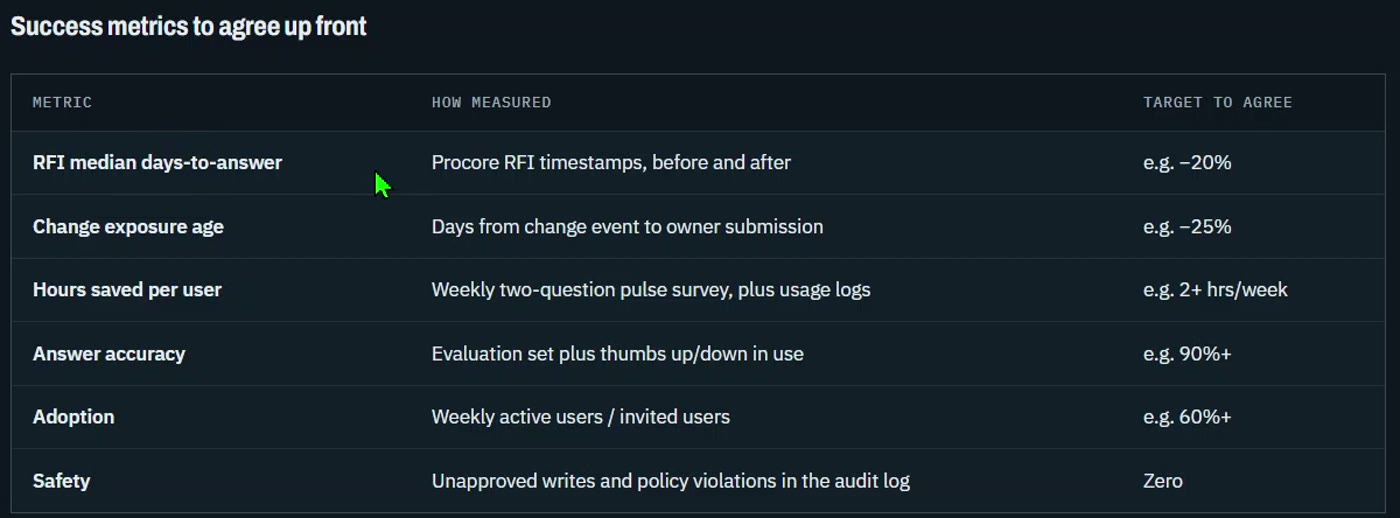 Success metrics to agree up front, from the playbook at 18:40 in the video.
For context on the RFI number: the often-quoted Navigant Construction Forum study (2013, about a million RFIs on some 1,300 projects) is reported to have found a median response time of 9.7 days. It's old and we could only confirm it through secondary summaries, which is exactly why the pilot measures your own baseline instead.
What it looks like on real data
The demo behind the video ran against a Procore developer sandbox on November 16, 2026. The numbers show what a read-only agent produces in discovery and what shadow mode should catch.
| Question | Answer from the live sandbox |
|---|---|
| Open RFIs and how many are past due | 23 open, 22 past due |
| Pending change exposure | $114,021 across 5 open or pending change events |
| Projected over budget | $261,050 across 3 cost codes |
| Write attempt | create_project_rfi_rfis denied by readonly-by-default |
| Smoke test | 11 of 11 checks passed |
It also shows the messy data risk in action. The oldest past-due RFI in that sandbox was 2,173 days overdue, which is leftover test data rather than a real problem. In a pilot, that is exactly what shadow mode flags so it can be cleaned up or filtered before users see it.
The ROI math
The playbook's estimator uses three steps. Here they are as formulas so you can run them in a spreadsheet.
Hours given back per year = users × hours saved per user per week × 48 weeks
Value of that time        = hours given back per year × loaded hourly cost
Revenue needed to match   = value of that time ÷ net margin
The last line is the one owners and CFOs pay attention to. At thin GC margins, a dollar saved in overhead is worth many dollars of new work.
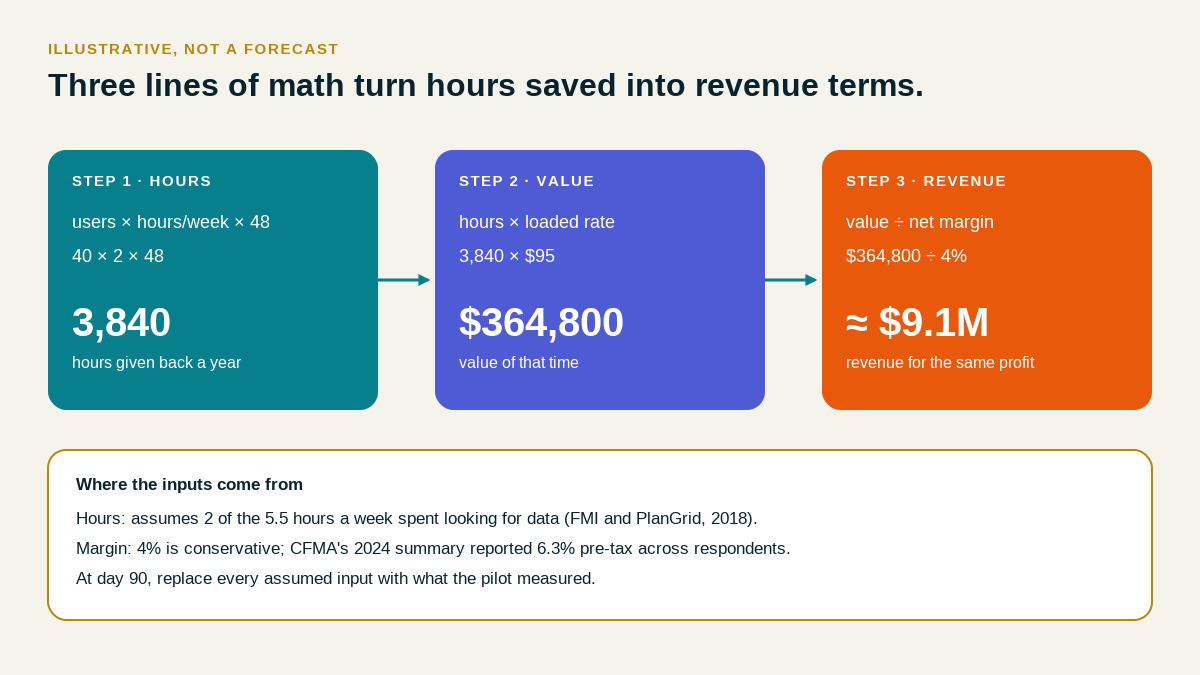 The estimator's logic as three lines of math, with its default inputs.
Illustrative example (not a forecast)
These are the estimator's default inputs. Swap in your own.
| Input | Value |
|---|---|
| PMs, PEs and supers using it | 40 |
| Hours given back per person per week | 2 |
| Loaded hourly cost | $95 |
| Net margin | 4% |
- Hours: 40 × 2 × 48 = 3,840 hours a year
- Value: 3,840 × $95 = $364,800
- Revenue needed for the same profit: $364,800 ÷ 0.04 = about $9.1 million
Why 2 hours? The FMI and PlanGrid "Construction Disconnected" survey (2018) found construction professionals spend about 5.5 hours a week looking for project data. The default assumes an agent gives back only 2 of those. For margin, CFMA's 2024 Benchmarker summary reported 6.3% pre-tax net income across respondents, and GC-only margins usually run lower, so 4% is a conservative input.
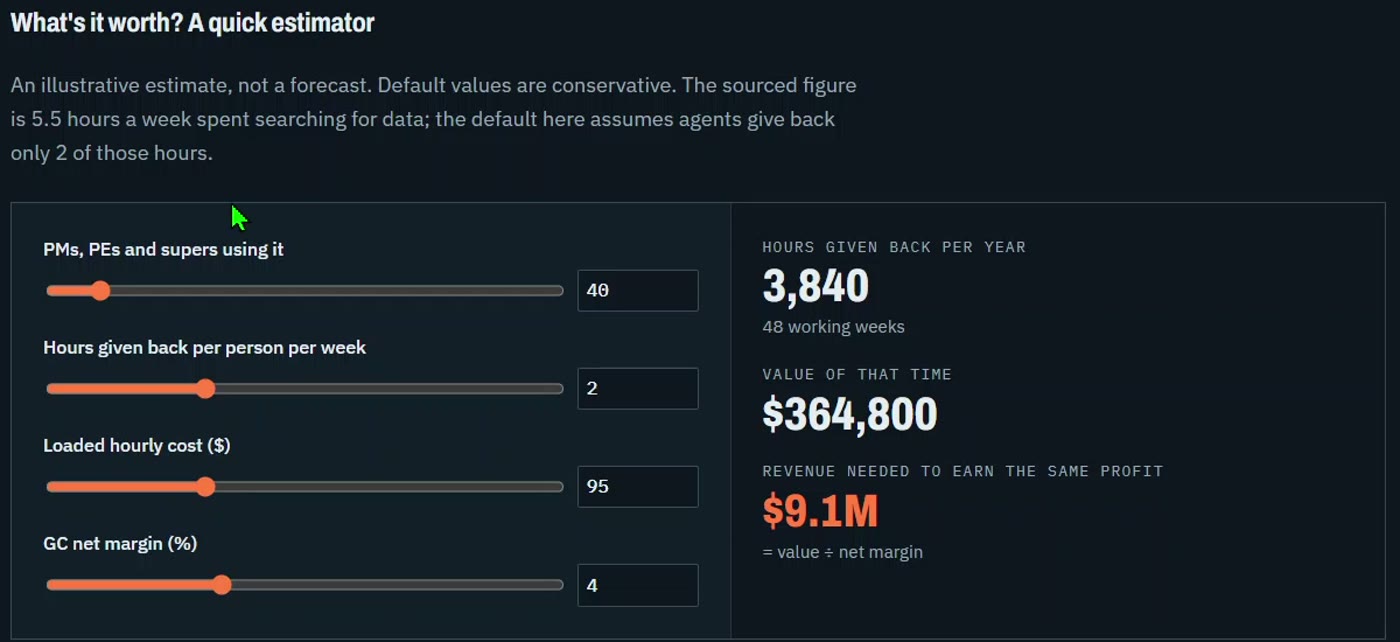 The estimator with its default inputs, at 16:40 in the video.
The pilot readout version
At day 90 you replace the assumptions with measured numbers. If 15 pilot users report a measured average of 1.5 hours a week, the annualized figure is 15 × 1.5 × 48 = 1,080 hours, worth $102,600 at $95 an hour, or about $2.6 million of revenue at 4% margin. That is still illustrative, but every input now comes from your own data.
Time saved isn't the only return. One recovered change order or one avoided long-lead slip can outweigh a year of hours saved. Track those as named events in the readout, not as a formula.
Risk register
| Risk | Likelihood | Impact | Mitigation |
|---|---|---|---|
| Procore rate limits | Medium | Medium | Procore enforces an hourly and a 10-second spike limit. Throttle centrally in the MCP server, retry 429s with backoff, and cache reads. The sandbox used in the demo reported a limit of 25 requests per window. |
| Wrong tool picked | Medium | Medium | Give each workflow a curated persona, pin known-good tools, and gate releases on the evaluation-set score. |
| Messy Procore data | High | Medium | Start on well-kept projects. Let the agent surface stale RFIs and test records instead of hiding them. |
| Overlap with Procore's own AI | Medium | Low | Focus on work that crosses systems and lands where people already work. Reassess at each Procore release. |
| Agent does too much | Low | High | Read-only by default, signed confirmations for writes, deletes blocked, full audit trail. |
| Low adoption | Medium | High | Deliver into chat and email, recruit a field champion per project, tune weekly, share wins. |
| Procore API changes | Medium | Low | Regenerate tools from Procore's API spec and run contract tests before each release. |
| Model usage cost | Low | Low | Keep the tool surface small with hybrid or router mode, and paginate and summarize large results. |
Who does what
| Activity | GC | BuildFlows |
|---|---|---|
| Executive sponsor, success metrics, go/no-go | Accountable and does it | Consulted |
| Workflow discovery and the 25 questions | Ops lead and project teams contribute | Leads |
| Procore app install and permissions | Procore admin owns it | Advises |
| Cloud project, identity and network | IT owns it | Advises |
| MCP server, personas, policies, agent build | Reviews | Builds |
| Evaluation set scoring | PEs, PMs and supers score | Runs and reports |
| Security review package | IT and security accountable | Prepares |
| Training, champions, adoption | Ops lead accountable | Supports |
From the GC side, budget for an executive sponsor, a Procore admin, a cloud admin, 10–20 willing users, and about two hours a week from an operations lead.
The pilot checklist
Copy this into your plan.
## Procore AI agent pilot: checklist

### Weeks 0–2: Discover
- [ ] Executive sponsor named
- [ ] 1–2 workflows chosen (e.g. RFI radar, change exposure rollup)
- [ ] 2–3 well-kept projects chosen
- [ ] 25 real questions captured from PEs, PMs and supers
- [ ] Baseline pulled: RFI median days to answer, change exposure age
- [ ] Baseline pulse survey sent (hours a week spent looking for data)
- [ ] Read-only Procore service-account app installed on the pilot projects
- [ ] Success metrics and targets written down and signed off
- [ ] 30-day checkpoint and 90-day readout on the calendar

### Days 15–30: Build read-only
- [ ] MCP server deployed in the GC's cloud, credentials server-side
- [ ] Persona with a curated tool list (hybrid mode)
- [ ] Policies on: readonly-by-default, deny-deletes, redact-pii, sandbox-only
- [ ] Audit records flowing to the security team's log store
- [ ] Evaluation set scored; 90%+ correct
- [ ] Two weeks of shadow mode; data issues logged and fixed or filtered

### Days 31–60: Run with users
- [ ] 10–20 users invited; one field champion per project
- [ ] Output delivered in chat or email
- [ ] Weekly pulse survey running
- [ ] Weekly tuning from feedback
- [ ] Drafts (L1) added where useful

### Days 61–90: Prove and expand
- [ ] Confirmed writes (L2) only where users asked, with signed approvals
- [ ] Audit log reviewed: zero unapproved writes
- [ ] ROI readout with measured inputs
- [ ] Security review package delivered
- [ ] Go / extend / stop decision recorded
Do it with us
BuildFlows runs this pilot with GCs: discovery interviews, the read-only build, the evaluation set, and the readout. Email charley@buildflows.ai or start at /engage. If you want to see the whole thing working first, watch the demo and read the pillar article on Procore data in Gemini. For the governance side, start with Governing AI agents in construction.
References
- BuildFlows, Procore Agent Playbook: 90-day pilot, success metrics, risk register, ROI estimator (estimator defaults are BuildFlows estimates)
- BuildFlows, procore-mcp on GitHub
- Video: Procore data in Google Gemini, ROI estimator at 16:30 and pilot to production at 17:50
- FMI and PlanGrid, Construction Disconnected (2018): 5.5 hours a week spent looking for project data
- Navigant Construction Forum RFI study (2013), as summarized by Smartsheet: Construction RFI guide (secondary source)
- CFMA, 2024 Construction Financial Benchmarker executive summary
- Procore Developers, Rate limiting
- Procore Support, What is a Developer Managed Service Account?
Frequently asked questions
How long does a Procore AI agent pilot take?
About 90 days: two weeks of discovery, two weeks of read-only build and shadow mode, a month with 10 to 20 users, and a final month to prove results and decide on production.
Which workflow should we pilot first?
Pick work people dislike and that Procore already tracks with clean timestamps. RFI aging and change exposure are the strongest first picks because you can measure them before and after.
How do you calculate ROI for a construction AI agent?
Multiply users by hours saved per week by 48 working weeks, then by the loaded hourly cost. Divide that value by your net margin to see how much new revenue would earn the same profit.
What is shadow mode?
The agent produces its output every day, but only the pilot lead and a few power users see it. They compare it with what the team actually did, which catches data problems before users rely on it.
What does the GC need to provide?
An executive sponsor, a Procore admin to install a read-only app on two or three projects, a cloud admin, 10 to 20 willing users, and about two hours a week from an operations lead.
Does the agent write to Procore during the pilot?
Not until the last phase. It starts read-only, adds drafts that people send, and only turns on confirmed writes where users ask for them and the audit log is clean.
Next step
Want help running this playbook?
Bring the report or workflow. We'll help map the work behind it.
Prefer email? charley@buildflows.ai
Keep learning
AI agents & MCP · November 16, 2026
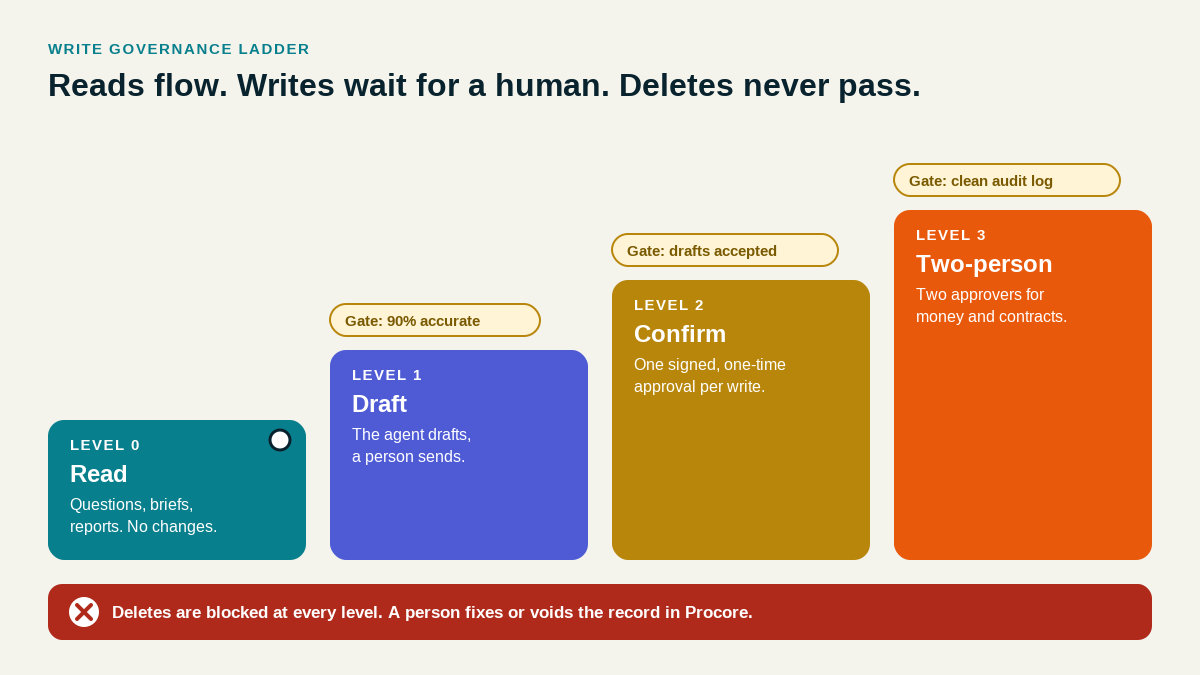
The Write Governance Ladder for AI Agents on Procore: Read, Draft, Confirm, Two-Person
A practical ladder for AI agents that touch Procore. What each level allows, which Procore actions belong where, how the open-source Procore MCP server enforces it with policy YAMLs and signed confirmation tokens, the live write denial from the sandbox, and a policy table GCs can copy.
AI agents & MCP · November 16, 2026
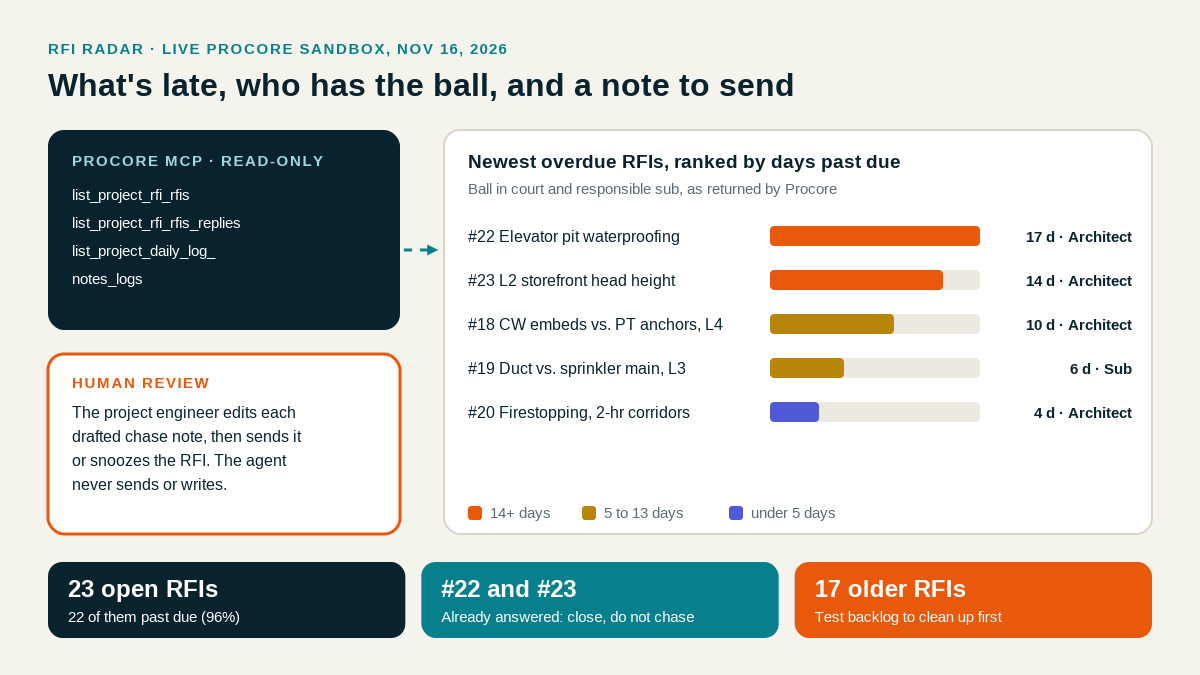
Procore RFI Radar: An AI Agent for Overdue RFIs and Ball-in-Court
Who the RFI radar is for, the exact Procore MCP tools it calls, the workflow blueprint, paste-ready prompts for Gemini or any MCP client, what it returned on a live Procore sandbox (23 open RFIs, 22 past due), and the data traps to plan for.
AI agents & MCP · November 16, 2026
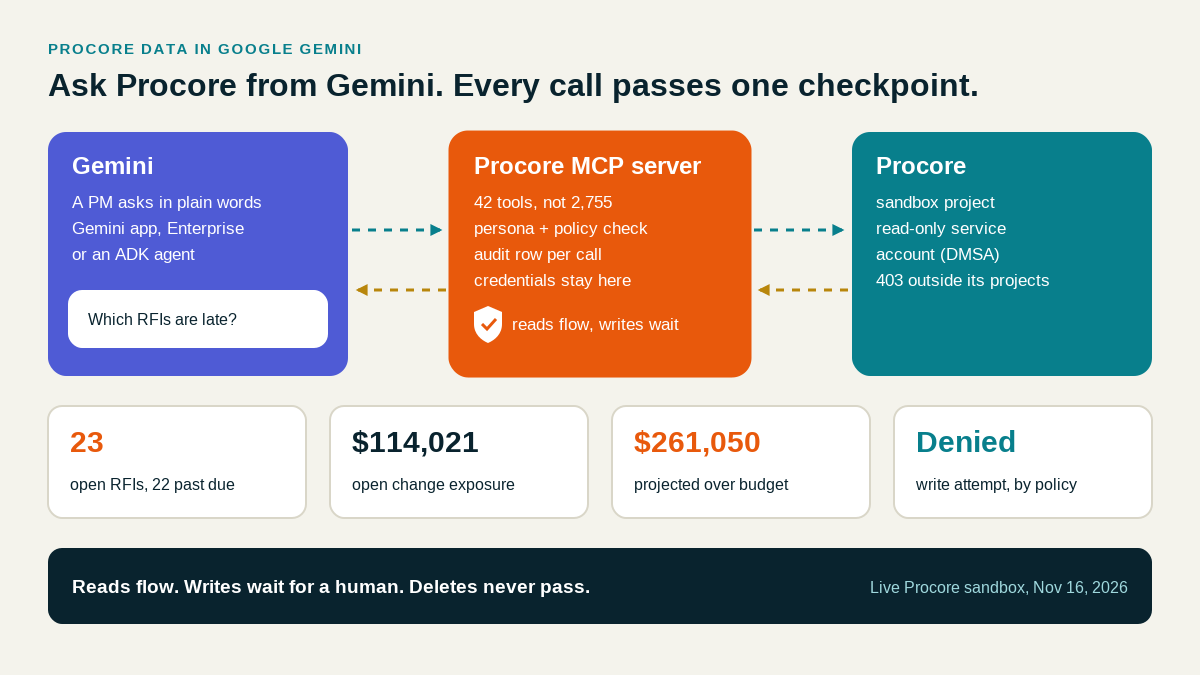
Procore Data in Google Gemini: The Governed Path for GC Agents
Why GCs want Procore answers in Gemini, the gap while Procore AI MCP supports only Claude, the Ask, Plan, Check, Fetch, Answer path, what we proved on a live Procore sandbox, where it fits in Google Cloud (Gemini Enterprise, ADK, A2A, BigQuery, Cloud Logging), the use cases to start with, and how to run a pilot.