The short answer: A streamable HTTP MCP server is an ordinary HTTP service with two quirks: some responses are long-lived event streams, and some servers keep session state. Run it stateless if you can, put it behind a proxy that does not buffer streams, validate Origin and OAuth tokens at the edge and in the server, split liveness from readiness, and load test the streaming path before real users find it. For one team and a handful of servers, managed containers (Azure Container Apps, Cloud Run) are usually the right first home. Kubernetes earns its cost once you run many servers across teams. A single VM with nginx and systemd is a perfectly good answer for one internal server, as long as you accept that you own patching, TLS and restarts.
While building integrations on Trimble App Xchange, we built about twenty MCP servers for Trimble products and other construction platforms. We deployed them to managed containers and as systemd services behind nginx, and wrote a hosting handbook with a reference Helm chart, smoke tests on a local Kubernetes cluster and a load harness. This is the vendor-neutral version of what we learned, focused on where the server runs and how traffic reaches it. For what tools to expose, see the MCP gateway pattern for construction APIs; for the server's own production checklist, see hardening MCP servers for production.
Streamable HTTP vs stdio: which transport you are hosting
MCP defines two standard transports:
- stdio. The client launches the server as a subprocess and talks JSON-RPC over standard input and output. Single user, single machine, no network surface: right for local tools such as an IDE plugin.
- Streamable HTTP. The server runs as its own HTTP service with one MCP endpoint (usually
/mcp). ClientsPOSTJSON-RPC messages to it. For each request, the server decides whether to answer with a single JSON response or open a Server-Sent Events (SSE) stream for progress messages and a final result. An optionalGETopens a server-initiated stream, and an optionalDELETEends a session.
Streamable HTTP replaced the older HTTP+SSE transport; do not enable the legacy one for new deployments.
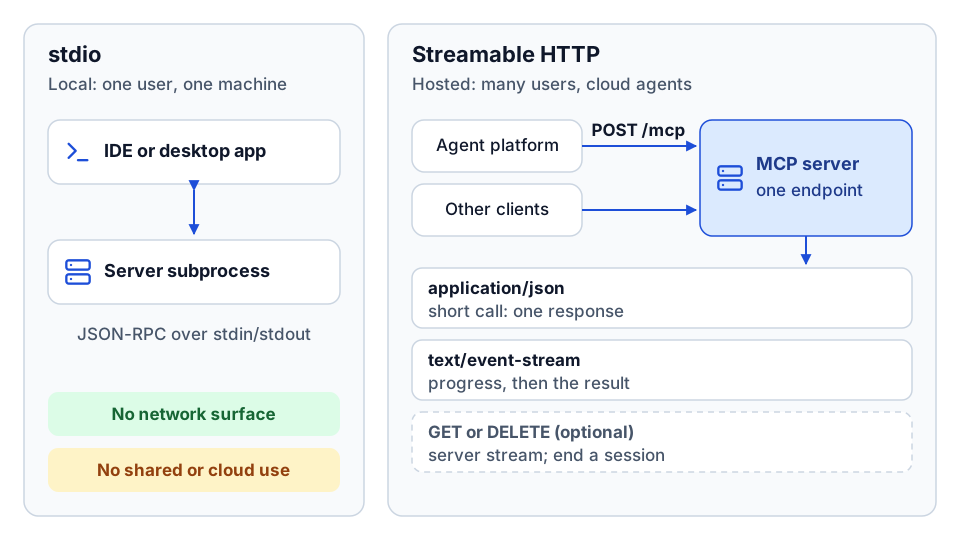 stdio is a local subprocess; streamable HTTP is a hosted service with one /mcp endpoint.
You need streamable HTTP when the server serves more than one user, when an agent platform calls it from the cloud, or when you need central auth, logging, rate limits and rolling deploys. Anything that uses delegated user identity, such as an on-behalf-of token exchange, is in practice an HTTP server, because the user's token has to arrive with each request.
A few wire details matter for hosting:
| Behavior | What it means for your infrastructure |
|---|---|
Short tool calls return application/json | Normal request and response. Standard timeouts apply. |
Streaming tool calls return text/event-stream | Long-lived response. Proxies must not buffer it and must allow long idle timeouts. |
MCP-Protocol-Version header after initialize | Unsupported versions get 400. A cheap way to route between server versions. |
Mcp-Session-Id header, only if the server issues one | Every replica must recognize the session, or traffic must be pinned to one replica. |
GET /mcp may return 405 | If you never push server-initiated messages, 405 is the simplest choice. |
Recent work on the specification also mirrors the JSON-RPC method and tool name into HTTP headers (Mcp-Method, Mcp-Name) so gateways can route, rate-limit and meter by tool without parsing the body. If you adopt those headers, the server must reject any request where the header and body disagree. Check the current MCP specification for the status of this in the protocol version you target.
Sessions and state: decide this first
Whether the server keeps session state shapes everything else. There are three postures.
Stateless (the default). The server never issues Mcp-Session-Id. Every request stands alone, any replica can serve any request, and rolling deploys do not drop anyone. A server that wraps a REST API with pure tools is stateless by construction. Our Vista AP server exposed a stateless HTTP setting so the same code could run either way.
Signed-token sessions. The server signs a small token (user, scopes, expiry) and returns it as the session ID. Each replica verifies the signature; no shared store is needed. The catch is revocation: a signed token stays valid until it expires, so keep lifetimes short (our handbook suggested 30 minutes as a starting point) and add a small denylist if you need to kill sessions immediately.
Shared session store. The server issues an opaque ID and keeps state in Redis or similar. Any replica can load it, deleting the key revokes it immediately, and it is the only clean way to support stream resumption across replicas. You pay a round trip per request and you now operate Redis, so set TTLs and clean up on DELETE.
| Stateless | Signed-token session | Shared store | |
|---|---|---|---|
| Extra infrastructure | None | None | Redis or similar |
| Any replica can serve any request | Yes | Yes | Yes |
| Immediate revocation | Not applicable | Hard | Easy |
| Stream resumption across replicas | No | No | Yes |
| Best fit | Pure tools over an API | Read-mostly tools with per-user context | Stateful workflows, long streams |
Sticky routing (session affinity) pins a session to one replica. Every platform in this article can do it: ingress cookie affinity on Kubernetes, a session affinity setting on managed containers, ip_hash or a hash on the session header in nginx. It makes in-memory state work, but it also makes replicas non-interchangeable: a deploy or a scale-down evicts every session on the affected replica at once. Use it only for a replay buffer you cannot move out of process, and try signed tokens first.
The spec also allows stream resumption with Last-Event-ID. For most internal servers, do not advertise it; make tools safe to re-run and let clients retry.
The three hosting options compared
| Managed containers (Container Apps, Cloud Run) | Kubernetes | VM with nginx and systemd | |
|---|---|---|---|
| Time to first deploy | Minutes to hours | Hours to days, unless a platform exists | Hours |
| Who owns operations | Mostly the platform | Your platform team | You, entirely |
| Scaling | Built-in, scale on HTTP traffic; can scale to zero | Horizontal Pod Autoscaler on CPU, then request rate or active streams | Manual, or a second VM behind a load balancer |
| Streaming gotchas | Platform ingress idle and request timeouts; check them against your longest stream | Default ingress buffering breaks SSE until you turn it off | Same nginx buffering defaults; you set the timeouts |
| Session affinity | Platform setting | Ingress annotation | nginx upstream hashing |
| Secrets | Platform secrets with vault references and managed identity | External secret operator backed by a vault | Env file readable only by the service user, or a vault agent |
| Rollout and rollback | Revisions, often with traffic splitting | Rolling updates, Helm or GitOps rollback | Redeploy the previous build and restart |
| Cost floor | Low; pay per use | Real, unless the cluster already exists | One small VM |
| Best fit | One team, a handful of servers | Many servers, many teams, shared platform services | One internal server, on-premises access, simple ops |
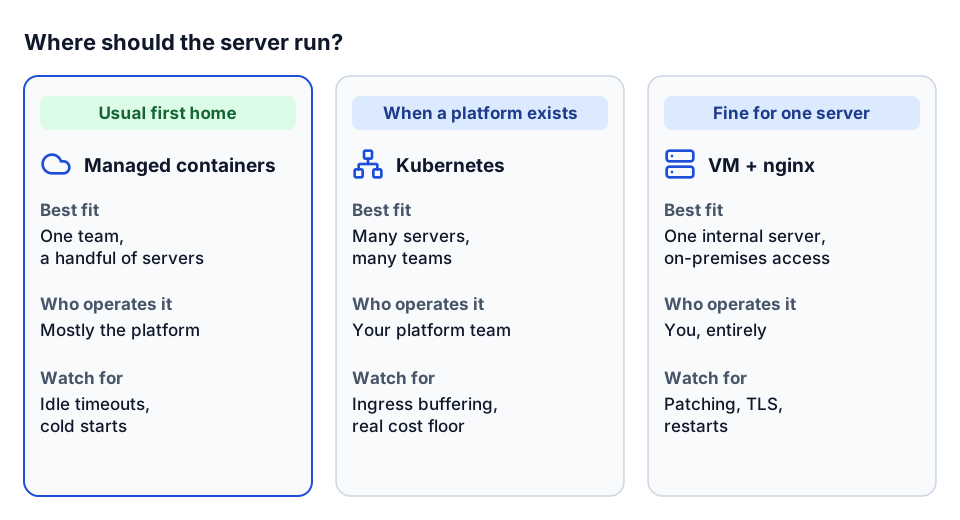 The short version of the comparison: fit, who operates it, and what to watch for.
Managed containers
This is where we would start a contractor's first hosted server. One of our template-based servers was built as a multi-stage Docker image (dependencies installed in a builder stage, a slim runtime stage running as a non-root user under a small init process) and deployed to Azure Container Apps by a CI pipeline. The pipeline read a YAML file listing each server with its scaling limits and secret references, built a deployment matrix from it, and deployed one container app per server. Some details worth copying:
- The matrix carried metadata, never secret values. Each deploy job resolved secret names to values at the last step, so secrets never appeared in job outputs or logs.
- Federated identity for CI, managed identity at runtime. The pipeline logged in without a stored cloud password, and the container app pulled its image with its own managed identity.
- An ownership tag check stopped two repositories from deploying over the same container app.
- Rollback by revision. Managed container platforms keep previous revisions, which makes rollback a traffic switch instead of a rebuild.
Watch for cold starts when you scale to zero (set a minimum of one replica for anything a user waits on), and check the platform's request and idle timeouts against your longest tool call.
Kubernetes
Kubernetes fits streamable HTTP cleanly: ingress, service, a deployment of stateless replicas, and optionally Redis for sessions. Our reference Helm chart used two to ten replicas scaling at 75% CPU, a pod disruption budget keeping at least two replicas up, and a network policy allowing traffic only from the ingress controller. The things that bit people:
- Ingress buffering. ingress-nginx buffers responses by default. Streaming clients see nothing, then everything at once, or time out. Turn proxy buffering off, raise proxy read and send timeouts (we used 3,600 seconds), and use HTTP/1.1 to the upstream so chunked responses flow.
- Scale-down kills streams. Set a termination grace period of at least 60 seconds and a
preStophook that drains in-flight streams. Keep scale-down conservative. - Never retry tool calls at the mesh. Automatic retries at the gateway can duplicate side effects. Retries belong in the server, for idempotent operations only.
- Scale on the right signal. CPU lags bursty agent traffic; add request rate, then active streams.
The honest objection is cost: for one MCP server and nothing else, a cluster is overkill.
A VM with nginx and systemd
Some of our smaller servers ran this way. It is a respectable pattern for one internal server or for anything that has to reach an on-premises system. The shape:
- The server binds to
127.0.0.1on a high port, runs as a dedicated system user with no login shell, and reads settings from an env file readable only by that user. - systemd restarts it on failure (we used a 5-second restart delay), starts it after the network is up, and applies basic hardening such as
NoNewPrivilegesand a private temp directory. - nginx terminates TLS and proxies a path such as
/mcp/<server>to the local port with buffering off, HTTP/1.1, forwarded host and protocol headers, and read and send timeouts of an hour. - The firewall allows only HTTP and HTTPS. The app port is never exposed.
One gotcha worth knowing: some MCP frameworks validate the Host header as DNS-rebinding protection and, by default, only accept localhost. Behind nginx, the request arrives with your public hostname, and the server answers 421 Misdirected Request. The fix is to configure the server to trust the proxy, or to add your public hostname to its allowed hosts list, not to turn the check off.
You also own TLS renewal, patching and log rotation. Put them in the runbook on day one.
Health and readiness probes
The MCP specification does not define health endpoints, so add your own and keep them distinct:
- Liveness (
/healthzor/status/live): is the process up? Cheap, no downstream calls. A failure restarts the server. - Readiness (
/readyzor/status/ready): can it serve traffic right now? Checks configuration, secret availability, the session store and, optionally, a lightweight upstream health call, cached for a few seconds. A failure takes the replica out of rotation without killing it.
If a Redis blip fails liveness, every replica restarts at once; if it fails readiness, traffic drains and returns when Redis does. Our template returned the build version from both endpoints, which made "which version is actually running?" a one-request question during rollouts. Probes should bypass user authentication and never return secrets or detailed config. On a VM, nginx can answer liveness itself so health checks never touch the app.
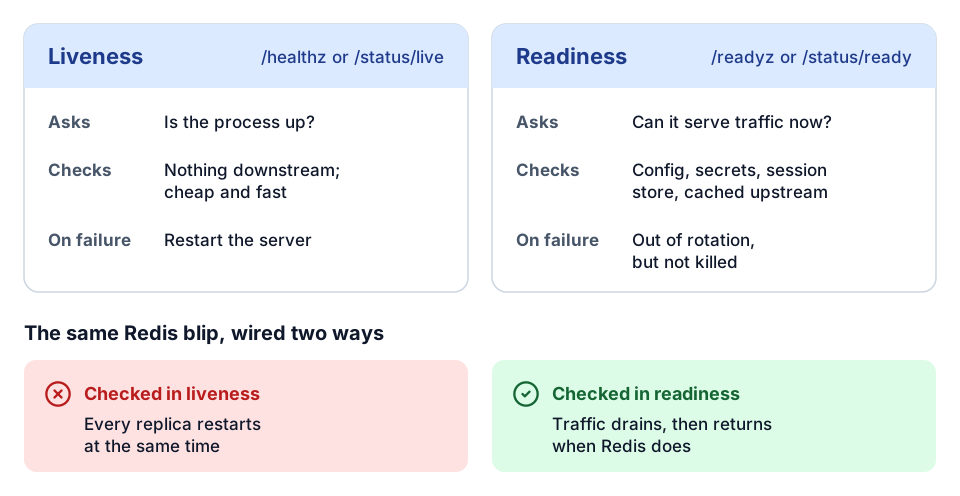 Two probes, two questions, and why a dependency check belongs in readiness.
Origin checks and DNS rebinding
The transport specification is direct: servers must validate the Origin header to prevent DNS rebinding, and local servers should bind to localhost. DNS rebinding lets a malicious web page trick a browser into treating a server on the user's machine or private network as same-origin.
Our C# server for Tekla PowerFab shows a sensible default:
- Bind to loopback by default.
- When bound to anything other than loopback, require a bearer token on every MCP request.
- Check
Originagainst a closed allowlist and return403for anything else. Loopback origins are accepted only when the server itself is loopback-only. - Requests with no
Originheader at all (typical for server-to-server agent platforms) pass the Origin check but still have to pass authentication. - Apply the checks only to the MCP path, so health probes keep working.
Enforce the allowlist at the edge (an nginx if on $http_origin, or the equivalent ingress rule) and again inside the server. No wildcards in production.
OAuth 2.1 at the edge
For any server that is not public, the MCP authorization spec expects OAuth 2.1. In practice, the server is an OAuth resource server:
- An unauthenticated request gets
401with aWWW-Authenticateheader pointing to the server's protected resource metadata. - The client discovers the authorization server from that metadata, runs an authorization code flow with PKCE, and asks for a token whose resource (audience) is this MCP server.
- The server validates every token: signature against cached JWKS, issuer, audience, expiry with a small clock-skew allowance, and required scopes.
Two rules prevent most auth incidents. Reject tokens whose audience is not this server, even if they are otherwise valid, or you have a confused-deputy problem. Never pass the user's token through to the product API. Exchange it for a token the product API expects, or use a service identity with least privilege. The exchange pattern we used across Trimble product servers is covered in on-behalf-of token exchange for AI agents.
A gateway can validate tokens and apply per-key rate limits at the edge, which is the role our Tool Runtime gateway plays. The server should still validate the token it receives.
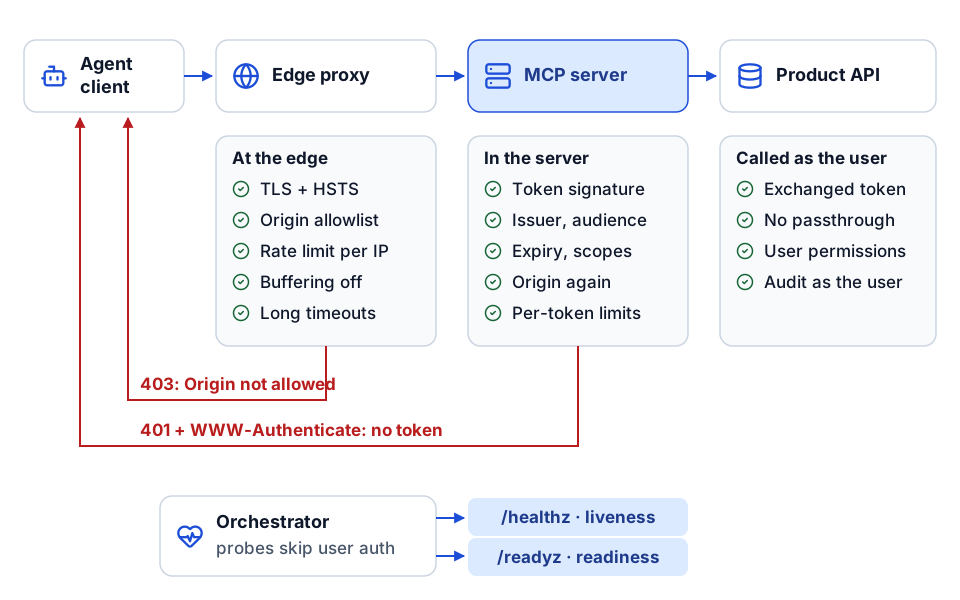 What each hop checks, where requests are turned away, and how probes bypass user auth.
Secrets
- Keep secrets in a vault (a cloud key vault, HashiCorp Vault, or a platform secret store with vault references) and commit only references. Prefer mounted files over environment variables that show up in process listings.
- Fail at startup if a required secret is missing, and rehearse rotation of client secrets, upstream keys and signing keys in staging.
- In CI, use federated identity instead of long-lived cloud credentials, and keep secret values out of build matrices and logs. On a VM, the env file belongs to the service user with mode
600.
Observability
At minimum, log one structured JSON line per request with a request ID, the MCP method, the tool name, status, duration and a hashed session ID (the raw session ID is a credential). Emit rate, errors and duration per tool, gauges for active streams and sessions, and token validation failures by reason. For SSE, track the interval between chunks: a spike there catches a proxy that has started buffering before users report it.
Our handbook's starting alerts: all replicas down for one minute, 5xx rate above 2% over five minutes, a spike in token validation failures, p99 latency above 5 seconds, and the autoscaler pinned at maximum for 15 minutes. What to record on each tool call, and how to turn it into reliability, cost and quality dashboards, is covered in what to log on every agent tool call.
Load testing before users do
Agent traffic is bursty: a client initializes, lists tools, then fires several tool calls in quick succession, sometimes in parallel. Our load harness ran three scenarios against the real ingress, not the pod directly:
| Scenario | Shape | What it catches |
|---|---|---|
| Initialize burst | 50 virtual users each sending one initialize | Cold starts, auth and JWKS fetch bottlenecks, connection limits |
| Steady tool calls | 20 virtual users calling tools for 60 seconds | Latency percentiles, CPU throttling, upstream rate limits |
| Streams | 5 virtual users holding SSE streams for 30 seconds | Buffering, idle timeouts, dropped streams |
The run failed if p99 latency for steady tool calls exceeded 300 ms against the reference server, if more than 1% of requests failed, or if any stream stalled. Those thresholds suit a lightweight reference server. Set your own from a baseline, because a tool that calls an ERP will be slower than one that does arithmetic. Run the harness before changing resource limits, timeouts or autoscaling, and in CI as a regression guard. A smoke test that posts a real initialize through the ingress and expects 200 is the cheapest post-deploy check there is.
When you change reliability settings in production, roll them out as a canary. On our Vista AP server, new retry, timeout and cache settings went to 10% of traffic first, with written rollback triggers: error rate above 5% or p95 latency above 4 seconds.
Deployment checklist
- One MCP endpoint;
GETandDELETEeither handled or a deliberate405; unsupported protocol versions rejected with400. - Session posture chosen on purpose (stateless, signed token or shared store), with no replica-local state.
- TLS at the edge with HSTS; proxy buffering off; timeouts cover your longest stream; a smoke test proves chunks arrive in real time.
-
Originallowlist at the edge and in the server; local servers bound to loopback. - OAuth resource metadata published; tokens checked for signature, issuer, audience, expiry and scopes; no token passthrough.
- Rate limits per IP at the edge and per token or key at the server.
- Secrets from a vault; startup fails if any are missing; rotation rehearsed.
- Non-root runtime; separate liveness and readiness; graceful shutdown drains streams; resource limits set from load tests.
- Structured logs with request IDs, per-tool metrics, alerts routed and dashboards bookmarked.
- Load harness passes; canary thresholds written down; runbook covers rollback, secret rotation and an emergency switch to read-only.
Where to go next
- Harden the server itself with hardening MCP servers for production, and get identity right with on-behalf-of token exchange for AI agents.
- Decide what to log on every call with the MCP tool-call telemetry blueprint, and see a working gateway on the Tool Runtime demo page.
- New to the protocol? Start with what MCP means for construction.
- Want a second pair of eyes on an MCP deployment before agents touch your ERP? The AI readiness review is a fixed-scope place to start, or tell us what you are building.
Frequently asked questions
Should an MCP server use stdio or streamable HTTP?
Use stdio for local, single-user tools that a client launches as a subprocess. Use streamable HTTP when the server serves multiple users, is called by a cloud agent platform, or needs central auth, logging, rate limits and rolling deploys.
Do MCP servers need sticky sessions?
Usually not. A stateless server, or one that encodes session state in a short-lived signed token, lets any replica serve any request. Sticky routing makes replicas non-interchangeable, so a deploy or scale-down drops every session on the affected replica. Reserve it for in-process replay buffers you cannot move to a shared store.
Why do MCP streaming responses freeze behind nginx or an ingress?
Most proxies buffer responses by default, which holds Server-Sent Events chunks until the buffer fills or the stream ends. Turn proxy buffering off, use HTTP/1.1 to the upstream, and raise read and send timeouts to cover your longest stream.
Why does my MCP server return 421 behind a reverse proxy?
Some MCP frameworks validate the Host header to prevent DNS rebinding and accept only localhost by default. Behind a proxy, the request arrives with your public hostname. Configure the server to trust the proxy or add the public hostname to its allowed hosts, rather than disabling the check.
Is Kubernetes required to host MCP servers in production?
No. Managed container platforms such as Azure Container Apps or Cloud Run handle most single-team deployments, and a VM with nginx and systemd works for one internal server. Kubernetes earns its cost when you run many servers across teams and already have shared platform services.
Next step
Have a workflow in mind?
Start with a readiness review: the task, the data and tools it needs, the access boundaries, and how a pilot would be evaluated.
Prefer email? charley@buildflows.ai
Get the next guide in your inbox
Field Notes: practical guides and new walkthroughs, about once a month.
Field Notes
Practical guides and new walkthroughs on construction data and automation, roughly monthly.
Keep learning
AI agents & MCP · October 9, 2026
Hardening MCP Servers for Production: A Checklist
A checklist-style guide to running MCP servers safely in front of ERPs and project platforms, covering auth modes, read-only defaults, write allowlists, approval handshakes, reliability controls, transport security, untrusted content, error envelopes, telemetry and hosting options.
AI agents & MCP · October 10, 2026
What to Log on Every Agent Tool Call: An MCP Telemetry Blueprint
A field-level specification for MCP tool call telemetry: five event types, common and per-event fields, privacy rules that keep raw payloads out, an OpenTelemetry span structure, and derived metrics including argument auto-correction and hallucinated tool names.
AI agents & MCP · October 9, 2026
On-Behalf-Of Token Exchange for AI Agents (RFC 8693)
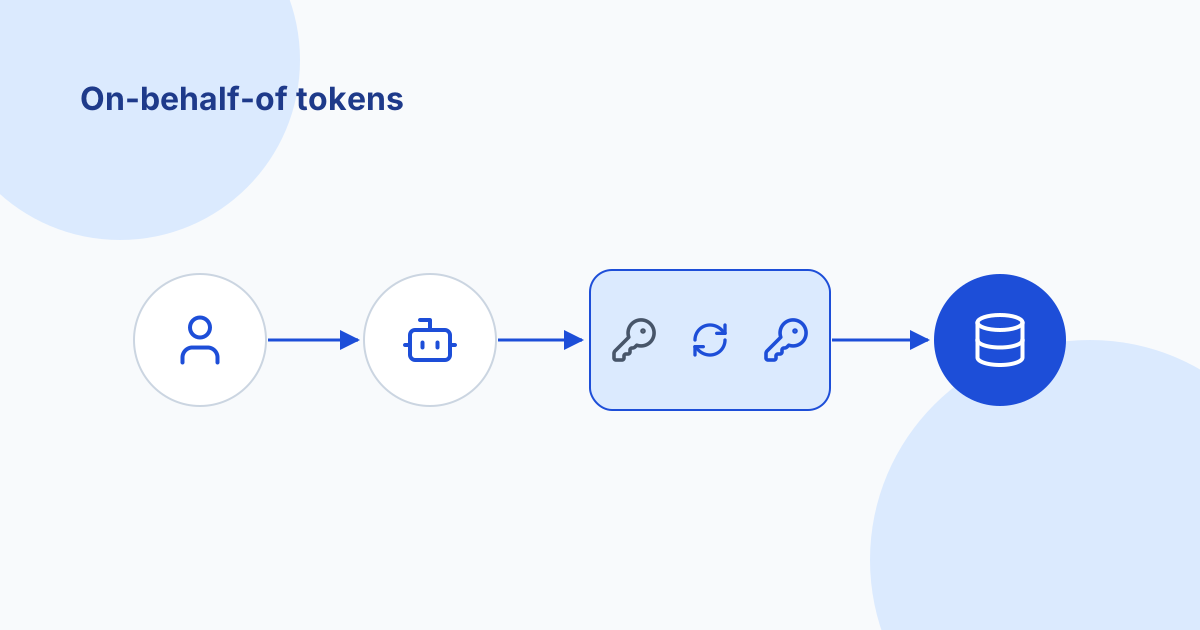
A plain-language guide for construction IT to on-behalf-of token exchange: why forwarding the agent platform's token fails, the four auth modes for MCP servers, audience and scope, a symptom-to-cause troubleshooting table, least privilege and audit.