Key takeaways
- Match the exposure to the URL's lifetime: quick tunnel for minutes, named tunnel behind Cloudflare Access for a pilot, Cloud Run with IAM for production.
- Cloudflare quick tunnels are public while they run, change hostname every run, have no uptime guarantee and don't support Server-Sent Events.
- The MCP spec requires tokens in the Authorization header and forbids them in the query string, because URLs end up in logs, history and recordings.
- A query-string token is only acceptable for a throwaway demo with a URL-only client. Generate a fresh one per session and rotate after any recording.
- Least privilege behind the URL matters more than the URL: a read-only Procore service account, sandbox-only and readonly-by-default policies, and a short persona tool list.
- Before, during and after recording: fresh token, never show the full server URL, stop the tunnel, rotate anything that appeared.
Video unavailable? Watch on YouTube or read the written breakdown.
Hosted AI clients like Google Gemini run in someone else's cloud. Your MCP server, during a build or a demo, runs on your laptop at localhost:8123. To connect the two you have to give the server a public HTTPS address, and the moment you do, anyone who finds that address can try it. If the server holds a Procore service account, that's your project data on the other side of a URL.
This guide is the safe way to bridge that gap. It compares quick tunnels, named tunnels behind Cloudflare Access, and Cloud Run. It explains why a token belongs in a header and not in the query string, how the Procore MCP server's demo token gate works, and how to keep the server least-privilege, sandbox-only and read-only. It closes with a screen-recording checklist, because demos get recorded and recordings get shared. It's general practice for any MCP server you put in front of a hosted client, with the Procore server as the worked example.
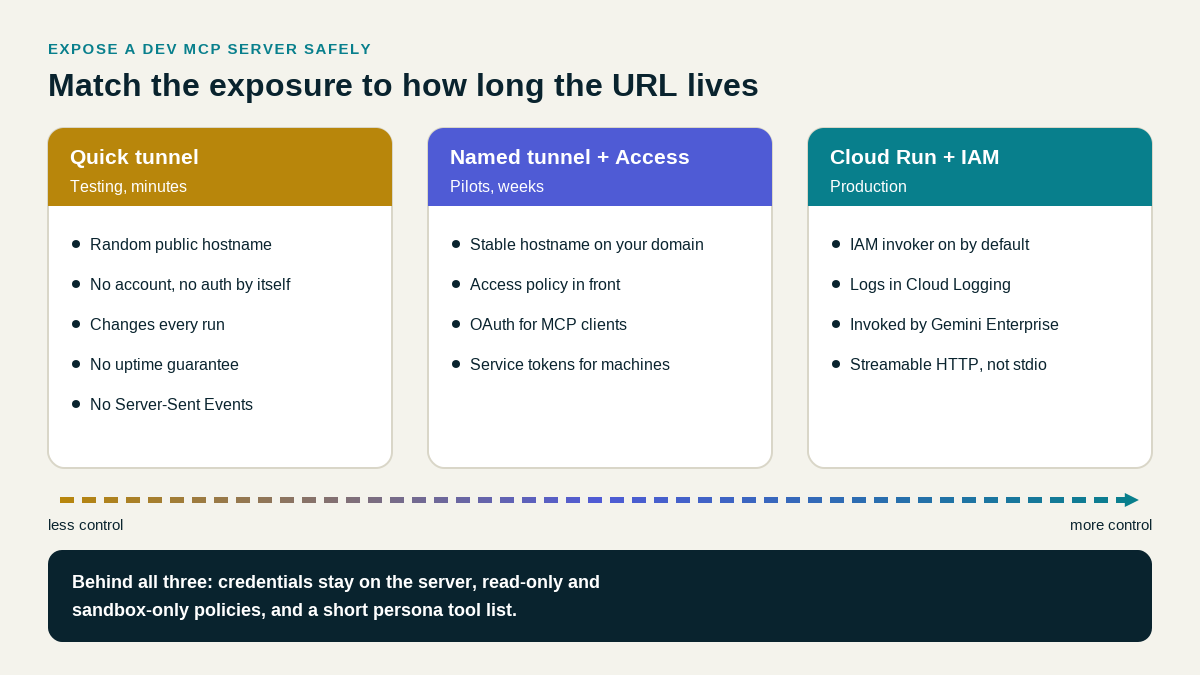 Pick the exposure that matches how long the URL will live and who can see it.
Why this matters for a construction MCP server
An MCP server is a proxy with credentials. The client sends it a tool call, and the server calls Procore with its own service account. Whoever can reach /mcp can borrow that account, within whatever limits the server enforces. So you need two layers:
- Who can reach the server. The tunnel or hosting choice, plus authentication at the front door.
- What the server will do once reached. The Procore permissions behind it, the persona's tool list, and the policies that block writes.
Get both right and a leaked URL is an annoyance, not an incident. The rest of this guide takes them in order.
Three ways to expose a dev server
| Option | What you get | Good for | Watch out for |
|---|---|---|---|
| Cloudflare quick tunnel | cloudflared tunnel --url http://localhost:8123 gives a random trycloudflare.com hostname. No account needed | A five-minute test, a live demo you control | Public until you stop it. Hostname changes every run. No uptime guarantee. 200 in-flight request cap. No Server-Sent Events |
| Named tunnel + Cloudflare Access | A stable hostname on your domain, with an Access policy in front | A pilot that runs for weeks with known users | You must set up Access correctly. Email one-time PINs need a browser, so they don't work for a server-to-server client |
| Cloud Run | A managed HTTPS service. IAM invoker auth is on by default, and logs go to Cloud Logging | Production, and anything Gemini Enterprise will call | Plan auth with the client. Gemini Enterprise's ID token only reaches default .run.app URLs |
Quick tunnels: fine for testing, public while they run
Cloudflare's docs are direct about this: "Quick Tunnels are for testing and development." For production they recommend a standard tunnel. Three details matter for MCP:
- The URL is public. Anyone with the hostname can send requests until you stop
cloudflared. Nothing about a random subdomain is authentication. - The hostname changes every run. Good for hygiene, since old URLs die, but you'll recreate the Gemini custom app each time.
- No Server-Sent Events. If your MCP server streams responses over SSE, a quick tunnel may break them. Plain JSON request and response over streamable HTTP worked in our test. If you see hangs on long calls, this is the first thing to suspect.
Cloudflare also offers an --allowed-mail option that puts an email one-time PIN in front of a quick tunnel. It protects people with browsers, but Gemini's tool calls come from Google's servers, so it doesn't help here.
Named tunnel behind Cloudflare Access: the pilot option
A named tunnel gives you a stable hostname, so you set up the Gemini app once. Put a Cloudflare Access application in front of it and only allowed identities get through. Access has two relevant modes:
- Service tokens for machine clients. The client sends
CF-Access-Client-IdandCF-Access-Client-Secretheaders, and the Access policy must use the Service Auth action. Cloudflare shows the secret once, at creation. - OAuth for MCP. Cloudflare documents securing MCP servers with Access acting as the OAuth provider, so the client runs a normal OAuth flow and your users sign in with your identity provider.
For Gemini, the OAuth route is the one that fits. Developer Mode's connect dialog takes a URL plus OAuth client details, and we found no documented way to add custom headers, so service tokens suit other clients better.
Cloud Run: the production option
Cloud Run runs streamable HTTP MCP servers (not stdio). By default it requires the Cloud Run Invoker role on every request. For Gemini Enterprise, Google's setup guide says to grant roles/run.invoker to the Gemini Enterprise service agent. Gemini then sends a Google-signed ID token in X-Serverless-Authorization and keeps the user's OAuth token in Authorization. It doesn't send the ID token to custom domains, only to default .run.app URLs. Request logs land in Cloud Logging automatically. Deployment patterns are covered in Hosting Streamable HTTP MCP Servers.
Where the token goes: header, not query string
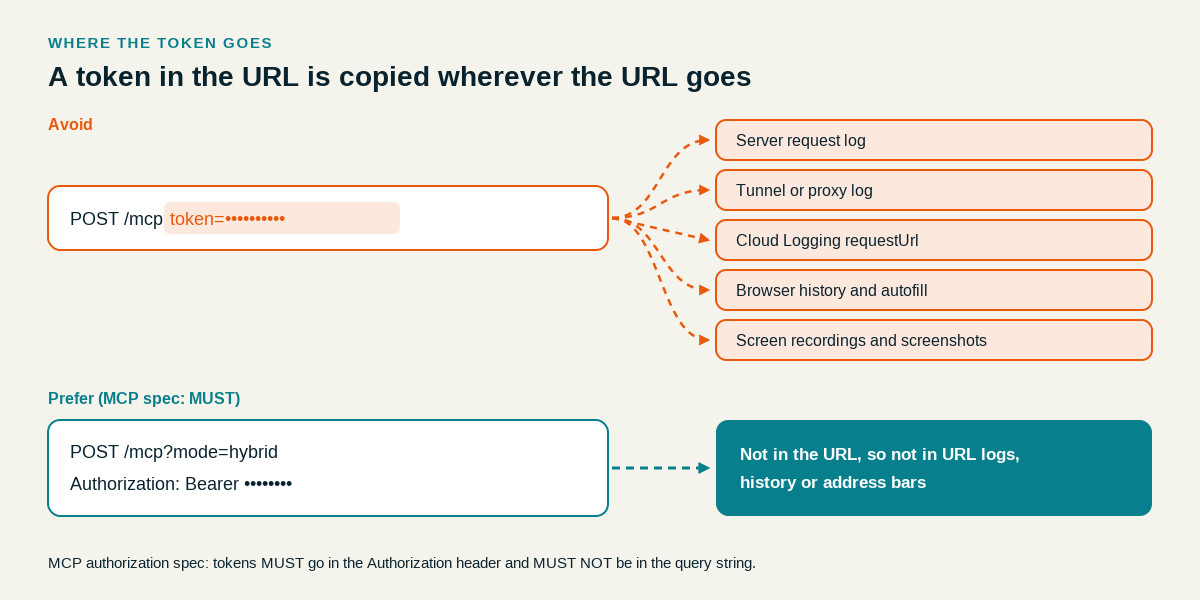 A token in the URL gets copied everywhere the URL goes.
The MCP authorization spec is explicit. Clients MUST send access tokens in the Authorization: Bearer header, and access tokens MUST NOT be included in the URI query string. The reason is where URLs end up:
- Server and proxy logs. OWASP notes that a request with secrets in its query string "is captured in the server logs even when requested via an encrypted channel." HTTPS protects the wire, not the logs at either end.
- Cloud logs. Cloud Logging's
httpRequest.requestUrlfield records "the path and the query portion of the URL that was requested." - Browser history and autofill, plus the Referer header if the page links out.
- Screen recordings and screenshots. A URL typed into a settings dialog is on screen for as long as the dialog is open.
So why would anyone put a token in a URL? Because some clients only take a URL. Gemini Developer Mode's connect dialog is one of them, unless you set up OAuth. That's the honest tradeoff: a query-string token is a quick lock for a throwaway demo, and only that.
How the Procore MCP server gates a demo
The demo build of the server adds an optional gate in src/server/http.ts. When the PUBLIC_DEMO_TOKEN environment variable is set, every request to /mcp must present the same value through one of three routes:
Authorization: Bearer <token>     preferred
x-demo-token: <token>             header alternative
/mcp?token=<token>                only for URL-only clients
A request without it gets HTTP 401 and a JSON-RPC error, before any tool runs:
{"jsonrpc":"2.0","error":{"code":-32001,"message":"Unauthorized"},"id":null}
A few design choices are worth copying:
- The gate runs before the MCP handler, so an unauthenticated caller can't list tools, let alone call them.
- Request logging never prints the value. With
MCP_REQUEST_LOG=truethe server logstoken=query,token=authortoken=none, so you can see how a client authenticated without writing the secret to disk. - It's separate from the production gate. For long-running deployments the server also supports
PROCORE_MCP_AUTH_TOKEN, which requires anx-procore-mcp-authheader on every request. For anything users depend on, prefer OAuth in front of the server.
Treat PUBLIC_DEMO_TOKEN as single-use: generate a fresh random value per session, never reuse it across demos, and unset it when the session ends.
# New random demo token for this session only (bash)
export PUBLIC_DEMO_TOKEN=$(openssl rand -hex 24)
npm run start:http
# When the demo ends: stop the server, stop the tunnel, unset the variable
Least privilege behind the URL
Front-door auth can fail. The second layer is making sure the server can't do much harm even if someone reaches it.
A narrow Procore service account. Use a Developer Managed Service Account. Procore's docs say the developer sets the exact company- and project-level tool permissions in the app manifest, and the company admin decides which projects the app can reach. Grant read-only permissions for the tools your persona needs. Our sandbox run showed this layer working: the service account got 403 on every project where it wasn't in the project directory. See Procore DMSA setup and read-only API scopes.
Sandbox first. The server's Procore environment defaults to sandbox. The sandbox-only policy blocks POST, PUT, PATCH and DELETE when the environment is production, so a misconfigured pilot can't write to a live job.
Read-only by policy. The repo's policies/ folder holds 22 YAML policies. Three do most of the work here:
| Policy | What it blocks |
|---|---|
readonly-by-default | create_*, update_*, delete_* tools and write HTTP methods |
deny-deletes | Every delete_* tool |
sandbox-only | Writes when the environment is production (opt-in) |
A short tool list. The gc_demo persona exposes 15 named read tools in hybrid mode, so even a reachable server only offers what a PM needs. More on choosing modes in Router, Hybrid or Expanded, and on climbing past read-only in the write governance ladder.
What it looks like on real data
On the Procore sandbox we asked the server to create an RFI, even as a dry run. The policy engine stopped it before Procore saw a request:
{
  "request": { "tool": "procore_call_tool", "name": "create_project_rfi_rfis", "dry_run": true },
  "isError": true,
  "response": {
    "error": "Denied by policy readonly-by-default: create_project_rfi_rfis",
    "requires_confirmation": false
  }
}
Paste this into Gemini after you connect, to prove the same thing to your security reviewer:
Create a new RFI on The Sparkling Skyrise Project asking the architect
to confirm the curtain wall embed locations at the L4 slab edge.
Then tell me exactly what the server returned.
You should get a policy denial, not a new RFI. Reads on the same connection keep working: 23 open RFIs, $114,021 of change exposure, $261,050 projected over budget.
Rotate on a schedule and after every exposure
- Demo tokens: new value every session. Rotate immediately after any recording or screen share where the value or a URL carrying it was visible.
- Procore client secret: rotate on a calendar and when people leave the project. Keep it in a vault, not a
.envfile on a shared laptop. See rotating API secrets. - Cloudflare service tokens: you choose a duration at creation, and the secret is shown once. Store it straight into your vault.
- Tunnels: a quick tunnel's hostname is single-use by nature. Kill it when you're done rather than leaving it running overnight.
Screen-recording hygiene checklist
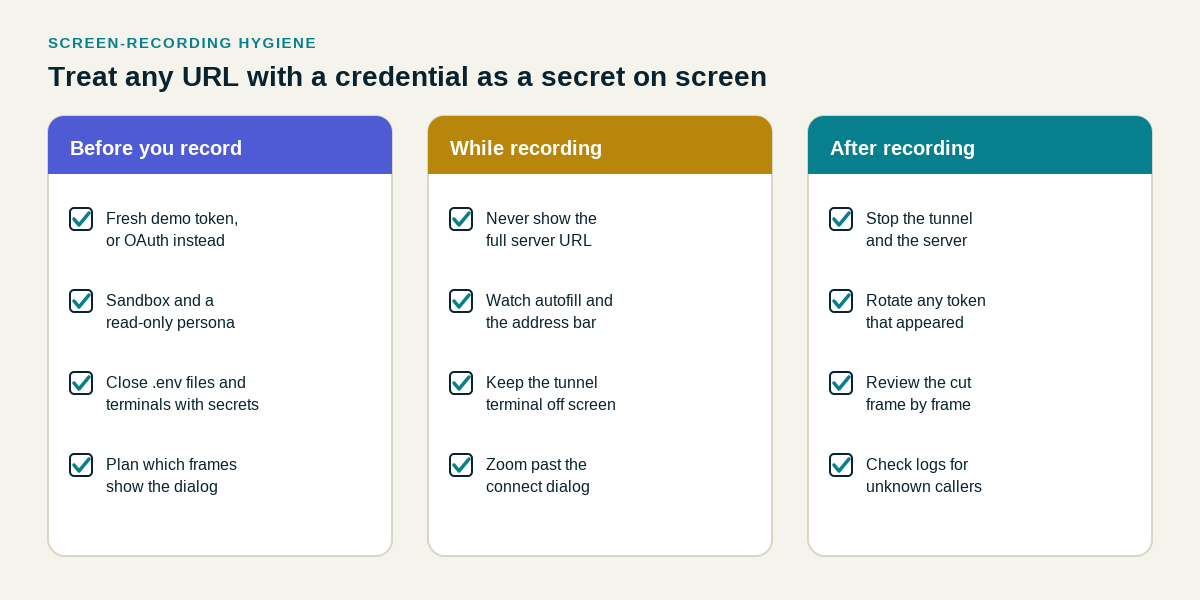 Treat any URL with a credential in it as a secret on screen.
Before you record
- Generate a fresh demo token, or better, use OAuth so no token appears at all.
- Point the server at the sandbox with a read-only persona.
- Close
.envfiles, password managers and any terminal that printed a secret. - Decide which frames will show the connect dialog, and plan to cut or blur them.
While recording
- Don't show the full server URL. Paste it with the dialog off screen, or zoom past it.
- Watch for browser autofill, history dropdowns and address bars.
- Keep the terminal running the tunnel off screen. It prints the hostname.
After recording
- Stop the tunnel and the server.
- Rotate any token that appeared on screen, even briefly, even partly.
- Review the edit frame by frame around the connect step before you publish. Blur the address bar and the URL field.
- Check the server's request log for callers you don't recognize.
Do it with us
BuildFlows sets up Procore MCP servers for GCs with the exposure, auth and policies matched to the stage: tunnels for a quick look, Access or Cloud Run for the pilot, and production hardening after that. Email charley@buildflows.ai or visit /engage.
Next steps: connect the server to Gemini step by step, read the pillar guide to Procore data in Gemini, see the demo (connecting in Gemini starts at 23:05), and review Hardening MCP Servers for Production and the Procore Agent Playbook before you go live. If MCP is new to your team, start with What is MCP? and Governing AI Agents in Construction.
References
- Cloudflare, Quick Tunnels: https://developers.cloudflare.com/cloudflare-one/connections/connect-networks/do-more-with-tunnels/trycloudflare/
- Cloudflare, Service tokens: https://developers.cloudflare.com/cloudflare-one/access-controls/service-credentials/service-tokens/
- Cloudflare, Secure MCP servers with Access: https://developers.cloudflare.com/cloudflare-one/access-controls/ai-controls/secure-mcp-servers/
- Model Context Protocol, Authorization specification (2025-11-25), Access Token Usage: https://modelcontextprotocol.io/specification/2025-11-25/basic/authorization
- OWASP, Information exposure through query strings in URL: https://owasp.org/www-community/vulnerabilities/Information_exposure_through_query_strings_in_url
- Google Cloud Logging, LogEntry HttpRequest: https://docs.cloud.google.com/logging/docs/reference/v2/rest/v2/LogEntry
- Google Cloud Run, Host MCP servers: https://docs.cloud.google.com/run/docs/host-mcp-servers
- Google Cloud Run, Logging: https://docs.cloud.google.com/run/docs/logging
- Google, Set up a custom MCP server in Gemini Enterprise: https://docs.cloud.google.com/gemini/enterprise/docs/connectors/custom-mcp-server/set-up-custom-mcp-server
- Google, Test, debug, and evaluate in Gemini Apps Developer Mode: https://developers.google.com/connected-apps/mcp/dev-mode/usage
- Procore, Developer Managed Service Accounts FAQ: https://support.procore.com/faq/what-is-developer-managed-service-account
- Procore MCP server (open source),
policies/andsrc/server/http.ts: https://github.com/charley-forey/procore-mcp
Frequently asked questions
Is a Cloudflare quick tunnel safe for an MCP server?
Only for short tests you control. Cloudflare says quick tunnels are for testing and development. The URL is public until you stop cloudflared, so the server behind it needs its own auth and read-only policies.
Why not put the token in the URL?
URLs are copied into server and proxy logs, Cloud Logging's requestUrl field, browser history and screen recordings. The MCP authorization spec says tokens must go in the Authorization header and must not be in the query string.
What's the best way to secure an MCP server that Gemini calls?
OAuth. Gemini Developer Mode supports OAuth client registration, and Cloudflare Access can act as the OAuth provider for MCP servers. For Gemini Enterprise on Cloud Run, grant roles/run.invoker to the Gemini Enterprise service agent and use the default .run.app URL.
How does the Procore MCP server's PUBLIC_DEMO_TOKEN gate work?
When the variable is set, every request to /mcp must present the same value as a Bearer header, an x-demo-token header or a token query parameter. Otherwise the server returns 401 with JSON-RPC error -32001 before any tool runs, and its request log records only how the token arrived, never the value.
What should I do after recording a demo?
Stop the tunnel and the server, rotate any token that appeared on screen even briefly, review the edit frame by frame around the connect step, blur URLs, and check the server's request log for callers you don't recognize.
Next step
Need this connection in your environment?
Scope one integration: the records, direction, timing, and business rules behind the connection.
Prefer email? charley@buildflows.ai
Keep learning
Integrations · November 16, 2026
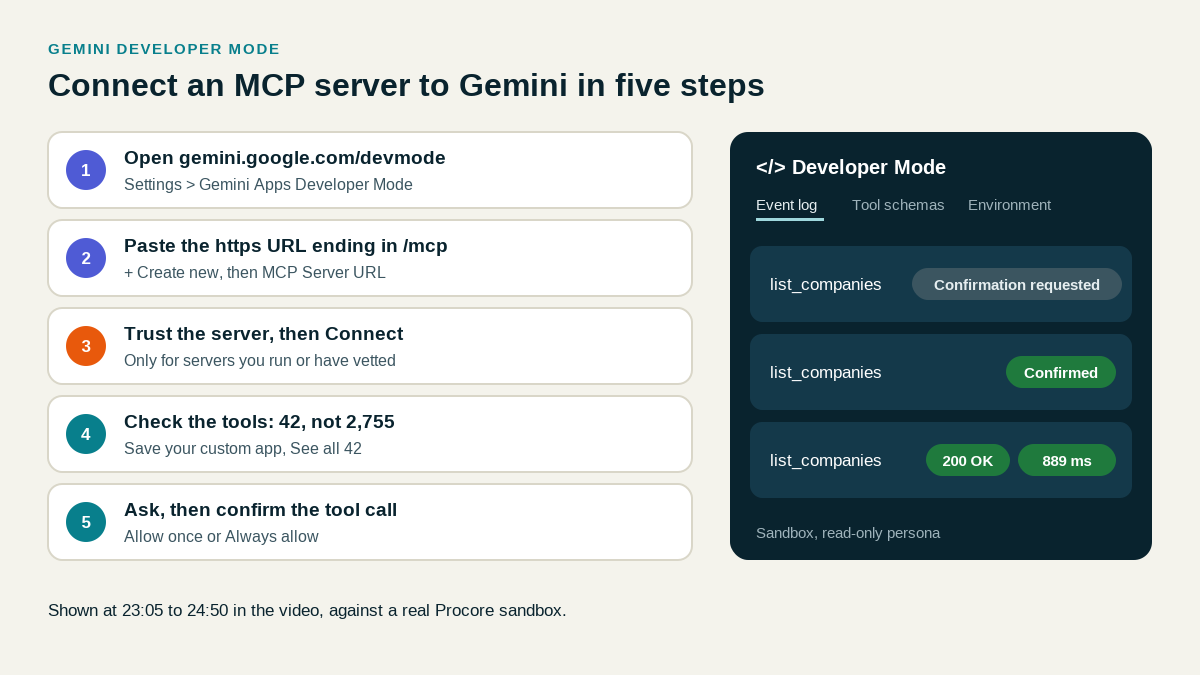
How to Connect a Procore MCP Server to Google Gemini (Developer Mode)
A help guide that matches the video from 23:05 to 24:50: what Gemini Apps Developer Mode is, how to run the server on port 8123 at /mcp, how to build the URL with mode and persona, each Gemini screen in order, the confirmation prompts, the Tool schemas, Environment and Authentication tabs, and troubleshooting.
AI agents & MCP · October 9, 2026
Hardening MCP Servers for Production: A Checklist
A checklist-style guide to running MCP servers safely in front of ERPs and project platforms, covering auth modes, read-only defaults, write allowlists, approval handshakes, reliability controls, transport security, untrusted content, error envelopes, telemetry and hosting options.
AI agents & MCP · October 10, 2026
Hosting Streamable HTTP MCP: Kubernetes, Container Apps or a VM
A vendor-neutral guide to hosting streamable HTTP MCP servers: choosing a session posture, comparing Kubernetes, managed containers and a VM with nginx and systemd, and getting probes, Origin checks, OAuth 2.1, secrets, observability and load testing right.