Key takeaways
- Measure four clocks, not one: days to price, days to submit, days pending with the owner, and approved but not billed.
- Bucket pending change orders by age and show both value and count, by job and by PM as well as the portfolio.
- Pending change orders are exposure, not contract; adding them to revised contract overstates revenue and margin.
- Approved change orders with no amount or date, double counted change events and status mismatches are the most common data problems.
- Track subcontractor change orders next to the owner changes that drive them; the risk is often two-sided.
Short answer: A change order aging report lists every change that is not yet approved and billed, groups it by how long it has been waiting, and shows the dollars at stake in each group. The useful version tracks four clocks, not one: days to price a change event, days to submit it to the owner, days pending with the owner, and days between approval and billing. Bucket pending items into 0–30, 31–60, 61–90 and over 90 days, show the value and count in each bucket, and track the subcontractor side alongside the owner side. Margin is lost where a clock runs long: work done on changes nobody priced, changes priced but never submitted, owners who sit on approvals, and approved changes nobody billed.
This guide is for controllers, project managers and operations leaders at general and specialty contractors. It walks through the change order lifecycle, the aging buckets, what to measure, the data problems that make aging reports wrong, and how to handle the owner and subcontractor sides together.
The change order lifecycle
Change orders move through roughly the same stages on every job, even when the names differ between systems:
- Change event. Something changed: an owner request, a design revision, an unforeseen condition. At this point there may be no price at all.
- Potential change order (PCO). The change is priced internally, often with subcontractor quotes.
- Submitted. A change order request goes to the owner.
- Approved. The owner signs. Only now does the amount become part of the revised contract.
- Billed. The approved change order appears as a line on a pay application.
In Procore this maps to change events, potential change orders, optional change order requests that group PCOs, and prime contract change orders. Procore projects can be set up with one, two or three tiers of change orders, so check which tiers your projects use before building a report on them. On the subcontractor side the same change usually produces commitment change orders against one or more subcontracts or purchase orders.
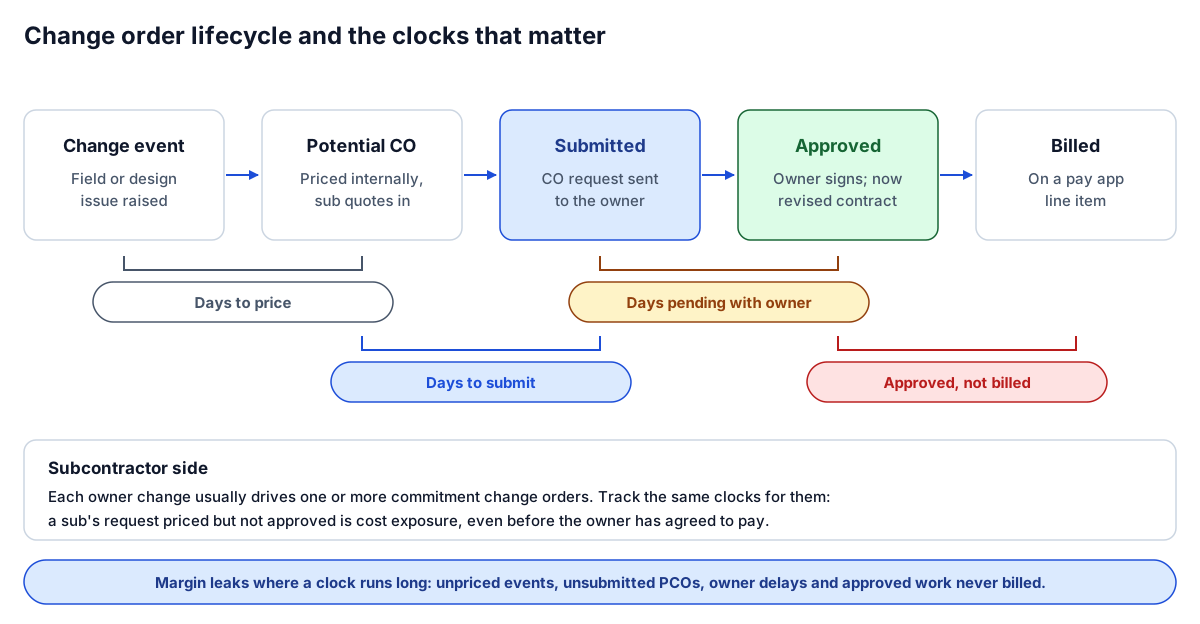 Four clocks, not one. Each measures a different place margin can leak.
What to measure
A single "days open" column hides where the delay is. Measure each stage separately:
| Measure | From | To | What a long one usually means |
|---|---|---|---|
| Days to price | Change event created | PCO priced | Work proceeding with no number attached; quotes not chased |
| Days to submit | PCO priced | Submitted to owner | Internal review bottleneck, or PMs batching changes |
| Days pending | Submitted | Approved or rejected | Owner or design team delay; dispute over scope or price |
| Approved, not billed | Approved | First billed on a pay app | Schedule of values not updated; lost revenue until someone notices |
Alongside the clocks, report three dollar figures:
- Pending exposure. Total value submitted or in negotiation but not approved. Our metric dictionary defines pending change order exposure as this total shown next to the age of the oldest item.
- Unpriced events. A count, and an estimate if the PM has one. Unpriced events carry real cost with no dollar value yet, so they never show up in a dollar total. Count them separately.
- Approved, not billed. Owner-approved value that has not yet appeared on a pay application. It is already contract, so it is the easiest money on the report to recover.
Report cost incurred to date on pending changes where your job cost structure allows it. A pending change with significant cost already spent is a higher priority than one where work has not started.
Aging buckets
Bucket pending change orders by days since they were submitted to the owner (or since created, for items not yet submitted), and show both value and count:
| Bucket | Typical reading |
|---|---|
| 0–30 days | Normal working queue |
| 31–60 days | Worth a follow-up with the owner or design team |
| 61–90 days | Escalate; confirm the work is not proceeding unpriced |
| Over 90 days | Executive attention; is this a dispute or a claim? |
These thresholds are a starting point, not a standard. Set them by job size and contract terms: some contracts set a response period for change order requests, and that period is a better bucket edge than a round number.
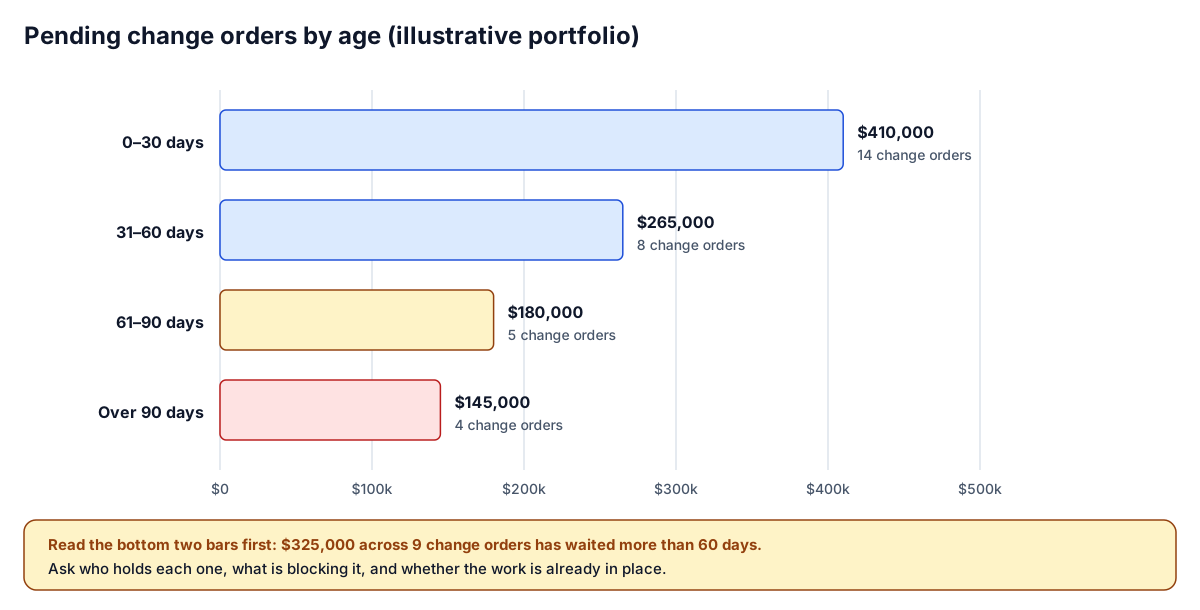 Illustrative portfolio. The bottom two bars are the ones to work first.
Show buckets by job and by PM as well as for the portfolio. A portfolio total can look fine while one job carries most of the old exposure.
Why the aging report protects margin
Pending change orders affect the numbers in ways that are easy to miss:
- Work done on pending changes is cost without contract. The cost goes into cost to date and moves percent complete, but revised contract does not move until approval. The job looks under billed and its margin looks lower than it will be if the change is approved, or exactly as low as it will be if it is rejected.
- Including pending changes in revised contract overstates revenue. It is the opposite mistake and it is worse, because it books margin you may never receive.
- Unapproved does not always mean excluded. Under ASC 606, a change order whose scope the owner has approved (in writing, orally or by customary practice) but whose price is still pending is a contract modification, and its expected price can be included in revenue as variable consideration when it is probable that doing so will not cause a significant reversal later. That is a judgment for your controller and CPA, made per change order and documented; keep those amounts as a separate, visible line rather than mixing them into approved contract.
- Old pending changes get negotiated down. The longer a change waits, the further it is from the work that justified it, and the harder it is to support.
- Approved but unbilled changes are pure cash delay. The revenue is earned; it just has not been invoiced.
That is why the WIP review should always sit next to the change order aging report. Our over/under billing guide lists unapproved change order work as the first question to ask about an under-billed job.
Common data problems
Aging reports are only as good as the change order log underneath them. These are the problems we see most:
| Problem | Effect on the report | Fix |
|---|---|---|
| Approved change order with no amount | Revised contract understated | Block approval without an amount |
| Approved with no approval date | Cannot place it in a period; aging blank | Require the date on approval |
| Approval date before created date | Negative cycle times | Fix at the source; one of the dates is wrong |
| Change event and change order both counted | Exposure double counted | Count each change once, at its latest stage |
| Status differs between PM system and ERP | Revised contract differs between WIP and PM reports | Sync status, or reconcile before the WIP |
| Duplicate change order numbers on a job | Items hidden or doubled | Unique key on job plus CO number |
| Free-text statuses ("waiting", "ok per Tom") | Items fall out of every bucket | A fixed status list |
You can test a change order export for most of these in the free construction data quality checker: pick the Change orders dataset, upload or paste your log, and it flags approved items with no amount or date, approvals dated before creation, duplicate numbers and job numbers that do not match.
Owner side and subcontractor side
Every owner change usually drives one or more subcontractor changes, and the two sides age differently:
- Owner side is revenue: what you will be paid. Exposure here is revenue at risk.
- Subcontractor side is cost: what you will pay. A sub's change request that is priced but not approved is cost exposure, even before the owner has agreed to anything.
Link them where you can. A commitment change order tied to an owner change that is still pending tells you the risk on that change is two-sided. A commitment change order approved while the matching owner change is rejected is margin already lost. Report both on the same page, by job, with the link between them visible.
A weekly review routine
Month end is too late to find a 90-day-old change order. Run a short review weekly, by PM:
- Unpriced events first. For every change event with no price after a set number of days, ask whether work has started and who is getting the quote.
- Priced but not submitted. Anything priced and not sent to the owner within your target needs a reason.
- Oldest pending with the owner. Work the over-90 and 61–90 buckets top down by value. Record who holds each one and what is blocking it.
- Approved, not billed. Every item here should be on the next pay application. Confirm the schedule of values has the line.
- Subcontractor side. Check commitment change orders linked to rejected or stalled owner changes.
- Compare with last week. Totals moving between buckets without any approvals means the queue is just getting older.
Keep the routine short, and keep the list of actions with the report, so the next review starts from what was promised.
Building the report
The minimum fields per change order are job, change order number, title, status, created date, submitted date, approved date, amount, and a link to the owner change for commitment change orders. Billed status comes from the pay application or the schedule of values.
If approvals themselves are the bottleneck, the report shows it but does not fix it. An approval workflow with routing and escalation does, by sending each change order to the right approver by amount and project and chasing them until a decision is recorded. For the reporting side, the automated WIP schedule use case covers keeping revised contract in line with approved change orders every month.
Where to go next
- Check your log: run a change order export through the data quality checker using the Change orders dataset.
- Fix the approvals: the change order approval workflow use case.
- Put it in the close: the month-end close checklist for construction controllers.
- Change orders aging in someone's inbox? Tell us how they flow today and we will sketch what an aging report and approval workflow would look like on your systems.
Frequently asked questions
What is a change order aging report?
It lists change orders that are not yet approved and billed, grouped by how long they have been waiting, with the value and count in each group. It shows where change orders are stuck and how much revenue or cost is exposed while they wait.
What aging buckets should I use for change orders?
A common starting point is 0 to 30, 31 to 60, 61 to 90 and over 90 days, measured from submission to the owner or from creation for items not yet submitted. If your contracts set a response period for change order requests, use it as a bucket edge.
Should pending change orders be included in revised contract?
No. Revised contract includes owner-approved change orders only. Pending change orders should be reported separately as exposure, with the age of the oldest item, so they do not overstate earned revenue and margin on the WIP schedule.
What does approved but not billed mean?
It is owner-approved change order value that has not yet appeared on a pay application. The revenue is earned and part of the contract, so it is usually the quickest money on the report to recover; the usual cause is a schedule of values that was not updated.
How do I find bad data in my change order log?
Look for approved change orders with no amount or approval date, approval dates before created dates, duplicate change order numbers on a job and job numbers that do not match the job master. The free Build Flows data quality checker runs these checks on a change order export.
Next step
Trying to automate a report like this?
Discuss your current reporting process: what the team does today, which systems are involved, and what you want to change.
Prefer email? charley@buildflows.ai
Keep learning
Playbooks · October 10, 2026
Month-End Close Checklist for Construction Controllers
The nine-step month-end close in the order that keeps the WIP from being rebuilt, who owns each step, what done looks like, and which parts to automate first.
Reporting & analytics · October 10, 2026
Over/Under Billing Explained: How to Read Your WIP Schedule
How over and under billing are calculated, three worked jobs including a stale forecast, the month-end journal entries and balance sheet impact, the usual causes, and a routine to review the WIP schedule every close.
Reporting & analytics · October 8, 2026
Construction Data Quality: The Rules That Make Reports Trustworthy
A practical checklist of the data-quality rules behind construction reports people can defend, from quality gates and blank-never-zero to cost-code crosswalks, reconciliation and snapshots.