Key takeaways
- Expanded lists all 2,755 tools, hybrid lists a persona's tools plus 27 meta-tools, and router lists only the 27 meta-tools.
- The live demo used hybrid with the gc_demo persona: 15 curated read tools plus 27 meta-tools, 42 in total.
- Personas built on broad capability bundles can list more than 100 tools in hybrid mode, over Gemini Enterprise's 100-action guidance.
- Set mode and persona with headers, environment variables, or ?mode= and ?persona= for URL-only clients like Gemini Developer Mode.
- An unset or misspelled mode falls back to expanded, and a persona's mode field does not set the mode.
- The persona list shapes what the model sees and searches. Policy is what blocks calls.
- Use hybrid for scheduled workflows, router for open-ended questions, and expanded only in code.
51 seconds · From a Build Flows walkthrough
2,755 Procore endpoints through 42 tools
Why the agent doesn't see every Procore endpoint at once: search and lookup tools let it pull in only the tools a task needs.
Read the clip transcript
and so you'll see here there are over 2,755 endpoints here, and these are exposed actually through 42 different tools. And so there are different tools to be able to help it search for, identify, look up, and quantify what tools it needs, and then be able to use those API endpoints in specific tool calls to be able to then do the actions. And so we're not necessarily referencing all of the context of every single tool that's happening for each of the endpoints that are happening. We're actually giving it the ability to query and search what tools need to be used, and then only pull those tools in as reference to then be able to let the agent use those tools to be able to perform its workflow. So this is working on real data within the sandbox today.
Captions adapted from the source video; proper names may reflect automatic transcription. Original segment: 2:40–3:30. Watch at the source.
37 seconds · From a Build Flows walkthrough
Router, hybrid or expanded mode?
Router mode keeps context small with meta-tools, hybrid adds a filtered tool set, and expanded exposes everything. The advice: scope an MCP per agent.
Read the clip transcript
different tools, have a hybrid search layer, as well as a router that you can search for and look. And so depending on the different types of mode, I would suggest doing a router type model. So this is meta tools referencing. So this would be if you want to reduce the context. Hybrid is also good if you're wanting to have a filtered search for tools as meta. This is ultimately then going to where you're exposing all the tools as one, which is going to blow every single context layer that you possibly have. So you'd most likely want to parse this down and do a specific agent use case and spin up different MCPs for each different agent that you're using.
Captions adapted from the source video; proper names may reflect automatic transcription. Original segment: 21:51–22:28. Watch at the source.
The first real decision when you connect an AI agent to Procore isn't which model to use. It's which tools the agent gets to see. Procore's API becomes 2,755 tools when you generate one per endpoint. Show all of them and the agent drowns. Show too few and it can't do the job.
The open-source Procore MCP server gives you three ways to shape that surface: expanded, hybrid and router. On top of that, personas decide which Procore tools a role sees. This article is the practical guide: what each mode lists, what the demo actually ran, how to set mode and persona with headers or URL parameters (for URL-only clients like Gemini), the gotchas we found reading the code, and a decision table for each agent you plan to build.
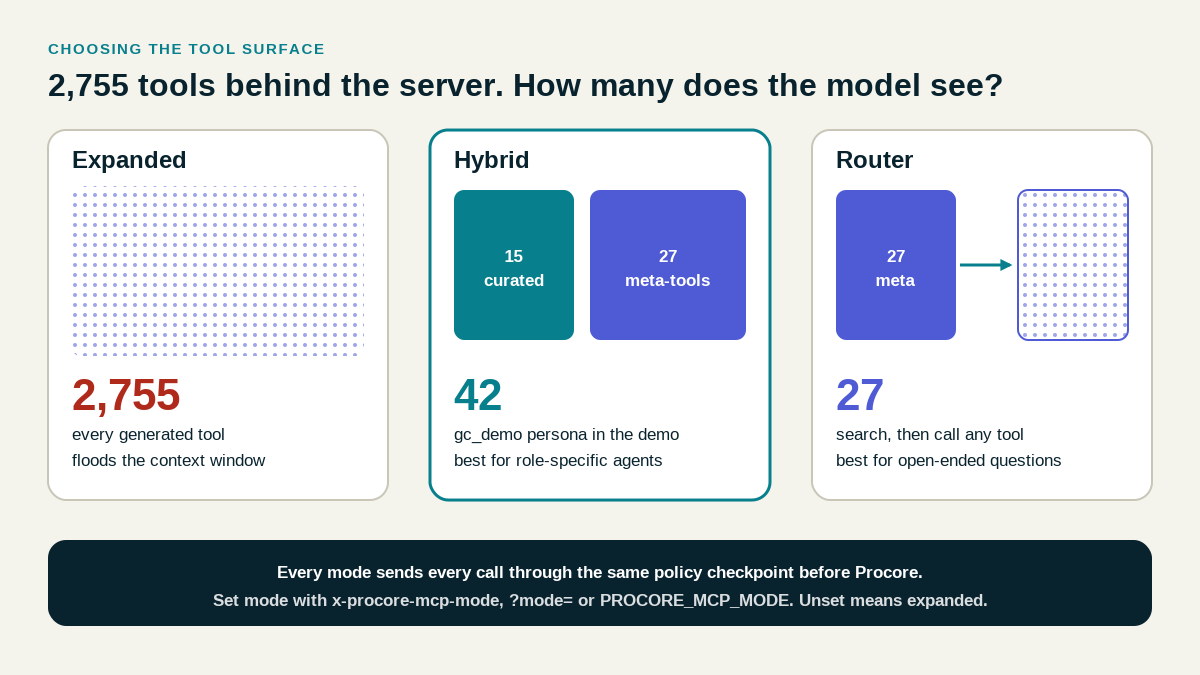 Same 2,755 tools behind the server. What changes is how many the model sees.
The architecture behind this, including the hybrid search, the dispatch path and why we generate every endpoint, is covered in Routing 2,755 Procore API tools through MCP. This article doesn't repeat it. It's about choosing.
The three modes in one table
| Mode | What tools/list returns | Live count | Good for | Watch out for |
|---|---|---|---|---|
| Expanded | Every generated Procore tool, no meta-tools | 2,755 | Scripts, test harnesses, a client that lets you hand-pick tools | Floods context. It's also the default if you don't set a mode |
| Hybrid | The persona's Procore tools plus the meta-tools | 42 with gc_demo (15 + 27) | Role-specific agents with a known job | Without a persona, hybrid lists everything plus the meta-tools |
| Router | Only the meta-tools | 27 | General-purpose agents, small context budgets, discovery | Every call depends on search picking the right tool |
The counts in the "live count" column come from the sandbox capture on November 16, 2026. The earlier routing article says "about 25" meta-tools. The live server listed 27, including procore_search_tools, procore_describe_tool, procore_call_tool, procore_resolve_entity, procore_plan_dag, procore_run_workflow and procore_paginate_tool.
In the video, Charley walks through the modes in the repo README at 22:00. His advice there: expanded "is going to blow every single context layer that you possibly have," so you parse it down to a specific agent use case.
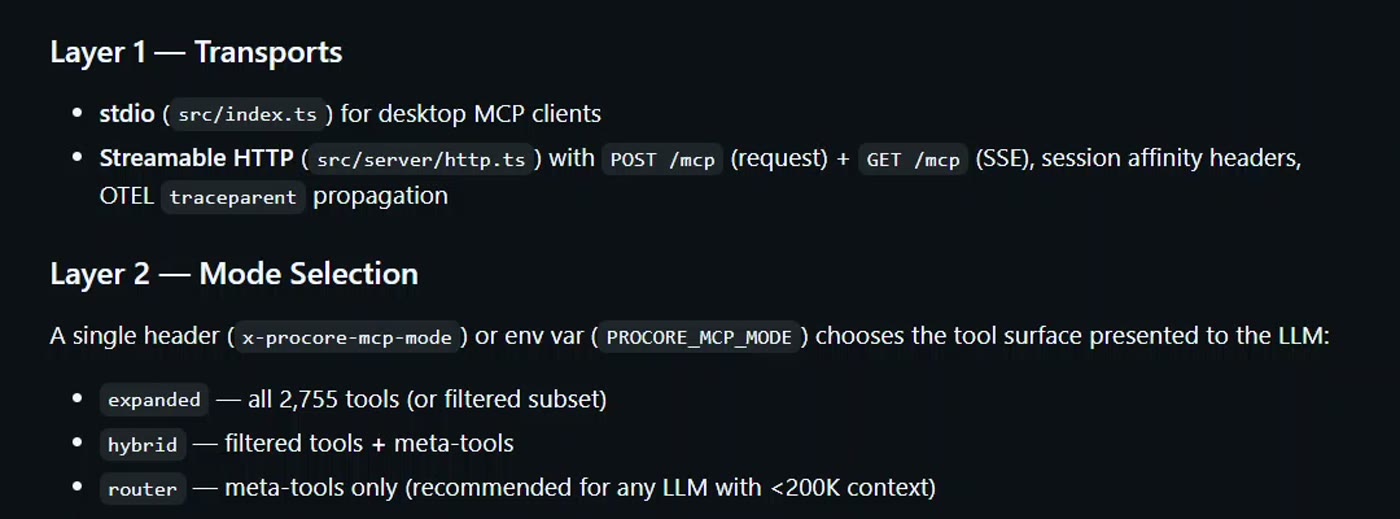 Server modes in the README, at 22:00 in the video.
What the demo ran: hybrid plus gc_demo = 42 tools
The live demo used hybrid mode with the gc_demo persona. The session context the server reported:
{
  "mode": "hybrid",
  "persona": "gc_demo",
  "policy_stack": ["readonly-by-default", "sandbox-only"],
  "tools_listed": 42
}
The 42 broke down as 15 curated read tools and 27 meta-tools. The 15 were exactly what a GC project team asks about every week:
list_companies,list_projectslist_project_rfi_rfis,list_project_rfi_rfis_replieslist_project_submittals_submittalslist_change_events,show_change_event,list_potential_change_orderslist_budget_views,list_budget_view_detail_rows,list_budget_view_summary_rowslist_work_order_contractslist_project_daily_log_manpower_logs,..._notes_logs,..._weather_logs
Why hybrid for the demo? The team's setup notes say it plainly: with the curated list, the model calls the right tool directly. Router mode is a great talking point ("2,755 tools behind 27"), but search is weaker without the persona allowlist narrowing it.
That combination answered every demo question from live data: 23 open RFIs with 22 past due, $114,021 of pending change exposure, $261,050 projected over budget, and a daily log summary. A write attempt was denied by policy.
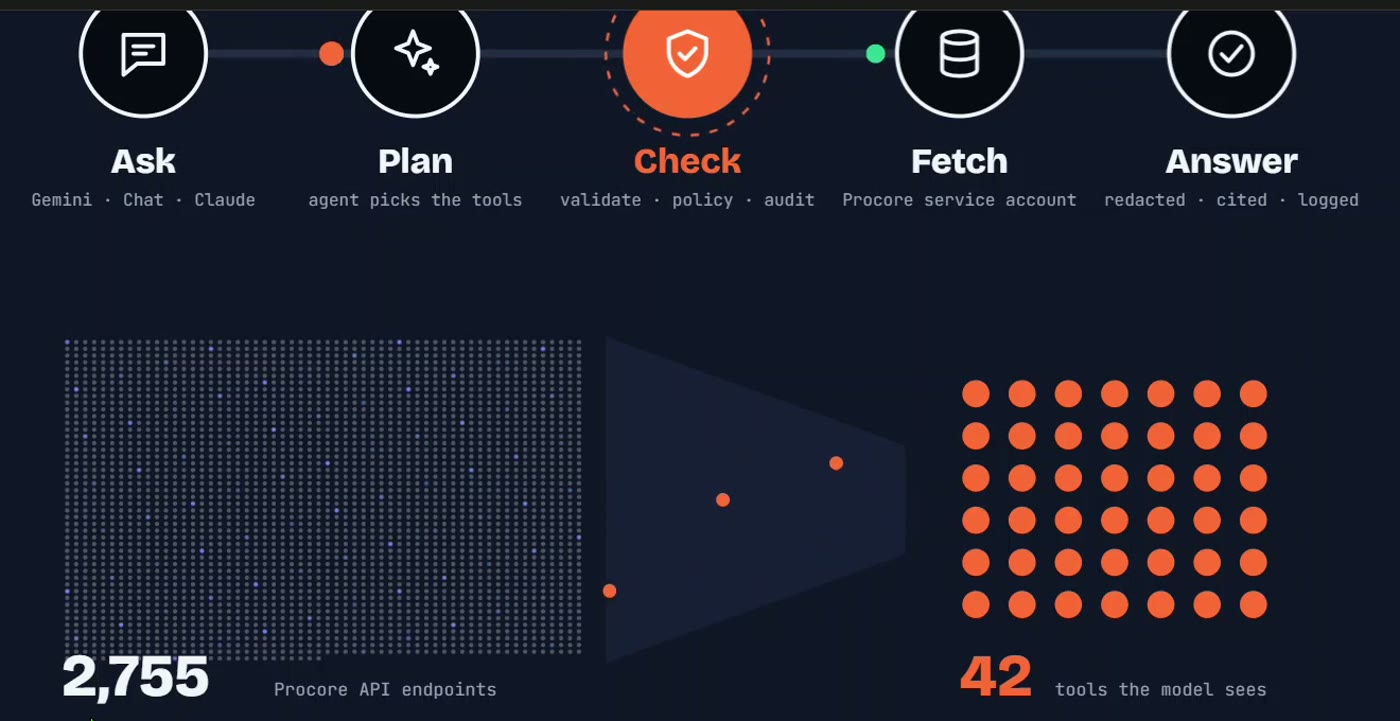 2,755 endpoints, 42 tools the model sees. From the video at 02:50.
Router mode on the same data
The capture also ran router mode. Only the 27 meta-tools were listed. Here is what discovery looked like for "rfis":
{
  "tier_used": "bm25",
  "confidence_band": "medium",
  "tools": [
    { "name": "list_project_rfi_rfis", "feature": "rfi" },
    { "name": "list_project_rfi_rfis_replies", "feature": "rfi" }
  ]
}
Then procore_call_tool with name: list_change_events and project_id: 120149 returned the project's five change events, including "Unforeseen rock at elevator pit excavation" and "Curtain wall embed relocation at L4 slab edge."
So router mode works. It just takes one more step for every new kind of question (search, then describe, then call), and its quality depends on search. It's the right default for a general "ask Procore anything" assistant, and the wrong one for a scheduled job that runs the same three calls every morning.
Personas: the role, not the model
A persona is a YAML file in personas/ that describes a role. The repo ships 13, including rfi_manager, budget_analyst, field_super, executive_dashboard, change_event_manager, submittal_coordinator and the demo's gc_demo. A persona can carry:
capabilities: capability bundles fromcapabilities/(70 of them), such asrfi_managementorconstruction_financials. Each bundle lists tools, and can require other bundles.expose_tools_directly: exact tool names to add.default_workflows: YAML workflows the persona should reach for.policies: policy ids to switch on, such asreadonly-by-defaultorsandbox-only.welcome_messageandexample_prompts: what users see first.
In hybrid mode, the persona's tool set is the union of every tool in its capability bundles (and the bundles they require) plus expose_tools_directly. That's where size sneaks up on you. By our count of the YAML files, these are the allowlist sizes before the 27 meta-tools are added:
| Persona | Built from | Procore tools | Plus meta-tools |
|---|---|---|---|
gc_demo | 15 exact tools, no bundles | 15 | 42 |
budget_analyst | construction_financials, executive_oversight | 16 | 43 |
precon_estimator | precon, procurement, preconstruction bundles | 26 | 53 |
rfi_manager | project_management, change_management | 103 | 130 |
field_super | project management, field ops, resources | 116 | 143 |
That matters if the client caps how many tools it will run. Gemini Enterprise asks you to keep enabled actions on a custom MCP server to 100 or fewer, and imports every action switched off until an admin enables it. A persona built on the broad project_management bundle won't fit in hybrid mode. Either curate it down like gc_demo, or use router mode with that persona.
The gc_demo pattern, for your own roles
id: pe_rfi_radar
description: Project engineer persona for the morning RFI radar. Read-only.
example_prompts:
  - Which RFIs are overdue on this project and who has the ball in court?
capabilities: []
expose_tools_directly:
  - list_projects
  - list_project_rfi_rfis
  - list_project_rfi_rfis_replies
  - list_project_submittals_submittals
policies:
  - readonly-by-default
  - sandbox-only
Start with no bundles and an exact list. Add tools only when a real question needs them.
How to set mode and persona
There are three ways, and they can be mixed.
1. Environment variables (one setting for the whole server). Good for stdio clients like Claude Desktop or Claude Code, where there are no per-request headers:
"env": {
  "PROCORE_ENVIRONMENT": "sandbox",
  "PROCORE_MCP_MODE": "hybrid",
  "PROCORE_MCP_PERSONA": "gc_demo",
  "PROCORE_MCP_POLICIES": "readonly-by-default,sandbox-only"
}
2. Headers (per request, over Streamable HTTP). Good for your own agents, ADK code, or gateways that can add headers:
x-procore-mcp-mode: hybrid
x-procore-mcp-persona: gc_demo
x-procore-mcp-policies: readonly-by-default,sandbox-only
x-procore-mcp-domains: project-management
The filter headers (x-procore-mcp-domains, x-procore-mcp-features, x-procore-mcp-exclude) narrow the surface further in every mode.
3. Query parameters (for URL-only clients). Some clients only let you paste a server URL. Gemini Apps Developer Mode, used in the video at 23:05, asks for an MCP server URL and optional OAuth client settings, with no custom header field. For those, src/server/http.ts copies ?mode= and ?persona= into the matching headers:
https://<your-mcp-host>/mcp?mode=hybrid&persona=gc_demo
A header always wins. The query parameter only fills in when the header is missing. Policies don't have a query parameter, so put them in the persona's policies: list or the server's environment. The step-by-step Gemini connection guide covers the rest. Keep secrets out of that URL. If your setup puts an access token in a query string, read exposing an MCP server securely first.
Gotchas from reading the code
These are worth knowing before you debug a confused agent.
- The default is expanded. If neither the header, the URL nor
PROCORE_MCP_MODEsets a mode, the server lists all 2,755 tools. - A typo means expanded too. Any mode value other than
router,hybridorexpandedfalls back to expanded.?mode=routrwill flood your context window without an error. - A persona's
mode:field doesn't set the mode. The persona files saymode: hybrid, but the server takes the mode from the header, URL or environment only. Always set both. - Hybrid without a persona isn't curated. With no persona (or one with an empty tool set), hybrid lists every Procore tool plus the meta-tools.
- The persona list filters what the model sees and searches, not what it can call.
procore_call_toolwill try any exact tool name. Policy is what blocks the calls you don't want. That's why every persona should listreadonly-by-defaultuntil you deliberately move it up the write governance ladder.
Check what you got by asking the agent to run procore_get_context. It reports the active mode, persona, policy stack and filters.
Call procore_get_context and tell me the mode, persona, policy stack
and how many tools you can see. Don't call any other tool.
One MCP per agent, or one router for all?
Charley's suggestion in the video is to "spin up different MCPs for each different agent." In practice that doesn't mean separate servers. It means separate connections to one deployment, each with its own mode, persona and policies.
| Approach | How it works | Pros | Cons |
|---|---|---|---|
| One connection per agent | Same server, different headers or URL per agent: ?mode=hybrid&persona=pe_rfi_radar, ?mode=hybrid&persona=budget_analyst | Small, predictable tool lists. Clear audit per role. Easy to fit client caps | More connections to register and maintain |
| One router for everyone | One connection in router mode, optionally with a broad persona | One thing to set up. Reaches all 2,755 tools | Every new question depends on search. Harder to explain to a security reviewer |
| Both | Hybrid connections for scheduled workflows, one router connection for the "ask anything" assistant | Reliable jobs plus flexible exploration | Two patterns to document |
We usually land on "both."
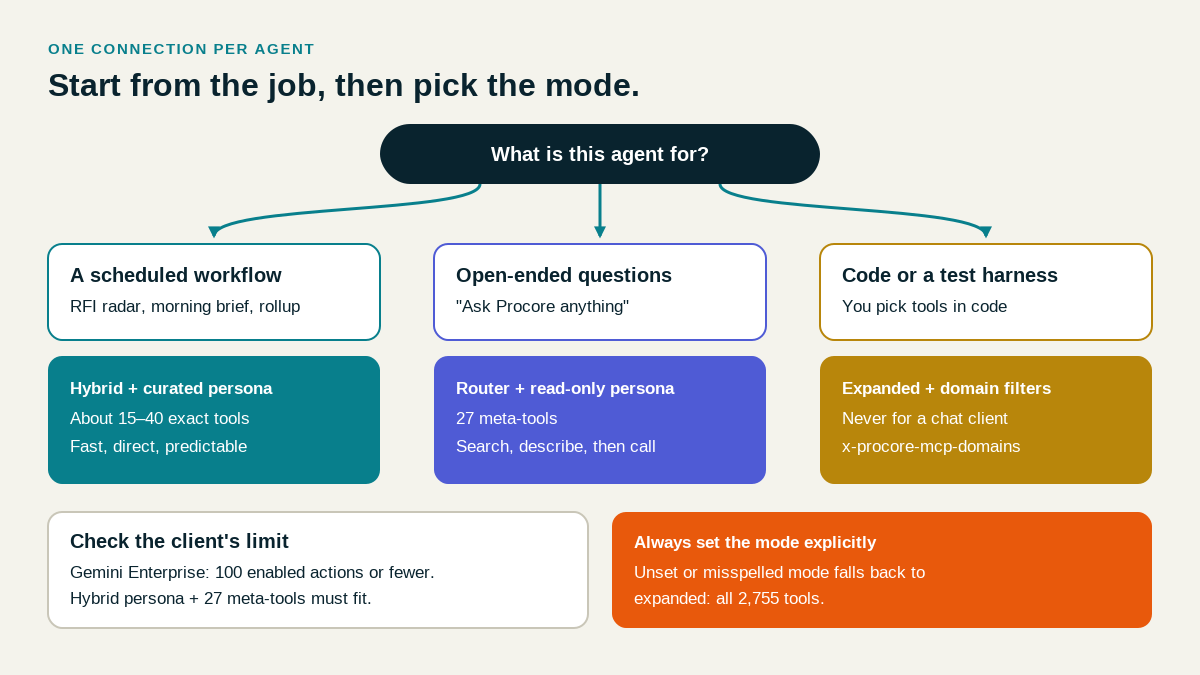 Start from the job, then pick the mode, then check the client's tool limit.
Decision table
| Agent | Mode | Persona | Why |
|---|---|---|---|
| Morning RFI radar (scheduled) | Hybrid | Curated, e.g. pe_rfi_radar | Same calls every day. Direct tool calls are fastest and most reliable |
| Change exposure rollup | Hybrid | Curated change and commitment reads | Few tools, money data, keep it tight |
| Superintendent morning brief | Hybrid | Daily log, RFI and inspection reads | Predictable inputs, field users want consistency |
| "Ask Procore anything" in Gemini or Claude | Router, or hybrid under 100 tools | Broad persona with readonly-by-default | Needs reach across tools. Fits the client's tool cap |
| Gemini Enterprise custom MCP connector | Router or curated hybrid | Any, if it stays at 100 actions or fewer | Enabled-action limit |
| Developer test harness or script | Expanded with domain filters | None | You choose the tools in code |
| Security review demo | Hybrid | gc_demo-style, read-only plus sandbox-only | Shows a small, explainable surface and a denied write |
Do it with us
BuildFlows sets up Procore agents with GCs, including the personas, modes and policies for each role, and connects them to Gemini, Claude or your own agents. Email charley@buildflows.ai or start at /engage. To see the 42-tool setup working on live sandbox data, watch the demo, read the pillar article on Procore data in Gemini, or browse the Procore Agent Playbook. New to MCP? Start with What is MCP for construction. For hosting, see hosting Streamable HTTP MCP servers.
References
- BuildFlows, procore-mcp on GitHub: README "Server Modes",
src/server/http.ts,src/server/setup.ts,src/router/persona.ts,personas/,capabilities/ - BuildFlows, Routing 2,755 Procore API tools through MCP
- Video: Procore data in Google Gemini, 2,755 to 42 at 02:40, server modes at 22:00, Gemini connection at 23:05
- Google Cloud, Set up a custom MCP server in Gemini Enterprise: Streamable HTTP only, actions off by default, limit enabled actions to 100
- Google for Developers, Test, debug, and evaluate in Gemini Apps Developer Mode: MCP server URL and OAuth client fields
- Model Context Protocol, Tools specification (2025-06-18)
Frequently asked questions
What is the difference between router, hybrid and expanded mode?
Expanded lists every generated Procore tool (2,755). Hybrid lists a persona's curated tools plus the meta-tools. Router lists only the 27 meta-tools, and the agent searches for and calls any tool through them.
Which mode should I use with Gemini?
Router, or hybrid with a curated persona that stays at 100 tools or fewer including the 27 meta-tools. Gemini Enterprise asks you to keep enabled actions on a custom MCP server to 100 or fewer.
How do I set the mode if my client only accepts a URL?
Add query parameters, for example /mcp?mode=hybrid&persona=gc_demo. The server copies them into the x-procore-mcp-mode and x-procore-mcp-persona headers when those headers are missing.
What is a persona in the Procore MCP server?
A YAML file describing a role. It lists capability bundles and exact tools to expose, default workflows, policies to switch on, and example prompts.
Why did the demo use hybrid instead of router?
With 15 curated tools the model calls the right tool directly, which is faster and more reliable for repeated GC questions. Router mode worked too, but every new kind of question depends on search.
Should each agent get its own MCP server?
Usually each agent gets its own connection to one deployment, with its own mode, persona and policies. Many teams use hybrid connections for scheduled workflows plus one router connection for open-ended questions.
Next step
Have a workflow in mind?
Start with a readiness review: the task, the data and tools it needs, the access boundaries, and how a pilot would be evaluated.
Prefer email? charley@buildflows.ai
Keep learning

AI agents & MCP · May 10, 2026
Routing 2,755 Procore API Tools Through MCP Without Drowning the Model
A walkthrough of the Procore MCP server architecture: generated tools for every endpoint, router-mode meta-tools, hybrid retrieval, and a single dispatch chokepoint for safety and audit.
Integrations · November 16, 2026
How to Connect a Procore MCP Server to Google Gemini (Developer Mode)
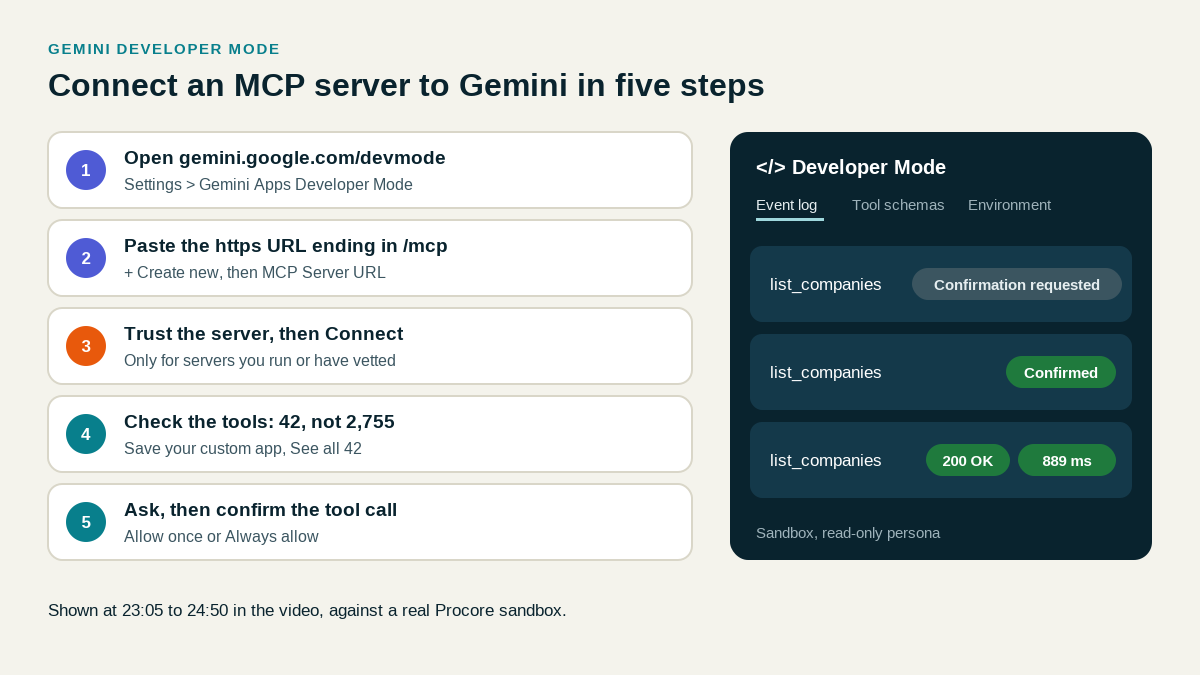
A help guide that matches the video from 23:05 to 24:50: what Gemini Apps Developer Mode is, how to run the server on port 8123 at /mcp, how to build the URL with mode and persona, each Gemini screen in order, the confirmation prompts, the Tool schemas, Environment and Authentication tabs, and troubleshooting.
AI agents & MCP · November 16, 2026
The Write Governance Ladder for AI Agents on Procore: Read, Draft, Confirm, Two-Person
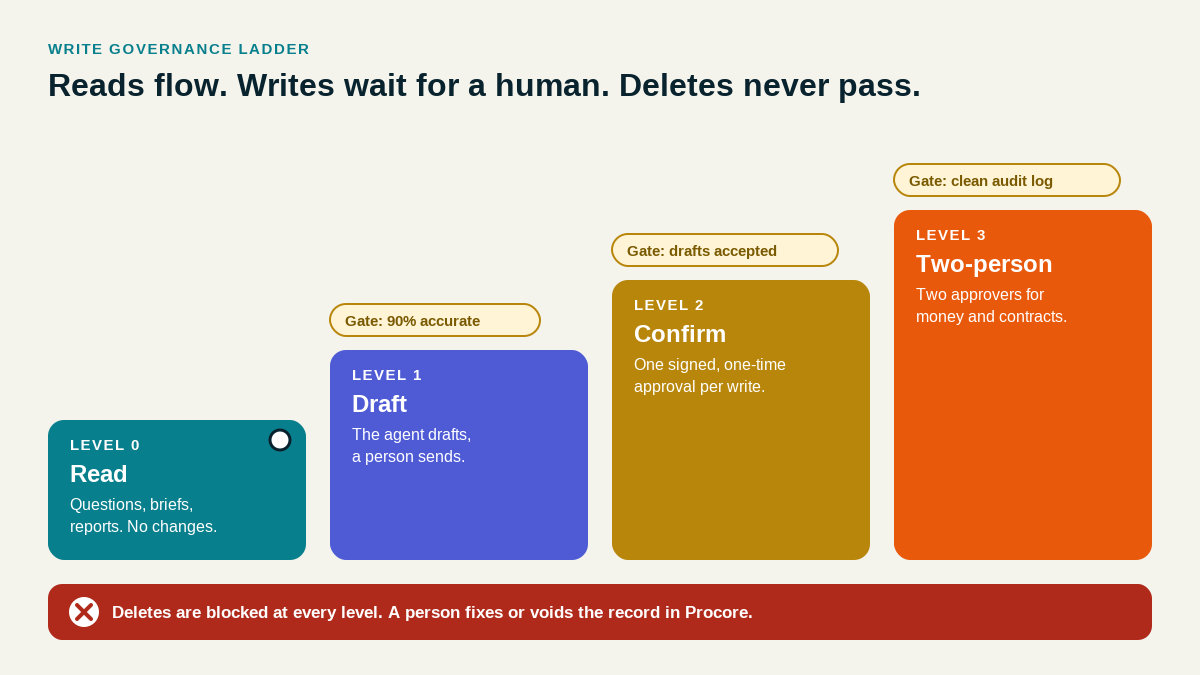
A practical ladder for AI agents that touch Procore. What each level allows, which Procore actions belong where, how the open-source Procore MCP server enforces it with policy YAMLs and signed confirmation tokens, the live write denial from the sandbox, and a policy table GCs can copy.