The short answer: An MCP server that works on a laptop is a demo. A production MCP server in front of an ERP or project platform needs the same discipline as any other integration that can move money: real authentication, read-only by default, writes allowed per domain with bulk caps, dry runs and preflight validation, an approval handshake for anything risky, retries with jitter, concurrency limits, circuit breakers, health and readiness probes, Origin checks, defense against SSRF and prompt injection in fetched content, a stable error envelope with request IDs, and telemetry on every call. This article is the checklist we work through before an agent is allowed near a live job or a live ledger.
It draws on about twenty MCP servers we built for Trimble products and other construction platforms, in Python, TypeScript and C#. The most production-grade of them sits in front of Viewpoint Vista AP data, and several examples below come from it. If you are still choosing how to expose an API to agents at all, read the MCP gateway pattern for construction APIs first. This piece assumes you have tools and now need to run them safely.
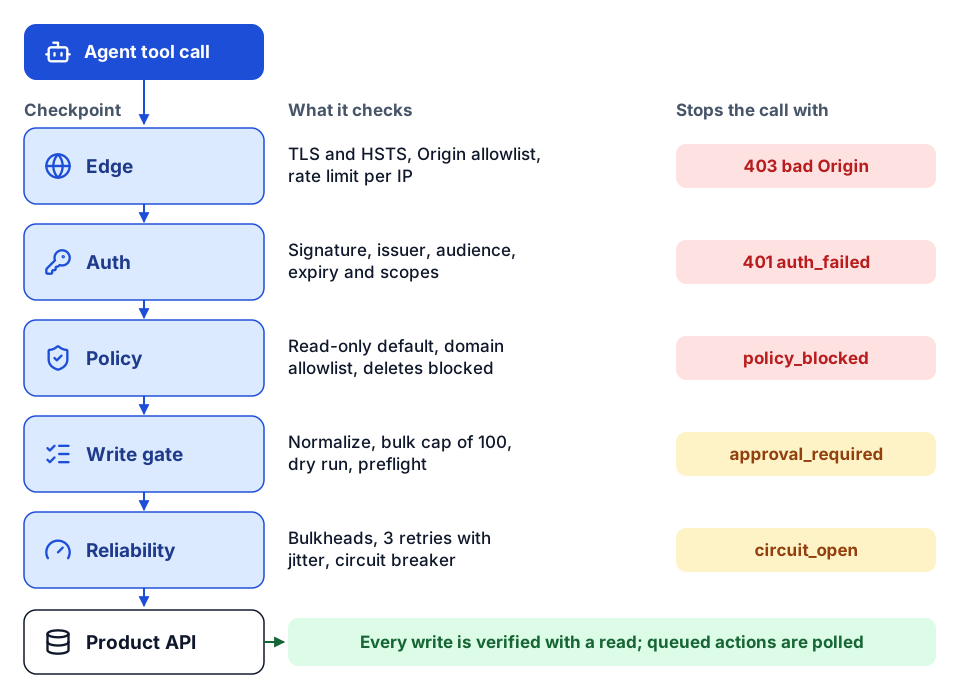 The path a tool call takes, and the structured response each checkpoint returns when it stops the call.
1. Authentication: pick a mode on purpose
Decide, per deployment, whose identity reaches the product API. The modes we support:
- Static or client credentials. A service identity. Fine for local development and back-office jobs that never take instructions from chat. Risky behind a shared agent, because every user inherits the service account's reach.
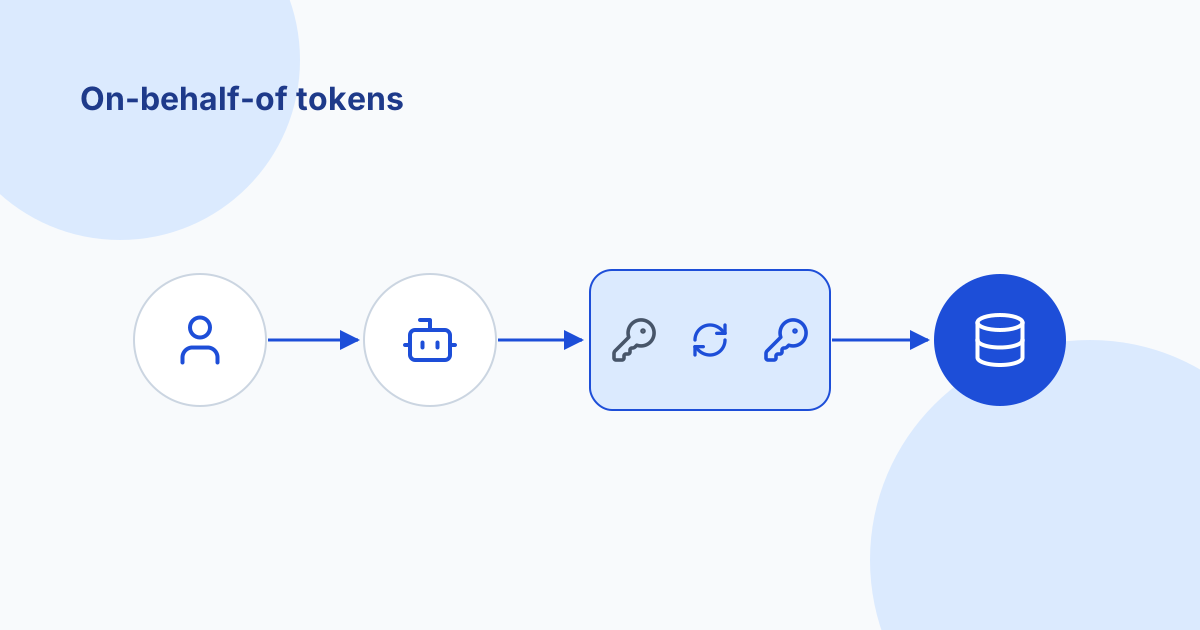
- Delegated (on-behalf-of). The user's token is validated (signature against the provider's JWKS, issuer, audience, expiry, required scopes) and then exchanged under RFC 8693 for a token the product API accepts. This is the default for hosted agents.
- Hybrid. Delegated when a user token is present, service identity otherwise. If you keep the fallback, log it and make it read-only.
- Server-managed refresh. The server holds a refresh token and manages the lifecycle. A bridge for platforms that cannot send user tokens yet.
Checklist:
- Startup fails loudly if the chosen mode's settings are missing. A server that boots with half an auth config will fail later, at a worse time.
- Incoming tokens are rejected if their audience is not this server.
- Downstream calls never reuse the user's token unless the product API is its intended audience. Exchange instead.
- Secrets come from a secret store or platform-managed environment, never from a file in the image or a prompt.
- A debug tool reports the auth mode and non-sensitive token claims, never the token.
The full treatment, including a troubleshooting table, is in on-behalf-of token exchange for AI agents.
2. Write safety: read-only first, then narrow doors
Most agent value in construction comes from reading: queue triage, variance questions, document lookups. Start there and open writes one domain at a time.
| Control | What it does | Example setting |
|---|---|---|
| Read-only mode | Disables every write and bulk tool at registration | One boolean, on by default in new deployments |
| Per-domain write allowlist | Only listed domains accept writes | AP allowed, PO and job cost not yet |
| Delete policy | Deletes never run; the tool returns a policy message | Deletes go through the product UI |
| Bulk cap | Hard ceiling on items per request | 100 items |
dry_run | Validates the full payload contract without calling the API | Required before the first real run of any bulk write |
| Preflight tools | A validate_<tool>_request companion for each write tool | Returns the normalized payload and every problem found |
Two details matter more than they look:
- Normalize before you validate. Single items and lists both become
{ "items": [...] }, and query inputs become a standard filter shape. Validation then has one shape to check, and the bulk cap applies the same way everywhere. - Partial data is degraded data. When a paginated collection stops early (timeout, page cap, upstream error), mark it
partial: trueand refuse approval-type actions on top of it until it is retried. An agent that approves invoices from half a queue is worse than one that waits.
Checklist:
- New deployments start read-only.
- Writes are allowlisted per domain and deletes are blocked by default.
- Every bulk write has a cap, a
dry_runand a preflight tool. - Every write is followed by a read that verifies the outcome. On APIs where writes are queued as asynchronous actions (Vista works this way), poll the action status before reporting success.
- Writes carry an idempotency key where the API supports one, so a retry cannot create a duplicate record.
3. Approval handshakes: make the agent ask
Free-text "are you sure?" prompts are unreliable. Use structured responses that the agent and client can act on:
| Response | Meaning | Next step |
|---|---|---|
need_more_info | A required ID or value is missing | Agent asks the returned questions and calls again with the answers |
approval_required | The action is allowed but needs explicit approval | Agent shows the plan; a person approves; agent calls again with an approval flag |
policy_blocked | Not allowed on this server | Agent explains and stops |
Pair approval_required with a plan the person can actually read: which records, which fields, old and new values. Where the client supports MCP elicitation, the server can ask for missing fields directly. This is human-in-the-loop designed into the protocol rather than left to the prompt.
Checklist:
- Every mutation path can return
approval_required, controlled by policy, not by the prompt. - Approvals are recorded with who approved, when and what plan they saw.
- Missing context returns
need_more_infoinstead of a guessed ID.
4. Reliability: retries, bulkheads, breakers, caching
Construction APIs rate-limit, time out during month-end close, and occasionally go down. The agent should see a clear, bounded failure, not hang.
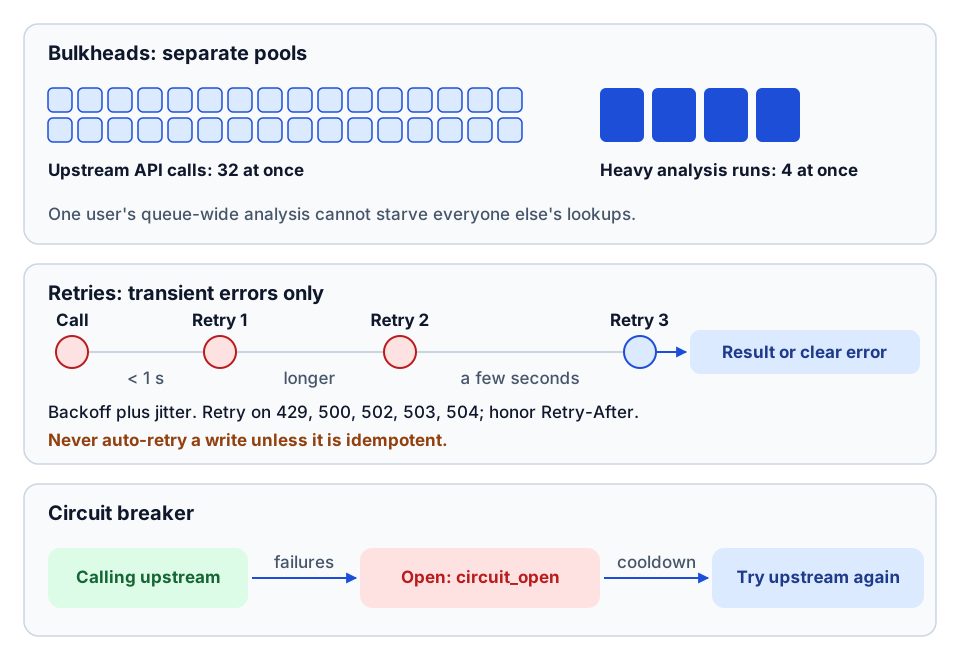 Bulkheads, bounded retries and a circuit breaker keep failures clear and contained.
Retries with jitter. Retry only transient failures (429, 500, 502, 503, 504), a small number of times (we default to three), with exponential backoff from under a second to a few seconds plus random jitter, so many clients do not retry in lockstep. Honor Retry-After when the API sends it. Never auto-retry a write unless it is idempotent.
Timeouts at every layer. Separate connect, read, write and pool timeouts. A single "timeout = 60" hides which part is slow.
Bulkheads. Cap concurrent upstream requests (we used 32) and separately cap heavy analysis runs (we used 4), so one user's queue-wide analysis cannot starve everyone else's quick lookups.
Circuit breakers. After a run of consecutive failures, stop calling the upstream for a cooldown period and return a circuit_open error immediately. That protects the product API and gives the agent an honest answer.
Caching. Cache expensive analysis results for a short TTL (minutes, not hours), keyed by user and inputs. Use in-memory cache for a single instance and Redis once you run more than one replica. Add single-flight so identical concurrent requests share one upstream call.
Bounded long work. For jobs that touch thousands of records, such as analyzing every submittal on a large project, give the tool explicit limits (maximum runtime, maximum pages) and a resume token. The agent gets a partial result plus a way to continue, not a timeout.
Canary rollout with rollback thresholds. When you change retry, timeout or caching settings, apply them to a sample of traffic first (we default to 10%) and define rollback triggers up front: for example, an error rate above 5% or p95 latency above 4 seconds. Promote only when the canary is clean.
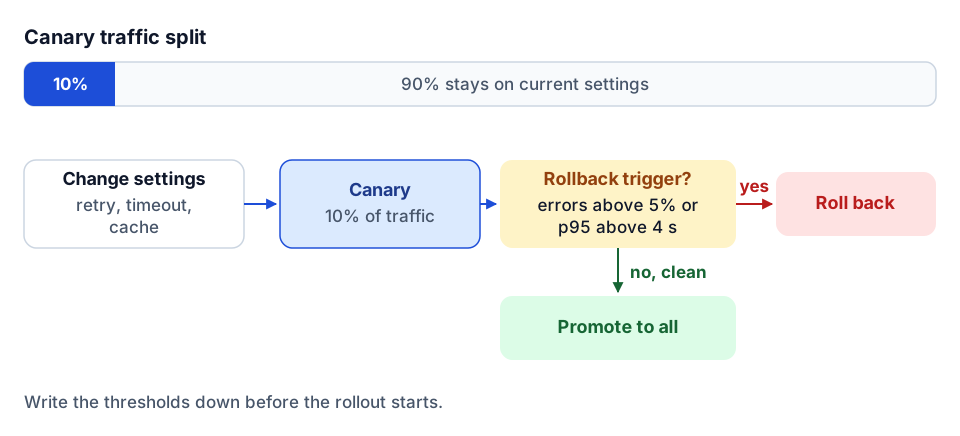 Canary first, with rollback triggers written down before the rollout.
Checklist:
- Retries are limited to transient status codes, with backoff, jitter and a cap.
- Connect, read, write and pool timeouts are set separately.
- Concurrency is capped globally and for heavy tools.
- A circuit breaker returns a distinct error code while open.
- Shared cache backs multi-replica deployments.
- Long-running tools have runtime and page limits and a resume token.
- Config changes go out as a canary with written rollback thresholds.
5. Health and readiness probes
Two endpoints, two different questions:
- Liveness (
/healthor/status/live): is the process up? Cheap, no upstream calls. - Readiness (
/readyor/status/ready): can it serve traffic right now? Checks configuration, secret availability, cache connectivity and, optionally, a lightweight upstream health call.
Probes should bypass user auth and never return secrets or detailed config. Point the orchestrator's liveness and readiness checks at the right one; a readiness check that calls the ERP on every probe can become its own load problem, so cache the upstream result briefly.
6. Transport security: Origin, binding and TLS
The MCP transport specification is direct about this: servers must validate the Origin header on incoming connections to prevent DNS rebinding, and local servers should bind to localhost, not all interfaces. DNS rebinding lets a malicious web page make a user's browser talk to a server on their own machine as if it were same-origin.
Our C# server for Tekla PowerFab binds to loopback by default, requires a bearer token whenever it is bound to anything other than loopback, and checks Origin against an allowlist. That is the right default for any local MCP server.
Checklist:
- Local servers bind to
127.0.0.1. - Non-loopback binding requires authentication. No exceptions for "internal" networks.
-
Originis checked against a closed allowlist at the ingress and in the server. No wildcards. - TLS terminates at the ingress, with HSTS. The server returns JSON and event streams, so a strict
default-src 'none'content security policy costs nothing. - Rate limits apply per IP at the edge and per token at the server.
- Containers run as a non-root user with a read-only root filesystem where possible.
7. Fetched content: SSRF and prompt injection
Any tool that fetches a URL, a document or a web page is an attack surface twice over.
SSRF. If a tool fetches a user- or model-supplied URL, an attacker can point it at internal addresses or cloud metadata endpoints. Resolve the hostname first, then block private, loopback and link-local ranges against the resolved IP, not the hostname. Re-check after redirects. For high-trust deployments, use a domain allowlist. Cap response size and time (our web search server used 15-second timeouts and a 5 MB body limit).
Indirect prompt injection. A submittal PDF, a vendor email or a web page can contain text written to instruct the model. Treat fetched content as data:
- Wrap it in clear delimiters, such as
<untrusted_content>...</untrusted_content>, and tell the agent that nothing inside is an instruction. - Strip hidden Unicode characters and sanitize HTML, including dangerous URI schemes.
- Flag text that looks like instructions ("ignore previous", "call the following tool") for the agent and the log.
- Most important: no fetched content should be able to unlock a capability. Writes still go through policy and approval regardless of what a document says.
Checklist:
- URL-fetching tools block private and metadata IP ranges after DNS resolution and after redirects.
- Fetched content is size-capped, time-capped and wrapped as untrusted.
- Secrets are redacted from error text and logs.
- No tool grants more authority than the calling user has.
8. A stable error envelope with request IDs
Agents handle errors better when errors look the same everywhere. Our Accubid server returns one envelope for every tool:
{ "ok": false, "request_id": "a1b2c3", "error": { "code": "validation_error", "message": "estimate_id is required" } }
Successful calls use the same shape with ok: true and data. A short, stable list of codes covers most cases: validation_error, auth_failed, api_error, dependency_unhealthy, circuit_open, internal_error. Codes are a contract: an agent prompt or a client can branch on them, so do not rename them casually.
Accept an incoming X-Request-Id header when the gateway or client sends one, generate one when it does not, and put it in every log line and every response. When a superintendent says "the agent gave me an error at 2:15," the request ID is how you find it.
Other output conventions that help:
- Output modes. Let tools return
raw(the API's payload),normalized(consistent snake_case fields with a schema reference) orboth. Normalized output is easier for the model; raw output is what you need when debugging. - Trim before returning. Large payloads waste context. Return what the task needs and offer a follow-up tool for detail.
9. Telemetry: evidence on every call
You cannot operate what you cannot see. Emit structured events for every tool call (started, completed, failed) with tool name, duration, outcome code, request ID and a hashed user identifier. Do not log raw inputs and outputs that may contain financial or personal data; log shapes, sizes and IDs. Use tracing so a model inference is the parent span, each tool call a child, and each upstream API call nested under that.
Then watch the agent-specific signals: hallucinated tool names, arguments the server had to correct, repeated need_more_info for the same field, and approvals requested versus granted. We describe the gateway we built for this in the Tool Runtime telemetry article, and telemetry in the glossary.
10. Hosting: pick the smallest thing that meets the need
Streamable HTTP MCP is an ordinary HTTP service, so most hosting options work. Default to stateless servers (no server-side session), so any replica can serve any request; if you do need state, keep it in Redis or a signed token, not in process memory.
| Option | Good fit | Watch out for |
|---|---|---|
| Managed containers (Azure Container Apps, Cloud Run) | One team, a handful of servers, fast setup | Long-lived streams and idle timeouts; set min replicas if cold starts hurt |
| Kubernetes | Many servers, multiple teams, existing platform with secrets, policy and observability | Ingress buffering breaks streaming: turn proxy buffering off and raise read and send timeouts. Cost floor is real |
| VM with nginx and systemd | A single internal server, on-premises access, simple ops | You own patching, TLS renewal and restarts. Same nginx buffering caveat |
We have shipped all three. One template-based server used a multi-stage Dockerfile and a matrix CI pipeline deploying to Azure Container Apps with live and ready probes. Several smaller servers ran as systemd services behind nginx. For a contractor's internal use, managed containers are usually the right first step. Move to Kubernetes when you are running enough servers that shared platform services pay for themselves.
Checklist:
- Stateless by default; any shared state in Redis or signed tokens.
- Liveness and readiness probes wired to the platform.
- Streaming works through the proxy (buffering off, timeouts raised).
- Image builds are reproducible, with dependencies pinned and scanned.
- A runbook says how to roll back, rotate secrets and turn on read-only mode in an emergency.
Go / no-go: the short version
Before an agent touches production data, we want a yes to each of these:
- Auth mode chosen on purpose; tokens validated; no silent fallback to a broad identity.
- Read-only by default; writes allowlisted per domain; deletes blocked; bulk capped.
- Dry run, preflight and approval handshake on every write path.
- Retries with jitter, timeouts, bulkheads, a circuit breaker and bounded long-running tools.
- Health and readiness probes; canary thresholds written down.
- Origin allowlist, loopback binding for local use, TLS at the edge.
- SSRF protection and untrusted-content handling on every fetch.
- One error envelope with stable codes and request IDs.
- Telemetry on every call, without raw sensitive payloads.
- A named owner, a runbook and a tested rollback.
Where to go next
- Choose the tool shape first in the MCP gateway pattern for construction APIs, then get identity right with on-behalf-of token exchange for AI agents.
- See these controls in a real workflow in the AP invoice review agent for Vista, and the governance side in governing AI agents in construction.
- Running several servers already? The Tool Runtime telemetry article covers gateways, keys and logging across all of them.
- Want an outside review of an MCP server or agent before it goes live? The AI readiness review is a fixed-scope way to start, or tell us what you are building.
Frequently asked questions
What is the minimum security for a hosted MCP server?
TLS at the edge, authenticated requests with audience-checked tokens, an Origin allowlist, rate limits, secrets in a secret store, and a server policy that keeps it read-only until writes are explicitly allowed.
Should a local MCP server listen on 0.0.0.0?
No. Bind local servers to 127.0.0.1 and validate the Origin header to prevent DNS rebinding. If you must bind to another interface, require authentication.
Where should we host a production MCP server?
For a contractor's internal use, managed containers such as Azure Container Apps are usually the right start. Kubernetes pays off when many servers share platform services, and a VM with nginx and systemd suits a single on-premises server. Keep servers stateless and turn off proxy buffering for streaming.
How do you protect an agent from prompt injection in documents it reads?
Wrap fetched content as untrusted data, strip hidden characters, flag instruction-like text, and make sure nothing in a document can unlock a capability. Writes still go through policy and approval regardless of content.
Next step
Have a workflow in mind?
Start with a readiness review: the task, the data and tools it needs, the access boundaries, and how a pilot would be evaluated.
Prefer email? charley@buildflows.ai
Get the next guide in your inbox
Field Notes: practical guides and new walkthroughs, about once a month.
Field Notes
Practical guides and new walkthroughs on construction data and automation, roughly monthly.
Keep learning

AI agents & MCP · April 29, 2026
MCP Gateway with Telemetry: How Tool Runtime Governs Agent Tools
Tool Runtime pulls many MCP servers into one governed endpoint. Here is how the gateway composes tools per API key, logs every call, and why production agents need this layer.
AI agents & MCP · October 9, 2026
On-Behalf-Of Token Exchange for AI Agents (RFC 8693)
A plain-language guide for construction IT to on-behalf-of token exchange: why forwarding the agent platform's token fails, the four auth modes for MCP servers, audience and scope, a symptom-to-cause troubleshooting table, least privilege and audit.
AI agents & MCP · October 9, 2026
The MCP Gateway Pattern for Large Construction APIs
One tool per endpoint overwhelms agents on large construction APIs. This guide compares a gateway tool over a registry (425 ProjectSight tools behind one tool), progressive discovery meta-tools, and task-first tools, plus the policy, docstring and testing practices that make routing reliable.