For contractor finance, operations, and IT leaders
Connect your construction systems. Trust the numbers.
WIP and monthly reports built nightly from Procore, Sage, and QuickBooks. Integrations that end the re-keying between project, accounting, and scheduling systems, with connectors for Vista and Spectrum built on Trimble App Xchange. AI agents your IT team can govern. Every number ties back to its source.

Charley Forey, founder. Ten years connecting construction software at Viewpoint, Nearmap, and Trimble.
Your systems
Governed data layer
- Mappings and crosswalks
- Quality checks before publish
- Least-privilege access
- Audit trail
Reporting
Fabric and Power BI
Automation
Approvals, alerts, sync
AI agents
Governed, over MCP
Procore
Projects, budgets, commitments, change orders, pay apps, quality and safety records.
REST API with OAuth. For agents, 2,755 API tools routed through one MCP gateway.
Procore reporting build- ~200data-quality rules checked on every nightly refresh
- 1 clickfrom any total to the source records behind it
- Frozenmonth-end WIP saved as reported, every month
- Yoursthe code and data live in your environment
For IT: 585 P6 operations behind one MCP server · 2,755 Procore API tools routed for agents · 33 public repos
What do you need?
Start from your seat at the table.
Pick your role to see what we would build, the published work that proves it, and a resource you can use on your own.
Month-end starts with exports and ends with explaining why WIP, billing, and accounting disagree.
What we build
- WIP, over/under billing, AR and cash forecast computed nightly from your ERP and Procore
- Agreed metric definitions your auditors and PMs can read
- An exceptions worklist instead of silent gaps
Selected builds
Real systems, labeled honestly.
Production work, reference builds, and open-source components, with walkthroughs and write-ups that show what broke and how we fixed it.
Monthly progress reporting on Microsoft Fabric
Procore, Sage 100 Contractor, Outbuild, and SharePoint inputs land in a nightly lakehouse, pass about 200 data-quality rules, and publish two Power BI reports. Anything that does not match goes to a worklist naming the system to fix it in.
Or browse a sample month-end report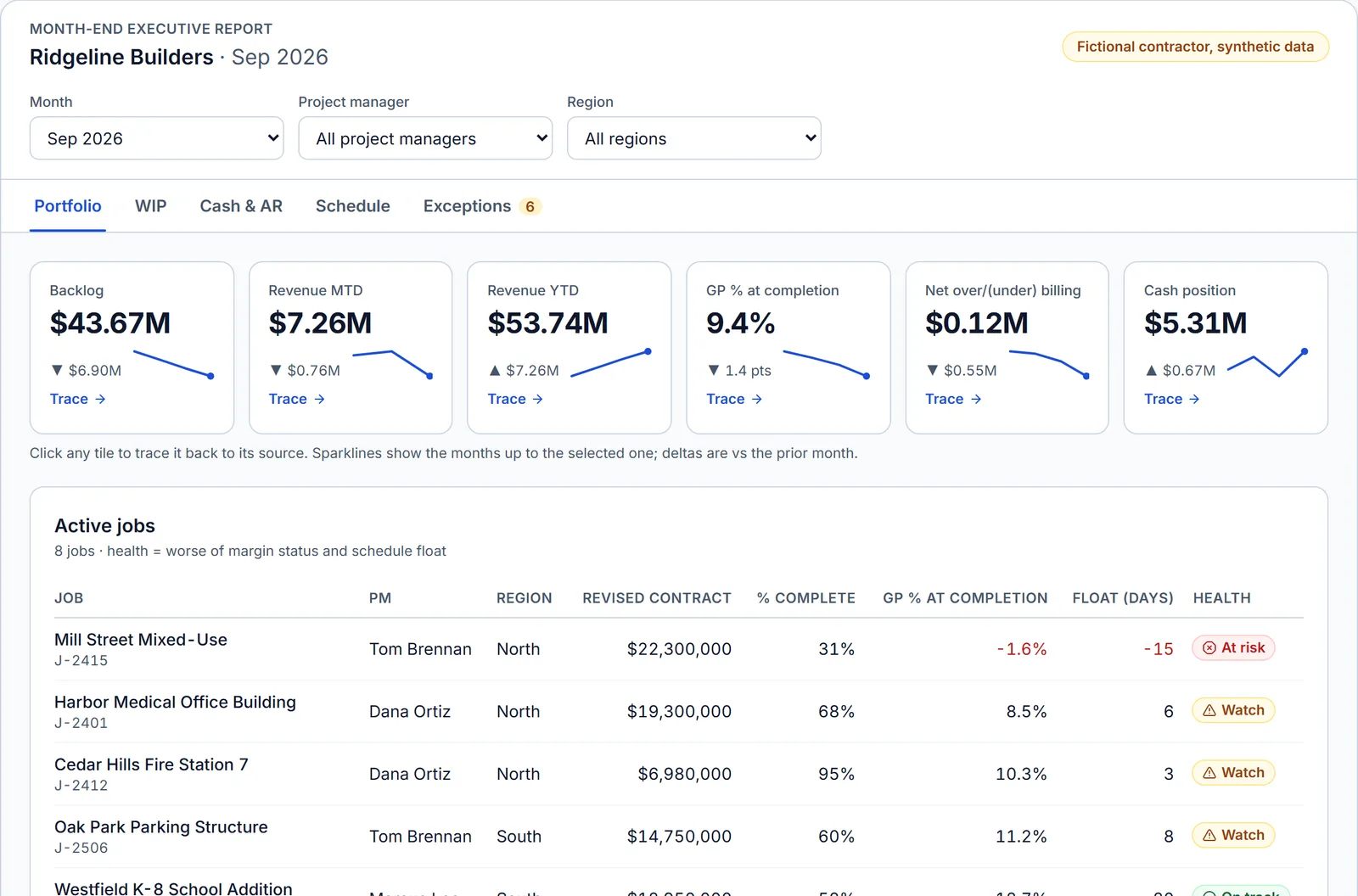
- Production implementationIntegrations and finance
Financial reporting across Procore, QuickBooks, and HubSpot
WIP, backlog, AR, cash forecast, pipeline, and labor capacity joined through a project crosswalk.
See the build → - Production implementationCustom application and AI
Connect: a multi-agent scheduling platform
A custom application for Syncify: file intelligence, client collaboration, CPM schedule drafts, XER export, and an admin portal.
See the build → - Reference architectureAI tooling
MCP servers for Procore and Primavera P6
Governed tool access so AI agents can work with live project and schedule data, with routing and telemetry.
See the build → - Reference buildERP integrations
Connectors and MCP servers for Trimble software
C# connectors for Trimble App Xchange and MCP servers for Vista, ProjectSight, Accubid, Trimble Connect, and Tekla PowerFab.
See the build → - Reference buildData and reporting
Procore and P6 in one analytics model
Nightly sync from field and schedule systems into Azure, with IT-approved service principals.
See the build → - Open sourceAutomation
Custom n8n nodes for construction
Production nodes that automate Procore, Autodesk, HCSS, and Power BI workflows inside n8n.
See the build →
How an engagement works
No surprises between the first call and handover.
- 1
30-minute call
The report or workflow that prompted you to reach out, the systems behind it, and who owns the result.
You get: A plain recommendation: an assessment, a bounded build, a referral, or no engagement, with the reason.
- 2
Assessment, only if needed
When sources, definitions, or access are unclear, a short paid assessment settles them before anyone commits to a build.
You get: A source map, metric register, and prioritized scope. Yours whether or not we do the build.
- 3
Fixed scope and price
A written proposal agreed before work starts. Anything outside it goes through a change process.
You get: Deliverables, acceptance criteria, fees, ownership, and handover terms in writing.
- 4
Build, reconcile, hand over
You review working versions and we check the output against your own figures.
You get: A live system, runbooks, and training for your owner. Ongoing care only if you want it.
Free tools, no sign-up
Size the problem before you talk to anyone.
- Maturity assessmentFind your stage, biggest gaps, and a 90-day plan.
- Stack mapperPick your systems and see what connects, and how.
- Data quality checkerScore a job cost or AP export before you report on it.
- Schedule health checkCheck an XER file in your browser; nothing is uploaded.
- WIP calculatorEarned revenue and over/under billing from a few job numbers.
- Integration payback calculatorPut a yearly cost on re-keying between systems.

Who you work with
“The data is there. The win is making it actionable.”
I'm Charley Forey. At Viewpoint, Nearmap, and Trimble I connected ERPs (Viewpoint Vista and Spectrum most of all), schedules, cost systems, and field tools for contractors and owners. I lead the design and build hands-on, working with the people who use the report, approve the numbers, and maintain the systems.
Questions buyers ask first
How much does a project cost?
Every engagement has a fixed scope and price, agreed in writing before any build starts. The price depends on the number of source systems, business rules, report or workflow complexity, access, and the support you want afterwards. When those are unclear, a short paid assessment comes first so the build price rests on facts. The 30-minute call is enough to tell you which path fits.
Who owns the code and the reports?
We build in your tenant, under your credentials, in version control, so your team can read, run, and extend the work after we leave. Ownership of assets, intellectual property terms, and licenses are set out in the proposal and documented again at handover.
How do you handle access and security?
Each workflow gets approved identities and only the permissions it needs. Secrets live in a server-side credential store, never in forms, screenshots, or model prompts. Consequential writes need an agreed approval step, and agent tool calls are logged. Our governance page sets out the details your IT team will ask about.
Which systems do you work with?
Procore, Viewpoint Vista, Spectrum, Sage, QuickBooks Online, Primavera P6, Outbuild, HubSpot, SharePoint, Microsoft Fabric, and Power BI all appear in published work or guides on this site. For anything else, feasibility depends on your versions, access, and data; the first call and discovery confirm the fit.
Do we need to buy a new platform?
Not necessarily. We start with the tools and licenses you already have. Any additional software or hosting is named in the scope with its cost before you agree to it.
Who actually does the work?
Charley Forey, the founder, leads the design and build hands-on. He spent a decade connecting construction software at Viewpoint, Nearmap, and Trimble, most recently building connectors and MCP servers on Trimble App Xchange.
Tell us what you want to fix.
Bring the report, the handoff, or the AI idea. In 30 minutes you will know whether we can help, what the first step would be, and what it needs from your team. No technical brief required.
Prefer email? charley@buildflows.ai