Key takeaways
- Every Procore agent starts at L0, read-only. Many useful workflows never need to leave it.
- L1 drafts text that a person enters into Procore, which gets most of the time savings with no write risk.
- L2 writes need a signed, single-use confirmation token that expires in 60 seconds by default and can be bound to one tool.
- L3 money and contract changes need two tokens from two different approvers. Deletes stay blocked at every level.
- In the live sandbox, a create-RFI call was denied by readonly-by-default before it reached Procore, even as a dry run.
- Name globs alone miss prefixed tools like bulk_delete_payouts_by_invoice, so pair deny lists with HTTP method bans.
- Move an agent up only on evidence: evaluation accuracy, accepted drafts and a clean audit log.
32 seconds · From a Build Flows walkthrough
A policy decides who can read, change or delete
Each user gets a level inside the MCP server that decides whether they can only read Procore data or also make changes.
Read the clip transcript
There are different capabilities, but ultimately we do have a policy to ensure that only specified users that have the ability to be able to gather and pull specific data have the ability to be able to read that data, as well as then be able to make any changes or updates or deletes to that specific. And so there is a level that you assign users within the MCP that give them access to do the various things. So ultimately, we need to make sure that we are
Captions adapted from the source video; proper names may reflect automatic transcription. Original segment: 4:12–4:44. Watch at the source.
Every GC that pilots an AI agent on Procore hits the same question in the first security meeting: "Can it change anything?" The honest answer should be "not yet, and here is exactly how it earns that." Agents that can only read are useful on day one. Agents that write to RFIs, change orders and commitments can do real damage if nobody planned for it.
This article lays out the four-step ladder we use for agents that touch Procore: Read, Draft, Confirm, Two-person. For each level you get what it allows, which Procore actions belong there, how the open-source Procore MCP server enforces it in policy files, the evidence an agent needs before it moves up, and a policy table you can copy into your own security review.
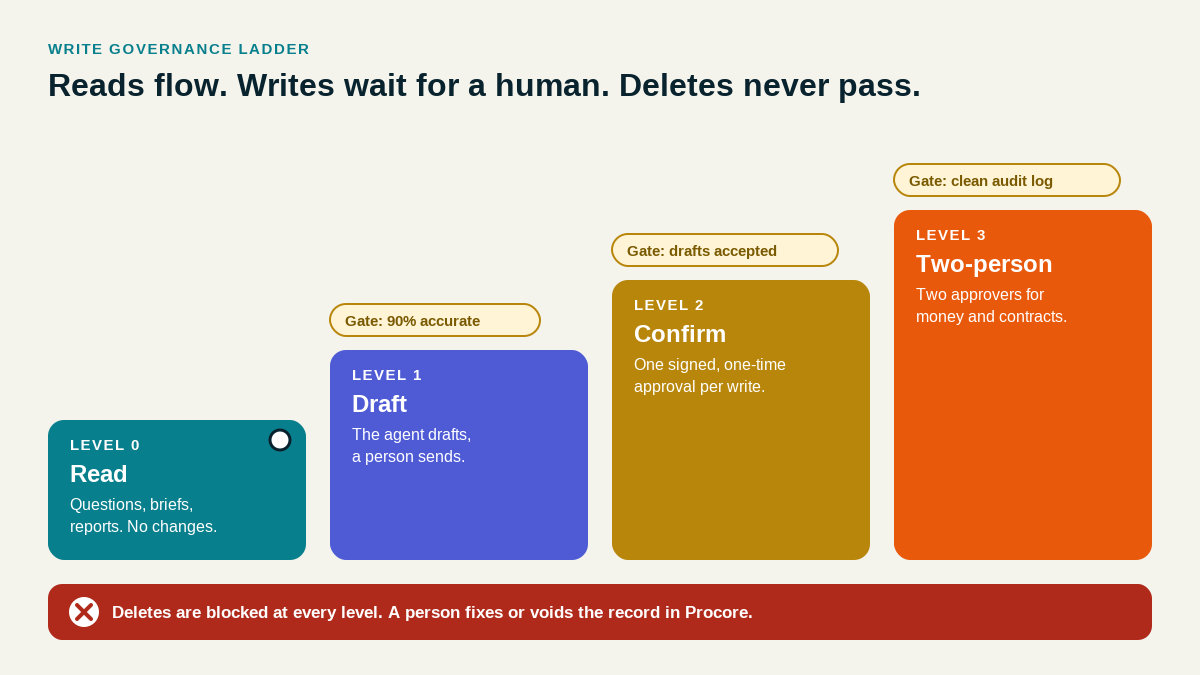 Reads flow, writes wait for a human, deletes never pass.
The ladder in one table
| Level | What the agent can do | Who acts in Procore | Typical Procore work |
|---|---|---|---|
| L0 Read | Answer questions, build briefs and reports | Nobody. No changes to Procore | Overdue RFIs, change exposure, budget variance, daily log summaries |
| L1 Draft | Write text that a person reviews and enters | A person, by hand | RFI reply drafts, chase emails, OAC narratives, change event write-ups |
| L2 Confirm | Write to Procore after a signed, one-time human approval | The agent, with one approver | Post an RFI reply, create an RFI from meeting notes, add a daily log note, open a punch item |
| L3 Two-person | Write money or contract changes after two different people approve | The agent, with two approvers | PCOs, change order packages, commitment change orders, budget modifications |
| Never | Delete records | Nobody through the agent | Any delete, any bulk delete |
In the video, this is the moment at 04:10 where the explainer says it plainly: reads flow, writes wait for a human, deletes never pass. The Procore Agent Playbook carries the same ladder in its pilot-to-production section (17:50 in the video).
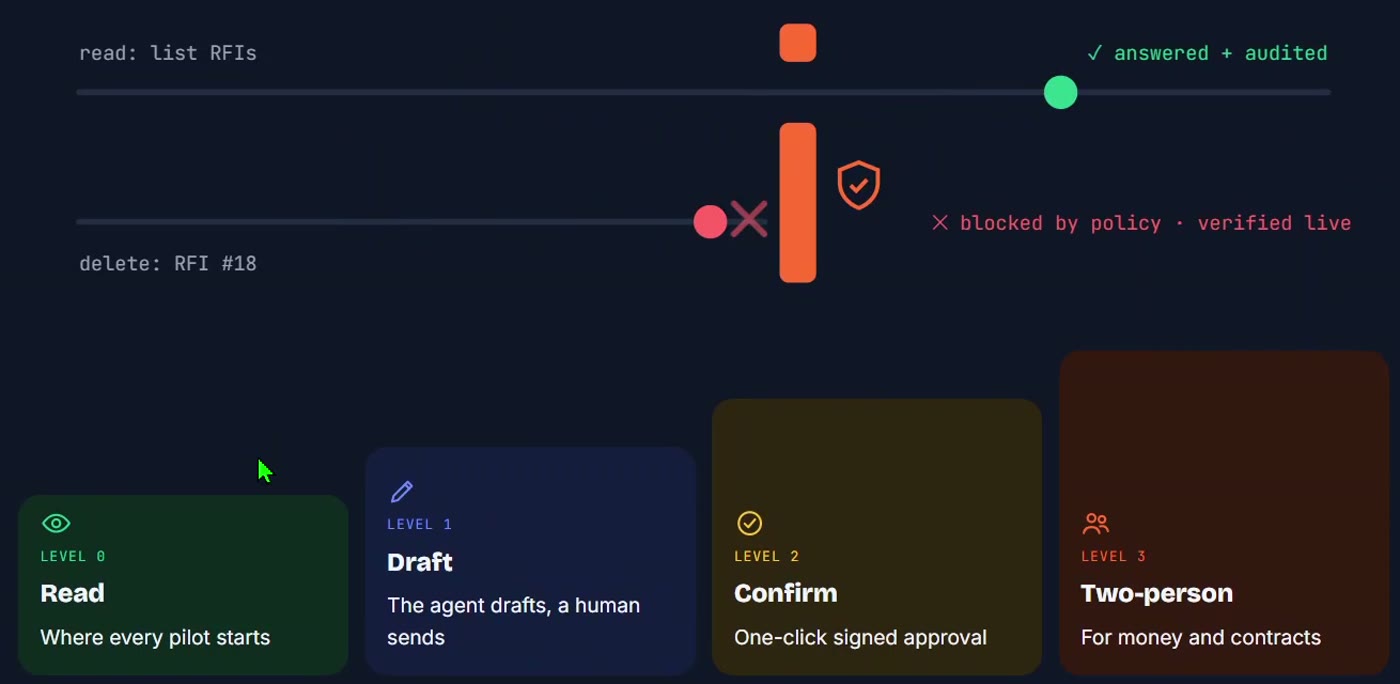 From the video at 04:18: the read passes, the delete is blocked, and the ladder sits underneath.
What each level means on a real job
L0: Read and answer
Every pilot starts here, and many workflows never need to leave. The RFI radar, change exposure rollup, budget variance narrative, submittal risk list and superintendent morning brief are all read-only. They save hours because they find and summarize. They don't need to change anything.
A good L0 prompt asks for the answer and the evidence:
Using Procore, list open RFIs on project 120149 that are past due.
For each one give number, subject, days overdue and ball-in-court.
Then tell me which three to chase first and why.
Do not create or change anything in Procore.
L1: Draft, a human sends
At L1 the agent writes words, not records. It drafts the RFI reply for the PE, the chase note to the architect, the narrative for the OAC meeting, or the change event description. The output lands in a doc or an email draft. A person reads it, fixes it, and enters it into Procore themselves.
On the server side, L1 is still read-only. The agent reads Procore and writes into Docs or Gmail drafts, so nothing about Procore permissions changes. That is why L1 is the cheapest step up: you get most of the time savings with none of the write risk.
L2: Confirmed write
At L2 the agent can create or update a Procore record, but only after a person approves that specific call. In the repo this is a signed confirmation token:
- HMAC-signed by the server's secret, which the model never sees
- single-use, tracked by a random
jtiso a replay is rejected - short-lived, 60 seconds by default and capped at 5 minutes
- bound to one tool name when the approval step sets the token's
toolfield, so approval for "post RFI reply" can't be reused for "update commitment"
Good L2 candidates are low-dollar, easy-to-correct records where double entry is the real cost: posting an approved RFI reply (create_project_rfi_rfis_replies), creating RFIs from an OAC transcript after the PM checks them (create_project_rfi_rfis), adding a daily log note (create_project_daily_log_notes_logs), or opening punch items (create_punch_list_punch_items).
L3: Two-person write
Anything that moves money or changes a contract needs two different approvers. The two-person-approval policy requires a confirmation_token and a secondary_confirmation_token, and it rejects the call unless the two tokens carry different approver_key_id values. The same PM can't click twice.
L3 is where these belong: create_potential_change_order, create_change_order_package, create_commitment_change_order, update_commitment_change_order, and create_project_budget_budget_modifications.
Two cautions from reading the code:
- Approving a change order or executing a contract is a judgment call, not data entry. Our recommendation is that the agent prepares the package and a person approves it inside Procore. Being able to automate an approval doesn't mean you should.
- Payment tools are blocked by default. The policy engine has a "PCI-light" rule that denies any tool whose name matches
paymentorcredit_cardunless an operator setsPROCORE_MCP_PCI_OPT_IN=true. That coverscreate_payment_application,update_contract_paymentand similar tools. Leave it on.
Never: deletes
Deletes stay blocked at every level. If a record is wrong, a person fixes or voids it in Procore, where Procore's own history shows what happened.
How the repo enforces it
Nothing here depends on the model behaving. Every tool call, in every mode, goes through one dispatch path, and policy is evaluated there before any request reaches Procore. The routing article covers that path. Here is what the policy files in policies/ actually do.
| Policy file | What it says | Loaded |
|---|---|---|
readonly-by-default.yaml | Denies create_*, update_*, delete_* and any POST, PATCH, PUT or DELETE | Always (bundled) |
deny-deletes.yaml | Denies delete_* | Always (bundled) |
confirm-writes-on-create.yaml | Every write needs a valid confirmation_token | Always (bundled) |
redact-pii.yaml | Strips ssn, tax_id, dob, account_number from responses | Always (bundled) |
two-person-approval.yaml | Needs two tokens from two different approvers | Opt-in |
sandbox-only.yaml | Blocks all writes when the Procore environment is production | Opt-in |
scope-to-project-allowlist.yaml | Denies calls whose project_id isn't on the list | Opt-in (template) |
business-hours-writes.yaml | Writes only inside a UTC window | Opt-in |
audit-required.yaml | Marker that pairs with your SIEM ingesting the audit log | Opt-in |
Opt-in policies switch on when a persona lists them, through the PROCORE_MCP_POLICIES environment variable, or through the x-procore-mcp-policies header. Bundled policies are always on.
The order matters too. The engine checks sandbox-only first, then project scope, then deny lists, then HTTP method bans, then confirmation tokens. On a successful read, it applies redaction last.
Audit sinks. Set PROCORE_MCP_AUDIT_SINK to file, otlp, http, or a combination such as file,otlp. The http sink posts each record to a webhook, which is how records reach Cloud Logging, BigQuery or a SIEM. Denials are always logged, even when you sample routine telemetry.
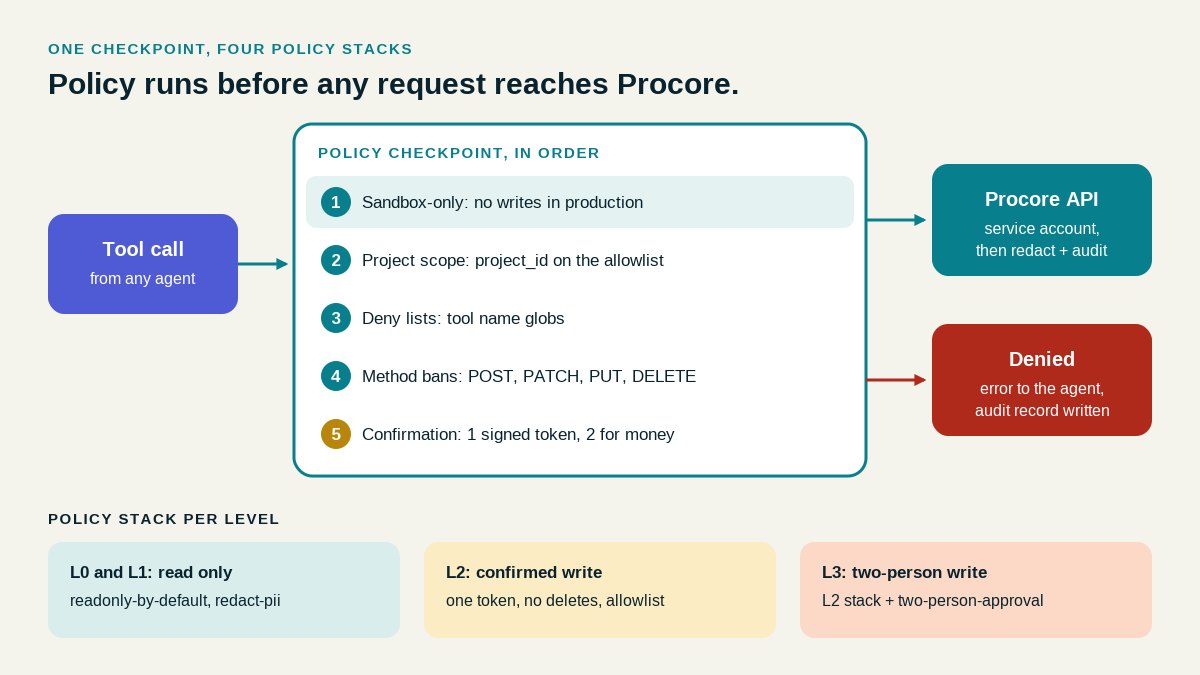 Each ladder level is a different policy stack on the same checkpoint.
What it looks like on real data
During the live sandbox capture on November 16, 2026 (project "The Sparkling Skyrise Project"), we asked the agent to create an RFI through procore_call_tool, with dry_run: true. It came back like this:
{
  "request": {
    "tool": "procore_call_tool",
    "name": "create_project_rfi_rfis",
    "dry_run": true
  },
  "isError": true,
  "response": {
    "error": "Denied by policy readonly-by-default: create_project_rfi_rfis",
    "requires_confirmation": false
  }
}
Three details are worth noticing:
- Policy runs before dry-run. Even a preview of a write is refused at L0, so the agent can't use dry runs to probe what it could write.
requires_confirmation: false. This isn't a "please approve" prompt. At L0 there is nothing to approve, so the call is simply denied.- The session was hybrid mode with the
gc_demopersona, policy stackreadonly-by-defaultplussandbox-only. The same session answered 23 open RFIs (22 past due), $114,021 of change exposure and $261,050 projected over budget, all as reads.
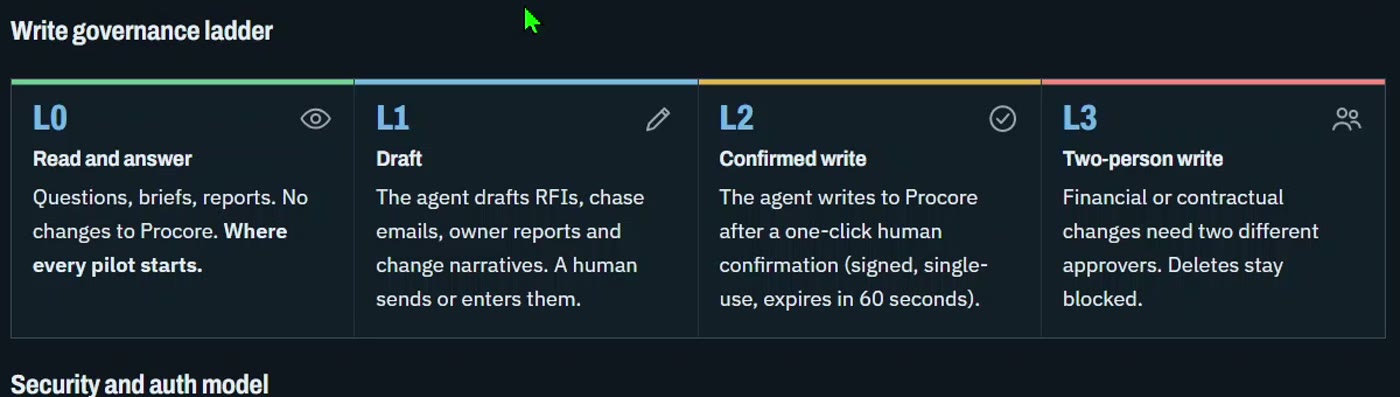 The ladder as it appears in the playbook, shown at 18:20 in the video.
Two gaps to close before you go above L0
Reading the code for this article turned up two things a pilot should handle on purpose.
Name globs aren't enough on their own. Generated tool names don't all start with create_, update_ or delete_. About 27 delete-capable tools are named things like bulk_delete_payouts_by_invoice or cf_delete_project_project_level_direct_costs_direct_costs, and about 125 create or update tools carry a prefix. At L0 the HTTP method ban in readonly-by-default catches all of them. Once you remove that policy for a write-enabled persona, deny-deletes (which only matches delete_*) would let those through. Add a method-based delete ban (in the policy table below).
The bundled read-only policy is global. Bundled policies load for every session, so as shipped no persona can write at all. That's the right default. To allow writes for one persona, your deployment tags readonly-by-default as opt-in and lists it on every read-only persona, while the write persona omits it. It's a small change, and it should be reviewed like any other change to an access control.
Moving an agent up a level: evidence gates
An agent earns each step. Agree the gates up front, write them in the pilot plan, and check them against the audit log rather than anecdotes.
| Move | Evidence you need |
|---|---|
| L0 → L1 | 90%+ correct answers on an evaluation set built from the team's real questions; users opening the output weekly |
| L1 → L2 | Several weeks of drafts accepted with light edits; a named owner per workflow; users asking for the write; confirmation UI tested in the sandbox; sandbox-only on until the security review signs off |
| L2 → L3 | A clean audit log at L2 (zero unapproved writes, zero policy violations); two named approvers per project; finance or contracts sign-off; project allowlist in place |
| Any level → down | Any unapproved write, any policy bypass, or accuracy falling below the gate. Step down first, investigate second |
One rule we hold to: the agent never mints its own approval. The server verifies tokens with a secret the model can't reach. The token comes from a separate approval step, such as a button in Google Chat or an approval page, that a person clicks after seeing the exact payload. The repo ships the signing and verification code. The approval surface is part of the pilot build.
For the broader governance picture, see Governing AI agents in construction. For a worked example of a human gate between an agent's draft and a system of record, read the two-phase agent workflow with human approval.
A policy table GCs can copy
Paste this into your pilot plan or security questionnaire. Change the project ids and approver groups to match your jobs.
| Level | Persona example | Policy stack | Tools exposed | Approver |
|---|---|---|---|---|
| L0 | gc_demo, rfi_manager | readonly-by-default, deny-deletes, redact-pii, sandbox-only (pilot) | Curated list reads only | None |
| L1 | Same as L0 | Same as L0 | Same as L0, output goes to Docs or Gmail drafts | The person who sends it |
| L2 | rfi_writer (new) | confirm-writes-on-create, no-deletes-any-name, scope-to-project-allowlist, business-hours-writes, redact-pii, audit-required | Reads plus 1–3 named writes, e.g. create_project_rfi_rfis_replies | PE or PM on that project |
| L3 | change_writer (new) | L2 stack plus two-person-approval | Reads plus named change tools, e.g. create_potential_change_order | PM plus project executive or controller |
| Never | All | no-deletes-any-name, PCI-light default | No delete or payment tools | n/a |
And the two YAML files you'd add:
# policies/no-deletes-any-name.yaml
id: no-deletes-any-name
description: Block every delete, whatever the generated tool is called.
applies_to:
  http_method:
    - DELETE
deny:
  tools:
    - "delete_*"
    - "*_delete_*"
# personas/rfi_writer.yaml (L2 example)
id: rfi_writer
description: PE persona that can post approved RFI replies on allow-listed projects.
mode: hybrid
expose_tools_directly:
  - list_project_rfi_rfis
  - list_project_rfi_rfis_replies
  - create_project_rfi_rfis_replies
policies:
  - no-deletes-any-name
  - scope-to-project-allowlist
  - business-hours-writes
  - audit-required
Two notes on the persona. The bundled policies (confirm-writes-on-create, deny-deletes, redact-pii) still load on top of what it lists. And business-hours-writes ships with a 09:00–17:00 UTC window, so set it to your own working hours before turning it on.
In hybrid mode, expose_tools_directly decides which tools the model sees, and it also filters what procore_search_tools returns. It is not a hard block, though. In the current code, procore_call_tool will try any tool name the model passes, and only policy stops it. So at L2 and L3 the real guard is the confirmation token: the bundled confirm-writes-on-create policy demands one for every write, and your approval step should always mint it with the tool field set so it only works for the exact tool the approver saw. A hard write allowlist per persona is worth adding as pilot hardening. The router, hybrid and expanded modes article explains how personas shape the tool surface.
Where Procore and Gemini fit
These controls sit alongside the platforms' own controls.
- Procore. A developer-managed service account gets its permissions from the app manifest, and the company admin picks which projects it can run in at install. Grant read-only permissions for L0 and L1, and add write permissions per tool only when a workflow reaches L2. See setting up a Procore service account.
- Gemini Enterprise. Imported MCP tools start disabled, and by default every action asks the user to confirm. Tools marked
readOnlyHintskip that confirmation. Tools that change data should carrydestructiveHintso the confirmation stays. - The MCP spec says there should always be a human in the loop with the ability to deny tool invocations. The ladder is how you decide when that human is clicking "approve" and when they are doing the work themselves.
The pillar article on Procore data in Gemini and the demo page show the whole path end to end. When you're ready to plan a rollout, the 90-day pilot plan puts these gates on a calendar.
Do it with us
BuildFlows sets this up with GCs: the read-only pilot, the evaluation set, the approval step, and the policy files your security team will review. Email charley@buildflows.ai or start at /engage.
References
- BuildFlows, procore-mcp on GitHub:
policies/,src/router/policy/engine.ts,src/router/security/confirmation-token.ts,src/router/telemetry.ts - Video: Procore data in Google Gemini, governed-by-design segment at 04:10 and pilot-to-production at 17:50
- Model Context Protocol, Tools specification (2025-06-18): human in the loop and client confirmation guidance
- Model Context Protocol, Schema reference: ToolAnnotations (
readOnlyHint,destructiveHint) - Google Cloud, Set up a custom MCP server in Gemini Enterprise: actions off by default, user confirmation,
readOnlyHint, 100 enabled actions - Procore Support, What is a Developer Managed Service Account?
Frequently asked questions
Can an AI agent change or delete data in Procore?
Not by default. The open-source Procore MCP server ships with read-only and deny-deletes policies always on. Writes are turned on per persona and need a signed human confirmation, and deletes stay blocked.
What is the difference between L1 Draft and L2 Confirm?
At L1 the agent writes text, such as an RFI reply or chase email, and a person enters it into Procore. At L2 the agent writes to Procore itself, but only after a person approves that specific call with a signed, single-use token.
Which Procore actions need two-person approval?
Anything that moves money or changes a contract: potential change orders, change order packages, commitment change orders and budget modifications. We recommend that people still approve change orders and execute contracts inside Procore.
How does the confirmation token work?
The server checks a token signed with an HMAC secret the model never sees. Each token is single-use, expires in 60 seconds by default, and can be bound to one tool name. A separate approval step mints it after a person reviews the exact request.
What evidence moves an agent from read-only to writing?
Agree it up front: 90 percent or better accuracy on an evaluation set of real questions, weeks of drafts accepted with light edits, users asking for the write, and an audit log with zero unapproved writes.
Does Gemini Enterprise add its own confirmation step?
Yes. Gemini Enterprise imports custom MCP tools switched off and, by default, asks the user to confirm each action. Tools marked readOnlyHint skip that step, so write tools should not carry it.
Next step
Have a workflow in mind?
Start with a readiness review: the task, the data and tools it needs, the access boundaries, and how a pilot would be evaluated.
Prefer email? charley@buildflows.ai
Keep learning
Playbooks · November 16, 2026
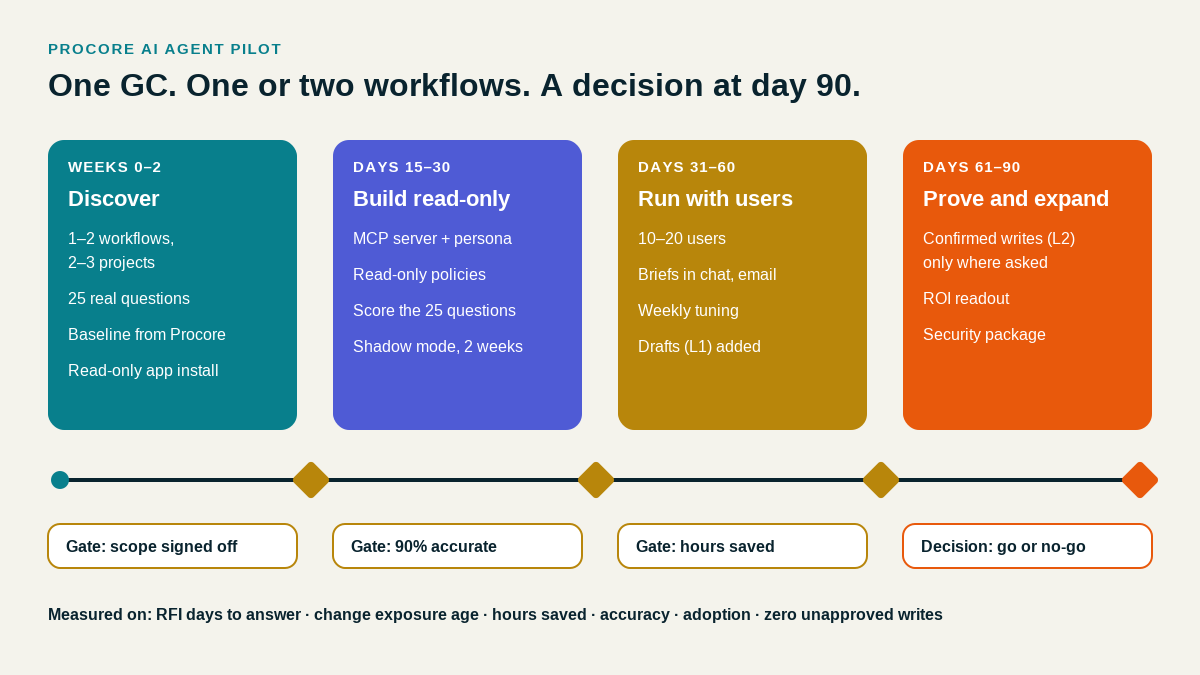
A 90-Day Pilot Plan for a Procore AI Agent: Gates, Metrics and ROI Math
The plan we use to take one GC from discovery to a go or no-go decision in 90 days: pick one or two workflows, build read-only, run shadow mode, go live with measured gates, and read out ROI as hours saved times loaded rate versus revenue at net margin. Includes a checklist you can copy.

AI agents & MCP · October 8, 2026
Governing AI Agents in Construction: A Checklist for IT and Leadership
A practical checklist for putting AI agents into construction systems safely, covering credentials, least privilege, read-first rollout, tool routing, telemetry, evaluation and human approval, drawn from our own builds.
AI agents & MCP · October 9, 2026
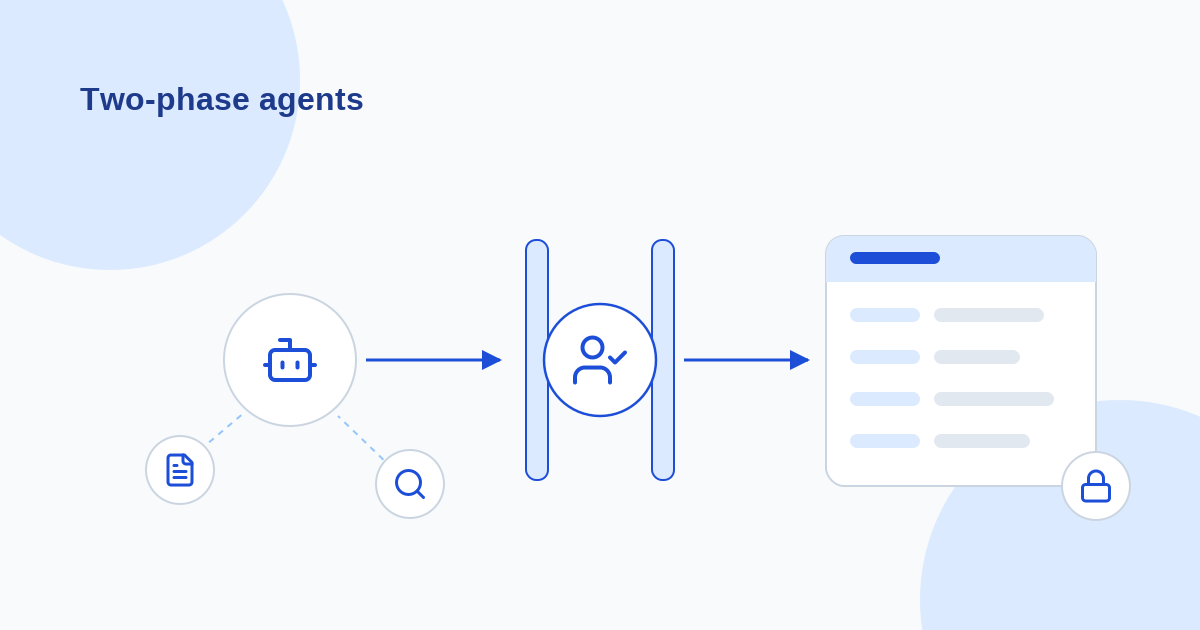
Two-Phase AI Agents with Human Approval: How We Built the Connect Info Sheet
A research agent builds a cited Profile, a person approves it through a server route, and a tool-less normalizer converts it into Facts limited to a fixed vocabulary. The pattern applies to any AI that writes to a system of record.