Key takeaways
- In the reference design, copied data stays in a OneLake lakehouse in your tenant. Confirm the region in Fabric's About dialog and on the capacity.
- Procore and HubSpot enforce read-only through tool permissions and read scopes. QuickBooks Online's accounting scope does not, so read-only there depends on the integration's code.
- Key Vault Secrets Officer can write and delete secrets but cannot grant access. Assign it on the one vault only.
- Key Vault logging is off until you add a diagnostic setting. Entra sign-in logs keep 7 or 30 days unless you export them.
- Removing the vault role assignment cuts secret access first. Decide whose identity runs the scheduled refresh before go-live so offboarding doesn't stop it.
A request lands with your IT lead. Finance wants a dashboard that combines Procore, HubSpot and QuickBooks Online. To build it, an outside consultant needs Admin on a Microsoft Fabric workspace, the Key Vault Secrets Officer role on a new Azure Key Vault, and read-only API apps in three systems your company depends on. The project sponsor wants a yes this week.
Approving that kind of request without questions is risky, and so is refusing it on reflex. What you need is a short list of questions, the answers a well-designed integration should give, and the evidence that proves each answer. This playbook is that list. It is written for the contractor's IT or security reviewer, and it follows the reference design in our four-step credential setup guide: source systems read over their APIs, secrets in your Key Vault, data and reports in your Fabric tenant.
The model answers describe that design. Your vendor should answer for their own build, in writing. Where a product's documentation doesn't settle a point, we say so below. Treat those items as questions for the vendor or the product's support team.
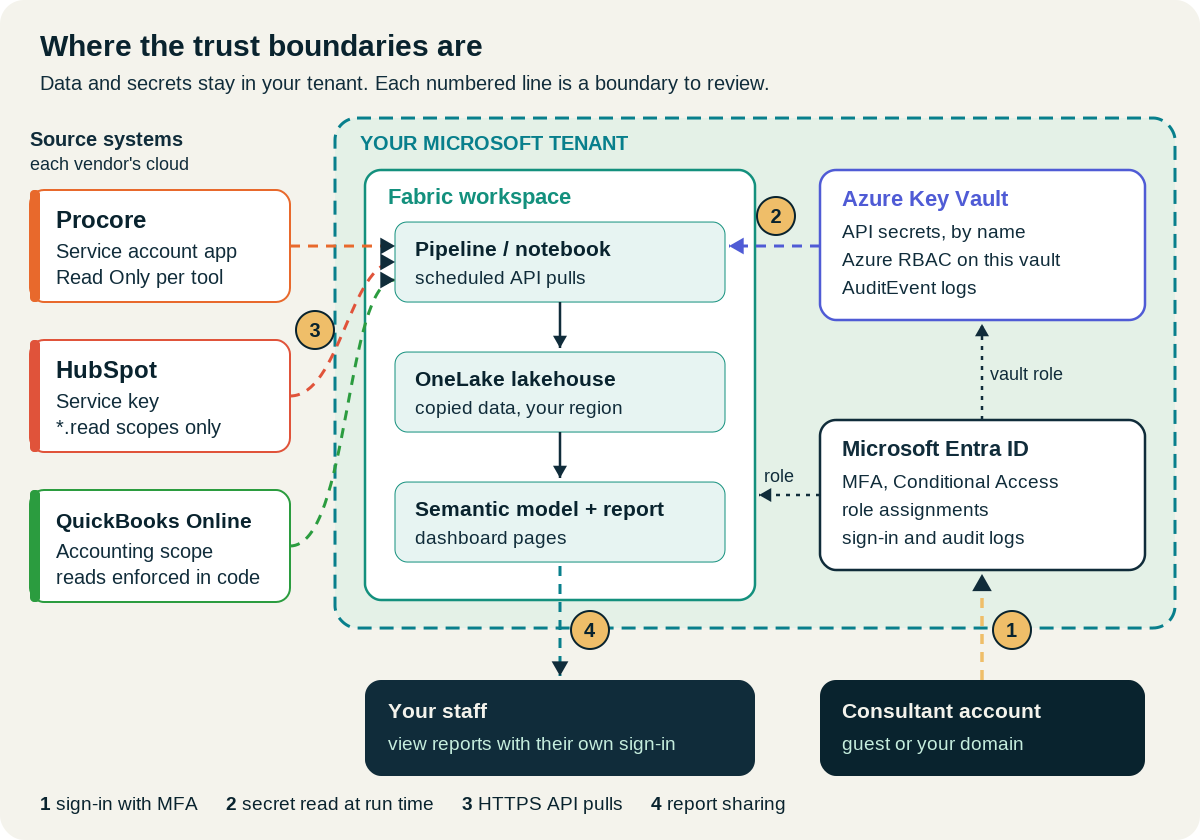 Four boundaries to review: sign-in, secret reads, API pulls and report sharing.
The design under review
Before the questions, agree on what is being reviewed. If the vendor's design differs from this table, ask them to redraw it.
| Component | Where it runs | Who owns it | What the vendor's identity holds |
|---|---|---|---|
| Procore app with a service account | Procore's cloud | Your Procore company admin | Read Only on named tools, permitted projects only |
| HubSpot service key | HubSpot's cloud | Your HubSpot Super Admin | Read scopes such as crm.objects.deals.read |
| QuickBooks Online app connection | Intuit's cloud | Your QuickBooks admin | The com.intuit.quickbooks.accounting scope |
| Azure Key Vault | Your Azure subscription | Your Azure owner | Key Vault Secrets Officer on that one vault |
| Fabric workspace and lakehouse | Your Fabric tenant, on your capacity | Your Fabric admin | A workspace role, Admin in the reference setup |
| Consultant account | Your Entra ID tenant, as a guest or a domain user | Your identity admin | Sign-in subject to your policies |
There's one point most reviews miss: the identity that builds the integration also runs it unless you plan otherwise. In the reference setup, the pipeline reads secrets as the account you granted on the vault. That shapes the offboarding answers later in this guide.
How to use the questionnaire
Each question below has three parts:
- Model answer: what a sound design says.
- Evidence to request: what you can check yourself, usually a screenshot or log from your own tenant.
- Watch for: answers that should slow the approval down.
Collect evidence from your systems rather than from the vendor's slides wherever you can. Most of it is visible to your own admins in under five minutes.
A. Where the data lives
A1. Where does copied data end up?
Model answer. In a OneLake lakehouse inside a Fabric workspace in your tenant, on a capacity your company pays for. The source records stay in Procore, HubSpot and QuickBooks. Nothing is copied to the vendor's own cloud, database or storage account.
Evidence to request. The workspace name and capacity, shown in your Fabric admin portal. A written statement that no copy is held outside your tenant, including on the consultant's laptop.
Watch for. "We stage it in our environment first." That moves your data across a boundary you don't control.
A2. Which region is the data stored in?
Model answer. Fabric stores data by default in your tenant's home region. You can see it in Fabric by opening the Help pane and choosing About, next to "Your data is stored in". Microsoft notes that you might also use capacities in other regions for some workspaces, so check the capacity this workspace sits on. Create the Key Vault in the same region as the Fabric capacity. The F2 capacity guide covers capacity choices.
Evidence to request. A screenshot of the Fabric About dialog. The capacity region from the admin portal. The vault's location from its Azure Overview page.
Watch for. A capacity or vault created in a region your policy doesn't allow. The source systems store data wherever each vendor hosts your account. That's a question for your Procore, HubSpot and Intuit agreements, not for the integration.
A3. Does any data pass through the consultant's device?
Model answer. Scheduled runs execute in Fabric. The consultant works in a browser session in your tenant. While building and testing, they will see your data in notebook output and table previews, the same way an internal analyst would. Exports to local files are not part of the design.
Evidence to request. A contract clause covering local copies, retention and deletion at the end of the engagement. If you use Microsoft Purview or Defender for Cloud Apps session controls, apply them to this account like any other.
Watch for. Any vendor who says they "never see the data." Anyone with Contributor or higher in the workspace can read lakehouse data through Spark, according to Microsoft's workspace roles table.
B. Who can access what
B1. Which identity does the vendor use?
Model answer. A named account in your Entra ID tenant. That is either a B2B guest invited from the vendor's own tenant, or an account on your domain that you issue. No shared logins, and never one of your employees' accounts. The trade-offs are in guest account vs domain account for consultant access.
Evidence to request. The user object in Entra ID, with user type (Guest or Member), creation date and sponsor.
Watch for. Requests to use a personal email address, or a "service" mailbox that several people share.
B2. Why does the vendor need Admin on the Fabric workspace?
Model answer. The reference setup asks for Admin so the consultant can manage the build without waiting on your team. Microsoft's role table shows that Contributor can already create, edit and run notebooks and pipelines and write lakehouse tables. Admin adds the rights to update or delete the workspace, add or remove people, create a workspace identity and connect Git. If you don't need the vendor to do those things, offer Member or Contributor and keep Admin internal.
Evidence to request. The workspace's Manage access list, showing every person and group with their role.
Watch for. Requests for Fabric administrator (a tenant-wide admin role) or capacity admin when one workspace is enough.
B3. Why Key Vault Secrets Officer rather than Secrets User?
Model answer. Microsoft defines Key Vault Secrets User as able to read secret contents, and Secrets Officer as able to "perform any action on the secrets of a key vault, except manage permissions." The integration needs to write as well as read. During setup it adds the QuickBooks refresh token, and Intuit tells developers to store the latest refresh token from each token response. Secrets Officer still cannot grant access to anyone else. Assign it on the one vault, not the resource group or subscription.
Evidence to request. The vault's Access control (IAM) → Role assignments tab showing scope "This resource". Confirmation that nobody outside your team holds Owner, User Access Administrator or Key Vault Data Access Administrator on it.
Watch for. Contributor on the vault or resource group. Microsoft warns that a Contributor on the control plane can grant themselves data access under the legacy access-policy model. Microsoft also documents attribute-based (ABAC) conditions that can limit a principal to secrets whose names match a pattern. It is marked preview, so test it before you depend on it.
B4. Is MFA and Conditional Access enforced on the vendor's account?
Model answer. Yes. Your Conditional Access policies apply to the account when they target guests or all users. For a guest, your cross-tenant access settings decide whether you trust MFA performed in the vendor's home tenant or require it in yours. For a domain account, the vendor registers MFA in your tenant like any employee.
Evidence to request. The Conditional Access policy that covers the account, and one sign-in log entry showing MFA satisfied.
Watch for. Exclusions from your MFA policy "so the pipeline can run." A scheduled run should not need an interactive sign-in. If it fails without one, the design needs fixing, not your policy.
C. Is it really read-only?
"Read-only" is enforced in different places in each system. That difference matters more than the label.
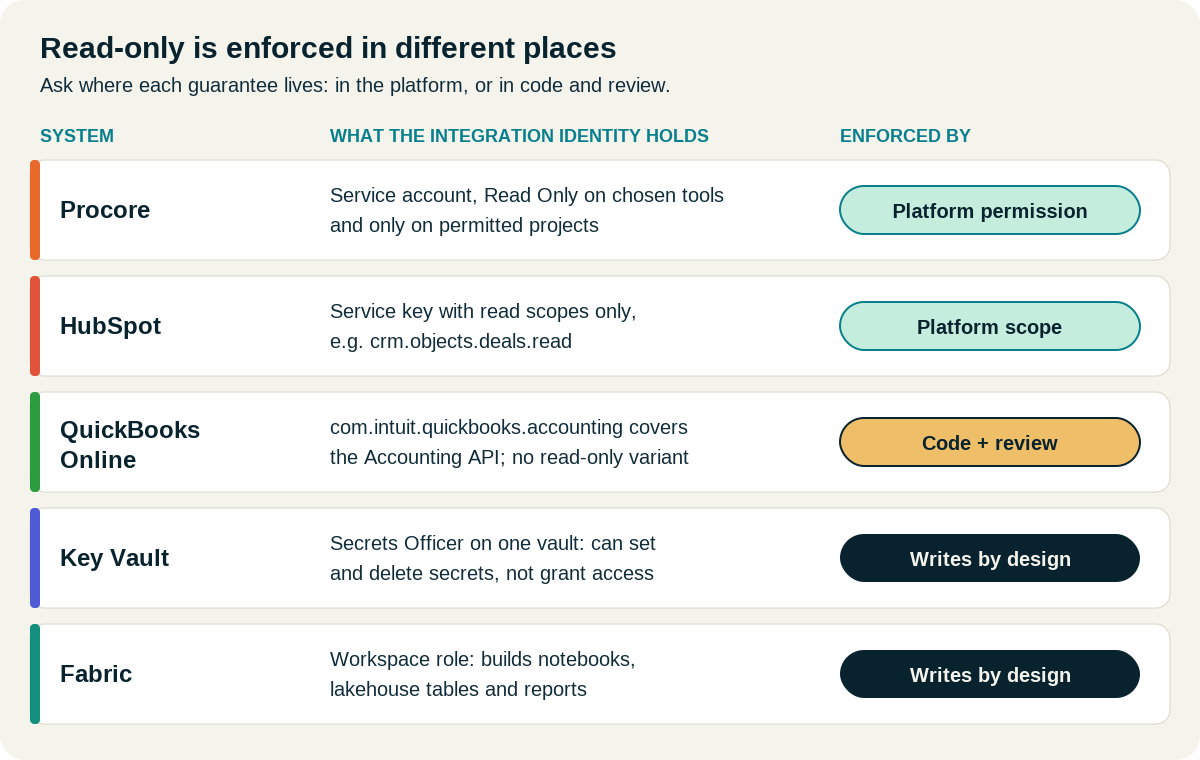 Platform-enforced, code-enforced, and writes by design.
| System | What enforces read-only | What to verify | Detail |
|---|---|---|---|
| Procore | The app's service account permissions, set per tool, plus the permitted projects list | App Management in your company Admin tool shows the installed app and its permissions | Procore service account setup |
| HubSpot | The scopes on the service key. A key with only .read scopes cannot write | The key's scope list on its details page | HubSpot service key setup |
| QuickBooks Online | Not the scope. Intuit's scope list has one accounting scope for the Accounting API and no read-only variant of it. Read-only is enforced by the integration only calling read and query endpoints | A code review or written statement listing the endpoints used | QuickBooks credentials |
| Key Vault | Nothing. Secrets Officer can create, update and delete secrets on that vault | Role scope, and Key Vault logs for secret writes | Key Vault setup |
| Fabric | Nothing. The workspace is where the build happens | Workspace role list | Fabric secrets in pipelines |
The read-only scopes guide and the read-only scope picker list the exact permissions for each report area.
C1. Can the integration change a project, deal or invoice?
Model answer. Not in Procore or HubSpot, because the platform rejects writes the permissions don't allow. In QuickBooks, the scope would allow it. The guarantee is that the code only reads, and that a change to that code goes through review. Say this plainly in the approval record rather than writing "read-only" across all three.
Evidence to request. For QuickBooks, the list of API entities and operations the integration calls. For Procore, a screenshot of the permissions the app requested at install.
Watch for. A Procore permission set to Standard or Admin on any tool "for later," or a HubSpot key with .write scopes.
D. Where the secrets are
D1. Where are API credentials stored, and who has seen them?
Model answer. Only in your Key Vault, under fixed names such as procore-client-secret. Your admin pastes each value directly from the source system into the vault. The vendor receives the vault URI and secret names, never the values. No credential travels by email, chat or a shared document. See why credentials never go in email and how Key Vault compares with a password manager or .env files.
Evidence to request. The vault's Secrets list (names only). Your own admin's confirmation of how each value was entered.
Watch for. "Just send us the keys and we'll put them in." The setup guide's handoff option exists for a screen-shared session, not an inbox.
D2. How does the pipeline get a secret at run time?
Model answer. A Fabric notebook calls notebookutils.credentials.getSecret with the vault URI and secret name. Microsoft documents that the call uses the current user's credentials to authenticate to Key Vault. Fabric notebook output tries to redact a secret printed directly. Microsoft states plainly that this is best-effort and "isn't a security boundary." Code must not print, log or write secrets. The walkthrough is in reading Key Vault secrets from a Fabric notebook.
Evidence to request. The notebook cell that reads the secrets, showing names rather than values. A search of the workspace for hard-coded tokens before go-live.
Watch for. Secrets passed as notebook parameters, stored in lakehouse files or pasted into pipeline settings.
D3. What happens if a secret is deleted or leaks?
Model answer. New vaults have soft-delete on by default. A deleted secret stays recoverable for the retention period, 7 to 90 days and 90 by default, set when the vault is created. Purge protection is optional and off by default. Turn it on if you want to stop anyone permanently deleting secrets before that period ends. A leaked credential is rotated at the source and the new value is written to the same secret name. The rotation guide covers each system.
Evidence to request. The vault's Properties page showing soft-delete and purge protection settings.
Watch for. No one named as owner of rotation. Every secret needs an owner on your side.
D4. Is the vault reachable from the internet?
Model answer. In the reference setup, yes. The vault keeps public network access, and every request still requires an Entra ID token and an RBAC role. If your policy requires a firewall or private endpoint, test Fabric's path to the vault before go-live. Microsoft's documentation for Fabric's Key Vault references requires either public network access or an on-premises data gateway with line of sight to the private endpoint. We have not verified every Fabric item type against a locked-down vault, so test the one you'll use.
Evidence to request. The vault's Networking page and your decision on it, recorded in the approval.
E. Logging and audit
E1. Which logs show what the vendor did?
Model answer. Five sources, and two of them have to be switched on.
| Log | What it records | Who can see it | Turn on or retention |
|---|---|---|---|
Key Vault AuditEvent | Every authenticated request, including SecretGet, SecretSet and failed attempts, with caller identity and IP | Whoever can read the log destination | Not on by default. Add a diagnostic setting that sends logs to a storage account or Log Analytics workspace. Entries arrive within about 10 minutes |
| Entra ID sign-in and audit logs | Sign-ins (with MFA and Conditional Access results) and directory changes such as role or guest changes | Entra report readers and admins | 7 days on Entra ID Free, 30 days on P1/P2. Export with diagnostic settings to keep longer |
| Fabric activity in Microsoft Purview audit | Workspace and item operations such as creating, editing and running items, and sharing changes | Users with the Audit Logs role | Purview audit retention depends on your Microsoft 365 licensing. Logging OneLake data access needs OneLake diagnostics, switched on per workspace |
| Procore | For data connection apps, App Management shows a graph of the app's daily API requests. Many tools keep a Change History tab of edits | Company admins; tool admins for Change History | A read-only app changes nothing, so expect Change History to stay quiet |
| HubSpot Audit Logs | User-based actions such as logins, security activity and, on Enterprise, more categories | Super Admins | The service key's details page has a View logs option for recent requests |
Evidence to request. A screenshot of the vault's diagnostic setting. A saved query that lists SecretGet calls by caller. The credential monitoring guide includes alert examples.
Watch for. Assuming HubSpot's audit log records API reads made with a service key. HubSpot's documentation says the log records HubSpot-user based actions and doesn't say how API calls appear. Confirm with HubSpot if this matters to you.
F. Revoking access and offboarding
F1. How do we cut access off quickly?
Model answer. Remove the vendor's role assignment on the Key Vault. Without it, the vendor's identity can no longer read any API secret. Microsoft notes role changes can take several minutes to apply. Then work through the remaining steps in order.
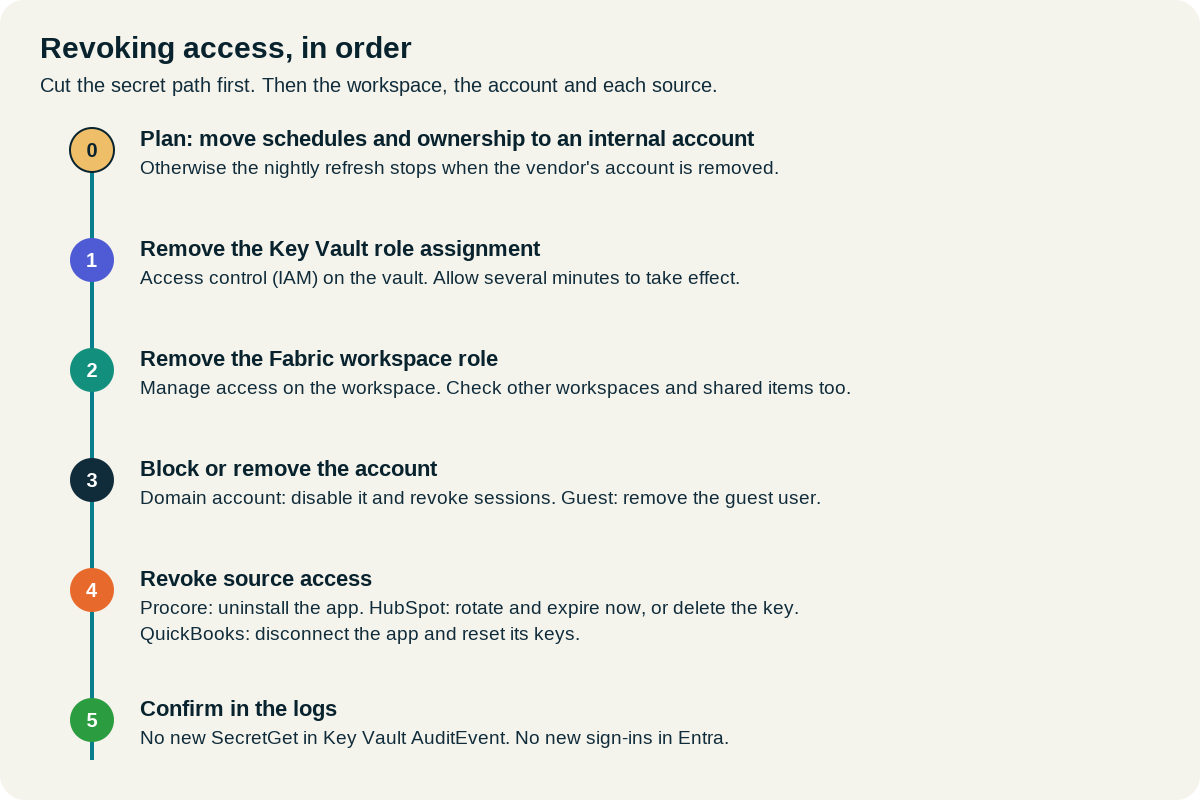 Cut the secret path first, then the workspace, the account and each source.
F2. What is the full offboarding sequence?
| Step | Action | Where | Note |
|---|---|---|---|
| 0 | Move schedules and item ownership to an internal account | Fabric workspace | Do this first if you want reports to keep refreshing |
| 1 | Remove the Key Vault role assignment | Vault → Access control (IAM) → Role assignments | Allow several minutes |
| 2 | Remove the workspace role | Fabric workspace → Manage access | Check other workspaces and shared items |
| 3 | Disable the domain account and revoke its sessions, or remove the guest user | Microsoft Entra admin center | Microsoft's session-revocation API doesn't revoke sessions for external users, because they sign in through their home tenant. For a guest, removing the user and their roles is the control |
| 4a | Uninstall the app | Procore company Admin → App Management | Company admin permission needed |
| 4b | Rotate and expire now, or delete the service key | HubSpot service key details page | "Rotate and expire later" keeps the old key working for 7 days |
| 4c | Disconnect the app from your QuickBooks company and reset the app's keys | QuickBooks and the Intuit Developer portal | Menu paths change. Follow Intuit's current help |
| 5 | Confirm no new SecretGet or sign-ins from the account | Key Vault logs, Entra sign-in logs | Keep the evidence with the offboarding record |
Watch for. A design where removing the vendor stops the nightly refresh and nobody knows why. That's step 0. Whose identity runs the schedule is a design decision, so make it before go-live. Fabric's support for service principals and workspace identity varies by item type and is changing. Check the current Microsoft documentation for the item you use before relying on either.
F3. Who owns each step?
Model answer. Your team owns every revocation step, because every control is in your tenant or your SaaS admin consoles. The vendor's job is to tell you which assignments exist. The RACI for connecting construction systems has a ready-made table.
G. Ongoing operation
G1. How will we know if something breaks or expires?
Model answer. The pipeline should alert on failed runs and on authentication errors from each source. Set expiry dates on the vault secrets that have them, and use Key Vault's near-expiry events. Run a quarterly access review of the workspace roles, the vault role assignments and the three source apps. The troubleshooting guide lists the common failure messages.
G2. What does the vendor need from us to support it?
Model answer. The vault URI, the Directory (tenant) ID and confirmation of which secrets exist. Never the values. The ID lookup guide explains the non-secret IDs. The OAuth flow comparison explains why QuickBooks needs a one-time admin click and the others don't.
The evidence pack
Ask for these eight items, mostly screenshots from your own consoles, and file them with the approval.
| # | Evidence | Produced by |
|---|---|---|
| 1 | Architecture diagram matching this design, or the vendor's redrawn version | Vendor |
| 2 | Fabric About dialog (home region), capacity region, vault location | Your Fabric and Azure admins |
| 3 | Workspace Manage access list | Your Fabric admin |
| 4 | Vault role assignments, scoped to the vault | Your Azure owner |
| 5 | Procore app permissions, HubSpot key scopes, QuickBooks endpoint list | Your admins, plus the vendor for QuickBooks |
| 6 | Conditional Access policy covering the account, and one sign-in showing MFA | Your identity admin |
| 7 | Key Vault diagnostic setting and a sample SecretGet query | Your Azure owner |
| 8 | Signed offboarding plan, with step 0 decided | Your team and the vendor |
The API credential setup checklist tracks the setup side of the same work. Our security and data handling page answers common vendor-questionnaire questions about how Build Flows works.
Checklist
- Data stays in a OneLake lakehouse in your tenant, in an approved region
- Key Vault is in the same region as the Fabric capacity
- The consultant uses a named guest or domain account, covered by MFA and Conditional Access
- The workspace role is the lowest that works (Contributor or Member unless Admin is justified)
- Key Vault Secrets Officer is assigned on the vault only, not the resource group or subscription
- Procore permissions are Read Only per tool, on permitted projects only
- The HubSpot service key has
.readscopes only - QuickBooks read-only behavior is documented as code-enforced, with the endpoint list attached
- No secret value was sent by email, chat or document
- Soft-delete is on and the purge protection decision is recorded
- Key Vault diagnostic logs go to a storage account or Log Analytics workspace
- Entra sign-in logs are exported if you need more than 7 or 30 days
- The identity that runs the scheduled refresh is decided and documented
- The offboarding sequence is written down, with an owner for each step
- A quarterly access review is on someone's calendar
Bring your reviewer's questions
If your IT team is reviewing an integration like this, send the questionnaire your vendor answered, or the one you're about to send. Build Flows can walk your reviewer through the design on a short call, and we'll say where your setup differs from the reference. Email charley@buildflows.ai or start at buildflows.ai. Don't include credentials or secret values. Names and screenshots of settings are enough.
References
- Microsoft Learn: Roles in workspaces in Microsoft Fabric
- Microsoft Learn: Find your Fabric home region
- Microsoft Learn: Track user activities in Microsoft Fabric and Fabric audit operation list
- Microsoft Learn: NotebookUtils credentials utilities
- Microsoft Learn: Configure Azure Key Vault references in Fabric
- Microsoft Learn: OneLake diagnostics overview
- Microsoft Learn: Key Vault ABAC conditions (preview)
- Microsoft Learn: Grant access to Key Vault with Azure RBAC
- Microsoft Learn: Azure Key Vault logging and Enable Key Vault logging
- Microsoft Learn: Azure Key Vault soft-delete
- Microsoft Learn: Microsoft Entra data retention
- Microsoft Learn: Cross-tenant access settings for B2B collaboration
- Microsoft Learn: user: revokeSignInSessions
- Procore Support: What is a Developer Managed Service Account?
- Procore Support: What is App Management? and Uninstall an App
- Procore Support: View the change history of an RFI (one example of a tool-level Change History tab)
- HubSpot Developers: Account service keys
- HubSpot Knowledge Base: View and export account activity history
- Intuit Developer: Learn about scopes and Authorization FAQ
Frequently asked questions
Is a Procore, HubSpot and QuickBooks reporting integration really read-only?
It depends on the system. Procore enforces read-only through the app's per-tool permissions and permitted projects, and HubSpot through read-only scopes on the service key. QuickBooks Online has one accounting scope with no read-only variant, so read-only there is enforced by the integration only calling read and query endpoints. Key Vault and the Fabric workspace allow writes by design.
Why does the vendor need Key Vault Secrets Officer instead of Secrets User?
Secrets User can only read secret values. The integration also writes: during setup it adds the QuickBooks refresh token, and Intuit tells developers to store the latest refresh token each time. Secrets Officer can manage secrets on the vault but cannot manage permissions. Assign it on the single vault, not the resource group or subscription.
Which logs show what an outside consultant did in our tenant?
Key Vault AuditEvent logs, once a diagnostic setting sends them to storage or Log Analytics. Entra ID sign-in and audit logs, kept 7 days on Free and 30 days on P1 or P2. Fabric activity in the Microsoft Purview audit log. In the source systems, Procore App Management shows the app's daily API requests and HubSpot Super Admins can review audit logs.
How do we revoke a reporting vendor's access quickly?
Remove their role assignment on the Key Vault first, which stops them reading any API secret after a few minutes. Then remove the Fabric workspace role, disable or remove the account, uninstall the Procore app, rotate or delete the HubSpot service key, and disconnect QuickBooks. Confirm in the Key Vault and Entra logs that access stopped.
Should the consultant use a guest account or an account on our domain?
Either can work. A guest signs in through their own tenant, and your cross-tenant settings decide whether you trust their MFA. A domain account is fully under your control for MFA, licensing and disabling. Microsoft's session revocation API doesn't apply to external users, so removing a guest means removing the guest user and their roles.
Does our data leave our Microsoft tenant?
Not in the reference design. Source data is read over HTTPS APIs into a OneLake lakehouse in your Fabric workspace, and reports are shared with your own staff. The consultant sees data in their browser while building and testing. Get a contract term that rules out local copies and covers deletion at the end of the engagement.
Next step
Want help running this playbook?
Bring the report or workflow. We'll help map the work behind it.
Prefer email? charley@buildflows.ai
Keep learning
Integrations · November 14, 2026
Guest Account vs Domain Account: Giving a Consultant Access to Fabric and Azure
How to give an outside consultant access to a Microsoft Fabric workspace and an Azure Key Vault, comparing a Microsoft Entra B2B guest invite with an account created on your own domain, with setup steps for each and a six-step offboarding sequence.
Integrations · November 14, 2026
Read-Only API Scopes for Construction Reporting: Procore, HubSpot, QuickBooks, Azure and Fabric
A reference that starts from the report (WIP, backlog, pipeline, AR aging, cash) and maps it to the smallest read permission in Procore, HubSpot and QuickBooks Online, plus the right Azure Key Vault and Microsoft Fabric roles, with every name checked against vendor docs.
Workflow automation · November 14, 2026
Monitoring Integration Credentials After Go-Live: Key Vault Logs, Expiry Alerts and a Refresh Runbook
What to switch on after a Procore, HubSpot and QuickBooks Online integration goes live on Microsoft Fabric: Key Vault diagnostic logs and failed-read alerts, near-expiry events, Fabric job failure emails, each vendor's warning sign, a weekly health check and a runbook for a report that didn't refresh.