Key takeaways
- Use a Fabric Python notebook: getSecret works everywhere, but Microsoft documents putSecret as Python-runtime only.
- getSecret runs as the notebook's identity: you interactively, the schedule's last editor, or the pipeline's last modified user.
- Procore client credentials and HubSpot service keys need no stored tokens; request or read them fresh each run.
- Refresh QuickBooks once per run and save a changed refresh token with putSecret before any other call.
- Fabric's output redaction is best effort, so route all output through one logger that prints counts and status codes only.
- Land each record's raw JSON in append-only bronze tables with run_id and loaded_at, and parse it later in silver.
The credentials are in Azure Key Vault. The Fabric workspace exists. Procore, HubSpot and QuickBooks Online each have a read-only app. Now someone has to write the notebook that ties them together, and this is where secrets usually leak: a print(token) left in a debug cell, a client secret pasted into a parameter cell "just for testing", a QuickBooks refresh token that rotates and never gets saved, so the integration dies three weeks later with invalid_grant.
This guide is the code-first version of that last step. It walks through one Fabric Python notebook that reads named secrets from Key Vault at runtime, gets a Procore token with the client credentials grant, calls HubSpot with a service key, refreshes QuickBooks and writes the rotated refresh token back to the vault, then lands raw JSON in bronze lakehouse tables. Every value stays in memory. Nothing secret reaches the output, the logs or the table.
If you haven't set up the vault and the three apps yet, start with the full four-step credential setup. This article assumes that work is done.
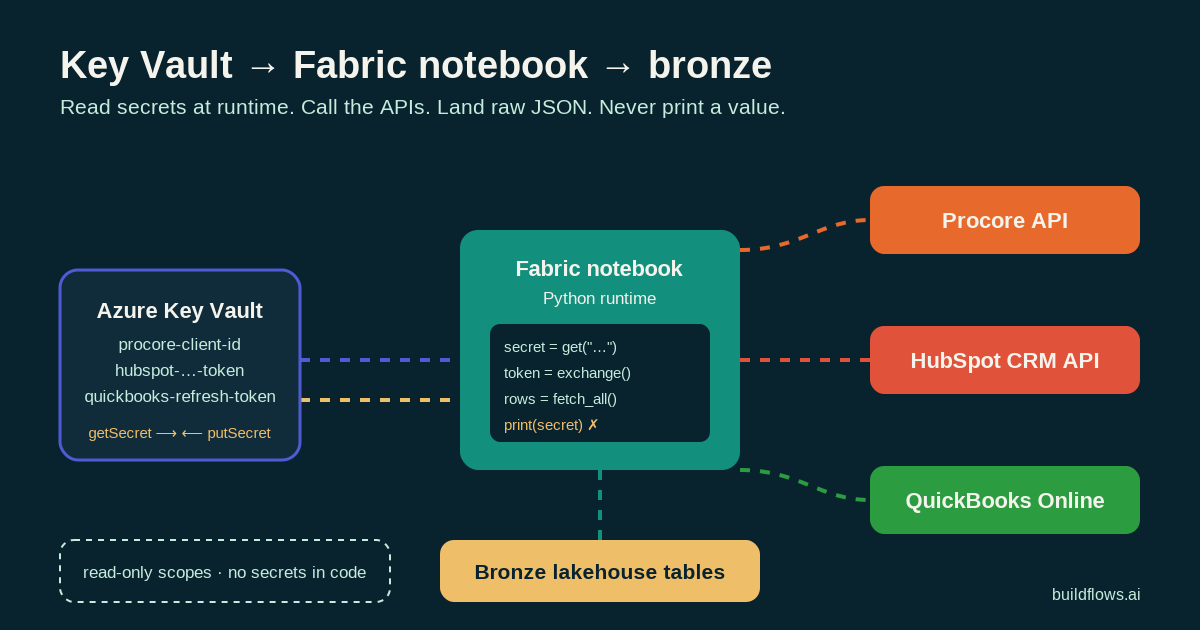 One notebook: secrets in from the vault, raw JSON out to bronze, nothing printed in between.
What you need before the first cell
The code below expects the secret names from the setup guide. If your vault uses different names, change the constants, not the logic.
| Secret name | Holds | Used for |
|---|---|---|
procore-client-id | Client ID of the Developer Managed Service Account app | Procore token request |
procore-client-secret | Client secret of the same app | Procore token request |
procore-company-id | Your numeric Procore company ID | Procore-Company-Id header and company_id parameter |
procore-base-url | https://api.procore.com (developer sandbox: https://sandbox.procore.com) | Procore REST calls |
hubspot-private-app-token | HubSpot service key (or a legacy private app token) | HubSpot Bearer header |
quickbooks-client-id | Intuit app client ID | QuickBooks token refresh |
quickbooks-client-secret | Intuit app client secret | QuickBooks token refresh |
quickbooks-realm-id | The QuickBooks company (realm) ID | QuickBooks API path |
quickbooks-environment | production or sandbox | Picks the API host |
quickbooks-refresh-token | The current refresh token | Token refresh, rewritten on rotation |
Not sure where the IDs come from? See where to find the Procore company ID, QuickBooks realm ID and HubSpot portal ID.
You also need:
- A Fabric Python notebook (not a Spark notebook). The reason is below.
- A lakehouse attached to the notebook for the bronze tables.
- Key Vault RBAC for whoever the notebook runs as. Reading needs Key Vault Secrets User. Writing the rotated QuickBooks token needs a role that can set secrets, such as Key Vault Secrets Officer. Azure Key Vault setup for data integrations covers the role assignment.
- Read-only scopes on every app. The notebook never writes back to Procore, HubSpot or QuickBooks, so it shouldn't be able to. The read-only scope picker lists the minimum scopes per report.
Why a Python notebook, not Spark
Fabric's notebookutils.credentials module has two secret methods, and they don't run in the same places:
| Method | What it does | Where it works |
|---|---|---|
getSecret(vaultUrl, secretName) | Returns a secret's current value | Python notebooks and Spark notebooks (PySpark, Scala, R) |
putSecret(vaultUrl, secretName, secretValue) | Creates or updates a secret | Python notebooks only. Microsoft's docs say Spark notebooks don't support it, even when they run PySpark |
getToken(audience) | Returns a Microsoft Entra token for storage, pbi, keyvault or kusto | Both |
QuickBooks rotates refresh tokens, so this notebook has to write to the vault. That alone points to the Python runtime. It also fits the workload: a few thousand API records per run doesn't need a Spark cluster, and Microsoft describes the Python notebook as a single node with 2 vCores and 16 GB of memory by default. The runtime ships with delta-rs (the deltalake package) for writing Delta tables. If capacity sizing is the question, see Microsoft Fabric F2 capacity for construction reporting.
If you must stay on Spark, keep the API pulls and token refresh in a small Python notebook and hand the landed data to Spark afterwards. Microsoft also documents a workaround that wraps getToken in a custom Azure SDK credential. We haven't verified it for Key Vault writes in every runtime, so test it before you depend on it.
Step 1: read secrets without leaking them
Put the vault URL and one tiny helper in the first cell. Every later call goes through it.
import base64, json, time, uuid
import datetime as dt
import requests

VAULT_URL = "https://kv-reporting-analytics.vault.azure.net/"  # Vault URI from the vault's Overview page
RUN_ID = str(uuid.uuid4())
session = requests.Session()

def secret(name: str) -> str:
    """Read one secret from Key Vault. Never print, log or return it to a cell's output."""
    return notebookutils.credentials.getSecret(VAULT_URL, name)

def log(msg: str) -> None:
    """The only way this notebook writes to output. Pass counts and status codes, never values."""
    print(f"[{dt.datetime.now(dt.timezone.utc):%H:%M:%S}] {msg}")
Three rules keep this cell safe:
- The vault URL is not a secret. The values are. It's fine to have the URI in code. It's not fine to have any value from
secret()in a string you print, a DataFrame youdisplay(), or an exception message you raise. - Don't lean on redaction. Fabric tries to redact a secret's original value when you print it directly. Microsoft is explicit that this is a best-effort safeguard, not a security boundary. A secret that has been base64-encoded, sliced or otherwise transformed won't match the original, so it can print in full.
- Don't pass secrets as notebook parameters. Parameter values show up in run snapshots and pipeline definitions. Pass secret names if you need to; let the notebook read the values.
Which identity is reading the vault
getSecret authenticates as whoever the notebook runs as, and that changes with how the run started. Microsoft's notebook docs spell it out:
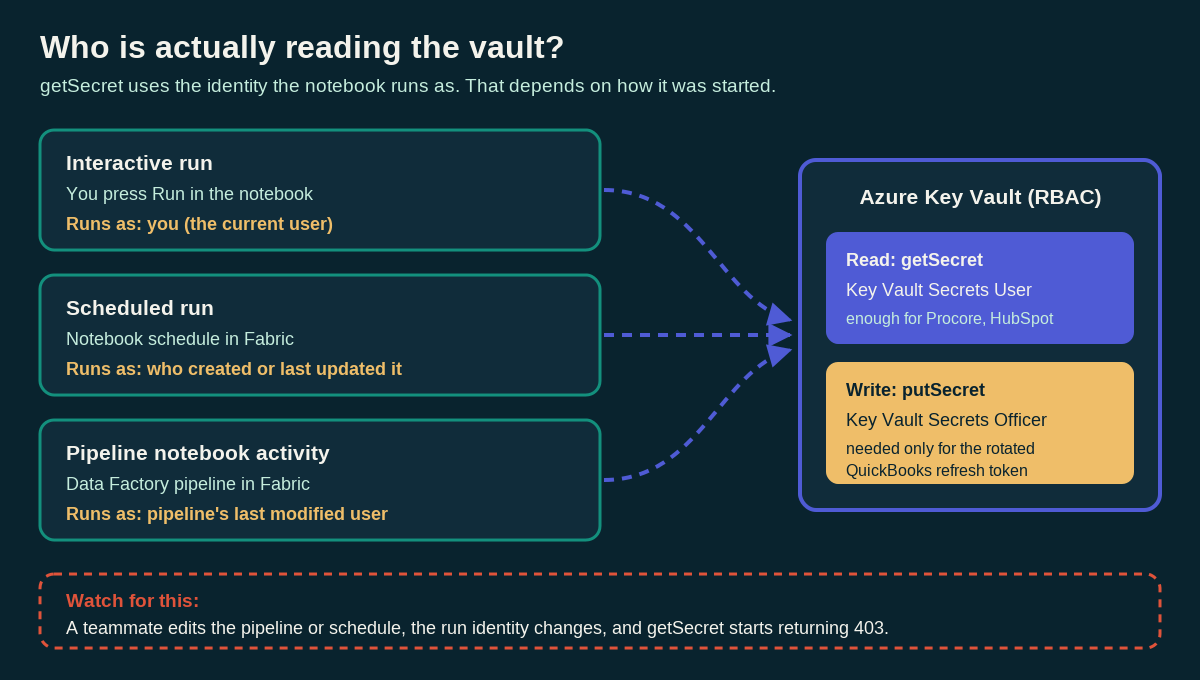 getSecret runs as the notebook's identity, which depends on how the run started.
| How the run starts | Identity used |
|---|---|
| You press Run (or call the notebook's REST API as yourself) | You, the current user |
| A notebook schedule | The user who created or last updated the schedule |
| A notebook activity in a pipeline | The pipeline's last modified user, not its owner |
The practical consequence: a pipeline that works for months can start failing with a 403 from Key Vault the morning after a colleague tweaks its retry settings, because the run now happens as them. Decide who owns the production pipeline, grant that account the vault role, and treat edits by anyone else as a change that needs a test run. Whether that account should be a guest or a domain account is covered in guest account vs domain account for consultant access.
Step 2: Procore with client credentials
Procore's client credentials flow works with a Developer Managed Service Account (DMSA). There's no browser sign-in and no refresh token to store. You POST the client ID and secret to /oauth/token and get an access token back. Procore's docs list an access token lifetime of 1.5 hours (expires_in 5400), and also announce that token lifetimes are being reduced gradually toward 15 minutes. So the notebook asks for a new token each run and never assumes a lifetime: read expires_in if a run could take longer, and request a fresh token on a 401.
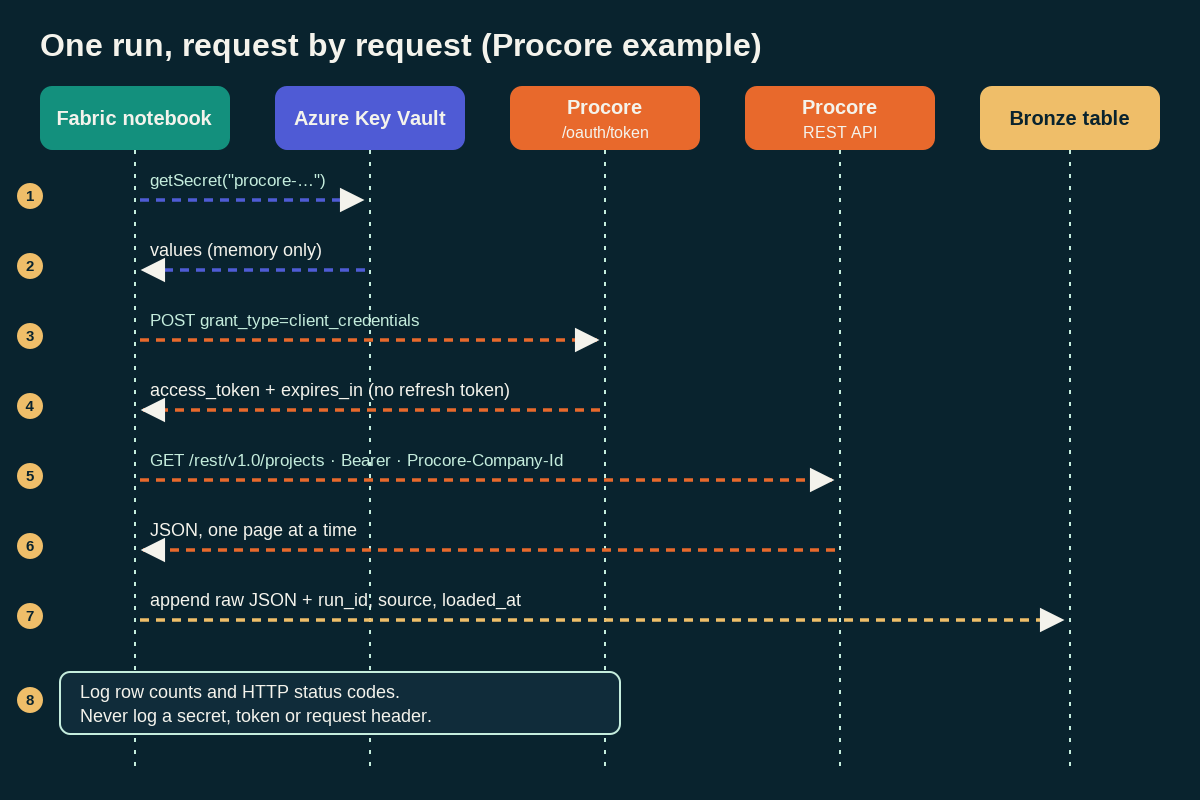 Every request in one Procore pull. Only counts and status codes reach the log.
PROCORE_LOGIN = "https://login.procore.com"  # production. Developer sandbox: https://login-sandbox.procore.com

def get_with_retry(url, headers, params=None, attempts=4):
    """GET with polite retries on 429 and 5xx. Error messages include the URL, never the headers."""
    for i in range(attempts):
        r = session.get(url, headers=headers, params=params, timeout=60)
        if r.status_code == 429 or r.status_code >= 500:
            ra = r.headers.get("Retry-After", "")
            wait = int(ra) if ra.isdigit() else 5 * 2 ** i
            log(f"HTTP {r.status_code} from {url}; retry in {wait}s")
            time.sleep(wait)
            continue
        if not r.ok:
            raise RuntimeError(f"HTTP {r.status_code} from {url}")
        return r.json()
    raise RuntimeError(f"Gave up after {attempts} attempts: {url}")

def procore_token() -> str:
    r = session.post(f"{PROCORE_LOGIN}/oauth/token", data={
        "grant_type": "client_credentials",
        "client_id": secret("procore-client-id"),
        "client_secret": secret("procore-client-secret"),
    }, timeout=60)
    if not r.ok:
        raise RuntimeError(f"Procore token request failed: HTTP {r.status_code}")
    return r.json()["access_token"]

def procore_projects() -> list[dict]:
    base = secret("procore-base-url").rstrip("/")
    company_id = secret("procore-company-id")
    headers = {"Authorization": f"Bearer {procore_token()}", "Procore-Company-Id": company_id}
    rows, page, per_page = [], 1, 100
    while True:
        batch = get_with_retry(f"{base}/rest/v1.0/projects", headers,
                               {"company_id": company_id, "page": page, "per_page": per_page})
        rows.extend(batch)
        if len(batch) < per_page:
            return rows
        page += 1
Notes on the Procore cell:
- Errors carry the status, not the response body. Token endpoint error bodies are usually harmless, but you don't control them. Raising
HTTP 401tells you enough. - The token never leaves the function's scope except inside the
headersdict, andheadersis never logged. - A 403 here is usually permissions, not auth. A DMSA token can only reach the tools its permissions allow, so a valid token can still get 403 on a tool set to None. Check the DMSA's permission template. Procore DMSA setup walks through it.
- Check the host. Procore's authentication docs use
https://login.procore.com/oauth/tokenfor production andhttps://login-sandbox.procore.com/oauth/tokenfor the developer sandbox, whose API host ishttps://sandbox.procore.com. Some third-party material showsapi.procore.com/oauth/token; follow Procore's docs. Keep sandbox and production in separate vaults or separate secret names. - A 401 partway through a long pull means the token expired. With lifetimes heading toward 15 minutes, a very large pull can outlive its token. Request a new one and retry the page; don't stretch the run to fit an assumed lifetime.
Step 3: HubSpot with a service key
HubSpot service keys are the simplest of the three. The key is a static Bearer token with object-level scopes, created in HubSpot under Development > Keys > Service keys. There's no token exchange in the notebook. Automatic rotation (every 3, 6 or 12 months) is off by default, and if you turn it on, someone still has to copy each new key into the vault. For a manual rotation, Rotate and expire later keeps the old key working for 7 days, so updating the vault secret within that window is enough. Rotate and expire now is for a key you think has leaked. For setup and scopes, see HubSpot service key for read-only CRM API access.
HUBSPOT_API = "https://api.hubapi.com"
DEAL_PROPS = "dealname,amount,dealstage,pipeline,closedate,hs_lastmodifieddate"

def hubspot_deals() -> list[dict]:
    headers = {"Authorization": f"Bearer {secret('hubspot-private-app-token')}"}
    params = {"limit": 100, "properties": DEAL_PROPS, "archived": "false"}
    rows = []
    while True:
        data = get_with_retry(f"{HUBSPOT_API}/crm/v3/objects/deals", headers, params)
        rows.extend(data.get("results", []))
        after = data.get("paging", {}).get("next", {}).get("after")
        if not after:
            return rows
        params["after"] = after
The key needs crm.objects.deals.read for this call and nothing else. If you add companies or contacts later, add only their .read scopes. Service keys can only make REST API calls; HubSpot says they can't authenticate webhooks or UI extensions, which is fine for a reporting pull.
Step 4: QuickBooks refresh, then write the new token back
QuickBooks Online uses the authorization code flow. A person connects the company once, and from then on the notebook trades a stored refresh token for a one-hour access token. The catch is that Intuit can hand back a different refresh token on each refresh. If you keep using the old one after it has been replaced, the refresh fails with invalid_grant and someone has to reconnect QuickBooks.
So the order matters: refresh, save the new refresh token, then call the API.
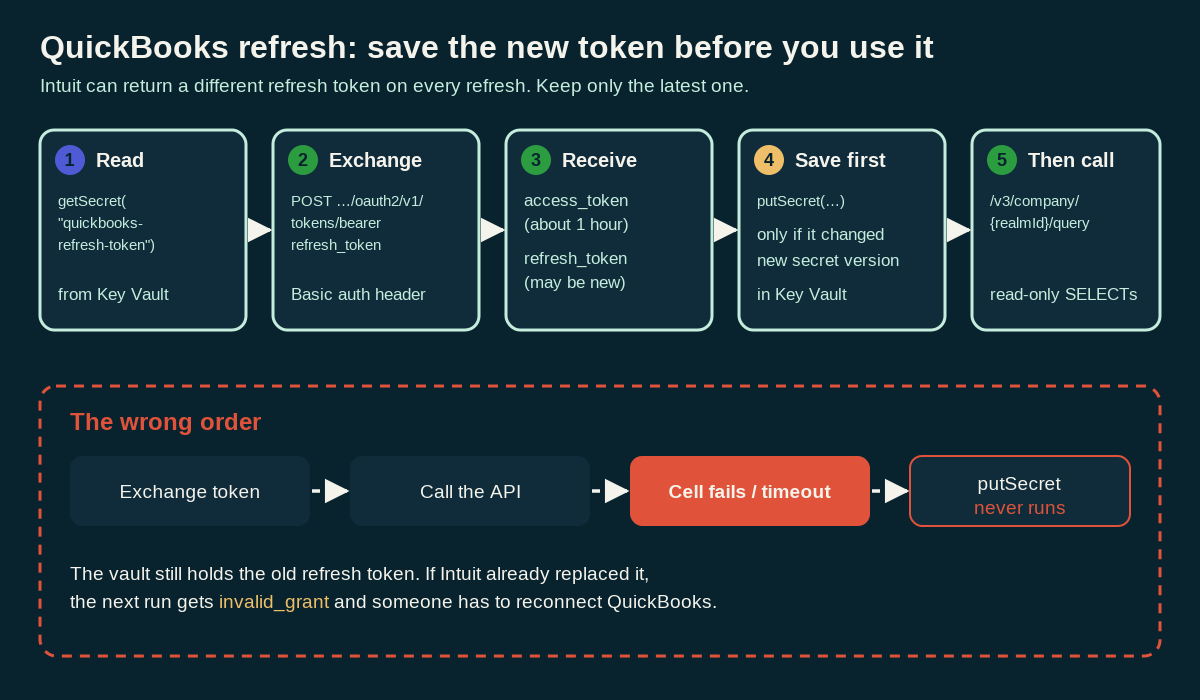 Save the rotated refresh token before anything else can fail.
INTUIT_TOKEN_URL = "https://oauth.platform.intuit.com/oauth2/v1/tokens/bearer"

def quickbooks_access_token() -> str:
    client_id = secret("quickbooks-client-id")
    client_secret = secret("quickbooks-client-secret")
    old_refresh = secret("quickbooks-refresh-token")
    basic = base64.b64encode(f"{client_id}:{client_secret}".encode()).decode()

    r = session.post(INTUIT_TOKEN_URL, timeout=60,
                     headers={"Authorization": f"Basic {basic}", "Accept": "application/json"},
                     data={"grant_type": "refresh_token", "refresh_token": old_refresh})
    if not r.ok:
        code = r.json().get("error", "unknown") if r.headers.get("content-type", "").startswith("application/json") else "unknown"
        raise RuntimeError(f"QuickBooks refresh failed: HTTP {r.status_code}, error={code}")

    tok = r.json()
    if tok["refresh_token"] != old_refresh:
        # Save before doing anything else that could fail. Python runtime only.
        notebookutils.credentials.putSecret(VAULT_URL, "quickbooks-refresh-token", tok["refresh_token"])
        log("QuickBooks refresh token rotated and saved to Key Vault")
    return tok["access_token"]

def quickbooks_query(entity: str, access_token: str) -> list[dict]:
    env = secret("quickbooks-environment")
    host = "https://quickbooks.api.intuit.com" if env == "production" else "https://sandbox-quickbooks.api.intuit.com"
    url = f"{host}/v3/company/{secret('quickbooks-realm-id')}/query"
    headers = {"Authorization": f"Bearer {access_token}", "Accept": "application/json"}
    rows, start, page_size = [], 1, 1000
    while True:
        q = f"SELECT * FROM {entity} STARTPOSITION {start} MAXRESULTS {page_size}"
        data = get_with_retry(url, headers, {"query": q, "minorversion": "75"})
        batch = data.get("QueryResponse", {}).get(entity, [])
        rows.extend(batch)
        if len(batch) < page_size:
            return rows
        start += page_size
Details that matter:
putSecretcreates a new version, not a new secret. Key Vault keeps the previous versions, which gives you a recovery path if a bad value is ever written.getSecretalways returns the current version.- Only write when it changed. That keeps the version history readable and avoids needless writes.
- Refresh once per run. Call
quickbooks_access_token()once and pass the access token to every query. Refreshing per entity multiplies rotations and the chances of a race. - Don't run two copies at once. Two concurrent runs can both refresh from the same old token. Keep one scheduled run per company and avoid running the notebook by hand while the schedule is active.
- Watch the expiry fields. Intuit's token response includes
x_refresh_token_expires_in. Intuit has changed its refresh-token policy over time: older guidance describes a 100-day window that renews as the token is used, and Intuit's current release notes describe a maximum validity of five years for every refresh token. Read the field from each response rather than hard-coding a lifetime, and plan for a reconnect before the hard limit. Monitor integration credential expiry shows how to alert on it. minorversion=75. Intuit retired minor versions 1 to 74 in 2025 and now treats 75 as the baseline. Set it explicitly so a future change is visible in code.- The write needs a write role. If the run identity only has Key Vault Secrets User,
putSecretfails after Intuit has already rotated the token. Test the write once, interactively, before you schedule anything. Microsoft's RBAC guide also describes scoping a role to a single secret or, in preview, constraining it with ABAC conditions, if you want write access limited toquickbooks-refresh-token.
Step 5: land raw JSON in bronze
Bronze is the untouched copy: one row per source record, the full JSON as a string, and enough metadata to trace every row to a run. Parsing, typing and joining happen later, in silver. Keeping the raw payload means a new report field never needs a re-pull.
import pyarrow as pa
from deltalake import write_deltalake

# The lakehouse's Tables folder as an ABFS path (copy it from the lakehouse explorer's properties).
TABLES = "abfss://<workspace>@onelake.dfs.fabric.microsoft.com/<lakehouse>.Lakehouse/Tables"

def land(source: str, entity: str, records: list[dict], id_field: str = "id") -> None:
    n = len(records)
    log(f"{source}.{entity}: {n} rows")
    if n == 0:
        return
    now = dt.datetime.now(dt.timezone.utc)
    table = pa.table({
        "source":    [source] * n,
        "entity":    [entity] * n,
        "record_id": [str(r.get(id_field, "")) for r in records],
        "payload":   [json.dumps(r, separators=(",", ":"), default=str) for r in records],
        "run_id":    [RUN_ID] * n,
        "loaded_at": pa.array([now] * n, type=pa.timestamp("us", tz="UTC")),
    })
    write_deltalake(f"{TABLES}/bronze_{source}_{entity}", table, mode="append",
                    storage_options={"bearer_token": notebookutils.credentials.getToken("storage"),
                                     "use_fabric_endpoint": "true"})
Then the run cell is short and readable:
land("procore", "projects", procore_projects())
land("hubspot", "deals", hubspot_deals())

qbo_token = quickbooks_access_token()          # refresh + save happen here, first
for entity in ["Invoice", "Bill", "Customer"]:
    land("quickbooks", entity.lower(), quickbooks_query(entity, qbo_token), id_field="Id")

log(f"run {RUN_ID} complete")
A few choices worth explaining:
- Append, don't overwrite. Each run adds a batch tagged with
run_id. Silver picks the latest version of eachrecord_id. If a run half-fails, the earlier batches are still there. - The payload holds API data only. No headers, no tokens, no request objects. The Procore and HubSpot responses don't echo credentials, but a careless
json.dumps(r.request.__dict__)would. - The write path is the one place a token appears, and it's a short-lived OneLake storage token, not a third-party secret. The
delta-rssnippet shape follows Fabric's built-in "Write data to Delta table" code snippet. If your runtime's snippet differs, follow the snippet.
For how the pipeline side calls this notebook and handles failures, see Microsoft Fabric and Azure Key Vault secrets in pipelines.
Security notes
| Risk | What happens | What to do |
|---|---|---|
| Printing a secret | Redaction may miss it if it was transformed | Route all output through log() and pass only counts and status codes |
| Exception text | Some libraries put request details in error messages | Raise your own errors with status code and URL only |
display() on a DataFrame with tokens | The value lands in saved cell output | Never put tokens in DataFrames. Clear outputs before sharing a notebook |
| Secrets in parameters | Visible in pipeline definitions and run snapshots | Pass secret names, never values |
| Run identity drifts | 403 from Key Vault after someone edits the pipeline | Name an owner; re-test after any edit |
| Rotated refresh token lost | invalid_grant; someone must reconnect QuickBooks | Save with putSecret immediately after the refresh |
| Over-broad API scopes | A leaked token can change source data | Read-only scopes only; see read-only API scopes |
| Over-broad vault role | Anyone running the notebook can rewrite every secret | Secrets User for most people; write access only for the pipeline owner |
| Unreviewed code | The notebook runs as you, with your vault access | Check version history before running code you didn't write, as Microsoft recommends |
Key Vault's diagnostic logs record every secret read and write with the caller's identity. Turn them on. If a value ever looks wrong, they tell you which run touched it. Your IT team will likely ask about this; the IT security review checklist collects the usual questions.
Troubleshooting
| Symptom | Likely cause | Check |
|---|---|---|
getSecret fails with 403 / Forbidden | Run identity has no data-plane role on the vault | Who the notebook ran as (table above) and their role on the vault. New assignments can take a few minutes |
getSecret fails with secret not found | Name mismatch | Names are case-insensitive but must match spelling and dashes exactly |
putSecret not available | Spark notebook | Switch the notebook language to Python |
| Procore 401 on the token call | Wrong host or wrong client ID/secret pair | Production vs sandbox host; regenerate if unsure |
| Procore 401 partway through a pull | Access token expired mid-run | Request a new token and retry; check expires_in |
| Procore 403 on data calls | DMSA permissions or missing company header | Permission template; Procore-Company-Id header present |
| HubSpot 401 | Key rotated or expired | Update the vault secret with the new key |
| HubSpot 403 | Scope missing | Add the .read scope for that object |
QuickBooks invalid_grant | Stale refresh token, revoked connection, or the token expired | Vault version history; reconnect if needed |
| Rows in bronze, but duplicates | Expected with append | De-duplicate on record_id and latest loaded_at in silver |
The API credential setup troubleshooting guide covers the setup-side errors in more depth.
Checklist
- Notebook language is Python, not PySpark
- Vault URL in code; no secret values anywhere in the notebook
- All output goes through one
log()helper that prints counts and status codes only - No secrets passed as parameters, written to DataFrames or left in cell output
- The production run identity is named, and holds Secrets User (read) plus write access only if it runs the QuickBooks refresh
- Procore token host matches your environment (production or sandbox)
- HubSpot key has only the
.readscopes the report needs - QuickBooks refresh happens once per run and the new refresh token is saved before any API call
- Only one scheduled run per company; no manual runs while the schedule is active
-
putSecrettested once interactively before the first scheduled run - Bronze tables append with
run_idandloaded_at - Key Vault diagnostic logging turned on
- Rotation plan written down; see rotating API secrets in Azure Key Vault
Want a second pair of eyes?
If you'd like someone to review a notebook like this before it runs against production, or build it with you, Build Flows does this work for contractors. Email charley@buildflows.ai or start at buildflows.ai.
References
- Microsoft Learn: NotebookUtils credentials utilities for Fabric (
getSecret,putSecretPython-runtime only,getTokenaudiences, redaction caveat) - Microsoft Learn: NotebookUtils for Fabric
- Microsoft Learn: How to use notebooks: security context of running a notebook
- Microsoft Learn: Use Python experience on Notebook (default compute,
delta-rs, write-to-Delta snippet) - Microsoft Learn: Grant permission to applications to access an Azure key vault using Azure RBAC (Secrets User and Secrets Officer roles)
- Procore Developers: Using the OAuth 2.0 Client Credentials Grant Type
- Procore Developers: OAuth 2.0 Access Tokens (1.5-hour lifetime, planned reduction toward 15 minutes) and Authentication endpoints (production and sandbox hosts)
- Procore Developers: Developer Managed Service Accounts
- HubSpot Developers: Account service keys (menu path, rotation options, REST-only limitation)
- Intuit Developer: OAuth 2.0 for QuickBooks Online and Authorization FAQ
- Intuit Developer: QuickBooks Online release notes (refresh token maximum validity, minor version 75 baseline)
Frequently asked questions
How do I read an Azure Key Vault secret in a Microsoft Fabric notebook?
Call notebookutils.credentials.getSecret with the full vault URL, such as https://<vault-name>.vault.azure.net/, and the secret name. It authenticates as the identity the notebook runs as, and that identity needs a data-plane role on the vault such as Key Vault Secrets User.
Can a Fabric notebook write a secret back to Key Vault?
Yes, with notebookutils.credentials.putSecret, but Microsoft's documentation says it works only in notebooks that use the Python runtime. Spark notebooks do not support it, even with PySpark. The run identity also needs permission to set secrets, such as Key Vault Secrets Officer.
Which identity does a scheduled Fabric notebook use to read Key Vault?
Per Microsoft's docs, an interactive run uses the current user, a scheduled run uses the user who created or last updated the schedule, and a pipeline notebook activity uses the pipeline's last modified user. Grant the vault role to the identity that actually runs production.
Does Fabric hide secrets if I print them?
Fabric attempts to redact a secret's original value in notebook output, but Microsoft calls this a best-effort safeguard, not a security boundary. Encoded or transformed values can still appear. Don't print, log, display or pass secrets as parameters.
Why does my QuickBooks connection fail with invalid_grant after a few weeks?
Usually because Intuit returned a new refresh token and the integration kept using the old one. Save any changed refresh token to Key Vault immediately after the refresh, refresh only once per run, and avoid overlapping runs.
Does the Procore client credentials flow need a refresh token?
No. With a Developer Managed Service Account you post the client ID and secret to the token endpoint and receive an access token with no refresh token. Procore lists a 1.5-hour lifetime but is gradually shortening it toward 15 minutes, so a nightly notebook requests a new token each run and gets another on a 401.
Should bronze tables store the full API response?
Store each record's raw JSON payload with source, entity, record ID, run ID and load time, but never headers, tokens or request objects. Appending raw payloads lets silver pick up new fields later without a re-pull.
Next step
Need this connection in your environment?
Scope one integration: the records, direction, timing, and business rules behind the connection.
Prefer email? charley@buildflows.ai
Keep learning
Integrations · November 14, 2026
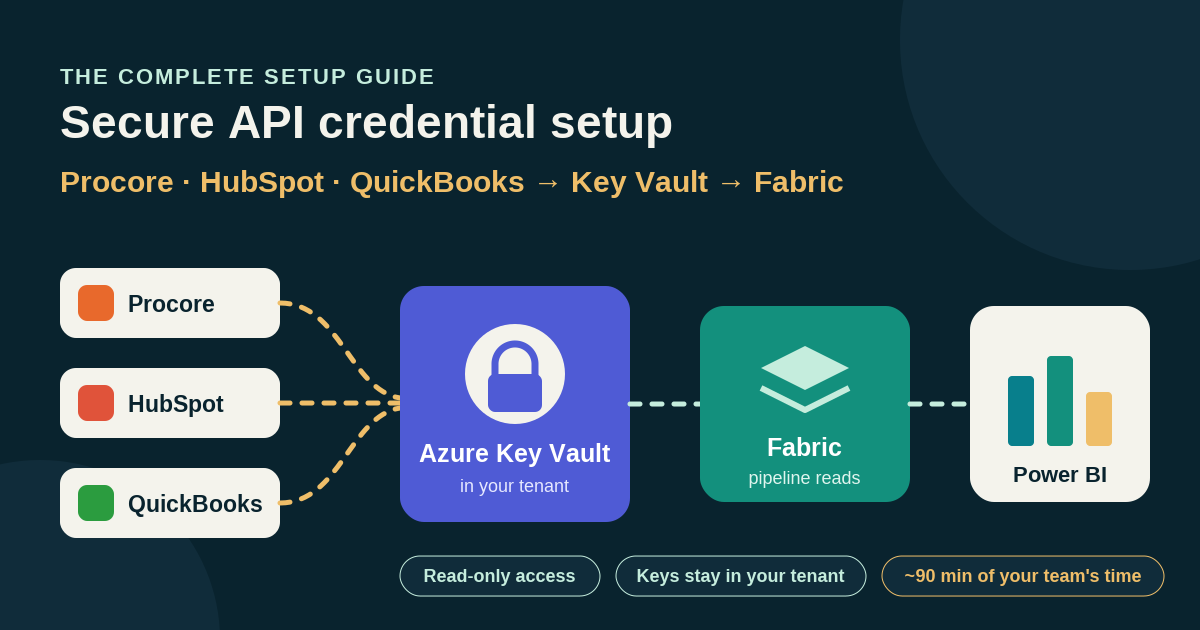
Secure API Credential Setup for Procore, HubSpot and QuickBooks with Azure Key Vault and Microsoft Fabric
The end-to-end guide to connecting Procore, HubSpot and QuickBooks Online to Microsoft Fabric and Power BI without handing over credentials: who owns each step and how long it takes, the architecture from sources through Azure Key Vault to Fabric, the four steps (Fabric access, read-only API access in three systems, Key Vault with the Secrets Officer role, connect and go live), the exact secret names, what to send back, how to revoke access, common mistakes and a checklist.
Integrations · November 14, 2026
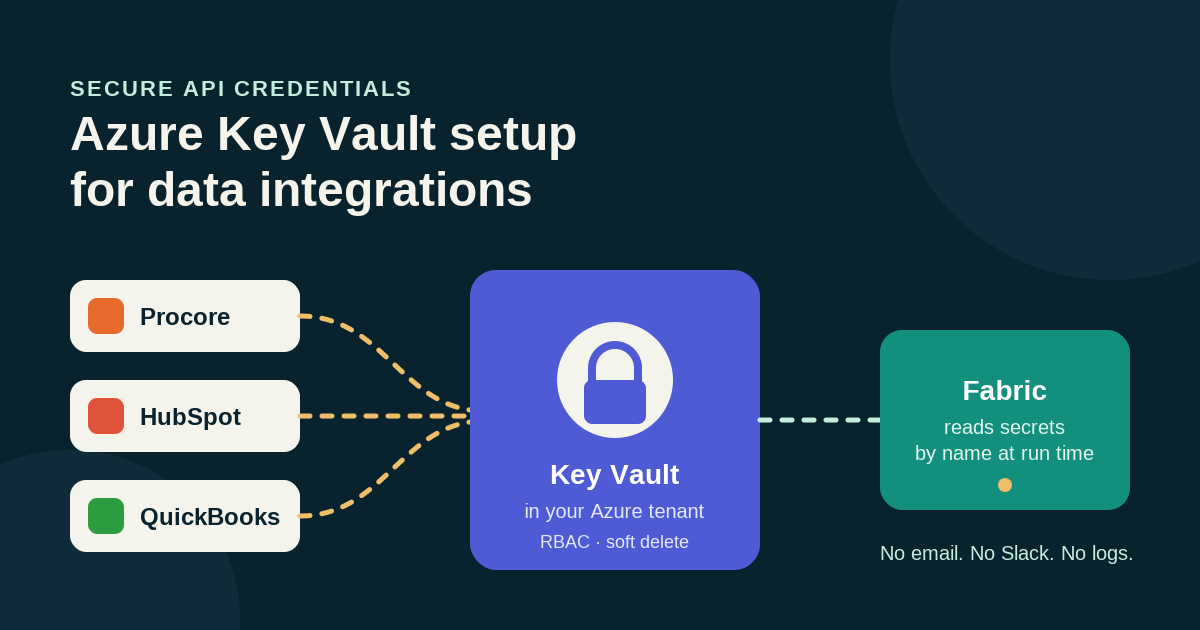
Azure Key Vault Setup for Data Integrations: Create the Vault, Set RBAC and Assign Secrets Officer
A step-by-step guide to creating an Azure Key Vault for integration secrets: resource group and globally unique name, matching the Fabric region, Standard tier, soft delete and the purge protection trade-off, the RBAC permission model, networking, the Key Vault Secrets Officer role assignment, why 'not authorized' appears right after setup, and what it really costs.
Playbooks · November 14, 2026
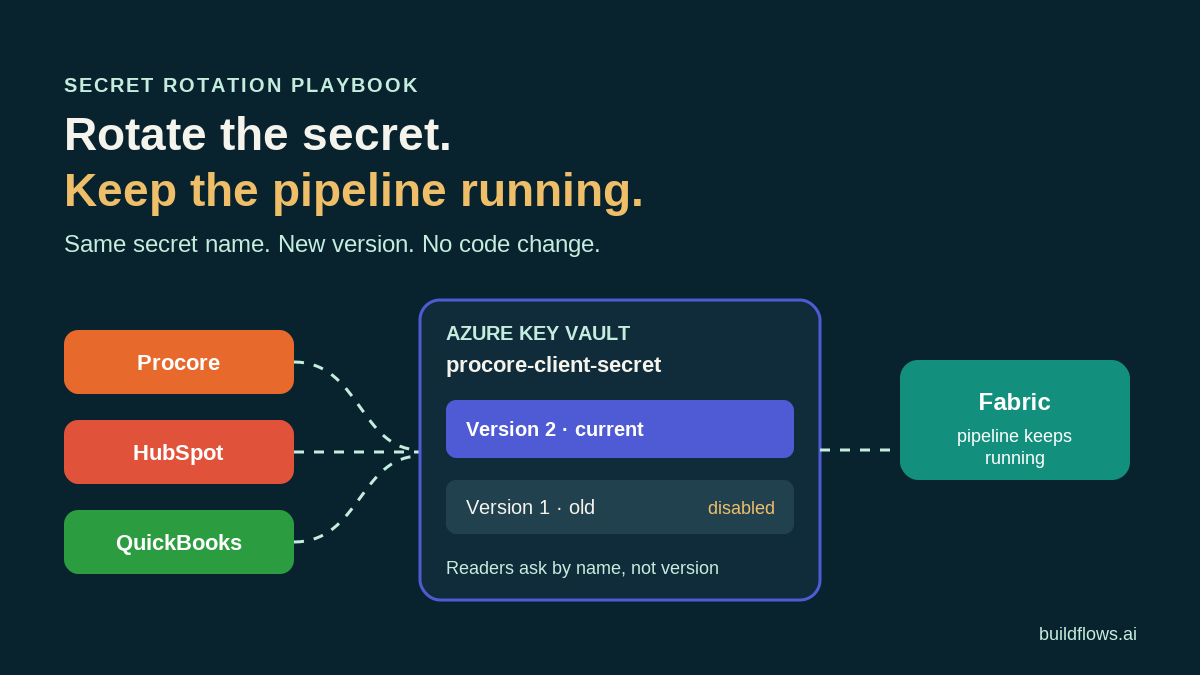
How to Rotate Procore, HubSpot and QuickBooks Secrets in Azure Key Vault Without Breaking Your Pipelines
When and how to rotate integration credentials: per-system steps for Procore, HubSpot service keys and QuickBooks Online, adding Key Vault versions so Fabric picks them up by name, a rotation calendar, and Event Grid near-expiry alerts.