Key takeaways
- Do not look for a safer channel to send secrets; keep them in a vault in your own tenant and send only the vault URI, tenant ID and secret names.
- Grant the partner one Key Vault data-plane role scoped to that vault: Secrets User to read, Secrets Officer only when the pipeline must write back a value such as a QuickBooks refresh token.
- Turn on Key Vault diagnostic logging before the first read so every SecretGet is tied to a named identity.
- Removing one role assignment stops future reads within minutes; rotating the source credentials makes anything already read useless.
- Run production pipelines under an identity your company owns so offboarding a partner never breaks the nightly refresh.
You hire a consultant to connect Procore, HubSpot and QuickBooks to your reporting. A few days later they ask for "the API keys." Someone on your team pastes a client secret into an email, or a Teams chat, or a shared spreadsheet called "integration creds." The integration works. The secret now also lives in two mailboxes, a chat history, a search index and probably a backup, and nobody can say who has read it since.
The fix is not a better channel for sending secrets. It is not sending them at all. Your company keeps the credentials in a vault inside its own Microsoft tenant. The partner gets a role on that vault, signs in as themselves, and their pipeline reads each value by name when it runs. You send the address of the vault, never the contents. This guide gives you that process end to end: what to send instead, how to grant and revoke access, what to log, when to rotate and how to offboard. It uses Azure Key Vault and Microsoft Fabric as the worked example, but the pattern carries over to any vault.
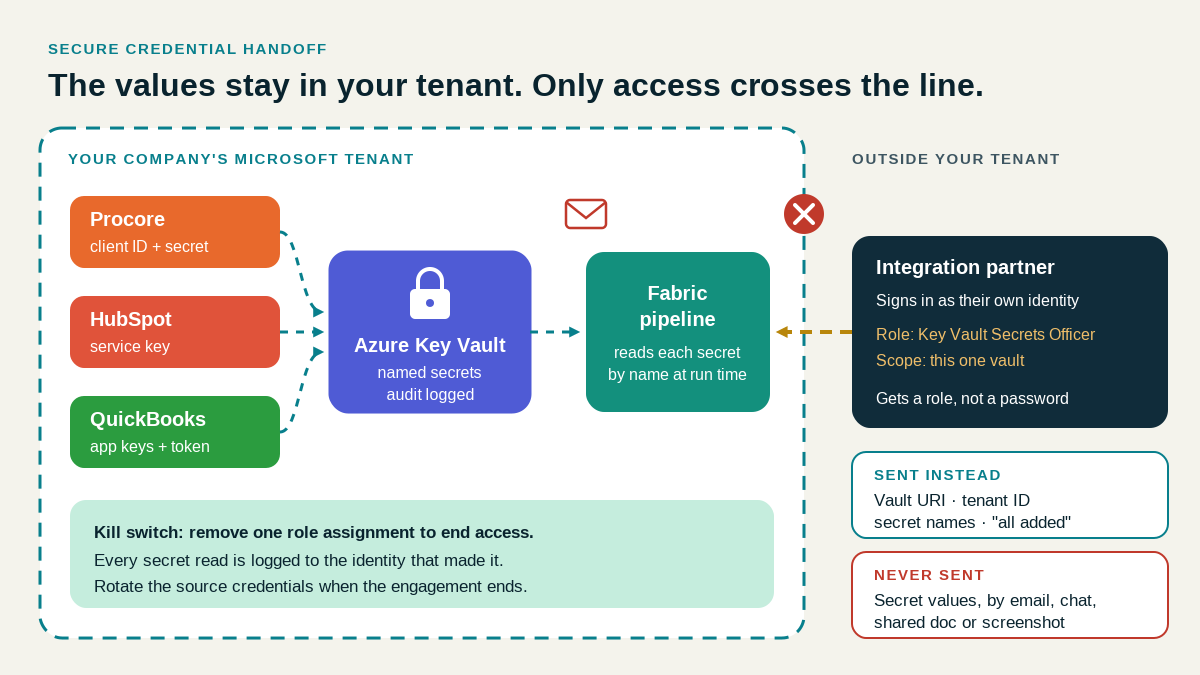 The trust boundary: values stay in your tenant, only access crosses the line.
The rule: you own the vault, the partner gets a role
In the setup walkthrough this guide is based on, Charley puts it simply after collecting the Procore, HubSpot and QuickBooks credentials: you don't want to send them to anyone, by email or otherwise, or have them recorded or logged anywhere else. Near the end he sums up the handoff: the company is not giving away the credentials it extracted, only access to the vault it provisioned.
That splits into four rules:
- The vault lives in your tenant and your subscription. Not the partner's. If the relationship ends, the vault, the secrets and the audit log stay with you.
- Your admin types each value in. Copy from the source system's screen straight into the vault's value field. The value never passes through a message.
- The partner gets a role, scoped to that one vault. They sign in with their own identity. You can see the assignment, and you can remove it.
- You send pointers, not values. The vault URI, the tenant ID and the list of secret names are enough for the partner to connect. None of them can call an API on their own.
One honest caveat. A partner whose pipeline reads a secret can, in principle, read the value. Key Vault does not hide values from an identity allowed to retrieve them. What this model changes is everything around that: no copies in transit, every read tied to a named identity and logged, and a single place to cut off access. If you want the partner to have no standing read access at all, see the tighter option under step 2.
The full four-step setup guide covers the whole build. This article focuses on the handoff between your company and the partner. To see what the finished integration produces, look at the Procore, QuickBooks, HubSpot and Fabric demo.
Compare the ways people share credentials
| Channel | Where copies end up | Can you revoke that copy? | Can you see who read it? | Use it for API secrets? |
|---|---|---|---|---|
| Sender's sent items, every recipient's inbox, forwards, mail backups and archives | No. Recall rarely works once delivered | No | No | |
| Chat (Teams, Slack) | Message history, search, notifications, connected apps, retention exports | Delete the message, but it may already be read, notified or exported | No | No |
| Shared doc or spreadsheet | The file, its version history, offline copies, anyone the link reaches | Edit the value out, but version history keeps it | File-level views at best, not per value | No |
| Meeting screen share or recording | Recordings, transcripts and anyone watching | Delete the recording, if you control it | No | Only live, never recorded |
| Password manager share | Encrypted item, often with expiry. Once opened, the recipient can copy it anywhere | You can stop sharing the item, not a copy already taken | Varies by product | Fine for a human login, not for a pipeline secret |
| Vault in your tenant plus a role | One place: the vault | Remove the role assignment | Yes, with audit logging on | Yes |
The pattern in the table is that every channel except the vault creates copies you cannot later find. A password manager is the best of the "send it" options, and it is fine for a one-off portal login. For a credential that a scheduled pipeline uses every night, you want the pipeline to fetch it from the source of truth, so rotating it means changing one place.
The handoff, step by step
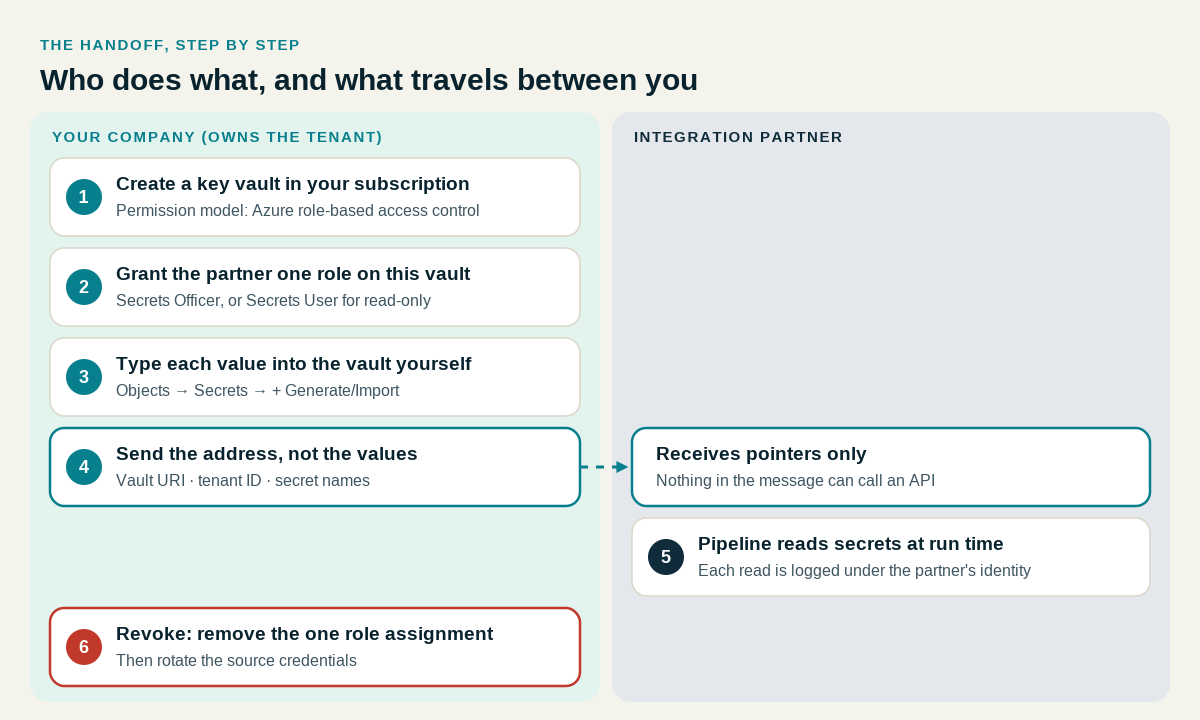 The handoff at a glance. Only the message in the middle crosses between you, and it carries no secrets.
1. Decide the owner and the partner's identity
Name one person at your company who owns the vault. They need permission to create resources and assign roles in the subscription, which usually means Owner or User Access Administrator. (Key Vault Data Access Administrator can also assign the Key Vault roles, and nothing else.)
Then decide which identity the partner uses in your tenant. You have two common options:
- A guest account. Invite the partner's work email as a B2B guest in the Microsoft Entra admin center → Entra ID → Users → Invite external user. Inviting needs at least the Guest Inviter or User Administrator role. They sign in with their own organization's credentials and MFA. You can remove the guest later.
- An account on your domain that you create and control for the engagement. This is simpler to audit and to disable, at the cost of one more account to manage.
Use the same identity for Fabric workspace access and for the vault role, so there is one thing to remove at the end.
2. Create the vault in your subscription
In the Azure portal, go to Create a resource → Key Vault → Create. Use a new resource group and a name such as kv-reporting-analytics. On the Access configuration tab, keep Azure role-based access control. Microsoft made RBAC the default for vaults created with API version 2026-02-01 and later, and it is what lets you grant access per vault instead of through legacy access policies. The Azure Key Vault setup guide walks through every field and the cost.
Microsoft recommends one vault per application per environment, with roles assigned at the vault scope. That keeps the partner's role from reaching anything else you store.
The tighter option. If your security team prefers, the pipeline can run under an identity your company owns, such as a service principal or an account on your domain, and the partner gets only the access needed to build. In that model, the partner's own role on the vault is temporary, and offboarding never breaks the nightly refresh. It costs a bit more setup. Either way, the steps below are the same.
3. Turn on audit logging before anyone reads a secret
Key Vault records who did what only if you send its logs somewhere. On the vault, open Monitoring → Diagnostic settings → Add diagnostic setting. Under Category groups, select audit and allLogs. Choose Send to Log Analytics workspace, pick a workspace, and click Save.
From then on, each secret operation is logged with its operation name (for example SecretGet, SecretSet, SecretList), the result, the caller's IP address and the identity from the token. Failed and unauthorized requests are logged too. Microsoft says entries are available within 10 minutes of the operation.
4. Grant the partner one role on the vault
- Open the vault and go to Access control (IAM) → Add → Add role assignment.
- On the Role tab, search for the role and select it.
- On the Members tab, keep User, group, or service principal, click Select members, and add the partner's identity from step 1.
- Click Review + assign.
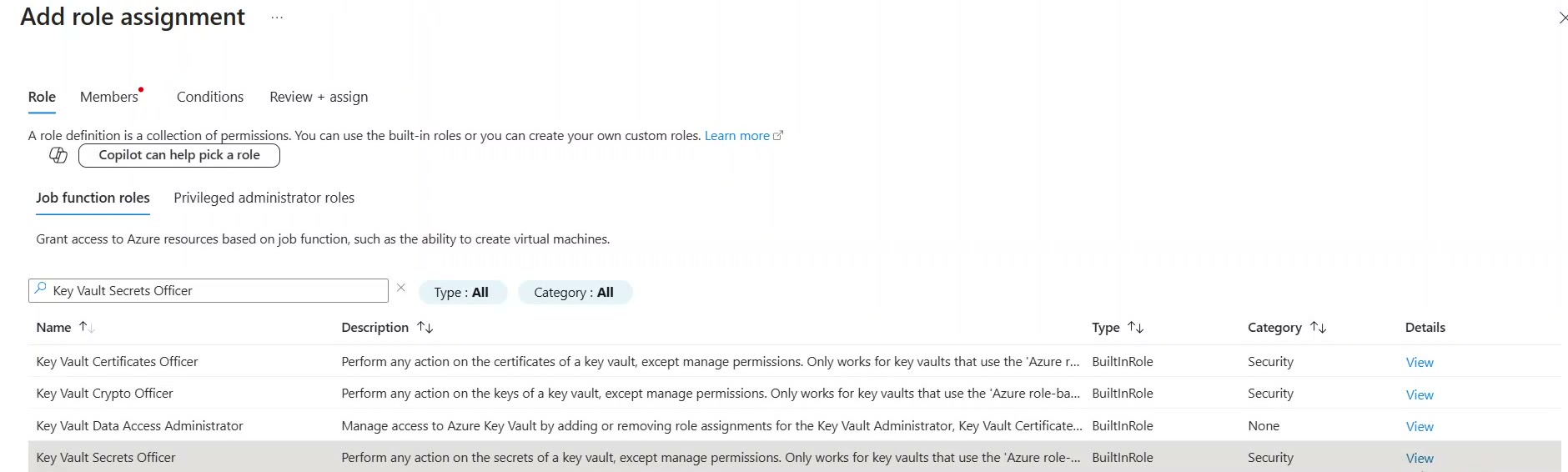 Search the role by name. The description confirms it covers secrets only and cannot manage permissions.
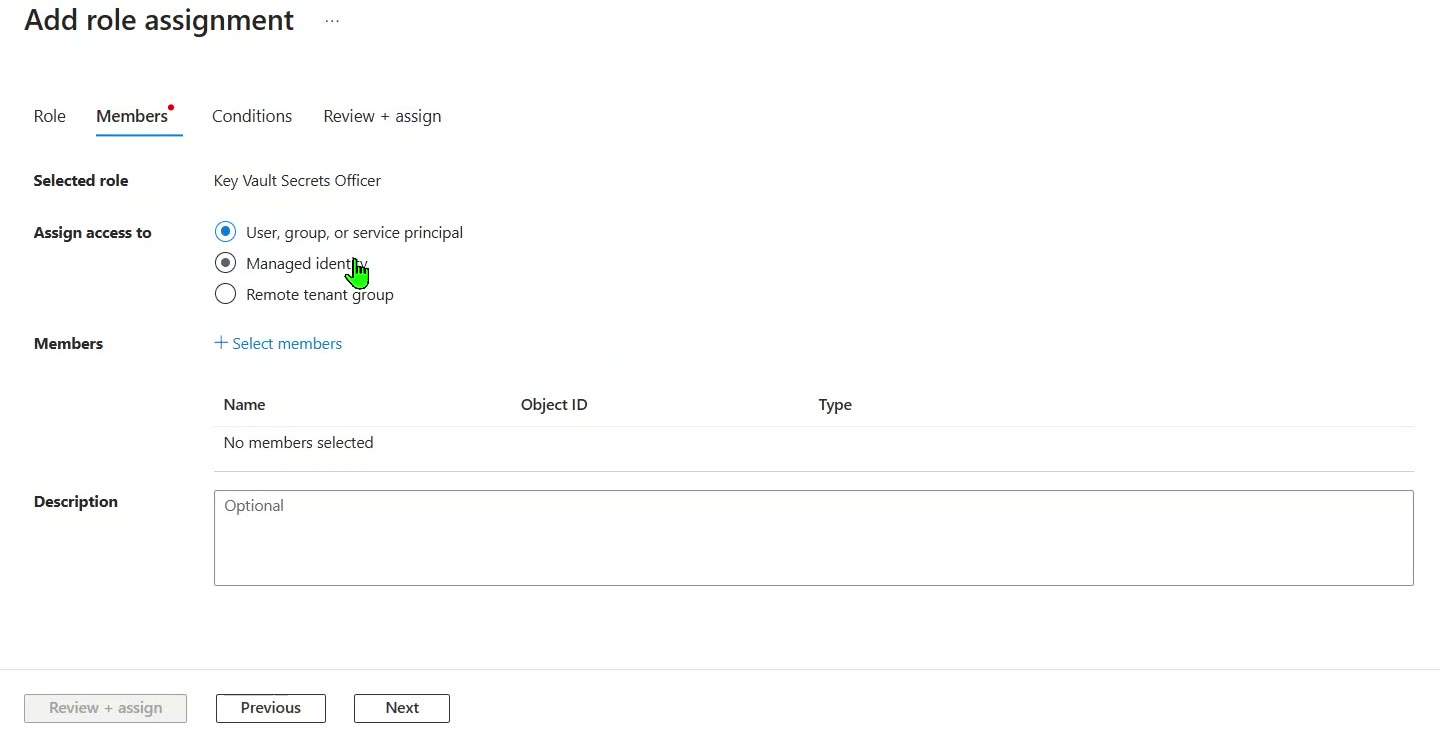 Assign the role to the partner's identity, scoped to this one vault.
Pick the smallest role that does the job. These are Microsoft's built-in data-plane roles:
| Role | What it allows | When to give it to a partner |
|---|---|---|
| Key Vault Reader | Read vault and secret metadata. Cannot read secret values | Rarely. Useful to let someone confirm names without values |
| Key Vault Secrets User | Read secret contents | When the pipeline only reads secrets |
| Key Vault Secrets Officer | Any action on secrets, except managing permissions | When the pipeline must also write a secret, such as a rotating QuickBooks refresh token |
| Key Vault Administrator | All data-plane operations on keys, secrets and certificates. Cannot manage role assignments | Not for a partner |
| Owner, Contributor, User Access Administrator | Control-plane rights, including role assignments for Owner and User Access Administrator | Never for this handoff |
The setup guide in the walkthrough uses Key Vault Secrets Officer, and there is a concrete reason. Intuit's QuickBooks Online refresh token changes value as it is used, and the pipeline has to save the newest one back to the vault. Reading alone would break the connection. If none of your sources need a write-back, Key Vault Secrets User is enough.
Allow a few minutes after assigning. Microsoft's docs say to allow several minutes for role assignments to refresh, and the portal may need a page refresh. If your admin sees "not authorized" when adding secrets, they need a data-plane role themselves first; creating the vault does not grant one.
5. Type each value into the vault yourself
Open Objects → Secrets → + Generate/Import. Enter the agreed Name exactly, paste the Value straight from the source system's screen, and click Create. Repeat for each credential.
A few habits keep the values out of other places:
- Copy from the source screen, paste into the vault, and move on. No scratch notepad, no "temporary" spreadsheet.
- Some values are shown only once. Procore shows the production client secret when you promote the app and does not show it again, so paste it in while the screen is open. If you lose it, reset it in the Developer Portal; the old secret then stops working.
- Use lowercase names with dashes, and agree them up front, for example
procore-client-id,hubspot-service-key,quickbooks-refresh-token. The Fabric and Key Vault guide covers naming, and the credential setup checklist generates the full list. - If a partner is helping on a call, they can guide while your admin types. Pause or skip recording for that part, since a recording or transcript captures whatever is on screen.
The source-side setup for each system has its own guide: Procore Developer Managed Service Account, HubSpot service key and QuickBooks Online app credentials. Request read-only scopes wherever the source allows it; the read-only scopes reference lists them.
6. Send the pointers, not the values
Once the secrets are in, send the partner a short message with:
- Vault URI, from the vault's Overview page, for example
https://kv-reporting-analytics.vault.azure.net/ - Directory (tenant) ID, from Microsoft Entra ID → Overview
- Subscription and resource group names
- Status of each secret: "all added", or which ones are missing
None of these grant access by themselves. Access comes from the role in step 4. Still, treat tenant and subscription IDs as internal details: fine in a direct email to the partner, not something to post publicly.
Here is a message you can copy:
Subject: Key Vault ready for the reporting integration

Vault URI: https://<vault-name>.vault.azure.net/
Directory (tenant) ID: <from Entra ID > Overview>
Subscription / resource group: <names>
Role granted: Key Vault Secrets Officer, to <partner identity>, on this vault only
Secrets added: procore-client-id, procore-client-secret, procore-company-id,
  hubspot-service-key, quickbooks-client-id, quickbooks-client-secret,
  quickbooks-realm-id (refresh token to be added on our call)

No secret values are included in this message.
7. The partner connects and reads at run time
On the partner's side, Fabric has two common ways to use the vault:
- Azure Key Vault references for connections, created under Settings (gear) → Manage Connections and Gateways → Azure Key Vault references → New. Microsoft's docs say Fabric records only the vault URI, the secret name and the credential used to reach the vault. Secret values are not stored in Fabric, and references always fetch the latest version of a secret. The identity that creates the reference needs read access (Get and List) to the vault's secrets.
- Notebooks, using
notebookutils.credentials.getSecret('https://<vault-name>.vault.azure.net/', '<secret-name>'), which authenticates with the credentials of whoever runs the notebook.
Either way, the value is fetched when the pipeline runs and is used in memory. The same principle applies inside a multi-tenant product; the connector framework article shows how we seal OAuth credentials there. Microsoft also warns that notebook output redaction is a convenience, not a security boundary, so code should never print or log a secret.
8. Verify with the log, not with trust
After the partner's first test run, look at the vault's logs. You should see SecretGet operations by the partner's identity, at the time they ran, and nothing else. If you see reads you did not expect, you have found out on day one instead of month six.
Revoke access with one change
To cut off the partner's access to the secrets, open the vault, go to Access control (IAM) → Role assignments, select the partner's assignment and delete it. Nothing else in the vault changes, and no secret needs to be re-entered for your own pipeline to keep working if it runs under your own identity.
Removal usually takes effect within minutes, not instantly. That is why the offboarding sequence below also rotates the source credentials.
Keep an audit trail you will actually read
Two logs matter:
- Key Vault audit events show every secret read and write. In Log Analytics, a starting query looks like this. It assumes the diagnostic setting writes to the resource-specific
AZKVAuditLogstable.Idis the secret that was touched andIdentityis who touched it. If your setting writes toAzureDiagnosticsinstead, filter onResourceProvider == "MICROSOFT.KEYVAULT"; the caller is in the columns that start withidentity_claim_.
AZKVAuditLogs
| where TimeGenerated > ago(30d)
| where OperationName in ("SecretGet", "SecretSet", "SecretList")
| project TimeGenerated, OperationName, Id, Identity, CallerIpAddress, ResultSignature
| order by TimeGenerated desc
- The Azure activity log records role assignment changes, with the account that made them. Filter for Create role assignment and Delete role assignment. Microsoft documents viewing these changes for the past 90 days; export the activity log to a workspace if you need longer.
Put a recurring 15-minute review on someone's calendar. The questions are short: who holds a role on the vault, who read which secret, and were there any failed reads?
Set a rotation schedule
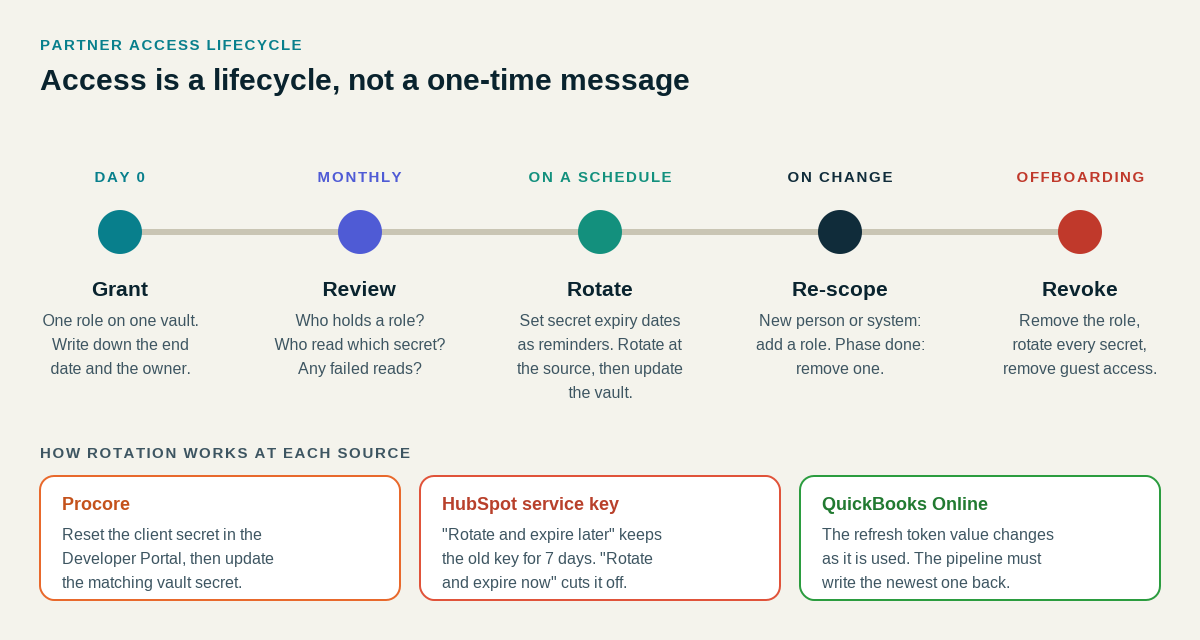 Access is a lifecycle. Put the review and rotation dates in a calendar on day 0.
Rotation means changing the credential at the source, then updating the matching vault secret. Because the pipeline reads by name, nobody else needs to be told.
| Credential | How to rotate | Suggested cadence |
|---|---|---|
| Procore client secret | Reset it in the Developer Portal under your app's credentials, then update the vault secret | At least yearly, and whenever someone with access leaves |
| HubSpot service key | Development → Keys → Service keys → Rotate. "Rotate and expire later" keeps the old key for 7 days. HubSpot also offers automatic rotation every 3, 6 or 12 months | Turn on automatic rotation, or rotate quarterly |
| QuickBooks Online refresh token | Rotates by itself as the pipeline refreshes it; the pipeline must save the newest value. Intuit now caps a refresh token's total life at five years, after which someone must reconnect | Monitor that write-backs succeed |
| QuickBooks client secret | Rotate in the Intuit developer app, then update the vault | At least yearly |
| Vault role assignments | Review and remove anything stale | Monthly review |
The cadences are a sensible starting point, not a vendor requirement. Match them to your own security policy.
You can set an expiration date on a Key Vault secret as a reminder. If you subscribe to the vault's events through Event Grid, Key Vault publishes a near-expiry event 30 days before the date. The setup guide leaves dates empty for the first load so a forgotten date cannot surprise the pipeline. Add them once the integration is stable and someone owns the reminder.
Offboard the partner cleanly
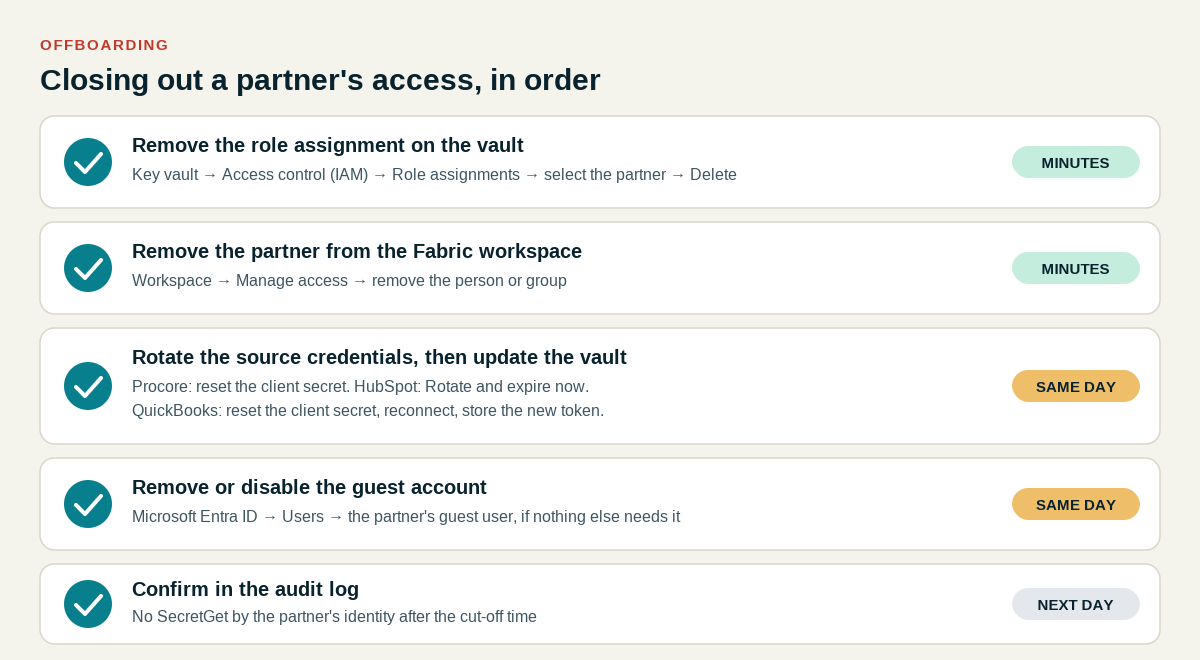 Revoke access first, then rotate, then confirm.
- Remove the vault role assignment in Access control (IAM) → Role assignments.
- Remove the partner from the Fabric workspace under Manage access.
- Rotate every source credential the partner could have read: reset the Procore client secret, use Rotate and expire now on the HubSpot service key, and reset the QuickBooks client secret in the Intuit developer app, then reconnect so a new refresh token is stored. Update each vault secret.
- Remove or disable the guest account in Entra ID → Users, if nothing else needs it.
- Check the audit log the next day. There should be no
SecretGetby the partner's identity after the cut-off time.
If the pipeline ran under the partner's identity, move it to an identity your company owns before step 1, or the nightly refresh will stop when access does.
Common mistakes
- Sending "just the client ID" by email. Client IDs are not secret on their own, but the habit spreads. Put every credential in the vault, so there is one rule and no judgement calls.
- Creating the vault in the partner's tenant. Then the partner owns the audit log and the off switch. The vault belongs in yours.
- Assigning the role at the subscription or resource group. The role should apply to this vault only. A broad scope reaches every vault you add later.
- Giving Owner or Contributor "to save time". Owner can assign roles, including to itself. Use a Key Vault data-plane role.
- Skipping diagnostic logging. Without it, "who read the HubSpot key last month?" has no answer.
- Recording the setup call. The recording captures every value that was on screen. Stop recording while secrets are visible.
- Leaving the pipeline on a personal account. When that person leaves, the refresh fails. Plan which identity runs production.
- Removing access but not rotating. Revocation stops future reads. Rotation makes anything already read worthless.
Checklist
Copy this into your ticket or project plan. The interactive API credential setup checklist has the same items and generates secret names.
- One named owner at the company for the vault and the integration
- Partner identity chosen (guest account or account on your domain) and MFA confirmed
- Key vault created in your own subscription with Azure role-based access control
- Diagnostic settings send audit and allLogs to a Log Analytics workspace
- Partner granted one role (Secrets User or Secrets Officer) scoped to this vault only
- Source credentials created with read-only scopes where available
- Each value typed into the vault by your admin, with agreed lowercase-dash names
- No secret values in email, chat, documents, tickets, screenshots or recordings
- Partner sent only the vault URI, tenant ID, subscription and resource group, and secret status
- First test run confirmed in the audit log under the partner's identity
- Monthly access review and rotation dates in a calendar, with an owner
- Offboarding plan written: remove role, remove workspace access, rotate, remove guest, check log
Do it together on a call
Most of this takes under an hour once the source credentials exist. If you would rather not work through the portal alone, Build Flows can do the setup with you on a screen-share: your admin types the values, we confirm the roles and logging, and nothing is recorded or sent. Email charley@buildflows.ai or start at buildflows.ai. For how we handle client data in general, see the security page, and if a step fails, the troubleshooting guide covers the common errors.
References
- Microsoft Learn: Grant permission to applications to access an Azure key vault using Azure RBAC
- Microsoft Learn: Azure Key Vault logging
- Microsoft Learn: Enable Azure Key Vault logging
- Microsoft Learn: Monitoring Key Vault with Azure Event Grid
- Microsoft Learn: Azure Key Vault soft-delete
- Microsoft Learn: View activity logs for Azure RBAC changes
- Microsoft Learn: Add a guest user and send an invitation (Entra B2B)
- Microsoft Learn: Configure Azure Key Vault references in Microsoft Fabric
- Microsoft Learn: NotebookUtils credentials utilities for Fabric
- HubSpot Developers: Account service keys
- Procore Developers: Managing OAuth credentials and redirect URIs
- Procore Developers: Developer Managed Service Accounts
- Procore Support: What is a Developer Managed Service Account?
- Intuit Developer: Authorization FAQ
Frequently asked questions
Is it ever OK to email an API key?
No. Email leaves copies in sent items, inboxes, forwards and backups, and you cannot revoke or audit any of them. Put the key in a vault in your own tenant and send the partner the vault address and a role instead.
What should I send a consultant instead of the credentials?
Send the vault URI, the Directory (tenant) ID, the subscription and resource group names, and the list of secret names with their status. None of these grant access on their own; access comes from the role assignment you create on the vault.
Which Azure Key Vault role should an integration partner get?
Key Vault Secrets User is enough if the pipeline only reads secrets. Key Vault Secrets Officer is needed if it must write a value back, such as a QuickBooks Online refresh token that changes as it is used. Avoid Owner, Contributor and Key Vault Administrator, and scope the role to the one vault.
Can the partner still see the secret values?
An identity allowed to read a secret can retrieve its value, so the vault does not hide values from the partner. What it adds is no copies in transit, a log entry for every read under a named identity, and one place to cut off access. Pair that with rotation at offboarding.
How do I revoke a partner’s access to the secrets?
Open the vault, go to Access control (IAM), Role assignments, and delete the partner’s assignment. Allow a few minutes for it to apply. Then rotate the source credentials and check the audit log for any reads after the cut-off.
How often should integration API keys be rotated?
A practical baseline is at least yearly for client secrets, quarterly or automatic rotation for HubSpot service keys, and immediately whenever someone with access leaves. QuickBooks refresh tokens rotate on their own, so monitor that the pipeline saves the newest one.
Do I need Key Vault logging turned on?
Yes, if you want to know who read which secret. Add a diagnostic setting on the vault that sends the audit and allLogs category groups to a Log Analytics workspace. Without it there is no per-read history to review.
Next step
Need this connection in your environment?
Scope one integration: the records, direction, timing, and business rules behind the connection.
Prefer email? charley@buildflows.ai
Keep learning
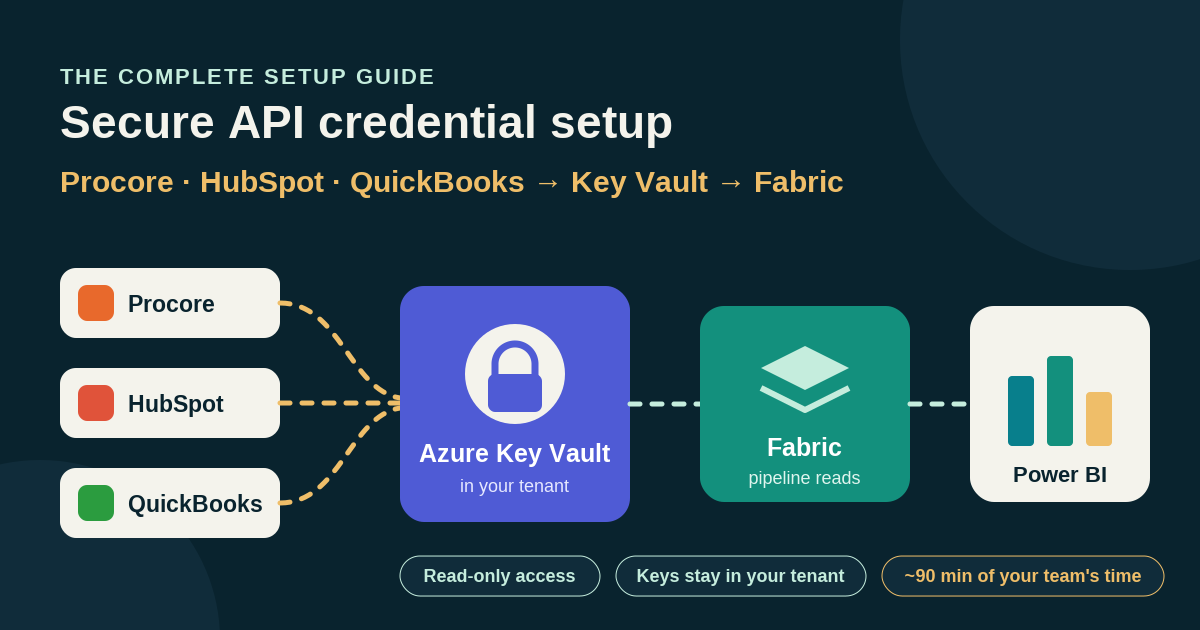
Integrations · November 14, 2026
Secure API Credential Setup for Procore, HubSpot and QuickBooks with Azure Key Vault and Microsoft Fabric
The end-to-end guide to connecting Procore, HubSpot and QuickBooks Online to Microsoft Fabric and Power BI without handing over credentials: who owns each step and how long it takes, the architecture from sources through Azure Key Vault to Fabric, the four steps (Fabric access, read-only API access in three systems, Key Vault with the Secrets Officer role, connect and go live), the exact secret names, what to send back, how to revoke access, common mistakes and a checklist.
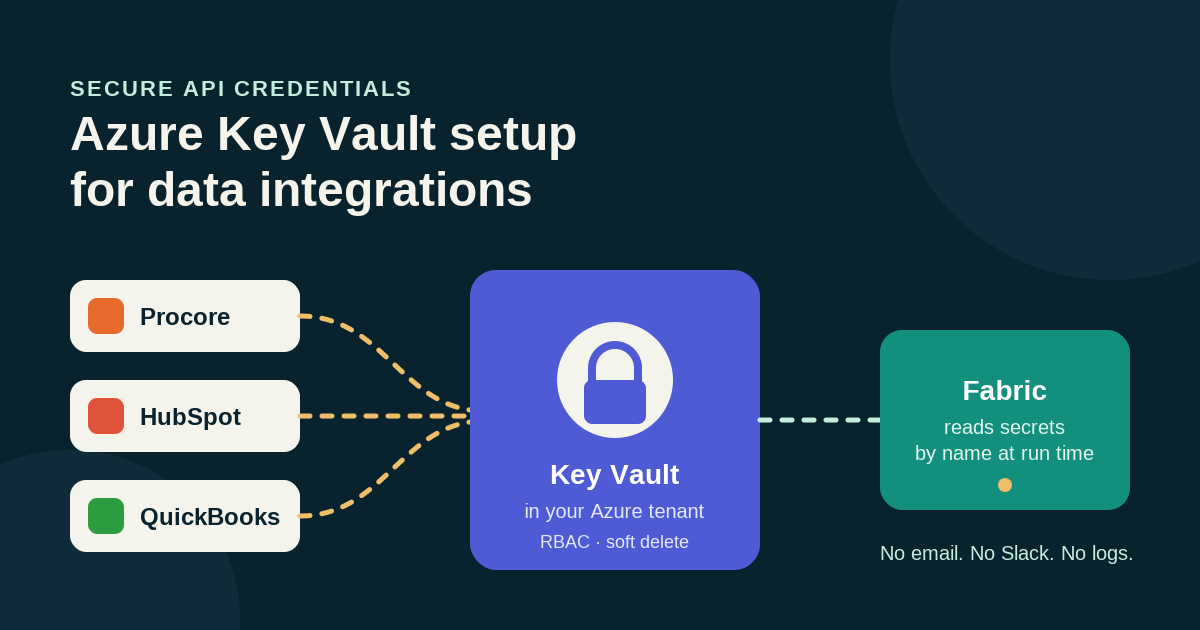
Integrations · November 14, 2026
Azure Key Vault Setup for Data Integrations: Create the Vault, Set RBAC and Assign Secrets Officer
A step-by-step guide to creating an Azure Key Vault for integration secrets: resource group and globally unique name, matching the Fabric region, Standard tier, soft delete and the purge protection trade-off, the RBAC permission model, networking, the Key Vault Secrets Officer role assignment, why 'not authorized' appears right after setup, and what it really costs.
Integrations · November 14, 2026
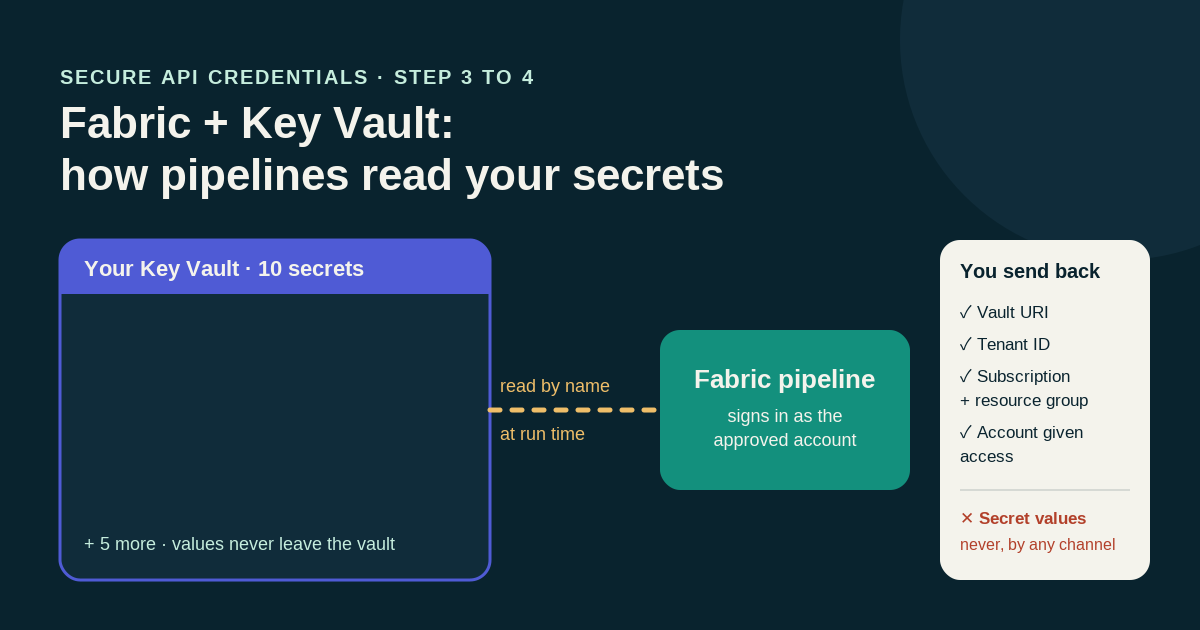
Microsoft Fabric and Azure Key Vault: Secret Names, the Vault URI Handoff and How Pipelines Read Secrets
The last stretch of a secure credential setup: Fabric workspace access (Admin role, guest vs domain account, F2 cost), adding ten named secrets under Objects > Secrets > Generate/Import, Key Vault naming rules, what to send back to your partner and what never to send, how a Fabric pipeline reads secrets at run time with notebookutils getSecret and whose identity it uses, why Key Vault references in Fabric connections don't cover Procore, HubSpot or QuickBooks, and how to revoke access by removing one role assignment.