Key takeaways
- Procore service accounts use OAuth client credentials: the pipeline trades the client ID and secret for a 1.5-hour access token whenever it needs one, with no person involved.
- A HubSpot service key is a static bearer token. Nothing expires on a timer; the risk is rotating the key in HubSpot without updating Key Vault the same day.
- QuickBooks Online uses authorization code plus refresh token: an admin approves once, then each refresh returns a 60-minute access token and a refresh token you must save back.
- QuickBooks is why the integration needs Key Vault Secrets Officer, not read-only access: it writes the newest refresh token to the vault on every refresh.
- A 401 usually means the credential is wrong or expired; a 403 usually means it works but lacks permission or scope.
- Store long-lived secrets in Key Vault and fetch short-lived access tokens at run time instead of storing them.
You set up read-only API access for Procore, HubSpot and QuickBooks Online, and you put every secret in Azure Key Vault. Three months later one connection stops working and the other two keep running. Nobody changed anything. Or so it seems.
The reason is usually that the three systems don't authenticate the same way. Procore hands out a fresh token every time the pipeline asks. HubSpot gives you one key that works until someone rotates it. QuickBooks Online needs a person to approve the connection once, and after that it keeps itself alive by trading one refresh token for the next. Each model fails in its own way, at its own time, for its own reasons.
This guide explains the three models in plain English, shows each one as a sequence diagram, and lists what breaks when. It's the background to the full four-step credential setup. You don't need to be a developer to follow it, but your IT lead and whoever runs the integration should both read it.
The short version
| System | Auth model | What you store in Key Vault | Who has to act | Short-lived token | What usually breaks it |
|---|---|---|---|---|---|
| Procore | OAuth 2.0 client credentials, using a Developer Managed Service Account (DMSA) | Client ID, client secret, company ID | Nobody, after install | Access token, 5,400 seconds (1.5 hours) | Client secret regenerated, app uninstalled, permissions changed |
| HubSpot | Static bearer token (a service key) | The key itself | Nobody, until rotation | None. The key is the credential | Key rotated or revoked and Key Vault not updated |
| QuickBooks Online | OAuth 2.0 authorization code + refresh token | Client ID, client secret, realm ID, refresh token | A QuickBooks admin clicks Connect once | Access token, 60 minutes | Refresh token not saved back, unused too long, revoked, or app disconnected |
If you only remember one row, remember the last one. QuickBooks is the only system here where the integration has to write to Key Vault on its own, every time it refreshes.
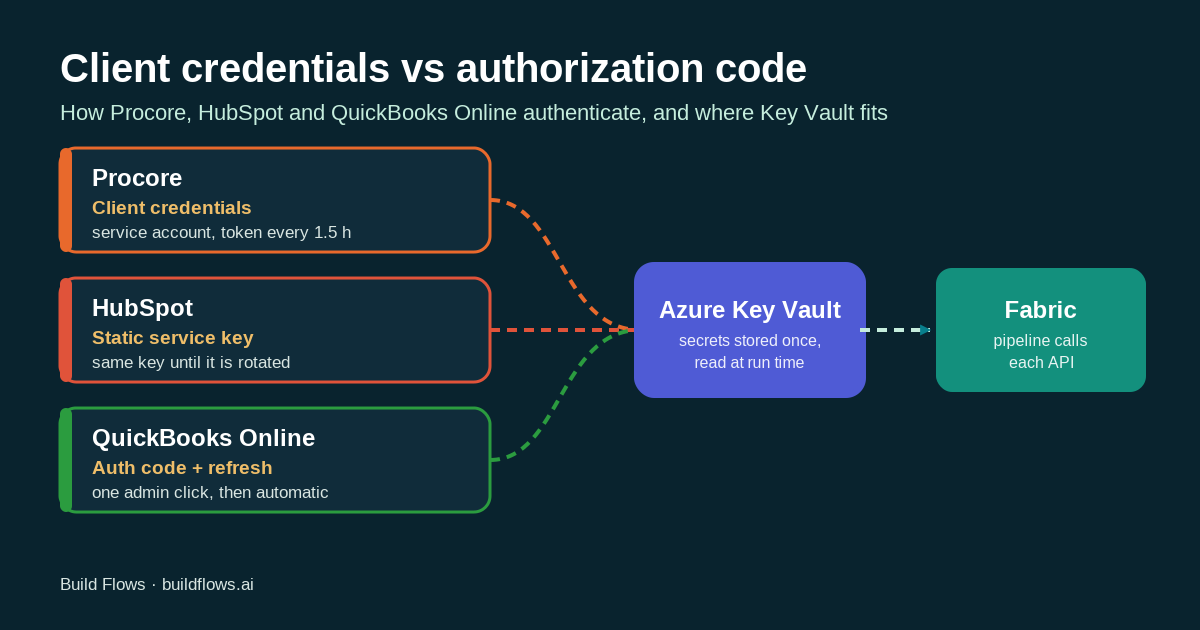 Three systems, three auth models, one vault.
Three auth models in plain English
Client credentials: the app logs in as itself
OAuth 2.0 defines several "grant types", which are ways for an app to get an access token. The client credentials grant is the simplest. The app sends its own client ID and client secret to the login server and gets back a short-lived access token. No person signs in, and nobody clicks Approve. The OAuth standard describes it for exactly this case: an app acting on its own behalf, not on behalf of a user.
Procore's version of this is the Developer Managed Service Account. You create an app in the Procore Developer Portal, add the service account component, set what each tool can see (None, Read Only, Standard or Admin), and a company admin installs the app in Company Settings → App Management. From then on, the app's client ID and secret are enough to get a token. The Procore service account guide walks through the clicks.
Think of it like a badge reader. The badge (client ID and secret) doesn't open doors by itself. Each time you swipe it, you get a day pass (the access token), and the day pass expires.
Static bearer token: the key is the credential
A bearer token is any token where holding it is enough. You put it in the Authorization: Bearer ... header and the API trusts whoever sent it. With a static token there's no exchange step at all. The same value works every time until someone rotates or revokes it.
HubSpot's service keys work this way. A super admin (or a user with Developer tools access) creates the key, picks scopes such as crm.objects.deals.read, and copies the value. HubSpot's docs show it sent as a plain bearer token. Older setups used a private app access token (it starts with pat-), which is sent the same way. If your vault already has a secret called hubspot-private-app-token, you can keep the name and store the service key in it. See HubSpot service key setup.
This is a house key. Simple, and it works until you change the locks. Whoever holds a copy can get in, which is why it belongs in Key Vault and nowhere else.
Authorization code + refresh token: a person says yes once
The authorization code grant exists for when the data belongs to someone who has to agree to share it. A person is sent to the provider's sign-in page, approves access, and the provider redirects back with a one-time code. The app exchanges that code for two tokens: a short-lived access token and a longer-lived refresh token. When the access token expires, the app trades the refresh token for a new pair. No person is needed again unless the refresh token stops working.
QuickBooks Online uses this model. That's why the setup has a step where "an admin clicks Connect once". Your QuickBooks admin signs in to Intuit, picks the company, and approves accounting access. Intuit sends back the code and the realm ID, which is the company's ID in QuickBooks. After that the connection runs on its own. The QuickBooks credentials guide covers creating the Intuit app.
This is a valet ticket. The owner hands over the car once. After that, each ticket is swapped for a new one every time the car moves, and you must keep the newest ticket.
Why each system is different
It isn't arbitrary. Each vendor picked the model that fits who owns the data and how apps are installed.
- Procore has both models. Apps that act for a signed-in user use the authorization code grant (the "User Level Authentication" component in the Developer Portal). Company-wide, unattended integrations use the DMSA with client credentials. A reporting pipeline is unattended, so the service account is the right fit.
- HubSpot introduced service keys as the replacement for legacy private apps in system-to-system integrations. A service key is tied to one HubSpot account and is meant for exactly this kind of data integration. HubSpot's docs note limits: service keys are for REST API calls, not webhooks or UI extensions.
- Intuit built QuickBooks Online access around the person who owns the books. As far as Intuit's public docs show, there is no service-account grant for a company's accounting data. A person with access to the company has to authorize the app, and the app then keeps the connection alive with refresh tokens.
Procore: client credentials, step by step
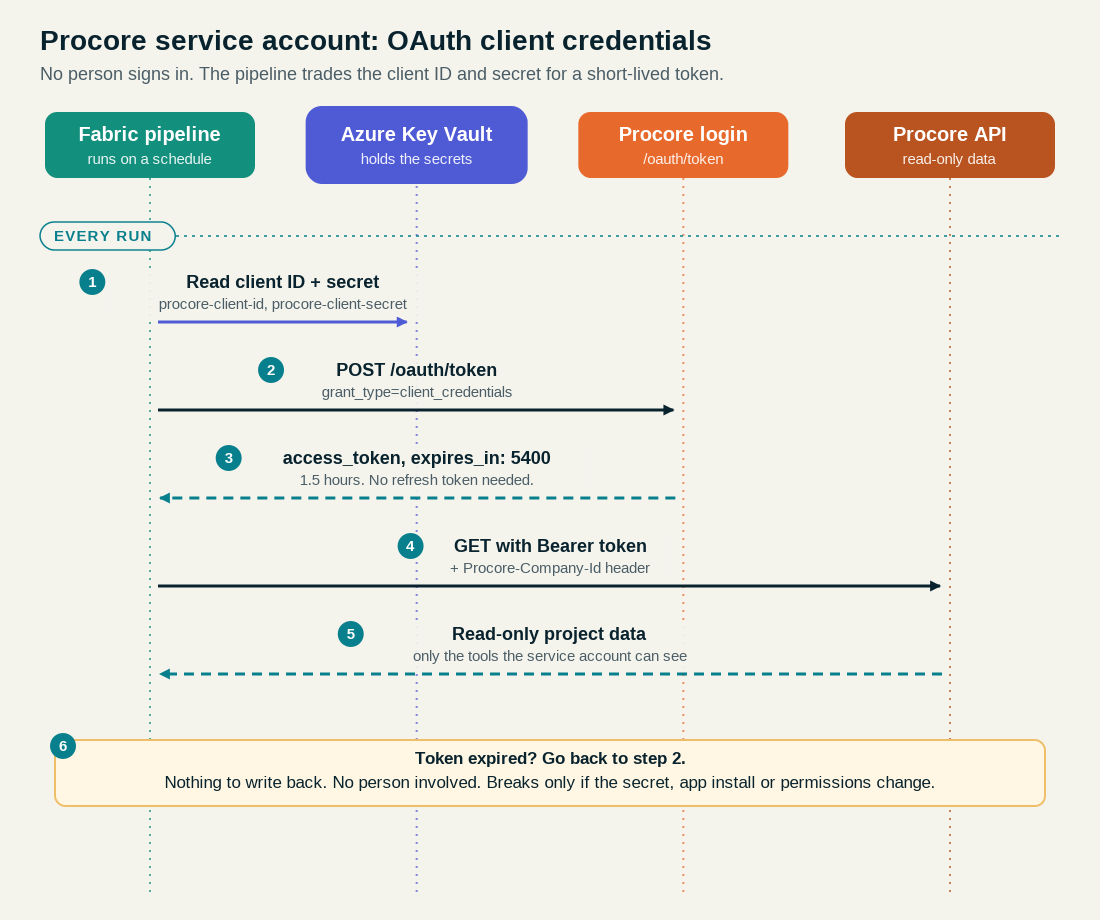 Procore: the pipeline trades the client ID and secret for a 1.5-hour token, every time it needs one.
- The pipeline reads
procore-client-idandprocore-client-secretfrom Key Vault. - It posts them to Procore's
/oauth/tokenendpoint withgrant_type=client_credentials. - Procore returns an access token. Procore's documented example shows
expires_in: 5400, which is 1.5 hours. - The pipeline calls the API with
Authorization: Bearer <token>and aProcore-Company-Idheader, so Procore knows which company the request is for. - Procore returns only what the service account's permissions allow.
What you store: the client ID, the client secret and the company ID (plus the base URL, https://api.procore.com). You don't need to store the access token. Getting a new one costs one request, so the simplest safe design is to request a token at the start of each run and request another if a call returns 401.
What breaks it: someone regenerates the client secret, the app is uninstalled from the company, or the service account loses access to a tool or project. Token expiry on its own is never a real outage, because the pipeline just asks again.
HubSpot: a static key, step by step
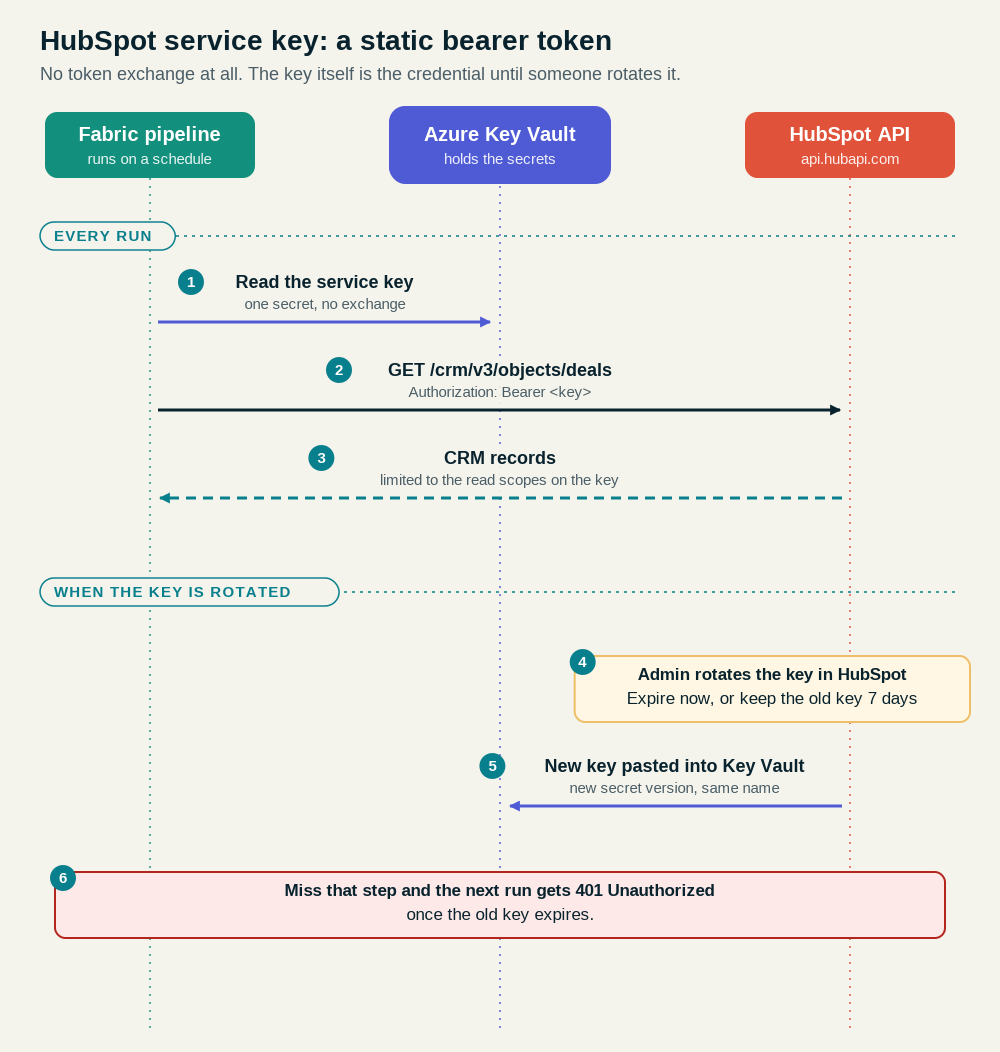 HubSpot: no exchange at all, so the only moving part is rotation.
- The pipeline reads the key from Key Vault.
- It calls the CRM API with
Authorization: Bearer <key>. - HubSpot returns records, limited to the scopes on the key.
There's no token endpoint and nothing expires on a timer by default. The moving part is rotation. HubSpot's docs describe three options:
| Rotation option | What happens to the old key | When to use it |
|---|---|---|
| Rotate and expire now | Revoked immediately | The key may have leaked |
| Rotate and expire later | Keeps working for 7 days | Planned rotation, so you have time to update Key Vault |
| Automatic rotation | Rotates every 3, 6 or 12 months; super admins and users with Developer tools access get an email when it rotates and before the old key expires | Ongoing hygiene, if someone owns the Key Vault update |
HubSpot recommends rotating every six months. Whichever option you pick, the rule is the same: the day you rotate in HubSpot is the day you add a new secret version in Key Vault. Use the same secret name so the pipeline picks up the new value without a code change. The rotation guide has the runbook.
QuickBooks Online: authorization code + refresh token, step by step
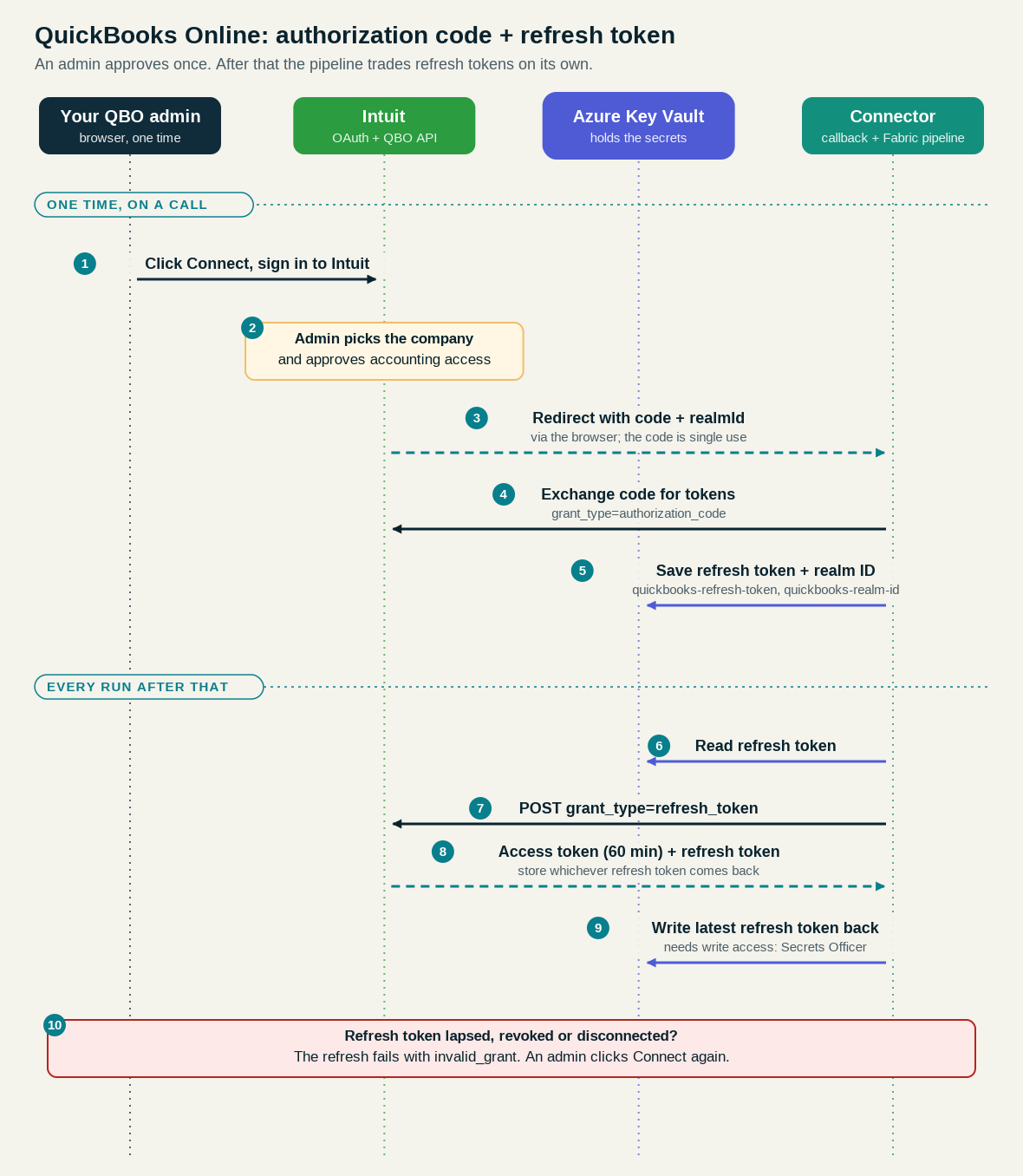 QuickBooks: one admin approval, then the connector keeps the newest refresh token in Key Vault.
One time, on a call:
- Your QuickBooks admin clicks Connect and signs in to Intuit.
- They choose the company and approve accounting access.
- Intuit redirects back with a one-time authorization code and the realm ID.
- The connector exchanges the code for an access token and a refresh token.
- The refresh token and realm ID go into Key Vault as
quickbooks-refresh-tokenandquickbooks-realm-id.
Every run after that:
- The connector reads the refresh token from Key Vault.
- It posts
grant_type=refresh_tokento Intuit's token endpoint. - Intuit returns a new access token and a refresh token. Intuit's docs state access tokens are valid for 60 minutes.
- The connector writes the refresh token it just received back to Key Vault, as a new version of the same secret.
Step 4 is the one that bites. Intuit's authorization FAQ says the refresh token value can change when you use it, and that once you receive a new one, the previous value expires. Always store the latest one. Keep using an old value and the next refresh can fail with invalid_grant. That's why the setup asks for Key Vault Secrets Officer and not a read-only role: the integration has to update this one secret on its own. In a Fabric Python notebook, notebookutils.credentials.putSecret can do that write. Microsoft's docs note it works only in notebooks on the Python runtime, not in Spark notebooks. The Fabric notebook guide shows the read side.
How long does the refresh token last? Be careful with any single number here, including ones you find in older blog posts. Intuit's authorization FAQ says a refresh token expires if it goes unused for 100 days, and that all refresh tokens now have a maximum validity of five years. Intuit's announcement puts the first five-year expiries in 2027 or 2028, depending on the scopes and when the token was issued. The practical rules don't change:
- Refresh at least every few days, even if you only report weekly, so the token never sits unused.
- Read
x_refresh_token_expires_infrom each token response and log it, instead of hard-coding a lifetime. - Plan for the day an admin has to click Connect again, because sooner or later one will.
Only one process should refresh at a time. If two runs refresh in parallel, one of them can end up holding a token that's already been replaced. Schedule the QuickBooks refresh in one place.
What breaks when
| Event | Procore (client credentials) | HubSpot (service key) | QuickBooks (auth code + refresh) |
|---|---|---|---|
| Access token expires | Nothing. Pipeline asks for a new one | Not applicable | Nothing, if the refresh works |
| Secret rotated at the vendor | Fails until Key Vault has the new client secret | Fails once the old key expires, unless Key Vault was updated | Client secret change fails the refresh until Key Vault is updated |
| Refresh token not saved back | Not applicable | Not applicable | Next refresh can fail with invalid_grant |
| Integration idle for months | Fine | Fine | Refresh token can lapse. Admin must reconnect |
| Person who set it up leaves | Fine. The service account isn't a person | Usually fine. Check that another admin can rotate the key | Can break. If the admin who clicked Connect loses admin access or is removed from the company, refreshes can fail with invalid_grant. Have another admin ready to reconnect |
| Permissions or scopes reduced | 403 on the tools removed | 403 on the objects without scope | 403 or missing data |
| App uninstalled, disconnected or key deleted | Every call fails | Every call fails with 401 | Refresh fails, admin must reconnect |
The useful pattern: a 401 usually means the credential itself is wrong or expired, and a 403 usually means the credential works but doesn't have permission. The troubleshooting guide goes through each error by system.
How Key Vault fits
Key Vault holds the long-lived parts. It doesn't need to hold the short-lived access tokens, because the pipeline can get those on demand.
| Secret name | Model | Who writes it | How often it changes |
|---|---|---|---|
procore-client-id | Client credentials | You, at setup | Rarely |
procore-client-secret | Client credentials | You, at setup and on rotation | When regenerated |
procore-company-id | Client credentials | You, at setup | Never |
procore-base-url | Client credentials | You, at setup | Never |
hubspot-private-app-token (holds the service key) | Static token | You, at setup and on rotation | Every rotation |
quickbooks-client-id, quickbooks-client-secret | Auth code | You, at setup | Rarely |
quickbooks-realm-id | Auth code | Connector, at Connect | Never |
quickbooks-environment | Auth code | You, at setup | Never |
quickbooks-refresh-token | Auth code | Connector, on every refresh | Can change every refresh |
A few rules that follow from the models:
- Read at run time, never copy. Fabric reads secrets by vault URL and name, using the identity running the notebook. Microsoft's docs say to never hard-code secrets in notebook code. See Fabric and Key Vault.
- Give write access only where it's needed. Secrets Officer can read and write secrets. Secrets User can only read them. The QuickBooks refresh is the reason the integration identity needs Officer. Key Vault setup covers the role assignment.
- Use expiration dates as reminders. If you set an expiration date on the HubSpot key secret to match your rotation schedule, Key Vault raises a
SecretNearExpiryevent 30 days before that date. The expiry alerts guide wires that up to an email. - Never send any of these by email. That includes the refresh token. The secure handoff guide explains why and what to do instead.
Checklist
- Procore DMSA installed in Company Settings → App Management, with Read Only on the tools the reports need
-
procore-client-id,procore-client-secret,procore-company-idandprocore-base-urlin Key Vault - HubSpot service key created with read-only scopes and stored in Key Vault
- HubSpot rotation schedule chosen, with a named person who updates Key Vault the same day
- Intuit app created, with QuickBooks client ID and secret in Key Vault
- QuickBooks admin booked for the one-time Connect click
- Integration identity has Key Vault Secrets Officer on this vault only, so it can save new refresh tokens
- QuickBooks refresh runs from one scheduled job, at least every few days
-
x_refresh_token_expires_inlogged on each refresh - Alerts on 401 responses for each system, plus Key Vault expiry events where you set dates
- A written note of who can click Connect again if QuickBooks has to be reauthorized
Use the API credential setup checklist to track the whole setup, and the read-only scope picker to choose scopes.
Need a hand?
Build Flows sets up these connections for contractors who report in Microsoft Fabric: the service account, the scopes, the vault and the refresh job that keeps QuickBooks alive. If you want a second pair of eyes on your setup, email charley@buildflows.ai or visit buildflows.ai.
References
- IETF, RFC 6749: The OAuth 2.0 Authorization Framework (authorization code grant, section 4.1; client credentials grant, section 4.4; refreshing an access token, section 6)
- Procore, Using the OAuth 2.0 Client Credentials Grant Type
- Procore, Developer Managed Service Accounts
- Procore, Choosing an OAuth 2.0 Grant Type
- Procore, Making Your First Call to the Procore API
- HubSpot, Account service keys
- HubSpot, Developer changelog: service keys
- Intuit, Authorization FAQ
- Intuit, Set up OAuth 2.0
- Intuit Developer blog, Important changes to refresh token policy
- Microsoft Learn, NotebookUtils credentials utilities for Fabric
- Microsoft Learn, Azure Key Vault as Event Grid source
- Microsoft Learn, Provide access to Key Vault keys, certificates, and secrets with Azure role-based access control
Frequently asked questions
What is the difference between OAuth client credentials and authorization code?
Client credentials lets an app get a token with its own client ID and secret, with no person signing in. Authorization code sends a person to sign in and approve access once, then the app uses a refresh token to stay connected.
How long does a Procore access token last?
Procore documents an expires_in of 5400 seconds, or 1.5 hours, for tokens from the client credentials grant. A service account integration simply requests a new token when the old one expires, so no refresh token is needed.
Do HubSpot service keys expire?
HubSpot does not document a default lifetime. A key stops working when it is rotated or revoked. You can rotate and expire the old key now, keep it working for 7 days, or set automatic rotation every 3, 6 or 12 months.
How long do QuickBooks Online tokens last?
Intuit says access tokens are valid for 60 minutes. A refresh token expires if it goes unused for 100 days, and Intuit now caps every refresh token at five years. Log x_refresh_token_expires_in from each response rather than hard-coding a lifetime.
Why does QuickBooks need an admin to click Connect?
QuickBooks Online uses the OAuth authorization code flow, so a person with access to the company must sign in to Intuit and approve the app once. After that the integration keeps the connection alive with refresh tokens.
Why does the integration need Key Vault Secrets Officer instead of read access?
The QuickBooks refresh token can change every time it is used, so the integration must write the newest value back to Key Vault. Secrets User can only read secrets; Secrets Officer can also set them.
Should I store access tokens in Azure Key Vault?
Usually not. Access tokens last an hour or two and can be fetched at run time. Store the long-lived parts in Key Vault: client IDs and secrets, the HubSpot key, IDs such as the realm ID, and the QuickBooks refresh token.
Next step
Need this connection in your environment?
Scope one integration: the records, direction, timing, and business rules behind the connection.
Prefer email? charley@buildflows.ai
Keep learning
Integrations · November 14, 2026
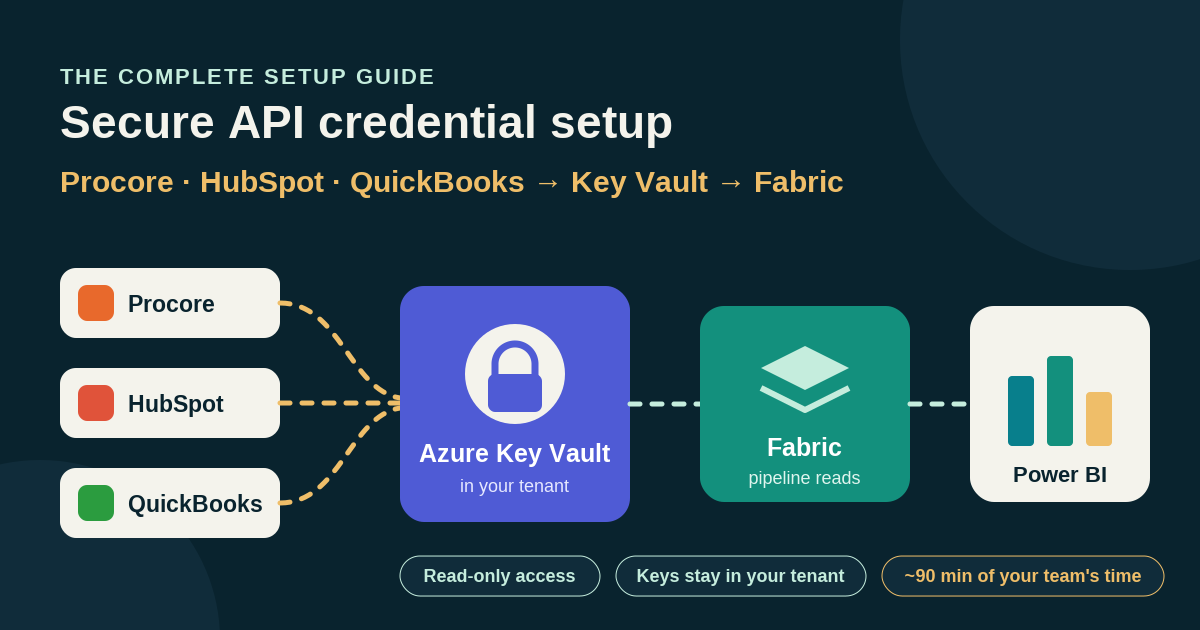
Secure API Credential Setup for Procore, HubSpot and QuickBooks with Azure Key Vault and Microsoft Fabric
The end-to-end guide to connecting Procore, HubSpot and QuickBooks Online to Microsoft Fabric and Power BI without handing over credentials: who owns each step and how long it takes, the architecture from sources through Azure Key Vault to Fabric, the four steps (Fabric access, read-only API access in three systems, Key Vault with the Secrets Officer role, connect and go live), the exact secret names, what to send back, how to revoke access, common mistakes and a checklist.
Playbooks · November 14, 2026
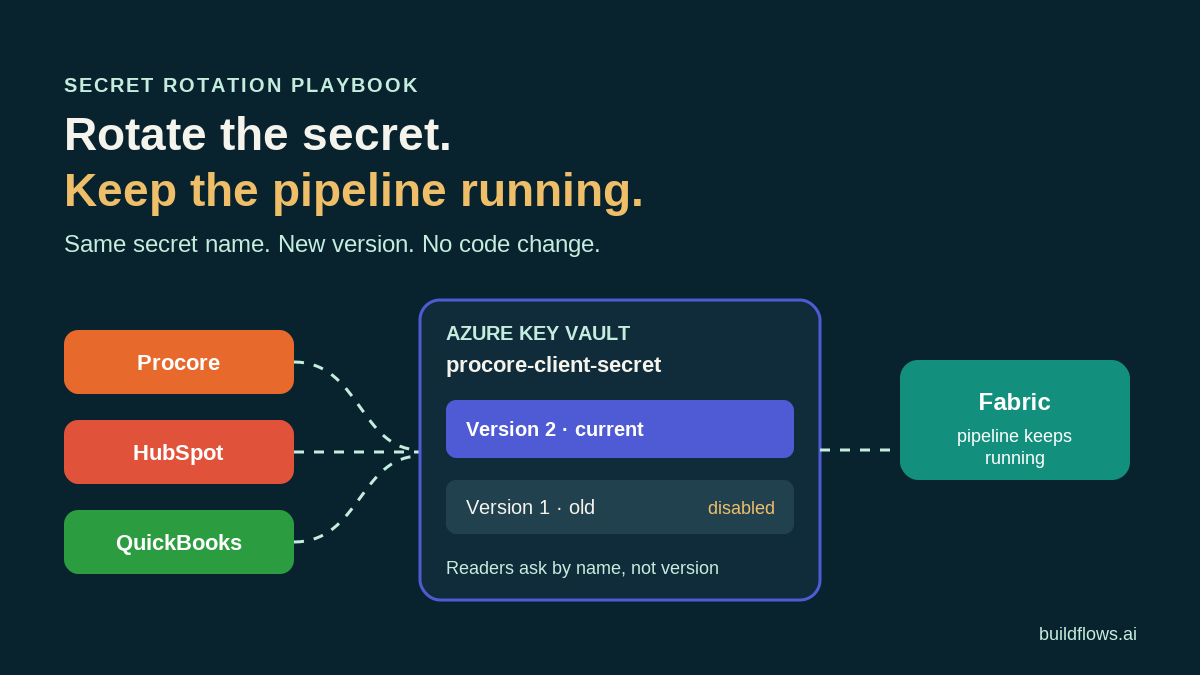
How to Rotate Procore, HubSpot and QuickBooks Secrets in Azure Key Vault Without Breaking Your Pipelines
When and how to rotate integration credentials: per-system steps for Procore, HubSpot service keys and QuickBooks Online, adding Key Vault versions so Fabric picks them up by name, a rotation calendar, and Event Grid near-expiry alerts.
Integrations · November 14, 2026
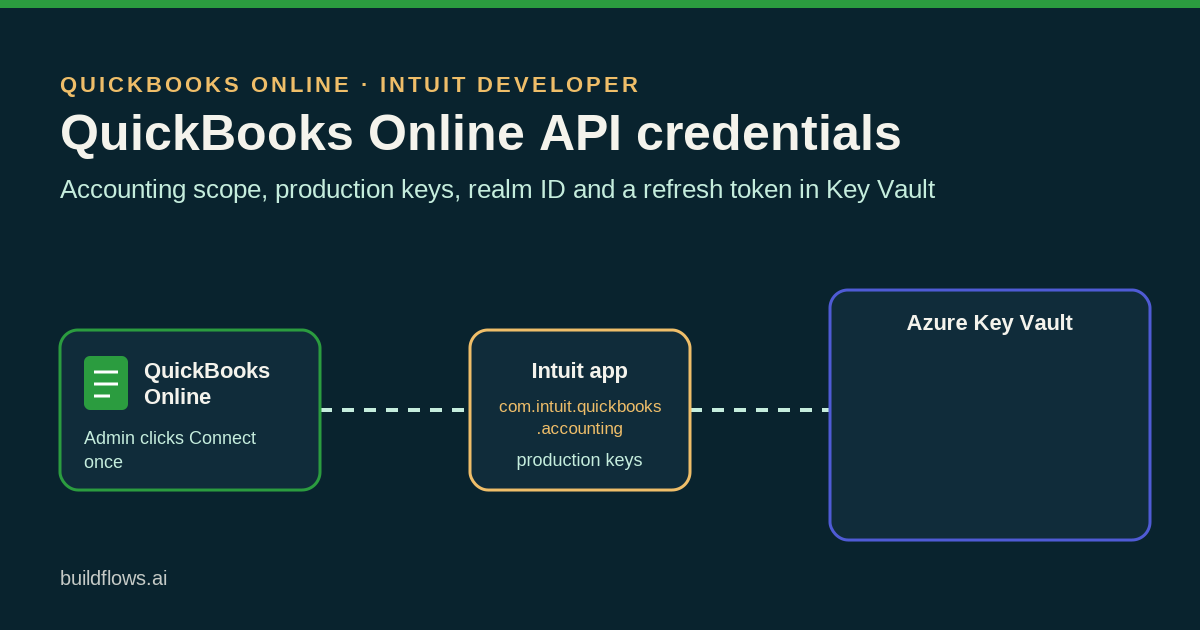
QuickBooks Online API Credentials: Intuit Developer App, Production Keys and Refresh Tokens
A step-by-step guide to QuickBooks Online API credentials for reporting: the Intuit developer account, an app with only the Accounting scope, development versus production keys, the production-keys tasks, the realm ID, the one-time Connect step, and how refresh tokens rotate and expire under Intuit's current policy, with every value stored in Azure Key Vault.