Key takeaways
- Each system checks a different admin role: Procore Directory Admin, HubSpot Super Admin, QuickBooks primary or Company admin, and Azure Owner or User Access Administrator.
- Creating a Key Vault does not let you add secrets; someone with role-assignment rights must grant Key Vault Secrets Officer.
- Microsoft states B2B guest users can't be Fabric capacity administrators, so a domain account avoids that limit.
- Each system admin types their own keys straight into the vault; only the vault URI and IDs are sent back.
- With prep done, a 60-minute call covers verification, the QuickBooks Connect click and a first test pull.
- Handing it all off works if you grant narrow, time-boxed admin access and take it back afterward.
Connecting Procore, HubSpot, QuickBooks Online and Microsoft Fabric rarely stalls on code. It stalls on calendars. The controller wants the dashboard. IT owns Azure. The Procore admin is on a jobsite. Nobody is sure who is a HubSpot Super Admin. The QuickBooks login belongs to the outside bookkeeper. Two weeks later, the setup call gets rescheduled for the third time.
The fix is to name the person and the admin role for each step before anyone opens a browser. This playbook gives you that list: the role each system requires, a RACI table, rough time per step, what to prepare before the setup call, a 60-minute call agenda and the option to hand the whole thing off. It is the "who" companion to the full four-step credential setup guide, which covers the "how".
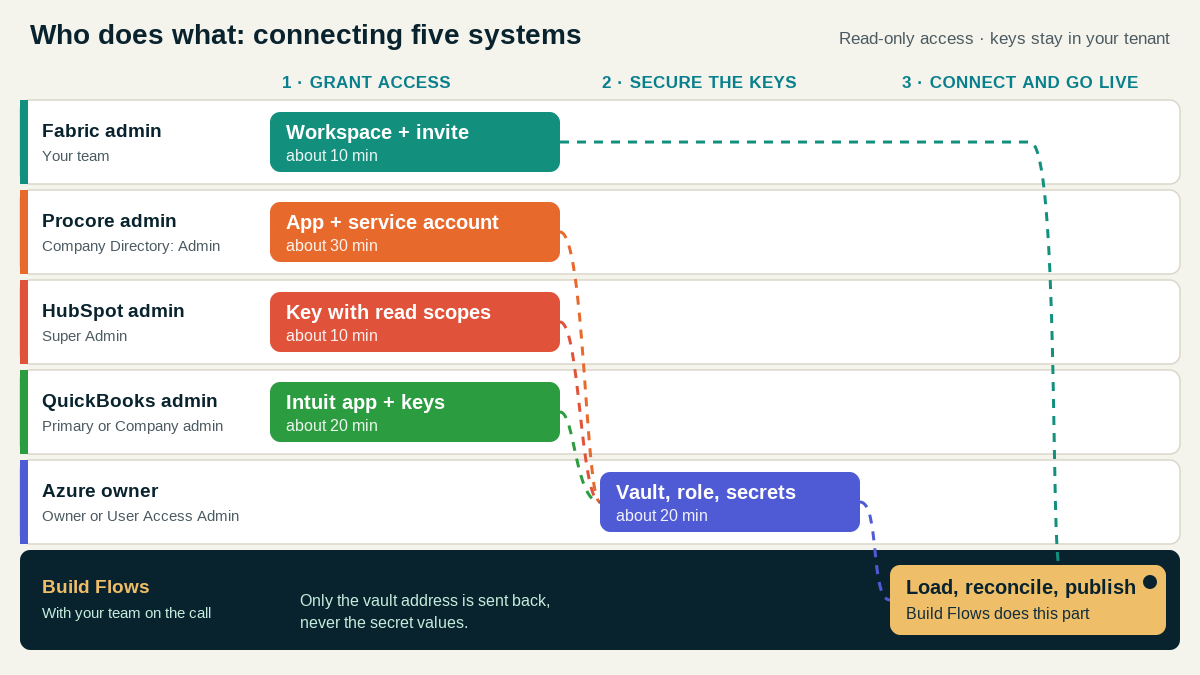 Who does what across the four setup steps
The short version
Five systems, four or five people, about 90 minutes of your team's time in total. Most of that time is spent by people who each touch one system.
| Step | System | Who on your side | What they hand over |
|---|---|---|---|
| 1 | Microsoft Fabric | Whoever runs Microsoft 365 or Power BI | A workspace on a capacity, with Build Flows invited as Admin |
| 2a | Procore | Procore Company Admin | An installed custom app with a read-only service account |
| 2b | HubSpot | HubSpot Super Admin | A service key with read scopes |
| 2c | QuickBooks Online | QuickBooks primary admin or Company admin | An Intuit app's production keys, plus one Connect click on the call |
| 3 | Azure Key Vault | Azure subscription Owner, or IT | A vault with the secrets entered and one role assignment |
| 4 | Fabric pipelines | Build Flows | Connected systems, a first load, reconciled numbers |
Nothing in step 2 writes back to your systems. If you want the scope detail first, read read-only API scopes for Procore, HubSpot and QuickBooks.
The admin role each system actually requires
"Admin" means something different in every product. These are the roles named in each vendor's documentation as of November 2026. If your company uses custom roles, check the specific permission instead of the role name.
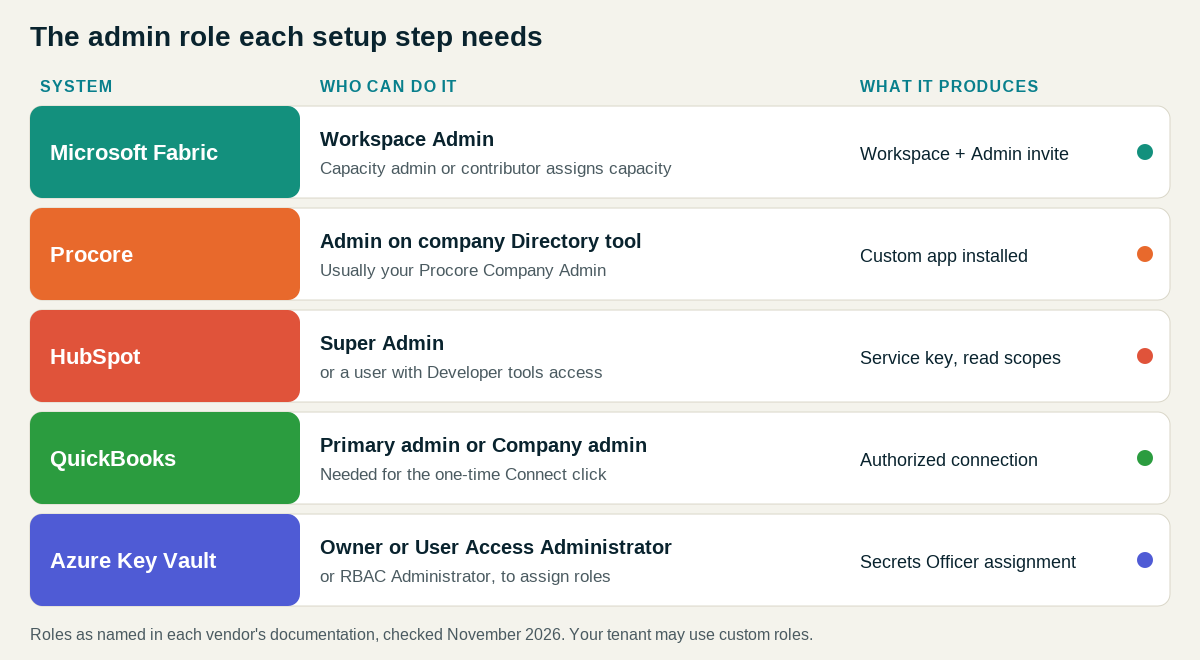 The role each system checks before it lets you finish the step
| System | Task | Role or permission required | Source |
|---|---|---|---|
| Microsoft Fabric | Buy an F SKU capacity, such as F2, in the Azure portal | A custom role with the Microsoft.Fabric/capacities read, write, suspend and resume actions (Microsoft's recommended option), or the broader Owner or Contributor role. The Microsoft.Fabric resource provider must be registered on the subscription | Microsoft Learn, Buy Fabric capacity |
| Microsoft Fabric | Name the capacity administrator | Must be a member of your tenant. Microsoft states that B2B guest users can't be capacity administrators | Microsoft Learn, Buy Fabric capacity |
| Microsoft Fabric | Add Build Flows to the workspace as Admin | Workspace Admin. Members can add Members, Contributors and Viewers, but only an Admin can add another Admin | Microsoft Learn, Roles in workspaces |
| Microsoft Fabric | Let a guest account sign in at all | A Fabric administrator, if the "Guest users can access Microsoft Fabric" tenant setting is off | Microsoft Learn, Export and sharing tenant settings |
| Procore | Create the app in the Developer Portal | A Procore developer account. The app is not live in your company until it's installed | Procore developer portal |
| Procore | Install the custom app in your company | Admin level permission on the company Directory tool. In practice, your Procore Company Admin | Procore Support, Install a Custom App |
| HubSpot | Create a service key | Super Admin, or a user with the Developer tools access permission | HubSpot developer docs, Service keys |
| QuickBooks Online | Create the Intuit developer app | Anyone with an Intuit developer account | Intuit developer docs |
| QuickBooks Online | Click Connect to authorize the app | Primary admin or Company admin. Standard users can't connect apps | QuickBooks help, Connect an app |
| Azure | Create the Key Vault | Permission to create resources in the resource group, such as Contributor | Microsoft Learn, Key Vault RBAC guide |
| Azure | Assign Key Vault Secrets Officer | Microsoft.Authorization/roleAssignments/write, which comes with Owner, User Access Administrator or Role Based Access Control Administrator. Key Vault Data Access Administrator can also assign Key Vault roles | Microsoft Learn, Key Vault RBAC guide |
Two notes worth reading twice.
Creating the vault does not let you read or add secrets. Key Vault separates managing the vault from using its contents. Contributor can create a vault. With the RBAC permission model, a data role such as Key Vault Secrets Officer is what lets a person add secrets. The person creating the vault usually has to assign that role to themselves too. Microsoft notes that role assignments can take several minutes to apply.
HubSpot private apps are being retired for new setups. HubSpot's documentation says that as of October 26, 2026, legacy private apps can no longer be created. Existing ones keep working. The video walkthrough uses service keys, and so does the HubSpot service key guide.
Not sure whether your account is a guest or a member of your tenant, and which one to give Build Flows? See guest account vs domain account for consultant access.
The RACI table
R is responsible (does the work). A is accountable (owns the outcome and signs off). C is consulted. I is informed. One A per row.
The "sponsor" is whoever wants the reporting: often the controller, CFO or operations lead. "IT / Azure owner" is whoever holds the Azure subscription. In a smaller contractor, that may be the same person as the sponsor, or an outside IT provider.
| Activity | Sponsor | IT / Azure owner | Procore admin | HubSpot admin | QuickBooks admin | Build Flows |
|---|---|---|---|---|---|---|
| Agree systems, data in scope and the read-only rule | A | C | C | C | C | R |
| Approve Azure spend (Fabric capacity, Key Vault) | A | R | I | I | I | C |
| Create Fabric capacity and workspace, invite Build Flows | I | A/R | C | |||
| Create Procore app and service account, install in company | I | C | A/R | C | ||
| Create HubSpot service key with read scopes | I | C | A/R | C | ||
| Create Intuit app and production keys | I | C | A/R | C | ||
| Create Key Vault and assign Key Vault Secrets Officer | I | A/R | C | |||
| Type each secret into the vault | I | A | R | R | R | C |
| Send back the vault URI and IDs (never the values) | I | A/R | I | |||
| One-time QuickBooks Connect on the call | I | C | R | A | ||
| First load and reconciliation against source reports | C | I | C | C | C | A/R |
| Sign off and go live | A/R | C | I | I | I | C |
| Rotate or revoke credentials later | I | A/R | R | R | R | C |
Read the "type each secret" row carefully. Each system admin copies their own Client ID, Client Secret or key straight into the vault. Nobody pastes it into an email, a Teams chat or a spreadsheet first. Why the handoff matters.
How long each step takes
These are our working estimates from running this setup, not vendor figures. Your first time in a developer portal will be slower than your second.
| Step | Who | Typical time | What can stretch it |
|---|---|---|---|
| Fabric workspace and invite | Microsoft 365 or Power BI admin | About 10 minutes | No capacity yet, or guest access turned off in tenant settings |
| Procore app, service account, install | Procore Company Admin | About 30 minutes | Promoting the app version, choosing tool permissions, adding the service account to projects |
| HubSpot service key | HubSpot Super Admin | About 10 minutes | Nobody on the team has Super Admin |
| Intuit app and production keys | QuickBooks admin | About 20 minutes | Intuit's production questionnaire. We can't predict if Intuit follows up |
| Key Vault, role, secrets | Azure Owner or IT | About 20 minutes | Missing role-assignment rights, or the "not authorized" error before the role applies |
| Setup call | All of the above, plus Build Flows | 60 minutes | Missing prep |
If Fabric capacity is new to you, budget time to decide on a size first. Is F2 enough for construction reporting?
What to prepare before the setup call
The call is short only if the access is already in place. Send this list to each admin a week ahead.
Names and roles
- One named person for each system, with the role from the table above confirmed in that system.
- The person who will click Connect in QuickBooks is on the call. That click needs a primary admin or Company admin.
Fabric
- Workspace created on a capacity, and Build Flows invited as Admin.
- The invited account has signed in once, so you know it works.
Procore
- App created, service account permissions set to read-only on the agreed tools, app installed in your company.
- Your Company ID noted. Where to find each ID.
HubSpot and QuickBooks
- HubSpot service key created with the agreed read scopes.
- Intuit app created with the Accounting scope only, and production keys available.
Azure
- Key Vault created with the Azure role-based access control permission model.
- Key Vault Secrets Officer assigned to the person entering secrets and to the Build Flows account.
- Secrets entered, except the QuickBooks refresh token, which is added during the call.
- A reply sent with the vault URI, directory (tenant) ID, subscription and resource group names, and which account got access. Not the secret values.
For the test pull
- One recent source report per system to compare against, such as a job cost report, a deal pipeline view and an AR aging. The five-record acceptance test is a good format.
The API credential setup checklist turns this into a list you can tick off as a team.
The 60-minute setup call agenda
Your admins drive. Build Flows watches the screen, checks settings and adds what has to be added live.
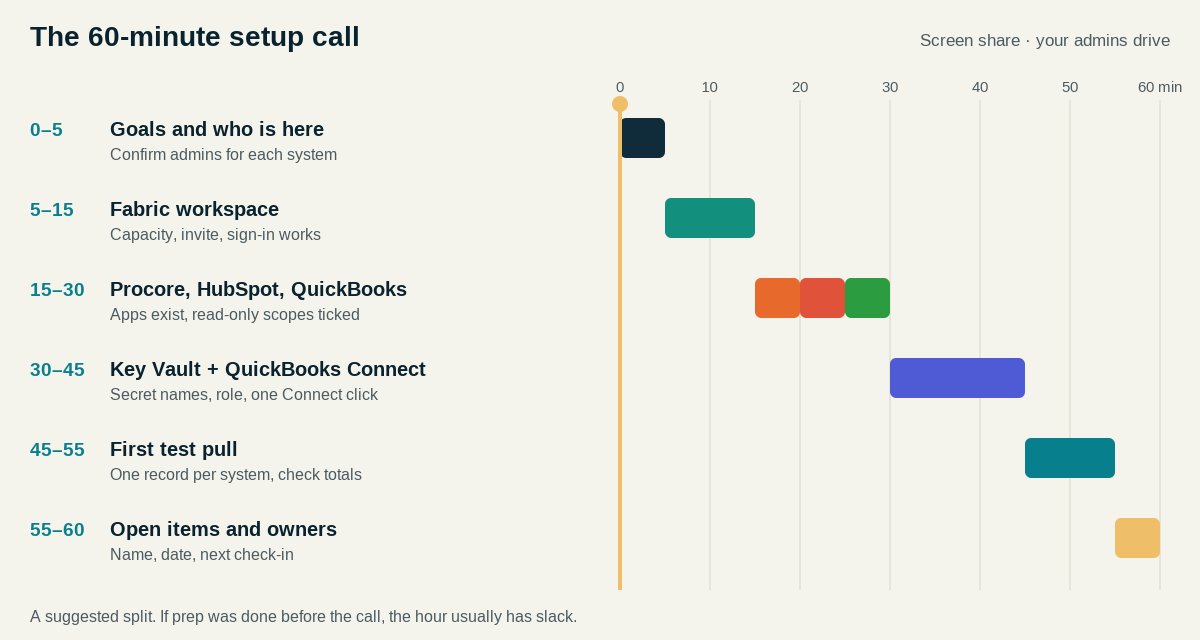 A suggested split of the hour
| Minutes | Topic | Who leads | Done when |
|---|---|---|---|
| 0–5 | Goals, systems in scope, who is here | Sponsor | Everyone knows what "live" means for this project |
| 5–15 | Fabric workspace: capacity, roles, sign-in | Fabric admin | Build Flows can open the workspace as Admin |
| 15–30 | Procore, HubSpot, QuickBooks: apps exist, scopes are read-only | Each system admin | Each app is visible with the agreed scopes, no write access |
| 30–45 | Key Vault: secret names and role, then QuickBooks Connect | Azure owner, QuickBooks admin | All secrets present, refresh token stored, role confirmed |
| 45–55 | First test pull | Build Flows | One record per system arrives and matches its source |
| 55–60 | Open items | Sponsor | Each open item has a name and a date |
If a step fails on the call, don't troubleshoot for 30 minutes with five people watching. Note it, move on and fix it with the one admin afterward. The troubleshooting guide covers the usual errors.
The hand-it-all-off option
Some teams don't have five free admins. In that case, you can give one account admin access and let Build Flows complete steps 2 and 3 with you watching.
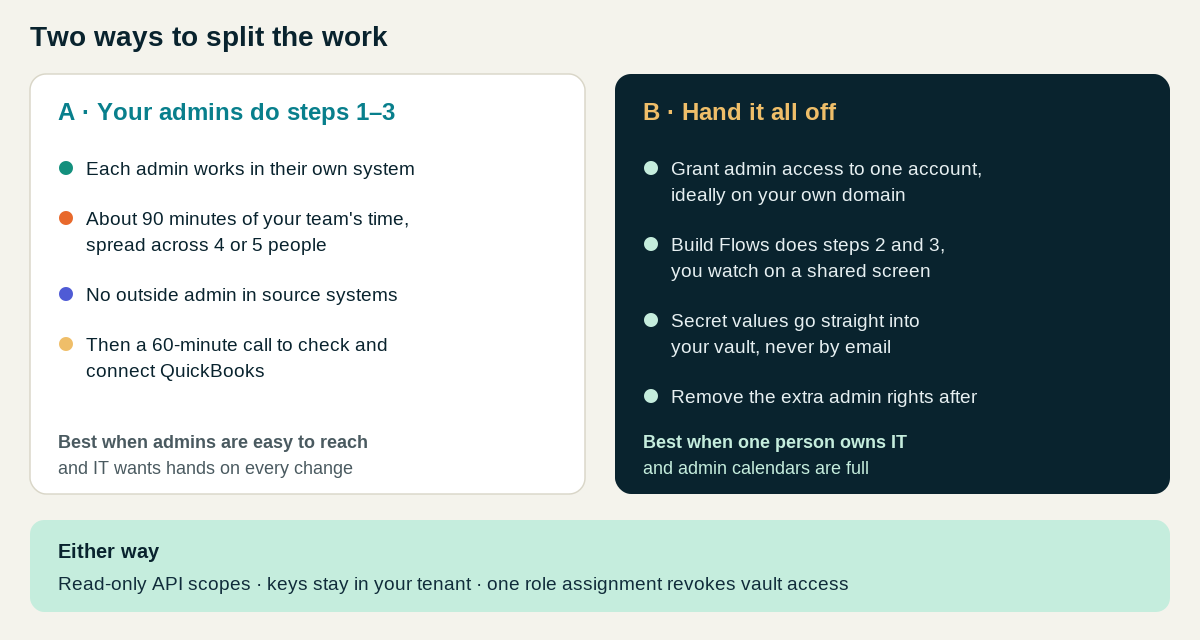 Both options end in the same place
What you grant, and the narrowest version of it:
| System | Access to grant | Narrower option |
|---|---|---|
| Fabric | Workspace Admin | Only this workspace. If that account should also be capacity admin, it must be a member of your tenant, not a guest |
| Procore | Admin on the company Directory tool | Grant it for the setup window, then lower it |
| HubSpot | Super Admin | A user with Developer tools access, if your policy allows it |
| QuickBooks Online | Company admin | Or keep your own admin on the call for the Connect click |
| Azure | Owner on one resource group | Avoid subscription-wide Owner. A dedicated resource group for the vault keeps the scope small |
Three rules hold either way:
- Prefer an account on your domain. You control its sign-in, MFA and offboarding. It also avoids the guest limits above.
- Secret values still go straight into the vault. On a shared screen, typed by whoever is driving. Never emailed.
- Take the admin rights back afterward. Keep only what the running pipeline needs: workspace access in Fabric and the vault role assignment.
Snags we see, and who fixes them
| Symptom | Likely cause | Who fixes it |
|---|---|---|
| App Management or "Install App" is missing in Procore | The user lacks Admin on the company Directory tool | Procore Company Admin |
| No option to create a service key in HubSpot | The user isn't a Super Admin and lacks Developer tools access | A HubSpot Super Admin |
| An admin-permissions error when clicking Connect in QuickBooks | The person clicking Connect is not a primary admin or Company admin on this company | Primary admin, or a Company admin |
| "Add role assignment" is greyed out, or the assignment fails, in Azure | The user has Contributor, which can't assign roles | Subscription or resource group Owner, User Access Administrator or Role Based Access Control Administrator |
| "Not authorized" when adding a secret | No Key Vault Secrets Officer role yet, or it hasn't applied | Azure owner, then wait a few minutes |
| Guest can't open Fabric | "Guest users can access Microsoft Fabric" is off, or the invite wasn't accepted | Fabric administrator |
| Guest can't be picked as capacity admin | B2B guests can't be capacity administrators | Use a tenant member account |
If your IT team wants a formal review before any of this, the IT security review guide lists the questions they usually ask.
Checklist
- A named owner for each system, with the required role confirmed in that system
- Sponsor agreed on systems in scope and the read-only rule
- Azure spend for Fabric capacity and Key Vault approved
- Fabric workspace created on a capacity, Build Flows invited as Admin, sign-in tested
- Procore app installed in your company with a read-only service account
- HubSpot service key created with read scopes
- Intuit app created with the Accounting scope, production keys available
- Key Vault created, Key Vault Secrets Officer assigned, secrets entered
- Vault URI and IDs sent back, with no secret values
- QuickBooks admin booked for the setup call
- One source report per system ready for the test pull
- Decided: your admins do it, or hand it off. If handing off, a date to remove the extra access
Want help working out who does what?
If you're not sure who holds which admin role, email charley@buildflows.ai with the list of systems and who you think owns each one. We'll send back a filled-in RACI and the questions to ask. Don't include any keys or passwords. More at buildflows.ai.
References
- Microsoft Learn: Buy Fabric capacity Azure SKUs (subscription permissions, capacity administrator, B2B restriction)
- Microsoft Learn: Roles in workspaces in Microsoft Fabric
- Microsoft Learn: Create a workspace
- Microsoft Learn: Export and sharing tenant settings (guest access settings)
- Microsoft Learn: Grant permission to applications to access an Azure key vault using Azure RBAC
- Microsoft Learn: Assign Azure roles using the Azure portal
- Procore Support: Install a Custom App
- Procore: Developer Portal
- HubSpot Developers: Account service keys
- HubSpot Developers: Legacy private apps overview
- Intuit Developer: Get started with the QuickBooks Online API
- QuickBooks Help: Connect an app to QuickBooks Online (UK edition of the article; check the version for your region)
Frequently asked questions
What Procore permission is needed to install a custom app?
Procore's support documentation lists Admin level permission on the company Directory tool. In most companies that is the Procore Company Admin. Anyone with a developer account can create the app in the Developer Portal, but it only reaches your data once installed.
Who can create a HubSpot service key?
HubSpot's developer documentation says Super Admins and users with the Developer tools access permission can create and manage service keys. HubSpot also states that legacy private apps can no longer be created as of October 26, 2026.
Can a standard QuickBooks Online user connect the app?
No. Intuit's help says only the primary admin and Company admin can connect and manage apps. Make sure one of them is on the setup call for the one-time Connect click.
Why can't our Azure Contributor assign the Key Vault role?
Assigning roles needs Microsoft.Authorization/roleAssignments/write, which comes with Owner, User Access Administrator or Role Based Access Control Administrator. Contributor can create the vault but can't grant Key Vault Secrets Officer.
Can a guest account be the Fabric capacity administrator?
No. Microsoft's capacity purchase documentation says the capacity administrator must belong to your tenant and B2B guest users can't be capacity administrators. A guest can still be a workspace Admin if guest access is allowed.
How long does the whole setup take?
Our working estimate is about 90 minutes of your team's time spread across four or five admins, plus a 60-minute setup call. Intuit's production questionnaire and missing admin roles are the usual reasons it takes longer.
What if we don't have time to do the steps ourselves?
Grant one account, ideally on your own domain, the admin access for each system for a set window. Build Flows completes steps 2 and 3 on a shared screen, secrets go straight into your vault, and you remove the extra access afterward.
Next step
Want help running this playbook?
Bring the report or workflow. We'll help map the work behind it.
Prefer email? charley@buildflows.ai
Keep learning
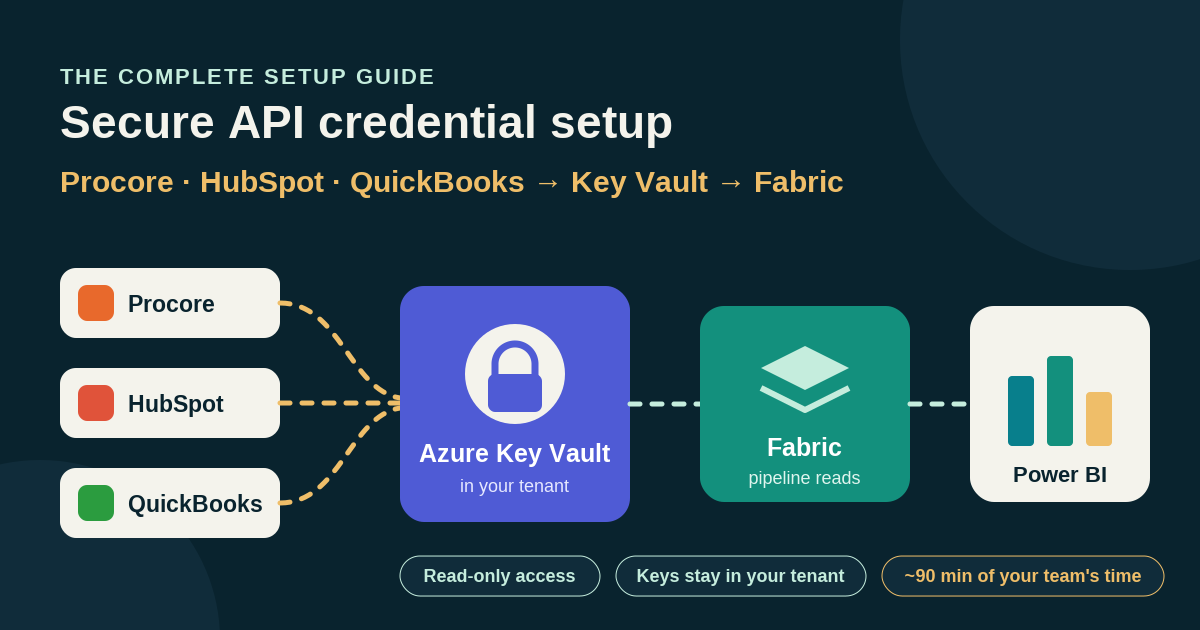
Integrations · November 14, 2026
Secure API Credential Setup for Procore, HubSpot and QuickBooks with Azure Key Vault and Microsoft Fabric
The end-to-end guide to connecting Procore, HubSpot and QuickBooks Online to Microsoft Fabric and Power BI without handing over credentials: who owns each step and how long it takes, the architecture from sources through Azure Key Vault to Fabric, the four steps (Fabric access, read-only API access in three systems, Key Vault with the Secrets Officer role, connect and go live), the exact secret names, what to send back, how to revoke access, common mistakes and a checklist.
Integrations · November 14, 2026
Guest Account vs Domain Account: Giving a Consultant Access to Fabric and Azure
How to give an outside consultant access to a Microsoft Fabric workspace and an Azure Key Vault, comparing a Microsoft Entra B2B guest invite with an account created on your own domain, with setup steps for each and a six-step offboarding sequence.
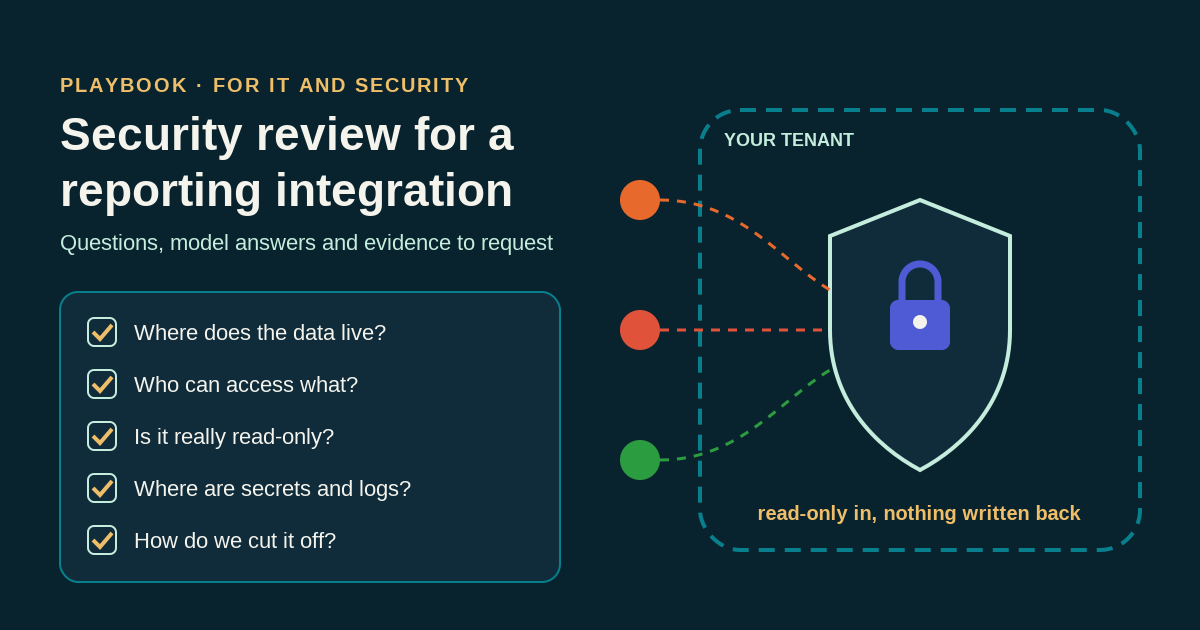
Playbooks · November 14, 2026
IT Security Review for a Construction Reporting Integration: Questions, Model Answers and Evidence
A questionnaire for the IT or security reviewer approving a Procore, HubSpot and QuickBooks reporting integration in Microsoft Fabric, with model answers, evidence to request and an offboarding sequence.