Key takeaways
- Split the problem in two: people share and keep secrets in a business password manager, and scheduled jobs read secrets at run time from a secrets service such as Azure Key Vault.
- In a Microsoft Fabric setup, Key Vault is the option where every read is tied to an identity, checked against a role and recorded in an AuditEvent log, once diagnostic logging is turned on.
- Give the identity your scheduled pipeline or notebook actually runs as Key Vault Secrets User (read only), and limit Secrets Officer to the one or two people who load and rotate secrets.
- Fabric connections can point at Key Vault with an Azure Key Vault reference, which always fetches the latest secret version, so rotation happens in one place.
- Pipeline variables, .env files, spreadsheets and email have no secret-specific audit; any secret that has been in them should be rotated.
- Removing someone's access does not undo what they already saw; if no person ever reads the production value, staff changes do not force a rotation.
Your reporting project needs a Procore client secret, a HubSpot service key and a QuickBooks Online client secret. Someone has to put them somewhere. The controller has a password manager. The consultant has a .env file. The IT lead says "just use Key Vault." Last year's integration had its keys in a spreadsheet tab called "logins."
All four "work" on day one. They differ on the questions that matter six months later: who can read the value, how a scheduled pipeline gets it at 2 a.m., whether anyone can tell who looked at it, and how fast you can shut it off when someone leaves.
The short answer: people share secrets through a password manager, and machines read secrets from a secrets service like Azure Key Vault. Everything else is either a pointer to one of those, or a copy you will have to hunt down later. This guide compares the options against the same seven criteria and gives a recommendation for the setups contractors actually run.
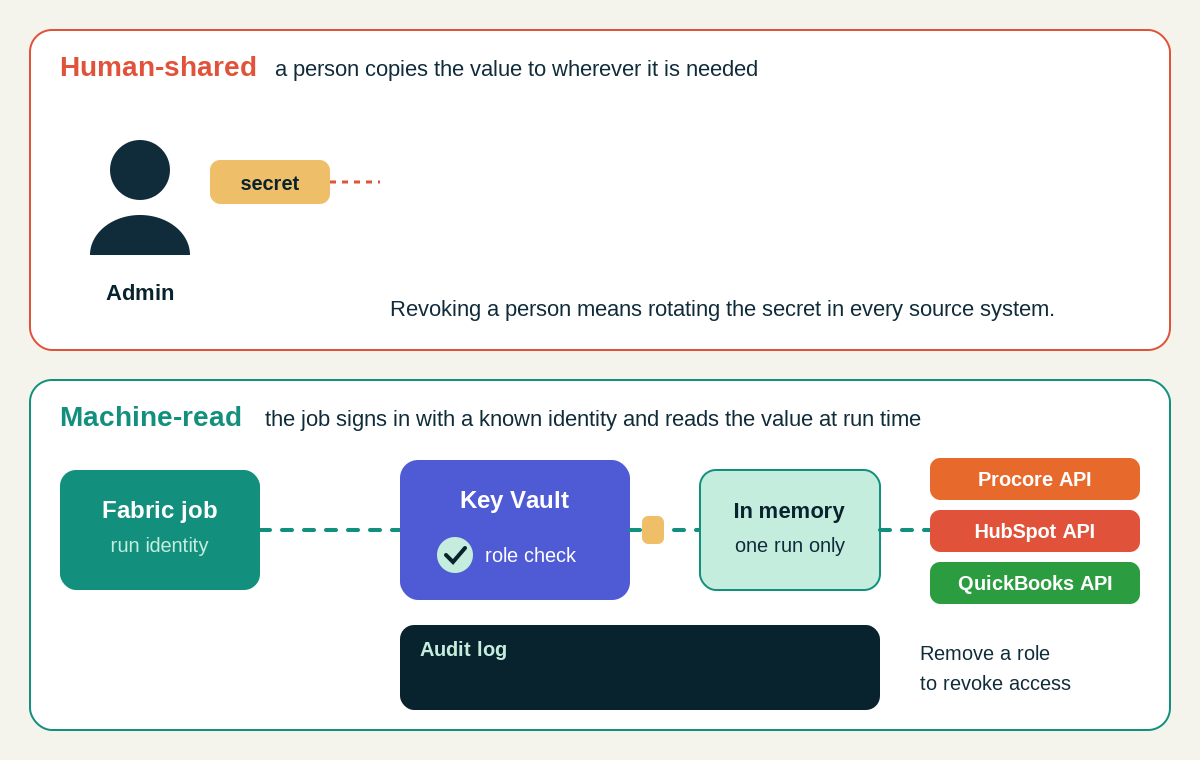 Human-shared secrets multiply as copies. Machine-read secrets stay in one place and every read is checked and logged.
Two jobs, not one
Most arguments about "where should the key go" mix up two different jobs.
| Job | Who does it | How often | What it needs |
|---|---|---|---|
| Handoff and safekeeping | A person creates the credential in Procore, HubSpot or Intuit and needs to keep it or pass it to another person | Once at setup, again at rotation | Easy for non-technical staff, sharing without email, a record of who has access |
| Run-time retrieval | A pipeline, notebook or service reads the credential every time it runs | Every scheduled run | Machine identity, no human in the loop, least-privilege read access, audit trail |
A password manager is built for the first job. Azure Key Vault is built for the second. Trouble starts when one tool is stretched to do both: a scheduled job that depends on someone's personal vault, or a finance user asked to paste secrets into the Azure portal with no guidance.
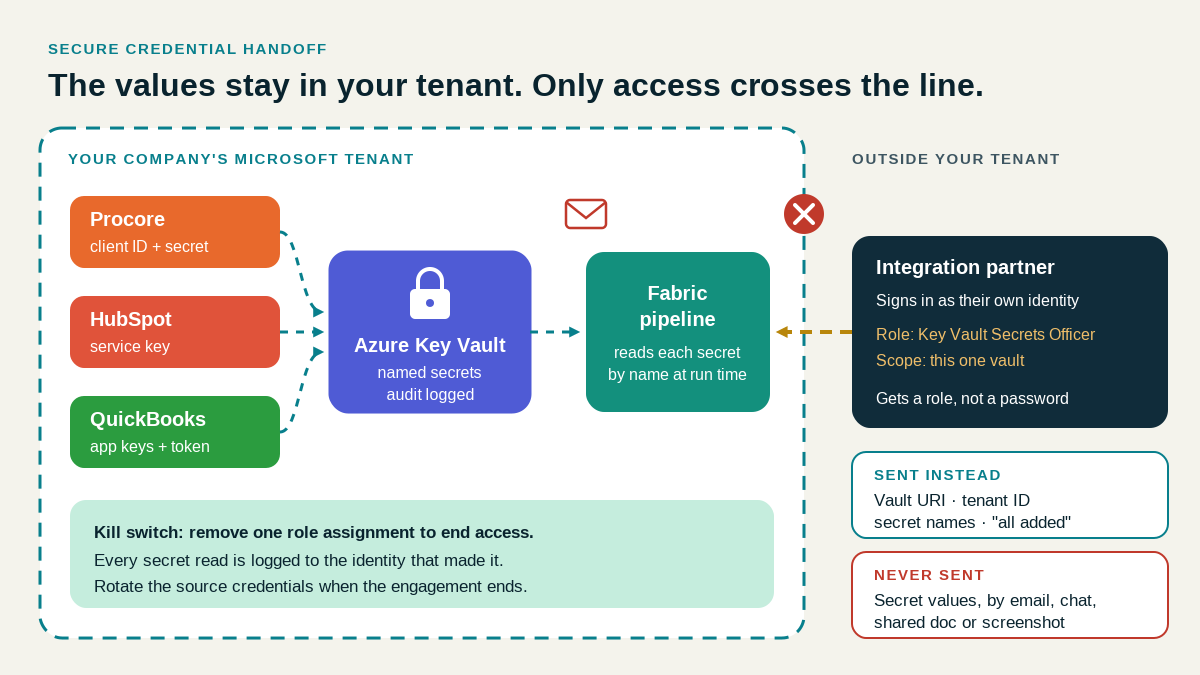
The full four-step credential setup uses both on purpose. The person who creates each credential pastes it straight into Key Vault, and nothing is sent by email. See secure API key handoff for that step on its own.
The options
Azure Key Vault. A managed Azure service for secrets, keys and certificates. Access to secret values is granted through Azure roles. Key Vault Secrets User can read secret contents. Key Vault Secrets Officer can do anything with secrets except manage permissions. Key Vault Reader can see metadata but not the secret values. Microsoft recommends one vault per application per environment, with roles assigned at the vault.
Business password manager. 1Password, Bitwarden and similar tools give each person an encrypted vault and let admins share collections or vaults with teams. They are good at the human side: sharing, recovery when someone leaves, and activity reports. Both vendors also sell machine access. 1Password has service accounts scoped to specific vaults. Bitwarden has Secrets Manager with machine accounts and access tokens. Those are separate products from the shared password vault, and they come with their own setup and pricing. Check your plan before you assume it is included.
.env files. A text file of NAME=value lines that a script loads at start-up. Simple and universal. Also a plain-text copy of the secret on every machine that has the file, with no record of who opened it, and one bad git add away from your repository.
Pipeline parameters and variables. Values typed into a Fabric pipeline or a Variable Library. Good for configuration such as a company ID, a date window or a connection reference. Not a secrets store. Fabric's Variable Library documents a connection reference type for pointing at a connection "without embedding credentials or connection strings," which tells you where secrets belong instead.
Fabric connection credentials. A connection created in Manage Connections and Gateways stores the credential with the connection. People are granted a role on the connection (User, User with resharing, or Owner) so they can use it in items. Microsoft's own note is blunt: users with access to the connection can write to the data source "and connect, based on either the stored credentials or SSO" chosen when it was created, so share connections only with trusted accounts. Fabric can also point a connection at Key Vault with an Azure Key Vault reference, so the secret value is never stored in Fabric. The reference signs in to the vault with the OAuth credential of the person who created it, so that person needs read (Get and List) access to secrets in the vault.
Spreadsheets, email and chat. Not a storage option. Listed here because it is where secrets end up when nobody chose a place.
The comparison matrix
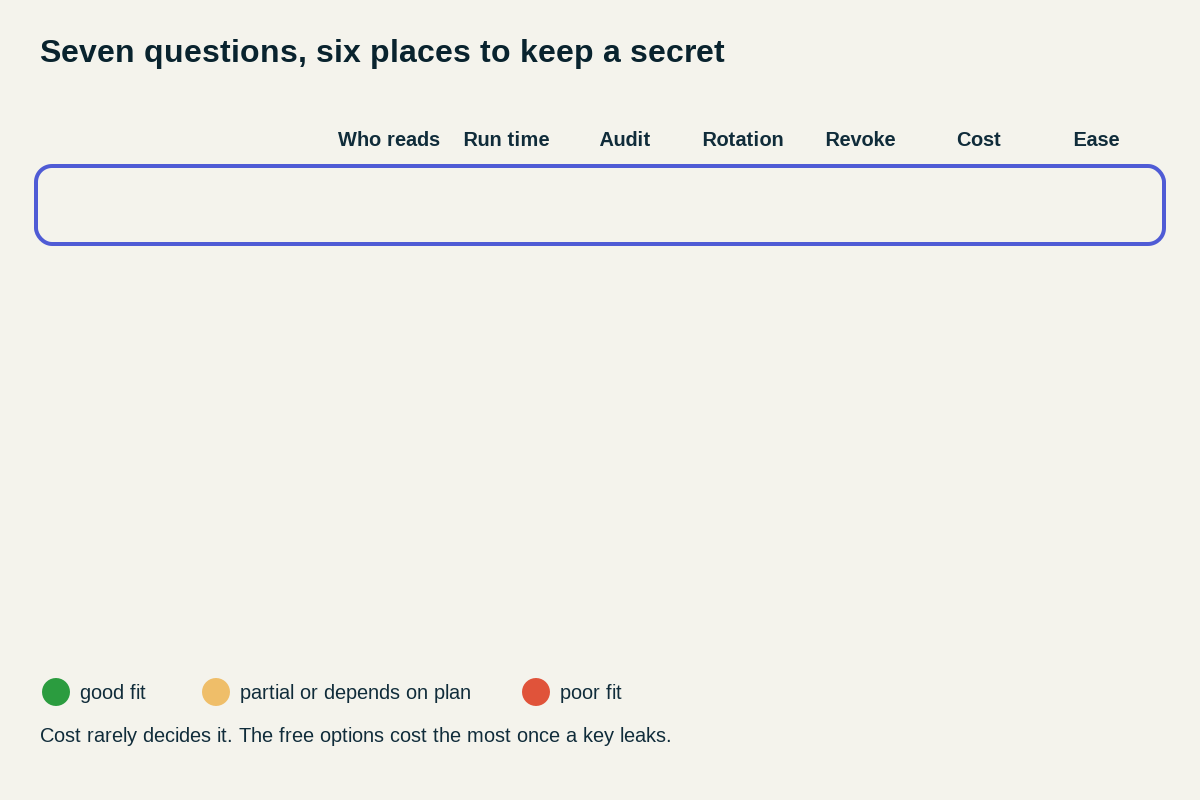 The same seven questions asked of every option. Green is a good fit, gold is partial, red is a poor fit.
| Azure Key Vault | Business password manager | Fabric connection (stored credential) | Pipeline parameter / variable | .env file | Spreadsheet / email / chat | |
|---|---|---|---|---|---|---|
| Who can read the value | Only identities with a data-plane role such as Secrets User or Secrets Officer | Members of the shared vault or collection | Fabric uses it; people get a role to use the connection | Anyone who can edit or inspect the pipeline or library | Anyone with the file or the machine | Anyone the message or file reaches, forever |
| Machine access at run time | Yes: notebooks call notebookutils.credentials.getSecret; connections can use a Key Vault reference | Only through the vendor's machine-access product (service account or machine account) | Yes, that is its purpose | Yes, but the secret sits in pipeline definitions | Yes, on the machine that holds the file | Only by a human copying it again |
| Audit of reads | Yes, SecretGet and other operations in AuditEvent logs once diagnostic logging is enabled | Vendor activity or usage reports, depending on plan | Connection metadata such as "Last credentials used"; not a per-read log of who saw the value | No dedicated secret audit | None | None |
| Rotation | New secret version; references read the latest version; near-expiry events available | Edit the item; consumers must re-copy it | Edit the connection credential, or update the Key Vault secret behind a reference | Edit every place it was typed | Edit every copy of the file | Impossible to track |
| Revocation of a person | Remove the role assignment | Remove the member from the vault (they may have copied it out already) | Remove the user from the connection | Remove workspace access | Not possible; the file is already copied | Not possible |
| Cost | Pay per operation on the Standard tier; check the Azure pricing page | Per-user subscription; machine access may be a separate product | Included with your Fabric capacity | Included | Free | Free, until it leaks |
| Ease for non-technical teams | Medium: portal is clear but unfamiliar, roles take a minute to understand | High | Medium: an admin screen most finance users never visit | Low and risky | Low | Very high, which is the problem |
Two things stand out. First, in a Microsoft Fabric setup nothing beats Key Vault for the run-time job. Reads are tied to an identity, checked against a role and logged, and Fabric reads it natively. A password manager's machine-access product can do much of the same, but it is a separate product to set up and pay for. Second, nothing beats a password manager for the human job, because it is the only option a project accountant will use without a training session.
What "audit" actually means here
"We can audit it" is the claim most often made and least often checked.
- Key Vault writes AuditEvent records with the operation (
SecretGet,SecretSet,SecretList), time, caller IP and identity. You have to turn on diagnostic settings and send them to a storage account or Log Analytics. Microsoft says entries are available within 10 minutes at most. Without that setting, you do not have the log. - Password managers have activity or usage reports showing which items a person or service account accessed. What is included varies by vendor and plan.
- Fabric connections now show "Last linked to items" and "Last credentials used" (preview). That tells you whether a connection is still in use. It does not tell you which person saw the secret, because people never see it.
.envfiles, pipeline variables and email have no secret-specific audit at all. You find out about a leak when someone else uses the key.
If your IT reviewer asks "who has read the QuickBooks secret in the last 90 days," only the first two can answer. The IT security review guide lists the other questions to expect.
Rotation and revocation in practice
A secret will be replaced at some point: a planned rotation, a staff change, or a vendor forcing a new client secret. The question is how many places you have to touch.
With Key Vault you add a new version of the secret. Fabric Key Vault references always fetch the current version, and a notebook that calls getSecret at run time picks it up on the next run. You touch one place. The rotation guide walks through the order: create the new credential in the source system, store it, test, then revoke the old one.
Key Vault also lets you set an expiration date on a secret and publishes SecretNearExpiry and SecretExpired events through Event Grid. That turns "the integration stopped on Monday" into "we got a warning two weeks ago." See monitoring credential expiry.
Revocation has two halves. Removing a person's access to the store is easy in Key Vault (remove the role assignment), a password manager (remove the member) or a Fabric connection (remove the user). But if that person ever saw the value, removing access does not remove their memory or their copy. The real revocation is rotating the secret in Procore, HubSpot or Intuit. That is why the machine-read pattern matters: if no person ever reads the production value, a staff change does not force a rotation.
Deleting is also recoverable in Key Vault. Soft delete is on by default for new vaults, and a deleted secret stays recoverable for 7 to 90 days (90 by default). That helps when someone deletes the wrong secret. It also means a deleted secret's name cannot be reused until it is purged or the period ends.
Recommendation by scenario
 Start with who reads the secret. The answer picks the store.
| Your situation | Where the secret lives | Notes |
|---|---|---|
| Procore, HubSpot and QuickBooks data lands in Microsoft Fabric on a schedule | Azure Key Vault, one vault per environment | Notebooks read with getSecret; supported connectors use a Key Vault reference. Grant Secrets User to the identity the scheduled run actually uses (a named user, service principal or workspace identity), not to "Fabric" in general. See Fabric and Key Vault secrets in pipelines. |
| A consultant builds the pipeline in your tenant | Your Key Vault, consultant gets Secrets Officer or Secrets User on that vault only | Their access ends when you remove the role. Compare guest vs domain accounts. |
| The controller needs to keep the QuickBooks developer login and recovery codes | Business password manager | That is a human login, not a run-time secret. Keep it out of Key Vault. |
| A small script runs on one office PC, no Azure | A password manager's machine-access product or the OS credential store, then plan a move | A .env file is acceptable only on a locked-down machine, outside any synced or shared folder, never committed. |
| A developer tests against the Procore sandbox locally | .env file with sandbox credentials, listed in .gitignore | Production values never go in the file. |
| A Fabric connector needs a password or service principal secret | Fabric connection with an Azure Key Vault reference where the connector supports it | Microsoft lists the supported connectors and auth types (Basic, Service Principal, token, account key). Web API/Webpage is on the list for Basic and Service Principal only, which does not cover the OAuth flows Procore and QuickBooks use or the bearer-token header a HubSpot service key needs, so those secrets are usually read in a notebook. |
| Someone emailed a secret last month | Rotate it, then store the new one in Key Vault | The old copy is in at least two mailboxes and their backups. |
Where people go wrong with each
- Key Vault: granting Secrets Officer to everyone "to be safe." Give the pipeline or notebook identity Secrets User (read only). Give Secrets Officer to the one or two people who load and rotate secrets. Also, Key Vault is for secrets, not configuration. Microsoft says to keep things like service names and feature flags elsewhere. Your Procore company ID or QuickBooks realm ID is not a secret; see where to find those IDs.
- Password manager: pointing a scheduled job at a person's vault. When that person leaves, the job breaks, or worse, keeps running on their access.
- Fabric connections: sharing a connection with a broad group. Anyone with access can use the stored credential, so give connection roles to a small group or a service account.
- Pipeline variables: pasting a secret into a parameter "just for testing." Run history, exported definitions and source control can all end up holding it.
.env: a file in a OneDrive or SharePoint-synced folder is a shared file, whatever its name.- Notebooks: printing a secret to check it worked. Fabric tries to redact the value in output, but Microsoft is explicit that this "isn't a security boundary." The notebook guide shows how to test without printing.
Cost, honestly
Cost is rarely the deciding factor at contractor scale.
- Key Vault Standard charges per operation rather than per vault. A nightly reporting job that reads nine secrets is a tiny number of operations a month. Microsoft's pricing page is the source of truth; check it and the Azure pricing calculator rather than relying on a figure in an article.
- Password managers charge per user per month. Machine access may be a separate product or add-on. Check your plan.
- Fabric connections and variables are included in your Fabric capacity.
.envfiles and email cost nothing until a key leaks, at which point you pay for the incident, the rotation and the conversation with the client whose data was exposed.
If your company already pays for Azure and Fabric, Key Vault is usually the cheapest correct answer. If you have no Azure footprint at all, a password manager's machine-access product may be simpler than standing up a subscription for one vault.
Checklist
- List every integration credential: system, owner, environment (sandbox or production), and who reads it (person or machine).
- Machine-read production secrets are in Azure Key Vault, one vault per environment, using the Azure RBAC permission model.
- The pipeline or notebook identity has Key Vault Secrets User, not Secrets Officer or Contributor.
- Secrets Officer is limited to the one or two people who load and rotate secrets.
- Key Vault diagnostic logging is turned on and sent to a storage account or Log Analytics workspace.
- Each secret has an expiration date or a rotation date in its tags, and someone gets the near-expiry alert.
- Human logins and recovery codes for developer portals live in a business password manager, shared by vault, not by email.
- No secrets in pipeline parameters, Variable Library values, notebook code, or exported definitions.
- Any
.envfile holds sandbox values only, is in.gitignore, and is outside synced folders. - Every secret that was ever emailed, pasted into chat or saved in a spreadsheet has been rotated.
- Fabric connections are shared with a small named group, and use a Key Vault reference where the connector supports it.
- The read-only scopes for each credential match the read-only scope guide.
For the full setup in one place, use the API credential setup checklist. If something fails along the way, start with credential setup troubleshooting. For the vault itself, see Azure Key Vault setup for data integrations.
Need a second pair of eyes?
Build Flows sets up construction reporting on Microsoft Fabric with Procore, HubSpot and QuickBooks Online. Credentials stay in your Key Vault, and we never ask for them by email. If you want someone to look over where your integration secrets live today, send a short brief or email charley@buildflows.ai. More guides are at buildflows.ai.
References
- Microsoft Learn: Grant permission to applications to access an Azure key vault using Azure RBAC (built-in roles: Key Vault Secrets User, Secrets Officer, Reader; one vault per application per environment)
- Microsoft Learn: Azure Key Vault logging (AuditEvent category,
SecretGetand other operation names, availability within 10 minutes) - Microsoft Learn: Secure your Azure Key Vault secrets (what to store as secrets, rotation, Event Grid notifications, configuration belongs elsewhere)
- Microsoft Learn: Azure Key Vault soft-delete (on by default, 7 to 90 day retention)
- Microsoft Azure: Key Vault pricing (per-operation billing; check current rates for your region)
- Microsoft Learn: Configure Azure Key Vault references in Fabric (supported connectors and auth types, latest-version behavior, Get and List permission for the reference creator, network prerequisites)
- Microsoft Learn: NotebookUtils credentials utilities for Fabric (
getSecret, output redaction is not a security boundary) - Microsoft Learn: Data source management in Fabric (connection roles, stored-credential warning, connection recency preview)
- Microsoft Learn: Fabric Variable Library variable types (connection reference type)
- 1Password Developer: Service accounts (vault-scoped machine access for scripts and CI/CD)
- Bitwarden Help: Machine accounts and Access tokens (Secrets Manager machine access)
Frequently asked questions
Should I store API keys in Azure Key Vault or a password manager?
Both, for different jobs. If a scheduled pipeline or notebook needs the secret at run time, store it in Azure Key Vault and let the job read it with its own identity. If only people need it, such as a developer portal login or recovery codes, keep it in a business password manager shared vault.
Can a password manager feed secrets to a pipeline?
Only through the vendor's machine-access product. 1Password offers service accounts scoped to specific vaults, and Bitwarden offers Secrets Manager with machine accounts and access tokens. These are set up separately from the shared password vault and may need a different plan, so check before relying on them.
Is a .env file safe for production API secrets?
Rarely. It is a plain-text copy on every machine that has the file, with no record of who opened it and an easy path into source control or a synced folder. Use .env files for sandbox credentials during development, list them in .gitignore, and keep production secrets in a secrets service.
Which Key Vault role should a Fabric pipeline or notebook get?
Key Vault Secrets User, which can read secret contents. Key Vault Secrets Officer can create, change and delete secrets, so keep it for the people who load and rotate them. Key Vault Reader sees metadata only and cannot read secret values.
Does Key Vault log who read a secret?
Yes, once you enable diagnostic logging. Key Vault writes AuditEvent records with the operation, such as SecretGet, the time, the caller IP address and the identity. Microsoft says entries are available within 10 minutes at most. Without a diagnostic setting, those logs are not kept.
Can I put secrets in Fabric pipeline parameters or a Variable Library?
Avoid it. Parameters and Variable Library values are meant for configuration and can end up in run history, exported definitions and source control. Use a Fabric connection with an Azure Key Vault reference, or read the secret in a notebook with notebookutils.credentials.getSecret.
Next step
Need this connection in your environment?
Scope one integration: the records, direction, timing, and business rules behind the connection.
Prefer email? charley@buildflows.ai
Keep learning
Integrations · November 14, 2026
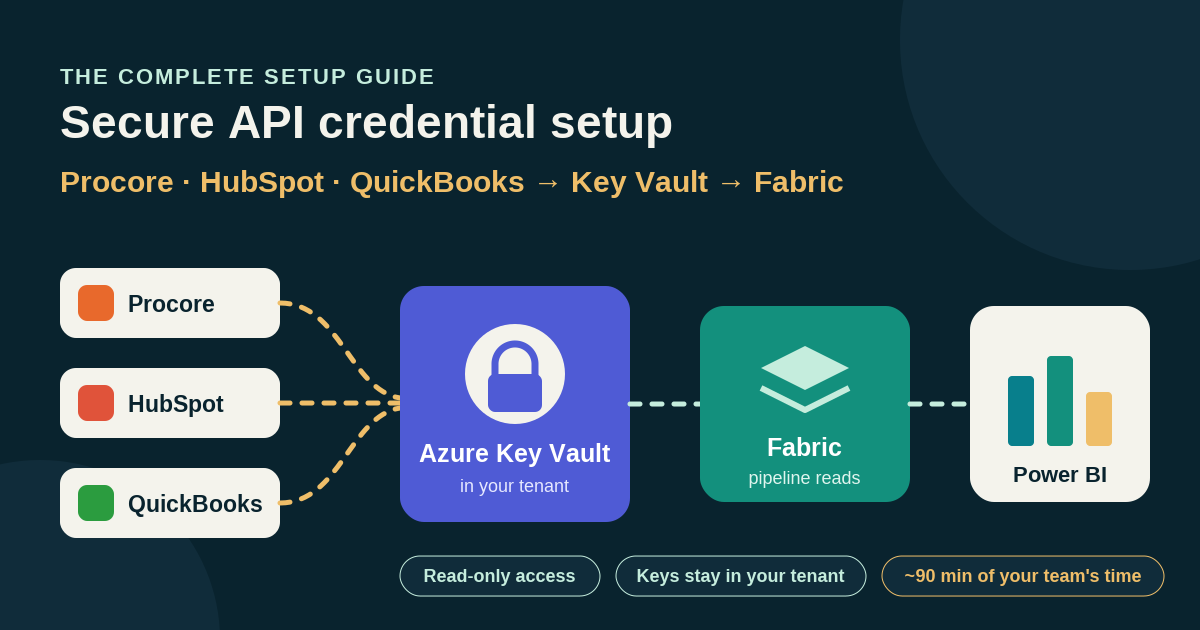
Secure API Credential Setup for Procore, HubSpot and QuickBooks with Azure Key Vault and Microsoft Fabric
The end-to-end guide to connecting Procore, HubSpot and QuickBooks Online to Microsoft Fabric and Power BI without handing over credentials: who owns each step and how long it takes, the architecture from sources through Azure Key Vault to Fabric, the four steps (Fabric access, read-only API access in three systems, Key Vault with the Secrets Officer role, connect and go live), the exact secret names, what to send back, how to revoke access, common mistakes and a checklist.
Integrations · November 14, 2026
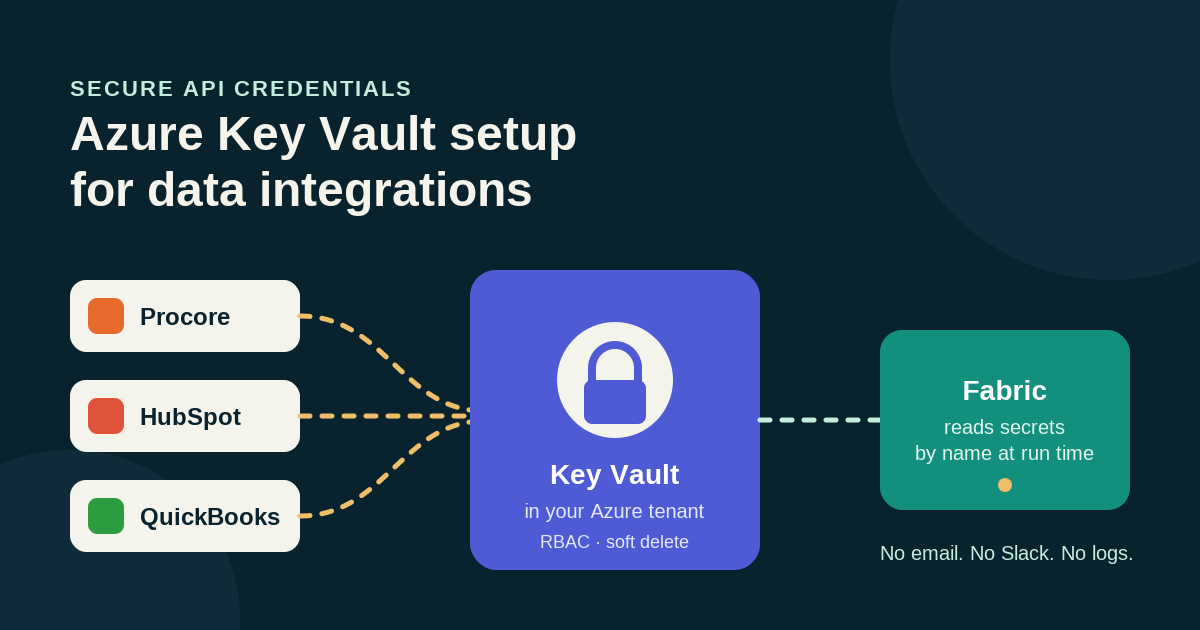
Azure Key Vault Setup for Data Integrations: Create the Vault, Set RBAC and Assign Secrets Officer
A step-by-step guide to creating an Azure Key Vault for integration secrets: resource group and globally unique name, matching the Fabric region, Standard tier, soft delete and the purge protection trade-off, the RBAC permission model, networking, the Key Vault Secrets Officer role assignment, why 'not authorized' appears right after setup, and what it really costs.
Integrations · November 14, 2026
Never Email an API Key: A Secure Credential Handoff Between a Company and a Consultant
A vendor-neutral process for sharing integration credentials safely: your company owns the vault, the partner gets a scoped role, and only the vault address ever crosses between you.