Key takeaways
- Add each secret under Objects > Secrets > + Generate/Import with the exact lowercase, dash-separated name. Leave content type and dates empty, and don't put quotes or spaces around values.
- Send your partner the Vault URI, the Directory (tenant) ID, the subscription and resource group, the account given access, and which secrets are filled in. Never send a value.
- For Procore, HubSpot and QuickBooks, a Fabric pipeline runs a Python notebook that calls notebookutils.credentials.getSecret. Key Vault references in Fabric connections don't support these APIs.
- A Notebook activity in a pipeline reads the vault as the pipeline's last modified user. Use the same account for the Fabric workspace role and the Key Vault role, and test after anyone edits the pipeline.
- Revoking access is one change: remove the partner's role assignment on the vault under Access control (IAM). The secrets and source credentials stay as they are.
- An F2 capacity is enough to start. At $0.18 per CU-hour pay-as-you-go in East US, it's about $262.80 a month running 24/7, and you can pause it.
88 seconds · From a Build Flows walkthrough
Add each API credential as a named Key Vault secret
Shows Objects > Secrets > Generate/Import and the Create a secret form: the exact lowercase-with-dashes name, the pasted value, and no dates or content type. It creates one secret (procore-client-id). Repeat the same steps for the other secrets.
Read the clip transcript
So now we need to add these secrets. Go to Objects, then Secrets, then Generate/Import. We'll name each one of them. Here's the secret name. In this case, it's the Procore client ID. For the secret value, we give it the actual client ID. So we go find the client ID for Procore and paste it into the secret value. You could set activation or expiration dates, but you don't need to. Then just create it. That's done. Now do the same for every credential you're putting into Key Vault. Names are lowercase with dashes, exactly as listed. No spaces or quotes around values. Leave content type and dates empty. That's how you store all of your secrets in Key Vault.
Captions adapted from the source video; proper names may reflect automatic transcription. Original segment: 25:43–27:10. Watch at the source.
38 seconds · From a Build Flows walkthrough
Find your Vault URI and tenant ID to send back
Shows where the Vault URI and the directory (tenant) ID sit on the Key Vault Overview page, so you can send them instead of any secret values. The IDs are blurred in the video. The subscription and resource group names are on the same page.
Read the clip transcript
From there, you reply with the Vault URI. So where do you find the Vault URI and the tenant ID? For the Vault URI, open the vault's Overview page. This is the Vault URI the integration uses. It's your vault name followed by .vault.azure.net. Then the directory (tenant) ID. That's your Microsoft Entra ID.
Captions adapted from the source video; proper names may reflect automatic transcription. Original segment: 27:27–28:05. Watch at the source.
30 seconds · From a Build Flows walkthrough
Grant access to the vault instead of sending secrets
Explains why you never send the secret values: you give one account access to the vault, and a Fabric pipeline signs in as that account and reads each secret by name. It is a high-level explanation, not a pipeline build.
Read the clip transcript
You're not handing over the credentials you pulled from any of these systems. What you're providing is just access for the one account you provisioned. The secrets can then be referenced by name in Fabric. A Fabric pipeline signs in as the Build Flows account that was created and reads them.
Captions adapted from the source video; proper names may reflect automatic transcription. Original segment: 28:57–29:27. Watch at the source.
You have an Azure Key Vault and read-only credentials for Procore, HubSpot and QuickBooks Online. Now the values have to go into the vault under names a pipeline can find, and the partner building that pipeline needs enough information to reach them. This is where setups usually drift. Someone names a secret Procore Client ID, someone else pastes a value with a trailing space, and the "quick check" ends with a client secret sitting in an email thread.
This guide covers that last stretch. You add each secret under Objects → Secrets → + Generate/Import, using one fixed set of names. You send back four pointers and never a value. You learn how a Microsoft Fabric pipeline actually reads those secrets when it runs, and how to cut off access later by removing one role assignment. It also covers the Fabric workspace access that has to be in place first.
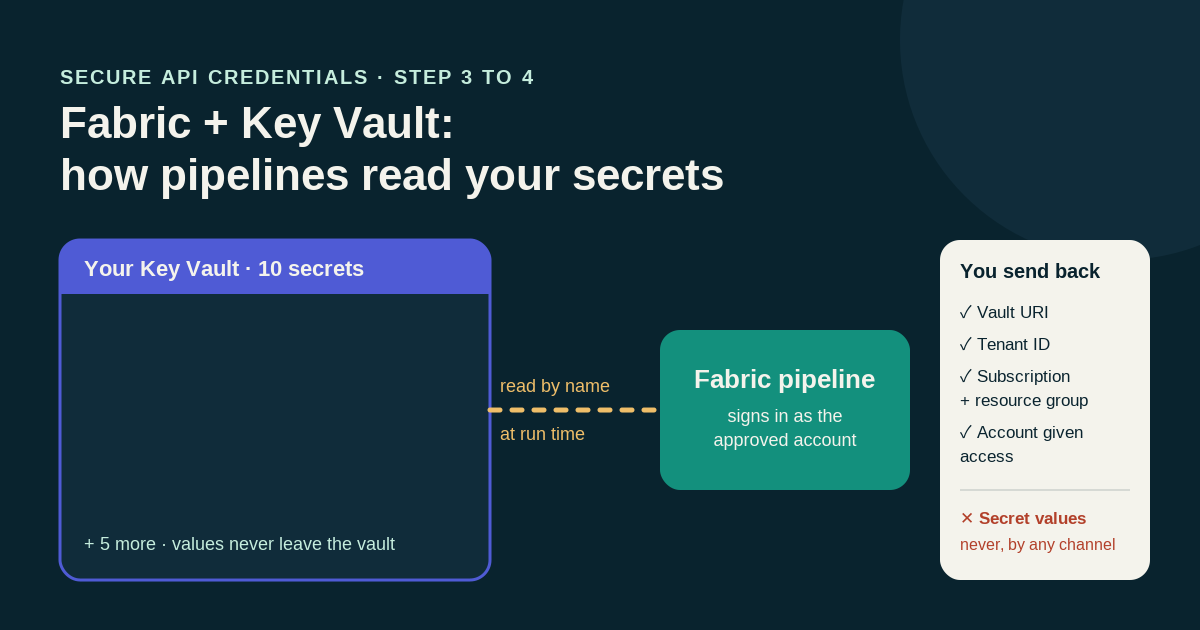 Values stay in your vault. Only names and pointers travel.
This is the end of Step 3 and the start of Step 4 in the secure API credential setup guide. If the vault doesn't exist yet, start with Azure Key Vault setup for data integrations. If you still need the credentials themselves, see the Procore DMSA, HubSpot service key and QuickBooks Online guides.
Before you start: Fabric workspace access
The pipeline that reads your vault lives in a Fabric workspace, and that workspace needs to be running on a capacity. Sort this out first. It takes about 10 minutes.
Give the partner a workspace role
- Sign in at app.fabric.microsoft.com and open (or create) the workspace, for example Reporting Analytics.
- On the workspace command bar, select Manage access. On narrow screens it sits under More options (...).
- Select Add people or groups.
- Enter the partner's account, choose Admin, and select Add.
Only workspace Admins and Members see Manage access. A Member can add people as Member, Contributor or Viewer, but only an Admin can add another Admin. Microsoft notes that role changes take effect the next time the person signs in to Fabric, so a "can't see the workspace" message right after the invite usually goes away after the person signs out and back in.
Why Admin? Microsoft's role table shows that Contributor can already create, edit and run lakehouses, notebooks and pipelines. Admin adds the workspace-level jobs: creating a workspace identity, connecting the workspace to Git, updating or deleting the workspace, and adding or removing other admins. The setup guide asks for Admin so none of those becomes a blocker mid-build. If your IT policy prefers Member or Contributor, that works for most builds. Agree on it up front.
Guest invite or an account on your domain
You can invite the partner's existing work account as a Microsoft Entra B2B guest, or create an account for them on your own domain. Both work with Fabric and Key Vault. The differences show up in licensing, MFA and offboarding.
Guest invite (for example charley@buildflows.ai) | Account on your domain (for example buildflows@yourcompany.com) | |
|---|---|---|
| Who controls sign-in and MFA | The partner's home tenant, unless your tenant requires its own MFA for guests | You |
| Tenant settings to check | Guest invitations allowed, and guests allowed in Fabric | None beyond normal users |
| Licensing | Depends on the guest's license and your capacity; check before go-live | You assign the license, so it's predictable |
| Offboarding | Remove the guest and its role assignments | Disable one account you own |
| Which identity runs the pipeline | The guest | Your account, which you can hand to someone else later |
The setup guide's own advice is that an account on your domain makes licensing and offboarding simpler. Guest account vs domain account for consultant access walks through both paths, including the tenant settings that block guests.
Whichever you pick, use the same account for the Fabric workspace role and the Key Vault role assignment. The pipeline signs in to the vault as that account, so the two have to match.
Capacity: F2 is enough to start
Fabric items need a capacity behind the workspace. For a contractor pulling Procore, HubSpot and QuickBooks data once or twice a day, an F2 (2 capacity units) is a reasonable start.
On November 14, 2026, the Azure Retail Prices API listed Fabric capacity at $0.18 per CU-hour pay-as-you-go in East US. For an F2 that is 2 × $0.18 × 730 hours, or about $262.80 a month if it runs 24/7. Pay-as-you-go capacity can be paused, and you aren't billed for compute while it's paused. A one-year reservation brings F2 to roughly $156 a month. Prices vary by region and change over time, so check the Fabric pricing page for your region. Is Microsoft Fabric F2 enough for construction reporting? covers pausing, reservations, Power BI viewer licensing and when to scale up.
Put the capacity and the Key Vault in the same region if you can. It keeps your data in one geography and keeps the network path simple.
Step 1: Add each secret to the vault
You need the Key Vault Secrets Officer role on the vault to do this. Owning the subscription isn't enough under the RBAC permission model. If + Generate/Import is greyed out, or you see "not authorized", the role is missing or hasn't applied yet. The Key Vault setup guide covers the role assignment.
The walkthrough below shows the steps for the first secret, procore-client-id.
- In the Azure portal, open your vault.
- In the left menu, select Objects → Secrets.
- Select + Generate/Import.
- Fill in the Create a secret form:
- Upload options: Manual
- Name: the exact name from the table below, for example
procore-client-id - Secret value: paste the value. Nothing before or after it.
- Content type: leave empty
- Set activation date and Set expiration date: leave unchecked
- Enabled: Yes
- Select Create.
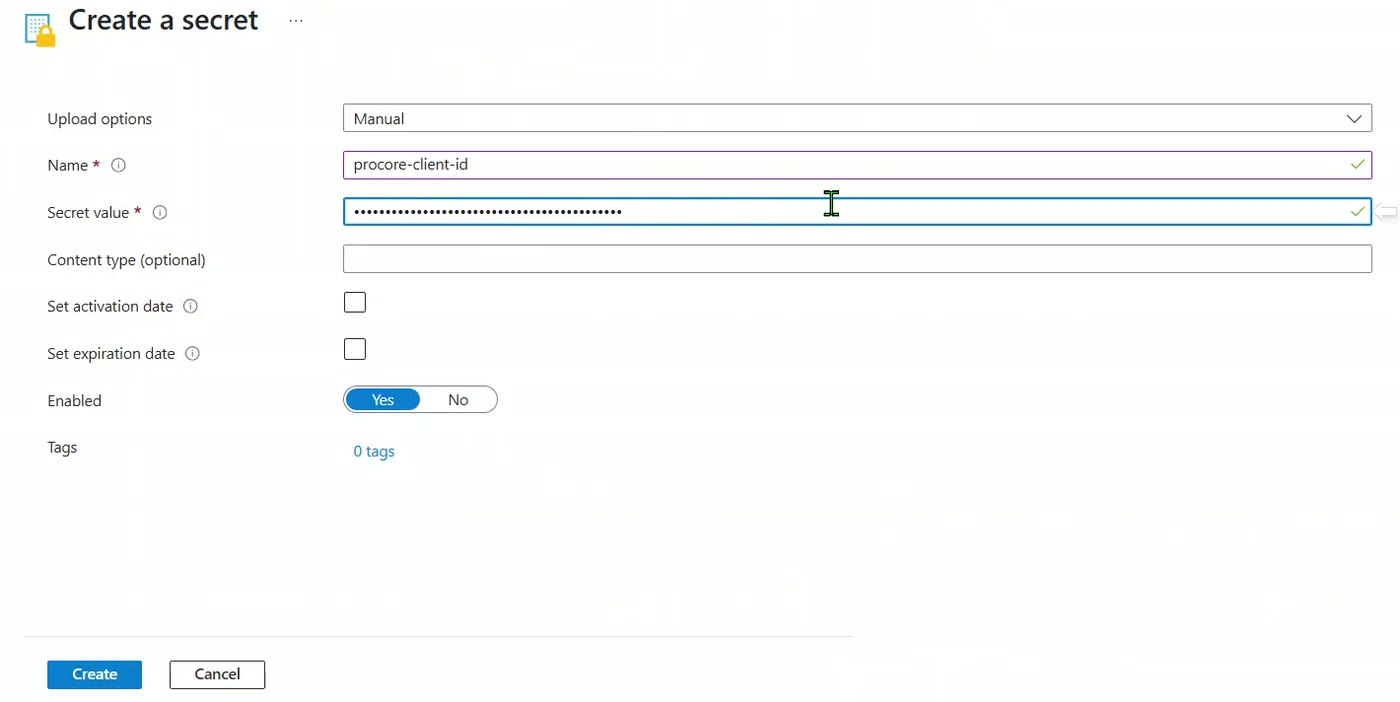 Create a secret: Manual, the exact name, the value, and nothing else.
The portal returns you to the Secrets list with a confirmation banner, and the new secret shows as Enabled.
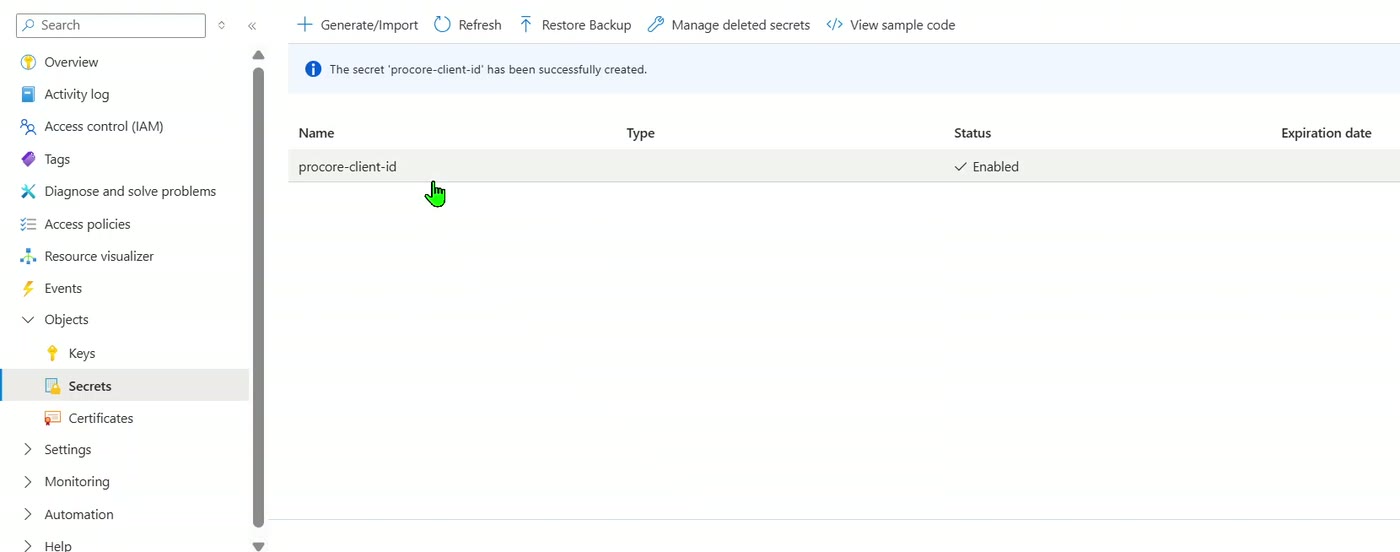 The secret is created and enabled. Repeat for each name in the table.
Repeat for every row in the table. Have the credentials open in one tab and the vault in another, and copy each value straight across. Some values are shown only once at the source, such as a Procore client secret or a HubSpot key. Paste them into the vault before you close that screen.
Why leave the dates empty? Microsoft describes a secret's expiration date as informational. Microsoft documents that a read still returns an expired or not-yet-active secret, and a date set here has no link to when Procore, HubSpot or Intuit actually expire a credential. The dates add a second, misleading source of truth and nothing else. Track real expiry dates separately. Monitoring integration credentials after go-live shows one way.
The secret names
Use these names exactly. They're what the pipeline code asks for, so a typo here is a failed run later.
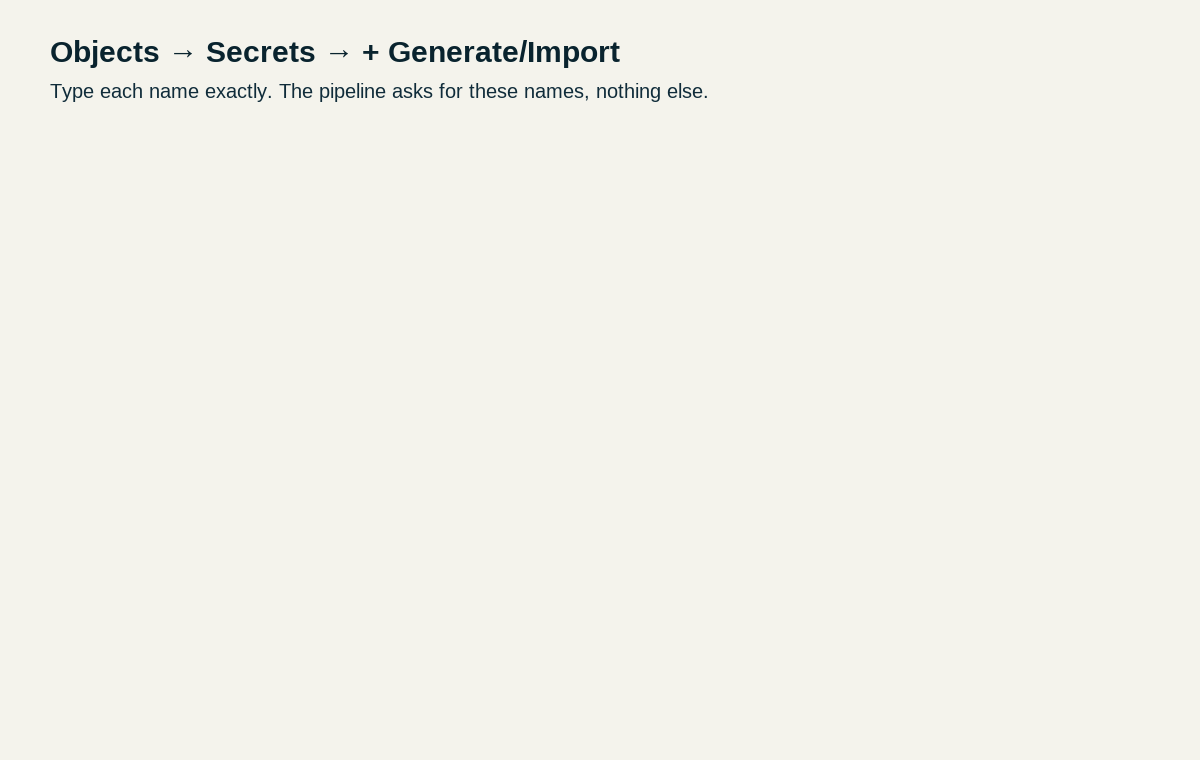 Nine secrets you add yourself, plus one added on the call.
| # | Secret name | Value | Where to find it |
|---|---|---|---|
| 1 | procore-client-id | Client ID | Procore Developer Portal → your app → production credentials |
| 2 | procore-client-secret | Client secret | Same screen. Copy it straight into the vault |
| 3 | procore-company-id | Company ID, numbers only | The long number in your Procore address, for example app.procore.com/1234567/company/home (on newer pages it follows /companies/) |
| 4 | procore-base-url | https://api.procore.com | Type exactly as shown. Sandbox apps use https://sandbox.procore.com |
| 5 | hubspot-service-key | The service key value | HubSpot Settings → Integrations → Service Keys (or Development → Keys → Service keys) → your key → Copy |
| 6 | quickbooks-client-id | Client ID | developer.intuit.com → your app → Keys and credentials (Production) |
| 7 | quickbooks-client-secret | Client secret | Same screen |
| 8 | quickbooks-realm-id | Company (realm) ID | QuickBooks → ⚙ Settings → Additional info. Admins also see it on the billing page (Account and settings → Billing & subscription in older menus) |
| 9 | quickbooks-environment | production | Type exactly as shown. Use sandbox only for a sandbox company |
| 10 | quickbooks-refresh-token | Refresh token | Skip for now. It's added during the setup call, after a QuickBooks admin clicks Connect once |
So "all 9 done" means rows 1 to 9. The refresh token comes from the one-time OAuth connection, and QuickBooks issues new refresh tokens over time. That's why whoever runs the pipeline needs to be able to write that one secret. More on that below.
A note on the HubSpot name. Earlier versions of the setup guide asked for a private app token stored as hubspot-private-app-token. HubSpot has since moved simple integrations to service keys, and new legacy private apps can no longer be created. The walkthrough video shows the service key screen. Store the service key as hubspot-service-key. If your vault already has hubspot-private-app-token from an earlier setup, keep that name and tell your partner. A renamed secret breaks the pipeline, while a consistent old name doesn't. See HubSpot service key for read-only CRM API access.
Not sure where an ID lives? Where to find every integration ID has screenshots for each one.
Naming rules
Key Vault's own rules are short. A secret name is 1 to 127 characters, using only letters, numbers and dashes (0-9, a-z, A-Z, -). No spaces, no underscores, no dots. Names are case-insensitive, so Procore-Client-ID and procore-client-id are the same secret.
On top of that, follow these conventions:
- Lowercase, with dashes, exactly as in the table. Case doesn't matter to Key Vault, but humans compare names by eye in logs and checklists.
- System name first.
procore-,hubspot-,quickbooks-. The Secrets list sorts alphabetically, so each system's secrets group together. - No environment suffix in the name. Keep sandbox and production in separate vaults instead of
procore-client-id-prodandprocore-client-id-dev. The code stays the same and only the Vault URI changes. - Never put a value in the name. Names show up in logs, audit events and error messages.
procore-company-1234567leaks the ID. - No quotes or spaces around values. A pasted
"abc123"orabc123is a different value, and the API will reject it with a confusing 401. - To change a value, add a new version. Open the secret and select + New Version. Don't delete it and create it again. The name stays the same and readers get the latest version. Rotating secrets without breaking pipelines covers this in detail.
The API credential setup checklist generates the full name list for the systems you're connecting, so you can copy names instead of typing them.
Step 2: Send back the pointers, never the values
Once the secrets are in, your partner needs four things to connect, and none of them is a secret value. All of them are on the vault's Overview page under Essentials.
- Open the vault and select Overview.
- Copy the Vault URI. It has the form
https://<vault-name>.vault.azure.net/, for examplehttps://kv-reporting-analytics.vault.azure.net/. Use the copy icon next to it. - Copy the Directory ID. This is your Microsoft Entra tenant ID. It's also shown as Tenant ID under Microsoft Entra ID → Overview.
- Note the Subscription name and the Resource group name.
 Everything you send back is on this one panel. The values are blurred here.
In the walkthrough video the Vault URI is described as "your resource group" followed by .vault.azure.net. It's the vault name, not the resource group name. Copy it from the Overview page and you can't get it wrong.
Then send a short reply with this list:
| Item | Example | Why the partner needs it |
|---|---|---|
| Vault URI | https://kv-reporting-analytics.vault.azure.net/ | The address the pipeline code reads from |
| Directory (tenant) ID | A GUID | Signs in against your tenant, not the partner's |
| Subscription and resource group | Reporting / rg-reporting-analytics | To find the vault in the portal and check its settings |
| Account given access | The email from the role assignment | Confirms which identity the pipeline must run as |
| Secrets added | "All 9 done", or the names that are missing | So nobody has to guess which runs will fail |
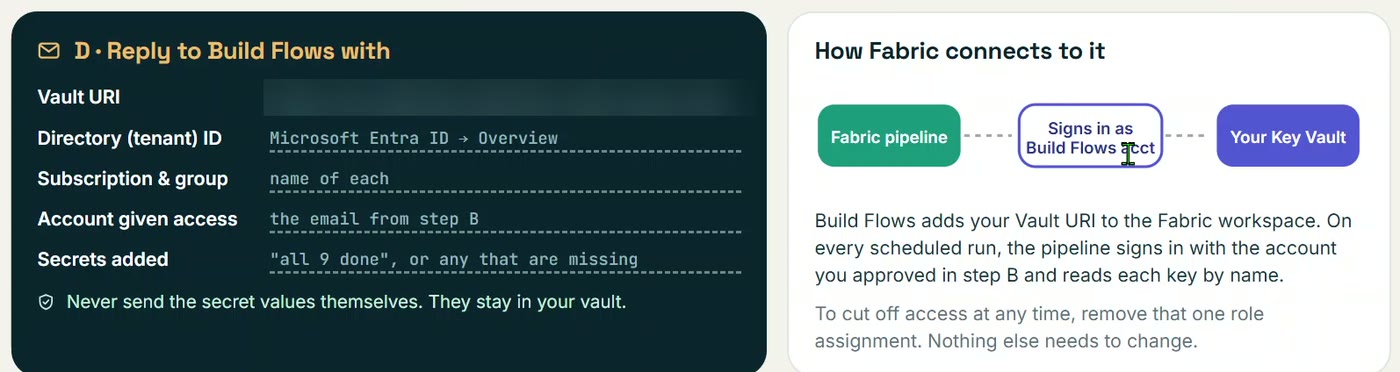 The reply checklist and the connection model, from the setup guide.
Is the tenant ID sensitive? It isn't a credential. Nobody can sign in with it alone. But it identifies your organization, so don't post it publicly. The same goes for the subscription ID. Email is fine for these pointers. It is not fine for anything from the vault itself.
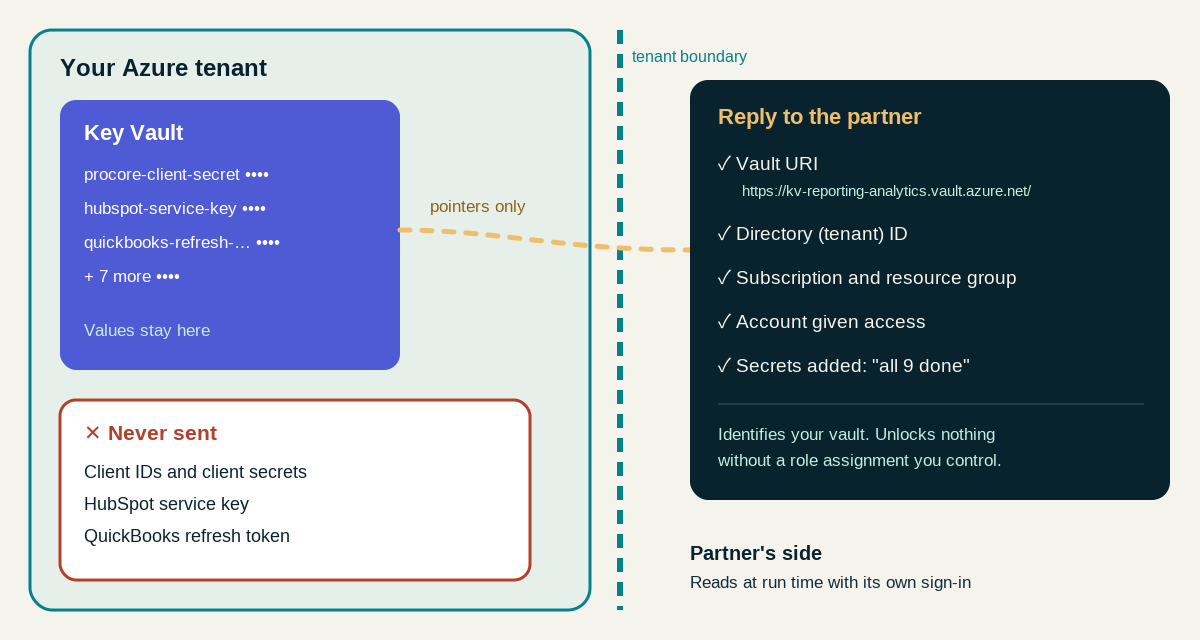 Pointers cross the boundary. Values never do.
If someone asks you to "just send the key so I can test it", say no and offer a screen-share instead. Never email an API key explains the full handoff and what to do if a value has already been sent.
How a Fabric pipeline reads the secrets at run time
Once the partner has the Vault URI and a role on the vault, nothing about the secrets is stored in Fabric. Each run signs in, reads each secret by name, uses it in memory and discards it. Fabric gives you three ways to do that. For Procore, HubSpot and QuickBooks, one of them clearly fits best.
Option 1: a notebook calls getSecret (the one we use)
A Fabric notebook reads a secret with one line:
VAULT_URL = "https://kv-reporting-analytics.vault.azure.net/"  # the Vault URI you sent back

client_id = notebookutils.credentials.getSecret(VAULT_URL, "procore-client-id")
The pipeline runs that notebook with a Notebook activity, on a schedule. The notebook gets a Procore token with client credentials, calls HubSpot with the service key, and refreshes QuickBooks. When QuickBooks returns a new refresh token, the notebook saves it back with notebookutils.credentials.putSecret.
Things to know, from Microsoft's NotebookUtils docs:
getSecretworks in Python notebooks and Spark notebooks (PySpark, Scala, R).putSecretworks only in Python notebooks. Spark notebooks don't support it, even when they run PySpark. The QuickBooks token rotation is the reason to use a Python notebook.getSecretuses the credentials of whoever the notebook runs as. The secret comes back as plain text in memory.- Fabric tries to redact a secret value printed in cell output. Microsoft calls this a best-effort safeguard, not a security boundary. Never print, log or
display()a secret, and never pass one as a notebook parameter. - You'll see
mssparkutils.credentials.getSecretin older posts.notebookutilsis the current name.
The full code for all three systems is in read Azure Key Vault secrets in a Fabric notebook.
Who the notebook runs as
This is the part that decides which account needs the vault role. Microsoft's notebook docs list three cases:
| How the run starts | Identity that reads the vault |
|---|---|
| Someone presses Run in the notebook | That person |
| A notebook schedule | The user who created or last updated the schedule |
| A Notebook activity in a pipeline | The pipeline's last modified user, not its owner and not the notebook's owner |
That's what the setup guide means by "the pipeline signs in with the account you approved." The partner's account builds and last edits the production pipeline, so the scheduled run reads the vault as that account. That account is the one in your role assignment.
The catch: if someone else edits the pipeline later, even just a retry setting, the next run reads the vault as them. If they have no role on the vault, the run fails with a 403 from Key Vault. Agree who owns the production pipeline and test after every edit.
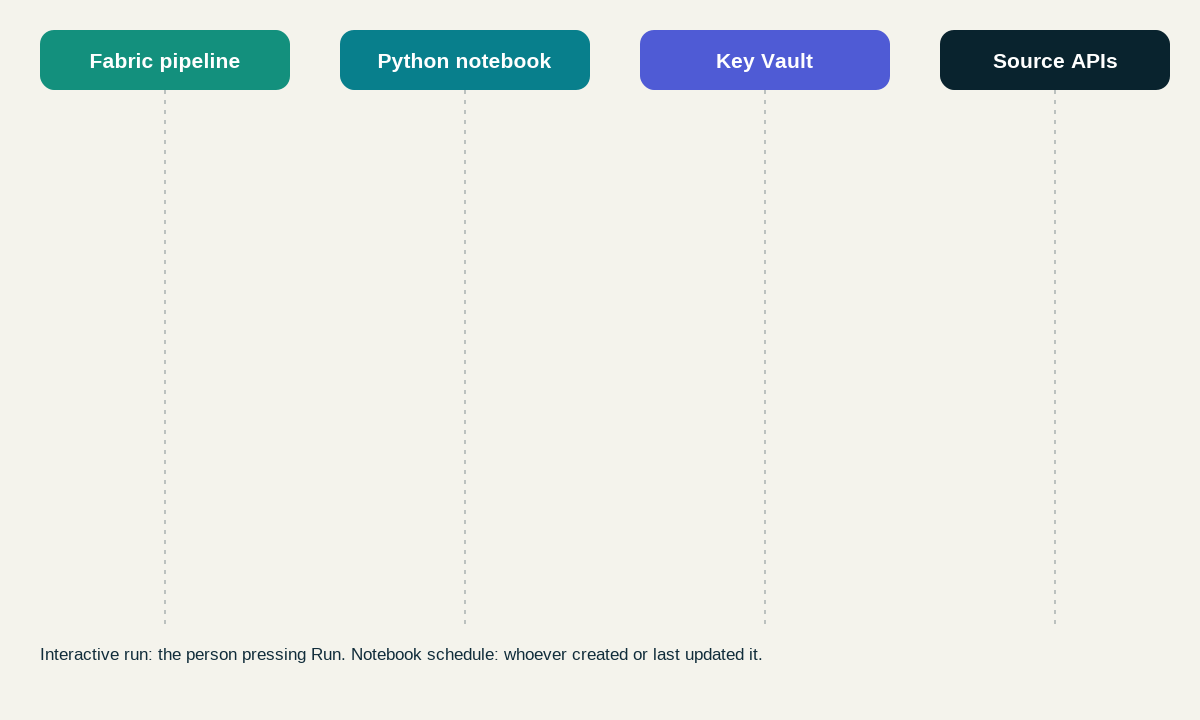 Every scheduled run signs in, reads by name, and keeps the value in memory only.
Which role that account needs
- Key Vault Secrets User lets an identity read secret values and nothing else. It's the least-privilege role for a pipeline that only reads.
- Key Vault Secrets Officer can also create, update and delete secrets. The setup guide asks for Officer because the pipeline writes the rotated QuickBooks refresh token back with
putSecret, and because the partner adds that token during the setup call.
If you'd rather keep write access tighter, there's a middle path. Give the partner's account Officer during setup. Afterwards, change it to Secrets User and move the QuickBooks refresh into a step that runs as an identity you control. It's more work, and most small teams keep Officer scoped to this one vault. Either way, assign the role on the vault itself, not on the resource group or subscription. In the walkthrough video, the narration says the role was assigned "for the subscription". The role assignment list shows it's scoped to This resource, the vault, which is correct.
Option 2: Azure Key Vault references in Fabric connections
Fabric Data Factory can also store a pointer to a Key Vault secret inside a connection, so copy activities and dataflows can authenticate without anyone typing a password into Fabric. To set it up:
- In Fabric, select the gear icon → Manage connections and gateways.
- On the Azure Key Vault references tab, select New. Enter a Reference alias, the vault's Account Name, and sign in with OAuth 2.0 under Edit credentials. Select Create.
- On the Connections tab, select New → Cloud, choose a supported connection type, and select the AKV reference icon next to the password or secret field. Pick the reference and type the secret name.
What Microsoft's docs say about it today:
- Fabric stores only the vault URI, the secret name and the credential used to reach the vault. It never stores the secret value.
- It always reads the latest version of a secret. You can't pin a version.
- You can't create these connections from the Get Data pane, only from Manage connections and gateways.
- The vault must be reachable from the public network, or through an on-premises data gateway with line of sight to its private endpoint.
- The person creating the reference needs read access to the vault's secrets. The page lists "at least Key Vault Certificate User" and also asks for Get and List permissions. In an RBAC vault, Key Vault Secrets User is the role that grants reading secret values, so if a reference won't come online, check that role first.
The limitation that matters here is the supported connector list. It covers Azure Blob Storage, ADLS Gen2, Azure Table Storage, Databricks, Dataverse, OData, Oracle Cloud Storage, PostgreSQL, SharePoint Online list, Snowflake, SQL Server and Web, plus Azure DevOps and GitHub for source control. There's no Procore, HubSpot or QuickBooks connector in it. The Web connector supports only basic and service principal authentication with a Key Vault reference. That doesn't fit a Procore client-credentials token exchange, a HubSpot bearer key or a QuickBooks refresh token. Key Vault references are great for a SQL password or a storage key, but they won't carry these three APIs.
Option 3: Fabric connections inside notebooks (preview)
Fabric can also hand a connection's credentials to a notebook with notebookutils.connections.getCredential. You have to tick Allow Code-First Artifacts like Notebooks to access this connection (Preview) when you create the connection, and you can't change it later. OAuth 2.0 connections aren't supported. For Key Vault connections that use a service principal or workspace identity, Microsoft's page asks for vault access policies, which is the legacy model this setup avoids. For now, getSecret is simpler.
Side by side
Notebook getSecret | Key Vault reference in a connection | Connection in a notebook | |
|---|---|---|---|
| Status | Generally available | Generally available | Preview |
| Works for Procore, HubSpot, QuickBooks REST calls | Yes | No supported connector | Not for OAuth 2.0 |
| Can write a rotated token back | Yes, putSecret in a Python notebook | No | No |
| Identity that reads the vault | The notebook's run identity | The credential saved on the reference | The connection's credential |
| Version read | Latest unless you code otherwise | Always latest | Depends on the connection |
| Good for | API integrations like this one | SQL, storage, Snowflake and similar sources | Reusing an existing non-OAuth connection |
Revoke access by removing one role assignment
Here's the payoff for doing it this way. The partner never had the values, so cutting them off doesn't need any secret to change. Their access is one role assignment on one vault.
- In the Azure portal, open the vault.
- Select Access control (IAM) → Role assignments.
- Find the Key Vault Secrets Officer (or Secrets User) row for the partner's account, scoped to This resource.
- Tick it, select Delete on the toolbar (some portal versions label it Remove), then confirm.
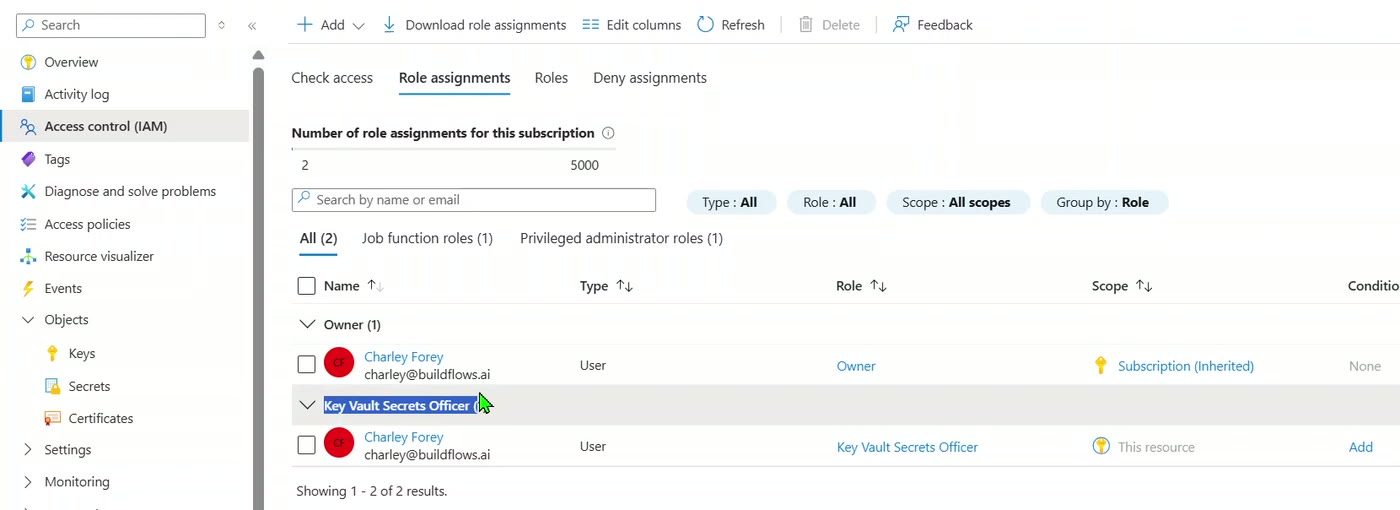 One row grants access to this vault. Removing it is the off switch.
From then on, the partner's account gets 403 Forbidden on every read, and the scheduled pipeline fails at its first getSecret. Your Procore, HubSpot and QuickBooks credentials keep working for anything else that uses them. Microsoft notes that role assignment changes can take up to 10 minutes to apply.
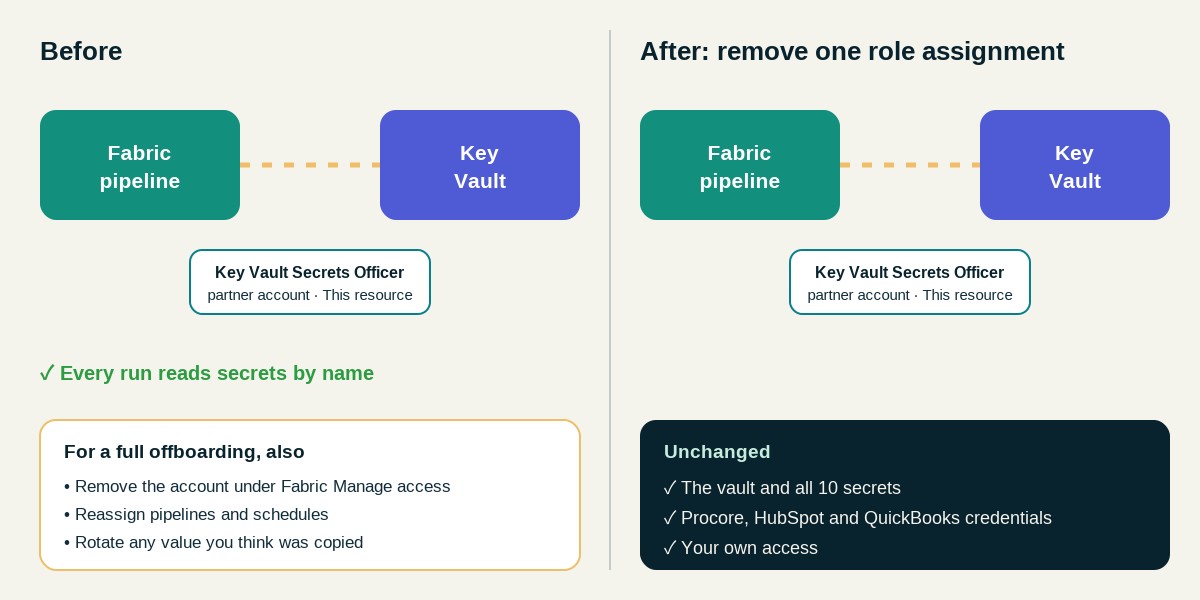 Remove one row and the partner is out. Nothing else needs to change.
Two things removing the role does not do:
- It doesn't un-read values already read. A run that was in progress still has values in memory until it ends. If you believe a value was copied out, rotate it at the source and add a new version in the vault.
- It doesn't remove Fabric access. For a full offboarding, also remove the account from the workspace under Manage access, and reassign the pipeline and schedules to someone who still has a vault role, or they'll stop working. Then disable the account, or remove the guest.
Common mistakes
- Names that almost match.
procore_client_id,Procore Client ID(not allowed anyway) orprocore-clientid. The pipeline asks for an exact name. Copy from the table or the checklist tool. - Whitespace or quotes in values. A trailing space from a copy, or quotes around the value, gets you a 401 from the API that looks like a bad credential.
- Sending values "just to check". Send the Vault URI and the list of names you filled. Your partner can confirm each secret exists without ever seeing its value.
- Using a different account for Fabric and the vault. The pipeline reads the vault as the account that last edited it. If that account has the workspace role but not the vault role, every run fails with 403.
- Editing the production pipeline as someone without a vault role. You just changed the identity it runs as. Test a run after every edit.
- Assigning the role at subscription scope. That grants access to every vault in the subscription, now and later. Assign it on the vault.
- Expecting Key Vault references to cover Procore, HubSpot or QuickBooks. They don't. Use a notebook with
getSecret. - Reading secrets in a Spark notebook and then trying
putSecret. It isn't supported there. Use a Python notebook for anything that writes the QuickBooks token back. - Deleting a secret to change it. Add a new version instead. A deleted secret sits in soft delete and blocks reusing the name until it's purged or recovered.
- Running the F2 around the clock when nobody needs it. Pay-as-you-go capacity can be paused. Schedule loads within the hours it runs, or reserve it if it truly runs all month.
Checklist
- Fabric workspace created on an F2 (or larger) capacity, in the same region as the vault if possible
- Partner added under Manage access → Add people or groups as Admin (or the role you agreed)
- Decided: guest invite or an account on your domain, and the same account used for Fabric and Key Vault
- Key Vault Secrets Officer assigned to you and the partner's account, scoped to the vault
- Secrets added under Objects → Secrets → + Generate/Import with the exact names
-
procore-client-id,procore-client-secret,procore-company-id,procore-base-url -
hubspot-service-key(or the existinghubspot-private-app-token, and the partner told which) -
quickbooks-client-id,quickbooks-client-secret,quickbooks-realm-id,quickbooks-environment -
quickbooks-refresh-tokenleft for the setup call - No quotes or spaces in values, content type and dates left empty
- Reply sent with Vault URI, Directory (tenant) ID, subscription and resource group, account given access, and secrets added
- No secret value sent by email, chat, text or document
- Agreed who owns and edits the production pipeline
- You know where the role assignment is, so you can remove it later
Doing it together
If you'd rather not do this alone, Build Flows can walk through it with you on a short screen-share. You stay signed in to your own tenant and type every value yourself. We check the names, the role scope and the reply details as we go, and add the QuickBooks refresh token when your admin clicks Connect. Email charley@buildflows.ai or start at buildflows.ai.
Related guides
- Secure API credential setup for Procore, HubSpot, QuickBooks and Fabric, the full four-step process
- Azure Key Vault setup for data integrations
- Never email an API key: secure credential handoff
- Troubleshooting credential setup across Procore, HubSpot, QuickBooks, Azure and Fabric
- Read-only API scopes for Procore, HubSpot and QuickBooks
- Building construction reporting in Microsoft Fabric
- Procore, QuickBooks and HubSpot into Fabric demo
- Connector framework for Procore OAuth integrations
- How we handle client credentials: Security at Build Flows
References
- Microsoft Learn: NotebookUtils credentials utilities for Fabric (
getSecret,putSecret, redaction) - Microsoft Learn: How to use notebooks: security context of running a notebook
- Microsoft Learn: Configure Azure Key Vault references in Microsoft Fabric
- Microsoft Learn: Fabric connection in notebooks (preview)
- Microsoft Learn: Give users access to workspaces
- Microsoft Learn: Roles in workspaces in Microsoft Fabric
- Microsoft Learn: About keys, secrets and certificates (secret name rules, Vault URI format)
- Microsoft Learn: Quickstart: set and retrieve a secret from Azure Key Vault using the Azure portal
- Microsoft Learn: Provide access to Key Vault keys, certificates and secrets with Azure RBAC (Secrets Officer and Secrets User)
- Microsoft Learn: Remove Azure role assignments
- Microsoft Learn: Troubleshoot Azure RBAC (changes can take up to 10 minutes)
- Microsoft Learn: Pause and resume your Fabric capacity
- Azure: Microsoft Fabric pricing and the Azure Retail Prices API
- HubSpot Developers: Service keys
Frequently asked questions
What names should I use for Procore, HubSpot and QuickBooks secrets in Azure Key Vault?
Use procore-client-id, procore-client-secret, procore-company-id, procore-base-url, hubspot-service-key, quickbooks-client-id, quickbooks-client-secret, quickbooks-realm-id, quickbooks-environment and quickbooks-refresh-token. Key Vault allows 1 to 127 letters, numbers and dashes, and names are case-insensitive. Keep them lowercase with the system name first so they group together in the portal.
Is it safe to email the Vault URI and tenant ID?
Yes. Neither is a credential, and nobody can read a secret without a role assignment on the vault that you control. They do identify your organization, so don't post them publicly. Never email a secret value, even once to test it.
How does a Microsoft Fabric notebook read a secret from Azure Key Vault?
Call notebookutils.credentials.getSecret with the Vault URI and the secret name. It signs in as whoever the notebook runs as and returns the value as plain text in memory. Don't print or log it. Fabric's output redaction is best-effort, not a security boundary. The older name for the same utility is mssparkutils.
Which account does a scheduled Fabric pipeline use to read Key Vault?
A notebook run by a pipeline's Notebook activity runs as the pipeline's last modified user, not its owner. A notebook schedule runs as whoever created or last updated the schedule. That account needs a Key Vault role on the vault. If someone else edits the pipeline, the next run uses their identity.
Can I use Azure Key Vault references in Fabric connections for Procore, HubSpot or QuickBooks?
Not today. Key Vault references work with a set list of connectors, such as SQL Server, Snowflake, Azure storage and Web. The Web connector supports only basic and service principal authentication with a reference. Procore client credentials, HubSpot bearer keys and QuickBooks refresh tokens need a notebook that calls getSecret.
Does the pipeline account need Key Vault Secrets Officer or Secrets User?
Secrets User is enough to read. The setup uses Secrets Officer because QuickBooks issues new refresh tokens, and the notebook writes them back with putSecret. putSecret works only in Python notebooks. Either way, scope the role to the vault, not the subscription.
How do I cut off a consultant's access to my Key Vault?
Open the vault, go to Access control (IAM) > Role assignments, select their row and choose Delete (Remove in some portal versions). The change can take up to 10 minutes to apply, and after that their reads return 403. For a full offboarding, also remove them from the Fabric workspace, reassign their pipelines and schedules, and rotate any value you think was copied.
Next step
Need this connection in your environment?
Scope one integration: the records, direction, timing, and business rules behind the connection.
Prefer email? charley@buildflows.ai
Keep learning
Integrations · November 14, 2026
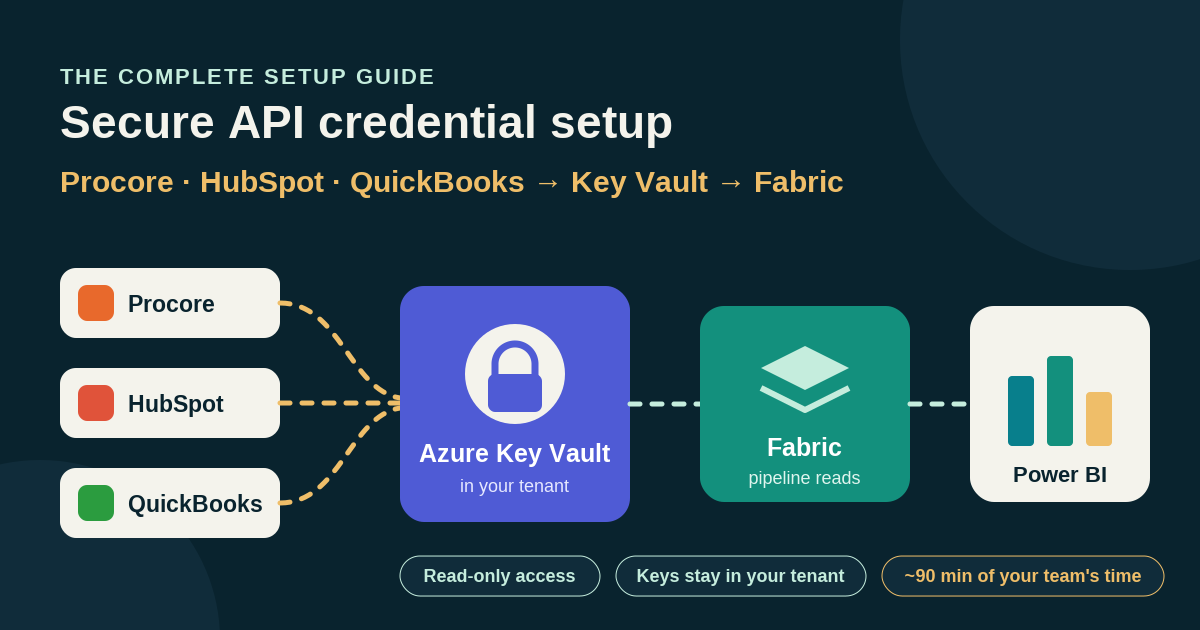
Secure API Credential Setup for Procore, HubSpot and QuickBooks with Azure Key Vault and Microsoft Fabric
The end-to-end guide to connecting Procore, HubSpot and QuickBooks Online to Microsoft Fabric and Power BI without handing over credentials: who owns each step and how long it takes, the architecture from sources through Azure Key Vault to Fabric, the four steps (Fabric access, read-only API access in three systems, Key Vault with the Secrets Officer role, connect and go live), the exact secret names, what to send back, how to revoke access, common mistakes and a checklist.
Integrations · November 14, 2026
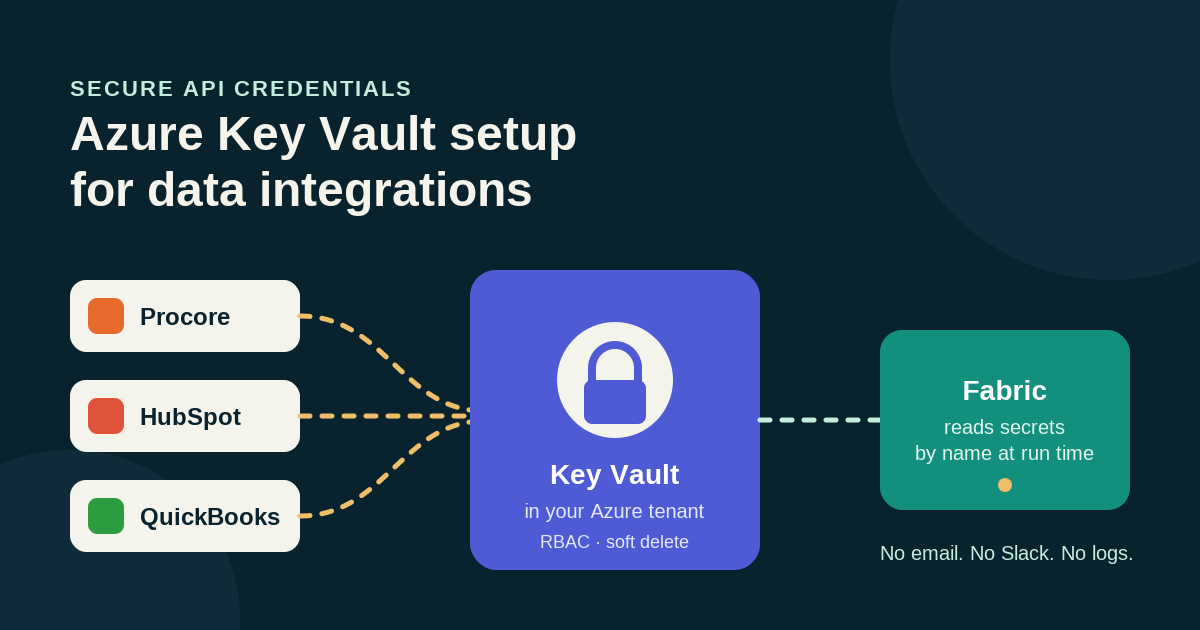
Azure Key Vault Setup for Data Integrations: Create the Vault, Set RBAC and Assign Secrets Officer
A step-by-step guide to creating an Azure Key Vault for integration secrets: resource group and globally unique name, matching the Fabric region, Standard tier, soft delete and the purge protection trade-off, the RBAC permission model, networking, the Key Vault Secrets Officer role assignment, why 'not authorized' appears right after setup, and what it really costs.
Integrations · November 14, 2026
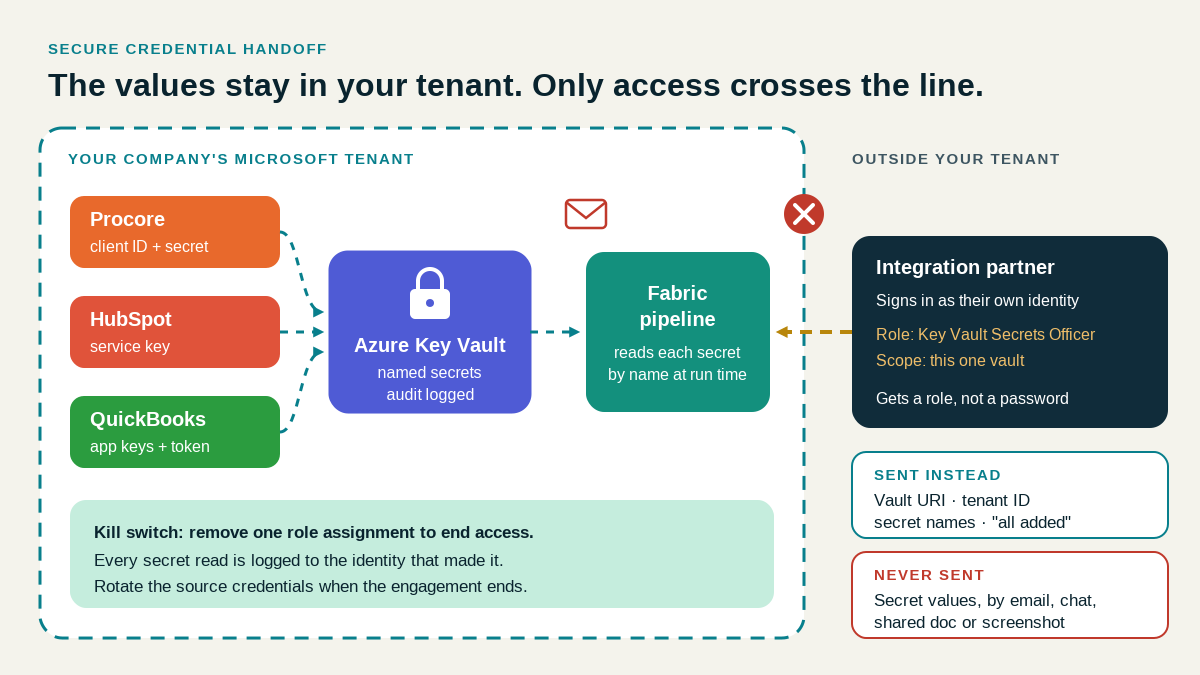
Never Email an API Key: A Secure Credential Handoff Between a Company and a Consultant
A vendor-neutral process for sharing integration credentials safely: your company owns the vault, the partner gets a scoped role, and only the vault address ever crosses between you.