Key takeaways
- Create the vault in its own resource group with a globally unique 3 to 24 character name, in the same region as your Fabric capacity, on the Standard tier.
- Soft delete is always on and the retention period (7 to 90 days) can't be changed later; purge protection can't be turned off once enabled, so use it on the production vault.
- Choose the Azure role-based access control permission model; vault access policies are the legacy model and let Contributors grant themselves access.
- Being subscription Owner doesn't let you add secrets. Assign Key Vault Secrets Officer on the vault to the people who load secrets, and Key Vault Secrets User to the pipeline identity.
- A 'not authorized' error right after setup usually means the role is missing or hasn't applied yet; Microsoft says assignments can take up to 10 minutes.
- Standard-tier secret operations cost $0.03 per 10,000 at list price, so a pipeline reading nine secrets hourly costs a few cents a month.
28 seconds · From a Build Flows walkthrough
Store API credentials in a vault, not an inbox
Why Procore, HubSpot and QuickBooks credentials belong in Azure Key Vault instead of email, chat or logs. This is the reasoning only; the vault setup steps come next.
Read the clip transcript
Now we need to store these credentials safely and be able to use them. We don't want to send them to anyone by email, or have them recorded or logged anywhere else. So the most appropriate solution is to use a Key Vault. In this instance, we'll open up our Key Vault. This is through Microsoft Azure. We can sign in at portal.azure.com.
Captions adapted from the source video; proper names may reflect automatic transcription. Original segment: 16:11–16:40. Watch at the source.
28 seconds · From a Build Flows walkthrough
Choose the region, tier and recovery settings for a new Key Vault
Walk through the Create a key vault form: region, Standard pricing tier, 90-day soft-delete retention and purge protection, then Review + create showing role-based access control and a public endpoint. The narration says East US 2 while the form shows East US; either way, pick the region that matches your Fabric capacity. Purge protection is a trade-off you should decide on, not a default to copy.
Read the clip transcript
We'll put this in East US 2, since we're in New York. For the pricing tier, we'll keep Standard. Then we'll keep the 90-day retention and disable purge protection. So that's all fine. We'll review and create. It takes a second to load here.
Captions adapted from the source video; proper names may reflect automatic transcription. Original segment: 19:18–19:45. Watch at the source.
37 seconds · From a Build Flows walkthrough
Assign Key Vault Secrets Officer before adding secrets
Creating a vault does not let you write secrets; under RBAC you need a data-plane role such as Key Vault Secrets Officer, or Azure returns "not authorized". The clip covers why the setup account needs Officer rather than read-only access; a running pipeline should get only Key Vault Secrets User.
Read the clip transcript
So we now have the role assigned: Key Vault Secrets Officer on this vault. Creating the vault doesn't let you add secrets. If you see "not authorized", finish the role assignment first. Without it you can't add secrets. We need Secrets Officer, not just read access, so we can add the QuickBooks tokens during our call and update a key if it's ever reissued, like a refresh token.
Captions adapted from the source video; proper names may reflect automatic transcription. Original segment: 24:58–25:35. Watch at the source.
You have a Procore client secret, a HubSpot service key and a QuickBooks Online client secret and refresh token. A scheduled pipeline needs to read them every night. The easy route is to email them to whoever builds the pipeline, or paste them into a chat, a notebook cell or a config file. Every one of those leaves a copy behind that nobody owns, nobody audits and nobody remembers to delete.
Azure Key Vault is the boring fix. The secrets live in one place in your own Azure tenant. People and pipelines sign in with their own identity to use them, every access is checked against a role, and you can turn on audit logging. This guide walks through creating a vault for a reporting or data integration, step by step: the settings that matter, the role you assign, the "not authorized" error almost everyone hits, and what it costs. It is step 3 of the full credential setup for Procore, HubSpot, QuickBooks and Fabric.
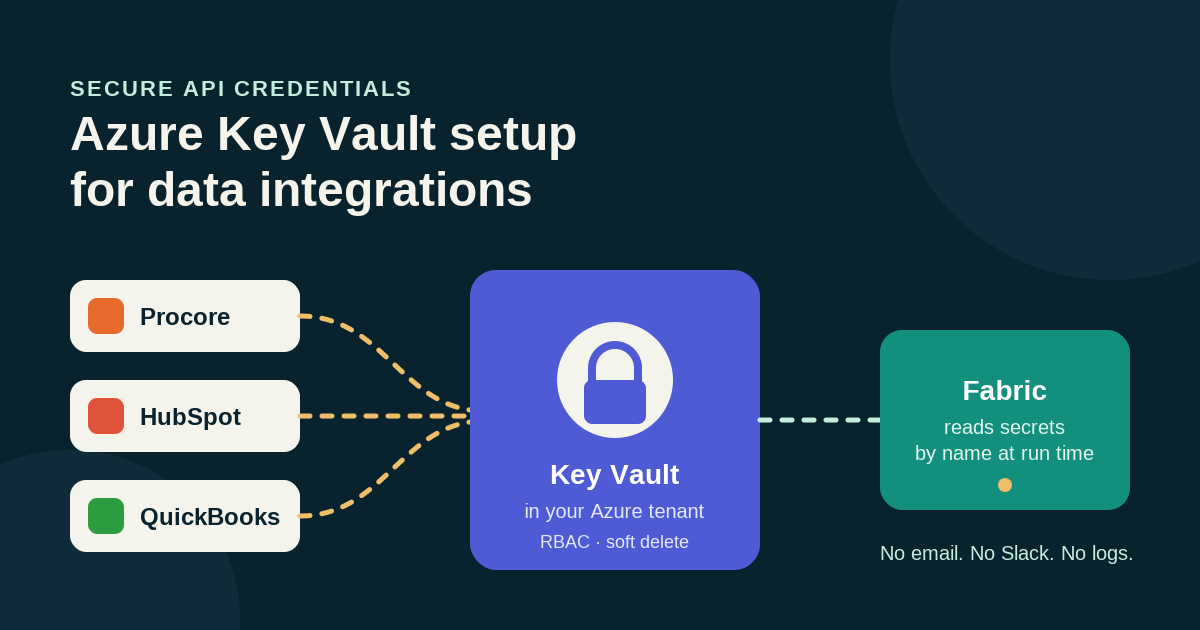 One vault in your tenant. The pipeline reads secrets by name; nobody passes values around.
Why a vault, and not email, Slack or a config file
The rule is simple: an API secret should exist in exactly two places. One is the system that issued it (Procore, HubSpot, Intuit). The other is the vault. Anywhere else is a copy you will have to track down when someone leaves or the key is reissued.
| Where the secret sits | Who can read it | Audit trail | How you revoke it |
|---|---|---|---|
| Email or Teams/Slack message | Everyone on the thread, forever, plus backups | None for the secret itself | You can't. Reissue the key. |
Notebook cell, script or .env file | Anyone with the file, its history or source control | None | Reissue the key, then hunt down the copies |
| Pipeline parameter or variable | Anyone who can open the pipeline or its run history | Partial | Reissue the key |
| Azure Key Vault (RBAC) | Only identities with a Key Vault data role | Per-operation logs once diagnostic logging is on | Remove the role assignment |
If you want the longer comparison, including password managers, see Azure Key Vault vs password manager vs .env files. For how to get the values from your company to a consultant without ever sending them, see never email an API key.
Before you start
- An Azure subscription. The vault is billed to a subscription. If your company has Microsoft 365 but has never used Azure, someone has to create a subscription first at portal.azure.com and add a payment method. Many companies already have one for Fabric capacity.
- The right person. Whoever creates the vault needs to be able to create resources in the subscription (Contributor or Owner), and whoever assigns the role in step 7 needs to be able to create role assignments (Owner, User Access Administrator, or Role Based Access Control Administrator). In a small company that is usually the same IT admin.
- Your Fabric capacity region. Look it up before you start. In the Azure portal, open the Fabric capacity resource and check its Location, or ask whoever manages Fabric.
- The secrets themselves, ready to paste, from the Procore, HubSpot and QuickBooks setup guides. You add them after the vault exists.
 The whole setup is seven steps. Steps 2 to 6 all happen on the one Create a key vault form.
Step 1: Create the Key Vault resource
- Sign in at portal.azure.com with your work account.
- Select Create a resource, search for Key Vault, choose Key Vault (publisher Microsoft) and select Create.
That opens the Create a key vault form. It has several tabs. You only need to change a few fields.
Step 2: Basics: resource group, name, region and tier
On the Basics tab:
- Subscription: pick the subscription that should pay for the vault.
- Resource group: select Create new and give it a name that says what it's for, such as
rg-reporting-analytics. A resource group is just a folder for related Azure resources. Keeping the vault in its own group makes it easy to find, tag and hand over later. - Key vault name: for example
kv-reporting-analytics. The name becomes part of the vault's address,https://kv-reporting-analytics.vault.azure.net/, so it must be globally unique across all of Azure, 3 to 24 characters, letters, numbers and hyphens only, starting with a letter, ending with a letter or number, and with no double hyphens. If the name is taken, the field turns red. Add a short suffix such as your company initials. Microsoft notes that values you enter for Azure resources can be copied globally, so don't put anything sensitive, such as a client or project name you want to keep private, in the vault name. - Region: choose the same region as your Fabric capacity. It isn't a hard requirement, but it keeps traffic and data in one geography, which is what most security reviews ask about.
- Pricing tier: Standard. Premium adds hardware-protected (HSM) keys. You are storing secrets, not encryption keys, so Standard is all you need.
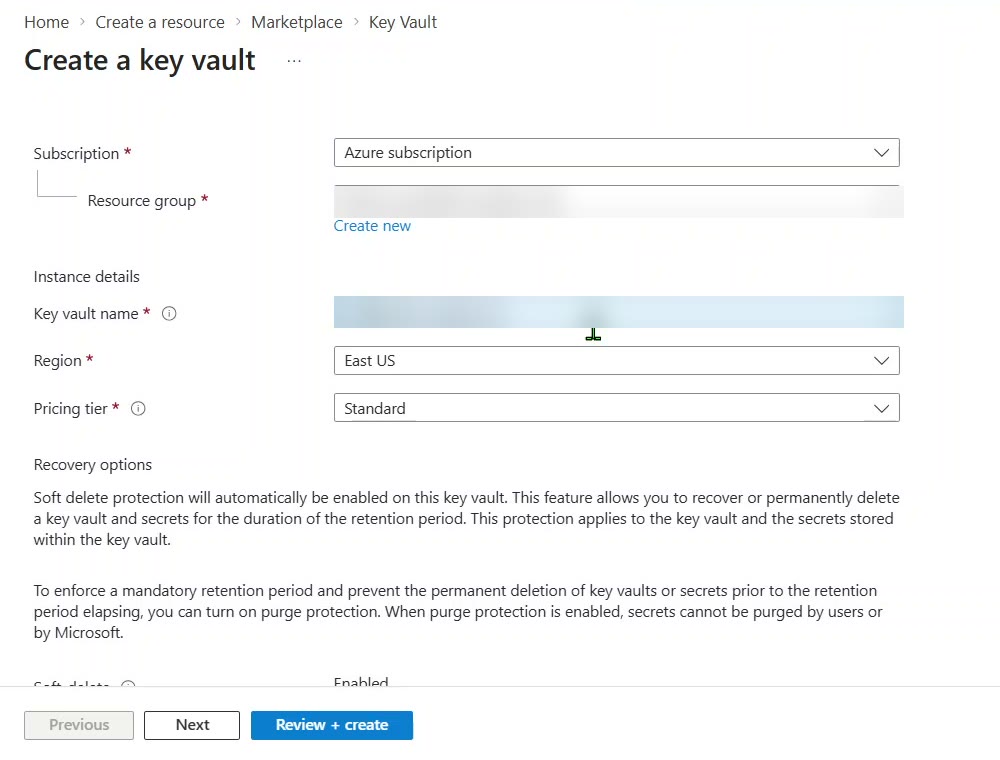 Basics tab: one resource group, a unique name, the Fabric region and the Standard tier.
In the recording, the narration says "East US 2" but the form shows East US. Use whichever region your Fabric capacity is in.
Step 3: Recovery options: soft delete and purge protection
Lower on the same Basics tab, under Recovery options:
- Soft delete is always on for new vaults and can't be turned off. A deleted secret or vault stays recoverable for the retention period.
- Days to retain deleted vaults: 90 is the default. You can set 7 to 90, and you can't change it after the vault is created. The same period applies to deleted secrets.
- Purge protection is a real decision. It is off by default.
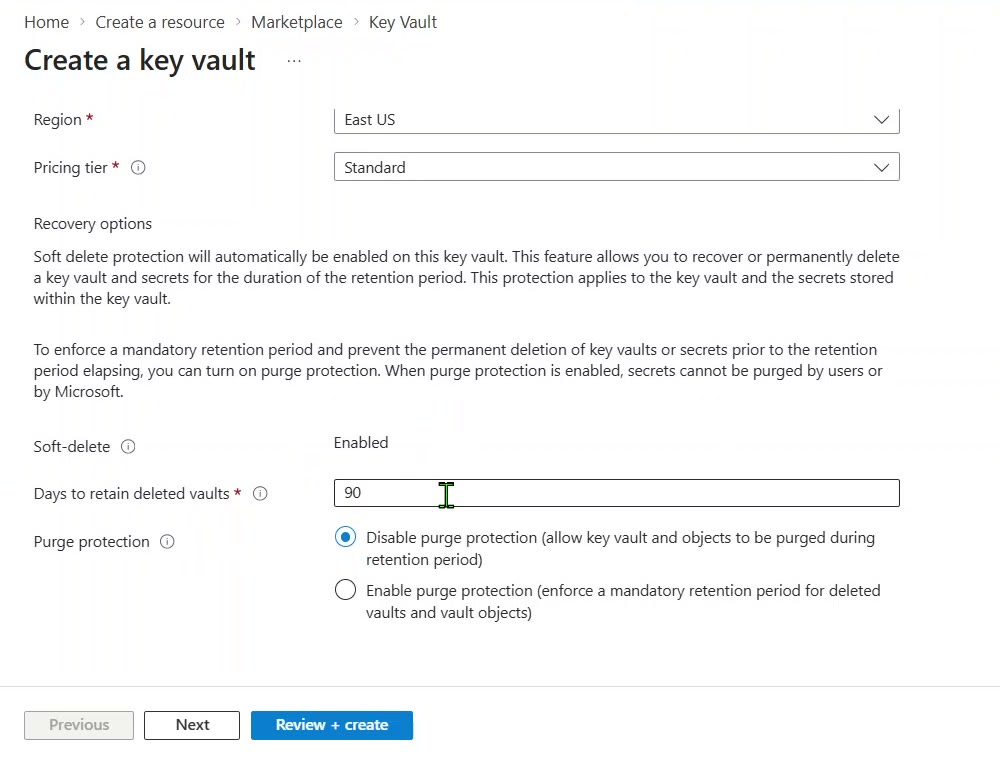 Recovery options. Retention can't be changed later; purge protection can't be turned off once on.
| Purge protection off | Purge protection on | |
|---|---|---|
| Deleted secret | Recoverable for the retention period, or someone with purge rights can delete it permanently right away | Recoverable, and nobody, including Microsoft, can purge it before the retention period ends |
| Can you change it later? | Yes, you can turn it on later | No. Once on, it can't be turned off |
| Vault name after deletion | Reserved until the retention period ends, unless purged | Reserved for the full retention period |
| Good for | Test vaults, first setups you may tear down and rebuild | Production vaults, and anything an auditor will ask about |
The video turns purge protection off because it's a test vault. For the vault your production pipeline depends on, Microsoft recommends turning it on: it stops anyone, by mistake or on purpose, from permanently wiping your secrets. The cost is flexibility. If you delete that vault, its name stays locked until the retention period ends. A sensible pattern is off for a throwaway test vault, on for the real one.
Step 4: Access configuration: choose Azure RBAC
On the Access configuration tab, set Permission model to Azure role-based access control. The portal recommends it, and new vaults created with Key Vault API version 2026-02-01 or later default to it.
The other option, Vault access policy, is the older model and Microsoft now labels it legacy. It is still supported, but RBAC is better for this job:
- One place for access. Vault permissions sit in Access control (IAM) next to every other Azure permission, so a security review can see them with the rest.
- Clear built-in roles. You assign "Key Vault Secrets User" instead of ticking Get/List/Set boxes in a policy.
- A known loophole closed. With access policies, anyone with Contributor on the vault can write themselves a policy and read the secrets. With RBAC, managing the vault and reading its data are separate permissions.
If you inherit an older vault that uses access policies, don't flip it to RBAC casually. Switching invalidates every existing policy, so pipelines lose access until the matching roles are assigned.
Step 5: Networking
On the Networking tab, the guide keeps public access from all networks. That sounds looser than it is. Network access only decides who can reach the vault's address. Every request still has to sign in with Microsoft Entra ID and hold a Key Vault data role, or it gets a 403.
Locking the vault to selected networks or a private endpoint is possible, but plan it before you do it. Fabric's Azure Key Vault references need the vault to be reachable from the public network, or to be private with an on-premises data gateway that has line of sight to the private endpoint. Lock it down without that and your scheduled runs fail with network errors. For most reporting setups, start with public access and RBAC, and tighten the network later with your IT team if your policy requires it.
Step 6: Review + create
Select Review + create. Before you select Create, check the summary:
- Pricing tier: Standard
- Soft-delete: Enabled, with the retention days you chose
- Purge protection: what you decided in step 3
- Permission model: Azure role-based access control
- Connectivity: Public endpoint (all networks), unless you chose otherwise
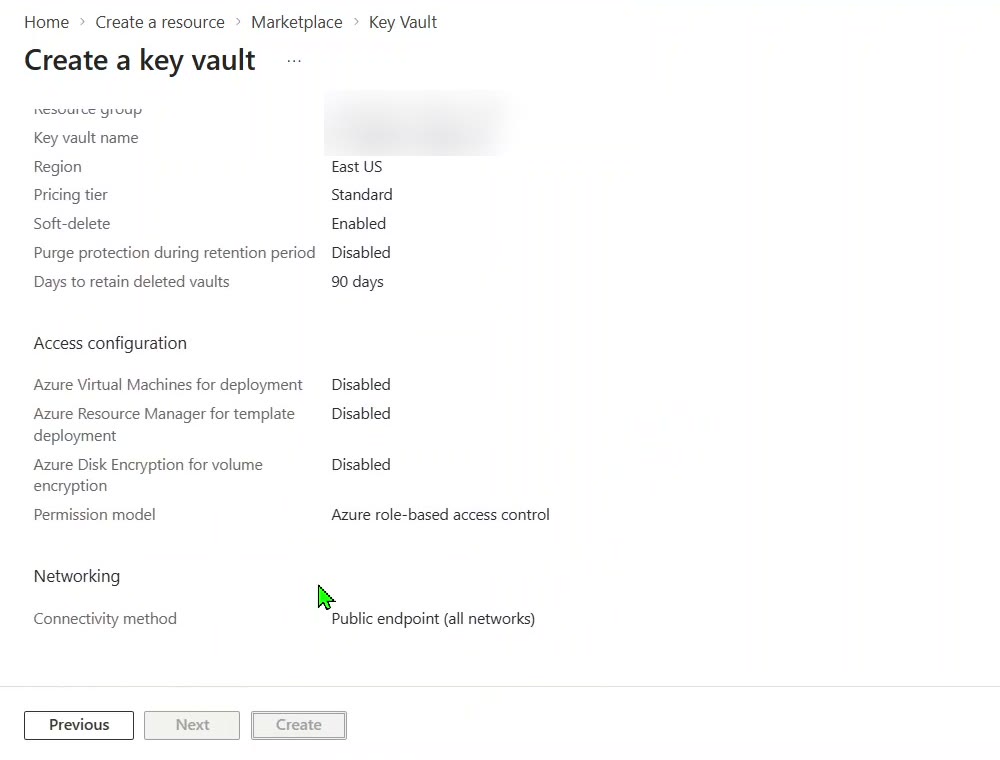 Check the permission model and connectivity rows before you select Create.
Select Create. Deployment usually finishes in a minute or two. When it finishes, select Go to resource. On the vault's Overview page, note the Vault URI. That address, not any secret value, is what you send to whoever connects Fabric. See how Fabric reads Key Vault secrets for that part.
Step 7: Grant access with Access control (IAM)
This is the step people skip. Creating the vault does not let you add secrets, even if you are the subscription Owner. Owner manages the vault resource. Reading and writing secrets is a separate data permission that comes from a Key Vault role.
- In the vault, select Access control (IAM).
- Select Add → Add role assignment.
- On the Role tab, search for
key vault secand select Key Vault Secrets Officer. Select Next. - On the Members tab, leave Assign access to on User, group, or service principal, select + Select members, and pick the people who will load secrets. That is usually you and, if a consultant is doing the setup with you, their account. Select Select.
- Select Review + assign, then Review + assign again.
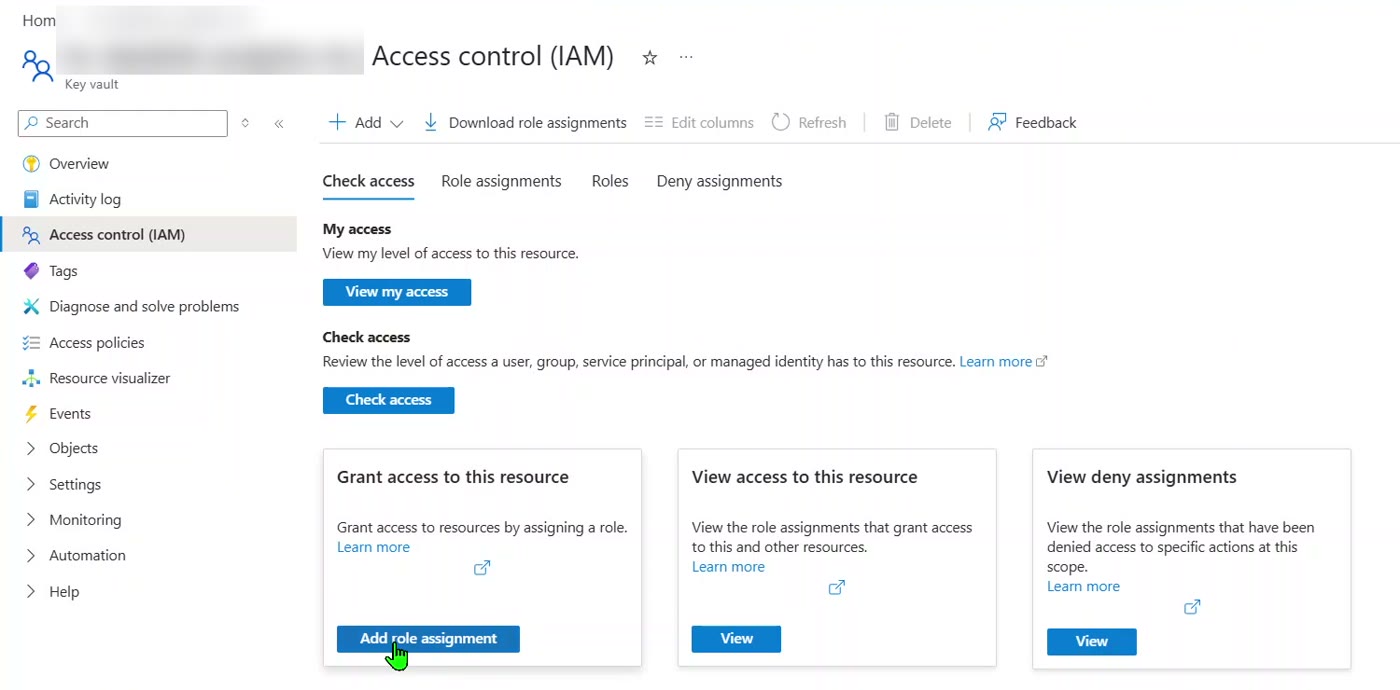 Access control (IAM) → Add → Add role assignment. The Add role assignment button on the Check access tab opens the same wizard.
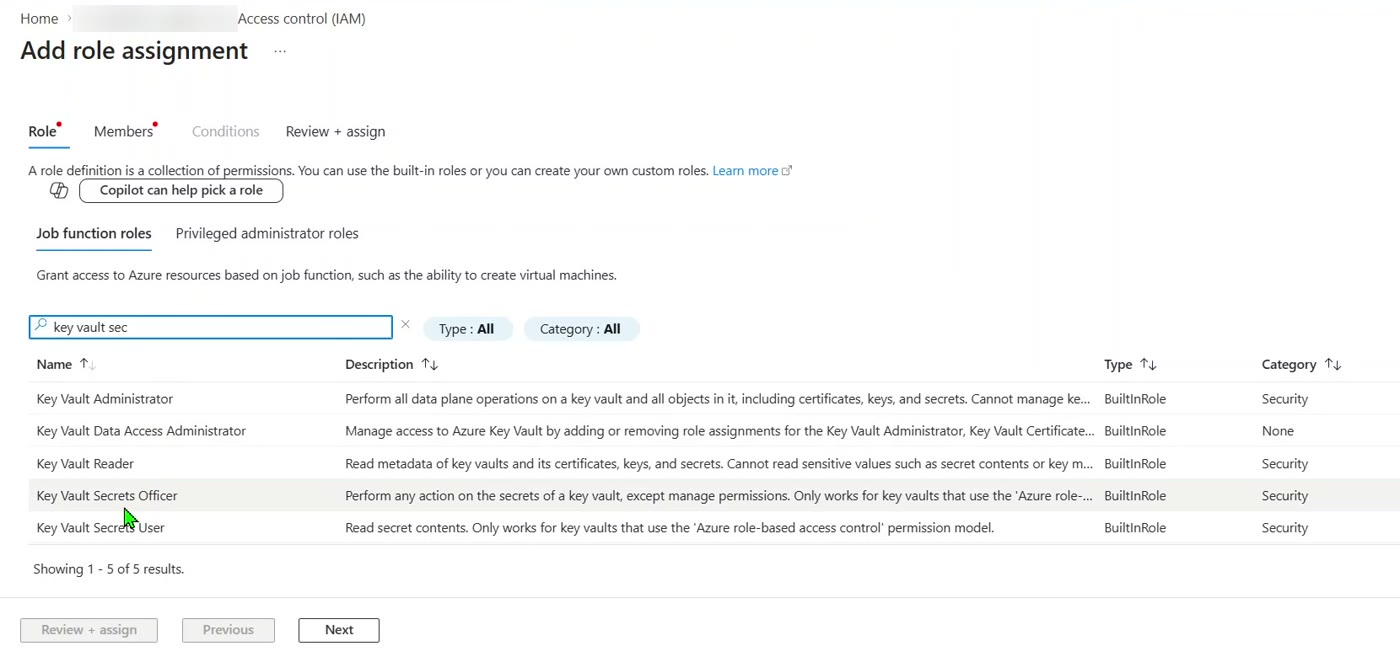 Five Key Vault roles match the search. For secrets, the choice is Officer or User.
The assignment applies to this vault only, not the resource group or the rest of your Azure. You can confirm it on the Role assignments tab: the scope column should say This resource.
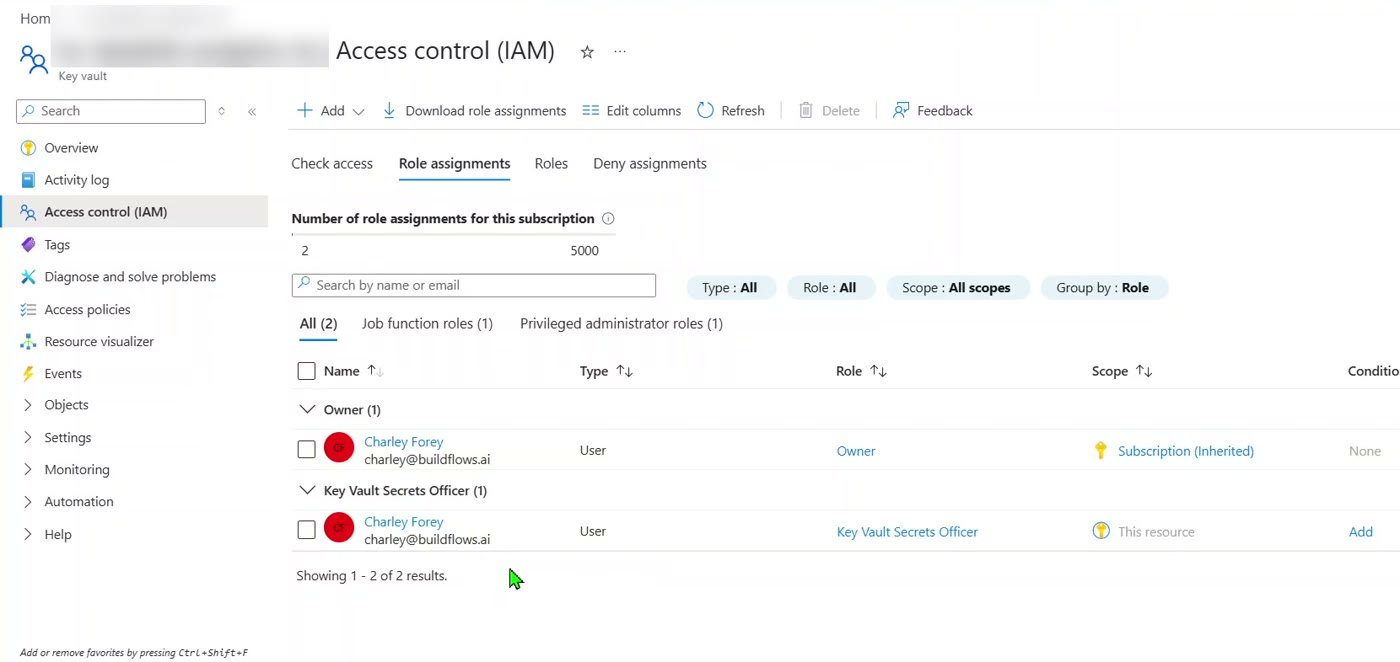 Owner comes from the subscription. Secrets Officer is scoped to this vault only.
Secrets Officer or Secrets User? Least privilege
Pick the smallest role that does the job, and give different roles to people and to the pipeline.
| Role | What it can do with secrets | Give it to |
|---|---|---|
| Key Vault Secrets User | Read secret values. Can't add, change or delete. | The identity your scheduled pipeline or notebook runs as |
| Key Vault Secrets Officer | Read, add, update and delete secrets. Can't grant access to anyone. | The one or two people who load and rotate secrets, and a consultant during setup |
| Key Vault Reader | See that secrets exist and their metadata. Can't read values. | Auditors or support staff who only need to see what's there |
| Key Vault Administrator | Everything on keys, secrets and certificates. Can't grant access. | Rarely needed for an integration vault |
| Key Vault Data Access Administrator | Grant or remove the Key Vault roles above. | The admin who manages who has access, if that isn't an Owner |
 Officer for people who load secrets, User for the pipeline. Nobody else needs a data role.
Why does the setup guide ask for Officer for the consultant, not just read access? Because some values only exist after the consultant does something. QuickBooks Online is the clearest case: the refresh token appears only after someone completes the one-time connect flow, and Intuit rotates it. Whoever runs that flow needs to write the new value into the vault. Officer also lets them replace a key that gets reissued. Once the integration is live, you can downgrade the consultant to Secrets User or remove them entirely. See rotating API secrets in Key Vault for how that plays out over time.
Why "not authorized" shows up right after setup
You create the vault, open Objects → Secrets, select + Generate/Import, and get a "not authorized" message or a 403. Two causes, in order of likelihood:
- You haven't assigned yourself a data role yet. Being Owner isn't enough under the RBAC model. Do step 7.
- You assigned it a moment ago. Microsoft says role assignment changes can take up to 10 minutes to take effect. Refresh the page. If it still fails, sign out of the portal and sign back in, which forces a fresh token.
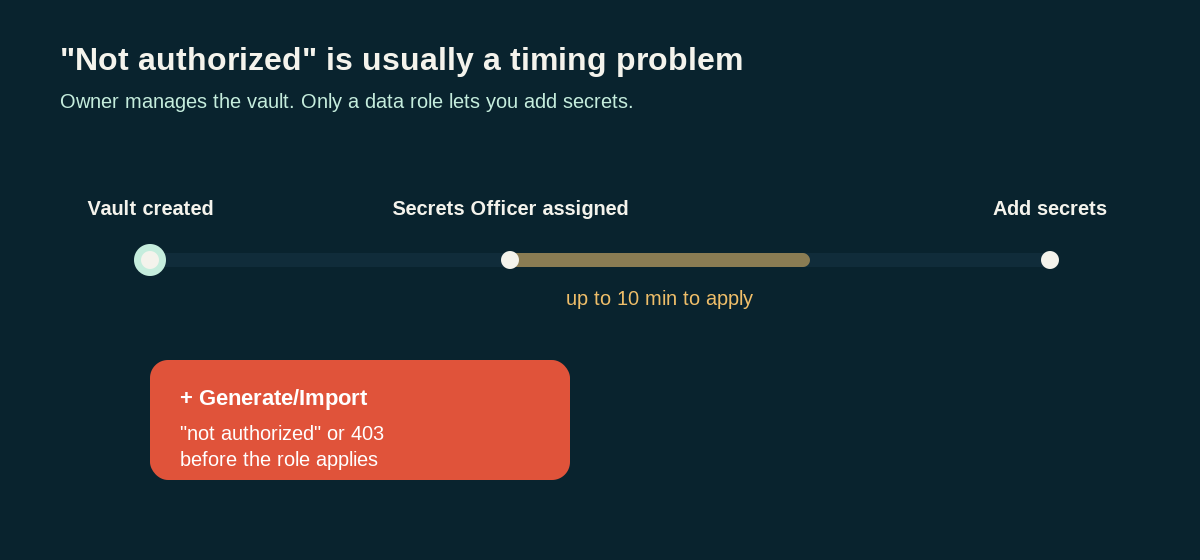 Owner isn't enough, and a new role assignment can take a few minutes to apply.
The setup guide puts it plainly: "Easy to miss: creating the vault does not let you add secrets. If you see 'not authorized' in the next step, finish this step first and wait a minute." More error messages and fixes are in the credential setup troubleshooting guide.
What it costs
For an integration vault holding a handful of secrets, almost nothing. The Standard tier has no setup fee and no per-vault or per-secret storage charge. You pay per operation. At the time of writing, Azure's retail price list shows Standard-tier operations at $0.03 per 10,000 transactions in East US. Prices vary slightly by region and agreement, so check the pricing page for yours.
A worked example: a pipeline that reads 9 secrets every hour makes about 9 × 24 × 30 = 6,480 reads a month. That is roughly 2 cents. Even reading every secret every 15 minutes is under 10 cents. "Under $5 a month," as the setup guide says, is comfortably true for this use. The things that cost real money in Key Vault are HSM-protected keys, certificate renewals and automated key rotation, and a reporting integration doesn't need any of them.
Common mistakes
- Assuming Owner can add secrets. It can't under RBAC. Assign Key Vault Secrets Officer on the vault first.
- Giving the pipeline Officer. The scheduled job only reads. Give its identity Key Vault Secrets User.
- Assigning the role at subscription or resource group scope. That grants access to every vault underneath, now and later. Assign on the vault itself.
- Picking a region at random. Match your Fabric capacity's region so data stays in one geography.
- Turning on purge protection on a vault you plan to rebuild. The name stays locked for the retention period. Turn it on for the production vault, where it belongs.
- Choosing Vault access policy because an old tutorial did. It's the legacy model, and Contributors can grant themselves access. Use RBAC.
- Locking down networking without a plan for Fabric. Fabric must be able to reach the vault, through public access or a gateway with line of sight to a private endpoint.
- Sending the secret values "just this once" to check them. Send the Vault URI and the list of secret names that are filled in. Never the values.
- Deleting and recovering a vault and expecting access to come back. Recovering a soft-deleted vault doesn't restore its role assignments. Recreate them.
Checklist
- Azure subscription available, and you can create resources and role assignments in it
- Fabric capacity region looked up
- Create a resource → Key Vault → Create
- Resource group created, for example
rg-reporting-analytics - Globally unique vault name, for example
kv-reporting-analytics - Region matches the Fabric capacity, pricing tier Standard
- Retention days chosen (90 default; can't be changed later)
- Purge protection decided: on for production, off only for a throwaway test vault
- Permission model Azure role-based access control
- Networking reviewed: public access with RBAC, or a private setup Fabric can still reach
- Review + create summary checked, vault created, Vault URI noted
- Access control (IAM) → Add role assignment → Key Vault Secrets Officer for the people loading secrets
- Waited a few minutes, then confirmed + Generate/Import opens
- Pipeline identity planned for Key Vault Secrets User, not Officer
- Only the Vault URI and secret names sent back, never values
If you'd rather not click through this alone, Build Flows can do the vault setup with you on a short screen-share. You keep control of your tenant and type the values yourself, and we check the settings, roles and secret names as we go. Email charley@buildflows.ai or start at buildflows.ai. You can also use the API credential setup checklist to generate the exact secret names for your vault.
Related guides
- Secure API credential setup for Procore, HubSpot, QuickBooks and Fabric, the full four-step process this vault is part of
- Microsoft Fabric and Azure Key Vault: how pipelines read secrets
- Read-only API scopes for Procore, HubSpot and QuickBooks
- Building construction reporting in Microsoft Fabric
- Procore, QuickBooks and HubSpot into Fabric demo
- How we handle client credentials: Security at Build Flows
References
- Microsoft Learn: Quickstart: Create a key vault using the Azure portal
- Microsoft Learn: Grant permission to applications to access a key vault using Azure RBAC (built-in roles and their descriptions)
- Microsoft Learn: Plan for Azure RBAC as the default access control model in Key Vault
- Microsoft Learn: Azure RBAC vs. access policies
- Microsoft Learn: Azure Key Vault soft-delete overview (retention, purge protection, recovery)
- Microsoft Learn: About keys, secrets and certificates (vault names, and not putting sensitive data in them)
- Microsoft Learn: Naming rules and restrictions for Azure resources (Key Vault: 3 to 24 characters, start with a letter, no consecutive hyphens)
- Microsoft Learn: Troubleshoot Azure RBAC (role assignment changes can take up to 10 minutes)
- Microsoft Learn: Configure Azure Key Vault references in Microsoft Fabric (network prerequisites)
- Microsoft Learn: Azure Key Vault logging
- Azure: Key Vault pricing
Frequently asked questions
Why can't I add secrets to a Key Vault I just created?
With the Azure RBAC permission model, creating the vault or being subscription Owner only lets you manage the vault resource. Adding secrets needs a data role such as Key Vault Secrets Officer, assigned under Access control (IAM). After assigning it, wait a few minutes, refresh, or sign out and back in.
What is the difference between Key Vault Secrets Officer and Key Vault Secrets User?
Secrets User can read secret values and nothing else. Secrets Officer can read, add, update and delete secrets, but can't grant access to anyone. Give Officer to the one or two people who load and rotate secrets, and User to the identity your scheduled pipeline or notebook runs as.
Should I enable purge protection on Azure Key Vault?
For a production vault, yes: it stops anyone from permanently deleting secrets before the retention period ends, and Microsoft recommends it. The trade-off is that it can't be turned off, and a deleted vault's name stays reserved for the retention period. For a throwaway test vault, leaving it off is reasonable.
Should I use RBAC or access policies for a new Key Vault?
Use Azure role-based access control. It is the portal's recommended option and the default for vaults created with API version 2026-02-01 or later, while access policies are now labeled legacy. RBAC keeps vault permissions in Access control (IAM) with your other Azure access and separates managing the vault from reading its secrets.
How much does Azure Key Vault cost for an integration?
Very little. The Standard tier has no setup or per-vault fee and bills per operation, listed at $0.03 per 10,000 transactions in East US at the time of writing. A pipeline reading nine secrets every hour makes about 6,500 reads a month, which is roughly two cents.
Which region should the Key Vault be in?
The same region as your Microsoft Fabric capacity. It isn't a hard technical requirement, but it keeps secrets and data in one geography, which is what security reviews usually ask about. Check the capacity's Location in the Azure portal before you create the vault.
Is public network access on a Key Vault safe?
Public access only means the vault's address is reachable. Every request still has to sign in with Microsoft Entra ID and hold a Key Vault role, or it is refused. You can restrict networks later, but Fabric must still reach the vault, either publicly or through a gateway with line of sight to a private endpoint.
Next step
Need this connection in your environment?
Scope one integration: the records, direction, timing, and business rules behind the connection.
Prefer email? charley@buildflows.ai
Keep learning
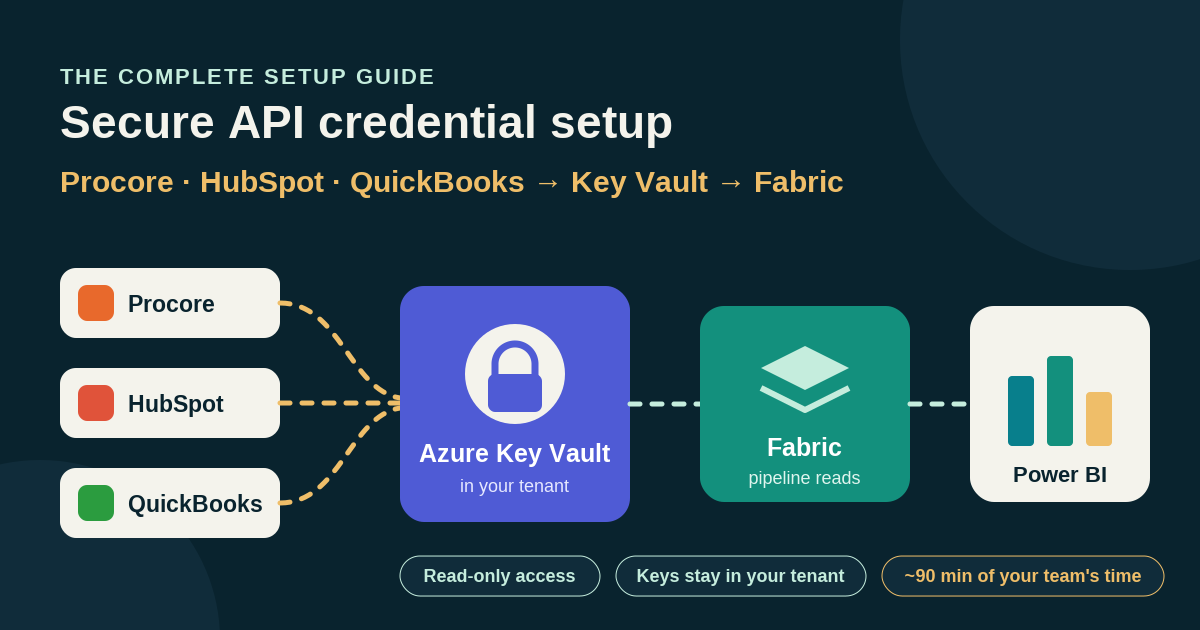
Integrations · November 14, 2026
Secure API Credential Setup for Procore, HubSpot and QuickBooks with Azure Key Vault and Microsoft Fabric
The end-to-end guide to connecting Procore, HubSpot and QuickBooks Online to Microsoft Fabric and Power BI without handing over credentials: who owns each step and how long it takes, the architecture from sources through Azure Key Vault to Fabric, the four steps (Fabric access, read-only API access in three systems, Key Vault with the Secrets Officer role, connect and go live), the exact secret names, what to send back, how to revoke access, common mistakes and a checklist.
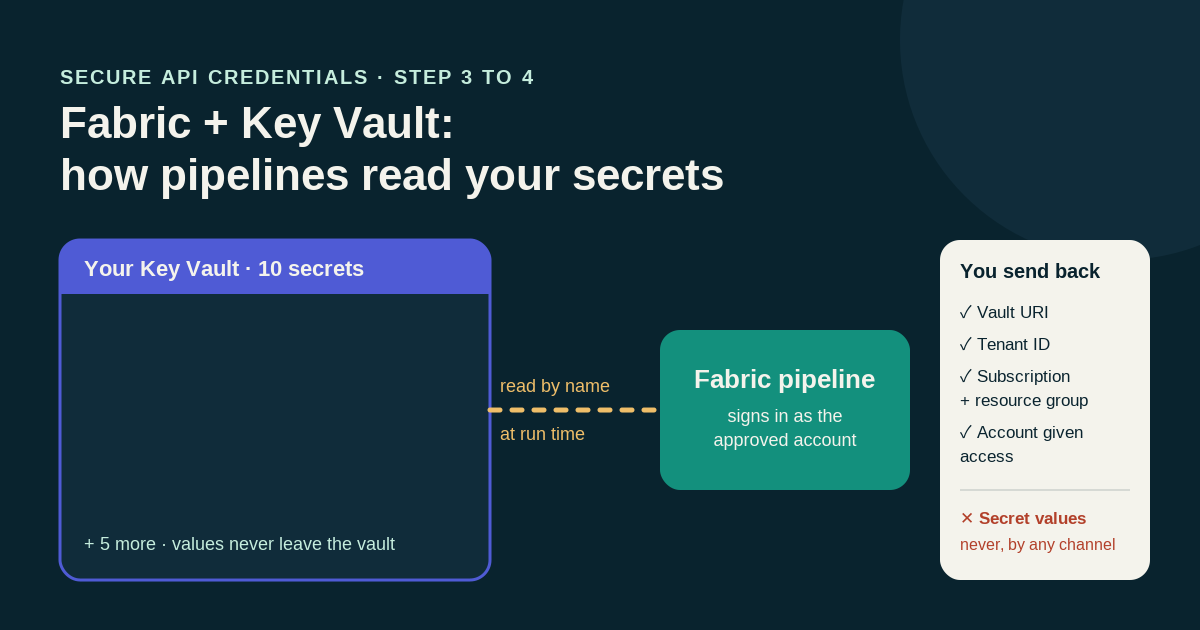
Integrations · November 14, 2026
Microsoft Fabric and Azure Key Vault: Secret Names, the Vault URI Handoff and How Pipelines Read Secrets
The last stretch of a secure credential setup: Fabric workspace access (Admin role, guest vs domain account, F2 cost), adding ten named secrets under Objects > Secrets > Generate/Import, Key Vault naming rules, what to send back to your partner and what never to send, how a Fabric pipeline reads secrets at run time with notebookutils getSecret and whose identity it uses, why Key Vault references in Fabric connections don't cover Procore, HubSpot or QuickBooks, and how to revoke access by removing one role assignment.
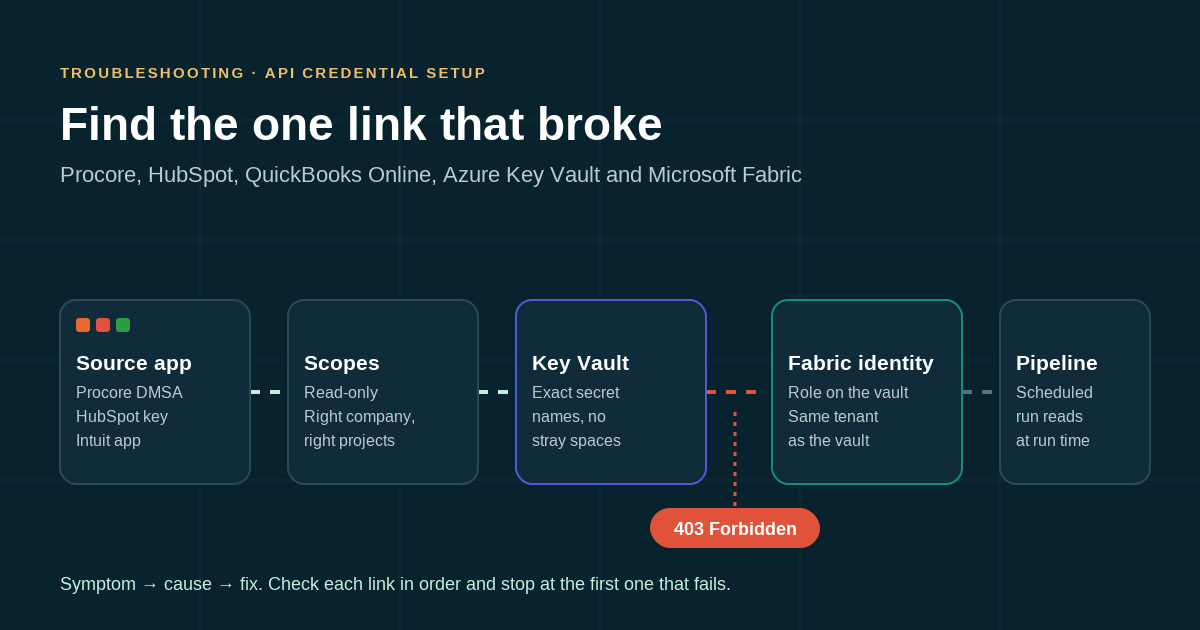
Integrations · November 14, 2026
Troubleshooting API Credential Setup: Procore, HubSpot, QuickBooks, Key Vault and Fabric
A symptom, cause and fix guide for the errors that stop a read-only reporting integration: Key Vault roles, Procore service accounts, HubSpot service keys, QuickBooks tokens and Fabric identities.