Trimble Spectrum ERP integration
Jobs, vendors, customers, POs and invoices move between Spectrum and your other systems through Spectrum Data Exchange, with clear ownership and failure handling.
The problem
Spectrum holds jobs, vendors, customers and cost, but project management, field service and payroll tools each need some of that data and send some back. Without an integration, people export and re-key records, and the copies drift.
What we build
We map which records each system owns, set up Spectrum Data Exchange access with the right operator code and security, and build flows for each record type with defined direction and scope. Failures are logged and routed to a person with the record and the reason.
What syncs between Procore and Trimble Spectrum
The same shape applies to ProjectSight and other project management platforms. Spectrum creates the master data; the PM system sends commitments and costs back.
| Object | Direction | System of record | |
|---|---|---|---|
| Projects / jobs | Trimble Spectrum to Procore | Spectrum | Hourly |
| Typical frequency: Hourly. Notes: Spectrum creates the job and the PM system receives it with the job number intact. Get services apply the integration operator's job security, so a restricted operator returns fewer jobs with no error. | |||
| Vendors and customers | Trimble Spectrum to Procore | Spectrum | Hourly |
| Typical frequency: Hourly. Notes: Vendors and customers are created in Spectrum first; the PM system references the Spectrum code. | |||
| Cost codes / phases and cost types | Trimble Spectrum to Procore | Spectrum | At job setup, then on change |
| Typical frequency: At job setup, then on change. Notes: Map at the standard list level. Reject unknown codes instead of defaulting them. | |||
| Budgets | Trimble Spectrum to Procore | Spectrum or estimate at award; Procore after | Once at setup |
| Typical frequency: Once at setup. Notes: Job Cost services cover jobs, phases, cost types and budgets. Changes after award go through Procore budget changes.(Typical: confirm against your configuration.) | |||
| Commitments / subcontracts and POs | Procore to Trimble Spectrum | One owner per object, usually Procore for subcontracts | Every 15 minutes |
| Typical frequency: Every 15 minutes. Notes: Subcontract value and changes flow to committed cost. Spectrum's public list shows only two purchase order services, so check the exact fields before promising a PO sync. | |||
| Change orders | Procore to Trimble Spectrum | Procore for approval; Spectrum for posted cost | Every 15 minutes |
| Typical frequency: Every 15 minutes. Notes: Project Management services cover subcontracts and change orders. Approved only; hold a change order until its subcontract exists.(Typical: confirm against your configuration.) | |||
| Invoices / pay apps | Procore to Trimble Spectrum | Spectrum after posting | Hourly |
| Typical frequency: Hourly. Notes: Subcontractor invoices or PO receipts become Spectrum AP invoices. Carry the source ID so a retry after a timeout does not create a duplicate. | |||
| Payments | Trimble Spectrum to Procore | Spectrum | Daily |
| Typical frequency: Daily. Notes: Paid status read back for project teams; payment runs stay in Spectrum.(Typical: confirm against your configuration.) | |||
Directions, owners and frequencies are the typical pattern from our integration guides and mapping workbook. Confirm each one against your configuration in discovery.
Is a native connector enough?
Procore documents a native ERP integration for Spectrum, and Trimble App Xchange offers standard Spectrum flows. If your job, phase and vendor setup is close to default and the connector moves the records you need, configure it first. We build when you need custom validation, defaults and user-defined field mapping, an on-premises route the standard flow does not cover, or Spectrum data joined with other systems for reporting.
Compare native connectors with a custom buildCommon gotchas
- Every Data Exchange call runs under an Authorization ID scoped to companies, services and an operator code. Use one per integration so you can audit and revoke each one separately.
- A Get service filtered by a restricted operator returns a partial set of jobs with no error. That looks exactly like a sync bug, so check operator security first.
- Enhanced authentication rotates client secrets with an expiry date. An integration that stops on the day a secret expires is one of the most common, and most avoidable, incidents.
- Per-service defaults fill fields the PM system lacks, but they also hide bad data. Default only fields with one right answer.
- Never retry a validation error. Spectrum returns the error code, description and column; route it to a person who can fix the source.
- On-premises Spectrum has to be reachable over the network. Firewall and certificate work is often on the critical path, so involve IT early.
How it works
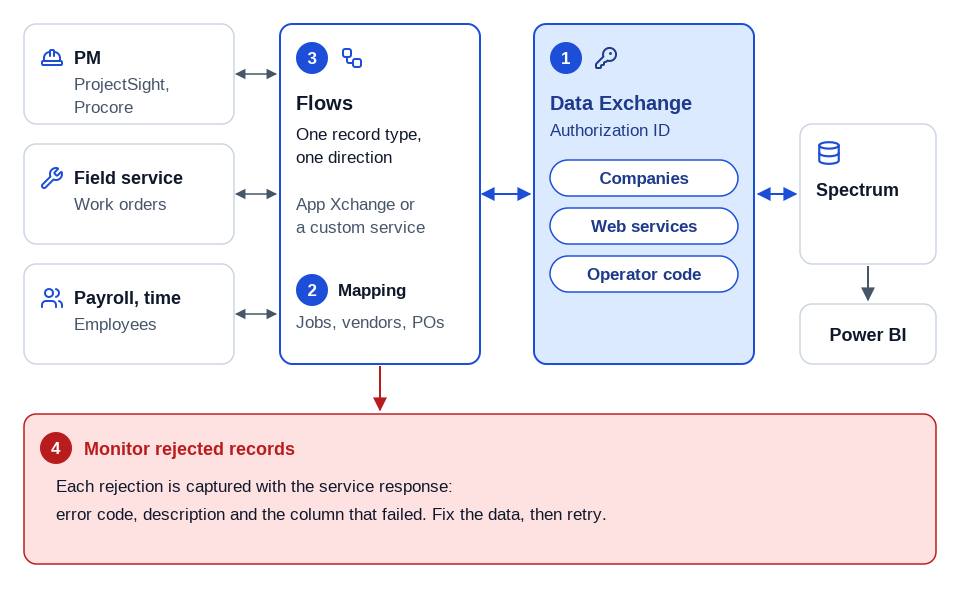
- 1
Set up access
We confirm the Spectrum Data Exchange authorization, the companies and services it covers, and the operator code that applies job-based security to reads.
- 2
Map the records
We map jobs, vendors, customers, POs, subcontracts and invoices between Spectrum and the other system, including defaults and user-defined fields.
- 3
Build the flows
Each flow moves one record type in one direction, for example Spectrum jobs to projects, or PO receipts to AP invoices, through App Xchange or a custom service.
- 4
Monitor
Rejected records are captured with the service response so they can be fixed and retried.
- Trimble Spectrum
- Spectrum Data Exchange
- Trimble App Xchange
- Trimble ProjectSight
- Procore
- Power BI
How a build goes
Discovery
Walk one real job, commitment and invoice through both systems. Agree the system of record, direction and frequency for each object.
Discovery questionsMapping workbook
Jobs, cost codes, cost types and vendors mapped field by field, reviewed and signed off by accounting before any flow runs.
Get the mapping workbookBuild
One flow per object and direction, read-only first, with create and update scope stated and failures turned into work items.
Reconcile
Run a real period and compare totals per job against the accounting system's own reports before anyone relies on the numbers.
Go-live
Turn on one company or a few jobs first, with a named owner for the exception queue and for credential renewals.
Estimate the payback
The value it creates
Time saved
Records are entered once; we count re-keyed records before and after.
Visibility
A daily view of what synced and what failed.
Standardization
One set of job, vendor and customer codes across systems.
Better decisions
Reporting reads from data that matches accounting.
Proof
Related use cases
- Built and shown
Cost-code crosswalk and master data that every report agrees on
Projects, cost codes, and vendors mapped once in versioned reference data, so every report uses the same answer and gaps go back to the owner.
- We design and build this
CRM to Procore integration: one job record from pursuit to closeout
Stamp the CRM deal ID onto the Procore project, keep company and contact records aligned, and report pipeline next to backlog without retyping anything.
- We design and build this
Custom connector development for iPaaS and construction APIs
When no connector exists for a system you need, we build one: authentication, data objects, change tracking, actions and tests, ready for an iPaaS or a custom integration.
- We design and build this
ERP migration data mapping without losing history
A versioned map from old ERP to new, reconciled before cutover, so job history, cost codes, and vendors carry over and reports read across both.
- We design and build this
Expense and card transactions into Vista or Spectrum AP
Jobs, cost codes and approvers flow from the ERP to the expense tool, and approved expenses come back as AP invoices coded to the right job.
- Built and shown
Get Procore data into Power BI, reliably
A repeatable pipeline from the Procore API into a Power BI model, with validation, history and refresh you can rely on.
Frequently asked questions
What is Spectrum Data Exchange?
It is Spectrum's set of web services for reading and writing data across modules such as job cost, AP, AR, payroll and equipment. Access is controlled by an authorization tied to specific companies, services and an operator code.
Can Spectrum be integrated if it is hosted on-premises?
Usually yes, through an on-premises agent or a service that can reach the server. We confirm the route against your hosting and current Trimble documentation.
Which systems have you connected Spectrum to?
In our work on Trimble App Xchange, Spectrum was one of the most connected systems, with flows to project management, field service and equipment platforms. We describe the patterns rather than name the companies.
Is Procore's native Spectrum integration enough?
Often. If your job, phase and vendor setup is close to default and the connector moves the records you need, start there or with a standard App Xchange flow. We build when you need custom validation, field defaults and mapping, an on-premises route the standard flow does not cover, or Spectrum joined with other systems for reporting.
Next step
What would you like to build?
An app, an integration, an automation, a dashboard or an AI agent. Tell us what your team does today and what you want to change. You get a straight answer on fit, then a written scope and price before any work starts.
Prefer email? charley@buildflows.ai