The short answer: A construction integration flow is a small, named program that moves one kind of record from one system to another under explicit rules: what starts it, what it reads, how it maps fields, what it is allowed to create, update or delete, and what happens when it fails. On an iPaaS such as Trimble App Xchange, connectors talk to each system and flows sit between them. The parts that decide whether an integration survives its first month are not the field mappings. They are the trigger type, the create/update/delete scope, the schedule relative to run time, and a remediation path that turns every failure into a work item someone owns.
This guide walks through the anatomy of an integration flow using App Xchange concepts from its public documentation, because it is the platform we built on most and its model is a clean way to explain the moving parts. The same ideas apply to any iPaaS, to Power Automate, or to a custom integration service. The last section covers building your own connector with the public Xchange connector SDK, for when the system you need is not in the catalog yet.
Our perspective comes from work we did while building integrations on Trimble App Xchange: connectors in C# for HCSS (HeavyBid, HeavyJob, Safety, Skills, Equipment360 and telematics), Bluebeam Studio, Ramp, Workyard, SmartPM, Power BI, Accubid, Nanonets and Pinecone, and flows connecting those systems and others to Viewpoint Vista and Spectrum.
Connectors and flows are different things
The first distinction to get straight is between the connector and the flow.
System A <-> Connector A <-> Flow(s) <-> Connector B <-> System B
- A connector knows how to talk to one system. It handles authentication, pagination, rate limits and the shape of that system's records. In the App Xchange connector model, a connector is made of modules (groups of related endpoints), data objects (the records you can read), cache writers and data readers (how records are pulled into the platform), and action processors (how writes are sent back).
- A flow knows nothing about HTTP. It knows business rules: when a Vista job opens, create a project in the PM system; when an expense report is approved, create an AP unapproved invoice; when an employee is terminated, deactivate the user.
Keeping these separate is what makes integrations reusable. One HCSS connector can serve a HeavyJob-to-Vista cost flow, a HeavyJob-to-Spectrum flow and an Equipment360-to-Power BI flow without any of them knowing how HCSS authenticates. If you are building custom code instead of using a platform, keep the same split: an API client per system, and business rules in a separate layer that never builds a URL.
Connector types and the on-premises agent
App Xchange documents several connector types (SFTP, HTTP, public and marketplace connectors). The one that matters most for contractors is the on-premises agent: a small service installed inside the contractor's network that lets the cloud platform reach a system that is not on the internet, such as an on-premises Vista or Spectrum database. If your ERP runs on a server in your office, ask early how the integration platform reaches it. The answer shapes security review, firewall rules and who has to be involved in setup. For which Vista and Spectrum deployments need the agent versus a direct API, check current Trimble documentation, because it has changed over time.
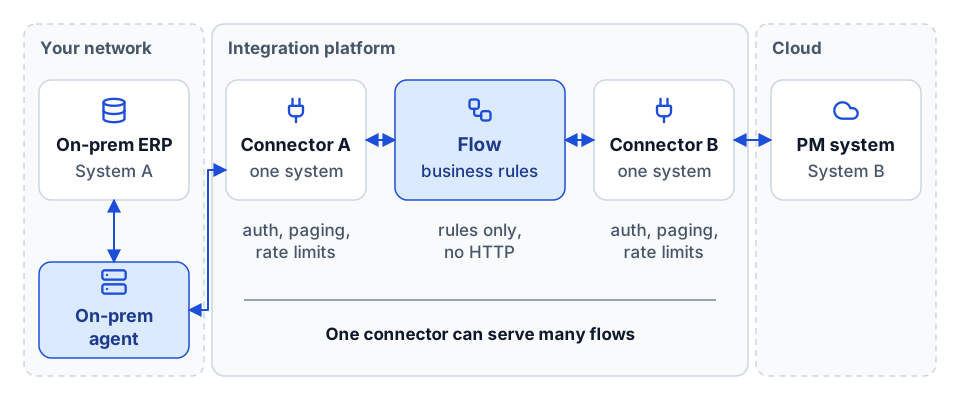 One connector per system, business rules in the flow, and an agent for systems inside your network.
The four trigger types
Every flow starts with a trigger. App Xchange documents four, and they map onto patterns you will meet on any platform.
| Trigger | What starts the flow | Typical construction use |
|---|---|---|
| Cache event | A record was created, updated or deleted in the platform's cache of a source system | A new job in Vista creates a project in the PM system; a vendor change in Spectrum updates the vendor in the field app |
| Action closeout | A write (action) to a target system finished, successfully or not | After an AP invoice is created in Vista, write the Vista invoice ID back to the expense system; on failure, raise a task |
| On demand | A person or another flow runs it | A one-off backfill of open jobs at go-live; a "resync this record" button |
| Batch request | A batch of records is submitted for processing together | Payroll hours or equipment hours sent as one batch at the end of a period |
The trigger choice is a design decision, not a default. Cache events suit master data that changes occasionally (jobs, vendors, employees, cost codes). Action closeout is how you chain steps without polling: create the record, then react to the result. On demand is essential for go-live, because events only fire for changes made after the flow is switched on, so existing records need a deliberate initial load.
Cache and events versus real-time actions
The most misunderstood part of an iPaaS is how reads and writes differ.
Reads come from a cache. A scheduled replication pulls records from each source system into the platform's cache. When the replication sees that a record was created, updated or deleted since the last run, it emits an event. Flows subscribe to those events. So a "real-time" integration built on cache events is really "as fresh as the last replication".
Writes are real-time actions. When a flow sends data to a target system, the action runs when the flow reaches that step. There is some lag while the action executes, but it is not waiting for a schedule.
That asymmetry explains most "why didn't it sync?" questions. A job created in Vista at 9:05 will not reach the PM system at 9:05 if the Vista replication runs every 30 minutes; it will arrive after the next replication, plus the time the flow takes. In our work, Vista reads served through the platform were cache-backed on a refresh schedule (hourly was common), while writes ran as action services when called.
Schedule interval must exceed run time
Replication schedules can be set as often as every 15 minutes on App Xchange at the time of writing. That does not mean every schedule should be. The rule we apply everywhere: the schedule interval must be longer than the time the replication takes to run. A cache refresh that takes 25 minutes on a 15-minute schedule will overlap itself, queue up, and fall further behind every hour. Large objects (job cost detail, AP history, timecards) usually need longer intervals or filtered replication; small master-data objects can run often. Measure the run time on production-sized data before you promise anyone a freshness.
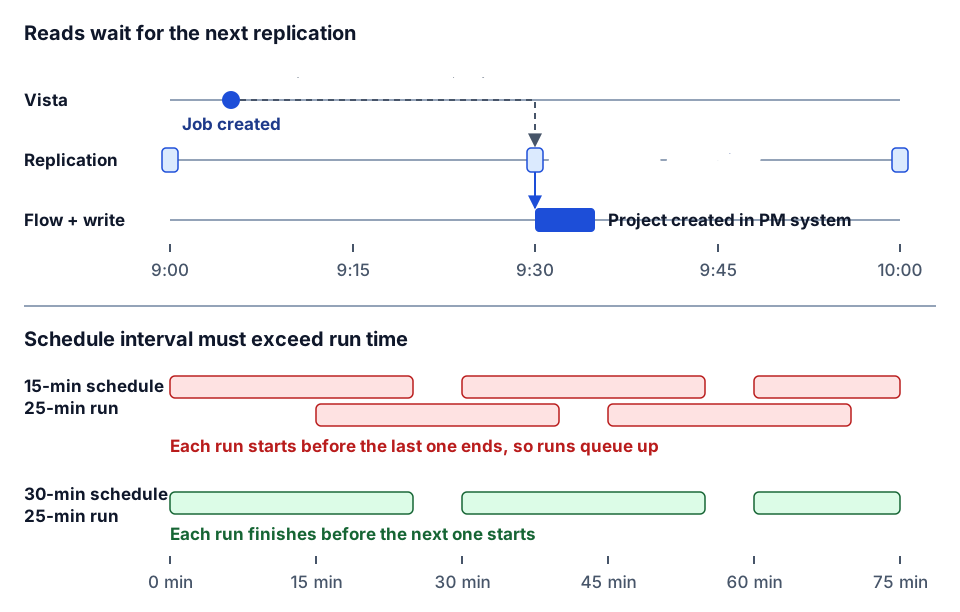 Freshness is bounded by the replication schedule, and the schedule must be longer than the run.
Step types: what a flow is made of
Between trigger and target, a flow is a chain of steps. App Xchange documents roughly thirty step types. They fall into a few groups, and the same groups exist in every flow tool.
| Group | Example step types | What they are for |
|---|---|---|
| Read and look up | Lookup, Get Work Items, Resolve Work Items | Find the matching record in the other system, usually through a crosswalk |
| Shape | Map JSON, Filter, Group By, Remove Duplicates, Parse CSV / Delimited / Excel to JSON | Turn a source record into the target's shape |
| Control | Conditional, For Each, Call a Flow, Stop Flow, Assertion | Branch, loop, reuse sub-flows, stop early, assert a precondition |
| Write | Connector Action, Cache Write, Relate / Unrelate Data Objects | Create or update in the target; record relationships between IDs |
| People and files | Create User Task, Create Work Items, Email, Build EDI, Encrypt File, Extract Zip | Hand a problem to a person; produce or unpack files for carriers and partners |
Two step types deserve special mention. Assertion lets a flow refuse to continue when a precondition is not met (no cost code, a closed job, a zero amount), which is far cheaper than cleaning up a bad record after it lands in the ERP. Relate Data Objects records that Vista job 2401 and PM project 88123 are the same thing, which is what lets the next update find the right record instead of creating a duplicate.
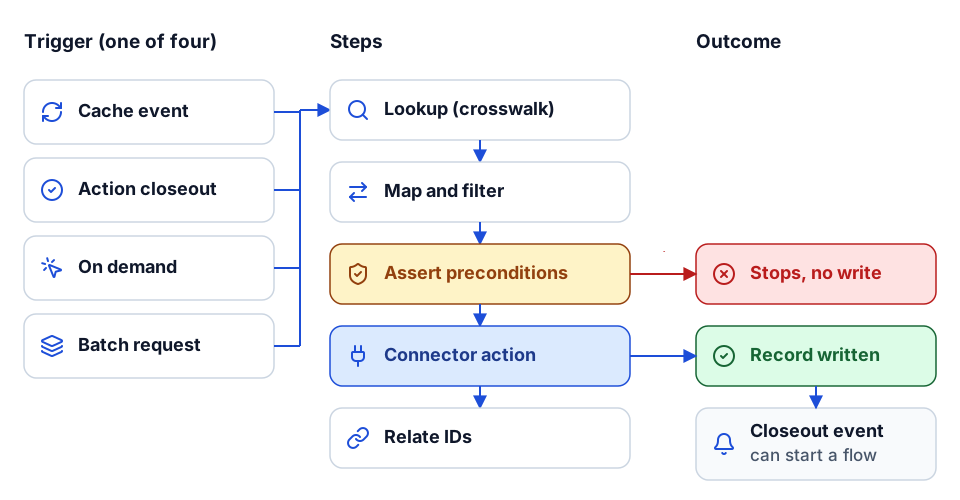 Trigger, steps, outcome: assertions stop bad records before the write, and closeouts chain flows.
Create, update, delete: scope every flow explicitly
The most useful convention we used was to put the write scope in the flow's name:
- CU: the flow may create and update target records.
- CUD: it may also delete (or deactivate) them.
- D: it only handles deletes.
Most flows should be CU. Deletes in construction systems are rarely true deletes; a closed job, a terminated employee or an inactive vendor is usually a status change, and the safest flow mirrors the status rather than removing the record. When a flow genuinely needs to delete, make it a separate D flow so that it can be reviewed, paused and monitored on its own.
A naming convention that documents itself
The convention we used looks like this:
SystemA <> SystemB : domain [1.2.0] : Source Object (CU) to Target Object (CU)
For example, written generically:
Vista <> PM System : jobs [1.0.3] : JC Job (CU) to Project (CU)
Expense <> Vista : ap [2.1.0] : Expense Report (C) to AP Unapproved Invoice (C)
Each part earns its place:
- The system pair tells you which connectors are involved.
- The domain groups flows for monitoring (jobs, vendors, AP, payroll, equipment).
- The semantic version (major.minor.patch) tells you whether a change is a breaking mapping change, a new field, or a fix. When a client reports a problem, the version in the run history tells you exactly which logic processed the record.
- The object pair with scope says what moves and what the flow is allowed to do.
Add tags for the flow's role (event-triggered, cache write, process, custom mappings) and you can filter a list of fifty flows down to the five that touch AP in seconds.
Remediation flows: failures become work items
Every integration fails. A vendor is missing in the target, a cost code is inactive, a job is closed, a required field is blank, the API returns a 500. The question is whether anyone finds out.
The pattern we built into every customer integration is a remediation flow: a small flow triggered when another flow's action closes out with a failure. It creates a work item or user task with the record, the error, the flow name and version, and an owner, and it emails or notifies that owner. In naming terms, something like Remediation : Create Task on Failure.
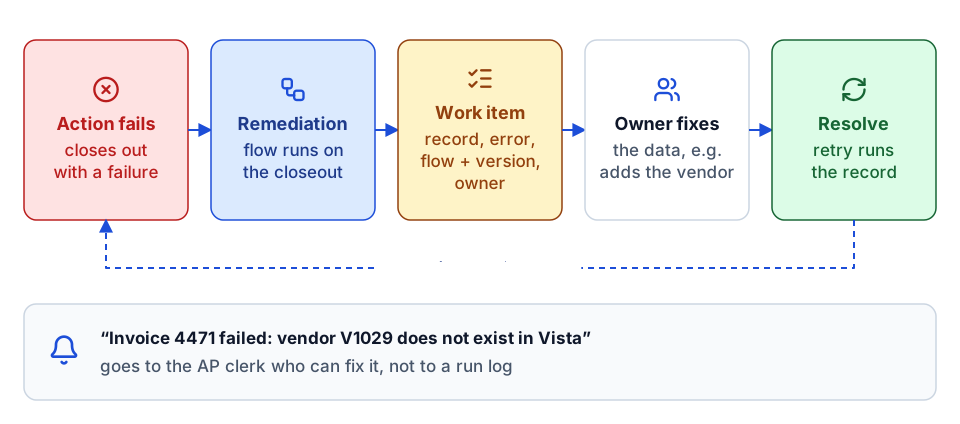 Every failure becomes a work item for the person who can fix the data, and resolving it retries the record.
This changes the operating model. Instead of an integration engineer reading run logs, the AP clerk gets a task that says "invoice 4471 failed: vendor V1029 does not exist in Vista", fixes the vendor, and resolves the work item, which can trigger a retry. The failure lands with the person who can fix the data, not the person who built the flow. It is the same idea as a data quality gate on a reporting platform: failures are named, owned and visible.
Data limits and volumes
Platforms have limits, and construction data is bigger than people expect. App Xchange documents a per-flow data limit (2 GB at the time we worked with it; check current documentation). Job cost transactions, timecards, equipment telematics and document metadata can approach limits like that on large contractors.
Practical rules:
- Filter at the source. Replicate open jobs, not every job since 1998.
- Batch writes. Send payroll or equipment hours as batches rather than one action per line where the target supports it.
- Split by domain. One flow per object pair keeps volumes, failures and versions independent.
- Measure peak, not average. Month-end, payroll week and the start of a large project are when volumes spike.
Common flow patterns in construction
The flows we saw deliver the most value fell into a few families:
- ERP to project management: jobs, phases, cost types, vendors and customers from Vista or Spectrum into the PM platform; commitments and change orders back. See our Viewpoint Vista API guide and Spectrum integration guide.
- Expense to ERP: jobs, equipment, GL accounts and employees out to the expense platform; approved expenses back as AP unapproved invoices. Project managers on a job often become the cost-object approvers in the expense system.
- Time and payroll: hours from field time apps into payroll and job cost; employees from HR into everything else.
- Equipment: telematics hours and locations into equipment and job cost.
- Carrier EDI and HR benefits: employee benefit files to insurance carriers on a schedule.
- Reporting: push datasets and refresh signals into Power BI.
Which of these to build first is a separate question, covered in construction integrations that pay back first.
Building a custom connector with the Xchange connector SDK
When the system you need has no connector, you can build one. The public connector documentation describes the SDK and CLI. The work assumes intermediate C#, comfort with REST APIs, and an API that uses API key, Basic or OAuth 2.0 (client credentials or authorization code) authentication.
What the target API must support
Before writing code, check the API can support a well-behaved connector:
| Requirement | Why it matters |
|---|---|
| CRUD on the objects you need | Flows need to create and update, not just read |
| Filtering | Replication should pull a subset, not everything |
| Pagination | Large lists must come back in pages, reliably |
| Changed-data queries (modified since, or equivalent) | Without them, every replication is a full reload and change events become expensive or impossible |
The last one is the most common gap. An API with no "modified since" filter forces full replications, which pushes schedules out and raises volumes. Find out before you commit to a freshness target.
The CLI steps
The shape of a connector build, using the CLI commands the SDK documents:
xchange connector new --name HCSS
xchange client new --type Http --auth-type OAuth2ClientCredentials
xchange module new --id contacts-1 --name Contacts --key contacts --version 1
xchange data-object new --module-id contacts-1 --name Vendor
xchange action new --module-id contacts-1 --object-name Vendor --name Create
xchange action new --module-id contacts-1 --object-name Vendor --name Update
xchange test init
xchange code submit
In practice we worked endpoint by endpoint from the vendor's API reference: one module per product area (HCSS has separate APIs for HeavyJob, HeavyBid, Equipment360, Safety and more, so each became a module), one data object per readable resource, and one action per write operation. Ramp used the OAuth authorization code flow instead of client credentials, which is a one-flag difference at client new but a real difference in how a customer authorizes the connection. HCSS was the largest connector we built, with around two hundred data objects and actions across its products.
The code-review step at submission is a real gate, not a formality: expect review comments on pagination, error handling, naming and test coverage.
Lessons from building them
- Name data objects after the business record, not the endpoint path. Flow builders think "Vendor", not
GET /api/v1/vendors/{id}. - Separate list and single-record objects where the API does (Vendors vs Vendor), because they replicate differently.
- Handle rate limits in the client, once, with retries and backoff, so no flow has to.
- Write tests against recorded responses, so a vendor API change shows up as a failing test rather than a failing customer flow.
A checklist for any new flow
- The trigger type is chosen deliberately, and there is an on-demand path for the initial load.
- The schedule interval is longer than the measured replication run time.
- The flow name states systems, domain, version, objects and CU/CUD/D scope.
- A crosswalk or relate step links source and target IDs, so updates do not create duplicates.
- Assertions stop the flow on missing or invalid data before it writes.
- Failures create a work item with an owner, through a remediation flow.
- Volumes at peak have been measured against the platform's data limits.
- Deletes, if any, are in a separate flow and mirror status rather than removing records.
If you have not yet agreed the answers behind several of those boxes, start with the discovery questions to ask before automating a contractor workflow.
Where to go next
- Before any flow is built, run through the integration discovery questions and the construction integrations that pay back first.
- ERP specifics: the Viewpoint Vista API integration guide and the Spectrum ERP integration guide.
- The same design principles in Microsoft tools: Power Automate construction workflows and our job setup automation deep dive.
- Weighing a platform against custom code: build vs buy for construction software.
- For a defined set of flows with fixed scope and price, see the integration sprint, or plan your build.
- Want to talk through your systems first? Start a conversation.
Frequently asked questions
What is the difference between a connector and a flow?
A connector handles one system's authentication, pagination, rate limits and record shapes. A flow holds the business rules for moving a record between two connectors: trigger, mapping, write scope and failure handling.
Is an App Xchange integration real time?
Writes run as real-time actions, but reads come from a cache refreshed on a replication schedule. A change in the source arrives after the next replication plus the flow's run time, so check schedules before promising freshness.
What does CU, CUD and D mean in a flow name?
The write scope: CU means the flow may create and update target records, CUD adds delete or deactivate, and D handles deletes only. Most construction flows should be CU, with deletes mirrored as status changes.
What does an API need before you can build an App Xchange connector for it?
Supported authentication (API key, Basic or OAuth 2.0), CRUD on the objects you need, filtering, pagination and changed-data queries. Without changed-data queries every replication becomes a full reload.
Next step
Need this connection in your environment?
Scope one integration: the records, direction, timing, and business rules behind the connection.
Prefer email? charley@buildflows.ai
Get the next guide in your inbox
Field Notes: practical guides and new walkthroughs, about once a month.
Field Notes
Practical guides and new walkthroughs on construction data and automation, roughly monthly.
Keep learning
Playbooks · October 9, 2026
Integration Discovery: Questions to Ask Before Automating a Contractor Workflow
A vendor-neutral discovery list for construction integrations, from process mapping and field-level source of truth to error routing, volumes, security, opportunity-cost ROI and phased rollout. Includes a printable checklist.
Integrations · October 9, 2026
Viewpoint Vista API Integration Guide for Contractors
A practical primer on integrating Viewpoint Vista: what the Vista API covers, how async write actions and App Xchange caching work, and how to align job, phase, cost type and vendor data so writes land correctly.
Integrations · October 9, 2026
Spectrum ERP Integration Guide: Spectrum Data Exchange Explained
A practical primer on integrating Trimble Spectrum through Spectrum Data Exchange: how Authorization IDs and operator codes scope access, Basic vs Enhanced authentication, the 18 modules of web services, Excel templates, and the integrations contractors build most.