The short answer: Spectrum (Trimble Spectrum, formerly Viewpoint Spectrum) integrates with other systems through Spectrum Data Exchange, a set of web services that read data out of Spectrum ("Get" services) and write data into it ("Put" services). Access is controlled by an Authorization ID that is scoped to specific companies and specific web services and, for Get services, tied to a Spectrum operator code whose job-based security limits what comes back. You authenticate with Basic authentication or with Enhanced authentication, which uses an OAuth client credentials flow. Trimble's public list shows 142 web services across 18 modules. The services are the easy part. The work is in the Authorization ID setup, the master data mapping, and handling validation errors well.
This guide covers how Spectrum Data Exchange works, how security is scoped, the two authentication modes, which modules are exposed, where the Excel templates fit, the integrations contractors build most often, and how we approach a Spectrum project. It draws on work we did while building integrations on Trimble App Xchange, where Spectrum was one of the most-connected systems in the flow catalogs we worked with. Trimble's Spectrum API Web Services documentation is the reference for current details.
How Spectrum Data Exchange works
Spectrum Data Exchange (SDX) exposes Spectrum's data through web services over a secure web connection. Trimble's documentation describes two types:
- Put services write new or changed data into Spectrum: a vendor, a job, an AP invoice, a PO.
- Get services take parameters (the selection criteria) and return matching data.
Each Get service ends its return layout with three error fields: an error code, a description, and the column that caused the error. Validation runs in levels: first authorization and required fields, then numeric, date and general validation, then rules specific to the service. That ordering is useful when debugging. An authorization error means your setup is wrong; a service-specific error usually means your data is.
The same services back the Spectrum Office Add-in, which uses Excel to build files for import. Trimble's documentation notes that each web service has its own template. More on that below, because it is a good prototyping tool.
The Authorization ID: scoping access
Every Data Exchange call runs under an Authorization ID, created on the Data Exchange Installation screen in Spectrum. It is the main control on what an integration can do.
| Setting | What it controls | Why it matters |
|---|---|---|
| Companies | Which Spectrum companies the ID can touch | Multi-company contractors can roll out one company at a time |
| Web services | Which specific services the ID can call | An AP integration should not be able to call payroll services |
| Operator code | Which Spectrum operator the ID acts as | Required when a Get service is assigned; applies that operator's job-based security and cost center logic, and must be valid for all companies on the ID |
| Per-service options | Default values, user-defined field mapping, counter overrides | Lets you fill fields the source system does not have, and map UDFs |
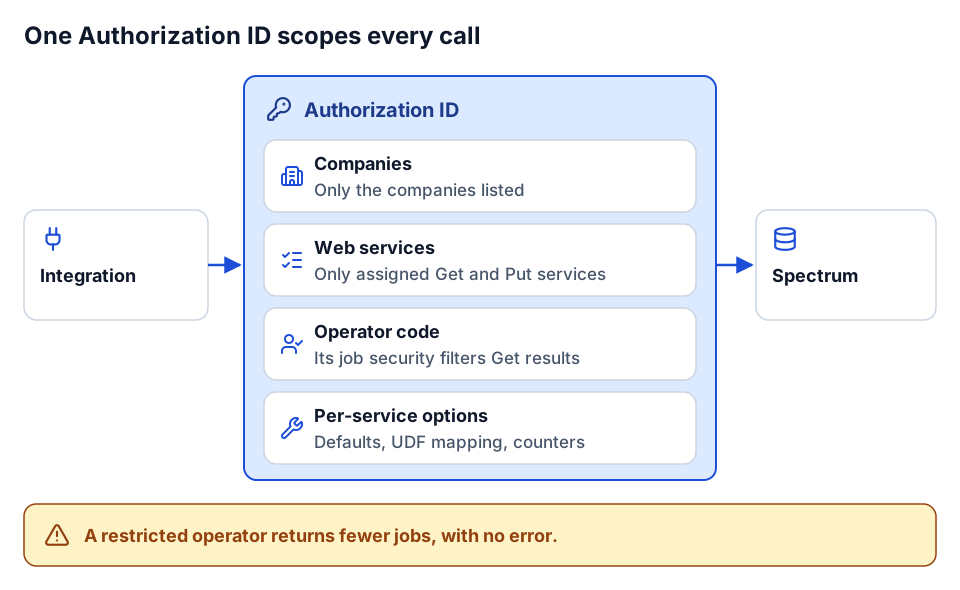 The Authorization ID decides what an integration can reach and what Get services return.
Three practical rules follow from this.
One Authorization ID per integration. If the PM sync and the field service sync share an ID, you cannot tell their traffic apart, and you cannot revoke one without breaking the other. Separate IDs give you least privilege and a cleaner audit trail.
Pick the operator deliberately. Because Get services apply the operator's job-based security, an operator with restricted job access will return a partial set of jobs, with no error. That looks exactly like a sync bug. Many teams create a dedicated integration operator. Decide which jobs and cost centers it should see, document it, and treat changes to that operator like changes to code. Follow the setup guide for your specific integration, because App Xchange and other vendors document their own steps for creating the operator and the Authorization ID.
Use defaults sparingly. Per-service default values are convenient: if the PM system has no concept of a Spectrum field, a default fills it. They are also a way to hide bad data. Default the fields that genuinely have one right answer, and let everything else fail validation so someone fixes the source.
Basic vs. Enhanced authentication
Trimble documents two authentication methods for Spectrum web services.
- Basic authentication sends static credentials with the request. It is simpler and is what older integrations tend to use. Trimble's Basic Authentication page lists the exact fields.
- Enhanced authentication uses an OAuth client credentials flow. Per Trimble's documentation, you enable it on the Data Exchange Installation screen, which provides a client ID and client secret. Your integration posts the client ID, client secret, the
spectrumapiscope andgrant_type=client_credentialsto a/connect/tokenendpoint, receives a bearer access token with an expiry, and sends that token on subsequent calls. A/secretRotationcall returns a new client secret with an estimated expiration date.
A sketch of the token request, written for illustration:
POST https://<your-spectrum-host>/connect/token
  client_id=...&client_secret=...&scope=spectrumapi&grant_type=client_credentials

-> { "access_token": "...", "token_type": "Bearer", "expires_in": ..., "scope": "spectrumapi" }
Prefer Enhanced for new work. Short-lived tokens limit the damage of a leaked credential, and secret rotation gives you a supported way to change secrets without a support ticket. Plan for it operationally: cache the token until shortly before expiry, store the client secret in a secret store such as Azure Key Vault, and give someone ownership of rotation before the secret's expiration date arrives. An integration that silently stops on the day a secret expires is one of the most common, and most avoidable, Spectrum incidents.
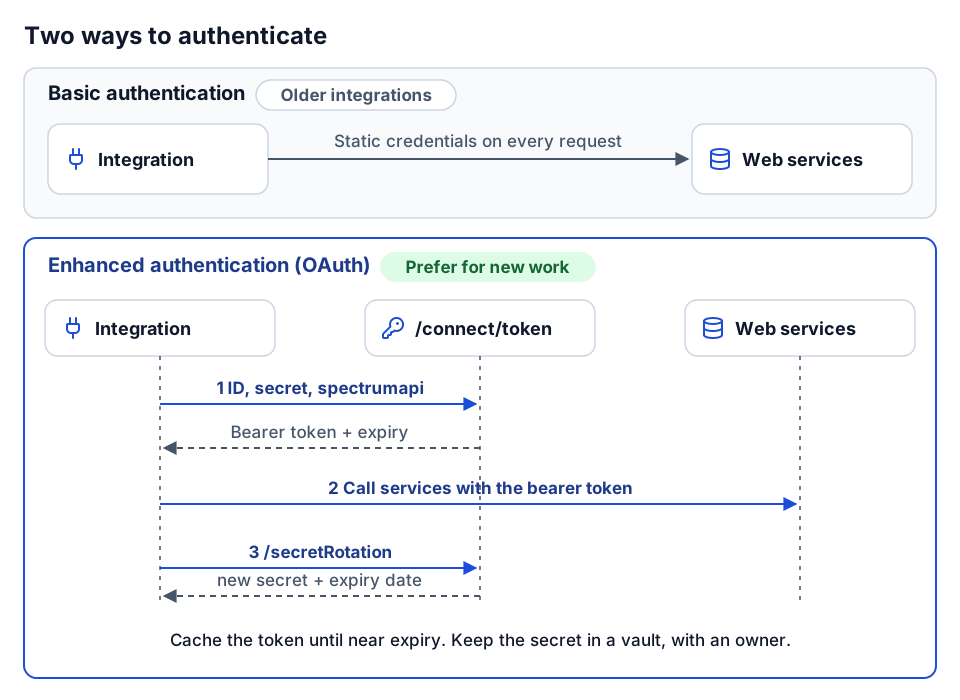 Basic sends static credentials; Enhanced uses short-lived tokens and supported secret rotation.
What the web services cover
Trimble's public list of web services showed 142 services across 18 modules when we checked. Trimble adds services over time, so treat these counts as a snapshot.
The "typical use" column is our summary of what integrations commonly do in each area, not Trimble's service descriptions; check the list for the exact services.
| Module | Services listed | Typical integration use |
|---|---|---|
| Payroll | 24 | Employee and time imports from time-tracking and HR systems |
| Accounts Receivable | 18 | Customers, AR invoices and payments from billing or field service |
| Work Order | 17 | Service work orders from field service platforms |
| Job Cost | 16 | Jobs, phases, cost types, budgets; job seeding into PM tools |
| Accounts Payable | 14 | Vendors, AP invoices, from expense, OCR or PO receipts |
| Equipment Control | 10 | Equipment master, meter readings, cost |
| Inventory Control | 9 | Items, transactions |
| Project Management | 7 | Subcontracts, change orders and PM records |
| Human Resources | 5 | Employee master data |
| Service Contract | 4 | Recurring service agreements |
| Time + Materials | 4 | T&M billing |
| Document Imaging | 3 | Attaching documents to Spectrum records |
| General Ledger | 3 | GL accounts and transactions |
| Preventive Maintenance | 3 | PM schedules for equipment |
| Purchase Order | 2 | POs from procurement or PM |
| Cash Management | 1 | Bank-related records |
| Equipment Tracking | 1 | Equipment location and assignment |
| Scale Ticketing | 1 | Scale tickets for material-heavy operations |
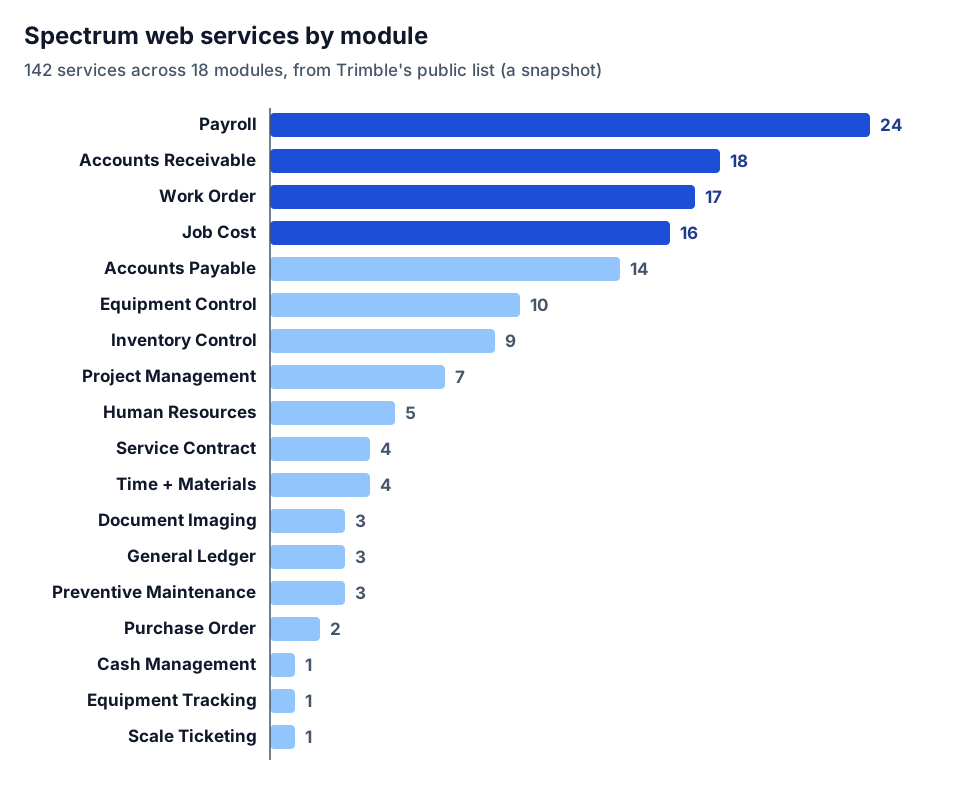 Services per module in Trimble's public list when we checked: 142 across 18 modules.
Two things stand out. Payroll, AR, work orders and job cost are the deepest areas, which matches what contractors integrate most. And some objects you might expect to be rich, such as purchase orders, have only a couple of services, so check the exact fields each service accepts before promising a PM-to-Spectrum PO sync.
Excel templates: a fast way to prototype
Because each web service has an Excel template through the Spectrum Office Add-in, you can test an integration's data before writing any code. Fill the template with a real sample from the source system (twenty vendors, five jobs, a week of AP invoices), import it, and read the errors.
That exercise answers most of the hard questions early: which fields are required, which defaults you need, where your source data uses codes Spectrum does not recognize, and whether the Authorization ID's operator can see the jobs you expect. It also gives accounting a concrete thing to review. We would rather find out that half the cost codes do not map in a spreadsheet on day two than in a failed sync on day twenty.
Common Spectrum integrations
These are the patterns we saw repeatedly in Spectrum flows on App Xchange, described generically.
PM system to and from Spectrum
The usual shape between a project management platform (ProjectSight, Procore or similar) and Spectrum:
| Object | Direction | Notes |
|---|---|---|
| Jobs | Spectrum JC jobs to PM projects | Spectrum creates the job; PM receives it with the job number intact |
| Vendors | Spectrum AP vendors to PM companies | Vendors created in Spectrum first; PM references the vendor code |
| Customers | Spectrum AR customers to PM | Owner and client records |
| Purchase orders | PM to Spectrum, or Spectrum to PM, but not both | Pick one owner per object |
| Subcontracts | Usually PM to Spectrum | Commitment value and changes flow to committed cost |
The design rule is the same as for any ERP: one system owns each object. Two-way sync of POs without an owner produces overwrites that nobody can explain.
Field service to Spectrum invoicing
Service contractors run dispatch and work orders in a field service platform and need the money in Spectrum. A typical flow set:
- Spectrum jobs and customers to the field service platform.
- Completed work to Spectrum AR invoices, and payments back.
- PO receipts in the field tool to Spectrum AP invoices.
- Schedule of values in the field tool to a fixed-price contract structure in Spectrum.
The hard part is usually customer identity (one customer, many sites, slightly different names) and tax. Settle both with accounting before building.
Equipment and telematics
Telematics platforms produce hours, miles and locations. Spectrum's equipment modules hold the equipment master and cost. A flow that posts meter readings to Spectrum lets preventive maintenance and equipment cost run on real usage instead of estimates. Map equipment IDs once, explicitly; telematics devices get swapped between machines, and a stale device-to-equipment map posts hours to the wrong unit.
Reporting into Power BI
Spectrum data feeds job cost, WIP and cash reporting. For reporting, land the data in a warehouse or lakehouse, then build Power BI on top, rather than having reports call web services directly. That gives you history, reconciliation against Spectrum's own reports, and a data quality gate before anyone sees a number. See construction WIP reporting in Power BI for the reporting side.
Master data: what has to line up
Every Spectrum integration depends on these keys being consistent across systems:
- Company code. Multi-company setups need the company on every key.
- Job number. Created in one place, pushed everywhere else.
- Phase and cost type. Map at the standard list level; reject unknown codes instead of defaulting them.
- Vendor and customer codes. Created in Spectrum first; other systems reference them.
- Employee ID. For payroll and HR flows, one ID across time, HR and payroll.
Keep the mappings as versioned reference data that accounting can read and approve, and keep a crosswalk for anything created before the integration existed.
Errors and reliability
Spectrum's validation is your friend. The error code, description and column it returns tell you exactly what to fix, so route them to a person with that detail attached. A few habits that keep Spectrum integrations healthy:
- Never retry a validation error. Retrying a bad cost code a hundred times does not make it valid. Retry transient failures only, with backoff.
- Make writes idempotent. Carry the source system's ID on each record and check for it before resubmitting, so a retry after a timeout does not create a duplicate invoice.
- Turn failures into tasks. On App Xchange, a common pattern is a remediation flow that creates a work item when a flow fails, so failures land in a queue with an owner. Any platform can do the same.
- Watch for silent partial reads. If a Get returns fewer jobs than expected, check the operator's job security before blaming the code.
- Schedule within limits. Batch syncs should finish well inside their interval. If a run takes longer than the schedule, they stack.
On-premises Spectrum
Many Spectrum customers run on their own servers. Data Exchange runs against your Spectrum installation, so an integration has to reach it over the network. Cloud integration platforms handle this differently; App Xchange, for example, documents an on-premises agent for connecting on-premises systems. Confirm the supported route for your version and hosting in current Trimble documentation, and get your IT team involved early, because firewall and certificate work is often on the critical path.
How we approach it
We start with the business question and a sample of real data in the Excel templates, so accounting sees the mapping before anything is built. We set up a dedicated Authorization ID and operator per integration, scoped to the companies and services it needs. We use Enhanced authentication for new work, with secrets in a vault and a named owner for rotation. Writes are idempotent, validation errors go to a person, and the mapping lives in version control. When the standard connector fits, we configure it. When it does not, we write the custom code, and leave it documented. An integration sprint is the usual starting point.
Where to go next
- Compare with Vista in the Viewpoint Vista API integration guide.
- Decide what to build first with construction integrations that pay back first.
- See how flows are structured in anatomy of a construction integration flow.
- Get your requirements straight with integration discovery questions for contractors.
- Weigh connector vs. custom in build vs. buy construction software.
- Ready to scope it? Use Plan your build or tell us what you want to connect to Spectrum.
Frequently asked questions
What is Spectrum Data Exchange?
It is Spectrum's set of web services for integration. Get services return data based on parameters, and Put services write new or changed data into Spectrum.
What is a Spectrum Authorization ID?
It is the credential and scope an integration runs under, set up on the Data Exchange Installation screen. It is limited to specific companies and web services, can carry per-service defaults, UDF mappings and counter overrides, and needs an operator code when Get services are assigned.
What is the difference between Basic and Enhanced authentication in Spectrum?
Basic sends static credentials with requests. Enhanced uses an OAuth client credentials flow with the spectrumapi scope to get a short-lived bearer token, and supports rotating the client secret.
Why does my Spectrum Get service return fewer jobs than expected?
Get services apply the job-based security and cost center logic of the operator assigned to the Authorization ID. Check that operator's job access before debugging the integration code.
Next step
Need this connection in your environment?
Scope one integration: the records, direction, timing, and business rules behind the connection.
Prefer email? charley@buildflows.ai
Get the next guide in your inbox
Field Notes: practical guides and new walkthroughs, about once a month.
Field Notes
Practical guides and new walkthroughs on construction data and automation, roughly monthly.
Keep learning
Integrations · October 9, 2026
Viewpoint Vista API Integration Guide for Contractors
A practical primer on integrating Viewpoint Vista: what the Vista API covers, how async write actions and App Xchange caching work, and how to align job, phase, cost type and vendor data so writes land correctly.
Playbooks · October 9, 2026
The Construction Integrations That Pay Back First
A playbook for choosing your first construction integrations: why expense-to-AP, PM-to-ERP, GL/AP/AR, payroll and HR, carrier EDI and reporting feeds pay back first, with an anonymized expense-to-Vista pattern and a prioritization table.
Integrations · October 9, 2026
Anatomy of a Construction Integration Flow
How an iPaaS integration flow is put together, illustrated with Trimble App Xchange concepts: connectors, triggers, the cache-and-event model, step types, write scope, naming, remediation and limits. Ends with building a custom connector with the public Xchange SDK.