Expense and card transactions into Vista or Spectrum AP
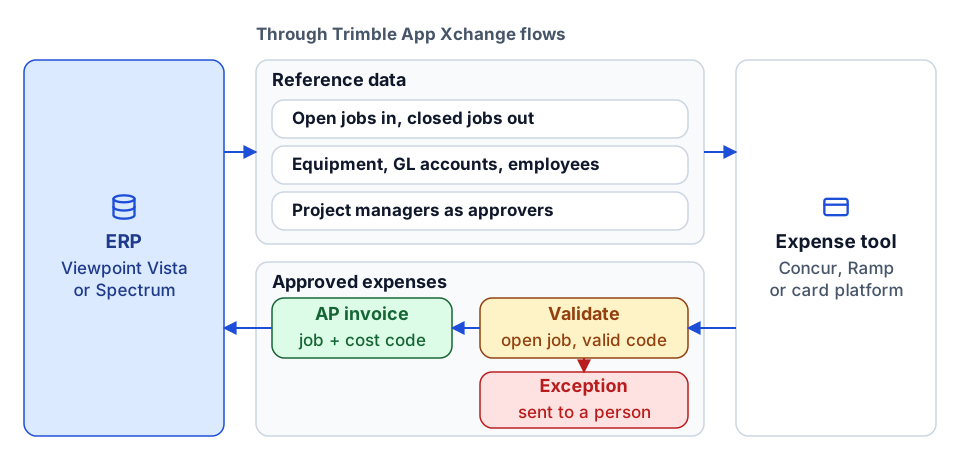
Jobs, cost codes and approvers flow from the ERP to the expense tool, and approved expenses come back as AP invoices coded to the right job.
The problem
Field staff spend on cards and file expenses in Concur, Ramp or another tool, but the job list there is out of date and accounting re-keys every approved report into the ERP. Miscoded expenses land on closed jobs or the wrong cost code.
What we build
We sync open jobs, equipment and GL accounts from Vista or Spectrum to the expense tool, make the job's project manager the approver, and return approved expenses to the ERP as AP invoices, one per report or one per line, as you choose.
How it works
- 1
Sync reference data
Open jobs are added to the expense tool and closed jobs removed, along with equipment, GL accounts and employees.
- 2
Set approvers
Project managers from the ERP become approvers for their jobs' expenses.
- 3
Return approved expenses
Approved reports become AP unapproved invoices in Vista or AP invoices in Spectrum, coded to job and cost code.
- 4
Handle exceptions
Expenses that fail validation, such as a closed job or bad cost code, are routed to a person with the reason.
- SAP Concur
- Ramp
- Viewpoint Vista
- Trimble Spectrum
- Trimble App Xchange
The value it creates
Time saved
Approved expenses stop being re-keyed; we count manual AP entries before and after.
Cost saved
Expenses are coded against current jobs, so fewer corrections after posting.
Standardization
One job and cost code list across expense and accounting systems.
Visibility
Accounting sees which expense batches posted and which need attention.
Proof
Related use cases
- Built and shown
Cost-code crosswalk and master data that every report agrees on
Projects, cost codes, and vendors mapped once in versioned reference data, so every report uses the same answer and gaps go back to the owner.
- We design and build this
CRM to Procore integration: one job record from pursuit to closeout
Stamp the CRM deal ID onto the Procore project, keep company and contact records aligned, and report pipeline next to backlog without retyping anything.
- We design and build this
Custom connector development for iPaaS and construction APIs
When no connector exists for a system you need, we build one: authentication, data objects, change tracking, actions and tests, ready for an iPaaS or a custom integration.
- We design and build this
ERP migration data mapping without losing history
A versioned map from old ERP to new, reconciled before cutover, so job history, cost codes, and vendors carry over and reports read across both.
- Built and shown
Get Procore data into Power BI, reliably
A repeatable pipeline from the Procore API into a Power BI model, with validation, history and refresh you can rely on.
- Built and shown
Procore and QuickBooks Online integration for WIP and cash reporting
Procore forecasts and QuickBooks actuals joined through a trust-ordered crosswalk, so the WIP schedule builds itself and unmapped jobs stay visible.
Frequently asked questions
One AP invoice per expense report or per line?
Either. One per report keeps AP tidy; one per line gives finer job and vendor coding. We set it with your accounting team.
Which expense tools does this work with?
We have worked with Concur and Ramp. Other card and expense platforms work the same way if they have an API for reference data and approved expenses.
How long does this take?
A typical rollout is a few weeks: kickoff, gathering mappings and approvers, configuration, testing with real reports, then go-live.
Next step
Which report or workflow would you like to improve?
Tell us what your team does today, which systems are involved, and what you want to change. We'll discuss whether there is a practical fit.
Prefer email? charley@buildflows.ai