The short answer: Before automating a contractor workflow, get answers to a short list of questions that decide whether the integration will work: what the process actually is step by step, which system is the source of truth for each field, how records are matched across systems, which direction data flows and how often, what the integration may create, update or delete, who fixes it when it fails, how much data moves at peak, where each system runs, what security rules apply, and what the manual process costs today. Most failed integrations did not fail on the API. They failed because one of these questions was answered by a guess.
This is the discovery list we use before building an integration or integration flow for a contractor, whether it ends up on an iPaaS, in Power Automate, or as custom code. It grew out of years of scoping integrations between ERPs such as Viewpoint Vista and Spectrum and the project management, time, expense, equipment and HR systems around them. A printable checklist is at the end.
Why discovery decides the outcome
Integration projects tend to start with a system pair: "connect our ERP to our PM system." That is a starting point, not a requirement. The same sentence can mean pushing jobs one way once a day, or a two-way sync of commitments and change orders every fifteen minutes with approvals in between. Those are different projects with different costs and different risks.
Discovery turns the system pair into a set of specific flows, each with a trigger, a direction, a scope, an owner and a measurable reason to exist. It also surfaces the things that kill projects late: no shared job number, a cost code structure that differs between systems, an on-premises server nobody can reach, or a process that only works because one person fixes it by hand every Friday.
We run discovery in four stages: understand the current process, map the solution, check volumes, environment and security, then size the value and plan the rollout.
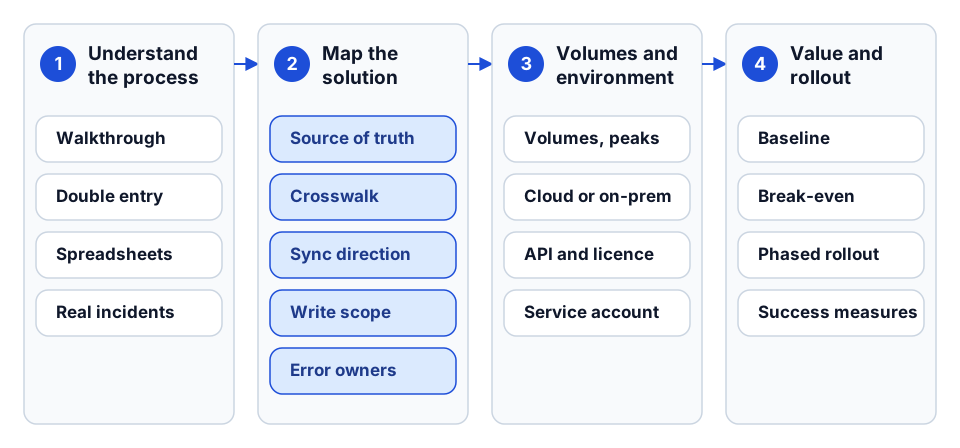 The four stages of discovery as this guide covers them, with the main outputs of each.
Stage 1: Understand the current process
Map the process before you map the fields
Ask the team to walk through one real example from start to finish: one job from award to setup, one invoice from receipt to payment, one week of timecards from field to payroll. Draw it as a sequence of steps with the system and the person at each step.
Questions to ask:
- Walk me through a typical project from start to finish. Which systems does it touch, and in what order?
- Where does the same data get entered more than once? Who enters it, and in which systems?
- Which steps wait on someone else (an approval, an export, an email)?
- What happens when something is wrong? Who notices, how, and how is it fixed?
- Which spreadsheets sit between systems? Who maintains them?
- What changes at month-end, at payroll, or at the start of a large project?
The spreadsheet question matters most. A spreadsheet between two systems is usually a hidden crosswalk, a hidden approval or a hidden data-quality check. If the integration removes the spreadsheet without replacing what it did, the problem it was solving comes back.
Find the real pain, in numbers
Ask for specific incidents, not general frustration:
- Which tasks take the most time each week or month?
- Can you name a time when late or wrong data affected a job's cost, schedule or a payment?
- How often do sync problems or re-keying errors happen, and how long do they take to resolve?
- Where do approvals stall, and for how long?
Specific incidents give you test cases for the integration and a baseline to measure against.
Stage 2: Map the solution
Source of truth, per field
For every object the integration touches (job, vendor, employee, cost code, commitment, invoice), decide which system owns each field. Not each object: each field.
A job is a good example. The ERP usually owns the job number, contract amount and cost structure. The PM system may own the project manager assignment, schedule dates and document folders. The CRM may own the client contact and the estimated value before award. If two systems can both edit a field and the integration syncs both ways, you need a rule for which wins, or you will get a record that flips back and forth.
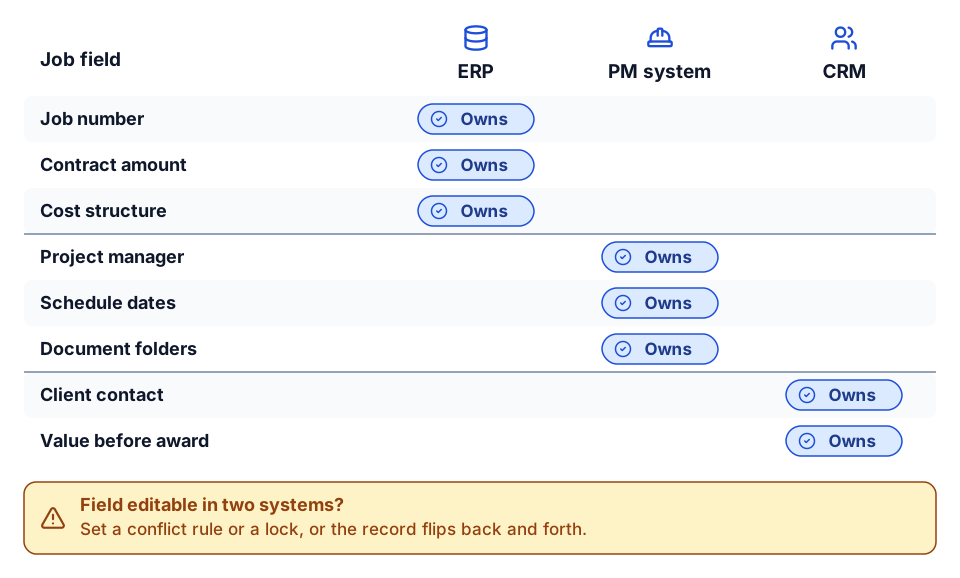 One owner per field, not per object. Any field editable in two systems needs a rule.
| Question | Why it matters |
|---|---|
| Which system creates this record? | Determines the trigger and the direction |
| Which system owns each field after creation? | Prevents overwrite loops and silent data loss |
| Can a field be edited in more than one system? | If yes, you need a conflict rule or a lock |
| What happens to the record when it closes, ends or is terminated? | Usually a status change, not a delete |
Master data and the crosswalk
Integrations live or die on matching. A job in the ERP and a project in the PM system must be known to be the same thing, and the same goes for vendors, employees, cost codes and equipment.
- Is there a shared identifier (job number, vendor code, employee ID) entered the same way in both systems?
- If not, how do people match them today? By name? By memory?
- Do cost codes and cost types match between systems, or is there a mapping?
- Who maintains the mapping when a new job, vendor or code is added?
The answer is usually a crosswalk: a maintained table that links IDs across systems, with an owner. We cover this in detail in our source mapping example. If the crosswalk does not exist yet, building it is often the first deliverable, before any flow runs.
Sync direction and frequency
For each object, ask:
- One way or two way? If two way, which fields go which way?
- How fresh does it need to be: real time, every 15 minutes, hourly, nightly, at period close?
- What would break if it were an hour late? A day late?
- Does anything downstream depend on the order of arrival (vendor before invoice, job before cost)?
Be honest about "real time". Many platforms read source systems on a replication schedule, so freshness is bounded by the schedule and by how long each replication takes. We explain the mechanics in the anatomy of a construction integration flow. Hourly is enough for most master data. Daily is enough for most HR records. The cases that genuinely need minutes are rarer than first conversations suggest.
Create, update and delete scope
For each flow, write down exactly what it may do in the target system:
- Create new records?
- Update existing ones? Which fields?
- Delete or deactivate? Under what condition?
Most construction flows should create and update only. A job that closes, a vendor that goes inactive or an employee who leaves is usually a status change to mirror, not a record to remove. Deleting in an ERP is rarely what anyone actually wants, and it is the hardest mistake to undo.
Error routing and owners
Every integration will fail on some records. Decide in discovery:
- When a record fails, who is told, and how (task, email, Teams message)?
- Who can fix each type of failure? A missing vendor goes to AP; a bad cost code goes to project accounting; an expired credential goes to IT.
- How is a fixed record retried?
- Is there a protocol for failures on critical data such as payroll?
The best answer turns each failure into a work item for the person who owns the data. An error that only appears in a run log is an error nobody will see.
Stage 3: Volumes, environment and security
Volumes and peaks
- How many records of each type per day, per month? How many open jobs, active vendors, employees, pieces of equipment?
- When are the peaks: month-end, payroll week, large project starts, year-end?
- How much history needs to move at go-live?
- Are volumes expected to grow with new hires, acquisitions or new divisions?
Volumes decide schedules, batch sizes and whether a platform's data limits are a concern. Measure the peak, not the average.
On-premises or cloud
- Where does each system run? Cloud, hosted, or on a server in your office?
- If on premises, who manages the server, and what is the process for installing an agent or opening a connection?
- Which version of each system are you on, and is an upgrade planned?
- Does each system have an API, and is it licensed and enabled for your account?
On-premises ERPs are common among contractors and are often the slowest part of setup, because they involve IT, firewall rules and sometimes the hosting provider. Find out in week one, not week six. If a system has no usable API, the options narrow to file exchange, database access or a different scope, and that changes the plan.
Security and compliance
- Who should see the integrated data? Are there restrictions by data type (payroll and HR versus project cost)?
- Which account will the integration run as? It should be a service account with only the access it needs, not a named person, following least privilege.
- Do you need an audit trail of who changed what, and when?
- Are there internal or external standards to meet (SOC 2 requirements from your customers, record retention, data residency)?
- Where are credentials stored, and who can rotate them?
Stage 4: Value and rollout
Opportunity cost, not just cost
The useful ROI question is not "what does the integration cost?" but "what does staying manual cost?" Ask:
- How many hours a week go into re-keying, reconciling and chasing data between these systems? Whose hours?
- How many errors happen, and what does each cost to find and fix?
- Has a late or wrong number delayed a payment, a billing, a payroll or a decision?
- What would the people doing this work do with the time back?
Then compare against the full cost of the integration: build, licences, setup, training and ongoing support. A simple break-even estimate (months until hours saved outweigh cost) is enough to rank options. Do not claim savings you have not measured; capture the baseline now so you can measure after go-live. Our monthly report cost calculator is a quick way to size the reporting side.
Phased rollout
Start with the flow that has the clearest value and the least disruption, then expand.
- Master data first. Jobs, vendors, employees and cost codes. Everything else depends on them matching.
- One transactional flow. The one with the most re-keying, such as expenses to AP or time to payroll.
- Two-way and approval flows once the first flows are trusted.
- Reporting and AI on top of data that is now consistent.
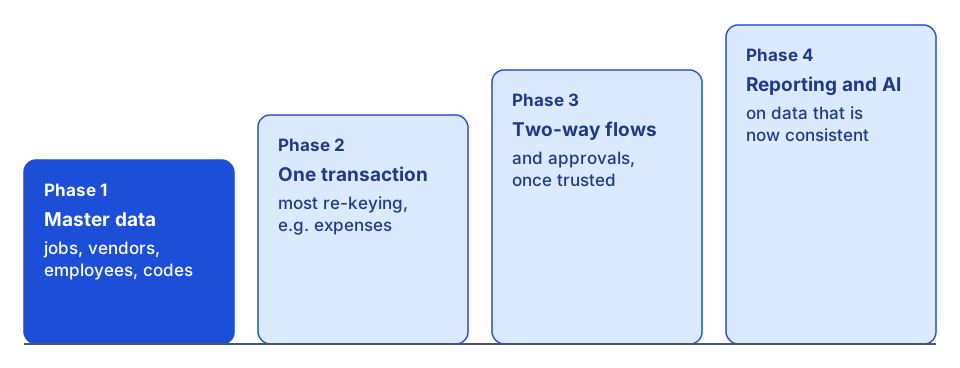 Each phase builds on the one before it, starting with master data.
For each phase, agree what success looks like (hours saved, error count, time from event to record) and review it after a month. Plan training for the people whose work changes, and a feedback loop for adjusting flows once they are live. We describe how we choose the first flows in construction integrations that pay back first.
Questions people forget to ask
- What happens at go-live to existing records? Event-driven flows only see changes after they are switched on. Existing open jobs, vendors and employees need a deliberate initial load.
- What about history? Do closed jobs and old invoices need to move, or only open items?
- Who owns the integration in a year? Name a business owner and a technical owner per flow.
- What changes are coming? A new PM system, an ERP upgrade or an acquisition next year changes the design now.
- Who can add records that the integration acts on? If anyone can add a row that issues a job number, anyone can issue a job number.
Printable discovery checklist
Copy this into your kickoff notes. Each box should have a written answer, an owner and a date before build starts.
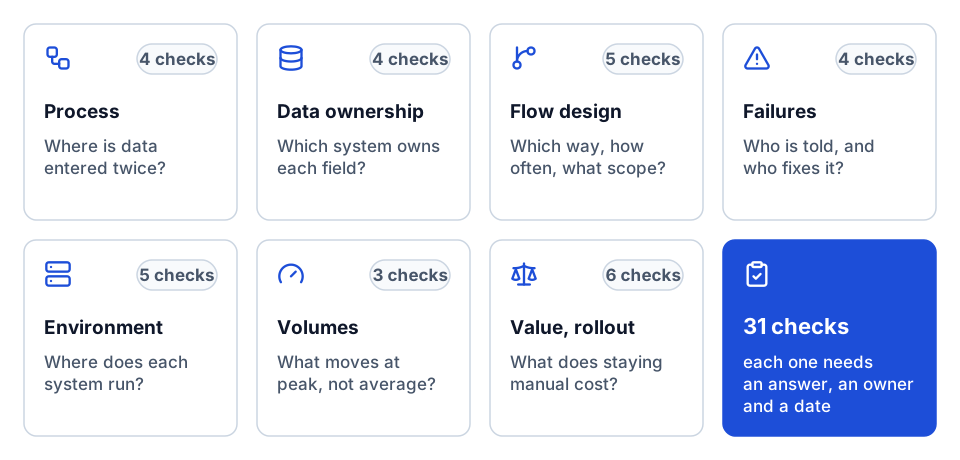 The checklist at a glance: seven groups, 31 checks.
Process
- One real example of the process walked end to end, with system and person at each step
- Every point of double entry identified
- Every spreadsheet between systems identified, with what it does
- Specific incidents of late or wrong data recorded as test cases
Data ownership and matching
- Source of truth agreed for each field of each object
- Conflict rule for any field editable in two systems
- Shared identifiers confirmed, or a crosswalk designed with an owner
- Cost code and cost type mapping agreed
Flow design
- Direction agreed per object and per field
- Freshness requirement agreed per object, with the reason
- Create, update and delete scope written for each flow
- Closed, inactive and terminated records handled as status changes
- Initial load and history scope agreed
Failures
- Failure notification method agreed
- Owner named for each failure type
- Retry process agreed
- Protocol for critical data (payroll, payments)
Environment and security
- Hosting of each system confirmed (cloud, hosted, on premises)
- API availability, licensing and version confirmed for each system
- Service account identified, with least-privilege access
- Audit, retention and compliance requirements recorded
- Credential storage and rotation owner named
Volumes
- Daily and monthly volumes per object
- Peak periods identified
- Growth expected over the next two years
Value and rollout
- Baseline measured: hours, errors, delays
- Break-even estimate per flow
- Phases agreed, master data first
- Success measure and review date per phase
- Training and change plan for affected roles
- Business owner and technical owner per flow
Where to go next
- See how the answers become a design in the anatomy of a construction integration flow, and how to choose what to build first in construction integrations that pay back first.
- System specifics: the Viewpoint Vista API integration guide, the Spectrum ERP integration guide and the Procore API integration guide.
- Matching and quality: our source mapping example and construction data quality rules.
- Deciding between a platform and custom code: build vs buy for construction software.
- When the answers are in, the integration sprint builds a defined set of flows at a fixed scope and price, or plan your build to scope it with us.
- Want help running discovery itself? Start a conversation.
Frequently asked questions
What is the most important question in integration discovery?
Which system owns each field. Without a field-level source of truth and a matching key or crosswalk, a two-way sync overwrites data or creates duplicates no matter how good the API work is.
How often should construction data sync?
It depends on what breaks if it is late. Hourly suits most master data and daily suits most HR records. Genuine minute-level needs are rarer than first conversations suggest, and replication schedules bound freshness on many platforms.
Should an integration delete records in the ERP?
Rarely. Closed jobs, inactive vendors and terminated employees are usually status changes to mirror. Keep any true deletes in a separate, reviewed flow.
How do you estimate ROI for an integration?
Measure the hours spent re-keying and reconciling, the errors and what they cost, and delays caused by late data. Compare against build, licence, setup, training and support costs for a simple break-even, and remeasure after go-live.
Next step
Want help running this playbook?
Bring the report or workflow. We'll help map the work behind it.
Prefer email? charley@buildflows.ai
Get the next guide in your inbox
Field Notes: practical guides and new walkthroughs, about once a month.
Field Notes
Practical guides and new walkthroughs on construction data and automation, roughly monthly.
Keep learning
Integrations · October 9, 2026
Anatomy of a Construction Integration Flow
How an iPaaS integration flow is put together, illustrated with Trimble App Xchange concepts: connectors, triggers, the cache-and-event model, step types, write scope, naming, remediation and limits. Ends with building a custom connector with the public Xchange SDK.
Playbooks · October 9, 2026
The Construction Integrations That Pay Back First
A playbook for choosing your first construction integrations: why expense-to-AP, PM-to-ERP, GL/AP/AR, payroll and HR, carrier EDI and reporting feeds pay back first, with an anonymized expense-to-Vista pattern and a prioritization table.
Integrations · October 9, 2026
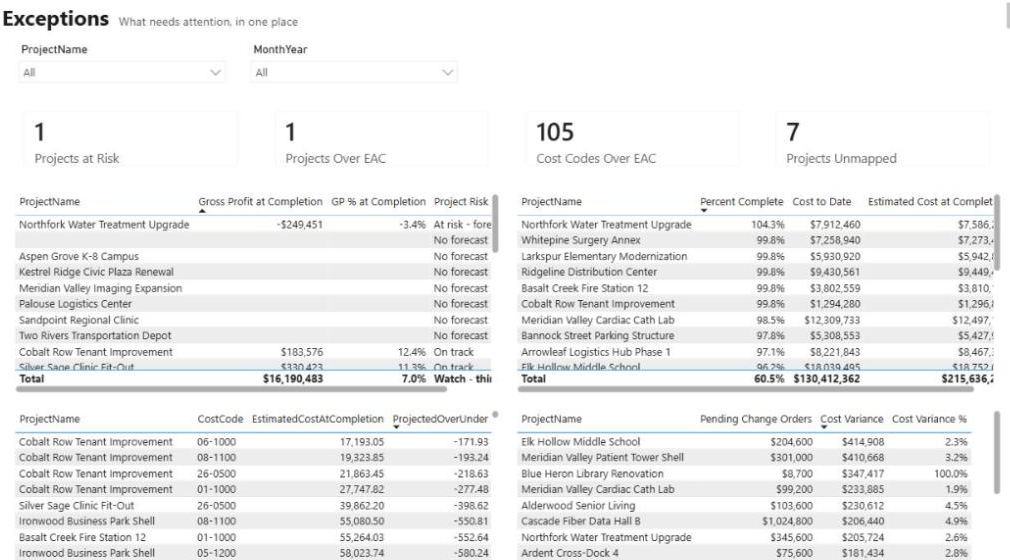
A Worked Source-Mapping Example: Procore, Accounting and CRM
How to link a Procore project, an accounting job and a CRM deal when they share no ID: match rules in order of trust, a sample crosswalk, old-to-new cost codes, and fixing exceptions at the source.