Procore and Viewpoint Vista integration
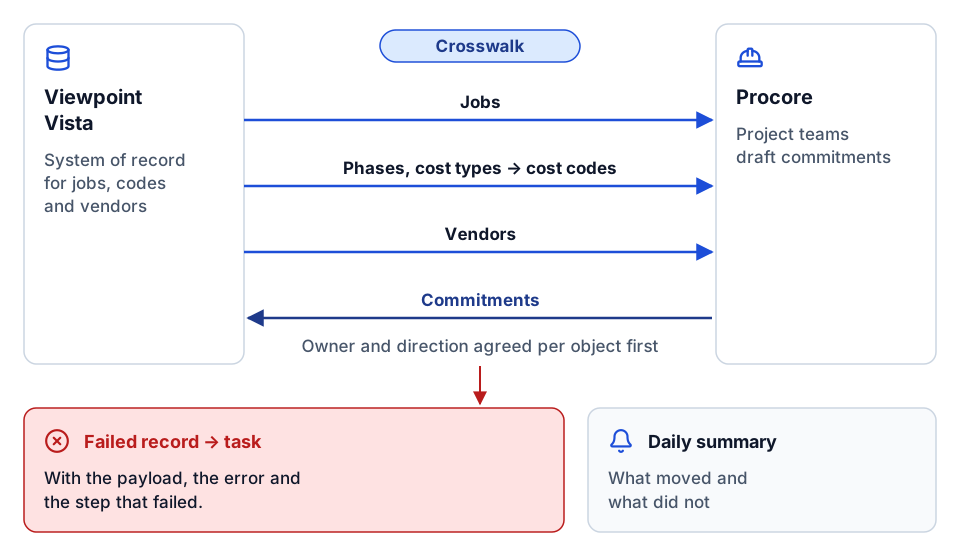
Jobs, vendors and cost codes set up once in Vista appear in Procore, and commitments and costs move between the two on a schedule you can monitor.
The problem
Project teams work in Procore while accounting runs on Vista. Jobs, vendors and cost codes are keyed twice, commitments drift between the two systems, and month-end reconciliation turns into a hunt for which side is right.
What we build
We agree which system owns each record, build a crosswalk for jobs, phases, cost types and vendors, and set up flows that move each record in one direction with clear create, update and delete rules. Failures become work items with the record and the reason, so nothing disappears silently.
How it works
- 1
Decide ownership
For each object, such as jobs, vendors, cost codes, commitments and change orders, we agree the system of record and the direction of flow.
- 2
Map the data
We build the crosswalk between Vista phases and cost types and Procore cost codes, and settle how job numbers and vendor codes match.
- 3
Build the flows
Each flow handles one object in one direction, with create and update scope stated, using the Vista API, App Xchange or a custom service depending on your setup.
- 4
Monitor and remediate
Failed records are turned into tasks with the payload and error, and a daily summary shows what moved and what did not.
- Procore
- Viewpoint Vista
- Trimble App Xchange
- Power BI
- Microsoft Teams
The value it creates
Time saved
Jobs, vendors and cost codes stop being typed twice; we count manual setups before and after.
Cost saved
Commitment and cost mismatches are caught when they happen rather than at month end.
Visibility
Everyone can see which records synced, which failed and why.
Standardization
Job numbers, cost codes and vendor codes follow one convention across both systems.
Proof
Related use cases
- Built and shown
Cost-code crosswalk and master data that every report agrees on
Projects, cost codes, and vendors mapped once in versioned reference data, so every report uses the same answer and gaps go back to the owner.
- We design and build this
CRM to Procore integration: one job record from pursuit to closeout
Stamp the CRM deal ID onto the Procore project, keep company and contact records aligned, and report pipeline next to backlog without retyping anything.
- We design and build this
Custom connector development for iPaaS and construction APIs
When no connector exists for a system you need, we build one: authentication, data objects, change tracking, actions and tests, ready for an iPaaS or a custom integration.
- We design and build this
ERP migration data mapping without losing history
A versioned map from old ERP to new, reconciled before cutover, so job history, cost codes, and vendors carry over and reports read across both.
- We design and build this
Expense and card transactions into Vista or Spectrum AP
Jobs, cost codes and approvers flow from the ERP to the expense tool, and approved expenses come back as AP invoices coded to the right job.
- Built and shown
Get Procore data into Power BI, reliably
A repeatable pipeline from the Procore API into a Power BI model, with validation, history and refresh you can rely on.
Frequently asked questions
Which system should own jobs and cost codes?
Usually accounting, so Vista. Jobs, phases, cost types and vendors are created in Vista and pushed to Procore, while project-side records such as commitments are often drafted in Procore and posted to Vista. We confirm this with your team before building anything.
Do we need Trimble App Xchange for this?
Not always. App Xchange is a common route and is often needed for on-premises Vista. Cloud Vista customers may be able to use the Vista API directly. We look at your hosting, licences and volumes and recommend one route.
What happens when a record fails to sync?
It becomes a work item with the record, the error and the step that failed, so someone can fix the cause and retry. Nothing fails silently.
Next step
Which report or workflow would you like to improve?
Tell us what your team does today, which systems are involved, and what you want to change. We'll discuss whether there is a practical fit.
Prefer email? charley@buildflows.ai