The short answer: A Viewpoint Vista integration connects Vista, the construction ERP, to the systems around it: project management, expense and card platforms, payroll and HR, field and fabrication tools, and reporting. The Vista API is a REST API scoped to an enterprise, with modules for accounts payable, purchase orders, subcontracts, job cost, equipment, projects, vendors, customers and more. Reads are straightforward. Writes are asynchronous "actions" you submit and then poll for a result. Most of the work is not the API calls. It is aligning master data (job, phase or cost code, cost type, vendor) so that what lands in Vista is coded correctly the first time.
This guide covers what the Vista API exposes, how enterprise scoping and async writes work, what changes when you go through Trimble App Xchange, cloud versus on-premises considerations, the integrations contractors ask for most, and how we approach a Vista build. It draws on work we did while building integrations on Trimble App Xchange, and on a Vista MCP server we built for AP invoice review that wraps 47 Vista endpoint specs.
What the Vista API covers
Trimble describes the Vista API as a bidirectional REST API that acts as a service layer for an organization's cloud-hosted instance of Vista. Paths are scoped to an enterprise, in the shape /api/v1/{enterpriseId}/..., and then grouped by module. The public reference lives in the Vista API documentation linked from help.trimble.com and developer.trimble.com; check it for the current endpoint list, because Trimble ships changes regularly.
The modules contractors use most:
| Area | Typical resources | What integrations do with it |
|---|---|---|
| Accounts payable | Unapproved invoices (create, query, get, action status), vendors, vendor alternate addresses | Push invoices from expense, card, OCR or field systems into the AP review queue |
| Purchase orders | Purchase orders, unposted purchase orders | Create POs from procurement or fabrication tools; read commitments for PM sync |
| Subcontracts | Subcontracts | Read committed cost; compare invoices to commitments |
| Job cost and projects | Contracts, projects, project phases, standard phases and cost types, project cost history, cost entries, daily production | Seed PM systems with jobs and cost structure; read actuals for reporting |
| Equipment | Equipment, categories, departments, locations, transfers, status | Sync fleet records with telematics, maintenance and expense systems |
| Billing | Customers, schedule of values, sales tax | AR sync, schedule of values to PM or billing tools |
| Organization | Enterprise, company, employees, units of measure, inventory, health | Reference data, health checks, user provisioning |
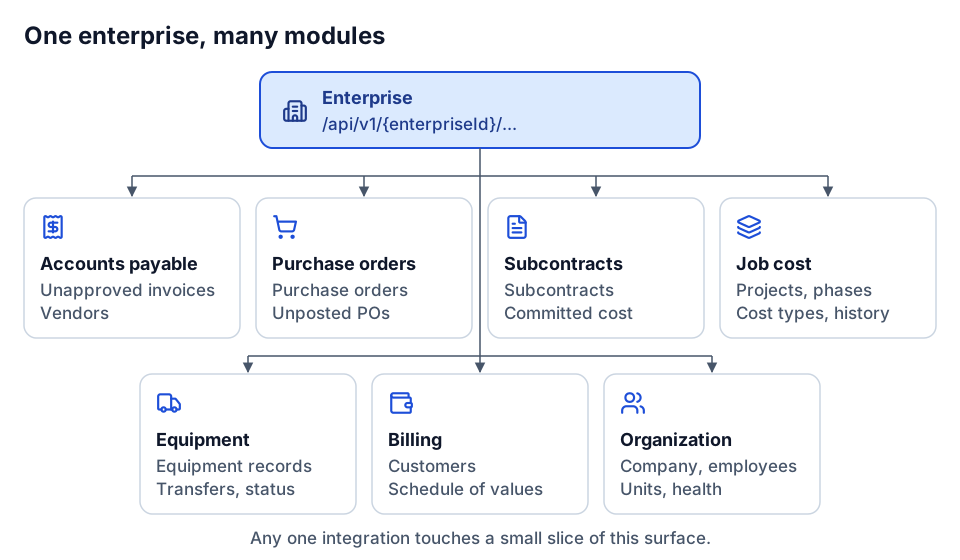 Every path is scoped to an enterprise, then grouped by module.
When we built our AP review MCP server, we worked from a Vista OpenAPI document with 72 paths and implemented 47 endpoint specs across enterprise, company, contract, customer, project, project cost entry and history, project phase, equipment, PO, AP unapproved invoice, sales tax, schedule of values, standard cost type and phase, subcontract, vendor and health. That is a useful sense of scale: the surface is broad, but any one integration touches a small slice of it.
Enterprise scoping
Every call carries an enterprise ID, and inside the enterprise you work with one or more Vista companies. That shapes three design decisions early:
- Which companies the integration may touch. Multi-company contractors often want an integration live for one company first. Make the company list explicit configuration, not an assumption buried in a query.
- Company-level keys. Jobs, vendors and GL accounts are company-scoped in practice. A job number is only unique within a company, so the integration's keys should be company plus job, not job alone.
- Credentials per environment. Keep test and production enterprises separate, with separate credentials. A sync that runs against the wrong enterprise is a bad day for accounting.
Writes are async actions you poll
This is the part that surprises developers coming from simpler REST APIs. When you create or change something in Vista through the API, such as an unapproved AP invoice, you are typically submitting an action. The response tells you the action was accepted, not that the invoice exists. You then poll an action status resource until it completes or fails, and read the result.
A simplified shape of the pattern, written for illustration:
{
  "submit":  "POST <create action>        -> { actionId, status: \"pending\" }",
  "poll":    "GET  <action status>/{actionId} -> { status: \"pending\" }",
  "result":  "GET  <action status>/{actionId} -> { status: \"succeeded\" | \"failed\", detail: ... }"
}
Check the current reference for exact paths and status values. What matters for design:
- Store the action ID with the source record the moment you submit, so a crash between submit and poll does not lose track of the write.
- Poll with backoff and a ceiling. Treat "still processing after N minutes" as an alert, not an infinite loop.
- Make submits idempotent. If you retry a submit because the network dropped, you need a way to know whether the first one landed. Carry a source reference (expense report ID, card transaction ID) on the record and check for it before resubmitting.
- Read the failure reason. Failed actions usually fail on master data: a closed job, an invalid phase, an inactive vendor. Route those to a person with the reason attached, not to a log nobody reads.
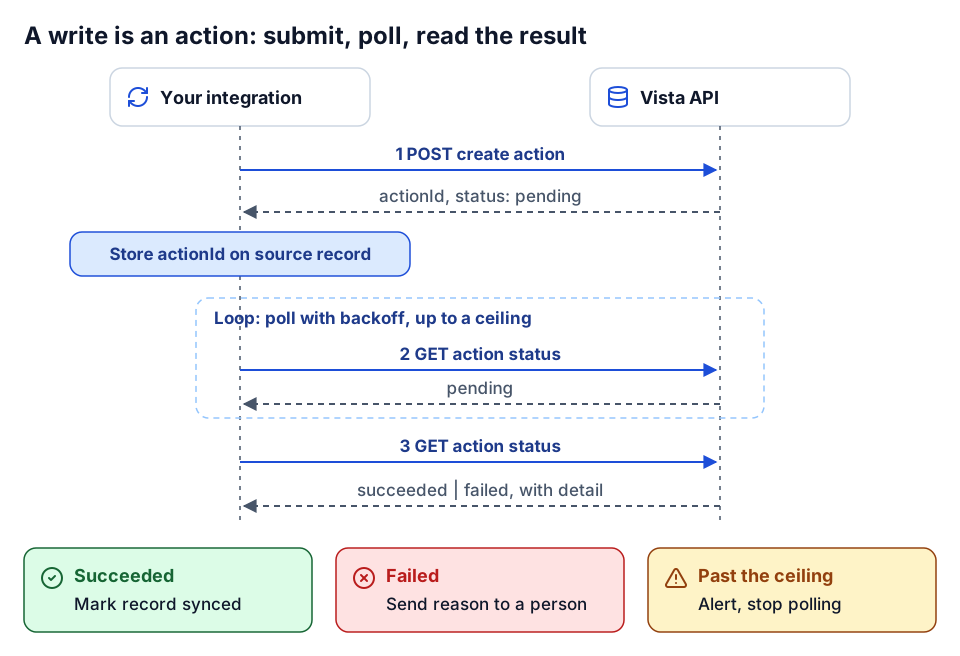 Submit, store the action ID, poll with backoff, then act on the result.
Cached reads vs. real-time writes through App Xchange
Many Vista integrations run through Trimble App Xchange, Trimble's iPaaS, which public docs at docs.appxchange.trimble.com describe as the maintainer of the Vista API. App Xchange uses a caching model that changes how you think about freshness:
- Reads come from a cache. Scheduled replication pulls Vista data into the App Xchange cache. In the setups we worked with, Vista reads were served from a cache refreshed roughly hourly. Creates, updates and deletes detected in the cache emit events that integration flows can subscribe to.
- Writes run in real time as action services against Vista.
- Schedules have a floor and a budget. Public docs describe a minimum schedule interval and per-flow data limits. The schedule interval also has to exceed the time a run takes, or runs stack up.
The practical consequence: a flow that writes an invoice and then immediately reads it back from the cache may not see it yet. Design flows around the action result, not a read-after-write. And if a business process needs a value fresher than the cache cycle, such as a job status checked at the moment of an expense submission, decide explicitly whether a slightly stale value is acceptable.
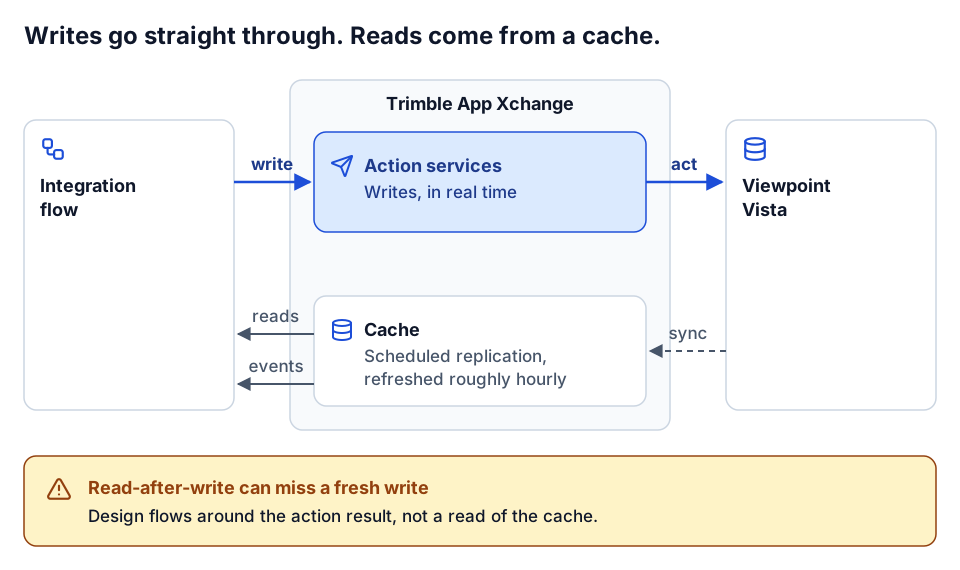 Writes are real time; reads lag by up to one cache cycle.
Cloud vs. on-premises
Be careful here, because the answer depends on your deployment and on what Trimble currently offers. Trimble's public documentation describes the Vista API as a service layer for cloud-hosted Vista, and says cloud-hosted Trimble Construction One customers are eligible to purchase it. App Xchange documentation describes an on-premises agent for connecting on-premises systems.
If you run Vista on your own servers, do not assume you can call the same REST API directly. Check current Trimble documentation and talk to your account team about which route applies to your version and hosting. Some on-premises contractors also have reporting needs met by reading the Vista SQL database directly through a gateway, which is a different pattern with different risks: read-only access is fine for reporting, but writing to ERP tables outside the application is a line we do not cross.
Common Vista integration targets
These are the integrations we see requested most. In the flow catalogs we worked with on App Xchange, Vista was the most-connected system by a wide margin, and the patterns below repeated across many contractors.
| Integration | Direction | What moves | The hard part |
|---|---|---|---|
| PM sync (Procore, ProjectSight, others) | Vista to PM for jobs and cost structure; PM to Vista for commitments and some cost | Jobs/contracts, phases, cost types, vendors, POs, subcontracts | Keeping cost structure identical; deciding which system owns commitments |
| Expense and card platforms to AP | Vista to platform for jobs, GL, employees; platform to Vista for invoices | Open jobs, equipment, GL accounts, employees; expenses as AP unapproved invoices | Job open/closed timing, approver mapping, one invoice per line vs per report |
| Payroll and HR | Usually HR to Vista, or Vista to benefits and time systems | Employees, departments, earnings, benefits enrollment | Employee identity across systems, effective dates |
| Field and fabrication (e.g. Tekla PowerFab) | Field tool to Vista for POs and production; Vista to tool for jobs and vendors | Purchase orders, material lines, T&M subcontract lines | Cost code and vendor code consistency |
| Estimating | Estimate to Vista budget at award | Phases, cost types, budget amounts | Estimate structure rarely matches the job cost structure |
| Reporting | Vista into a warehouse or Power BI | Job cost, commitments, billing, AP/AR | Definitions, cutoffs, reconciling to Vista reports |
PM sync
The most common pattern seeds the PM system from Vista: when a job is set up in Vista, create the project in Procore or ProjectSight with the same phases and cost types, and sync vendors so commitments can be written against real vendor records. The reverse direction, commitments and cost from PM back to Vista, is where ownership decisions matter. Decide which system is the source of truth for POs and subcontracts and enforce it. Two-way sync of the same object without a clear owner creates loops and overwrites. Our Procore API integration guide covers the Procore side.
Expense and card to AP unapproved
This is often the fastest payback, covered in detail in the integrations that pay back first. The shape: Vista sends open jobs, equipment, GL accounts and employees to the expense platform; job project managers become approvers; approved expenses come back as AP unapproved invoices, so they enter Vista's normal review workflow instead of bypassing it. Landing in the unapproved queue matters. It keeps AP's controls intact and gives reviewers a place to catch miscoding.
Field and fabrication
From PowerFab-to-Vista work, a few rules that apply to most procurement integrations:
- POs carry material lines (quantity times price) and may carry time-and-material subcontract lines.
- A PO with a job hits committed cost on that job. A PO without a job is an expense. Getting that wrong moves cost between job cost and overhead.
- Unused material may go back to inventory, which is its own transaction, not a negative PO line.
- The failures we saw were almost all miscoded POs and invalid cost codes. The fix was standardizing job number, cost code and vendor code across both systems, not more integration logic.
Master data alignment
Every Vista integration depends on four keys lining up. Get these right before writing flows.
| Key | Vista concept | What goes wrong | What to do |
|---|---|---|---|
| Job | Job / contract, company-scoped | Different job numbering in PM or field tools; jobs created in one system only | Pick one system to create jobs; push the number everywhere else; keep a crosswalk for legacy work |
| Phase / cost code | Phase codes per job, often from a standard phase list | PM uses a simplified code list; estimating uses another | Map at the standard list level; reject unknown codes instead of defaulting |
| Cost type | Labor, material, subcontract, equipment, other (your list) | Defaulting everything to "other"; mismatched cost type IDs | Explicit mapping table, reviewed by accounting |
| Vendor | AP vendor, company-scoped | Duplicate vendors created by integrations; name-matching | Vendors created in Vista first; integrations reference the Vista vendor number |
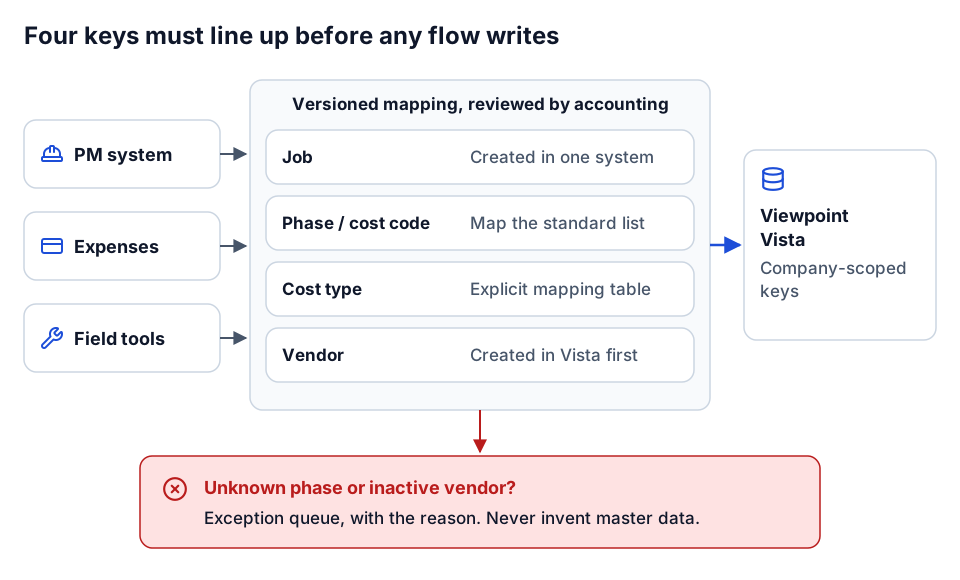 Map the four keys once, as reviewed reference data; reject what does not map.
Two rules we hold to. First, an integration should never invent master data to make a write succeed. If a phase does not exist, the record goes to an exception queue with the reason. Second, keep the mappings as versioned reference data, not as logic scattered through flows, so accounting can review them and you can re-run history when they change. See construction data quality rules for the checks we run.
Reliability and safety for Vista writes
Writing to an ERP is different from reading it. The controls we built into our Vista AP review server carry over to any Vista integration:
- Read-only by default. Writes are enabled per domain through an allowlist, so an integration that only needs AP cannot touch POs.
- Dry runs and preflight validation. Validate the request against the same rules Vista will apply (open job, valid phase, active vendor) before submitting.
- Bulk caps. Limit how many records one run can write. A mapping mistake should break 100 records at most, not 10,000.
- Retries with jitter on 429 and 5xx, plus bounded concurrency so a backlog does not hammer the API.
- Deterministic paging for reads, so a review or reconciliation can resume from a known page.
- Audit export. Record what was submitted, by whom or by what, and what Vista returned.
For AI agents working against Vista, the same controls sit behind the MCP server, with human-in-the-loop approval for anything that writes. Our AP review build runs nine read-only risk rules (missing fields, stale invoices, possible duplicates, vendor amount anomalies, PO or subcontract vendor mismatches and others) and never approves an invoice on its own. The design is written up in AI AP invoice review on Vista, and the auth model in on-behalf-of token exchange for AI agents.
Build vs. buy for Vista
Buy, or configure an existing App Xchange flow, when the integration is a standard pattern (expense to AP, PM project seeding, HR employee sync), your Vista configuration is close to typical, and the vendor's field mapping fits. Build or extend when:
- you need cross-system reporting, not a one-to-one sync,
- your phase and cost type structure needs a governed mapping the standard flow does not support,
- you need custom validation or exception routing before anything touches AP,
- you are on premises and the standard route does not fit, or
- you want AI agents reading or drafting in Vista under your own policy.
Our broader framework is in build vs. buy construction software.
A checklist for a Vista integration
- Name the business outcome. "Expenses land in AP coded to the right job within a day" is a requirement. "Integrate Concur with Vista" is not.
- Confirm the access route. Cloud API, App Xchange, on-premises agent, or read-only database for reporting. Confirm in current Trimble documentation.
- List the objects and the owner of each. Jobs, phases, cost types, vendors, POs, subcontracts, invoices.
- Agree the master data mapping with accounting, in writing.
- Design writes as actions: store action IDs, poll with backoff, idempotent submits, exception routing on failure.
- Account for cache freshness if you read through App Xchange.
- Start read-only, then enable writes for one domain and one company.
- Test in a non-production enterprise, then reconcile a real period against Vista reports.
- Give it an owner, including credential renewals and the exception queue.
How we approach it
We have built against Vista from both sides: App Xchange flows and connectors while building integrations on Trimble App Xchange, and an MCP server over the Vista API for AP review. We start with the business outcome, map master data with accounting before writing a flow, keep writes behind allowlists, dry runs and caps, and route every failure to a person with the reason. We write custom code when the standard connector does not fit your configuration, and we leave behind version-controlled mappings your team can read. A typical first engagement is an integration sprint: one integration, scoped, built and reconciled.
Where to go next
- See the integrations that usually pay back first in construction integrations that pay back first.
- Running Spectrum instead? Read the Spectrum ERP integration guide.
- Understand how a flow is put together in anatomy of a construction integration flow.
- See an AI agent working the Vista AP queue in AI AP invoice review on Vista.
- Pressure-test your requirements with integration discovery questions for contractors.
- Scope your own project with Plan your build, or tell us what you want to connect to Vista.
Frequently asked questions
What does the Vista API cover?
Trimble describes it as a bidirectional REST API over cloud-hosted Vista. It covers modules including AP unapproved invoices, purchase orders, subcontracts, job cost and projects, equipment, vendors, customers, schedule of values and company data. Check Trimble's current Vista API reference for the full endpoint list.
Can on-premises Vista customers use the Vista API?
Trimble's public documentation describes the Vista API as a service layer for cloud-hosted Vista. If you run Vista on your own servers, check current Trimble documentation and your account team for the supported route, such as App Xchange's on-premises agent.
Why don't Vista API writes return the record immediately?
Writes are submitted as actions that Vista processes asynchronously. Your integration stores the action ID, polls the action status until it completes or fails, and reads the failure reason when it fails.
Why is data I just wrote not showing up in App Xchange reads?
App Xchange serves Vista reads from a cache that refreshes on a schedule, while writes run in real time. A read immediately after a write may not reflect it until the next cache refresh.
Next step
Need this connection in your environment?
Scope one integration: the records, direction, timing, and business rules behind the connection.
Prefer email? charley@buildflows.ai
Get the next guide in your inbox
Field Notes: practical guides and new walkthroughs, about once a month.
Field Notes
Practical guides and new walkthroughs on construction data and automation, roughly monthly.
Keep learning
Integrations · October 9, 2026
Spectrum ERP Integration Guide: Spectrum Data Exchange Explained
A practical primer on integrating Trimble Spectrum through Spectrum Data Exchange: how Authorization IDs and operator codes scope access, Basic vs Enhanced authentication, the 18 modules of web services, Excel templates, and the integrations contractors build most.
Playbooks · October 9, 2026
The Construction Integrations That Pay Back First
A playbook for choosing your first construction integrations: why expense-to-AP, PM-to-ERP, GL/AP/AR, payroll and HR, carrier EDI and reporting feeds pay back first, with an anonymized expense-to-Vista pattern and a prioritization table.
AI agents & MCP · October 9, 2026
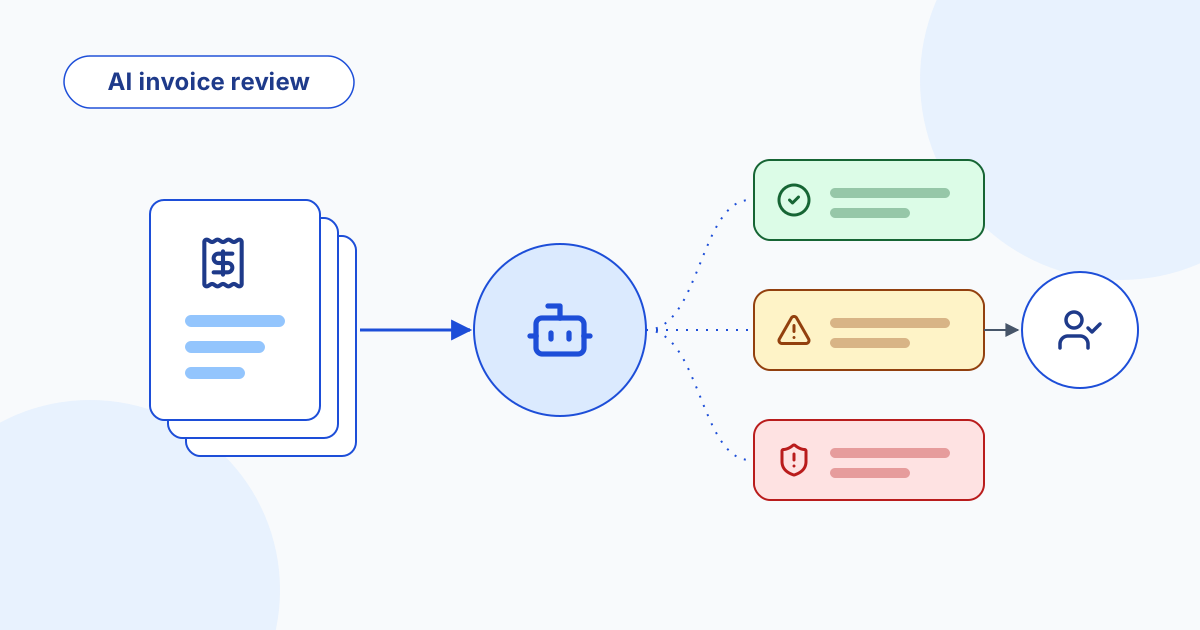
AI Invoice Review for Viewpoint Vista AP: Design of a Safe Agent
The design of an AI agent that triages Viewpoint Vista AP unapproved invoices with deterministic risk rules, hands reviewers an evidence packet, and records every human decision. Read-only by default, with dry-run and allowlisted writes.