The short answer: The construction integrations that pay back first are the ones that remove re-keying from high-volume, rule-based accounting work and that touch systems you already own. In rough order: expense and card transactions into ERP accounts payable, PM-to-ERP sync of jobs, vendors and commitments, ERP general ledger, AP and AR feeds, payroll, HR and benefits sync, carrier EDI for benefits enrollment, and a data exchange from the ERP into reporting. Each one replaces hours of manual entry every week, has a clear owner, and can go live in weeks rather than quarters. The integrations that pay back last are the ambitious two-way syncs of everything, started before anyone agreed which system owns which record.
This playbook explains why some integrations pay back faster than others, walks through the six that usually come first, gives an anonymized expense-to-ERP pattern with a typical 30-day onboarding shape, and ends with a prioritization table you can use to rank your own list. It draws on work we did while building integrations on Trimble App Xchange, where Viewpoint Vista and Spectrum were the most-connected systems in the flow catalogs we worked with, and on integrations we have built for contractors since.
What makes an integration pay back fast
Payback is not about how impressive the integration is. Four things predict it:
- Volume of manual entry removed. An integration that replaces 400 expense lines a month pays back faster than one that replaces 12 project setups.
- Error cost avoided. Some re-keying is slow; some is dangerous. A miscoded invoice moves cost to the wrong job and corrupts WIP. Removing that risk is worth more than the hours.
- Clear ownership. If one system clearly owns the record and one person owns the process, the integration is a pipe. If nobody agrees, the integration becomes a negotiation.
- A proven pattern. Expense to AP is a well-worn pattern with off-the-shelf flows. A custom two-way sync between an estimating tool and a scheduling tool has not. Proven patterns have known failure modes and short timelines.
Run every candidate through those four questions before you look at connectors or prices.
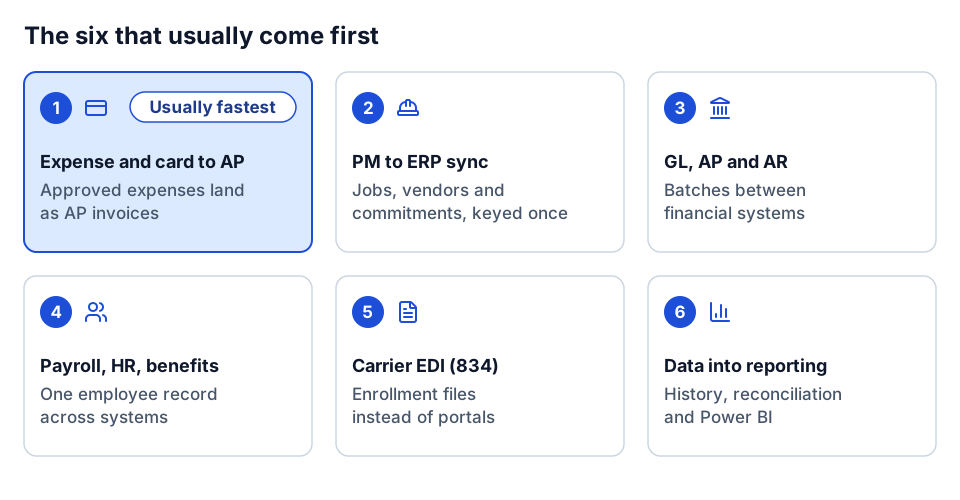 The six integrations covered below, in rough payback order.
1. Expense and card transactions into ERP AP
This is usually the fastest payback for a contractor with a field workforce. Every fuel purchase, hotel and materials run on a company card ends up as an ERP transaction coded to a job, phase and cost type. Without an integration, someone exports a report, re-keys it, and chases the employee who coded a job that closed last month.
The integration has two halves. Reference data goes from the ERP to the expense platform, so employees can only code to valid jobs, equipment and GL accounts. Approved expenses come back to the ERP as AP invoices, landing in the normal AP review queue rather than bypassing it.
An anonymized pattern: expense platform to Vista
This is a pattern we saw repeatedly, between a mainstream expense platform (Concur, Chrome River and card platforms such as Ramp follow the same shape) and Vista:
| Flow | Direction | Rule |
|---|---|---|
| Jobs | ERP to expense | Add a job to the expense platform's list when it opens in the ERP; remove it when it closes |
| Equipment | ERP to expense | Equipment list for equipment-coded expenses |
| GL accounts | ERP to expense | Valid GL accounts for overhead expenses |
| Employees | ERP payroll to expense users | Payroll employees become expense users, so terminations flow through |
| Approvers | ERP job cost to expense | The job's project manager becomes the approver for expenses coded to that job |
| Expenses | Expense to ERP | Approved expenses become AP unapproved invoices, one per line or one per report |
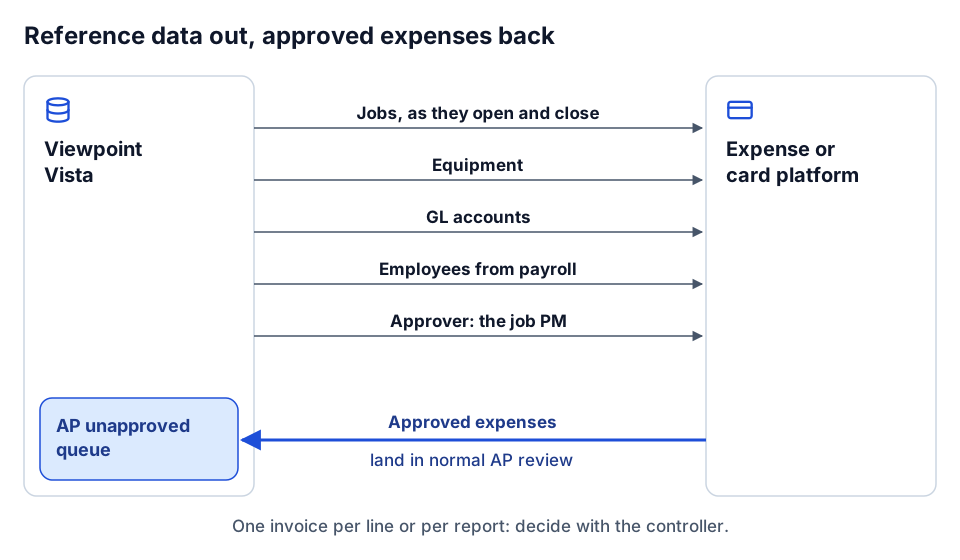 Reference data goes out to the expense platform; approved expenses come back into AP review.
Three design choices make or break it.
Job open and closed timing. If jobs leave the expense list the moment they close in the ERP, employees with older receipts cannot code them. If jobs stay forever, people code to dead jobs. Agree a rule with accounting, such as a grace period after close, and implement it in the flow.
PM as approver. Routing approval to the job's project manager, pulled from the ERP, puts the person who knows whether the cost belongs to the job in the approval seat. It also means approver changes follow the ERP automatically instead of living in a second admin screen.
One invoice per line or per report. One AP invoice per expense line gives clean job cost detail and more AP records. One per report is tidier for AP and harder to audit by job. There is no universal answer; pick with the controller and write it down.
The typical onboarding shape
In the setups we worked with, this pattern went live in roughly 30 days, in five steps:
- Kickoff (days 1 to 3). Confirm scope, owners, the ERP companies in scope, and the go-live target.
- Information gathering (days 3 to 10). Credentials, the expense platform's configuration, the job, equipment and GL lists, approver rules, invoice granularity, and how vendor records for employees or card issuers are set up in AP.
- Configure (days 10 to 20). Build or configure the flows, the mapping tables and the exception handling.
- Test (days 20 to 27). Run real expense reports through a test company; reconcile what lands in AP against the reports.
- Go-live (days 27 to 30). Switch on for production, watch the first cycles closely, hand over the exception queue.
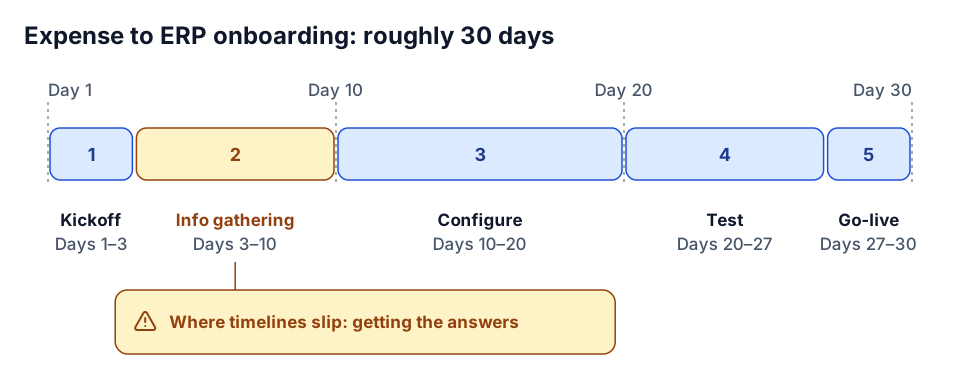 The typical 30-day shape; information gathering is where it slips.
Information gathering is where timelines slip. The integration is quick to configure once the answers exist; getting the answers takes the time. Our integration discovery questions are written to shorten that step.
2. PM to ERP sync
Most contractors run project management (Procore, ProjectSight, or similar) separately from the ERP, and re-key the overlap: new jobs, vendors, commitments, and sometimes cost and billing. A PM-to-ERP sync removes that and, more importantly, keeps the job structure identical in both systems so reporting can join them.
Payback comes in two stages. The first stage, ERP to PM for jobs, cost structure and vendors, is low risk and fast: when a job is set up in the ERP, the project appears in PM with the same phases and cost types. The second stage, PM to ERP for commitments, is where ownership must be settled. Decide which system owns POs and subcontracts before building, and never sync the same object both ways without an owner. The Vista and Spectrum specifics are in the Vista API integration guide and the Spectrum integration guide; the Procore side is in our Procore API integration guide.
3. ERP general ledger, AP and AR
Contractors with more than one financial system (a parent company on a corporate ERP, operating companies on a construction ERP, or a recent acquisition still on its old system) re-key journal entries, AP batches and AR invoices between them. GL, AP and AR integrations remove that work, and they are well understood: batches of invoices with line attachments into AP, AR invoice batches out of billing, a chart of accounts kept consistent, journal entries posted on a schedule.
The risk is in the chart of accounts mapping and period handling. Keep the account mapping as reference data that the controller approves, and agree what happens when a source transaction lands in a closed period.
4. Payroll, HR and benefits
Employee data lives in at least three places at most contractors: HR, payroll and time tracking, often with benefits administration as a fourth. Every hire, termination, rate change and department move is entered more than once, and the mismatches show up in payroll.
The usual pattern makes HR the source of the employee record and syncs it to payroll and time systems, with time flowing back into payroll. Time and payroll platforms such as BambooHR, ADP and UKG all fit this pattern. Payback is high because errors here are visible to every employee on every paycheck. The hard parts are employee identity (one ID everywhere) and effective dates, so a rate change applies from the right pay period.
5. Carrier EDI
Benefits carriers accept enrollment files in EDI formats, typically the 834 benefit enrollment transaction. Without an integration, HR sends spreadsheets or keys changes into carrier portals one by one, and terminated employees stay on coverage longer than they should.
An EDI feed generated from the HR or ERP system, on a schedule, is a mature pattern: integration platforms including App Xchange support building EDI documents in a flow. Payback is steady rather than dramatic, but the risk reduction is real: fewer premium payments for people who left, fewer coverage gaps for people who joined. Expect carrier testing to set the timeline, since each carrier has its own file specifications and approval cycle.
6. Data exchange into reporting
The last of the early integrations is the one that feeds everything else. A scheduled exchange from the ERP (and PM system) into a warehouse or lakehouse gives you history, a place to reconcile, and a foundation for Power BI reporting without monthly Excel exports.
This pays back through the reporting it enables rather than on its own: the monthly report that stops taking three days, the WIP schedule that stops being rebuilt by hand. It belongs early because it also shows you where the other integrations are failing. A reconciliation check that compares job cost in the ERP to the PM system is the cheapest monitoring you will ever build. See construction WIP reporting in Power BI and construction data quality rules.
Prioritization table
Use this as a starting point and adjust for your volumes and systems. Effort assumes a mainstream platform on each side and a reasonably clean master data setup.
| Integration | Typical effort | Payback | Risk | Why |
|---|---|---|---|---|
| Expense / card to ERP AP | Low (weeks) | Fast | Low | High volume, proven pattern, lands in the AP review queue so controls stay intact |
| ERP to PM (jobs, phases, vendors) | Low to medium | Fast | Low | One direction, ERP clearly owns the data, removes re-keying at every job setup |
| PM to ERP (commitments, cost) | Medium | Medium | Medium | Requires ownership decisions; mistakes hit committed cost |
| GL / AP / AR between financial systems | Medium | Fast to medium | Medium | Well understood, but account mapping and closed periods need care |
| HR to payroll and time | Medium | Fast | Medium | Errors are visible on every paycheck; identity and effective dates are the hard part |
| Carrier EDI (834) | Medium | Steady | Low to medium | Mature format; carrier testing sets the pace |
| ERP and PM into reporting | Medium | Medium, compounding | Low | Read-only; enables reporting and monitors every other integration |
| Two-way sync of everything | High | Slow | High | No clear ownership, many failure modes, hard to reconcile |
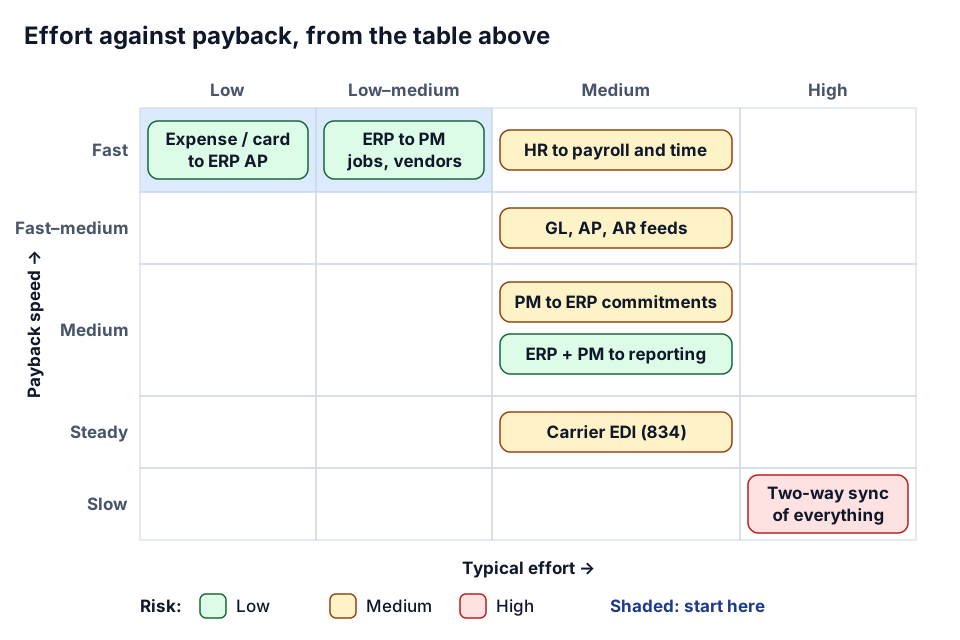 The prioritization table as a map: start in the shaded corner.
The last row is on the table on purpose. It is the integration project most often proposed first, and the one that most often stalls.
Patterns that apply to all of them
Whatever you build first, a few habits carry across:
- One owner per object. Write down which system owns jobs, vendors, commitments, employees and invoices. Integrations follow that list.
- Land writes where controls already exist. Expenses into the AP unapproved queue, not straight to posted. Agents and integrations should feed the review process, not skip it.
- Reject, do not default. An unknown cost code should create an exception with a reason, not get coded to a catch-all.
- Turn failures into tasks. Every failed record should land in a queue with an owner. A common App Xchange pattern is a remediation flow that creates a task when a flow fails; the idea works on any platform.
- Make writes idempotent. Carry the source ID so a retry cannot create a duplicate invoice.
- Reconcile on a schedule. Compare totals between systems weekly. It finds the quiet failures.
The structure of a single flow, from trigger to exception handling, is covered in anatomy of a construction integration flow.
How to pick your first one
- List every place data is re-keyed between systems, with a rough monthly volume.
- Mark the owner of each record type. Where nobody agrees, park it; that is a decision before it is an integration.
- Score each candidate on volume, error cost, ownership clarity and pattern maturity.
- Pick one that scores well on all four and can go live in about a month.
- Build it with reconciliation from day one, so you can show the payback rather than estimate it.
- Use the first one to fix master data. The job, cost code and vendor clean-up you do for integration one makes every later integration cheaper.
How we approach it
We start with discovery: where the re-keying is, what it costs, who owns each record. Then we pick the integration that pays back first and build it end to end, including the exception queue and the reconciliation check, rather than a long roadmap of integrations nobody has scoped. We have built these patterns on App Xchange and in custom code against Vista, Spectrum, Procore and others, and we write custom code when a standard connector does not fit your configuration. The integration sprint is built for exactly one high-payback integration, and the AI readiness review covers the data foundation if agents are on your list next.
Where to go next
- Go deeper on Vista in the Viewpoint Vista API integration guide.
- Go deeper on Spectrum in the Spectrum ERP integration guide.
- Prepare for scoping with integration discovery questions for contractors.
- See how automation fits around integrations in Power Automate construction workflows.
- Weigh platform connectors against custom builds in build vs. buy construction software.
- Rank your own list with Plan your build, or tell us where your team re-keys data.
Frequently asked questions
Which construction integration should we build first?
Usually expense and card transactions into ERP accounts payable, or ERP-to-PM job setup. Both remove high-volume re-keying, have a clear owner and follow a proven pattern.
How long does an expense-to-ERP integration take?
In the setups we worked with, roughly 30 days across kickoff, information gathering, configuration, testing and go-live. Information gathering is where timelines usually slip.
Should expenses come into the ERP as one invoice per line or per report?
One per line gives cleaner job cost detail; one per report is tidier for AP. Pick with the controller and document the choice.
Why not sync everything both ways between PM and ERP?
Without one owner per object, two-way syncs overwrite each other and are hard to reconcile. Decide which system owns jobs, vendors and commitments first, then sync in one direction per object.
Next step
Want help running this playbook?
Bring the report or workflow. We'll help map the work behind it.
Prefer email? charley@buildflows.ai
Get the next guide in your inbox
Field Notes: practical guides and new walkthroughs, about once a month.
Field Notes
Practical guides and new walkthroughs on construction data and automation, roughly monthly.
Keep learning
Integrations · October 9, 2026
Viewpoint Vista API Integration Guide for Contractors
A practical primer on integrating Viewpoint Vista: what the Vista API covers, how async write actions and App Xchange caching work, and how to align job, phase, cost type and vendor data so writes land correctly.
Integrations · October 9, 2026
Spectrum ERP Integration Guide: Spectrum Data Exchange Explained
A practical primer on integrating Trimble Spectrum through Spectrum Data Exchange: how Authorization IDs and operator codes scope access, Basic vs Enhanced authentication, the 18 modules of web services, Excel templates, and the integrations contractors build most.
Playbooks · October 9, 2026
Integration Discovery: Questions to Ask Before Automating a Contractor Workflow
A vendor-neutral discovery list for construction integrations, from process mapping and field-level source of truth to error routing, volumes, security, opportunity-cost ROI and phased rollout. Includes a printable checklist.