The short answer: When an AI agent calls a tool that reaches into Viewpoint Vista, ProjectSight, Procore or any other product API, the token the agent platform holds is usually the wrong token: it was issued for the agent platform, not for the product API, so the product rejects it. On-behalf-of token exchange, standardized as OAuth 2.0 Token Exchange (RFC 8693), fixes this. The MCP server takes the user's token, swaps it at the identity provider for a new token scoped to the product API, and calls the API as that user. Done right, every agent action runs with the user's own permissions and lands in the audit log under their name. Done wrong, you get a wall of 401s, or worse, an agent quietly running everything as an all-powerful service account.
This guide is for construction IT and integration owners who have to approve or troubleshoot agent connections. It explains why the platform token fails, the four auth modes you will meet, what audience and scope actually mean, and a symptom-to-cause table built from the failures we hit while building MCP servers for Trimble products and other construction platforms.
Why the agent platform's token fails against product APIs
Picture the chain. A project manager signs in to an agent platform. The platform gets an access token for that user. The user asks the agent to "show me unapproved invoices over $50,000 for the Westside job." The agent calls a tool on an MCP server, and the MCP server needs to call the Vista API.
The obvious move is to forward the user's token to Vista. It usually fails, and for good reasons:
- Wrong audience. An access token says who it is for (the
audclaim, or an equivalent the provider enforces). A token issued for the agent platform is not a token issued for the ERP API. A well-built API rejects tokens meant for someone else. - Wrong scopes. The platform token carries the scopes the platform asked for at sign-in. It rarely carries the scope the product API requires.
- Wrong client. Many API gateways tie product subscriptions to the OAuth client that requested the token. If that client is the agent platform, and the product subscription belongs to your integration's client, the gateway says "not subscribed" even though the user is fully licensed.
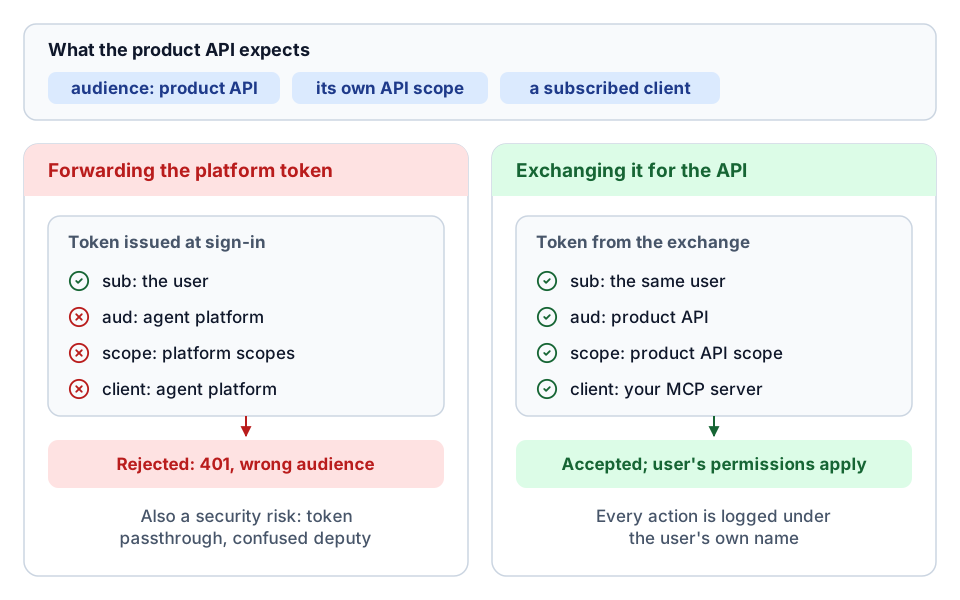 Same user, different token: why the forwarded token fails and the exchanged one works.
Forwarding the token is also a security problem. The MCP authorization specification explicitly warns against token passthrough, where a server accepts a token that was not issued for it and forwards it downstream. It breaks audience checks, lets a stolen token be replayed through your server, and hides which component actually made the call. This is the classic "confused deputy" problem.
Token exchange solves all three. The MCP server presents the user's token to the identity provider and says: "this user, authenticated through this client, needs a token for that API with these scopes." The identity provider checks the rules and returns a new token, still in the user's name, valid for the product API.
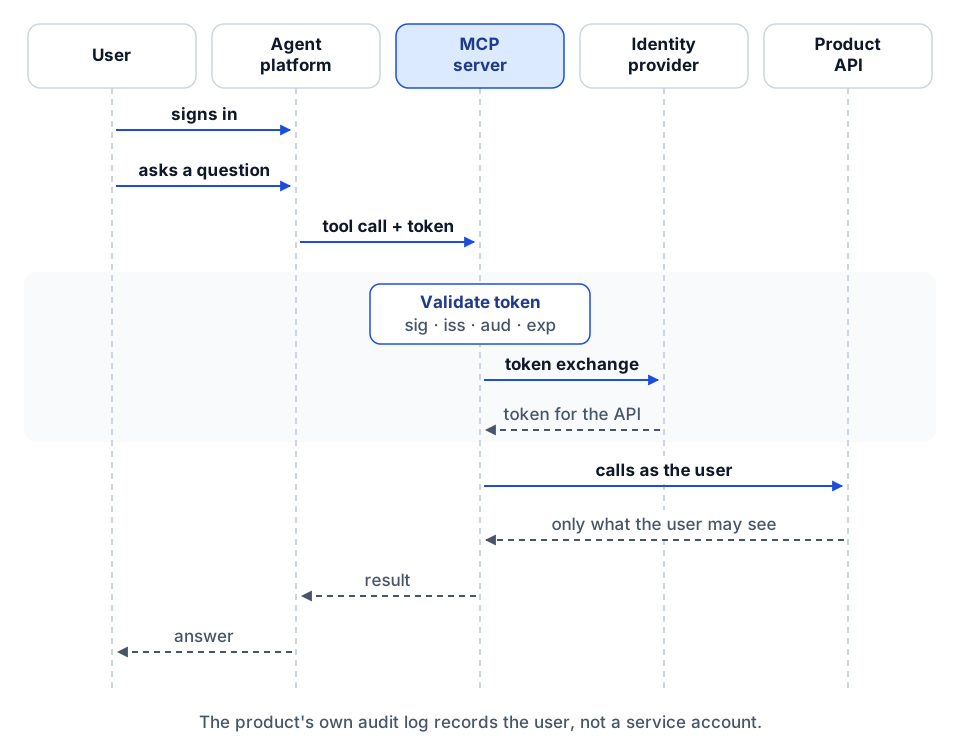 The on-behalf-of flow: validate the user's token, exchange it, call the API as the user.
What RFC 8693 actually specifies
RFC 8693 defines a token request with a special grant type. The parameters that matter in practice:
| Parameter | Meaning |
|---|---|
grant_type | urn:ietf:params:oauth:grant-type:token-exchange |
subject_token | The token representing the user (what the agent platform sent you) |
subject_token_type | What kind of token that is, for example urn:ietf:params:oauth:token-type:access_token or ...:jwt |
requested_token_type | What you want back, usually an access token |
scope | The scopes the new token should carry |
audience / resource | Which service the new token is for (optional in the RFC) |
actor_token | Optional: a token for the party acting on the user's behalf |
The MCP server also authenticates itself, as a registered OAuth client with its own client ID and secret. That matters: the identity provider will only exchange tokens for clients that are allowed to use this grant type and request these scopes.
The RFC distinguishes impersonation (the new token simply says "this is the user") from delegation (the token says "the user, with this actor acting for them", recorded in an act claim). Most identity providers we have worked with implement the impersonation style for on-behalf-of flows. Either way the user stays the subject, which is what you want for permissions and audit.
Two practical warnings from real builds:
- Identity providers implement subsets. One provider we integrated with rejected
audienceandresourceoutright with a 400, and accepted onlygrant_type,subject_token,subject_token_typeandscopeplus client authentication. Others requireaudience. Read your provider's documentation for the exact parameter set and do not add parameters "just in case." - The subject token type has to match. If the platform sends a JWT and you label it as a generic access token (or the reverse), some providers refuse the exchange with a "token type not supported" error. Detect the token's shape and send the matching type.
A minimal exchange request looks like this (illustrative, form-encoded in practice):
{
  "grant_type": "urn:ietf:params:oauth:grant-type:token-exchange",
  "subject_token": "<the user's token from the agent platform>",
  "subject_token_type": "urn:ietf:params:oauth:token-type:jwt",
  "requested_token_type": "urn:ietf:params:oauth:token-type:access_token",
  "scope": "openid <product-api-scope>",
  "client_id": "<your MCP server's client id>",
  "client_secret": "<from a secret store, never a prompt>"
}
The four auth modes you will meet
Every MCP server we build for a product API supports a small set of modes. Naming them clearly saves a lot of confusion when an agent platform, a developer's laptop and a scheduled job all use the same server.
| Mode | Whose identity hits the API | Good for | Watch out for |
|---|---|---|---|
| Client credentials (static or service) | The integration's own service identity | Local development, scheduled jobs, single-tenant back-office automation | Every call looks like the service account. Permissions are whatever that account has, for every user |
| Delegated (on-behalf-of) | The signed-in user, via exchange or validated passthrough | Hosted agents used by many people | Requires a hosted HTTP transport, an identity provider that supports exchange, and correct registration |
| Hybrid | The user when a user token is present; the service identity otherwise | Migration periods, mixed clients | Silent fallback hides failures and can widen access. Make the fallback explicit, logged, and ideally read-only |
| Server-managed refresh | A specific user or service account whose refresh token the server holds | Agent platforms that cannot send a user token yet | The server now stores a long-lived credential; rotate it, scope it narrowly, and log its use |
A few notes from practice.
Client credentials are the simplest and the most dangerous for agents. A service account usually has broad access, because it was set up for an integration that touches many jobs. Put an agent in front of it and every user, including a field engineer who should never see payroll, can ask the agent to read anything the service account can. Use it for local development and for automation that never takes instructions from a chat window.
Delegated is the target state for hosted agents. In our Vista server, delegated mode validates the incoming user token against the identity provider's published signing keys (JWKS), checks issuer, audience, expiry and required scopes, and then either passes it through (when the downstream API genuinely accepts that token) or performs an RFC 8693 exchange. We default to passthrough only where the product API is the intended audience of the user's token, and switch to exchange whenever audience or token type requirements demand it.
Hybrid needs care. One of our earlier servers fell back automatically to client credentials when an exchange failed, so tools kept working during setup. That is convenient and also exactly how a misconfiguration goes unnoticed for weeks while every call runs as the service identity. If you keep a fallback, log every fallback event, surface it in the tool response, and limit the fallback identity to read-only access.
Server-managed refresh is a bridge, not a destination. It fits when the agent platform's connection is configured with no user authentication at all. Treat the stored refresh token like a password.
Audience and scope, in plain terms
Most exchange failures come down to two words.
Audience answers "who is this token for?" A token for the agent platform is not for your ERP API, and a token minted for one MCP server must not be accepted by another. Your MCP server should reject incoming tokens whose audience is not the server (or the client the user signed in to). The product API will reject outgoing tokens whose audience is not the API. When an identity provider says "caller is not the intended audience of the subject token," it means the user's token was issued for a different application than the client doing the exchange.
Scope answers "what may this token do?" Scopes must be registered with the identity provider for both the API and your client, and the names must be exact. On one platform we worked with, a scope was the plural of a noun and the singular form failed, and another scope was a short abbreviation rather than the full word you would guess. A one-character mistake produces an error that looks like a permissions problem.
Scopes are coarse. They open the door to an API. The product's own permissions (company access, job security, role) then decide what the user actually sees. That is the point of on-behalf-of: the second check uses the user's real permissions in the product, not the integration's.
Symptom to cause: a troubleshooting table
These are the failures we have actually hit, grouped by where they show up. Check the response body, not just the status code. Most identity providers and API gateways return a specific message.
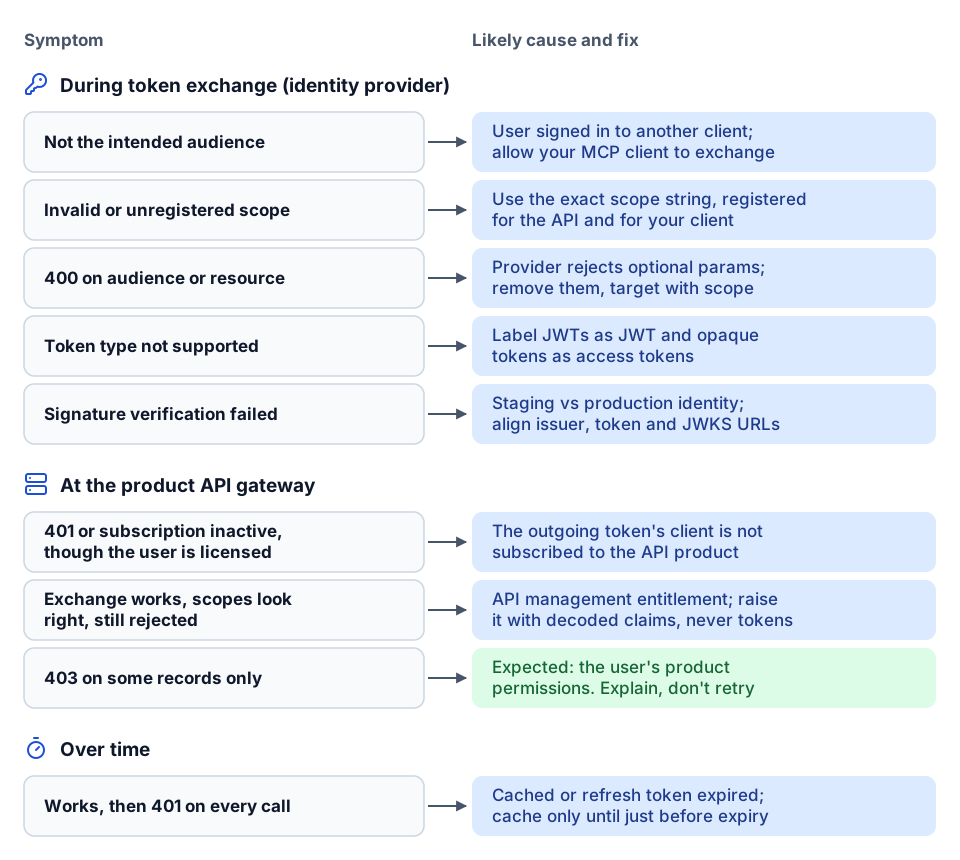 Start from where the error appears, then match the symptom to its cause.
| Symptom | Likely cause | What to check |
|---|---|---|
| 401 or "subscription inactive" from the API gateway, though the user is licensed | The product API subscription is not enabled for the OAuth client on the outgoing token | Decode the outgoing token and check which client it names (azp or client_id). That client must be subscribed to the API product. Some gateways apply different subscription rules to token-exchange grants than to authorization-code grants, so a call that works in Postman can fail from the agent |
| "Caller is not the intended audience of subject token" during exchange | The user's token was issued for a different application than the client doing the exchange | Make the MCP server's client the one the user signs in to, or register it as an allowed exchanger for the platform's client |
| "Invalid scope" or "scope not registered" during exchange | The requested scope is misspelled, not registered for the API, or not allowed for your client | Compare exact scope strings with the identity provider's registration. Request only what each operation needs |
400 rejecting audience or resource | Your provider does not accept those optional RFC 8693 parameters | Remove them; use scope to target the API |
| "subject_token type not supported" | Token type label does not match the token | Send the JWT type for JWTs, access token type for opaque tokens |
| "Signature verification failed" | The token came from a different identity environment (for example staging vs production) than the one your server trusts | Align issuer, token URL and JWKS URL per environment |
| Works for a while, then 401 on every call | Cached exchanged token expired, or a stored refresh token expired or was revoked | Cache exchanged tokens only until shortly before expiry. For server-managed mode, alert on refresh failure and re-authorize |
| 403 on some records but not others | Exchange worked; the user lacks product permissions for that company or job | Expected behavior. Return a clear message, not a retry |
| Exchange succeeds, scopes look right, still rejected | The API route requires a scope or subscription your client is not entitled to | This is configuration on the identity or API management side, not a code bug. Raise it with the platform's API support with decoded token claims (never the token itself) |
A habit that saves hours: add a debug tool to the MCP server that reports, for the current request, which auth mode was used, whether an exchange happened, and the non-sensitive claims of the outgoing token (issuer, audience, client, scopes, expiry). Never return the token itself.
Least privilege for agent tool calls
On-behalf-of gives you the user's permissions. Least privilege means also narrowing what the agent can do with them.
- Request the smallest scope per operation. If reads and writes use different scopes, exchange for the read scope on reads. Cache tokens keyed by user, scope set and input token, so a read token is never reused for a write.
- Layer server policy on top. A user who can delete RFIs in the product does not need an agent that deletes RFIs. Read-only modes, per-domain write allowlists and approval steps belong on the MCP server regardless of what the token allows. See hardening MCP servers for production.
- Keep secrets out of the conversation. The MCP server's client secret lives in a secret store. Users never paste tokens into chat, and tools never return them.
- Separate environments. One client registration per environment, with its own issuer, token URL and JWKS. Mixing staging and production identity is the most common cause of signature errors.
- Short lifetimes. Exchanged tokens should be short-lived. Refresh on demand rather than holding long-lived tokens in memory.
Audit: proving who did what
The payoff of on-behalf-of is attribution. Because the exchanged token keeps the user as the subject, the product's own audit trail shows the real person, not "integration user." Your MCP server should log the other half:
- Request ID, timestamp, tool name and outcome for every call.
- The auth mode used and whether an exchange or fallback occurred.
- A hashed or pseudonymous user identifier, so you can join to the product's audit trail without storing personal data in plain text.
- For writes: what was requested, whether approval was given and by whom, and the result of the follow-up read that verified it.
Do not log raw tokens, and avoid logging full tool inputs and outputs that may contain financial or personal data. Log shapes and identifiers instead. We describe a telemetry design that does this in the Tool Runtime telemetry article.
A rollout plan that works
- Start in client credentials, locally, read-only. Prove the tools work against a test company or job.
- Register the MCP server as an OAuth client per environment, with token exchange permitted and the exact downstream scopes allowed. Subscribe that client to the product API.
- Turn on delegated mode with full token validation (signature, issuer, audience, expiry, scopes).
- Test with three users: one with broad access, one with a single job, one with no product access. Their results should differ exactly as their product permissions do.
- Remove or fence the fallback. If you keep hybrid mode, make fallback read-only and visible.
- Turn on writes per domain only after audit logging and approval steps are in place.
Where to go next
- Read the MCP gateway pattern for construction APIs for how tools are exposed once auth works, and governing AI agents in construction for policy and approval design.
- Connecting agents to Vista specifically? Start with the Viewpoint Vista API integration guide and the AP invoice review agent.
- Background on the protocol: what MCP is for construction, the RFC 8693 text, and Trimble's developer documentation for Trimble identity specifics.
- Need agent access to your ERP or project platform that your IT team will sign off on? The AI readiness review covers auth, permissions and audit, or tell us what you want to build.
Frequently asked questions
Why can't the MCP server just forward the user's token to the API?
The token was issued for the agent platform, so its audience, scopes and client usually do not match the product API. Forwarding it also breaks audience checks and is warned against in the MCP authorization specification. Exchange it for a token meant for the API instead.
What does 'caller is not the intended audience of subject token' mean?
The user's token was issued for a different application than the OAuth client doing the exchange. Make your MCP server's client the one the user signs in to, or have it registered as an allowed exchanger for the platform's client.
Should agents use client credentials or on-behalf-of?
Use client credentials for local development and automation that never takes chat instructions. For hosted agents used by many people, use on-behalf-of so each call runs with the user's own product permissions and shows their name in the audit trail.
Why do I get 'subscription inactive' when the user is licensed?
Many API gateways tie product subscriptions to the OAuth client on the outgoing token, not the user. Check which client the exchanged token names and make sure that client is subscribed to the API product.
Next step
Have a workflow in mind?
Start with a readiness review: the task, the data and tools it needs, the access boundaries, and how a pilot would be evaluated.
Prefer email? charley@buildflows.ai
Get the next guide in your inbox
Field Notes: practical guides and new walkthroughs, about once a month.
Field Notes
Practical guides and new walkthroughs on construction data and automation, roughly monthly.
Keep learning
AI agents & MCP · October 9, 2026
Hardening MCP Servers for Production: A Checklist
A checklist-style guide to running MCP servers safely in front of ERPs and project platforms, covering auth modes, read-only defaults, write allowlists, approval handshakes, reliability controls, transport security, untrusted content, error envelopes, telemetry and hosting options.
AI agents & MCP · October 9, 2026
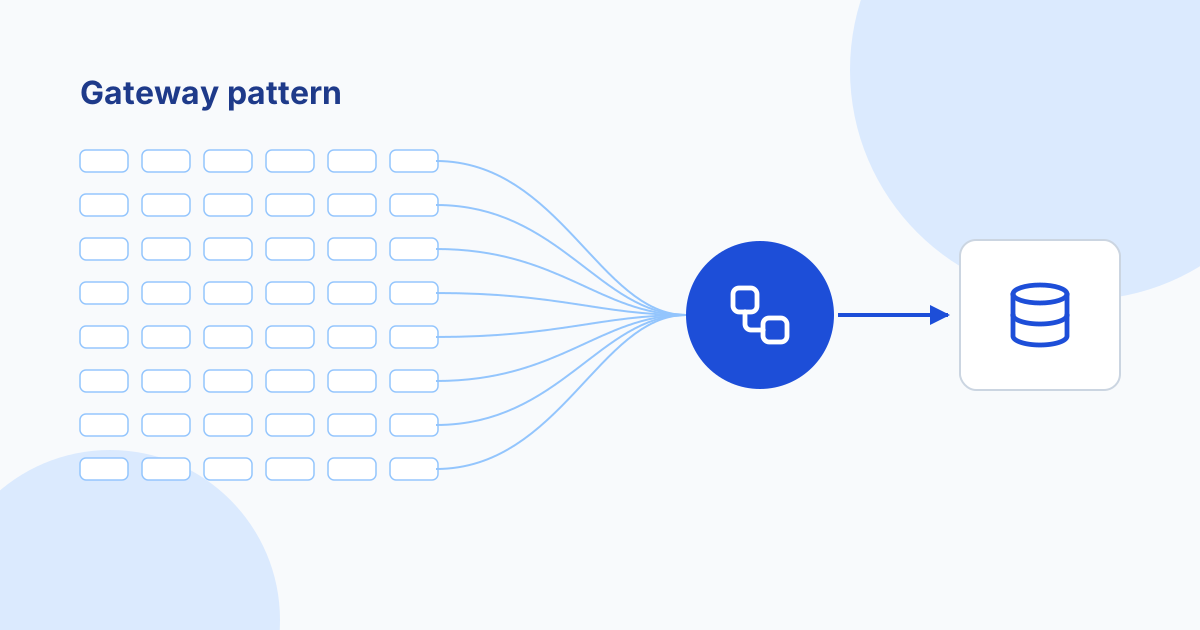
The MCP Gateway Pattern for Large Construction APIs
One tool per endpoint overwhelms agents on large construction APIs. This guide compares a gateway tool over a registry (425 ProjectSight tools behind one tool), progressive discovery meta-tools, and task-first tools, plus the policy, docstring and testing practices that make routing reliable.

AI agents & MCP · October 8, 2026
Governing AI Agents in Construction: A Checklist for IT and Leadership
A practical checklist for putting AI agents into construction systems safely, covering credentials, least privilege, read-first rollout, tool routing, telemetry, evaluation and human approval, drawn from our own builds.