The short answer: An AI invoice-review agent for Viewpoint Vista should not approve invoices. It should read the AP unapproved invoice backlog, run a fixed set of deterministic risk rules, sort every invoice into one of three review queues, hand a reviewer a complete packet with the evidence, record the reviewer's decision, and check that an approval is safe before anyone touches Vista. The model explains and routes; the rules score; the person decides. Run it read-only by default, put every write behind a dry run and a per-domain allowlist, and export an audit record of every decision. Built that way, it shortens AP review in Vista without moving accounting control away from the AP team.
Accounts payable in construction is a volume problem with a control problem inside it. A busy AP desk sees hundreds of invoices a week against POs, subcontracts and jobs, and most of them are fine. The work is finding the few that are not: the duplicate, the invoice from a vendor that doesn't match the PO, the amount that is ten times what that vendor normally bills, the invoice that has sat in the queue for six weeks. That is exactly the shape of task where an agent helps, as long as it is designed to find and explain, not to approve.
This guide describes the design of an AP invoice-review agent we built as an MCP server over the Viewpoint Vista API: how it triages, how it scores risk, what the reviewer sees, how decisions are captured, and what controls keep it safe. The prototype was built for an electrical contractor's AP team. The patterns apply to any contractor running Vista AP, and most of them apply to any ERP.
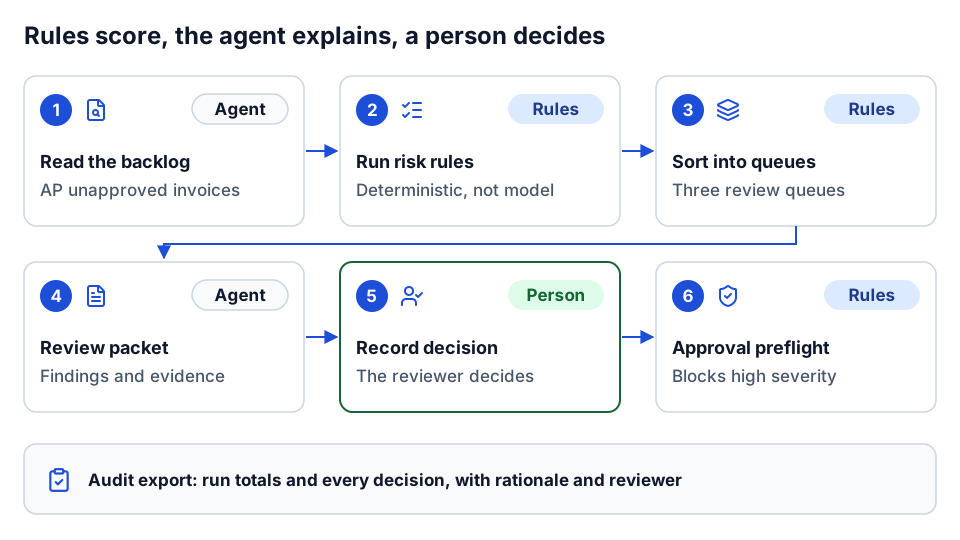 Rules score, the agent explains and routes, a person decides.
What the agent works with in Vista
The agent sits on top of Vista's API. Vista exposes AP unapproved invoices as a resource you can query, read and create, with writes handled as asynchronous actions you poll for status. Around that, the useful context lives in other modules: vendors, purchase orders (posted and unposted), subcontracts, projects and phases, project cost history, standard cost types and schedules of values.
In our build we described 47 Vista endpoint specs from a 72-path Vista OpenAPI definition, covering enterprise, company, contract, customer, project, project cost entry and history, project phase, equipment, purchase order, AP unapproved invoice, sales tax, schedule of values, standard cost types and phases, subcontract, vendor and health. On top of those raw endpoints sit nine analysis tools, which are what the agent actually uses for review work:
| Tool | What it does |
|---|---|
| Analyze unapproved invoices | Pulls the backlog for a date window, runs the risk rules, and creates a review run |
| List review queues | Returns the three queues and their counts for a run |
| Get queue page | Returns one deterministic page of a queue |
| Get review packet | Returns one invoice with its findings, recommended action and whether a human check is required |
| Compare invoice to commitments | Loads the linked PO or subcontract and compares vendor and amounts |
| Capture review decision | Records approve, correct or investigate, with rationale and reviewer |
| Preflight approval | Checks whether an invoice has blocking issues before approval |
| Export audit | Returns the run, its totals and every captured decision |
| Collect all pages | Walks the full invoice backlog with partial-result safety |
That split matters. If you give a model 47 raw endpoints and ask it to "review AP", it will improvise a workflow every time. Tools shaped around the review task give it a workflow to follow. We cover the general principle in designing AI agent tools for construction.
A note on connectivity: whether you can call the Vista API directly depends on how your Vista is hosted. On-premise Vista environments are commonly connected through Trimble App Xchange and its on-premise agent instead. Check current Trimble documentation for what applies to your deployment before you design around direct API access. Our Vista API integration guide covers the options.
Queue-first triage
The first design decision is that the agent never starts from a single invoice. It starts from the queue.
An analysis run pulls unapproved invoices for a window (we defaulted to 365 days), evaluates every one against the risk rules, and places each into one of three queues:
- Approve candidates. No findings, or only low-severity findings such as "stale". These can go through normal approval when policy allows.
- Needs correction. At least one medium-severity finding, such as a missing invoice date or an amount far above the vendor's baseline. Something should be fixed and re-validated.
- Needs investigation. At least one high-severity finding, such as a possible duplicate or an amount over the high-value threshold. Hold until someone has looked.
Each invoice also gets a recommended action that follows from its queue: approve when policy allows, correct and revalidate, or investigate and hold. And each gets a flag for whether a human check is required, which is true for anything outside the approve-candidate queue and for any invoice with a high risk score, even if it landed there.
Starting from the queue changes the conversation the AP team has with the agent. Instead of "is invoice 4471 okay?", the question becomes "what needs my attention today, worst first?" That is the question AP managers actually ask.
Deterministic paging
An AP backlog does not fit in one response, and a model that sees half the queue will cheerfully summarize half the queue as if it were all of it. So paging is designed to be boring and repeatable:
- Each queue is sorted by risk score, then invoice amount, then invoice ID, all descending. The same run always produces the same order.
- Pages are returned with a cursor and a "has more" flag. Page size defaults to 25 and caps at 100.
- The run is stored server-side with an ID, so the agent pages through a fixed snapshot instead of re-querying a backlog that changes underneath it.
- When collecting the full backlog from Vista, the collector tracks whether the result is partial (for example, if a page call fails after retries) and says so. You can configure the run to fail outright on partial data rather than score an incomplete set.
The reason to care: "deterministic" is what makes the output reviewable. If two AP clerks ask for page two of the investigation queue from the same run, they see the same invoices. If an auditor asks what the agent showed on Tuesday, you can answer.
The risk rules and severity weighting
The rules are plain code, not model judgment. The model never decides whether an invoice is a duplicate; a rule does, and the model explains the result. Our rule set:
| Rule | Severity | What triggers it |
|---|---|---|
| Missing invoice ID, vendor, invoice number, amount or date | Medium | A required identity or value field is empty or invalid |
| Non-positive amount | Medium | Invoice amount is zero or negative |
| Stale invoice | Low | Invoice has been open longer than the stale threshold (default 30 days) |
| High-amount threshold | High | Amount at or above the threshold (default $50,000) |
| Possible duplicate | High | Same vendor and normalized invoice number with amounts within a small delta (default one cent) |
| Vendor amount anomaly | Medium | Amount is at least three times that vendor's average in the run, once the vendor has at least five invoices to compare |
| Vendor submission burst | Low | Ten or more invoices from one vendor dated the same day |
| PO vendor mismatch | Flag | The invoice vendor differs from the vendor on the linked purchase order |
| Subcontract vendor mismatch | Flag | The invoice vendor differs from the vendor on the linked subcontract |
The last two come from the commitment comparison, covered below, and are surfaced in the review packet rather than folded into the queue score.
Scoring is simple on purpose. Each finding adds a weight by severity: high 40, medium 20, low 8. The total is capped at 100. A policy profile adjusts the thresholds and the multiplier:
- Standard uses the configured thresholds as-is.
- Strict tightens the stale window by 20%, drops the high-amount threshold by 25%, and scales scores up by 15%.
- Lenient does the reverse.
Two invoices from the same vendor with the same normalized number and the same amount will both score at least 40 and both land in the investigation queue. An old, otherwise clean invoice scores 8 and stays an approve candidate, with a note to chase it.
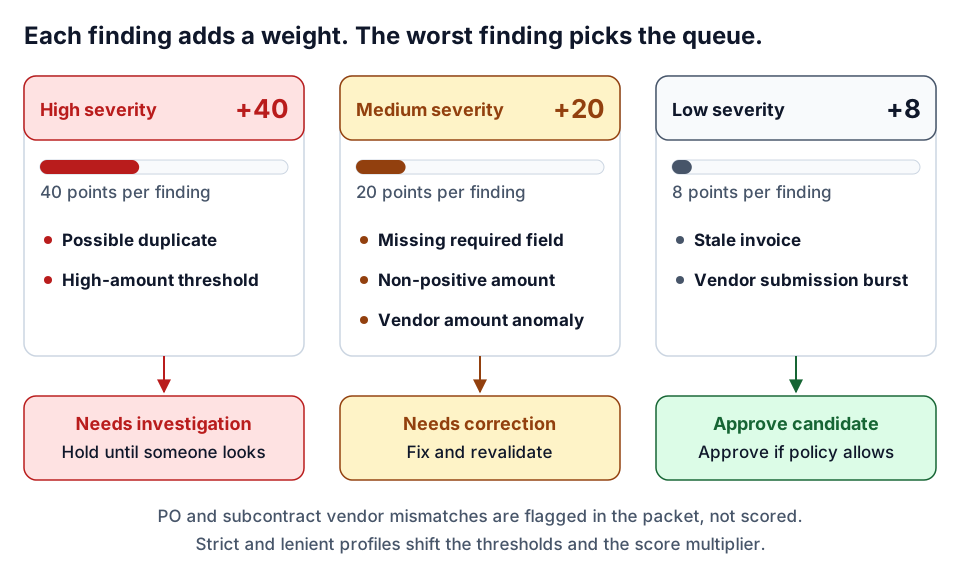 Severity weights of 40, 20 and 8, capped at 100; the worst finding sets the queue.
Why not let a model score risk? Because the AP team needs to know exactly why an invoice was held, and needs the reason to be the same tomorrow. A rule that says "amount at or above $50,000" can be explained to a controller, tuned in a meeting and tested in a unit test. A model's sense that something "looks unusual" cannot. Rules like these are a form of data quality gate, and the same thinking appears in our article on construction data quality rules.
The thresholds are a starting point, not a recommendation. A specialty contractor whose typical material invoice is $3,000 and a heavy civil contractor whose typical invoice is $300,000 need very different high-amount lines. Set them with the AP manager, not from a default.
The review packet
When a reviewer opens an invoice, the agent fetches a review packet. It contains:
- The invoice as normalized from Vista: ID, vendor, invoice number, amount, date, linked PO or subcontract.
- Every finding, each with a code, severity, plain-language message and a suggested next step ("compare with matching records and resolve duplicate risk").
- The recommended action for its queue.
- Whether a human check is required.
The agent's job at this point is to write the packet up for a person: what was found, why it matters, and what to do next, in AP language. The instructions we gave the agent framed it as an AP operations specialist that prioritizes auditability and correctness over speed, states what it found and why, labels uncertainty explicitly, and never presents a guess as a fact. That framing does real work. It keeps the agent from "resolving" a duplicate flag by deciding one of the invoices is probably fine.
Commitment comparison against the PO or subcontract
Most construction AP risk sits in the relationship between the invoice and the commitment it bills against. The comparison tool loads the linked purchase order or subcontract from Vista and returns:
- The commitment type, number, vendor and project.
- For a PO, the sum of line quantity times unit price across its lines, and the difference between the invoice amount and that sum.
- A flag if the commitment's vendor differs from the invoice vendor.
- A flag if the linked commitment could not be loaded.
Two honest limitations, which the tool states in its output rather than hiding:
- The PO line sum is quantity times price per line. Tax and freight may not be included, so a small positive difference is often normal.
- The subcontract resource we worked with did not expose per-line dollar amounts through the API, so the subcontract comparison checks vendor, project and line count. A full dollar tie-out against billed-to-date and retainage still needs the ERP screen or an extended data source.
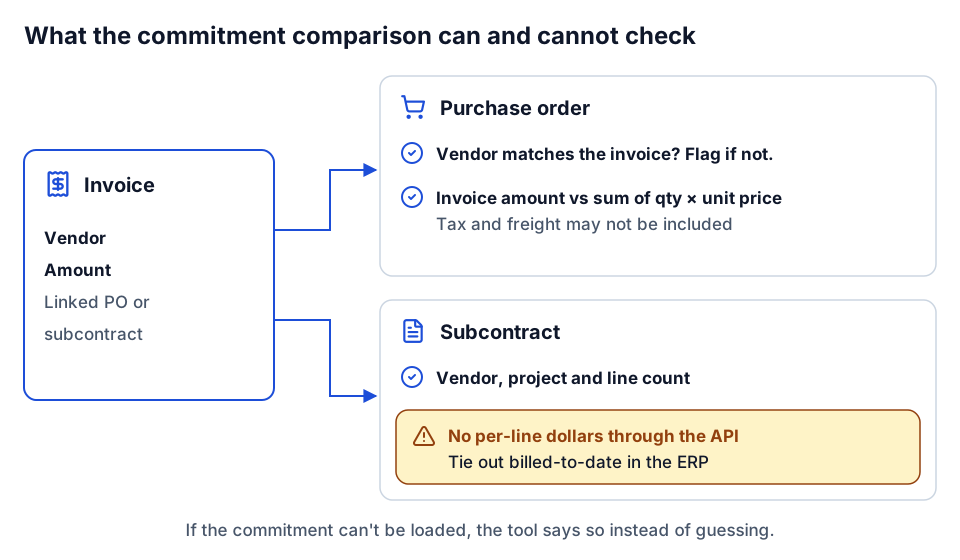 The comparison states what it checked and what it could not.
That is a pattern worth copying: when the data cannot support a conclusion, the tool says what it compared and what it could not. An agent will otherwise fill the gap. If you want the full picture of PO versus committed cost behavior in Vista, our Vista integration guide covers how POs with and without a job post differently.
Human decision capture
The reviewer, not the agent, makes the call. The capture tool accepts exactly three decisions:
- Approve
- Correct
- Investigate
Each decision is recorded against the run and the invoice with an optional rationale and the reviewer's identity. Anything else is rejected. This is human-in-the-loop as a data structure, not a policy statement: there is no code path in the review tools where the agent's opinion becomes a decision without a person's input.
Keep the decision vocabulary small. Three values map cleanly onto what AP actually does next, and they make the audit trail easy to count. If your process has a fourth outcome, such as "return to project manager", add it deliberately and update the queues and reports to match.
Approval preflight
Before an invoice is approved in Vista, the preflight tool checks it again and returns a yes or no with reasons:
- Any high-severity finding is a blocking issue.
- Medium and low findings are returned as warnings.
- Missing invoice ID, vendor or invoice number is blocking.
- A missing, zero or negative amount is blocking.
The result is "can approve: true or false", the list of blocking issues, the warnings, and the recommended action. A reviewer can still choose to approve an invoice with warnings; that is their job. What preflight prevents is the agent, or a hurried person using the agent, moving straight past a duplicate flag.
Audit export
At the end of a run, the export tool returns everything an auditor or controller would ask for: the run ID and creation time, the analysis window, the totals by queue, whether the data collection was complete or partial, and every captured decision with its rationale and reviewer.
Store that export somewhere durable, outside the agent. The agent's own run store has a time-to-live; your audit trail should not. A SharePoint list, a database table or a file in your document system all work. The point is that six months from now you can show which invoices were flagged, who decided what, and why.
Write safety: read-only by default
Review is read-only. The analysis, queue, packet, comparison, preflight and export tools never write to Vista. The same server also exposes Vista write endpoints (creating unapproved invoices, for example), because AP teams sometimes want an agent to help enter invoices from documents. Those writes sit behind several layers:
| Control | What it does |
|---|---|
| Read-only mode | One setting disables every write and bulk tool |
| Write allowlist by domain | Only the domains you list (for example AP) can be written; everything else is refused |
| Bulk cap | Bulk writes are capped (100 items by default) |
| Dry run | Any write can be run as validation only, with nothing sent to Vista |
| Request preflight | Each write tool has a matching validation tool that checks the payload against the API schema first |
| Row-level results | Partial success is expected; the agent retries only the failed rows, never the whole batch |
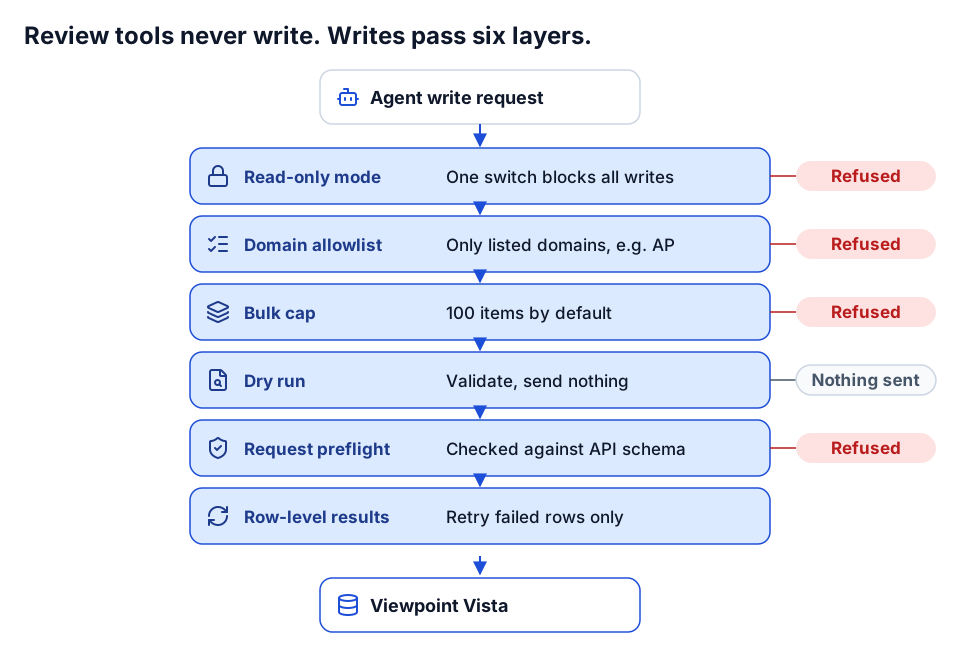 Six layers sit between an agent and a Vista write.
For a pilot, turn read-only mode on and leave it on. Add AP writes later, behind the allowlist, once the team trusts the review side. This is least privilege applied to an agent, and it is the same posture we recommend in governing AI agents in construction.
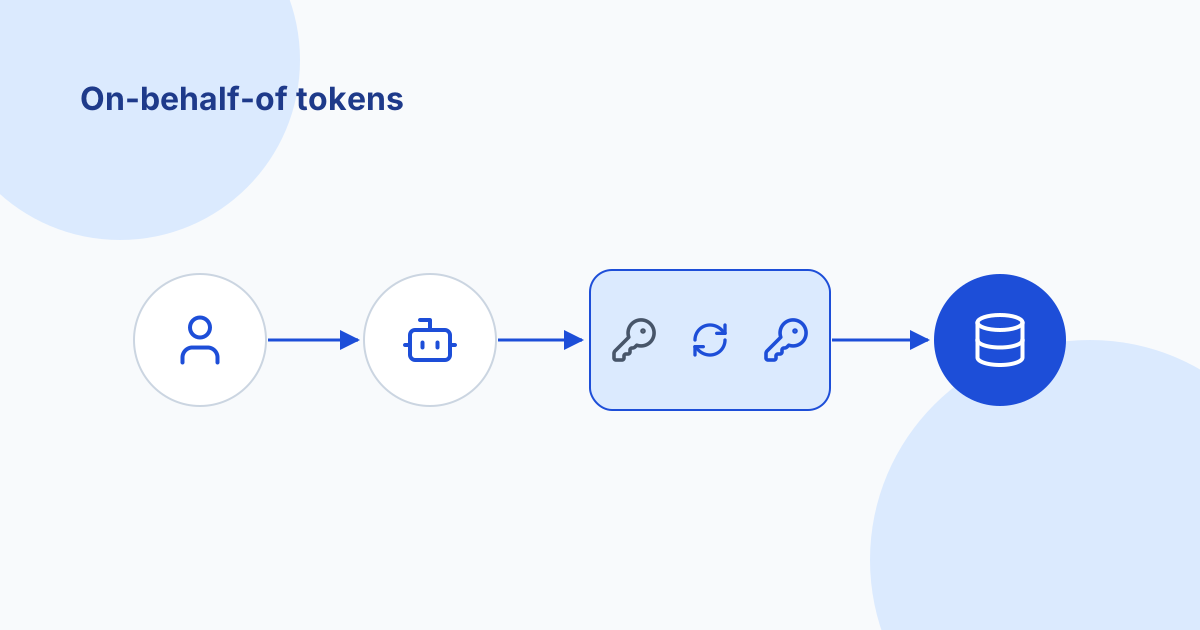
Identity matters too. The server supports a static service credential for local testing, and delegated modes where the agent acts with the signed-in user's own Vista permissions, either by passing the user's validated token through or by exchanging it for a Vista token using the standard OAuth token exchange. Delegated access means the agent can never see more of AP than the person asking. We explain that pattern in on-behalf-of token exchange for AI agents.
Reliability, briefly
AP review runs against a production ERP, so the server retries with jitter on rate limits and server errors, caps concurrent requests, and caches briefly so repeated questions do not re-pull the backlog. It also ships seven review-workflow prompts (triage, vendor and amount check, suspect invoice number, project cost context, pre-approval gate, audit closeout, vendor master spot check) so the agent follows a known path instead of inventing one. More on hardening servers like this in hardening MCP servers for production.
What the AP team still owns
An agent like this changes where AP spends its time. It does not change who is accountable. The AP team still owns:
- The approval itself, in Vista, under your existing approval rights.
- The thresholds and policy profile. What counts as high-value, how long is stale, how strict to be.
- Vendor master data. Duplicate vendors and wrong vendor IDs on POs cause a large share of the findings. The agent finds them; someone has to fix them at the source.
- Coding. Job, phase and cost type on the invoice are still an AP and project management responsibility. See cost codes and job cost.
- Exceptions the rules do not cover. A rule set will never know that a particular vendor always bills twice in the same week by arrangement. People do.
- The audit trail, including where it is stored and who reviews it.
How to pilot it
A sensible pilot is small, read-only and measured.
- Pick one company and a recent window. Ninety days of unapproved invoices is enough to see real findings.
- Agree the thresholds with the AP manager. Write them down. Start with the standard profile.
- Run read-only for two to four weeks, alongside the existing process. The AP team reviews the queues; nobody changes how invoices are approved.
- Compare findings with what the team already caught. Which flags were real? Which were noise? Which did the team catch that the rules missed?
- Tune. Adjust thresholds, add or remove a rule, fix vendor master data that keeps generating findings.
- Measure the before and after on things you can count: time from receipt to approval, number of invoices reviewed per hour, duplicates caught before payment. Don't claim savings you did not measure.
- Only then consider writes, starting with dry-run invoice entry behind the AP allowlist.
Keep a small golden set of known invoices (a real duplicate, a clean invoice, a PO vendor mismatch, a stale item) and re-run it after every rule or prompt change. If a known duplicate stops landing in the investigation queue, you find out before AP does.
Where to go next
- Read the Viewpoint Vista API integration guide for the API, auth and connectivity options underneath this agent.
- See how we put many tools behind one entry point in the MCP gateway pattern for construction APIs, and how we handle identity in on-behalf-of token exchange for AI agents.
- For the governance side, start with governing AI agents in construction and what MCP is.
- Not sure your AP data is ready for an agent? The AI readiness review checks the data, access and controls first. If you already know what you want, plan your build.
- Want to talk through your AP process? Start a conversation.
Frequently asked questions
Can an AI agent approve invoices in Viewpoint Vista?
It can be wired to, but it should not. A safer design has the agent score and explain risk, a person decide approve, correct or investigate, and a preflight check block approval while high-severity issues remain.
What risk rules should an AP invoice review agent check?
Start with missing identity fields, non-positive amounts, stale invoices, a high-amount threshold, possible duplicates by vendor and invoice number, vendor amount anomalies, same-day submission bursts, and vendor mismatches against the linked PO or subcontract. Set thresholds with your AP manager.
Why use deterministic rules instead of letting the model judge risk?
AP needs to know exactly why an invoice was held, and needs the reason to be the same tomorrow. Rules can be explained to a controller, tuned in a meeting and unit tested; a model's sense that something looks unusual cannot.
Does the agent need write access to Vista?
Not for review. Run read-only for the pilot. If you later add invoice entry, put writes behind a per-domain allowlist, bulk caps, dry-run validation and the reviewer's own delegated permissions.
Next step
Have a workflow in mind?
Start with a readiness review: the task, the data and tools it needs, the access boundaries, and how a pilot would be evaluated.
Prefer email? charley@buildflows.ai
Get the next guide in your inbox
Field Notes: practical guides and new walkthroughs, about once a month.
Field Notes
Practical guides and new walkthroughs on construction data and automation, roughly monthly.
Keep learning
Integrations · October 9, 2026
Viewpoint Vista API Integration Guide for Contractors
A practical primer on integrating Viewpoint Vista: what the Vista API covers, how async write actions and App Xchange caching work, and how to align job, phase, cost type and vendor data so writes land correctly.

AI agents & MCP · October 8, 2026
Governing AI Agents in Construction: A Checklist for IT and Leadership
A practical checklist for putting AI agents into construction systems safely, covering credentials, least privilege, read-first rollout, tool routing, telemetry, evaluation and human approval, drawn from our own builds.
AI agents & MCP · October 9, 2026
On-Behalf-Of Token Exchange for AI Agents (RFC 8693)
A plain-language guide for construction IT to on-behalf-of token exchange: why forwarding the agent platform's token fails, the four auth modes for MCP servers, audience and scope, a symptom-to-cause troubleshooting table, least privilege and audit.