Every cross-system construction report rests on one unglamorous table: the one that says "this Procore project is that accounting job, and that CRM deal." Get it right and earned revenue lines up with billings, backlog sits next to pipeline, and cost variance means something. Get it wrong and the report still looks plausible, which is the dangerous part.
This guide walks through a worked source-mapping example from start to finish: the identifiers in each system, the match rules in order of trust, a sample crosswalk, cost codes that changed partway through, and how exceptions get surfaced and fixed at the source. The rules come from our Procore, QuickBooks and HubSpot build. The records are invented to show the mechanics.
Sample data notice: every project, job, deal, number and name in the tables below is fictional and made up for this example. None of it comes from a client.
Why the three systems never line up on their own
Procore, an accounting system such as QuickBooks Online or Sage, and a CRM such as HubSpot each create their own record for the same building, at different times, typed by different people:
- The CRM deal appears first, often months before the work is won. It is named however the salesperson named it.
- The Procore project is created when the job is awarded. It usually gets a project number, but the format depends on who set it up.
- The accounting job is created when someone needs to bill or post cost against it. In QuickBooks it is often a customer with a sub-customer (job) name.
There is no shared ID across the three. The same job can be "Main St Clinic" in one system and "Main Street Medical Clinic - Phase 2" in another. A crosswalk is the table that links them explicitly, so every report uses the same answer.
Step 1: Inventory the identifiers and owners
Before writing any match logic, list each entity, where it lives, which field identifies it, and who can fix it. The owner column matters most: when a record fails to match, the fix happens in that person's system, not in the report.
| Entity | Source system | Identifier used for matching | Owner (who fixes it) |
|---|---|---|---|
| Project | Procore | Project number, plus project ID from the API | Project manager or project admin |
| Job | QuickBooks Online (or Sage) | Customer:Job name, with the project number embedded | Controller or AP/AR lead |
| Deal | HubSpot | Deal ID; deal name; project number property if one exists | Sales or business development owner |
| Cost code | Procore and accounting | Cost code within a cost-code standard (old or new) | Controller, with operations sign-off |
| Vendor | Procore and accounting | Vendor name and tax ID where available | AP lead |
| Manual mapping | Version-controlled CSV | Procore project ID ↔ accounting job ↔ deal ID | Controller |
Two practical notes from the build:
- Prefer system IDs over names wherever you can. Names drift; the Procore project ID and the HubSpot deal ID do not.
- Pull read-only. The mapping only needs read access to projects, jobs and deals. Least privilege by default applies here as everywhere.
Step 2: Apply the match rules in order of trust
The crosswalk applies three rules, in strict order. The first rule that produces a match wins, and later rules never override it.
- The controller's list wins. A short manual mapping file explicitly pairs a Procore project with an accounting job (and a deal, where relevant). If a row exists for a project, it is used, full stop. This is where the controller resolves legacy work, renamed jobs and anything the automatic rules get wrong.
- Exact project-number match. If the Procore project number appears in the accounting job name (or in a project-number property on the deal), the records are linked.
- Cautious fuzzy name match. A name match is used only when similarity is 80% or higher and there is exactly one candidate at that level. Two candidates above the threshold means no match, not a coin flip.
Anything that fails all three is not guessed. It stays in the totals, flagged as unmapped, and goes to the Exceptions page.
Why refuse to guess? A wrong link quietly moves revenue or cost onto the wrong job, and the WIP schedule still balances. An unmapped project is visible and fixable. This is "flag, never drop" from our approach.
Step 3: A worked crosswalk (sample data)
Here is what the matching looks like on six fictional projects. The Procore project numbers use a year-sequence format (24-017).
Source records (sample data)
| Procore project ID | Procore number | Procore name | Accounting Customer:Job | HubSpot deal |
|---|---|---|---|---|
| 5501 | 24-017 | Harbor View Clinic | Kestrel Health:24-017 Harbor View Clinic | D-9001 "Harbor View Clinic" |
| 5502 | 24-021 | Pine Ridge School Addition | Pine Ridge USD:Pine Ridge School Addn | D-9002 "Pine Ridge Elementary Addition" |
| 5503 | 24-030 | Northgate Warehouse | Northgate Logistics:Northgate Warehouse Bldg A | D-9003 "Northgate Warehouse" |
| 5504 | 24-033 | Elm St Retail TI | Elm Street Partners:Elm St Retail TI; Elm Street Partners:Elm St Retail TI 2 | D-9004 "Elm St TI" |
| 5505 | 23-112 | Lakeside Office Reno | Lakeside Holdings:LSO-Renovation | none |
| 5506 | 24-040 | Cedar Point Fire Station | none yet | D-9006 "Cedar Point FS" |
Resulting crosswalk (sample data)
| Procore project | Accounting job | HubSpot deal | Rule applied | Status |
|---|---|---|---|---|
| 24-017 Harbor View Clinic | Kestrel Health:24-017 Harbor View Clinic | D-9001 | Exact project number | Mapped |
| 24-021 Pine Ridge School Addition | Pine Ridge USD:Pine Ridge School Addn | D-9002 | Fuzzy name, single candidate above 80% | Mapped, flagged for review |
| 24-030 Northgate Warehouse | Northgate Logistics:Northgate Warehouse Bldg A | D-9003 | Fuzzy name, single candidate above 80% | Mapped, flagged for review |
| 24-033 Elm St Retail TI | (two candidates) | D-9004 | Fuzzy name found two candidates | Unmapped: ambiguous |
| 23-112 Lakeside Office Reno | Lakeside Holdings:LSO-Renovation | none | Controller's list | Mapped |
| 24-040 Cedar Point Fire Station | none | D-9006 | No accounting job exists | Unmapped: missing in accounting |
A few things to notice:
- 24-017 is the easy case. The project number was typed into the job name, so rule 2 links it with no judgment involved.
- 24-033 shows why the single-candidate rule exists. Both "Elm St Retail TI" and "Elm St Retail TI 2" look right. Picking one would silently split or double the job. It goes to exceptions instead.
- 23-112 would never match automatically ("LSO-Renovation" shares almost nothing with the Procore name). The controller added one row to the manual file, and rule 1 handles it from then on.
- 24-040 is a timing issue: the work was won, but nobody has set up the accounting job yet. It stays in the Procore totals and shows up as missing in accounting, rather than reporting zero revenue with no explanation.
The manual mapping file itself stays small. For this sample it is one line:
procore_project_id,accounting_job,hubspot_deal_id,note
5505,Lakeside Holdings:LSO-Renovation,,Legacy job name predates numbering standard
Step 4: Map cost codes across old and new standards
Project matching is half the job. The other half is cost codes, especially when a company changes its coding standard. In our Procore and Sage build, the client was rolling out a new cost-code standard shared by both systems, while historical actuals were recorded under the old codes. Without a mapping you get two half-empty columns instead of one complete one.
The approach:
- Store the cost-code master and the old-to-new map as reference data under version control, not as formulas inside report visuals.
- Translate old codes to the new standard during the transformation into the gold layer, so every report sees one structure (division, then cost code).
- Where an old code has no clear equivalent, send it back to the controller as an open question. Never invent a new code in the pipeline.
- Measure how much budget maps cleanly, and list codes that appear in transactions but not in the master.
Cost-code map (sample data)
| Old code | Old description | New code | New description | Note |
|---|---|---|---|---|
| 03-300 | Concrete | 03 30 00 | Cast-in-place concrete | One to one |
| 09-250 | Drywall | 09 21 00 | Plaster and gypsum board assemblies | One to one |
| 26-100 | Electrical | 26 05 00 | Common work results for electrical | One to one |
| 01-500 | General conditions | 01 50 00 | Temporary facilities and controls | Confirmed by controller |
| 99-000 | Miscellaneous | (none) | (none) | Open question: split or retire |
Code 99-000 is the realistic one. It holds cost that no single new code describes. Until the controller decides, that cost stays in the totals under an "unmapped" bucket and shows up as an exception, with its dollar value visible.
Step 5: Surface exceptions and fix them at the source
Unmatched records are only useful if someone sees them and knows what to do. In the Procore, QuickBooks and HubSpot build, they appear on an Exceptions page alongside projects at risk, projects over their estimate at completion and cost codes projected over. You can see that page in the report walkthrough.
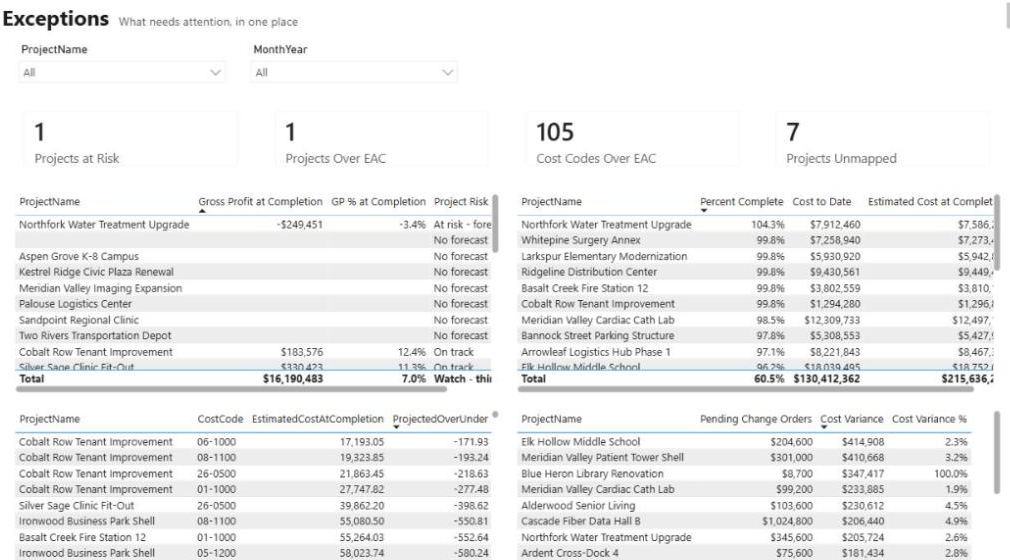
Each exception should say what failed and which system the fix belongs in. From the sample above:
| Exception (sample data) | Reason | Where it gets fixed | Who fixes it |
|---|---|---|---|
| 24-033 Elm St Retail TI | Two accounting jobs match | Accounting: merge or rename the duplicate job, or add a manual mapping row | Controller |
| 24-040 Cedar Point Fire Station | No accounting job | Accounting: create the job with the project number in its name | Controller or AR lead |
| 24-021 and 24-030 | Fuzzy match, not yet confirmed | Accounting: add the project number to the job name so rule 2 takes over | Controller |
| Cost code 99-000 | No new-standard equivalent | Cost-code map: decide split or retire | Controller, with operations |
The preference is always to fix the record in its own system rather than patch it in the pipeline. Adding "24-021" to a job name turns a fuzzy match into an exact one permanently. That is "fix it at the source."
The longer-term version goes further. The next step we discussed for the build was a Power Automate flow that, when a HubSpot deal moves to closed won, creates the Procore project and the accounting job together with the same number. Then the link exists from birth, and the manual file only covers legacy work.
How the crosswalk feeds the numbers
Once the crosswalk exists, every cross-system measure runs through it:
- Cost variance compares Procore cost to date with accounting job cost, project by project. It is only meaningful for mapped projects, and a difference is a finding to review, not automatically an error.
- Over/under billing compares earned revenue from Procore with billings. See our guide to construction WIP reporting in Power BI and the over/under billing glossary entry.
- Backlog and pipeline sit side by side. Won work enters through Procore. HubSpot deals are never added to backlog or counted as revenue.
Treat the crosswalk as something to check, not just use. Report mapping coverage (how many projects are fully mapped) on every run, so a drop shows up as a number rather than a surprise at month end. Our guide to construction data quality rules covers which checks to write first.
Source-mapping checklist
Use this before you build any cross-system report:
- List every entity you need to join (project, job, deal, cost code, vendor) and the identifying field in each system.
- Name an owner for each source who can fix records there.
- Agree on a project-number format and where it must appear (Procore number, accounting job name, deal property).
- Create the manual mapping file, keep it in version control, and make the controller its owner.
- Implement the match rules in order: manual list, exact number, fuzzy match at 80% or higher with a single candidate.
- Keep unmatched records in the totals and flag them. Never drop them, never guess.
- Map old cost codes to the new standard as versioned reference data, with open questions routed back to the controller.
- Build an exceptions view that names the reason, the system and the owner for each record.
- Track mapping coverage on every run and review flagged fuzzy matches until they become exact matches.
- Plan the source fix: consistent numbering at setup, ideally created automatically when a deal is won.
Where to go next
- Need this crosswalk built and wired into your reporting? See the Integration Sprint.
- See how the same mapping powers a full report in connected financial reporting.
- Agree what each number means before you join anything: browse the metric dictionary.
- Check how ready your data is with the reporting readiness checklist.
Frequently asked questions
How do you link a Procore project to a QuickBooks job?
Use a crosswalk table. First apply any rows in the controller's manual mapping file, then match on the Procore project number appearing in the QuickBooks job name, and only then try a cautious name match. Anything that still does not match is flagged as unmapped for a person to resolve.
Is fuzzy name matching safe for construction projects?
Only with guardrails. We use a name match only at 80% or higher similarity and only when exactly one candidate qualifies. If two jobs look equally right, the project goes to exceptions instead, because a wrong link moves revenue or cost onto the wrong job without any visible error.
What happens to projects that cannot be matched?
They stay in the totals, flagged as unmapped, and appear on an exceptions page with the reason and the system where the fix belongs. Nothing is dropped and nothing is guessed, so the totals stay complete and the gap stays visible.
How do you report across an old and new cost-code standard?
Keep an old-to-new cost-code map as version-controlled reference data and translate codes during the data transformation, not inside report formulas. Codes without a clear equivalent go back to the controller as open questions, and their cost stays visible in an unmapped bucket until they are resolved.
Should HubSpot deals count toward backlog?
No. Won work enters reporting through Procore. HubSpot deals are linked through the crosswalk so pipeline can sit next to backlog, but they are never added to backlog or counted as revenue.
How do you stop the mapping problem from coming back?
Fix it at the source. Agree on one project-number format and require it in the Procore project, the accounting job name and the CRM deal. Better still, create the project and job together, with the same number, when a deal is marked won.
Next step
Need this connection in your environment?
Scope one integration: the records, direction, timing, and business rules behind the connection.
Prefer email? charley@buildflows.ai
Keep learning

Integrations · August 18, 2026
How We Joined Procore, QuickBooks and HubSpot in Microsoft Fabric
A build walkthrough of the pipeline that joins Procore projects, QuickBooks jobs and HubSpot deals in Microsoft Fabric, including the crosswalk that refuses to guess and the gate that stops wrong numbers.
Reporting & analytics · October 7, 2026
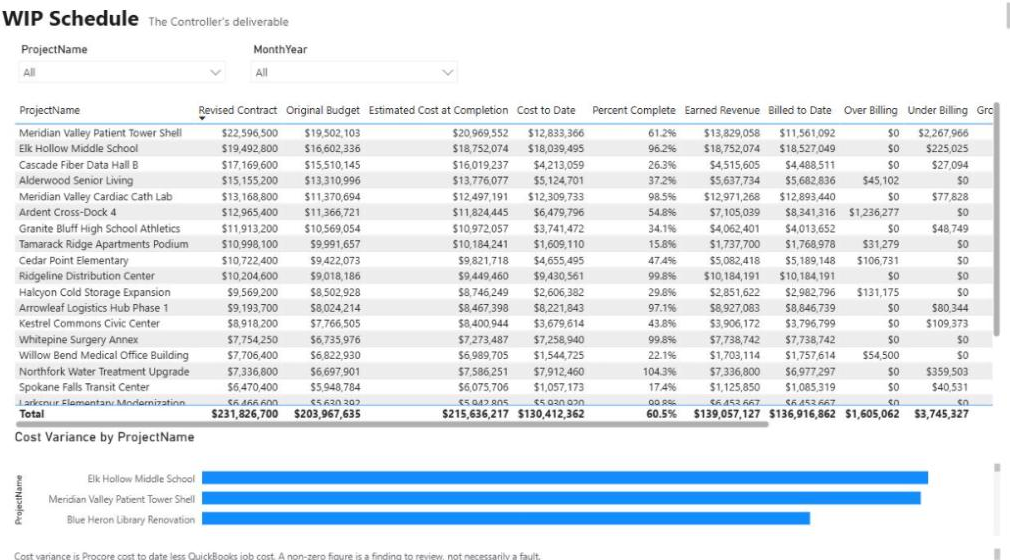
Procore, QuickBooks & HubSpot Reporting Example
A 10-page Financial Operating System in Power BI that gives owners and controllers one view of contracts, WIP, cost, cash, pipeline, and labor—joined across Procore, QuickBooks Online, and HubSpot.
Reporting & analytics · October 8, 2026
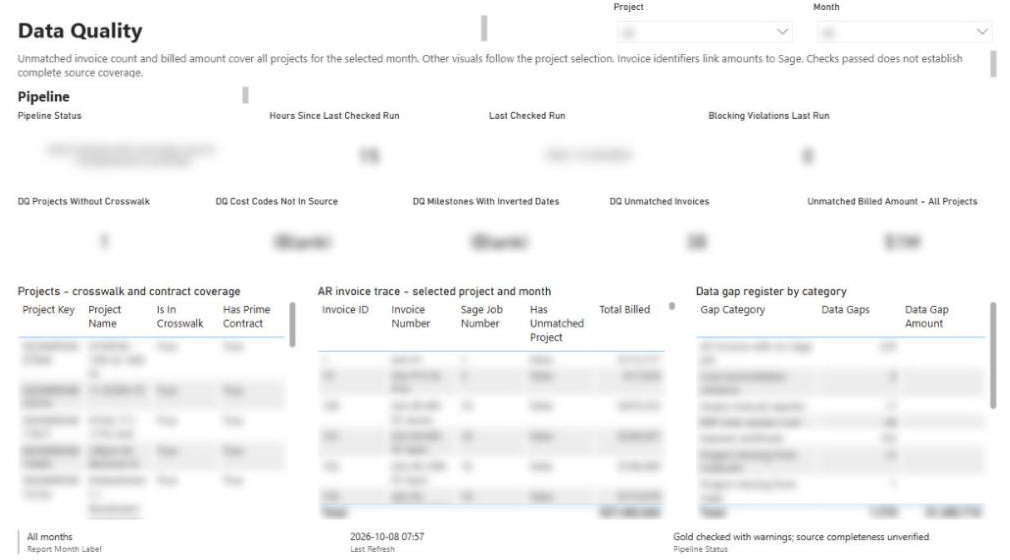
Construction Data Quality: The Rules That Make Reports Trustworthy
A practical checklist of the data-quality rules behind construction reports people can defend, from quality gates and blank-never-zero to cost-code crosswalks, reconciliation and snapshots.