Most commercial contractors run the business on three systems that were never designed to talk to each other. Procore holds the projects. QuickBooks Online holds the money. A CRM like HubSpot holds the pipeline of work you have not won yet. Every month, someone opens all three, exports to Excel, and reconciles by hand to produce a WIP schedule, a cash forecast and a backlog report.
This article walks through how we built a platform that does that join automatically: the API connections, the bronze/silver/gold lakehouse in Microsoft Fabric, the crosswalk that links a Procore project to a QuickBooks job and a HubSpot deal, the quality gate that stops bad numbers from publishing, and the Power BI layer on top. If you want the page-by-page tour of the finished report instead, read Procore, QuickBooks and HubSpot reporting. This piece is about how it is put together and why.
The problem: three systems, no shared key
The goal of the build was one governed source of truth that replaces the controller's hand-built WIP schedule and the dashboards and reports that get rebuilt every month. That means the numbers have to be generated from the source systems and validated before anyone sees them.
The hard part is not pulling data. Each system has a reasonable API. The hard part is that nothing links them. A Procore project, a QuickBooks job and a HubSpot deal can all describe the same building, but there is no shared ID across the three. Project numbers may or may not be entered consistently. Names drift: the same job might be "Main St Clinic" in one system and "Main Street Medical Clinic - Phase 2" in another. Any reporting that crosses systems, like earned revenue against billings or backlog against pipeline, depends on getting that link right.
Architecture at a glance
The whole platform lives in one Fabric lakehouse, with notebooks, pipelines, a semantic model and a Power BI report, all stored in GitHub and generated from code. The layers:
| Layer | What it holds | Why it exists |
|---|---|---|
| Sources | Procore, QuickBooks Online, HubSpot APIs | Systems of record stay the systems of record |
| Bronze | Raw API payloads stored as JSON, exactly as received | You can always replay or audit what the source actually said |
| Silver | Trimmed, typed, validated tables with checksums | Clean, consistent records before any business logic |
| Gold | Mapped business schema joined through the crosswalk | One model of projects, jobs, deals, costs, billings and hours |
| Quality gate | Automated data-quality checks | A failure that would make a number wrong stops the publish |
| Semantic model | Related tables plus governed measures | Every report uses the same definitions |
| Report | 11-page Power BI report | WIP, backlog, pipeline, AR, cash and capacity in one place |
This is a standard medallion architecture. If you are new to it, our guide to Microsoft Fabric for contractors covers the pattern in more depth.
Step 1: Connect the three sources
Each system needs its own credentials, and each has a different authentication model. The build started against sandbox environments for all three.
- HubSpot. We created a service key and granted it read scopes only for what the reports need: companies, deals, line items and contacts. Nothing else.
- QuickBooks Online. We created an app in the Intuit developer portal, provisioned the client ID and client secret, and ran the OAuth authorization code flow. In this build we planned for that access to last about 100 days before someone has to sign in and reauthorize. Token lifetimes are set by Intuit, so check Intuit's current OAuth documentation and plan the refresh on day one, not on day 101.
- Procore. We created a custom app and provisioned its client ID and client secret. See Procore's developer documentation for how apps and service accounts work.
During development the credentials came from local environment variables. The production plan moves them into Azure Key Vault so the Fabric notebooks read secrets at runtime and nobody stores keys in code. That follows a principle we apply everywhere: least privilege by default. Grant only the scopes the reports need and keep every secret in one store.
Step 2: Extract with a versioned endpoint registry
The notebooks run in a fixed order: a bootstrap notebook that sets up credentials and authentication, then one extract notebook per source (Procore, QuickBooks Online, HubSpot).
The Procore extractor does not hard-code its API calls. It loads a registry of endpoints from a YAML file. When Procore versions an endpoint, we update one file and the change is reviewable in version control, instead of hunting through notebook cells. The extractor walks projects, links the related records, and runs everything through a rate limiter so the pull stays inside Procore's API limits. The QuickBooks and HubSpot extractors follow the same pattern.
Every response lands in bronze as a raw JSON object. Nothing is cleaned or reshaped at this stage. That decision costs a little storage and buys a lot: when a number looks wrong later, you can go back to exactly what the API returned and prove whether the problem is in the source or in our logic. That is the "evidence on every output" principle from our approach.
For more on the Procore side specifically, see the Procore API integration guide.
Step 3: Bronze to silver to gold
From bronze, the pipeline trims the payloads, casts types, validates them and runs checksums. That produces silver: clean tables that still look like the source systems.
Gold is where the business model appears. Fields from all three systems are mapped to one schema, standardized and associated with each other. A naming convention governs how fields are referenced so the same concept has the same name everywhere. A shared date dimension (dim date) is the anchor that lets Procore cost dates, QuickBooks invoice dates and HubSpot close dates line up on the same calendar.
Two Fabric pipelines orchestrate this. An ingestion pipeline feeds the extract notebooks. A master pipeline runs the full sequence: bronze, silver, gold, then the quality gate.
Step 4: Build the crosswalk without guessing
The crosswalk is the table that says "this Procore project is this QuickBooks job." It is the single most important piece of the build, and it is matched in a strict order of trust:
- Manual mapping first. The controller maintains a CSV that explicitly pairs a Procore project with a QuickBooks job. If a row exists, it wins.
- Exact project number second. If both systems carry the same project ID or number, they are linked.
- Name match last, and only when unambiguous. A semantic name match is used only when there is exactly one sensible candidate.
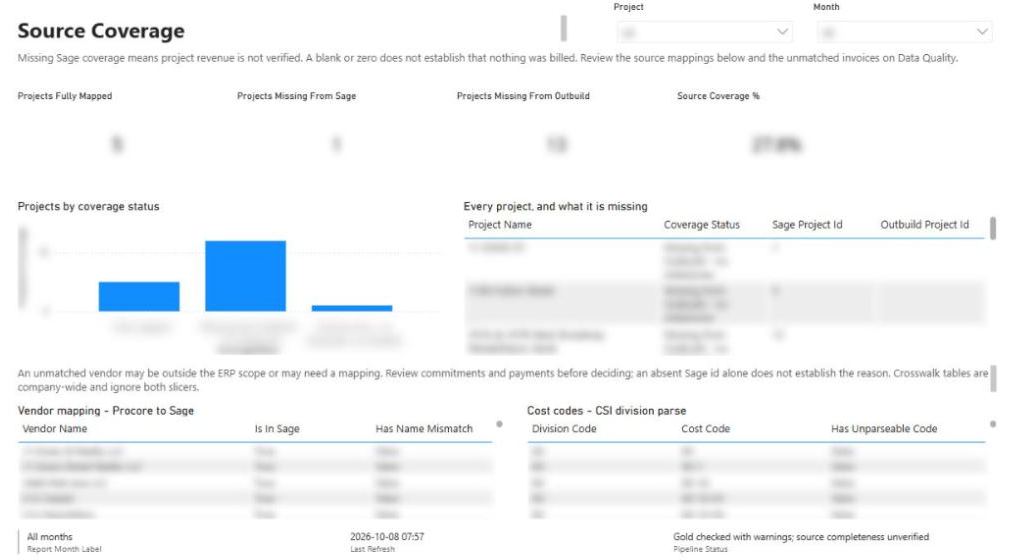
Anything that fails all three is not guessed. It goes to the Exceptions page as an unmapped project so a person can resolve it. Refusing to guess matters more than matching everything. A wrong link quietly moves revenue or cost onto the wrong job, and the WIP schedule will still look plausible. An unmapped project is visible and fixable. This is "flag, never drop" in practice.
The CSV is a deliberate starting point, not the end state. The next step we discussed is a Power Automate flow that, when a HubSpot deal moves to closed won, creates the project in Procore and the job in QuickBooks Online at the same time. Then the link exists from birth and the controller's CSV only handles legacy work. That is "fix it at the source": stop creating the matching problem rather than getting better at cleaning it up.
Step 5: The quality gate
Before anything reaches Power BI, the data runs through a quality gate that checks for missing data and values that would make a calculation wrong. Behind it, the build carries 53 automated tests and 203 offline assertions, so the logic is tested as well as the data.
The gate's behavior is the important part. When a check fails, the publish stops, and the report keeps showing the most recent version that passed. A notification or log entry in the report says that the latest run failed. The reasoning is simple: we do not want incorrect data or wrong calculations influencing decisions. A stale answer that is labeled as stale beats a fresh answer that is wrong.
If you are designing your own checks, our guide to construction data quality rules goes deeper on which rules are worth writing first.
Step 6: Semantic model and report as code
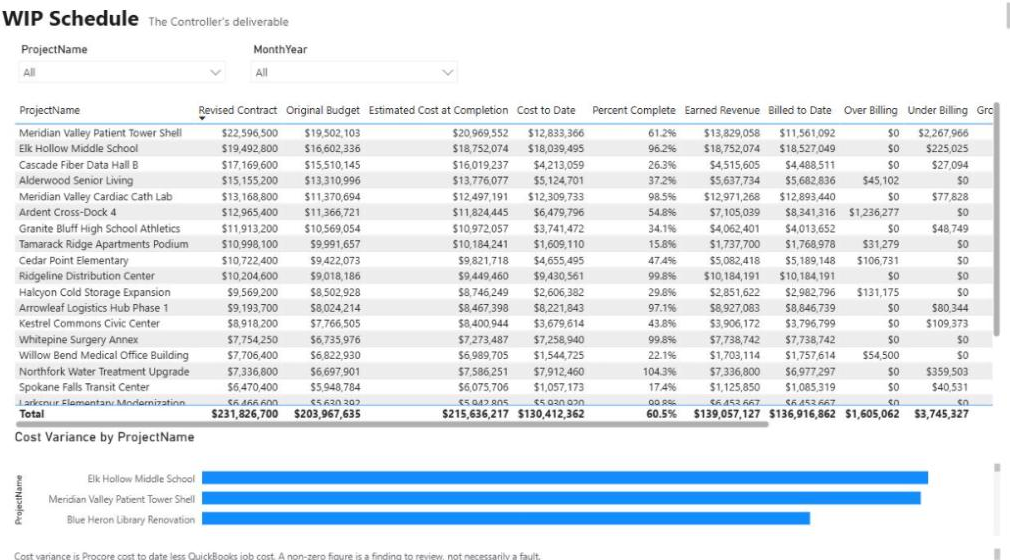
The semantic model relates all the gold tables and defines 68 governed measures, so earned revenue, percent complete, backlog and over/under billing are calculated once and reused on every page. The Power BI report sits on top: 11 pages and roughly 110 visuals covering portfolio, executive KPIs, WIP, project financial performance, backlog and burn, exceptions, pipeline and forecast, AR and collections, cash forecast, capacity and data quality.
The whole thing, report included, is generated from code and stored in GitHub. A change to a measure or a visual is reviewed as a diff, the same way a change to an extractor is. That makes the reporting layer auditable instead of a binary file someone edits by hand.
What real data exposes
The walkthrough runs on sandbox data, and we were explicit that live data would surface new issues. It did. Two defects that surfaced once real data flowed are worth knowing about if you are doing anything similar:
- Budget columns whose names contain spaces. A reference to a column name with spaces can silently return zero instead of failing. The result was a WIP schedule that satisfied every accounting identity while being completely wrong. Balanced is not the same as correct, which is why checks need to test values against the source, not just internal consistency.
- Hours classification. How hours were classified as billable understated utilization by half. Nothing errored; the capacity page just told the wrong story.
Neither of these is the kind of bug you catch offline. Both are the kind a quality gate and a source-level reconciliation should be designed to catch.
What this means for your company
If your month-end depends on exporting Procore, QuickBooks and your CRM into Excel, the practical takeaways are:
- The join is the project, not the dashboard. Budget most of your effort for the crosswalk and the rules around it.
- Keep the raw data. Bronze storage is cheap. Being able to prove what the source said is not optional when a CFO questions a number.
- Let failures stop the line. A gate that blocks publish and shows the last good version protects trust in the report.
- Plan for production, not just the demo. Token expiry, secret storage, rate limits and real-data defects are where these projects succeed or stall.
- Put the report in version control. If you cannot diff it, you cannot review it.
At the time of the walkthrough, the next stage was pointing the build at production data: setting up Key Vault, validating the Procore project alignment, reconciling against QuickBooks actuals and aligning the HubSpot deals.
Where to go next
- Watch the full build on the Procore + QuickBooks + HubSpot demo page.
- Tour each report page in Procore, QuickBooks and HubSpot reporting.
- See how WIP is calculated in our guide to construction WIP reporting in Power BI.
- Running into the same three-system problem? Tell us what you want to build and we will walk through how it would map to your stack.
Frequently asked questions
Can Procore, QuickBooks Online and HubSpot be connected without a shared ID?
Yes, with a crosswalk. We link records using a controller-maintained mapping file first, then exact project numbers, then a name match only when there is exactly one candidate. Anything that does not match is surfaced as an exception for a person to resolve.
What permissions does the integration need?
Only what the reports need. In HubSpot we granted a service key read scopes for companies, deals, line items and contacts. QuickBooks Online uses an Intuit app with the OAuth authorization code flow, and Procore uses a custom app with its own client ID and secret.
How often does QuickBooks Online need to be reauthorized?
In this build we planned for the QuickBooks Online authorization to last about 100 days before someone signs in again. Intuit sets token lifetimes, so check its current documentation and give the refresh an owner from the start so the pipeline does not quietly stop refreshing.
What happens if the data fails a quality check?
The publish stops. The Power BI report keeps showing the most recent version that passed, and a notification or log entry shows that the latest run failed. A failed run never replaces the last good numbers on the dashboard.
Why use Microsoft Fabric instead of connecting Power BI straight to the APIs?
Fabric gives you a lakehouse to keep raw payloads, clean them in stages, join systems through a crosswalk and run quality checks before reporting. Connecting Power BI directly to the APIs makes that governance much harder and keeps no record of what the source returned.
Can new projects be linked automatically in the future?
Yes. A Power Automate flow can create the Procore project and the QuickBooks Online job when a HubSpot deal moves to closed won, so the link exists from the start and the manual mapping file only covers older work.
Next step
Have a problem like this?
Tell us the outcome you need. We'll tell you honestly how we'd approach it, and reply within two business days.
Keep learning
Reporting & analytics · October 7, 2026
Procore, QuickBooks & HubSpot Reporting Example
A 10-page Financial Operating System in Power BI that gives owners and controllers one view of contracts, WIP, cost, cash, pipeline, and labor—joined across Procore, QuickBooks Online, and HubSpot.
Reporting & analytics · October 8, 2026
Microsoft Fabric for Contractors: A Lakehouse Guide
A practical guide to Microsoft Fabric for construction: the medallion lakehouse, notebooks, Direct Lake models, quality gates, the SQL endpoint, cost considerations, and when Fabric is the wrong choice.
Reporting & analytics · October 8, 2026
Construction WIP Reporting in Power BI: A Controller's Guide
A practical guide to construction WIP reporting in Power BI: the formulas, where the data comes from in Procore and accounting, the mistakes that make a WIP schedule look right while being wrong, and how to automate it.