Key takeaways
- Four kinds of software can sit on Procore and Sage at once: Procore's native ERP connectors, third-party sync platforms, a reporting layer that reads both, and a custom operating layer with approvals and AI agents.
- Procore's native connectors push approved commitments and change orders to Sage and bring job cost back; every export needs an accounting approver, and none of them import commitments from Sage.
- Sage 300 CRE and Sage 100 Contractor run on your own server, so Procore's connector needs the hh2 sync client there; Sage Intacct is cloud and needs Web Services and Construction subscriptions.
- WIP, cash forecasts and owner reports need a reporting layer that joins both systems on a project-to-job crosswalk; the sync connectors move records but don't join them.
- Give every record one owner: Sage for jobs, vendors, cost codes, posted cost and cash; Procore for budgets, forecasts, commitments and commitment change orders.
- Two integrations writing the same record will conflict, so decide which tool owns commitments and invoices before adding a second sync.
Short answer: Yes. Several kinds of software can sit on top of Procore and Sage at the same time, and they solve different problems. Procore's own ERP connectors sync records between Procore and Sage 300 CRE, Sage 100 Contractor or Sage Intacct. Third-party integration platforms such as Trimble App Xchange, Agave and Workato move data between the two on rules you configure. A reporting layer in Power BI or Microsoft Fabric reads both systems for WIP, cash and owner reports without writing to either. A custom operating layer, a portal with AI agents, adds approvals and workflows that neither system has. Most contractors end up with the native connector for syncing plus a reporting layer, and add the others only when a specific gap shows up.
This guide is for CFOs, controllers and IT leads at contractors who run Procore for projects and a Sage product for accounting. It explains the four layers, what each one can and can't do, which system should own which record, and how the answer changes between Sage 300 CRE, Sage 100 Contractor and Sage Intacct. Every vendor claim links to the vendor's own documentation, checked in November 2026. Connector features change often, so confirm the current list for your versions before you scope anything.
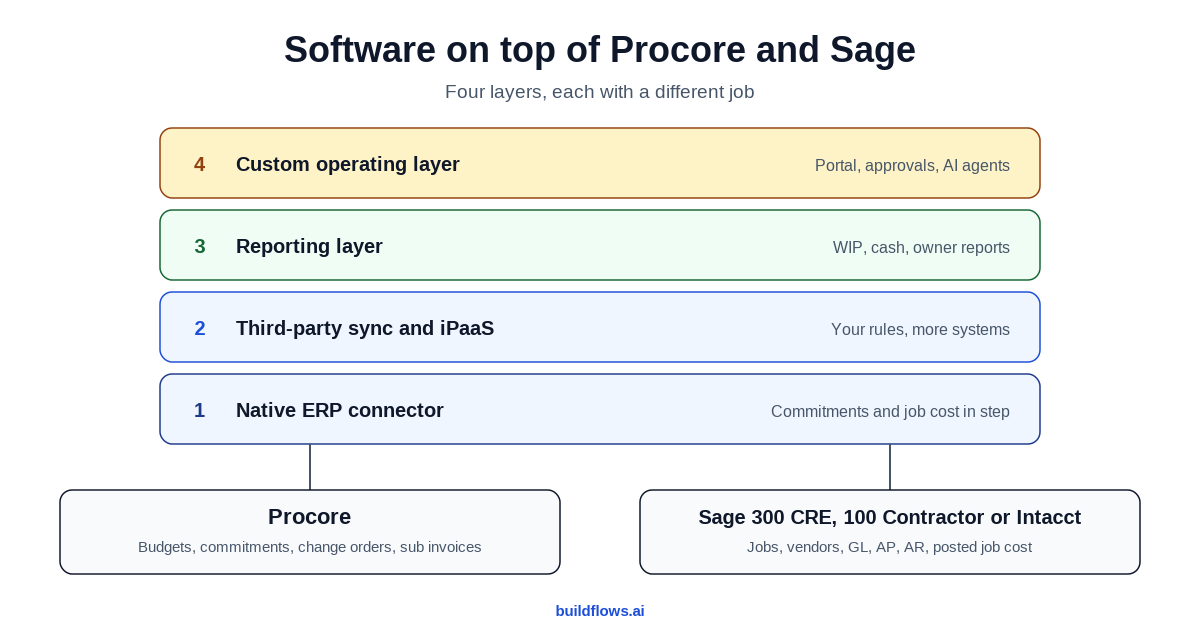 Four kinds of software can sit on top of Procore and Sage
Why this question comes up
Procore holds the project side: budgets, commitments, change orders, subcontractor invoices and forecasts. Sage holds the books: the general ledger, AP, AR, payroll and posted job cost. Neither system has the whole picture. The project team sees committed cost in Procore but not what accounting has paid. Accounting sees posted cost in Sage but not the pending change orders the PM knows about.
So the monthly WIP, the cash forecast and the owner report get built by exporting from both and joining them in Excel. "Software on top of both" is really four different requests:
- Keep the two systems in step so nobody types a commitment twice.
- Report across both without the export-and-paste.
- Run workflows, such as approvals, that touch both.
- Ask questions across both and get an answer with a source.
Each layer below answers one or two of those well.
Layer 1: Procore's own ERP connectors
Procore builds and supports connectors for all three Sage products. They live in Procore's ERP Integrations tool, and every export to Sage has to be accepted by a designated accounting approver before it posts. That approval step matters: it means accounting stays in control of what lands in the ledger.
Sage 300 CRE. Sage 300 CRE runs on the contractor's own server, so the connector needs a piece of software on that server. Procore's documentation says the only requirement is to install the hh2 synchronization client on the system running Sage 300 CRE, which connects outbound to hh2's cloud service with no inbound ports. Jobs, vendors, cost codes and job cost come into Procore. Approved commitments, commitment change orders, budget changes and subcontractor invoices go to Sage. Procore lists Sage 300 CRE versions 22 through 25 as supported. Importing commitments from Sage into Procore is not supported, and projects created before the connection can't be synced without extra work. Procore's FAQ describes Sage-to-hh2 syncs every five minutes and Procore polling hh2 every 30 minutes, so expect some lag.
Sage 100 Contractor. Same pattern: the hh2 Sync Client on the machine running Sage 100 Contractor, version 20.5 or higher. Cost codes, categories and job costs sync, and approved commitments and subcontract change orders go from Procore to Sage. Procore lists owner invoices, prime contract sync, owner change orders and importing commitments from Sage as not supported. Procore's documentation is blunt: once a project is synced, create commitments in Procore, never directly in Sage 100 Contractor.
Sage Intacct. Intacct is cloud software, so there is no agent to install. Procore and Sage launched this cloud-to-cloud connector in 2021, built on Procore's ERP Connector Platform. Procore's documentation says you need both the Web Services and Construction subscriptions in Sage Intacct. Cost codes and cost types come from Intacct. Commitments, commitment change orders and subcontractor invoices (as bills) go to Intacct after approval. Direct costs import from Intacct's general ledger. Owner invoices are listed as unsupported.
The native connector is the right first answer for keeping commitments and job cost in step. It is the wrong tool for reporting: it moves records, it doesn't join them, and it has no view of the AR aging, cash or GL balances a CFO reports on.
Layer 2: Third-party sync and integration platforms
These sit between the two systems and move records on rules you configure. You use them when the native connector doesn't cover a record you need, when you run more systems than Procore and Sage, or when you want one platform for all your integrations.
- Trimble App Xchange. Trimble bought Ryvit, a construction integration platform, in 2023, and its products became App Xchange and Data Xchange. App Xchange lists connectors for Procore, Sage 300 CRE and Sage 100 Contractor. We built connectors on this platform while working with the App Xchange team, so we know its strengths: shared authentication, monitoring and reusable flows.
- Agave. A unified API for construction software, aimed mainly at software vendors. TechCrunch described it in 2023 as connecting cloud tools like Procore with on-premises Sage 100 Contractor and Sage 300 CRE. We could not confirm its current Sage Intacct coverage from public sources, so ask Agave directly.
- Workato and other general iPaaS tools. Workato documents a Sage Intacct connector, and Procore has announced a Workato connector for Procore. General platforms are strong on cloud APIs. For on-premises Sage 300 CRE or Sage 100 Contractor, check how they reach the server before you buy.
One caution applies to every option in this layer. Two integrations writing the same record will fight. Procore locks certain financial records once an integration stamps them as synced, and only one integration can own that link. Decide which tool owns commitments and invoices before you add a second one. Our Procore and Sage Intacct pair page lists the specific gotchas, and build vs buy for construction integrations compares the platform options in more depth.
Layer 3: A reporting layer that reads both
This is usually what the CFO actually wants. A reporting layer reads Procore and Sage, joins them on a project-to-job crosswalk, and produces the WIP schedule, cash forecast, backlog and owner reports. It writes to neither system, so it can't break the books.
Procore Analytics. Procore's own analytics product gives you Power BI access to Procore data, refreshed hourly. It is good for project-side reporting. It reports on what is in Procore, so Sage data appears only where the connector has already brought it in, such as direct costs. It won't give you the GL, AR aging or cash position from Sage. Our comparison of Procore Analytics and a custom Power BI model covers where the line falls.
Power BI or Microsoft Fabric over both. The pattern we build most: land Procore through its API and Sage through whatever route the product allows, then join them in a governed model. The route depends on the Sage product:
| Sage product | Where it runs | How a reporting layer reads it | What to arrange first |
|---|---|---|---|
| Sage 300 CRE | Your server | ODBC reads (Timberline Data) through an on-premises gateway; the Web API for job cost | Gateway on a machine that can reach the server; the Sage Development Partner Program key if you use the Web API |
| Sage 100 Contractor | Your SQL Server | Read-only SQL through an on-premises gateway | A read-only SQL login; Sage publishes no public REST API |
| Sage Intacct | Sage's cloud | REST API (Sage's recommended path) or the older XML Web Services API | Web Services subscription and a sender ID authorized in each Intacct company |
Our system pages for Sage 300 CRE, Sage 100 Contractor and Sage Intacct list the API facts with sources. For a worked build, see our Procore and Sage integration use case, which reads Sage 100 Contractor through a data gateway into a Fabric lakehouse and puts every unmatched project or invoice on a worklist.
The hard part of this layer is never the connection. It's the crosswalk that says Procore project 2417 is Sage job 24-017, and the cost-code map between the two. Source mapping across Procore, accounting and CRM walks through one.
Layer 4: A custom operating layer with AI agents
The fourth layer is a portal or set of workflows that sits on both systems and does things neither does alone. Examples we see:
- An approval step for change orders that checks the commitment exists in Sage before the PM can send it.
- A cost-coding queue where field staff code card spend to a Procore cost code before it posts to accounting.
- An AI agent that drafts the monthly budget variance narrative from Procore forecasts and Sage actuals, and a person approves it before it goes out.
- An owner portal that shows billing, retainage and change order status from both systems in one place.
This layer costs the most to build and own, so it earns its place only where the workflow is specific to how you run jobs. Agents should read financial numbers from the governed reporting model in layer 3, not recompute them from raw API calls. And any agent that writes to Procore or Sage should do it through the same approval steps a person would.
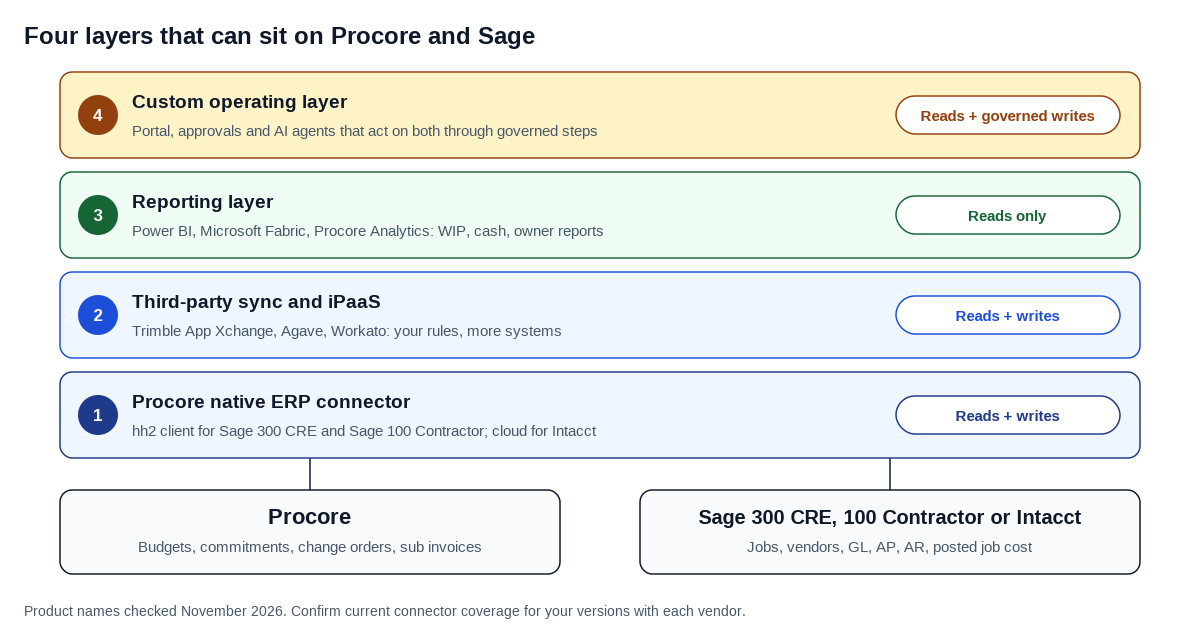 The four layers, and whether each one reads, writes or both
Which layer for which problem
| Problem | Native connector | Third-party sync | Reporting layer | Custom layer |
|---|---|---|---|---|
| Commitments and change orders typed twice | Best fit | If native misses a record | No | No |
| Job cost actuals visible to PMs | Good (direct costs) | Possible | Good | No |
| WIP schedule and over/under billing | No | No | Best fit | Adds review and sign-off |
| Cash forecast and AR aging | No | No | Best fit | No |
| Owner and lender reporting | No | No | Best fit | Portal for owners |
| Approvals that span both systems | Accounting approval only | Limited | No | Best fit |
| More systems than Procore and Sage | No | Best fit | Good | Possible |
| Questions in plain language with sources | No | No | Needed as the source | Agents on top |
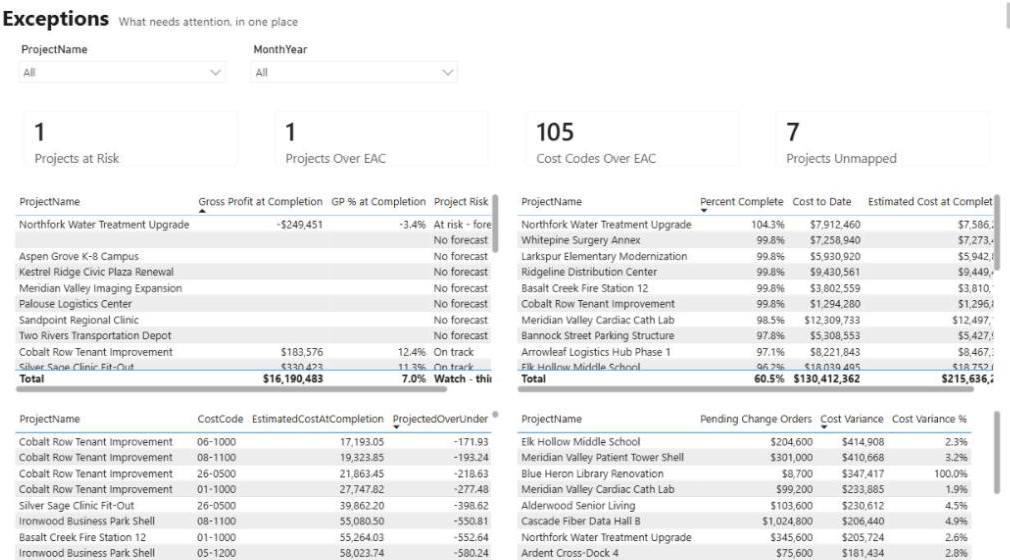
If you only fix one thing, fix the one that costs the most hours at month end. For most contractors that is the WIP. Our guide to construction WIP reporting in Power BI shows what the reporting layer produces.
Which system should own which record
Every layer works better when each record has one owner. The owner is where the record is created and corrected. Everything else reads it or receives a copy.
| Record | Owner | Why |
|---|---|---|
| Jobs and project numbers | Sage | Accounting needs the job before cost can post; Procore projects carry the Sage job number |
| Vendors | Sage | AP, 1099s and payments live there; matching vendors on name creates duplicates |
| Cost codes and categories | Sage | The ledger structure; Procore follows it |
| Budgets and forecasts | Procore after award | The PM forecasts there; Sage holds the original estimate |
| Commitments (subcontracts, POs) | Procore | Procore's connectors only push commitments to Sage, and Procore's Sage 100 documentation says never to create them in Sage once synced |
| Commitment change orders | Procore for approval | Pushed to Sage once approved |
| Subcontractor invoices | Procore for review, Sage after posting | Approved in Procore, posted and paid in Sage |
| Job cost actuals | Sage | Posted cost, payroll and expenses; Procore shows them as direct costs |
| AP payments and cash | Sage | The source for paid status and the cash forecast |
| Owner billing and AR | Check your connector | Owner invoices are listed as unsupported in the Sage 100 and Sage Intacct connectors; many contractors bill from Sage |
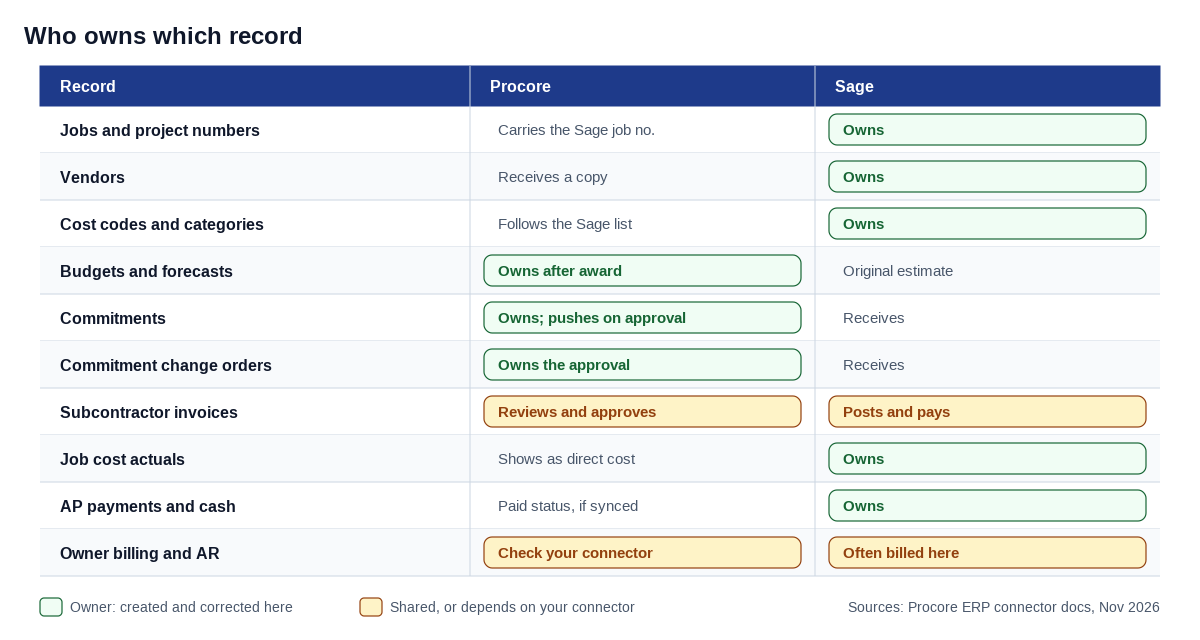 One owner per record: where it is created and corrected
Write this table down for your company and get the controller and the head of operations to sign it. Our RACI for connecting construction systems covers who sets up each piece.
Sage 300 CRE, Sage 100 Contractor and Sage Intacct are different problems
People say "Sage" as if it were one system. For integration it is three.
Sage 300 CRE is on-premises. Anything that reads or writes it needs a route to your server: the hh2 client for Procore's connector, a gateway for reporting, a VPN for anything else. Its Web API needs a Sage Development Partner Program key on every request. Plan for the server, its backups and its upgrades as part of the integration.
Sage 100 Contractor is also on-premises, on SQL Server. It has no public REST API, so reporting reads the database read-only. Procore's connector covers commitments and job cost but leaves owner invoices and prime contracts out.
Sage Intacct is cloud. It has a REST API and a Web Services subscription, so a reporting layer or iPaaS can reach it without a gateway. The constraints are different: each Intacct company has to authorize your integration's sender ID, and Intacct limits concurrent requests per company, shared with every other integration you run.
Multi-entity contractors. If you run several companies, Intacct handles this natively. Sage documents inter-entity account mapping and automatic eliminations on consolidation. For integration, that means every synced record needs the right entity, and your reporting layer should consolidate from Intacct's eliminated figures rather than add up entities itself. We have not tested Procore's connector against every multi-entity setup, so confirm with Procore how its Intacct connector maps projects to entities in yours.
How Build Flows can help
We build layers 3 and 4, and we configure or extend layers 1 and 2 when they fit. A typical engagement starts with the native connector you already pay for, then adds a reporting layer that joins Procore and Sage on a crosswalk with data-quality checks, then adds approvals or agents only where a workflow needs them. Our published build is for a GC running Procore with on-premises Sage 100 Contractor; the same pattern applies to Sage 300 CRE and Sage Intacct, with a different route into Sage.
If you want to see where your systems connect today, map them with the stack map tool. If you'd like us to look at your Procore and Sage setup and tell you which layer to fix first, tell us what you run.
Frequently asked questions
Is there software that sits on top of both Procore and Sage at the same time?
Yes. Procore's own ERP connectors sync Procore with Sage 300 CRE, Sage 100 Contractor and Sage Intacct. Integration platforms such as Trimble App Xchange, Agave and Workato move data between them on your rules. A Power BI or Microsoft Fabric reporting layer reads both for WIP and cash reporting, and a custom portal with AI agents can run approvals across both.
What syncs in the Procore Sage integration?
It depends on the Sage product, but the pattern is similar: jobs, vendors and cost codes come from Sage; approved commitments and commitment change orders go from Procore to Sage after an accounting approver accepts them; and job cost transactions come back into Procore as direct costs. Importing commitments from Sage into Procore is not supported, and owner invoices are listed as unsupported for Sage 100 Contractor and Sage Intacct. Check Procore's current documentation for your version.
Does the Procore Sage 300 CRE integration need software installed on our server?
Yes. Procore's documentation says you install the hh2 synchronization client on the system running Sage 300 CRE. It connects outbound to hh2's cloud service and needs no inbound ports. Sage 100 Contractor uses the same hh2 Sync Client. Sage Intacct is cloud software and needs no local agent.
Which construction data analytics tools integrate natively with Procore and other construction software without custom APIs?
Procore Analytics gives Power BI access to Procore data without custom API work, refreshed hourly, but it reports on Procore data and won't bring in your Sage general ledger, AR or cash. To report across Procore and Sage you need a reporting layer, such as Power BI or Microsoft Fabric, that reads both systems and joins them on a project-to-job crosswalk.
What do I need to use the Sage Intacct API?
A Sage Intacct Web Services subscription, and your integration's sender ID authorized in each Intacct company you connect. Sage recommends its REST API for new work; the older XML Web Services API still works. Intacct limits concurrent requests per company, shared across all your integrations, so queue writes.
Can Sage Intacct Construction handle multi-entity contractors?
Yes. Sage Intacct supports multiple entities with inter-entity account mapping and automatic eliminations on consolidation. For integration, make sure every synced record carries the right entity and consolidate from Intacct's eliminated figures. Confirm with Procore how its Intacct connector maps projects to entities in your setup.
Which system should own commitments and change orders, Procore or Sage?
Usually Procore. Procore's connectors push approved commitments and commitment change orders to Sage and don't import them from Sage, and Procore's Sage 100 Contractor documentation says to create commitments only in Procore once a project is synced. Sage should own jobs, vendors, cost codes, posted job cost and cash.
Next step
Need this connection in your environment?
Scope one integration: the records, direction, timing, and business rules behind the connection.
Prefer email? charley@buildflows.ai
Keep learning
Integrations · October 8, 2026
Procore API Integration Guide: Patterns, Crosswalks and Governance
A practical guide to connecting Procore with accounting, scheduling, BI and CRM systems: which pattern to use, how to link projects across systems, and how to keep the numbers trustworthy.
Integrations · October 10, 2026
Build vs Buy for Construction Integrations: Code, iPaaS or Connector
A vendor-neutral comparison of the five ways to connect construction systems, with the technical questions that decide between them: authentication, webhooks vs changed-data queries, API requirements, error handling and ownership cost.
Reporting & analytics · October 8, 2026
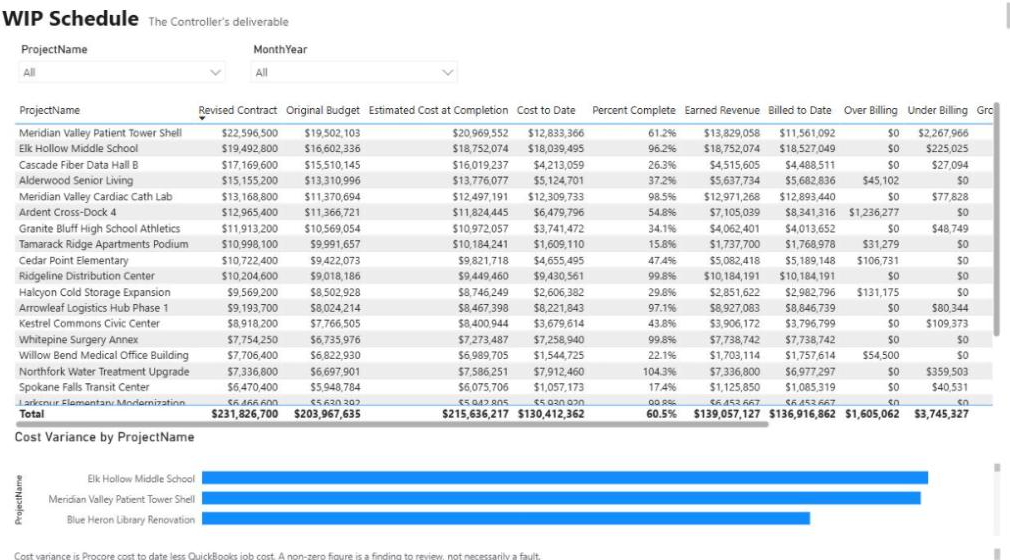
Construction WIP Reporting in Power BI: A Controller's Guide
A practical guide to construction WIP reporting in Power BI: the formulas, where the data comes from in Procore and accounting, the mistakes that make a WIP schedule look right while being wrong, and how to automate it.