The short answer: There are five realistic ways to connect construction systems: point-to-point code you write and run, a native integration one of the vendors already offers, a general iPaaS with pre-built connectors, a custom connector built on an iPaaS SDK, and a low-code flow tool such as Power Automate or n8n. None is right everywhere. Use a native integration when it covers your workflow, an iPaaS when you have several systems and want shared authentication, monitoring and reuse, a custom connector when the platform you already use is missing one system, low-code for simple and well-bounded flows, and your own code when the logic is genuinely unusual or performance-critical. The decision turns less on how fast you can build the first version and more on who handles authentication, change detection, failures and API changes for the next five years.
This guide compares the options side by side, then walks through the technical questions that decide between them: authentication, how changes are detected, what an API needs before a good connector is even possible, error handling, and the ownership cost after go-live. It ends with a decision checklist. Our view comes from building integrations on both sides of the line: connectors in C# on an iPaaS SDK (for HCSS, Ramp, Bluebeam, Workyard and Power BI, among others, built while we worked on Trimble App Xchange), flows on that platform, custom integration services, and Power Automate and n8n builds for contractors.
If your question is the broader one of buying construction software versus building it, start with build vs buy for construction software. This article is only about the connections between systems.
The five options compared
| Option | What it is | Best when | Watch out for |
|---|---|---|---|
| Point-to-point code | Your own service calls both APIs directly | Unusual logic, high volume, strict performance or hosting requirements, an in-house team to run it | You own auth, retries, monitoring, logging and every API change, forever |
| Native vendor integration | A connection one of the two vendors builds and supports | It covers your workflow as-is and both vendors stand behind it | Fixed field mappings, limited control over timing and errors, one-directional or partial coverage |
| iPaaS with pre-built connectors | A platform that hosts connectors and flows between many systems | Several systems, recurring integration needs, desire for shared monitoring and reuse | Connector coverage of the specific endpoints you need, platform data limits, cache freshness |
| Custom connector on an iPaaS SDK | You build the missing connector to the platform's SDK, then use normal flows | You already use the platform and one system is missing or only partly covered | You (or your builder) maintain the connector when the vendor's API changes |
| Low-code flows (Power Automate, n8n) | Visual flows using the tool's connectors or HTTP steps | Simple, bounded flows; Microsoft 365 or self-hosted shops; prototypes | Logic sprawl across many flows, weak version control, auth and paging hand-built in HTTP steps |
Most contractors end up with a mix. A common healthy shape is native integrations where they exist and are good enough, one iPaaS or flow platform for the rest, and custom code only where it earns its place. The unhealthy shape is the same five tools each holding a different copy of the vendor list.
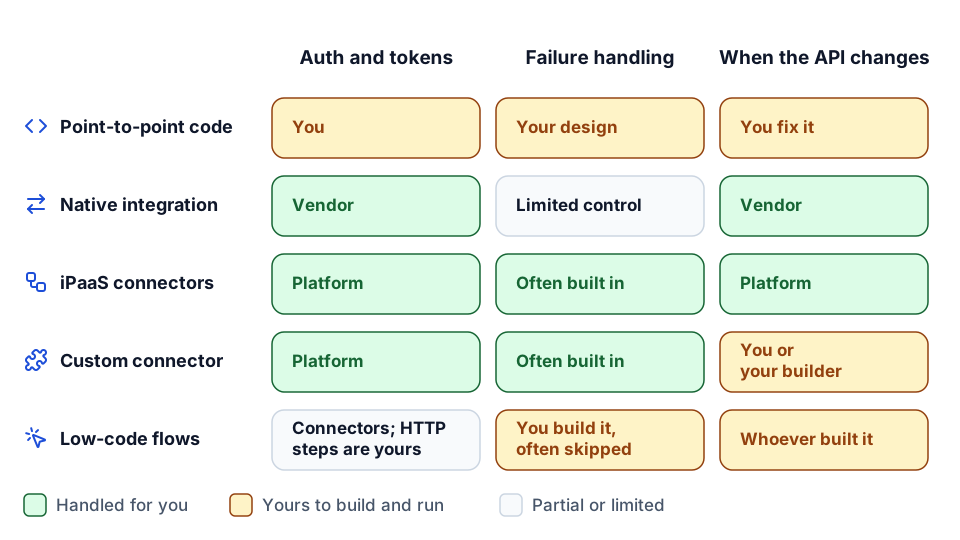 The same five options, viewed by who does the work after go-live.
For software vendors: native integration or embedded platform
Construction software companies face a mirror image of this decision. Customers ask you to connect your product to their ERP, their PM system and their payroll provider. Building each as a native integration gives you full control over the experience, but every one adds an API you must learn, an auth flow you must maintain and a support queue. Building one connector for your product on an iPaaS your customers already use, and letting flows handle each customer's specifics, trades some control for reach. The technical questions below apply either way.
Authentication: the cost nobody estimates
Authentication looks like a day's work in a proof of concept and becomes a permanent job in production.
The patterns you will meet in construction APIs:
| Pattern | How it works | Operational burden |
|---|---|---|
| API key | A static key sent with each request | Rotation, storage, and keys that never expire if nobody rotates them |
| HTTP Basic | Username and password per request | Same as API keys, plus password policies breaking integrations |
| OAuth 2.0 client credentials | The integration exchanges a client ID and secret for a short-lived token | Token caching and refresh, secret rotation |
| OAuth 2.0 authorization code | A user signs in and grants access; the integration holds a refresh token | Refresh tokens that expire or are revoked, re-consent when the user leaves the company |
The difference between the last two is bigger than it looks. When we built connectors, HCSS used client credentials, so the connection belongs to the integration. Ramp used the authorization code flow, so a person at the customer had to authorize the connection, and the integration depends on that grant staying valid. In the SDK it was close to a one-flag difference; in operations it decides who gets the call when the connection breaks.
What to ask of any option:
- Who stores the credentials, and where? A platform with a managed credential store, or your own secrets vault. Never a config file on a server.
- Who refreshes tokens? Each vendor sets its own expiry rules. Something has to refresh before expiry and handle a refresh failure gracefully.
- What happens when a token is revoked? The right answer is a clear alert to a named owner, not a week of silently failed syncs.
- Is access scoped? The integration identity should have only the permissions its flows need, in line with least privilege. An integration user with full admin in the ERP is a common audit finding.
- Multi-tenant? If you are a vendor connecting to many customers, you are managing one set of tokens per customer, each with its own expiry and failure modes.
An iPaaS takes most of this on: it stores the credentials, refreshes tokens, and surfaces failed connections in one place. With point-to-point code, all of it is yours. With low-code tools, the built-in connectors handle it, but custom HTTP steps often push you back to hand-managed keys.
Change detection: webhooks, polling and changed-data queries
Every integration has to answer "what changed since last time?" There are three ways, and the API decides which you can use.
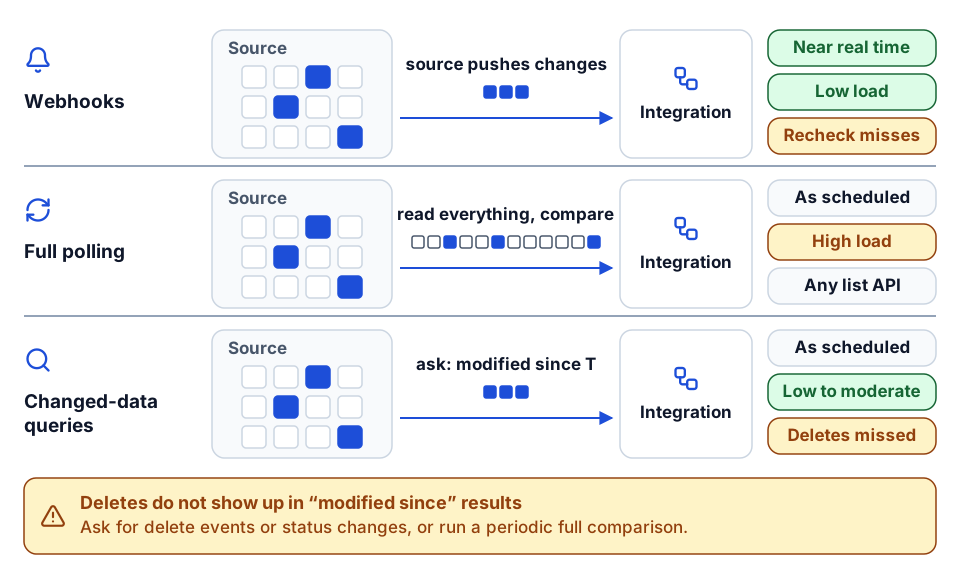 What each method moves across the wire when three records have changed.
Webhooks
The source system calls your endpoint when something changes. Webhooks are the fastest option and the least wasteful, but in practice:
- Not every system offers them, and those that do rarely cover every object and event you need.
- Deliveries get missed during outages, so you still need a periodic reconciliation to catch what was dropped.
- Your receiving endpoint must be public, authenticated, and able to handle duplicates and out-of-order events, which means designing writes for idempotency.
Polling full lists
On a schedule, read everything and compare with what you saw last time. It works with any API that can list records, but it is slow and expensive at construction volumes. Reading every job cost transaction every 15 minutes to find the three that changed is how integrations hit rate limits and data caps.
Changed-data queries
The middle ground, and the one we look for first: the API lets you ask for records modified since a timestamp or after a change token. You poll, but you only receive what changed. This is what makes scheduled replication into an iPaaS cache practical, and it is the single most important feature to check in an API before committing to an integration design.
| Method | Freshness | Load on the source | What the API must support | Still need reconciliation? |
|---|---|---|---|---|
| Webhooks | Near real time | Low | Event subscriptions for the objects you need | Yes, for missed deliveries |
| Full polling | As often as you can afford | High | List endpoints with pagination | Built in, but expensive |
| Changed-data queries | As often as you schedule | Low to moderate | A reliable modified-since filter or change token | Occasionally, for deletes |
Deletes are the gap in most changed-data designs. A record that was deleted does not show up in "modified since" results. Ask whether the API exposes deleted records, a status change or a delete event; if not, plan a periodic full comparison for the objects where deletes matter. In construction systems, most "deletes" should really be status changes (closed job, inactive vendor), which is easier to sync anyway.
Whatever the method, remember that "real time" on an iPaaS often means "as fresh as the last replication". We cover that cache-versus-action distinction, and why the schedule interval must exceed the replication run time, in the anatomy of a construction integration flow.
What an API must support for a good connector
Before choosing any option, assess the API itself. When we scoped a new connector, these were the things that decided what it could do reliably:
| Capability | Why it matters | If it is missing |
|---|---|---|
| Create, read, update, delete endpoints for the objects in scope | A flow can only write what the API lets it write | Read-only integration, or manual steps for writes |
| Filtering by job, company, status and date | Pull open jobs, not every job since 1998 | Large reads, slow syncs, data limits |
| Pagination with stable ordering | Reliable reading of large lists | Missed or duplicated records on large sets |
| Changed-data queries (modified since, change tokens) | Efficient incremental sync | Full polling or webhooks only |
| Clear errors with useful messages and status codes | Failures can be routed to the person who can fix the data | Generic failures that need an engineer to diagnose |
| Documented rate limits | The client can pace itself | Unexplained throttling under load |
| A published OpenAPI specification | Faster, more accurate client generation and testing | Hand-reading docs endpoint by endpoint |
| A sandbox or test company | Writes can be tested safely | Testing against production, or not testing writes |
The iPaaS connector requirements we worked to asked for exactly this: HTTP/REST endpoints, supported authentication (API key, Basic or OAuth 2.0 client credentials or authorization code), documentation covering CRUD operations and parameters for filtering, pagination and changed-data queries, and an OpenAPI 3.0 specification preferred but not mandatory. Those are good requirements for any integration, platform or not.
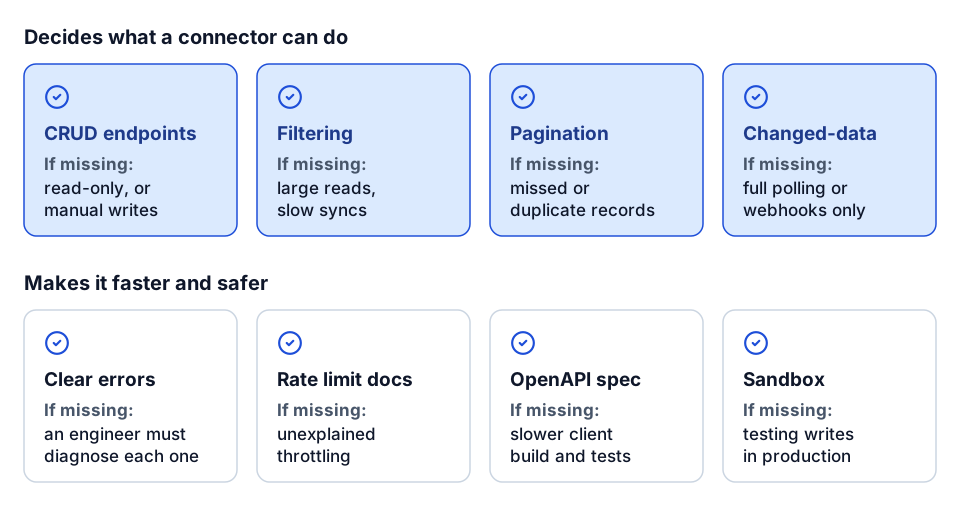 The eight API capabilities to check before committing to a design, and what happens without each.
An API that lacks changed-data queries and filtering is not a dead end, but it pushes you toward custom code with careful paging and local state, or toward file-based exchange. Know that before you promise anyone a 15-minute sync.
Designing the connector around the business, not the endpoints
If you do build a connector, model it around records people recognize. Name data objects after the business record ("Vendor", "Timecard", "Equipment Hours"), not the endpoint path. Separate list objects from single-record objects where the API does, because they replicate differently. Handle rate limits and retries once, in the client, so no flow has to. Test against recorded responses so a vendor API change shows up as a failing test, not a failing customer flow. And follow two guidelines that save the most pain later: avoid hardcoding values, and keep schemas backward compatible so existing flows do not break when you add fields.
Error handling and remediation
Every integration fails. A vendor is missing in the target, a cost code is inactive, a job is closed, a required field is blank, an API returns a 500. The options differ sharply in what happens next.
The pattern to insist on, whatever you build with:
- Validate before writing. Check that the job is open, the cost code exists and the amount is non-zero before sending anything. A refused write is cheaper than a bad record in the ERP.
- Retry only what is transient. Timeouts, rate limits and 5xx errors deserve retries with backoff. A validation error will fail the same way every time.
- Turn failures into owned work items. A failed write should create a task with the record, the error, the flow and version, and an owner, sent to the person who can fix the data. "Invoice 4471 failed: vendor V1029 does not exist" belongs with the AP clerk, not in a log file an engineer reads weekly.
- Make retries safe. After the data is fixed, re-running the record must not create a duplicate. That needs a crosswalk of source and target IDs and idempotent writes.
- Reconcile. A periodic check that counts and totals match between systems catches the failures nobody saw.
On an iPaaS, steps 3 and 4 are often built in as remediation flows and work items. In Power Automate or n8n, you build them yourself, and they are frequently skipped. In custom code, they are entirely your design. Our guide to construction data quality rules covers the validation side in more depth.
Maintenance and ownership cost
The first version of an integration is the cheap part. The cost that decides build versus buy is everything after go-live:
- API changes. Vendors deprecate endpoints, add required fields and change pagination. Someone has to notice, update the client and retest.
- Credential churn. Secrets expire, the person who authorized an OAuth connection leaves, an admin password policy changes.
- Volume growth. A flow that handles 50 jobs comfortably can struggle at 500, especially around month-end and payroll week.
- Business changes. New cost codes, a new company in the ERP, an acquisition, a change in who approves what.
- Knowledge. Point-to-point code written by one person is a single point of failure. So is a tangle of low-code flows nobody documented.
Ask of each option: when the vendor changes its API, who fixes it, and how quickly would we know it broke? With a native integration or a maintained iPaaS connector, the vendor or platform owns that. With a custom connector or your own code, you do, or the firm you hired does. With low-code, it is usually whoever built the flow, who may not be there next year.
None of this means custom is wrong. It means custom needs an owner, version control, tests, monitoring and a budget line for maintenance from day one. We put every integration we build in source control with a version number in each flow's name, so the run history always shows which logic processed a record.
How the low-code tools fit
Power Automate and n8n deserve a fair hearing, because for many contractors they are the right first tool.
- Power Automate is strong when the work lives in Microsoft 365: SharePoint lists, Outlook approvals, Teams notifications, Excel files. Its connectors handle auth for supported systems. It gets harder when you need custom HTTP calls with paging, complex mapping, or many flows sharing logic. See Power Automate construction workflows and our job setup automation deep dive.
- n8n suits teams that want self-hosting, code steps inside visual flows, and custom nodes for systems without official ones. We built construction nodes for it, covered in n8n construction nodes for Procore, Autodesk and HCSS.
The same discipline applies as on any platform: one owner per object, explicit create/update/delete scope, validation before writes, failures routed to people, and flows in version control.
Decision checklist
Work through these in order. The first one that clearly applies usually decides it.
- Does a native integration already cover the workflow as-is? If both vendors support it and it does what you need, start there. Check field coverage, direction and timing first.
- Do you already run an iPaaS or flow platform? If so, check whether it has connectors for both systems, and whether they cover the specific endpoints you need, not just the system name.
- Is only one system missing? Build a custom connector on the platform's SDK rather than a separate point-to-point service. Every future flow can reuse it.
- Is the flow simple, bounded and mostly inside Microsoft 365 or a self-hosted stack? Power Automate or n8n is likely enough.
- Is the logic genuinely unusual, the volume high, or the hosting constrained? Custom code is justified, with an owner and a maintenance budget.
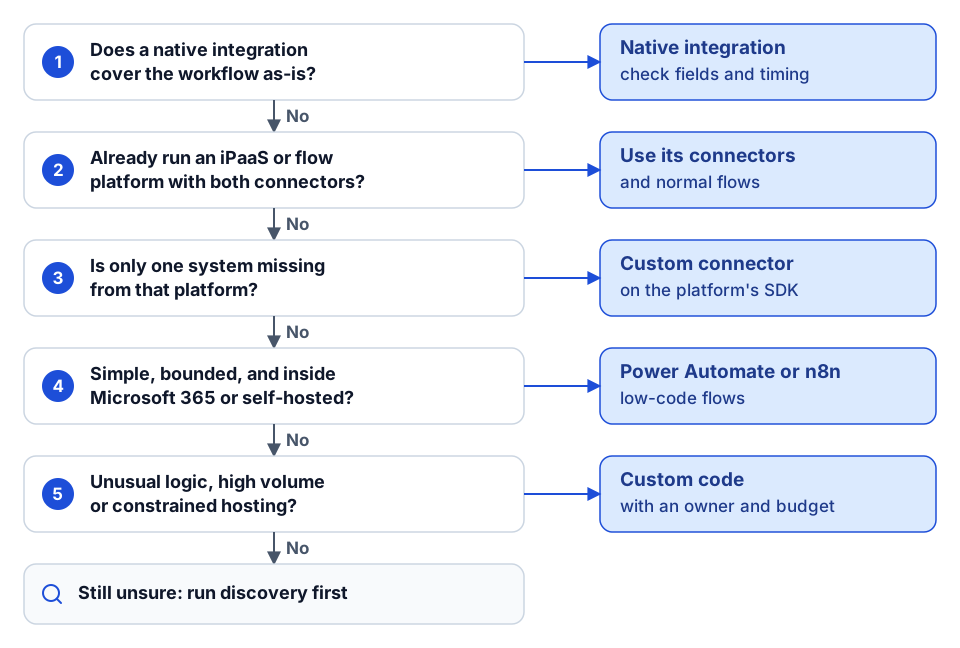 Work down the questions; the first clear yes usually decides.
Then check these regardless of option:
- Does the API support CRUD, filtering, pagination and changed-data queries for the objects in scope?
- Which authentication pattern applies, who stores credentials, and who is alerted when a token fails?
- Webhooks, polling or changed-data queries, and how are deletes detected?
- Which system owns each object and field?
- Is there a crosswalk of IDs so updates never create duplicates?
- Do failures become work items with an owner, and are retries safe?
- Is there a reconciliation check?
- Who maintains it when the vendor's API changes, and how will you know it broke?
- Is it in version control, with versions visible in the run history?
If several of those answers are still "we don't know yet", spend a week on discovery before choosing a tool. Our integration discovery questions are the list we use.
Where to go next
- How a flow is put together once you have chosen a platform: the anatomy of a construction integration flow.
- Which integrations to build first: construction integrations that pay back first.
- Missing a connector for a system you rely on? See custom connector development and our integrations capability.
- ERP specifics: the Viewpoint Vista API integration guide and the Spectrum ERP integration guide.
- For a defined set of flows at a fixed scope and price, see the integration sprint, or plan your build.
- Want a second opinion on build versus buy for your systems? Start a conversation.
Frequently asked questions
When should a contractor use an iPaaS instead of custom code?
When you have several systems to connect, recurring integration needs and want shared authentication, monitoring and reuse. Custom code is justified when the logic is unusual, volumes are high or hosting is constrained, and only with an owner and a maintenance budget.
What is a custom connector?
A connector built to an integration platform's SDK for a system the platform does not yet cover, or covers only partly. It handles authentication, paging and the system's record shapes once, so every flow on the platform can reuse it.
Are webhooks better than polling for construction integrations?
Webhooks are faster, but not every system offers them for every object and deliveries get missed. Changed-data queries, which return only records modified since a timestamp, are often the most reliable option. Either way, keep a periodic reconciliation.
What should an API support before we commit to an integration?
Create, read, update and delete endpoints for the objects in scope, filtering, stable pagination, changed-data queries, clear error messages and documented rate limits. An OpenAPI specification and a sandbox make the build faster and safer.
Is Power Automate good enough for construction integrations?
For simple, bounded flows inside Microsoft 365 it often is. It gets harder with custom HTTP calls, paging, complex mapping and many flows sharing logic, so apply the same discipline: one owner per object, validation before writes and failures routed to people.
Next step
Need this connection in your environment?
Scope one integration: the records, direction, timing, and business rules behind the connection.
Prefer email? charley@buildflows.ai
Get the next guide in your inbox
Field Notes: practical guides and new walkthroughs, about once a month.
Field Notes
Practical guides and new walkthroughs on construction data and automation, roughly monthly.
Keep learning
Integrations · October 9, 2026
Anatomy of a Construction Integration Flow
How an iPaaS integration flow is put together, illustrated with Trimble App Xchange concepts: connectors, triggers, the cache-and-event model, step types, write scope, naming, remediation and limits. Ends with building a custom connector with the public Xchange SDK.
Playbooks · October 9, 2026
The Construction Integrations That Pay Back First
A playbook for choosing your first construction integrations: why expense-to-AP, PM-to-ERP, GL/AP/AR, payroll and HR, carrier EDI and reporting feeds pay back first, with an anonymized expense-to-Vista pattern and a prioritization table.

Playbooks · October 9, 2026
Build vs Buy for Construction Software, Integrations and Reporting
A practical framework for deciding when to buy, build or combine construction software, integrations and reporting, with a decision table, questions for vendors and builders, and a checklist.