Key takeaways
- EAC is cost to date plus the PM's cost to complete, and it drives percent complete, earned revenue, over or under billing and projected margin.
- On sample job 26-004: $611,000 cost to date plus $489,075 to complete gives an EAC of $1,100,075, 55.5% complete, $709,823 earned, $69,823 under billed and 13.9% margin.
- The PM forecasts by cost code from a prefill of committed remaining plus uncommitted budget, overrides lines with a note, and submits; submitting freezes the figures for sign-off.
- Executives see fade flags when margin falls more than 1 point or EAC grows more than 2% versus the last locked month, but a big margin gain deserves the same question.
- Locking the month writes a WIP snapshot per job that later syncs can't change; only an admin can unlock it, with a written reason kept in the audit log.
- Clear card spend coding before the close, or cost to date is short and every downstream number is wrong in the same direction.
24 seconds · From a Build Flows walkthrough
Month-end close: forecast each job and submit for review
As projects close out the month, PMs forecast the remaining cost per job and submit it for review.
Read the clip transcript
And then ultimately that kicks off the project creation in Procore. And then we have our different month end close. And so as these projects are being closed and we're tracking all of the costs for it, we then can start seeing everything here. And then we can then see our forecasts for all of these different month ends for each of the costs for all of the materials and items. And we can assign costs and submit for review here.
Captions adapted from the source video; proper names may reflect automatic transcription. Original segment: 18:51–19:15. Watch at the source.
A month-end cost-to-complete review is the routine where each project manager forecasts what's left to spend on each job, an executive reviews and approves every forecast, and the month is locked so the WIP schedule stops moving. The PM's cost to complete sets the estimate at completion (EAC), and the EAC drives percent complete, earned revenue, over and under billing, and projected margin. This guide walks through the workflow as we built it in the Cattlemen OS proof of concept for Cattlemen Construction Services, with the formulas, a fully worked sample job, the review flags, and a month-end EAC review worksheet (CSV) you can use with or without software.
 Forecast, submit, review, lock
Every number in this guide comes from the sample data in the proof of concept, and the job names are made up. You can watch the walkthrough; the month-end screen is at about 18:51.
Why the PM's forecast is the number that matters
A WIP schedule looks like accounting, but most of it is arithmetic on one judgment call: how much more will this job cost? Cost to date comes from the books. Contract and billings come from the owner contract and the pay apps. The only number that needs a person is cost to complete, and the person who knows it is the PM.
If that number is stale or optimistic, everything downstream is wrong in the same direction: percent complete, earned revenue, the over/under billing entry, projected margin, and the company's revenue for the month. That's why the routine has three parts: the PM forecasts, an executive questions it, and the month gets locked so nobody changes the answer after the fact.
The terms
| Term | Meaning |
|---|---|
| Revised contract | Original contract plus approved change orders |
| Cost to date | Job cost posted so far. In the app: Procore actual on each cost code, plus card spend coded to it that isn't in Procore yet, plus any QuickBooks job cost with no cost code on an "Unallocated" line |
| Cost to complete | What's left to spend to finish, by cost code. The PM's forecast |
| EAC (estimate at completion) | Cost to date plus cost to complete |
| % complete | Cost to date ÷ EAC (the cost-to-cost method) |
| Earned revenue | % complete × revised contract |
| Over billed | Billed minus earned, when positive. A liability: you've billed ahead of the work |
| Under billed | Earned minus billed, when positive. An asset: you've done work you haven't billed |
| Projected margin | (Contract − EAC) ÷ contract |
| Margin fade | A drop in projected margin from one locked month to the next |
If over and under billing are new to you, over/under billing explained covers them with journal entries.
The formulas, worked on one job
 Five formulas, one job
Sample job 26-004 Clearfork Medical Office TI, as of November 30, 2026:
| Line | Formula | Value |
|---|---|---|
| Revised contract | original + approved changes | $1,278,000 |
| Cost to date | from QuickBooks, Procore and coded card spend | $611,000 |
| Cost to complete | PM forecast, sum of cost codes | $489,075 |
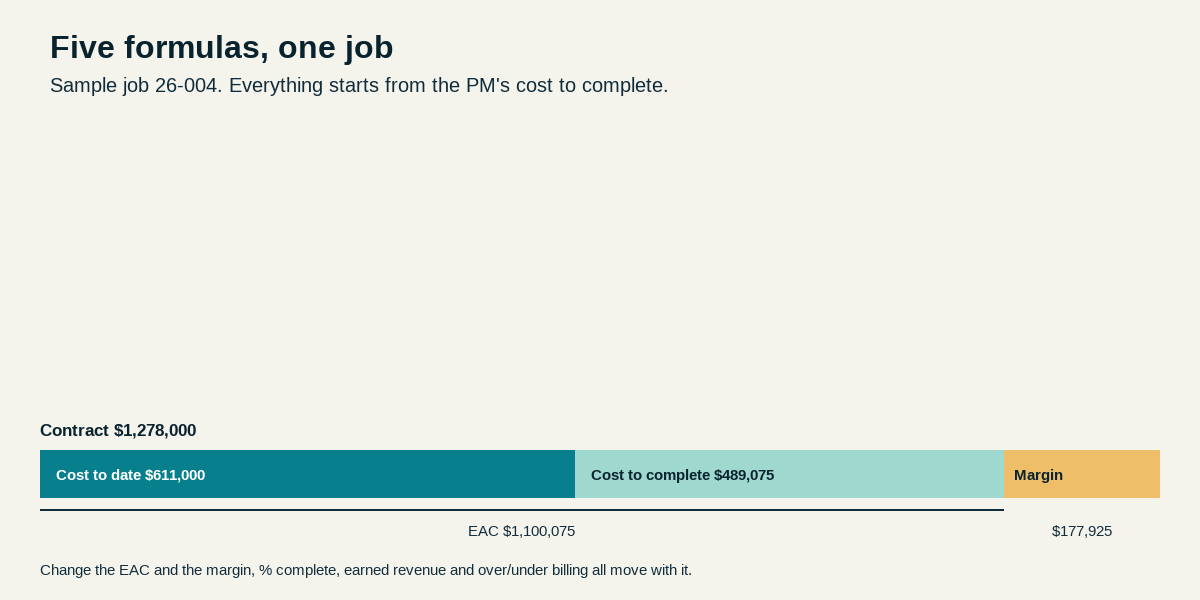
| EAC | 611,000 + 489,075 | $1,100,075 |
| % complete | 611,000 ÷ 1,100,075 | 55.5% |
| Earned revenue | 0.5554 × 1,278,000 | $709,823 |
| Billed to date | from QuickBooks / the prime contract | $640,000 |
| Over / (under) billed | 640,000 − 709,823 | ($69,823) under |
| Projected margin $ | 1,278,000 − 1,100,075 | $177,925 |
| Projected margin % | 177,925 ÷ 1,278,000 | 13.9% |
Change the cost to complete and five other numbers move. Raise it by $50,000 and the EAC is $1,150,075, % complete drops to 53.1%, earned revenue drops to $678,963, the under billing shrinks to $38,963, and margin falls to 10.0%. That's why the forecast deserves a review and not a rubber stamp.
Step 1: the executive opens the month
An executive opens Month-end close and clicks Open November. That creates one review row per job in the close: every won or active job. Pursuits and closed jobs aren't in it.
Before opening, clear the inputs. Card spend should be coded (the approvals queue has a "Not in Procore yet" tile for exactly this), bills entered, and QuickBooks and Procore synced. The order matters for the same reason it matters in any close; our month-end close checklist goes through cutoff, accruals and the rest. The app doesn't enforce dates. It's a rhythm, not a gate.
Step 2: the PM forecasts cost to complete by cost code
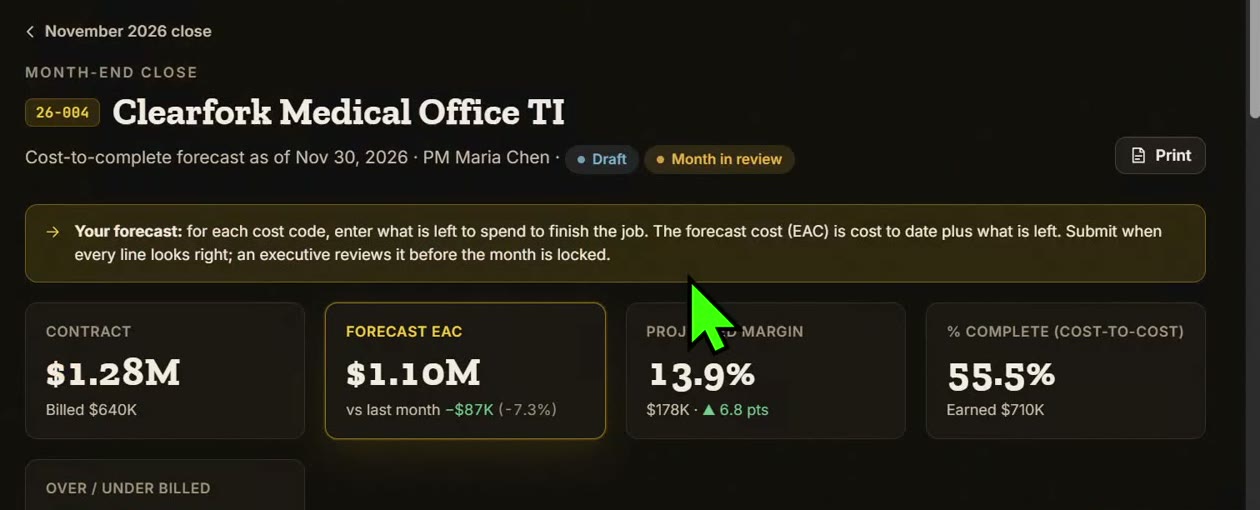
The PM clicks Forecast on their job. The page reads "Cost-to-complete forecast as of Nov 30, 2026" and shows five tiles (Contract, Forecast EAC, Projected margin, % complete, Over/under billed) and a table with one row per cost code.
 The PM's forecast page (sample data)
The columns: Cost code, Budget, Committed, Actual to date, Committed remaining, Prefill, Forecast to complete, EAC, Over/(under) budget, Note.
Until the PM saves, every line is live and pre-filled with a starting guess:
- Committed remaining = committed − actual, never below zero.
- Prefill = committed remaining + whatever budget hasn't been committed or spent yet:
committed remaining + max(0, budget − max(committed, actual)). - EAC on the line = actual to date + forecast to complete.
Here's what the prefill does on four lines of the sample job (budget, committed and actual from the screen, overrides illustrative):
| Cost code | Budget | Committed | Actual | Committed remaining | Prefill | PM forecast | Why |
|---|---|---|---|---|---|---|---|
| 09-300.S Tile | $46,100 | $44,256 | $28,764 | $15,492 | $17,336 | $15,492 | Sub is bought out; the $1,844 of uncommitted budget won't be spent |
| 22-400.S Plumbing Fixtures | $105,400 | $103,292 | $63,386 | $39,906 | $42,014 | $39,906 | Same: contract covers the scope |
| 22-400.M Plumbing Fixtures | $39,500 | $5,024 | $10,320 | $0 | $29,180 | $24,000 | Fixtures for two exam rooms still to buy; quote in hand |
| 26-050.M Electrical | $26,300 | $3,345 | $7,956 | $0 | $18,344 | $18,344 | Leave the prefill; no better information |
The material lines tell a story you'll see on most jobs: actual is higher than committed because materials get bought on cards and by bill, not on a commitment. The prefill handles that by treating the uncommitted budget as still to spend.
The prefill is a floor for thinking, not an answer. The PM overrides any line, writes a reason in Note ("Why?"), and can Reset to prefill if they change their mind. They also write a short PM summary for the executive. Then Save draft, which stores the forecast and re-snapshots the actuals at that moment.
Two guardrails:
- A forecast to complete can't be negative. If a code is over, the EAC shows it; the remaining spend can't hide it.
- QuickBooks job cost that has no cost code appears as an Unallocated line so the lines add up to the job's real cost to date. If that line is large, coding isn't finished, and the forecast will be wrong in ways nobody can see.
Step 3: submit for review
Submit for review saves the draft and freezes the figures the executive will sign off: contract, billed to date, cost to date (the sum of line actuals) and EAC (the sum of line EACs). The first submit moves the month from Open to In review. A note goes into the job's Discussion, and the PM sees "Submitted. Waiting on executive review; you can edit again if it is sent back."
Step 4: executive review
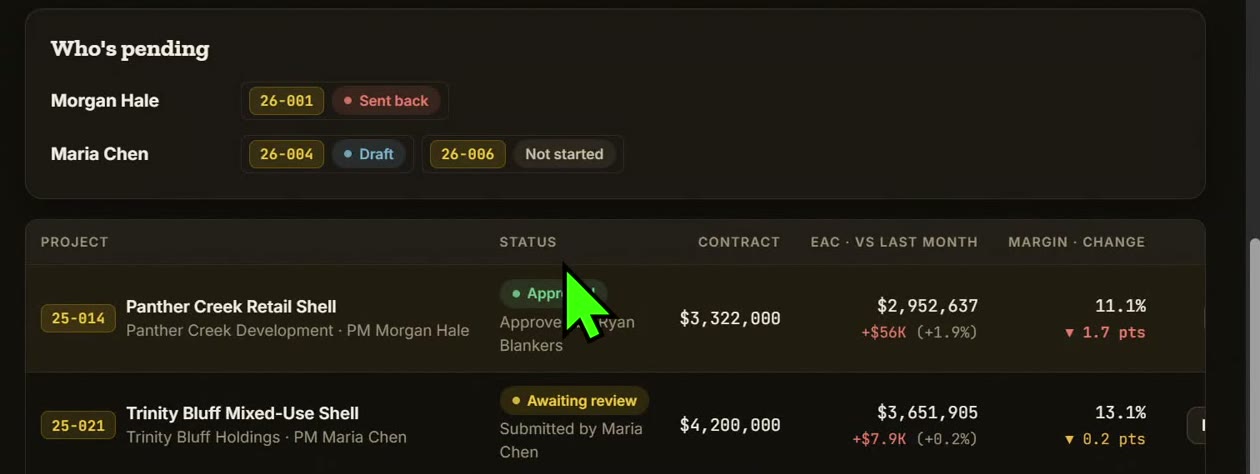
The executive's view of the close is the Sign-off tab. Tiles count approved jobs, jobs awaiting review, jobs waiting on PMs (with how many were sent back), margin fade flags and the forecast margin. Who's pending lists each PM with their jobs that are not started, in draft or sent back.
 Who's pending, and every job's EAC and margin change (sample data)
Each row compares this month's forecast with the last locked month. A row is flagged when:
- projected margin fell by more than 1 point, or
- EAC grew by more than 2%.
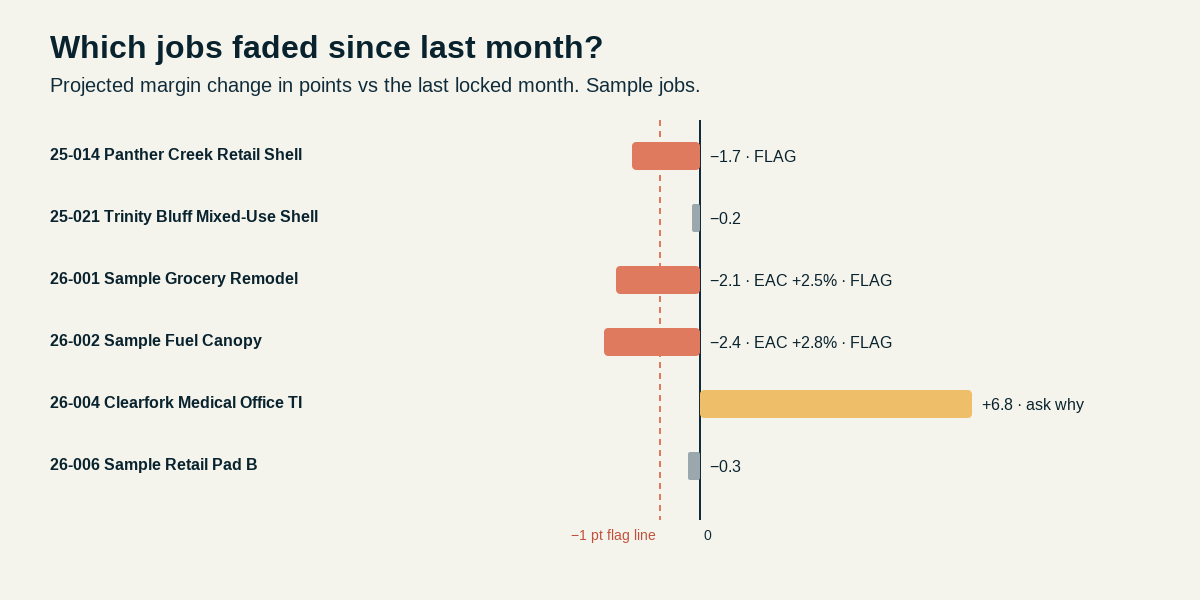 Fade flags across the sample jobs
The executive opens each submitted job, reads the PM summary and the line notes, and either:
- Approves, or
- types a comment and Sends back. The comment is required. The PM sees a red banner with it ("Sent back: general conditions look light for the extended duration"), edits and resubmits.
An approved forecast can still be sent back until the month is locked. Every approve, send-back and comment is stamped with who and when.
What to ask on review
The flags catch fades. They don't catch everything. On the sample data, 26-004 Clearfork Medical Office TI isn't flagged at all, and it's the job we'd look at first:
| Last locked month | This forecast | Change | |
|---|---|---|---|
| EAC | about $1,187,200 | $1,100,075 | −$87K (−7.3%) |
| Projected margin | 7.1% | 13.9% | +6.8 pts |
| System EAC (budget-based) | $1.20M |
The PM's EAC is about $100K under what the budget-based system EAC says. That could be good news: a rebid came in lower, scope was bought out under budget. It could also be a forecast that dropped lines nobody has bought yet. The rule only flags drops, so a margin jump like this is the reviewer's job to question. Ask for the backup before approving.
Questions we'd ask on any job:
- Which three cost codes moved the most since last month, and why? The line notes should answer this without a call.
- Is the Unallocated line near zero? If not, cost to date is incomplete.
- Does the forecast cover pending change orders? Cost for unapproved changes is real cost; the contract side may not be.
- Do material lines have room for what's still to buy? Card and bill purchases often run ahead of commitments.
- Is general conditions forecast for the actual remaining duration? Schedule slips show up here first.
- If over billed, is the billing ahead of real progress, or is cost to complete too high? If under billed, is a pay app late, or is cost to complete too low?
Step 5: lock and sign off
When every job is approved, Lock November becomes active. Until then its tooltip reads "Every job must be approved first." The lock window summarizes the jobs, contract, EAC and margin, and warns that only an admin can reopen it. Lock and sign off then:
- writes one WIP snapshot per job from the submitted figures (contract, EAC, cost to date, % complete, earned, billed, over/under, margin),
- marks the month locked with who and when,
- adds a log entry "WIP schedule as of Nov 30, 2026 signed off".
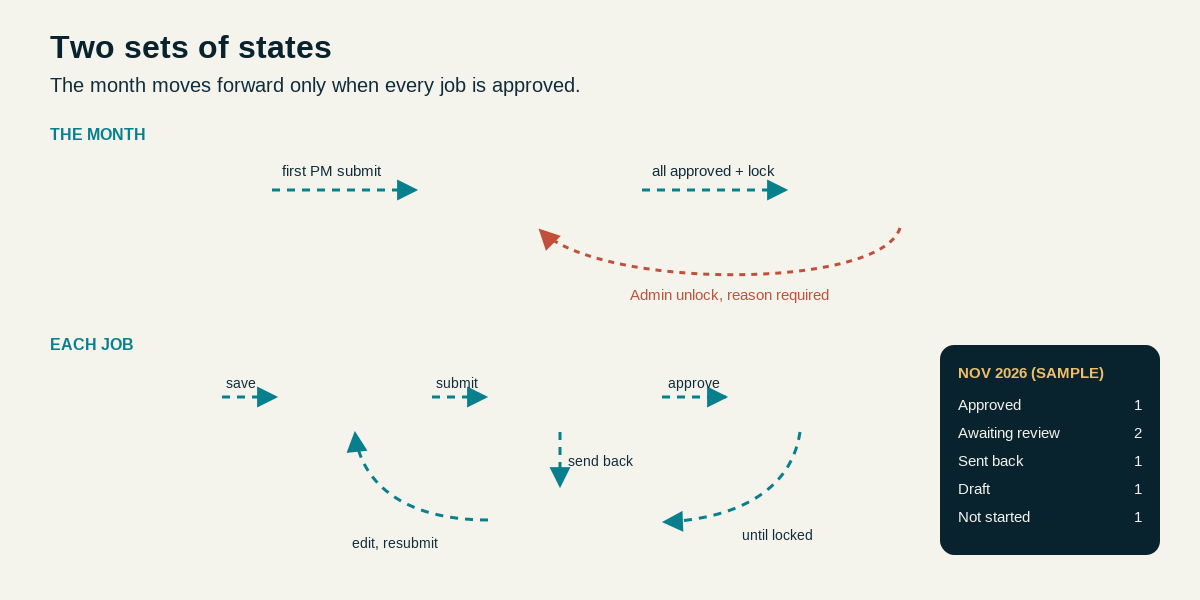 The month and each job have their own states
After the lock, the WIP schedule tab reads "WIP schedule as of Nov 30, 2026" and later syncs don't change it. It exports to CSV or prints. EAC & margin history charts each job's projected margin or EAC across the last 12 locked months, which is where slow fades show up. Next month's flags compare against this snapshot.
The close pack (Reports > Close pack) prints a company summary and one page per job: WIP figures, pending changes, uncoded card spend, the QuickBooks vs Procore gap, exceptions, and ready yes or no. One caveat we built into the help text: the close pack reads live data, not the locked snapshot, so print it at lock time if you want the two to match.
Unlocking
Sometimes a pay app posts after the close. An admin (only an admin) clicks Unlock, types a reason of at least five characters ("Pay app 7 posted after close"), and confirms. The snapshots are removed, but their values are kept in the audit log with the reason. The month goes back to In review, the executive sends back the affected job, the PM resubmits, and the month is locked again.
The portfolio view
Here are all six sample jobs in the November close, as they appear in the worksheet:
| Job | Contract | Cost to date | Cost to complete | EAC | % complete | Billed | Over / (under) | Margin | Change | Status |
|---|---|---|---|---|---|---|---|---|---|---|
| 25-014 Panther Creek Retail Shell | $3,322,000 | $2,412,000 | $540,637 | $2,952,637 | 81.7% | $3,020,000 | $306,269 | 11.1% | −1.7 pts, flag | Approved |
| 25-021 Trinity Bluff Mixed-Use Shell | $4,200,000 | $2,948,000 | $703,905 | $3,651,905 | 80.7% | $2,960,000 | ($430,450) | 13.0% | −0.2 | Submitted |
| 26-001 Sample Grocery Remodel | $1,914,200 | $812,400 | $840,464 | $1,652,864 | 49.2% | $948,000 | $7,151 | 13.7% | −2.1, flag | Sent back |
| 26-002 Sample Fuel Canopy | $425,000 | $98,400 | $266,497 | $364,897 | 27.0% | $118,000 | $3,392 | 14.1% | −2.4, flag | Submitted |
| 26-004 Clearfork Medical Office TI | $1,278,000 | $611,000 | $489,075 | $1,100,075 | 55.5% | $640,000 | ($69,823) | 13.9% | +6.8 | Draft |
| 26-006 Sample Retail Pad B | $2,640,000 | $18,600 | $2,225,400 | $2,244,000 | 0.8% | $0 | ($21,882) | 15.0% | −0.3 | Not started |
| Total | $13,779,200 | $6,900,400 | $5,065,978 | $11,966,378 | $7,686,000 | ($205,343) | 13.2% |
The totals tie to the company screens: $13.8M of open contract on the Projects list, about $210K net under billed on the company dashboard's billing position (the dashboard uses the system EAC until a forecast is approved, so it won't match to the dollar mid-close), and 13.2% projected margin on the profitability report.
Two jobs pull opposite ways. Panther Creek is over billed by about $306K, a liability, while Trinity Bluff is under billed by about $430K: work done that hasn't been billed, which is cash the company is financing. The owner reports guide covers the WIP and cash reports that sit on top of this close.
Using the worksheet without the app
The month-end EAC review worksheet has one row per job with contract, cost to date, cost to complete, EAC, % complete, earned, billed, over and under billing, projected margin, last month's EAC and margin, the change, a fade flag, a PM note and an executive comment. The formulas are written out at the bottom. To run the routine in a spreadsheet:
- Paste cost to date and billed to date from QuickBooks after cutoff.
- Send each PM their rows and ask for cost to complete by cost code, with a note for any line that changed more than you'd expect.
- Recalculate, flag anything that fades more than 1 point or grows EAC more than 2%, and look at big gains too.
- Review with each PM. Approve or send back with a comment.
- When every job is approved, save a copy named for the month and don't touch it again. That copy is your lock.
The weakness of the spreadsheet is step 5. Nothing stops someone from editing last month's file. That's the main reason we put the lock in software.
Where this fits
The close is one area of the project operating system tour. Its projected margin feeds the Profitability measure in the weighted project grade. Cost to date is only right if card spend is coded, which is the job of the approvals queue and the fix in Ramp bills show $0 in Procore. If you report WIP in Power BI today, construction WIP reporting in Power BI covers the model behind it.
Want a close like this?
If your WIP schedule lives in a spreadsheet that changes after the partners have seen it, we can build the forecast, review and lock on top of the Procore and QuickBooks data you already have. Email charley@buildflows.ai or tell us how your close runs today.
Frequently asked questions
How do you calculate estimate at completion (EAC) on a construction job?
EAC equals cost to date plus the forecast cost to complete. For example, $611,000 spent plus $489,075 left to spend gives an EAC of $1,100,075. The forecast should be built by cost code from what's committed but not yet spent, plus budget not yet committed, adjusted by the project manager.
How is projected margin calculated from EAC?
Projected margin equals revised contract minus EAC, divided by revised contract. With a $1,278,000 contract and a $1,100,075 EAC, projected margin is $177,925, or 13.9%.
How do you calculate over and under billing from EAC?
Percent complete is cost to date divided by EAC. Earned revenue is percent complete times revised contract. Over or under billing is billed to date minus earned revenue: positive means over billed, a liability; negative means under billed, an asset.
Who should review project managers' cost-to-complete forecasts?
An executive who didn't write the forecast. They should review every job, approve it or send it back with a written comment, and only lock the month once every job is approved. The PM knows what's left to spend; the reviewer's job is to question it before it becomes revenue.
What is margin fade and how do you flag it?
Margin fade is a drop in a job's projected margin from one month to the next. A simple flag rule is margin down more than 1 point or EAC up more than 2% versus the last locked month. Large margin gains aren't fades, but they should still be questioned before approval.
Why lock the WIP schedule at month end?
So the numbers the partners signed off don't change when later syncs or edits arrive. A locked snapshot also gives next month's review a fixed baseline for fade flags. If something must change, an admin unlocks with a written reason that is kept in the audit log.
Next step
Trying to automate a report like this?
Discuss your current reporting process: what the team does today, which systems are involved, and what you want to change.
Prefer email? charley@buildflows.ai
Keep learning
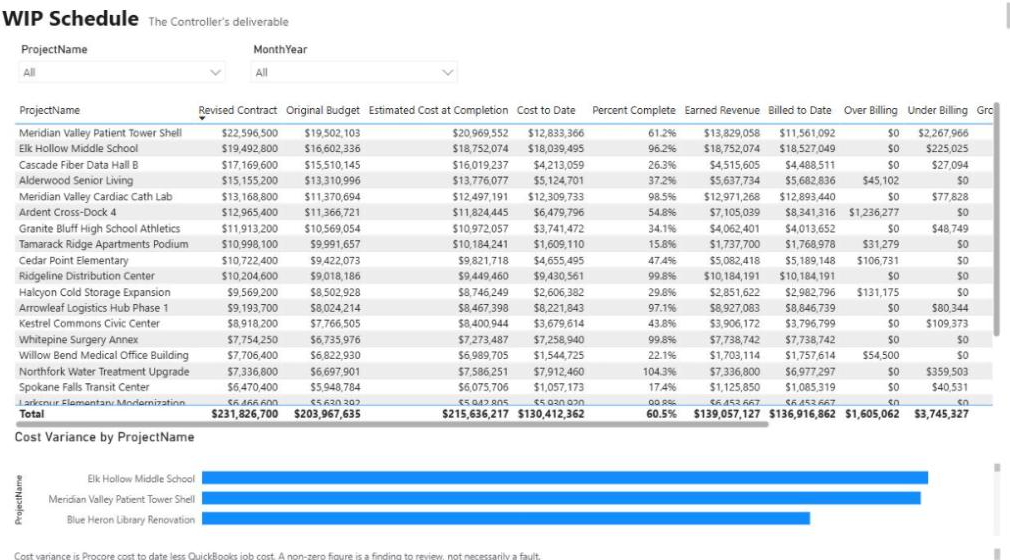
Reporting & analytics · October 8, 2026
Construction WIP Reporting in Power BI: A Controller's Guide
A practical guide to construction WIP reporting in Power BI: the formulas, where the data comes from in Procore and accounting, the mistakes that make a WIP schedule look right while being wrong, and how to automate it.
Reporting & analytics · October 10, 2026
Over/Under Billing Explained: How to Read Your WIP Schedule
How over and under billing are calculated, three worked jobs including a stale forecast, the month-end journal entries and balance sheet impact, the usual causes, and a routine to review the WIP schedule every close.
Playbooks · October 10, 2026
Month-End Close Checklist for Construction Controllers
The nine-step month-end close in the order that keeps the WIP from being rebuilt, who owns each step, what done looks like, and which parts to automate first.