Key takeaways
- Close in the order the WIP needs: cutoff, AP and AR, accruals, change orders and job cost review before the WIP is calculated.
- Give every step exactly one named owner; a step owned by a department is a step nobody chases.
- Use one cutoff date for cost and billing, or over/under billing swings every month for no real reason.
- Tie the over and under billing GL balances to the WIP gross columns every month, and snapshot the schedule as issued.
- Automate the checks and arithmetic first; keep EACs, change order judgment and sign-off with people.
Short answer: A construction month-end close runs in a fixed order because each step feeds the next. Cut off cost and billing on the same date, post AP and AR, book accruals for work received but not invoiced, settle which change orders are approved, review job cost and update each job's estimate at completion (EAC), then calculate the WIP schedule and book the over/under billing entry. Reconcile retainage on both sides, and finish with a review, a sign-off and a snapshot that never changes. Give every step one named owner. When you start automating, automate the checks and the arithmetic first, and leave forecasts and judgment calls with the people accountable for them.
This checklist is for controllers, CFOs and project accountants at general and specialty contractors. It sets out the nine steps, who owns each one, what "done" looks like, and which parts are worth automating first. It assumes you already produce a WIP schedule; if you want a refresher on the math, read over/under billing explained first.
Why the order matters
Most close problems in construction are sequencing problems. The WIP schedule depends on four inputs per job: revised contract, EAC, cost to date and billed to date. If any one of those changes after the WIP is calculated, the over/under figure, the gross profit and the journal entry are all wrong, and someone has to redo them.
So the checklist is built backwards from the WIP:
- Cost to date has to include AP posted through the cutoff and accruals for work already received.
- Revised contract has to include every owner-approved change order, and nothing that is still pending.
- EAC has to be reviewed after cost is final, not before.
- Billed to date has to match the pay applications actually issued for the period.
Steps 1 to 5 fix those inputs. Steps 6 and 7 calculate. Steps 8 and 9 check and lock the month.
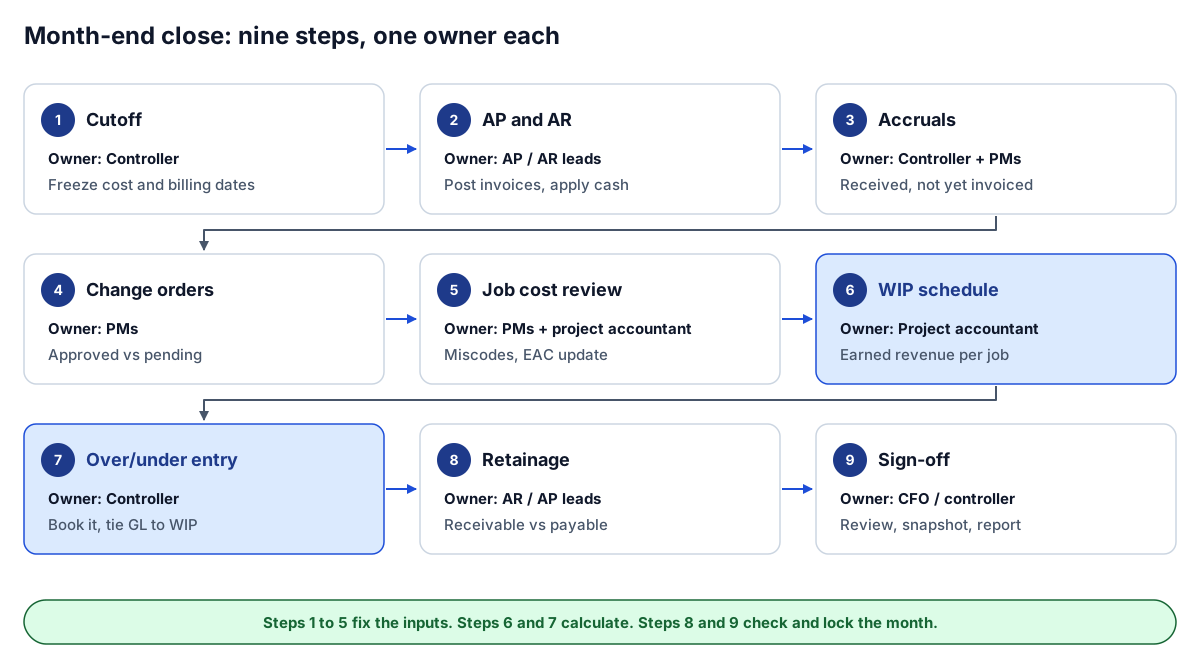 Nine steps, one owner each. The order is what keeps the WIP from being rebuilt.
The nine-step checklist, with owners
| # | Step | Owner | Done when |
|---|---|---|---|
| 1 | Cutoff | Controller | Cost and billing cutoff date set and communicated; late items go to next month |
| 2 | AP and AR | AP lead (AR lead posts pay apps and cash) | Vendor invoices through the cutoff posted to jobs; owner pay apps posted; cash applied |
| 3 | Accruals | Controller (PMs list received-not-invoiced items) | Received-not-invoiced costs listed per job and accrued |
| 4 | Change orders | Project manager (one per job) | Every change order is approved, pending or rejected, with dates and amounts |
| 5 | Job cost review | Project accountant (PMs review their jobs and EACs) | Miscodes fixed; every open job has a current EAC |
| 6 | WIP schedule | Project accountant | Earned revenue and over/under calculated job by job; exceptions listed |
| 7 | Over/under entry | Controller | Entry posted; GL over and under billing balances tie to the WIP gross columns |
| 8 | Retainage | AR lead (AP lead reconciles retainage payable) | Retainage receivable and payable reconciled to pay apps and the GL |
| 9 | Sign-off | CFO (controller where there is no CFO) | Reviewed, snapshot saved, reports issued |
Your titles may differ. What matters is that each row has exactly one accountable name next to it; the people in brackets help but do not own the step. A step owned by "accounting" or "the PMs" is a step nobody is chasing.
Step by step
1. Cutoff
Pick one date for cost and billing and hold to it. If cost is cut off on the 31st and billing on the 25th, every job looks under billed by six days of work, and the WIP swings month to month for no real reason. Write the cutoff into the close calendar, send it to PMs and AP, and decide in advance what happens to an invoice that arrives late: it either waits for next month or gets accrued in step 3, never quietly added after the WIP is run.
2. AP and AR
Post vendor and subcontractor invoices dated through the cutoff, coded to the right job and cost code. Post owner pay applications issued for the period, and apply cash received. Two checks catch most problems here:
- Invoices with no job, or with a job or cost code that does not exist in the job master.
- Identical lines that look like the same batch posted twice.
The free construction data quality checker covers the mechanical part against an AP or job cost export in a couple of minutes: blank job numbers, invalid dates, duplicate lines and the same job written different ways. Checks against your job master need a second source, so the checker cannot tell you a job number does not exist; that comparison is part of the mapping and reconciliation we build into WIP reporting.
3. Accruals
Cost to date should include work received but not yet invoiced: materials delivered, equipment rented, subcontractor work in place with no pay app yet. Ask each PM for a short list, or build it from commitments where work is reported in place but not billed. Book the accrual against the job so that it moves percent complete, and reverse it next month when the invoice arrives. Missing accruals make jobs look less complete than they are, which understates earned revenue.
4. Change orders
Revised contract includes owner-approved change orders only. Pending and draft change orders are exposure, not contract, and they belong on a separate line. In this step the PM confirms the status, approval date and amount of every change order on their jobs, and the change order status in the PM system matches the ERP. Two classic errors: an approved change order with a blank amount, which understates revised contract, and a pending change order already added to the contract, which overstates it. Our guide to change order aging covers how to track the pending ones.
5. Job cost review
With cost final, each PM reviews their jobs: cost posted to the wrong job or code, commitments not yet entered, and the EAC. The EAC is the single most important number in the close. If it is stale, percent complete is wrong, and so is everything downstream of it. Two rules worth enforcing:
- Any job where cost to date is above EAC needs a re-forecast before the WIP is final.
- A job with no EAC is labeled "No forecast" and excluded from earned revenue, not treated as zero cost to complete.
6. WIP schedule
Now calculate. For each job: percent complete is cost to date ÷ EAC, earned revenue is revised contract × percent complete, and over or under billing is billed to date minus earned revenue. Calculate job by job and then sum; never apply a portfolio percent complete to the portfolio contract. The WIP and over/under billing calculator will run the math on a pasted schedule and flag fades and large under billings, which is a useful second check on a spreadsheet.
Produce an exceptions list alongside the schedule: jobs with no forecast, cost over EAC, large swings from last month, and jobs missing from the schedule entirely. A missing job looks exactly like a job with no activity.
7. Over/under entry and tie-out
Book the WIP adjustment so that revenue on the income statement equals earned revenue, with over billings in current liabilities and under billings in current assets. Then tie the general ledger balances to the WIP schedule's gross over and under columns. That tie-out is the most useful single check in the close. If it does not tie, something changed after step 6. The journal entries are worked through in over/under billing explained.
8. Retainage
Reconcile retainage receivable (held by owners on your billings) and retainage payable (held by you on subcontractors) to the latest pay applications and to the GL. Retainage columns on pay apps are running balances, so take the latest issued or approved pay app per contract, never a sum across periods. Flag jobs that are substantially complete or closed out with retainage still held. Retainage tracking has a reconciliation checklist and a report layout.
9. Review, sign-off and snapshot
The CFO or controller reviews the WIP, the exceptions list and the month-over-month changes, then signs off. Save the final schedule and the reports exactly as issued. Next month's fade and gain are measured against this snapshot, and a board pack should never change after it is sent. If you want to see what a finished month-end pack looks like with every number traced to its source, open the interactive sample report.
What to automate first
Not every step should be automated, and the ones that should are not always the ones that take the longest. A useful rule: automate the checks and the arithmetic, keep the forecasts and judgment calls with people.
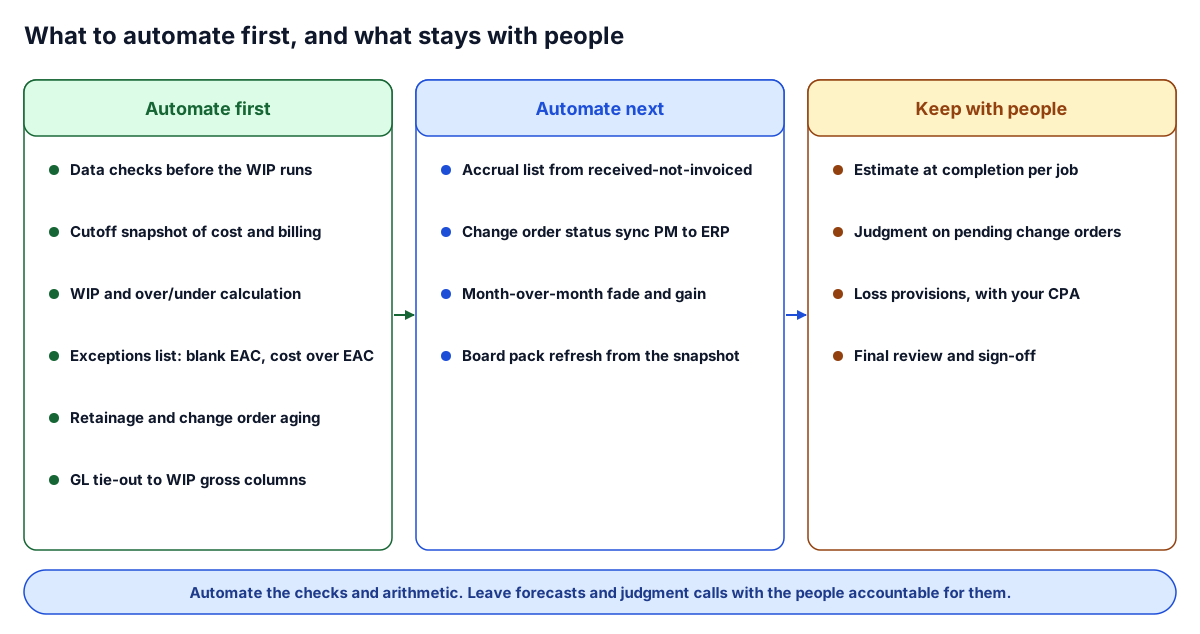 Automate the checks and arithmetic first. Forecasts and sign-off stay with people.
Automate first:
- Data checks before the WIP runs. Blank job numbers, orphan cost codes, duplicate lines, approved change orders with no amount. These are mechanical, they recur every month, and catching them early saves a re-run. See construction data quality rules for the checks we build in.
- The cutoff snapshot. Freeze cost and billing as of the cutoff so a late posting cannot move a number after review.
- The WIP calculation and exceptions list. Once the inputs are clean, the math is deterministic and should never be retyped.
- Retainage and change order aging. Both are lists that are easy to generate and tedious to build by hand.
- The GL tie-out. A check that the over and under billing accounts equal the WIP gross columns, run automatically after the entry is posted.
Automate next: the accrual list from received-not-invoiced commitments, change order status sync between the PM system and the ERP, month-over-month fade and gain, and refreshing the board pack from the signed-off snapshot.
Keep with people: the EAC for each job, judgment on whether a pending change order will be approved, loss provisions (with your CPA), and the final review. Software can flag a stale EAC. It should not write one.
If the WIP is still a spreadsheet, the WIP schedule template is a reasonable halfway step: the formulas are fixed and the exceptions are highlighted, so the close stops depending on who built the file. Our guide to construction WIP reporting in Power BI covers the next step, with a project crosswalk, a data quality gate and month-end snapshots.
Common close problems and where they start
| Symptom | Usually starts at | Fix |
|---|---|---|
| Over/under swings every month on steady jobs | Step 1: different cost and billing cutoffs | One cutoff date for both |
| Job looks under billed and very profitable | Step 5: EAC set too low | Re-forecast; watch for fade |
| Revised contract does not match the PM system | Step 4: change order status out of sync | Reconcile status and amounts before the WIP |
| GL does not tie to the WIP | Step 7: posting after the WIP was run | Lock the cutoff; re-run, never patch |
| Board pack changes after it was sent | Step 9: no snapshot | Save the schedule as issued |
| Retainage balance looks doubled | Step 8: summing running balances | Use the latest pay app per contract |
Where to go next
- See the end result: the interactive sample report, a month-end pack with portfolio, WIP, cash and exceptions.
- Check your inputs: run an AP, job cost or change order export through the data quality checker, then the WIP calculator.
- Read the math: over/under billing explained and construction WIP reporting in Power BI.
- Want a shorter close? Tell us what your month-end looks like and we will suggest which steps to automate first on your systems.
Frequently asked questions
What are the steps in a construction month-end close?
Set one cutoff for cost and billing, post AP and AR, book accruals, confirm change order status, review job cost and update each EAC, calculate the WIP schedule, book the over/under billing entry and tie it to the GL, reconcile retainage, then review, sign off and snapshot. Each step feeds the next, so the order matters.
Who should own each step of the close?
Typically the controller owns the cutoff, accruals and the over/under entry; AP and AR leads own posting and retainage; project managers own change order status and EACs; the project accountant owns the WIP schedule; and the CFO or controller signs off. Titles vary, but each step needs one named owner.
Why should change orders be reviewed before the WIP schedule?
Revised contract on the WIP includes owner-approved change orders only. If change order status changes after the WIP is calculated, earned revenue, over/under billing and the journal entry are all wrong and have to be redone.
What should a contractor automate first in month-end close?
Start with data checks before the WIP runs, a cutoff snapshot, the WIP and over/under calculation with an exceptions list, retainage and change order aging, and the GL tie-out. Leave estimates at completion, judgment on pending change orders and final sign-off with people.
How long should a construction month-end close take?
It depends on job count, systems and how clean the data is, so there is no single benchmark worth quoting. The fastest gains usually come from a fixed cutoff, catching data problems before the WIP runs, and never rebuilding the WIP after review.
Next step
Want help running this playbook?
Bring the report or workflow. We'll help map the work behind it.
Prefer email? charley@buildflows.ai
Keep learning
Reporting & analytics · October 10, 2026
Over/Under Billing Explained: How to Read Your WIP Schedule
How over and under billing are calculated, three worked jobs including a stale forecast, the month-end journal entries and balance sheet impact, the usual causes, and a routine to review the WIP schedule every close.
Reporting & analytics · October 8, 2026
Construction WIP Reporting in Power BI: A Controller's Guide
A practical guide to construction WIP reporting in Power BI: the formulas, where the data comes from in Procore and accounting, the mistakes that make a WIP schedule look right while being wrong, and how to automate it.
Reporting & analytics · October 10, 2026
Retainage Tracking: Receivable, Payable and How to Report It
Retainage receivable and payable defined, where each lives in Procore and the ERP, how to age it, what triggers release, eight monthly reconciliation checks and a report layout you can copy.