Key takeaways
- QuickBooks Online has no read-only accounting scope, so the limits on what an automation can change have to live in the automation's code.
- The Ramp to Procore job-cost fix needs ten reads and only two writes: a QuickBooks bill sparse update and, by exception, a Procore update on manually entered costs.
- The automation never changes amounts or vendors, never breaks payment links, never touches closed periods and never creates items.
- Every update carries the bill's current SyncToken and every line; a conflict means re-read, retry once, then send the bill to a person.
- Low-confidence bills (missing item, ambiguous code, closed period) go to a review queue with a suggested coding and one-click approval.
- Edit bills in place and never delete and re-create, because Procore's connector doesn't detect deletions.
- Nothing writes until a hand test on three bills passes and shadow mode produces 20 proposals in a row approved with no corrections.
88 seconds · From a Build Flows walkthrough
Detect, translate, score, queue, and never touch the amount
Bills are detected by webhook with a 15-minute sweep, translated, scored and either rewritten or queued with a suggestion. Amounts, vendors, payment links, closed periods and items are never changed.
Read the clip transcript
So essentially then there's different things that we tried initially to go through and do this to resolve this. And ultimately, the integration that they currently have to date is currently set. And so we had to go through and develop this. And so the bills are needed to be detected initially. So we're doing that through webhooks and having a 15-minute stop to identify them. Then those are read in Ramp. They're translated. And associated to the Procore cost codes. And then they're then scored and written. And then we'll rank those as a queue. And so then we give like a recommendation for what it could be or should be. And then they'll ultimately have a queue within their system here. And so we're not changing anything for the amounts or vendors or payment links or anything, their periods or create items. Essentially, all it's doing is reading exactly what that bill, provision from the Ramp to QuickBooks. And then we're rewriting it. And then we're just assigning whatever that Procore new cost code is to us so that it has better costing when we're looking at it in Procore. So then we'll be able to then read the total amount because once Procore is able to read that line item from QuickBooks, then essentially it'll pull in that total cost for what that is. And so it will finally then land on their job costs there. And they'll be able to assign that to there.
Captions adapted from the source video; proper names may reflect automatic transcription. Original segment: 3:45–5:13. Watch at the source.
An automation that edits QuickBooks bills is touching the books. If it gets something wrong, the error shows up in job cost, in the P&L and possibly in a vendor payment. So before we build one, we write down exactly what it may read, the only two things it may write, and the list of things it never does. This guide is that list, taken from the job-cost plan we wrote for Cattlemen Construction Services, a general contractor in Fort Worth, Texas, whose Ramp bills weren't reaching Procore.
The automation in question reads how AP coded a bill in Ramp, then rewrites the matching QuickBooks bill so its lines sit on the Procore service items that Procore's QuickBooks Online connector can read. A second automation checks every night that QuickBooks and Procore agree. Every rule below exists to keep those two jobs small, traceable and reversible.
 Ten reads, two writes, five nevers
Why the limits live in the code
QuickBooks Online's API uses an OAuth 2.0 accounting scope. There's no read-only accounting scope to request, so once an app is connected it can technically edit almost anything in the company file. The only place to draw a tighter line is in the automation itself: which endpoints it calls, which fields it sends and which records it's allowed to change.
That's also how we think about AI agents in Procore. Our write governance ladder starts every agent at read-only and earns each write with evidence. This automation sits on the same ladder. It reads widely, writes in two narrow places, and spends weeks proposing changes before it's allowed to make any.
On the walkthrough I put the rule plainly: "we're not changing anything for the amounts or vendors or payment links." You can hear that section in the walkthrough video, from about 4:20.
Ten ways we look, two ways we touch
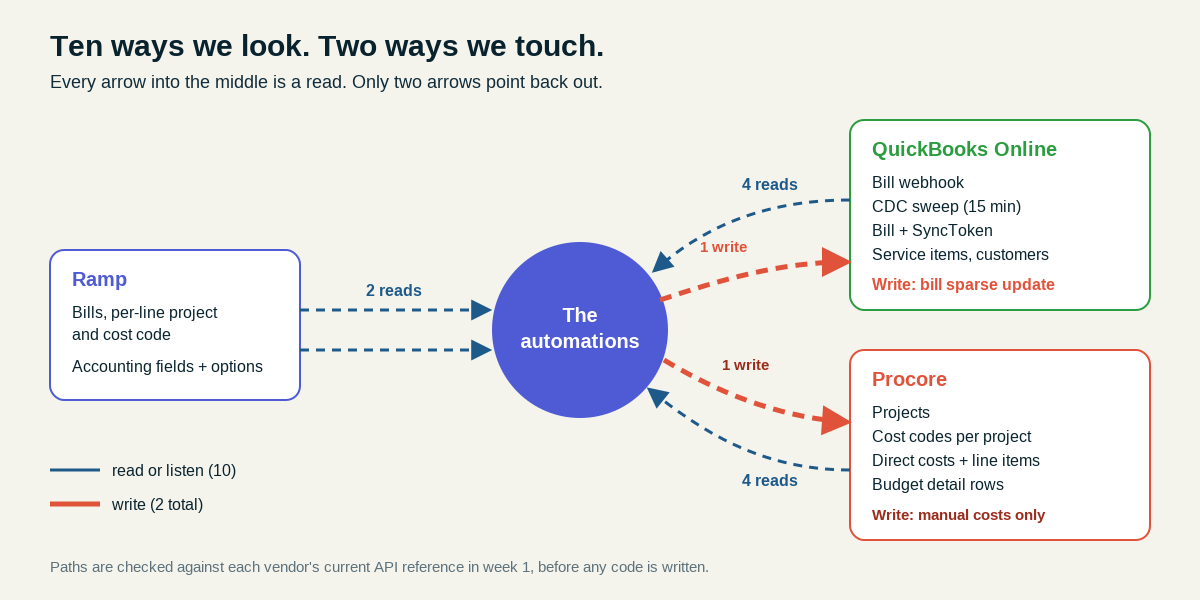 Every arrow in is a read. Two arrows point back out.
This is the full endpoint map from the plan. Automation 1 is the bill line rewriter. Automation 2 is the nightly reconciliation. "Crosswalk" means the call feeds the translation table that maps Ramp coding to QuickBooks service items and Procore budget codes.
| # | System | Call | Used by | Purpose | Type |
|---|---|---|---|---|---|
| 1 | QuickBooks | Webhook: Bill Create / Update | Auto 1 | Start a run when Ramp writes a bill | Listen |
| 2 | QuickBooks | GET /v3/company/{realmId}/cdc?entities=Bill,Purchase,VendorCredit&changedSince= | Auto 1, 2 | Backstop sweep for missed webhooks | Read |
| 3 | QuickBooks | GET /v3/company/{realmId}/bill/{id} | Auto 1 | Current lines and SyncToken | Read |
| 4 | QuickBooks | GET /v3/company/{realmId}/query (Item where Type = 'Service'; Customer) | Auto 1 | Load service items and projects into the crosswalk | Read |
| 5 | QuickBooks | POST /v3/company/{realmId}/bill (sparse update) | Auto 1 | Replace Category lines with Item lines | Write |
| 6 | Ramp | GET /developer/v1/bills and /bills/{id} | Auto 1 | Line-level project and cost code, as AP coded it | Read |
| 7 | Ramp | GET /developer/v1/accounting/fields and /accounting/field-options | Crosswalk | List of Ramp project and cost code values | Read |
| 8 | Procore | GET /rest/v1.0/companies/{company_id}/projects | Crosswalk | Project number to QuickBooks project | Read |
| 9 | Procore | GET /rest/v1.0/cost_codes?project_id= | Crosswalk | Budget codes per project | Read |
| 10 | Procore | GET /rest/v1.0/projects/{project_id}/direct_costs (+ /line_items) | Auto 2 | What Procore imported, per budget code | Read |
| 11 | Procore | GET /rest/v1.0/budget_views/{id}/detail_rows?project_id= | Auto 2 | Job-to-date cost per budget line | Read |
| 12 | Procore | PATCH /rest/v1.0/projects/{project_id}/direct_costs/{id}/line_items/{id} | Auto 2 | Only manual direct costs, only after approval | Write |
That's twelve rows and ten reads: the webhook is a listener, and two rows are writes. Paths and minor versions change, so the plan says we check each one against the vendor's current API reference in week 1, before any code is written. Treat the table as the shape of the integration, and the vendor docs as the source of truth for exact URLs.
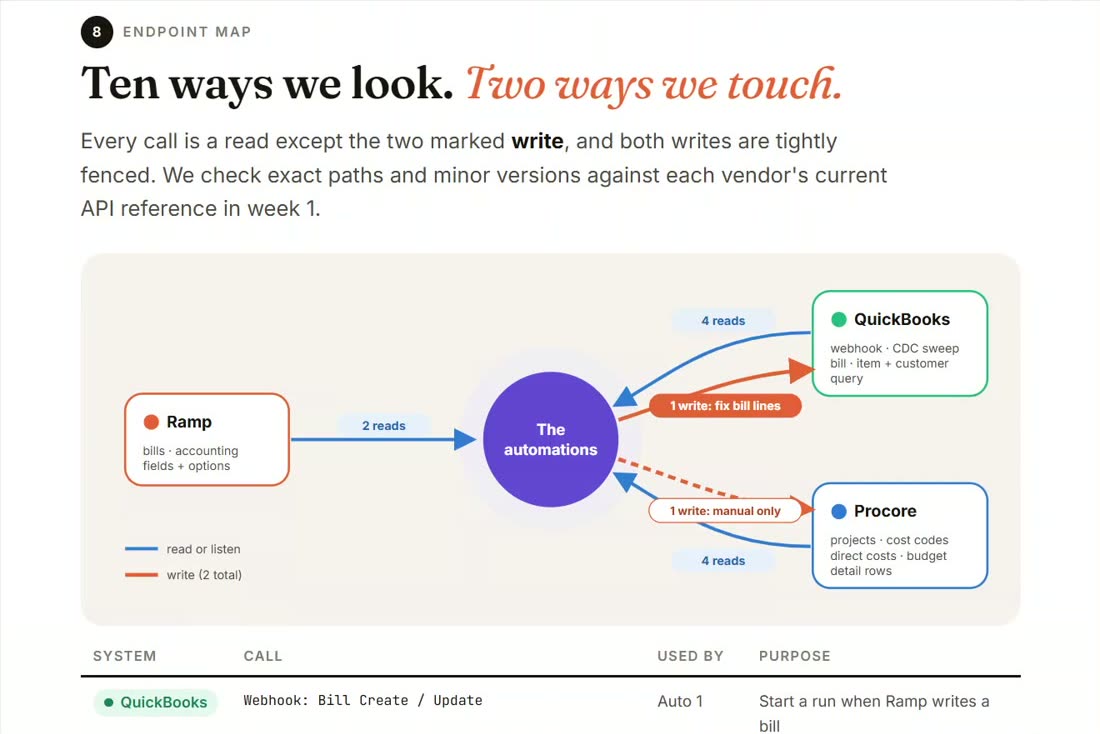 The endpoint map in the plan, as shown in the video (illustrative)
Who the automation signs in as
Each system gets its own dedicated integration user, so every change in an audit trail points back to the automation and nobody else:
| System | Auth | Scope |
|---|---|---|
| QuickBooks Online | OAuth 2.0 | Accounting scope |
| Ramp | OAuth client credentials | bills:read, accounting:read |
| Procore | OAuth service account, with the Procore-Company-Id header | Company Admin, Direct Costs and Budget on active projects |
Access is read-only first. Write access only comes after the hand test passes and the owner signs off. If you're setting these up, our API credential setup guide covers the common errors.
The two writes, up close
Write 1: the QuickBooks bill sparse update
This is the whole point of Automation 1. For a bill that passed every check, it sends one update:
- The bill's Id and its current SyncToken. QuickBooks stamps each version of a record with a SyncToken. An update sent with an old one fails. That's what stops us overwriting someone else's edit.
- Sparse mode, so header fields we don't send are left alone. Vendor, AP account, date, bill number and total are never in the payload.
- Every line on the bill. Each Category line becomes an Item line with
ItemRefpointing at the Procore service item (for example2401-03-300.M), the same amount and the original description. The plan also keeps theCustomerRefso the line stays on the QuickBooks project. Procore's documentation identifies the job from the project-specific service item; it doesn't list the line's customer as a requirement.
One thing to test in the sandbox: our understanding is that when a sparse update includes the Line array, QuickBooks replaces all of the bill's lines with what you send. We haven't seen that in Intuit's official text, so we treat it as true until a test says otherwise, and the rule is to always send every line, including any tax or freight lines we're leaving as Category lines.
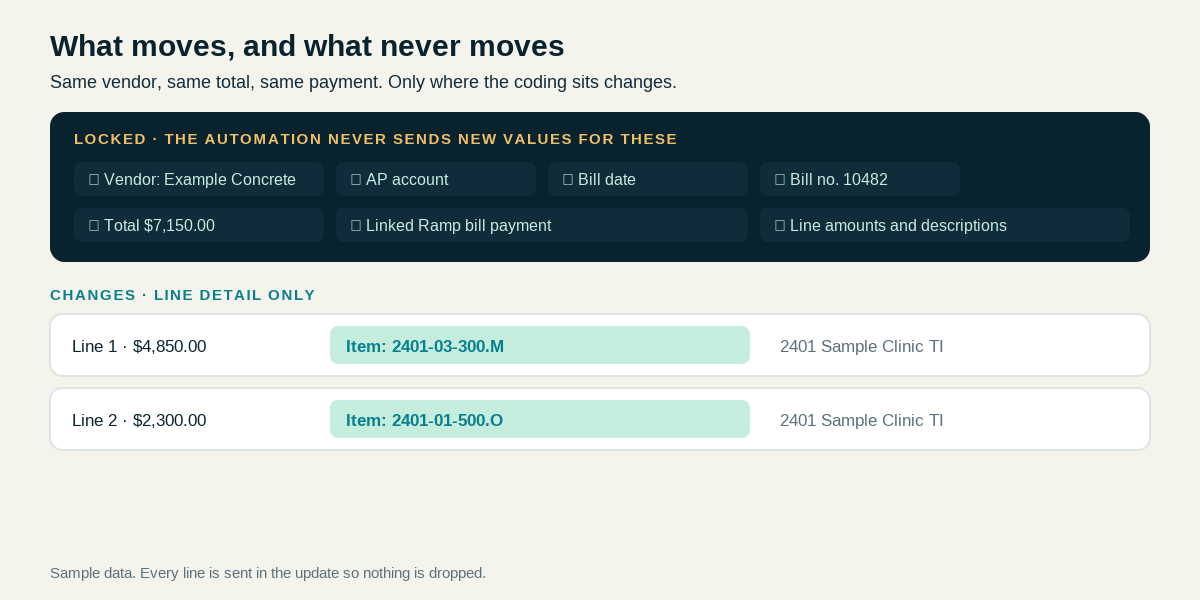 Only the line detail moves
Write 2: Procore direct cost line items, by exception only
Automation 2 has one write, and it's fenced twice. It may update a direct cost line item in Procore only when that cost was entered manually in Procore, and only after a person approves the change. It never edits imported records. Procore wouldn't let it anyway: imported direct costs arrive approved and can't be edited in Procore. Changes to them happen in QuickBooks.
What it never does
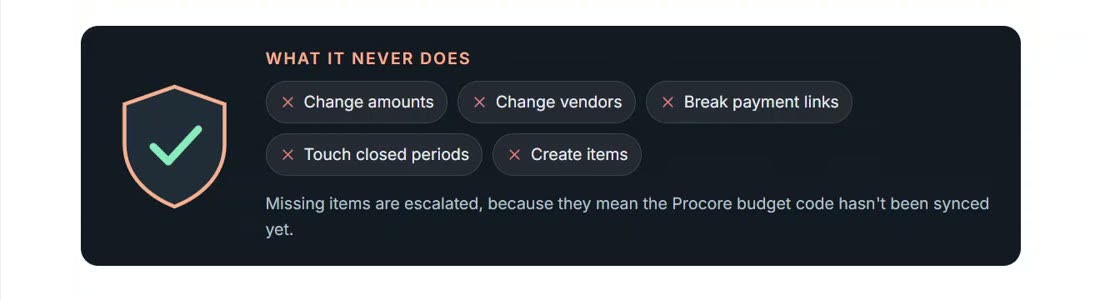 The never list, as shown in the plan in the video
| Never | Why |
|---|---|
| Change amounts | The bill total ties to the vendor's invoice and to the payment. A rewrite that moves a cent is a bookkeeping error. |
| Change vendors | Vendor drives 1099s, AP aging and the payment record. Coding has nothing to do with it. |
| Break payment links | Ramp pays the bill and syncs a bill payment linked to it. Keeping total, vendor and AP account fixed is how the link survives. We also check linkage on the first 20 bills in shadow mode before anything is written. |
| Touch closed periods | Closed books are closed. QuickBooks rejects API writes dated inside a closed period anyway, so these bills go straight to review. |
| Create items | Procore only reads service items it created. If an item is missing, the Procore budget code hasn't been synced. The automation escalates to the project manager to add the code in Procore. |
One more rule we add to every QuickBooks job-cost automation: edit in place, never delete and re-create. Procore's connector doesn't detect deletions, so a deleted bill can leave a stale direct cost behind in Procore.
How it decides: confidence, then write or queue
The plan's seven steps are detect, read Ramp, translate, score, rewrite, queue and log. The scoring step is the guardrail most people skip.
- High confidence: one exact service item match on an active project. The automation rewrites.
- Low confidence: a missing item, an ambiguous code or a closed period. The bill goes to a review list by email or Teams with the suggested coding. One click approves it, and then the rewrite runs.
Matching between Ramp and QuickBooks uses vendor, invoice number, amount and date. Ramp is treated as the source of truth for coding, because that's where AP coded it. Lines that aren't job cost, such as tax or freight, stay as Category lines. The crosswalk lists which GL accounts count as job cost.
Conflicts, re-runs and Ramp re-syncs
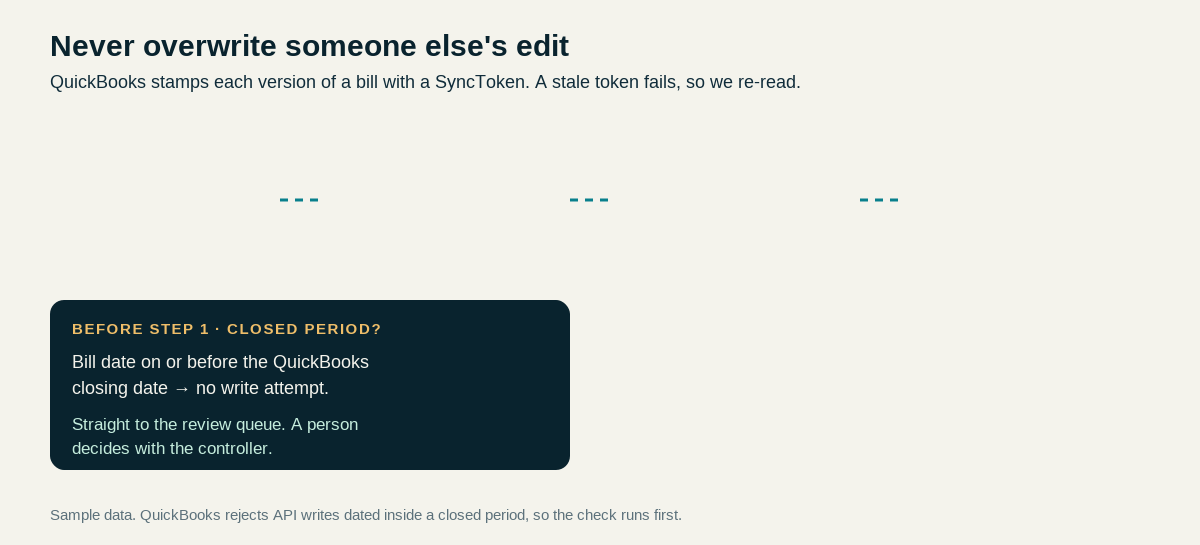 Re-read and retry once, then hand it to a person
- SyncToken conflict. If someone edits the bill while the automation is working, the write fails. The automation re-reads, checks nothing important changed, and retries once. A second failure goes to the review queue.
- Idempotent by design. Running it twice gives the same result as running it once. If Ramp re-syncs a bill, nothing doubles up, because a bill that's already on the right items has nothing left to change.
- Ramp re-syncs. Ramp's docs say edits made in Ramp re-sync the bill to QuickBooks and update the relevant fields. We don't yet know whether a re-sync puts our item lines back to category lines. The automation re-runs on every Bill update, so if it happens, the bill gets fixed again, and the log shows it. Test this in the sandbox before go-live.
- Missed webhooks. A change data capture sweep every 15 minutes catches anything a webhook missed.
Every change leaves a trail
For each bill it changes, the automation:
- Writes a private note on the bill: "Re-coded by automation from Ramp line coding."
- Stores a before/after record of every line it touched, outside QuickBooks, with the run ID and the integration user.
- Sends a daily exceptions list by project, with links to the QuickBooks bill and the Procore direct cost.
If a cost lands on the wrong code, you can see who (the automation, or the person who approved a queued bill), when, and what the line looked like before.
Automation 2: fix the source, never type into Procore
The nightly reconciliation compares QuickBooks and Procore per project and budget code, matching records by vendor, invoice number and date. When they disagree, it classifies the gap:
| What it finds | What it does |
|---|---|
| $0 or missing in Procore, bill still Category-coded | Send to Automation 1, then refresh |
| $0 in Procore, bill already Item-coded | Run a job cost refresh. Still $0? Flag for a person |
| Amounts differ | Flag with both values and the bill link |
| In Procore but not in QuickBooks | Flag a possible manual entry or duplicate |
It never adds a manual cost in Procore to "fill the gap." Imported direct costs are controlled from QuickBooks, so a manual cost next to one would double-count once the import catches up.
There's one open point the plan says to settle in testing: when a bill that already imported at $0 is corrected in QuickBooks, does Procore update the existing direct cost or create a second one? The answer sets the cleanup rule for older bills, and it's one of the reasons the hand test comes first.
Shadow mode and the gates
Nothing writes until it's earned. The plan's rollout has four gates:
| Gate | Phase | Pass condition |
|---|---|---|
| A | Discover: access, exports, settings checks | Settings alone don't close the gap |
| B | Prove by hand: re-code 3 bills, refresh Procore | Amounts land on the right budget code and payment is still linked |
| C | Shadow: Automation 1 proposes but doesn't write; Automation 2 sends its daily report | 20 proposals in a row approved with no corrections |
| D | Go live: high confidence runs automatically; backfill history | One month-end close with no unexplained gaps |
Shadow mode is the important one. For every bill, the automation logs exactly what it would have changed, and a person reviews it. Twenty clean proposals in a row is the bar. One correction resets the count. Our five-record acceptance test is a good companion: run a clean record, an unknown project, a repeat delivery, a late record and a correction through shadow mode on purpose.
Risks and controls
The plan ends with the risks we could name in advance. When in doubt, the automation asks a person instead of guessing.
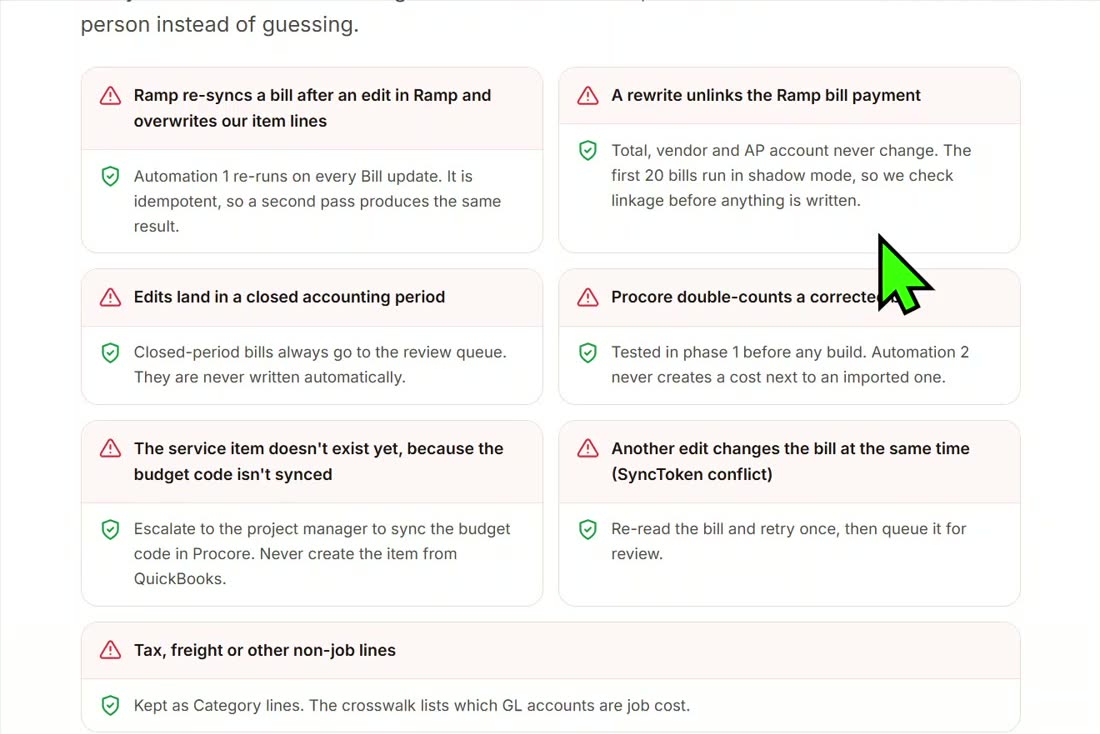 Risks and controls, as shown in the plan in the video
| Risk | Control |
|---|---|
| Ramp re-syncs a bill after an edit in Ramp and overwrites the item lines | Automation 1 re-runs on every Bill update. It's idempotent, so a second pass produces the same result |
| A rewrite unlinks the Ramp bill payment | Total, vendor and AP account never change. The first 20 bills run in shadow mode, so linkage is checked before anything is written |
| Edits land in a closed accounting period | Closed-period bills always go to the review queue. They're never written automatically |
| Procore double-counts a corrected bill | Tested in the hand-test phase before any build. Automation 2 never creates a cost next to an imported one |
| The service item doesn't exist, because the budget code isn't synced | Escalate to the project manager to sync the budget code in Procore. Never create the item from QuickBooks |
| Another edit changes the bill at the same time (SyncToken conflict) | Re-read and retry once, then queue for review |
| Tax, freight or other non-job lines | Kept as Category lines. The crosswalk lists which GL accounts are job cost |
A checklist for your own QuickBooks write automation
Whether it's our design or someone else's, ask for these before you connect anything with write access to your books:
- A table of every endpoint, with reads and writes marked
- Dedicated integration users, one per system
- A written "never" list, enforced in code (amounts, vendors, payment links, closed periods, item creation)
- Optimistic locking (SyncToken) with a single retry and a queue
- Every line sent on every update
- Edit in place, never delete and re-create
- A confidence rule that sends anything ambiguous to a person
- A private note on each changed record and a before/after log
- Shadow mode with a numeric pass bar
- A hand test that proves the fix before any code
The section hub shows where this fits in the overall fix, and the settings checklist covers what to rule out first.
Next step
Take the endpoint table above and hold your current integrations up against it. Any app with write access to QuickBooks that can't show you its never list is worth a conversation. If you want help writing one, or you'd like us to build the fix with these guardrails in place, email charley@buildflows.ai or tell us what you're working on.
References
- Intuit Developer: QuickBooks Online Accounting API, Bill entity
- Intuit: Change the closing date and password
- Procore Support: QuickBooks Online connector, things to know
- Procore Support: QuickBooks Online detailed data mapping
- Procore Developers: REST API reference
- Ramp: Developer API documentation
- Ramp Support: Bill Pay accounting
Frequently asked questions
What is a SyncToken in QuickBooks Online?
It's QuickBooks Online's version stamp on a record. Every update has to include the current SyncToken. If someone changed the record since you read it, the update fails as stale, which stops an automation from overwriting another person's edit. The safe response is to re-read, check, and retry once.
Can I give an integration read-only access to QuickBooks Online?
Not through OAuth scopes. QuickBooks Online's accounting scope covers reads and writes, so an integration's limits have to be enforced in its own code: which endpoints it calls, which fields it sends and which records it may change.
Will rewriting a paid QuickBooks bill break the Ramp payment link?
The plan keeps the total, vendor and AP account unchanged so the bill payment stays linked, and checks linkage on the first 20 bills in shadow mode before anything is written. Changing a paid bill's total is the risky move, so the automation never changes amounts.
Why shouldn't an automation create missing items in QuickBooks?
Procore's QuickBooks Online connector only retrieves costs on the service items it created. A missing item means the Procore budget code hasn't been synced, so the right fix is to add the budget code in Procore. The automation escalates to the project manager.
Can an automation fix missing job costs by entering them in Procore?
It shouldn't. Imported direct costs are controlled from QuickBooks, so a manual Procore cost next to one would double-count once the import catches up. The safe pattern is to correct the QuickBooks source and let Procore's import pull it.
What is shadow mode for an accounting automation?
The automation runs on real bills, works out what it would change and logs the proposal, but writes nothing. A person reviews each proposal. In this plan, it only moves to live after 20 proposals in a row are approved with no corrections.
What happens to bills in a closed accounting period?
They always go to a review queue and are never written automatically. QuickBooks Online also rejects API writes dated inside a closed period, so the automation checks the closing date before it tries.
Next step
Want this workflow automated?
Tell us the handoff, approval, or reminder your team repeats. We'll scope the automation, the approvals it needs, and who owns it.
Prefer email? charley@buildflows.ai
Keep learning
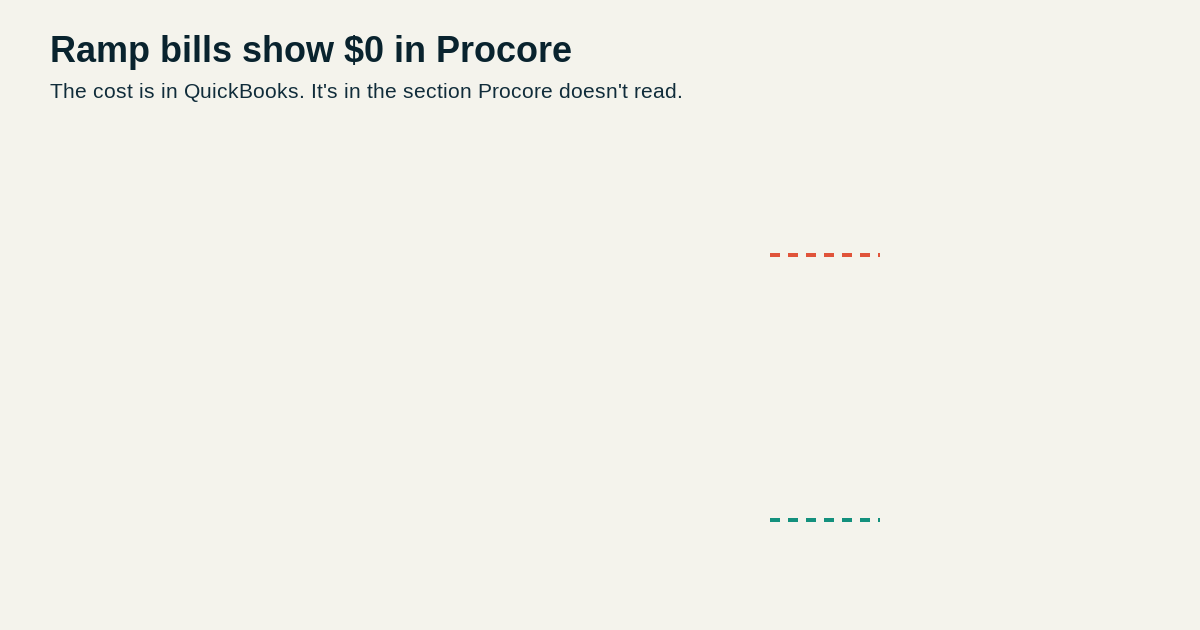
Integrations · November 19, 2026
Why Ramp Bills Show $0 in Procore, and How to Fix It
The section hub for the Ramp to QuickBooks to Procore job-cost fix, built from the plan we wrote for Cattlemen Construction Services. Ramp writes its coding to the Category details lines of a QuickBooks Online bill. Procore's QuickBooks Online connector only retrieves job costs from lines coded to the project-specific service items it created, which live in Item details, so the cost never reaches the Procore budget. The guide shows how to confirm the gap in five minutes, then the cheapest order to fix it: check four settings, build a translation table, re-code three bills by hand to prove it, then automate with a bill line rewriter and a nightly reconciliation, with guardrails and a phased rollout.
Integrations · November 19, 2026
Ramp, QuickBooks Online and Procore: The Settings to Check Before You Build an Integration
The step-zero checklist from a real job-cost plan for Cattlemen Construction Services. Before anyone builds an automation to get Ramp bills into Procore job costs, confirm the Procore QuickBooks Online connector's basics (QBO Plus or Advanced, Projects not sub-customers, projects created after connection), ask Ramp whether Bill Pay lines can use the Procore-created service items, confirm 2+ tier cost codes and synced budget codes, check the budget view shows direct costs, find where the cost code lives in Ramp, check each service item's expense account, the QuickBooks closing date and the daily sync timing, and settle the owner's decision on entering invoices in Procore first.
Playbooks · November 19, 2026
Prove a Job-Cost Fix First: Re-Code Three Ramp Bills by Hand in QuickBooks Online
A step-by-step hand test that proves a Ramp to QuickBooks Online to Procore job-cost fix before anyone builds automation. Pick three paid Ramp bills on synced projects with three cost types, capture the before state in Ramp, QuickBooks and Procore, check the closing date and each service item's expense account, move each Category details line to an Item details line on the Procore-created service item with the same amount and description, confirm the bill is still paid with its payment linked, run an on-demand Procore job cost sync, and read the budget. Includes pass and fail rules for Gate B, what each failure means, the four-gate rollout that follows, and a printable worksheet. From the job-cost flow plan written for Cattlemen Construction Services, shown with sample data.