Key takeaways
- Track three documents per sub: certificates of insurance (GL, Auto, WC, optional umbrella), a W-9, and lien waivers per pay period.
- A certificate is future, current, expiring (within 30 days) or expired, based on its effective and expiry dates and today's date; expiring still counts but raises an amber alert.
- A sub is compliant only with a current or expiring certificate for every required kind; one missing or expired kind makes it non-compliant.
- A lien waiver gap opens when a pay period is marked paid and no unconditional waiver has been received for it; final waivers are more serious than progress waivers.
- Linking subs to jobs through Procore commitments means nobody has to add each sub to each project by hand.
- The app raises alerts; a written block list decides what holds a payment: missing required insurance, no W-9 before first payment, an open waiver gap when the next payment is due, and no final waiver before retainage.
- Limits and additional-insured wording still need a person to check against each subcontract.
20 seconds · From a Build Flows walkthrough
Job cost, expenses and subs with insurance on file
Job cost from Procore, expenses from QuickBooks, and the subcontractors you pay with their certificates of insurance tracked.
Read the clip transcript
them for better visibility into how it's progressing but then ultimately we can track all of our job costs today what expenses are in here that we're all pulling from QuickBooks and our job costs from Procore and then we have our subs here that then we are paying out to and that we need to have
Captions adapted from the source video; proper names may reflect automatic transcription. Original segment: 20:53–21:13. Watch at the source.
Most general contractors track subcontractor insurance certificates in a spreadsheet, an inbox folder or someone's memory. It works until a certificate lapses mid-job, or a sub gets paid for a period without handing over a lien waiver, and nobody notices until there's a claim or a lien. This guide covers the compliance tracking we built into the Cattlemen OS proof of concept: what it tracks for each sub (certificates of insurance, W-9s and lien waivers), how it decides a sub's status, what it alerts on, and which gaps we'd treat as a payment hold.
Cattlemen Construction Services is a general contractor and design-build firm in Fort Worth, Texas. The app runs on sample data, so the subs and dollars below are made up. You can watch the walkthrough; the Subs tab shows up at about 21:05, where Charley describes the subs "that we are paying out to and that we need to have certificates on of insurance, so we're logging all that."
 Who is safe to pay on this job? (sample data)
What gets tracked
Three documents cover most of the risk on a small or mid-size GC's subcontract:
| Document | What it protects | What the app stores |
|---|---|---|
| Certificate of insurance (COI) | Proof the sub carries the coverage the subcontract requires | Kind (GL, Auto, WC, Umbrella), carrier, policy number, each-occurrence and aggregate limits, effective and expiry dates, additional insured yes/no, a link to the document |
| W-9 | The sub's tax ID, needed to pay them and to file a 1099 | On file yes/no |
| Lien waiver | The sub's release of lien rights for a pay period, in exchange for payment | Sub, project, commitment, period end, conditional or unconditional, progress or final, amount, paid date, received date, document link |
A sub counts as "on" a project when it's assigned there in the app, or when it holds an open Procore commitment (a subcontract or PO) on that job whose vendor matches the sub. That second rule matters. Nobody has to remember to add each sub to each job; if there's a commitment in Procore, the sub shows up on the job's Subs tab.
 The Subs tab on one job (sample data)
The four tiles on the Subs tab answer the four questions a PM or controller asks before a pay run: how many subs are on this job, is anyone uninsured, who needs a renewal soon, and did we pay anyone without a waiver.
How a certificate's status is decided
Each COI gets a status from its two dates and today's date:
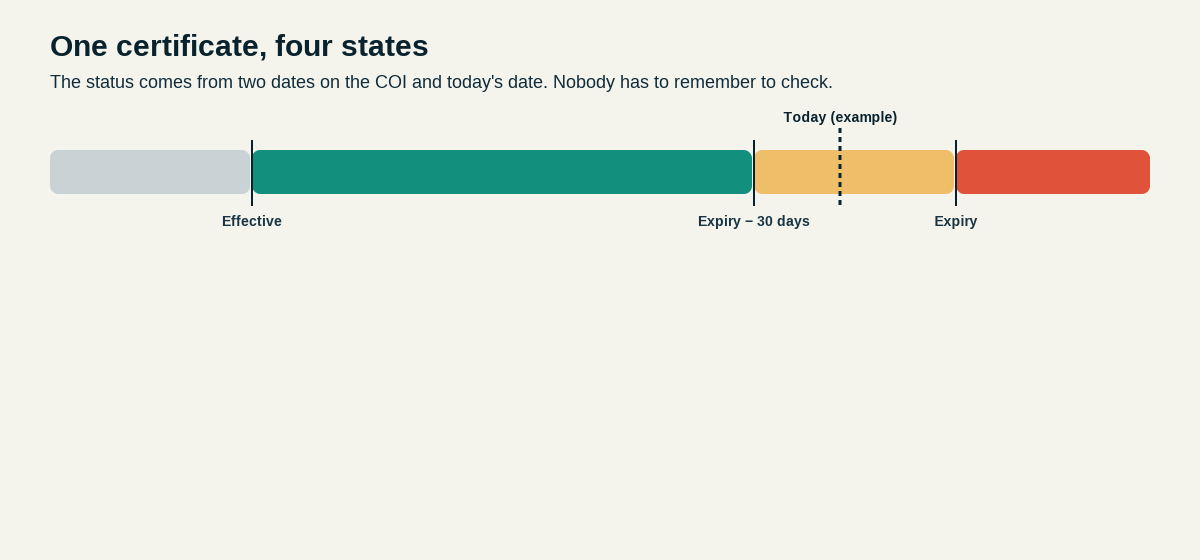 One certificate, four states
| Status | Rule | Counts toward compliance? |
|---|---|---|
| Future | Effective date is after today | No |
| Current | In force, more than 30 days from expiry | Yes |
| Expiring | In force, expires within 30 days | Yes, with an amber alert |
| Expired | Expiry date has passed | No, red alert |
Then the sub-level rule. In the proof of concept a sub is compliant when it has a current or expiring certificate for every required kind: general liability, auto and workers' comp. Umbrella is tracked but not required by default, because plenty of small subcontracts don't call for it. If any required kind has no current certificate, the sub is non-compliant, and the screen says exactly what's missing: "WC expires Dec 10, 2026" or "GL expires Dec 6, 2026 · 1 lien waiver missing."
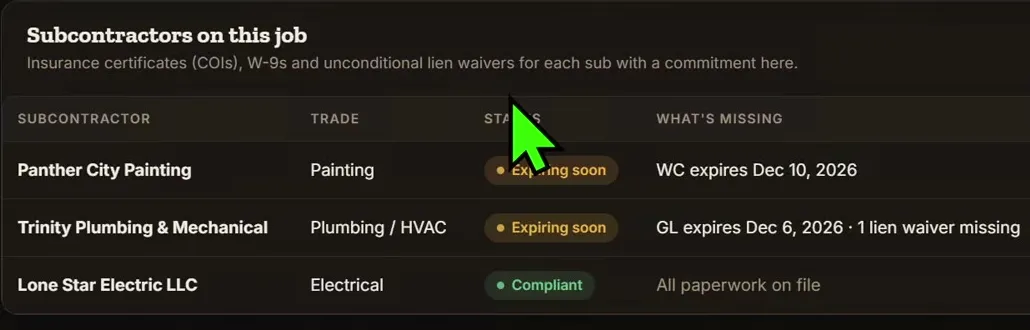 What's missing, in words a PM can act on (sample data)
The 30-day window is a setting worth thinking about. Thirty days gives the sub time to get a renewal from their agent. Shorter than two weeks and you'll be chasing certificates the week a policy lapses.
Two things the status doesn't check on its own: whether the limits meet the subcontract, and whether your company is named correctly as additional insured. The fields are there (limits and an additional-insured flag), but comparing them to each subcontract's requirements still takes a person reading the certificate. We'd rather say that plainly than show a green dot that implies more than it checked.
Lien waivers: when a gap opens
Lien waivers come in four combinations. Conditional waivers take effect only once the payment clears. Unconditional waivers say the payment has been received. Each can be for a progress payment or the final payment. A common sequence:
- The sub submits a pay application with a conditional progress waiver for the period.
- You pay.
- The sub sends an unconditional progress waiver for that period.
- At the end of the job, the same pattern with final waivers, usually before retainage is released.
The app tracks each pay period per sub and project, and opens a gap when a period is marked paid and no unconditional waiver has been received for it.
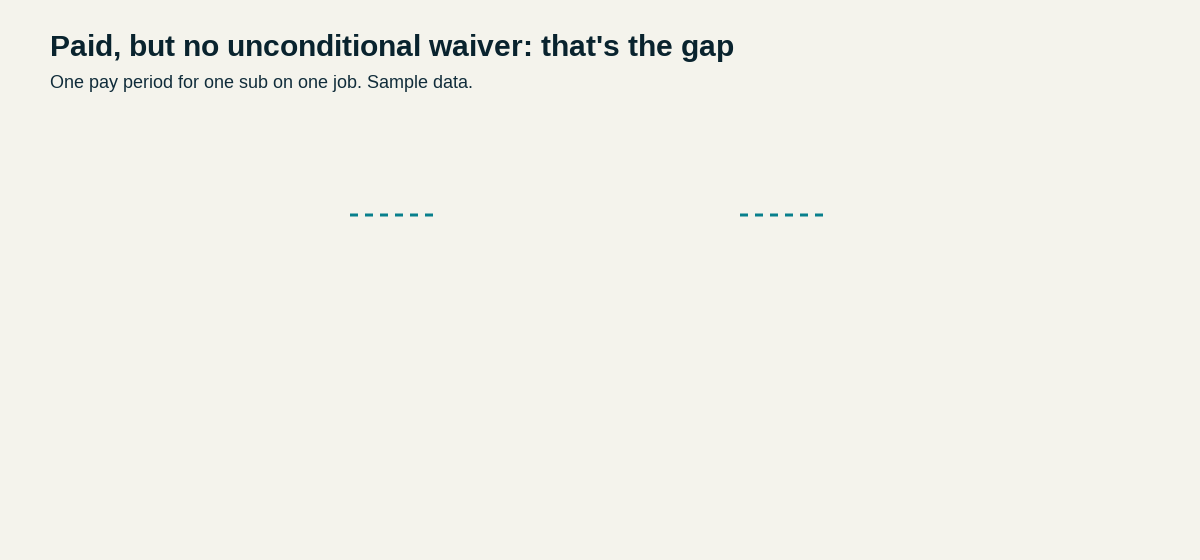 Paid, but no unconditional waiver: that's the gap (sample data)
In the sample data, one sub has a $27,400 period paid without an unconditional waiver. That's the "Missing waivers 1" tile. A missing progress waiver raises an amber alert; a missing final waiver is red, because final waivers usually stand between you and releasing retainage.
Waiver forms vary by state. Texas, where Cattlemen works, has statutory waiver and release forms in Chapter 53 of the Texas Property Code. Use the form your state requires and have your attorney confirm the rules for your contracts. The app records which waiver you received and when; it doesn't judge whether the form is valid.
The alerts it raises
Compliance alerts only fire for subs with open work, meaning a project in won or active status. A sub who finished a job last year with an expired certificate isn't noise on this week's list.
| Alert | Fires when | Severity |
|---|---|---|
| COI expired | A required kind's latest certificate has expired | Red |
| COI missing | A required kind has no certificate on file | Red |
| COI expiring | A required kind's current certificate expires within 30 days | Amber |
| W-9 missing | No W-9 on file for a sub with open work | Amber |
| Waiver missing (progress) | A paid progress period has no unconditional waiver | Amber |
| Waiver missing (final) | A paid final period has no unconditional waiver | Red |
Each alert names the sub, what's missing and the projects with open work, for example "Open work on 26-004. Get a renewed certificate before the next payment." Alerts land in the same Alerts screen as financial alerts, where someone can assign one, add a note, snooze it or acknowledge it. The alerts part of the walkthrough runs from about 21:15 to 21:50.
Visibility follows the role. A project manager sees compliance alerts only for the projects they run. Executives and admins see all of them. Field users don't see compliance at all. The full role model is in roles and view-as access control.
What to block, and what to warn about
The app raises alerts. It doesn't stop a payment in QuickBooks or Procore. Whether a gap holds up a payment is a business decision, and it's worth making once, in writing, instead of case by case on pay day.
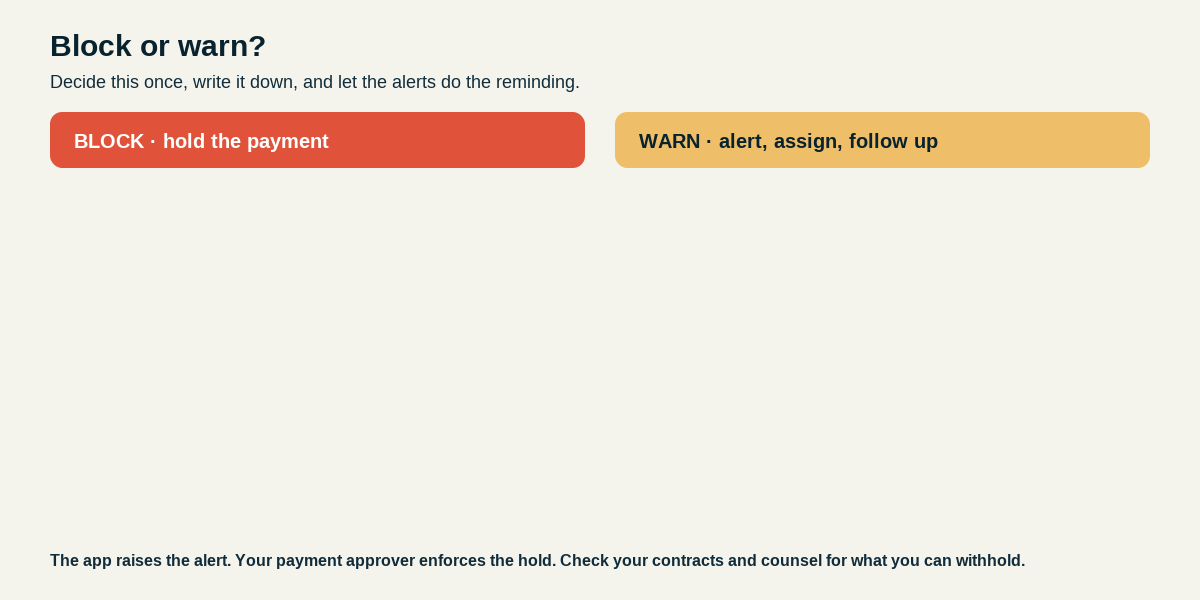 Block or warn? Decide once, write it down
Here's where we'd start:
Hold the payment when:
- a required certificate (GL, Auto, WC) is expired or missing on a sub with open work
- there's no W-9 on file before the first payment
- a previous paid period still has no unconditional waiver when the next payment comes up
- there's no unconditional final waiver before retainage is released
Warn and follow up when:
- a certificate expires within 30 days
- a progress waiver is late but the next payment isn't due yet
- umbrella coverage is missing on a subcontract that doesn't require it
- the limits or additional-insured wording need a second look
Who enforces the hold depends on where you approve payments. If PMs approve sub pay apps in Procore and accounting pays from QuickBooks, the person releasing the payment checks the job's Subs tab first. A future step is to show the compliance status right on the approval screen, so nobody has to remember to look. Check your subcontracts and your counsel for what you're allowed to withhold, and when.
Some card and AP platforms now offer their own checks. Ramp, for example, says its construction product (launched in July 2026) can check lien waivers, W-9s and COIs before payment. If you already pay subs through a tool like that, use its checks, and keep the job-level view of who is compliant where your PMs work.
How compliance feeds the project grade
Each project in the operating system gets a weighted grade across pillars like schedule, financials, safety and quality. There's also a Risk pillar, off by default. When an executive turns on the insurance measure, the project's reading is the number of active subs on it with an expired or missing required certificate:
| Subs out of compliance on the job | Measure score |
|---|---|
| 0 | 1.0 (all subs insured) |
| 1 | 0.6 |
| 2–3 | 0.3 |
| 4 or more | 0 |
Turning the measure on doesn't change how much the Risk pillar counts. The executive sets that weight separately, with a live what-if before saving. That keeps a paperwork lapse from swinging a job's grade until the owner decides it should. The full grading method is in the weighted project scorecard.
Setting it up on real data
The order we'd follow when moving from sample data to live:
- Load the sub list. Name, trade, contact, email and phone, plus W-9 on file yes/no. Match names to the vendor names on Procore commitments so subs attach to jobs automatically.
- Enter current certificates. For each sub: kind, carrier, policy number, limits, effective and expiry dates, additional insured, and a link to the PDF in the project or company folder. See SharePoint project folder structure for where those files can live.
- Backfill waivers for open periods. Start with the last two or three paid periods per active sub. Older history is rarely worth the typing.
- Agree the block list. Write down what holds a payment. Share it with PMs and accounting.
- Turn on alerts and assign owners. One person per alert type is enough. The controller usually owns waivers; the PM or an assistant owns certificate renewals.
- Decide on the Risk pillar. Leave it off for the first month while the data settles, then turn it on with a small weight.
The sample data in the walkthrough was created by the app's seed. On a live system, the compliance tables start empty and fill as you enter documents; nothing comes across from QuickBooks or Ramp automatically.
Next step
Pick your three largest active subcontracts and check them by hand this week: current GL, Auto and WC certificates, a W-9 on file, and an unconditional waiver for every period you've paid. If any of the three fails, you've found the case for tracking this properly. The owner report pack guide lists the reports that sit next to this in the weekly review, and the project operating system tour shows where the Subs tab fits in the project page.
If you'd like compliance tracking tied to your own Procore commitments and payment approvals, email charley@buildflows.ai or tell us what you're building.
Frequently asked questions
How do I track subcontractor certificate of insurance expirations?
Store each certificate with its kind, carrier, policy number, limits and effective and expiry dates, and let the system work out a status every day: current, expiring within 30 days, expired, or not yet in force. Alert when a required certificate is expiring or expired for a sub that still has open work.
Which insurance certificates should a subcontractor have on file?
Most subcontracts require general liability, auto and workers' compensation, with umbrella coverage on larger scopes. The exact kinds, limits and additional-insured wording come from your subcontract, so check each certificate against it.
What is the difference between a conditional and an unconditional lien waiver?
A conditional waiver releases lien rights only once the payment actually clears, so it is usually sent with the pay application. An unconditional waiver says the payment has been received and releases those rights outright, so it should follow every payment. Each can be for a progress payment or the final payment. Use the forms your state requires.
When should a contractor hold a subcontractor payment?
A common block list is: an expired or missing required certificate on a sub with open work, no W-9 on file before the first payment, a previous paid period still missing its unconditional waiver when the next payment comes up, and no unconditional final waiver before retainage is released. Check your subcontracts and counsel for what you can withhold.
Why collect a W-9 before paying a subcontractor?
The W-9 gives you the sub's legal name and taxpayer identification number, which you need to report payments on a 1099. Collecting it before the first payment is much easier than chasing it in January.
Can a card or AP platform check subcontractor compliance before payment?
Some can. Ramp, for example, says its construction product checks lien waivers, W-9s and COIs before payment. Whatever pays the sub, keep a job-level view of who is compliant on which project where your PMs work, with alerts tied to open work.
Next step
Want help running this playbook?
Bring the report or workflow. We'll help map the work behind it.
Prefer email? charley@buildflows.ai
Keep learning
Custom applications · November 19, 2026
A Contractor's Project Operating System, Screen by Screen: What Each Role Sees and Why
A screen-by-screen tour of the Cattlemen OS proof of concept built for Cattlemen Construction Services in Fort Worth, Texas, on sample data over QuickBooks Online, Procore, Ramp and Microsoft 365. Covers sign-in and Home, My expenses and the approvals queue that gets card spend onto Procore cost codes, the Projects list with convert to won and SharePoint folders, the project page tabs (overview, grade, job cost, expenses, subs, files), the weighted project grade, the month-end cost-to-complete close, the company dashboard, alerts, reports, the platform console with read-only view as, the help center and the AI brain connection through iframe, read-only API and MCP. For each screen: what it shows, which role sees it and why, with sample numbers and timestamps from the walkthrough video.
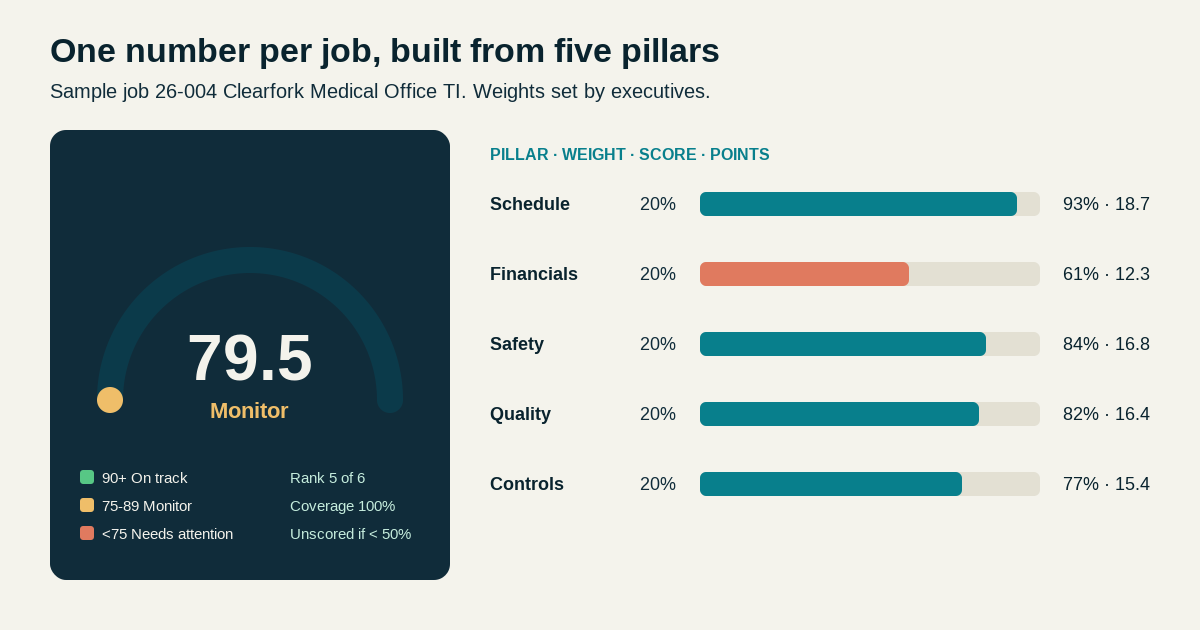
Reporting & analytics · November 19, 2026
A Weighted Project Grade for Contractors: Pillars, Measures, Tolerances and a Worked Example
The project grade built into the Cattlemen OS proof of concept for Cattlemen Construction Services: five weighted pillars (schedule, financials, safety, quality, project controls) plus a risk pillar that starts off, 16 measures read from Procore, QuickBooks and the app's coding log, scoring bands with deliberate cliffs, grade tolerances (90 on track, 75 monitor, 50% minimum coverage), the four-step math, a full worked example on sample job 26-004 that grades 79.5, how missing data and project stage are handled, executive-adjustable weights with a live what-if (Financials at 40% drops 26-004 to 74.98, Needs attention), tuning advice, where the grade appears, and a CSV scorecard template.
Reporting & analytics · November 19, 2026
The Contractor Owner's Report Pack: WIP, Cash, Profitability, Buyout and More
The report catalog from the Cattlemen OS proof of concept, built for Cattlemen Construction Services in Fort Worth, Texas, and shown on sample data. Eight reports, each answering one question: the WIP schedule (cost-to-cost percent complete, earned revenue, over and under billing), cash position with a 13-week forecast, job cost by cost code, profitability and portfolio with margin fade and months of backlog, commitments and buyout variance, vendor spend with uncoded spend aging, card spend coding, and an exceptions list. For each: the formula, which numbers come from Procore, QuickBooks Online and Ramp, how to read it with real sample figures, and the red flag to watch, plus a fifteen-minute Monday reading order.