Key takeaways
- Most construction ERPs already calculate over and under billing: Sage 100 Contractor, Sage 300 CRE, Sage Intacct Construction, Vista, Spectrum and Foundation all have a WIP report, and QuickBooks Online Advanced now advertises one.
- Excel WIP schedules break on structure: inputs pasted from two systems, stale EACs, pending change orders mixed into contract, version sprawl and formulas nobody audits.
- When inputs are split between an ERP and Procore, a nightly Power BI or Fabric model with a crosswalk, quality checks and month-end snapshots can rebuild the schedule automatically.
- A governed workflow (PM forecast, executive approval, lock, snapshot, journal entries from the snapshot) is what keeps reported WIP from moving after it is sent.
- The cost-to-complete forecast still needs the PM's judgment and an approver; automation removes the exporting, matching and retyping around it.
- Excel with a clean template and a monthly forecast routine is a valid starting point for contractors with few open jobs.
Short answer: Four kinds of software can take a work in progress (WIP) schedule out of Excel. Your construction ERP probably has a WIP or over/under billing report already: Sage 100 Contractor, Sage Intacct Construction, Vista, Spectrum and Foundation all do, and QuickBooks Online Advanced now advertises one. Job management platforms such as Adaptive and Knowify calculate WIP from their own data. A Power BI or Microsoft Fabric model can rebuild the schedule every night from your ERP and Procore. The fourth option is a governed workflow around any of these, where PMs forecast, an executive locks the month, the schedule is snapshotted and the journal entries are posted from the locked numbers. Most contractors get the most from the first and fourth together, and keep Excel only as the review sheet.
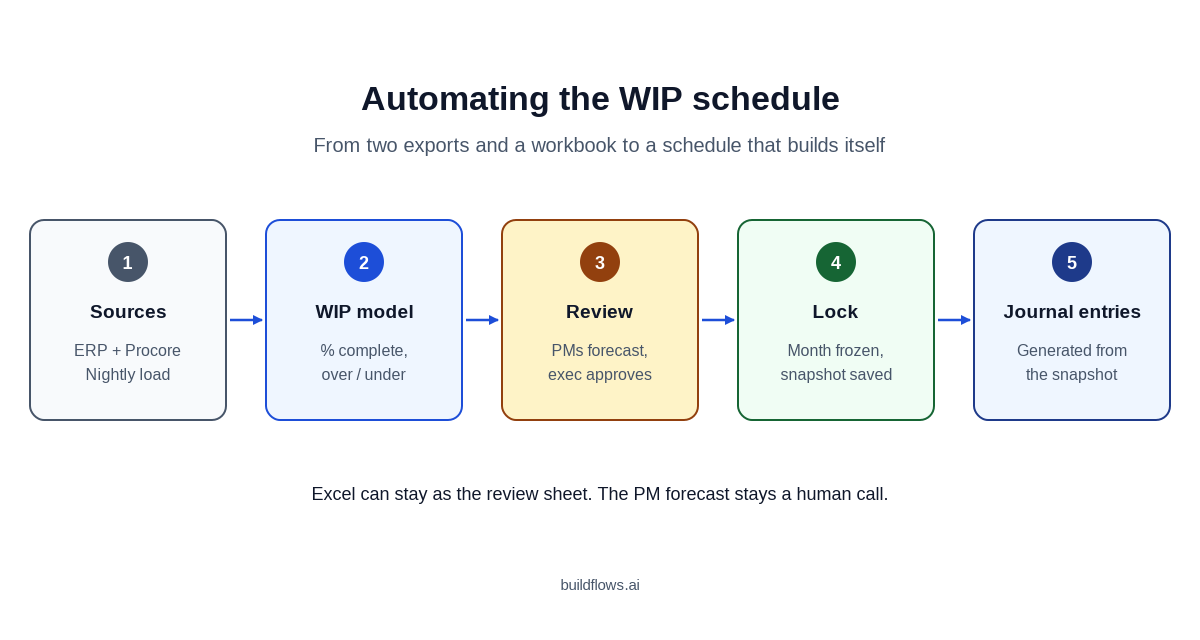 From two exports and a workbook to a schedule that builds itself
This guide is for controllers and CFOs who rebuild the WIP every month and want to stop. It covers what the schedule needs, why the spreadsheet version breaks, what each kind of software actually does (with sources), a step-by-step automation plan, the part that still needs a person, and a decision table by company size and stack.
What a WIP schedule has to do
A WIP schedule lists every open job with its revised contract, estimated cost at completion (EAC), cost to date and billed to date. From those four numbers it calculates percent complete, earned revenue, gross profit and the over or under billing on each job. The over and under columns drive a month-end journal entry, so the schedule is part of the books as well as a report. If you want the math and the entries worked through on three jobs, read over/under billing explained.
The formulas are short. Percent complete is cost to date divided by EAC. Earned revenue is revised contract times percent complete. Over billing is billed minus earned when positive, and under billing is the reverse. Any tool can do that arithmetic. What separates the options is where the four inputs come from, who is allowed to change them, and what happens to the numbers once the month is reported.
Why the Excel WIP breaks
Excel is a fine place to learn the schedule, and plenty of contractors run a good one. It breaks for the same reasons almost everywhere.
- The inputs live in two or three systems. Cost to date and billings come from the ERP. Contract, change orders and often the PM's forecast live in Procore or another project system. Someone exports both, pastes them in and matches jobs that do not share an ID.
- EACs go stale. The workbook has an EAC column, but nothing forces a PM to update it. A job whose cost to date has passed its EAC shows 100% complete while the crew is still on site.
- Pending change orders get mixed in. One PM adds an unapproved change order to the contract, another leaves it out, and the schedule treats them the same.
- Versions multiply. There is the PM's copy, the controller's copy, the one sent to the bank and the one with "FINAL v3" in the name. Next month's fade is measured against whichever one someone remembers.
- The formulas drift. A row is inserted, a range stops one job short, a hard-coded number replaces a formula. Nobody audits the cells, so the error survives until the auditors find it.
The common thread is structure. A spreadsheet has no source connections, no approval step and no lock. The options below each fix some of that.
Option 1: use your ERP's built-in WIP report
Start here, because you have probably paid for it already. Most construction ERPs calculate over and under billing from job cost and billing data they already hold. What varies is where the EAC comes from and whether the system posts the entry for you.
| ERP | What it offers for WIP | What to check |
|---|---|---|
| Sage 100 Contractor | The 6-1-7 Over/Under Billing Report calculates the WIP adjustment per job; you post it yourself as a journal transaction | Percent complete uses accumulated cost over the current budget, so the budget has to be kept current as your EAC |
| Sage 300 CRE | A WIP report from job cost data that many users book the over/under entry from | Users on the Sage community report revised contracts missing until posted and entries that do not tie to the income statement |
| Sage Intacct Construction | WIP management with schedules per period, PM forecast fields, finalize and post, and automatic over and under billing GL transactions | Posting can be reverted and re-posted; forecasts can be imported from CSV worksheets in the report library |
| Vista (Trimble Viewpoint) | The JC Work in Progress report calculates earned revenue and over/under by contract using projected cost | Only as good as the JC projections; revenue projections replace contract amount where they exist |
| Spectrum (Trimble Viewpoint) | The Contract Status report, also called the WIP or bonding report, plus a WIP Schedule with Backlog | Choose original or revised contract and projected or current estimate consistently |
| Foundation | A contracting WIP report under job profitability; its WIP field guide describes contract and estimates pulling in from budgets and change orders | The adjusting entry is still made by accounting |
| QuickBooks Online | Intuit now says Advanced includes WIP reporting | A CPA firm notes the native report does not handle retainage, overhead allocation or company-wide contract asset and liability adjustments; check your tier before relying on it |
The ERP report is the cheapest route and the one your auditor already trusts. Its weak spot is the EAC. If PMs forecast in Procore or in a side spreadsheet, the ERP report calculates percent complete from a budget nobody updated. It also rarely knows about pending change orders, and few of them keep a frozen copy of what you reported last month. Ask your reseller how the report gets its estimate, then decide whether to fix that inside the ERP or feed it from somewhere else.
Option 2: a job management platform with WIP built in
A second group of products calculates WIP from job data they manage themselves, usually on top of QuickBooks or another general ledger. Two examples with public documentation:
- Adaptive describes itself as an AI-native project accounting platform that works with Sage, QuickBooks and Foundation. Its WIP report compares budgets, costs, billings, earned revenue and gross profit, with an as-of date for month-end views and an export.
- Knowify shows over and under billing per job in its WIP report and lets you export it to a spreadsheet.
These suit smaller contractors whose estimating, billing and job costing already run in that platform. They are less useful when your PMs live in Procore and your books live in Sage or Vista, because then the WIP tool becomes a third system to reconcile. We could not find a widely used standalone product that only does WIP forecasting for mid-size GCs; most of the "WIP software" results are ERP modules, job management platforms or vendor blogs. Treat any comparison list with care and ask each vendor where the EAC comes from.
Option 3: a Power BI or Fabric WIP model fed nightly
If your inputs are split across an ERP and Procore, a reporting model can do the joining every night. Data lands from both systems, a crosswalk matches Procore projects to ERP jobs, quality checks run, and a semantic model calculates the WIP with one definition of every measure. Our guide to construction WIP reporting in Power BI walks through the formulas, the data sources and the common mistakes.
This option is strong where the ERP report is weak. It can read the PM's forecast from Procore, show pending change orders as exposure, flag jobs with cost over EAC, and keep month-end snapshots so a board pack never changes after it is sent. On its own it is still a report: it shows the numbers, but it does not decide who approves a forecast, and it does not post anything to the ledger. If you are replacing a whole monthly workbook rather than just the WIP tab, the Excel report replacement playbook covers the inventory and parallel-run steps.
Option 4: a governed WIP workflow
The fourth option wraps a process around options 1 or 3. It is what turns a WIP report into a WIP close.
- The controller opens the period after cost and billing cutoffs.
- Each PM forecasts cost to complete by cost code and submits it.
- An executive reviews the forecasts that moved, approves them or sends them back with a comment.
- The month is locked and the schedule is saved as a snapshot.
- Over and under billing journal entries are generated from the locked snapshot and posted, or handed to accounting to post.
We built this routine in a client proof of concept and documented it in the month-end cost-to-complete review workflow. The lock is the part most teams skip. Without it, a late cost batch or a PM's afterthought changes a number that has already gone to the bank, and next month's fade report compares against a moving target.
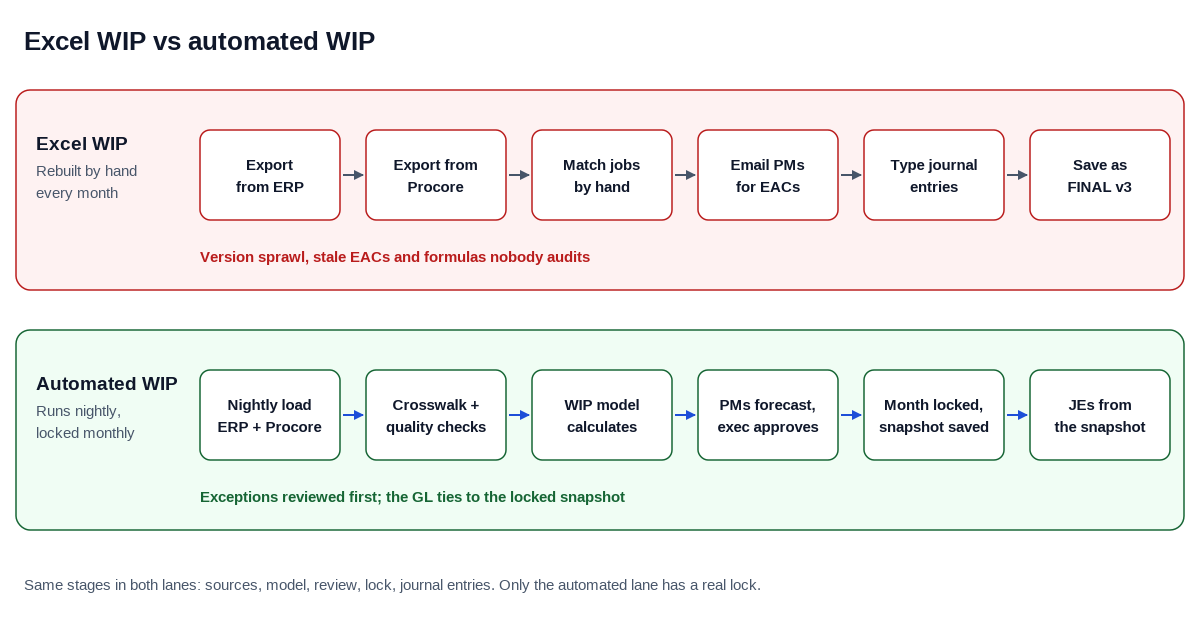 Sources, model, review, lock and journal entries
A step-by-step plan to automate the WIP schedule
This is the order we use. Each step produces something you can check before moving on.
- Pull. Connect read-only to the ERP for cost to date, billed to date and retainage, and to Procore (or your project system) for prime contract, change orders by status and the PM's forecast. Load nightly and keep the raw extracts so a logic fix is a re-run.
- Map. Build the crosswalk from project system to ERP job, and decide which system owns each input. Write the definitions down. Our metric dictionary shows the level of detail that keeps two people from calculating "billed to date" differently.
- Calculate. Compute percent complete, earned revenue, over and under billing, gross profit and backlog job by job, then sum. Keep pending change orders out of contract. Label jobs with no forecast instead of treating a blank as zero.
- Review. Publish an exceptions list before the schedule: cost above EAC, EAC unchanged for three months on an active job, margin swing of more than a couple of points, under billing above a threshold. PMs and the executive work the list.
- Lock. When forecasts are approved, freeze the period and save the snapshot. Later changes go into next month.
- Post. Generate the over and under billing entries from the snapshot, by job or in total, using reverse-and-rebook or book-the-change. Tie the general ledger balances back to the gross over and under columns.
Run the new schedule alongside your current workbook for one or two closes. When the numbers tie, or every difference is explained, retire the workbook. The month-end close checklist shows where the WIP sits in the close order and who owns each step.
What still needs a human
Automation takes over the exporting, matching, formula checking and retyping. The judgment at the center of the schedule stays with people.
The cost to complete is a forecast. It depends on what the PM knows about the remaining buyout, a sub who is behind, a change order the owner will probably reject and a rain delay that will add general conditions. No system knows that from cost data. An AI model can flag an EAC that has not moved while cost climbed, or draft a question for the PM, but the number itself should come from the person who runs the job and be approved by someone who can push back.
A few other calls stay with people: whether a pending change order is likely enough to forecast cost against, when to recognize a projected loss (talk to your CPA), how to present contract assets and liabilities, and whether a job that looks under billed is a billing problem or a forecast problem. The automated schedule's job is to put those questions in front of the right person on time, with the history next to them.
Which option fits your company
| Company and stack | Good fit | Why |
|---|---|---|
| Under about 15 open jobs, QuickBooks, PMs forecast in their heads | Excel with a clean template, or the QuickBooks Advanced WIP report if you have it | The volume is manageable; spend the effort on getting PMs to forecast monthly |
| Small contractor running jobs, billing and costing in one platform | That platform's WIP report (for example Adaptive or Knowify) | Inputs already sit in one system |
| Sage 100 Contractor, Sage 300 CRE, Foundation or Spectrum, PMs in the ERP | The ERP's WIP report plus a written forecast and lock routine | Cheapest path; fix the EAC habit and keep snapshots |
| Sage Intacct Construction | Intacct WIP management, with PM forecasts imported or entered each period | Finalize, post and GL transactions are built in |
| Any ERP plus Procore, 20 or more open jobs, a bank or surety reading the WIP | Power BI or Fabric model with a governed forecast, lock and snapshot workflow | Inputs are split across systems and the history has to hold still |
| Multiple entities or divisions, owner reporting beyond WIP | Same model extended to cash, profitability and buyout | One set of definitions across every report |
Excel stays a valid starting point. If you are not ready to automate, our WIP schedule template gives you the cost-to-cost formulas, over and under columns, gross profit and backlog, with matching Power BI measures for later. The WIP and over/under billing calculator checks a single job or a pasted schedule. A clean workbook with a monthly forecast routine beats an automated report fed by stale EACs.
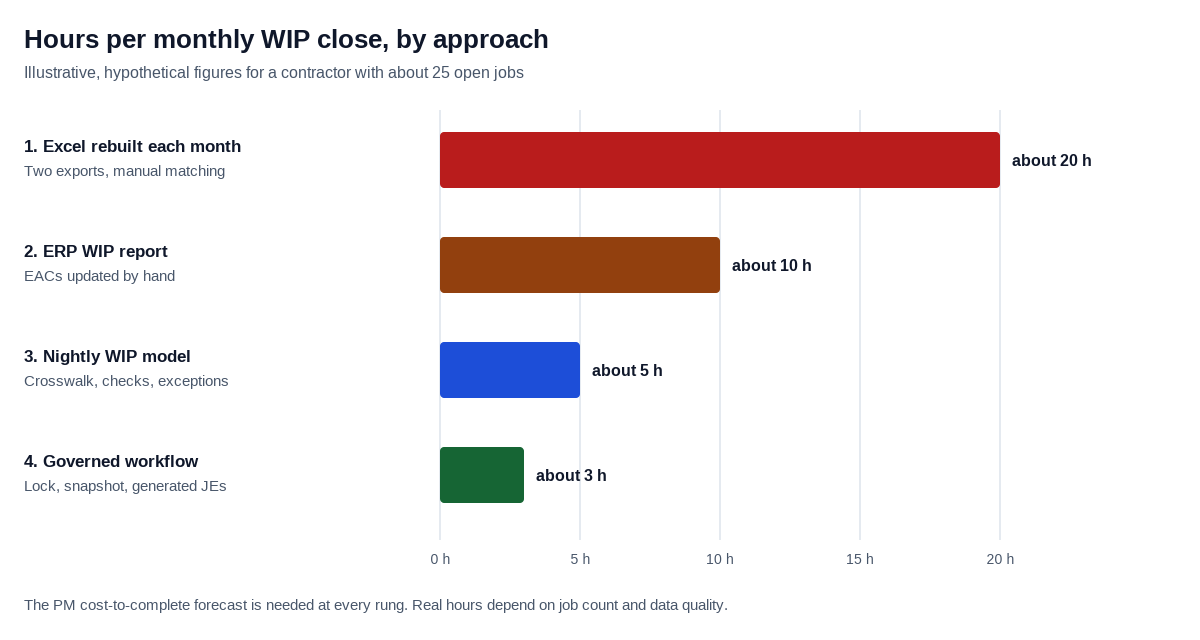 Each rung removes manual work; the PM forecast stays at every rung
How Build Flows can help
We connect construction ERPs and Procore, build the WIP model and its quality checks, and set up the forecast, review, lock and snapshot routine around it. The WIP and cash forecast offer covers WIP, billing, cost, receivables, backlog and cash scenarios your finance team can review, and the owner reports guide shows how the WIP sits next to cash, profitability and buyout once it is trusted. If you are spending days on the WIP every month, tell us what systems you run and we will show you what an automated schedule would look like on them.
Frequently asked questions
What software can automate a work in progress schedule instead of using Excel?
Start with your construction ERP's WIP or over/under billing report, which Sage 100 Contractor, Sage Intacct Construction, Vista, Spectrum and Foundation all provide. Job management platforms such as Adaptive and Knowify calculate WIP from their own data. If your inputs are split between an ERP and Procore, a Power BI or Microsoft Fabric model can rebuild the schedule nightly, with a forecast, lock and snapshot workflow around it.
Does QuickBooks have a WIP report?
Intuit says QuickBooks Online Advanced includes WIP reporting. A CPA firm notes the native report does not handle retainage, overhead allocation or company-wide contract asset and liability adjustments, so many QuickBooks contractors still finish the WIP in Excel or an add-on. Check your subscription tier before relying on it.
Why is WIP reporting so hard to get right?
The math is simple, but the inputs live in different systems and one of them is a forecast. Cost to date and billings come from accounting, contract and change orders often come from the project system, and the estimated cost at completion depends on the PM updating it. Stale forecasts, pending change orders and unlocked spreadsheets cause most WIP errors.
Who handles over/under billing and WIP for general contractors?
Usually the controller or CFO owns the WIP schedule and the month-end over/under billing entry, project managers own the cost-to-complete forecast on each job, and an executive reviews and approves the forecasts. Outside CPAs review the schedule at year end and for bonding.
How do you create a WIP report?
For each open job, collect revised contract, estimated cost at completion, cost to date and billed to date. Percent complete is cost to date divided by EAC, earned revenue is contract times percent complete, and over or under billing is billed minus earned. Calculate job by job, then sum, and tie the general ledger balances to the gross over and under columns.
What are the journal entries for construction WIP?
For over billing, debit contract revenue and credit billings in excess of costs and estimated earnings, a liability. For under billing, debit costs and estimated earnings in excess of billings, an asset, and credit contract revenue. Many contractors reverse the entry each month and rebook it from the locked WIP schedule; confirm presentation with your CPA.
Can AI forecast cost to complete on construction jobs?
AI can flag forecasts that look stale, such as an EAC that has not moved while cost climbed, and draft questions for the PM. The cost-to-complete number should still come from the person running the job and be approved by an executive before the month is locked.
Next step
Trying to automate a report like this?
Discuss your current reporting process: what the team does today, which systems are involved, and what you want to change.
Prefer email? charley@buildflows.ai
Keep learning
Reporting & analytics · October 10, 2026
Over/Under Billing Explained: How to Read Your WIP Schedule
How over and under billing are calculated, three worked jobs including a stale forecast, the month-end journal entries and balance sheet impact, the usual causes, and a routine to review the WIP schedule every close.
Reporting & analytics · October 8, 2026
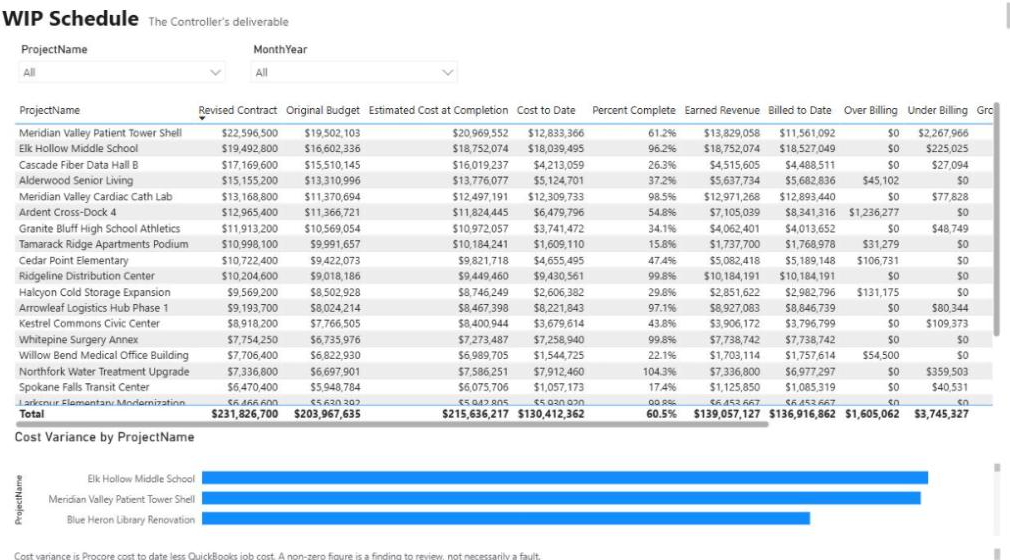
Construction WIP Reporting in Power BI: A Controller's Guide
A practical guide to construction WIP reporting in Power BI: the formulas, where the data comes from in Procore and accounting, the mistakes that make a WIP schedule look right while being wrong, and how to automate it.
Reporting & analytics · November 19, 2026
Month-End Cost-to-Complete Review: PM Forecast, Executive Sign-Off and a Locked WIP
The month-end close in the Cattlemen OS proof of concept for Cattlemen Construction Services, on sample data. Defines cost to date, cost to complete, estimate at completion, cost-to-cost percent complete, earned revenue, over and under billing, projected margin and margin fade, and works every formula on sample job 26-004 (EAC $1,100,075 on a $1,278,000 contract, 13.9% margin, $69,823 under billed). Walks through opening the month, the PM's cost-code forecast with prefill rules, submit, executive review with fade flags (margin down more than 1 point or EAC up more than 2%) and questions to ask, approve or send back, lock and sign off, the close pack, and admin unlock with a reason. Includes a six-job portfolio table and a CSV review worksheet.