Key takeaways
- Trimble Automatic Invoicing reads PDF invoices into Vista AP unapproved, but its documented fields are header fields, so line coding still happens in Vista.
- Ramp syncs with Trimble Vista and Spectrum through a partner connector from ClearPlan (ClearSync) on Trimble App Xchange, not a native Ramp integration.
- SAP Concur reaches Vista and Spectrum through a Trimble Data Xchange connector that creates AP invoices after expense reports are approved.
- We found no Vista or Spectrum connector on Brex’s or BILL’s published integration pages.
- Vendor pages say least about line-level job, phase and cost type coding, so test it on a real two-line invoice in your test company.
- OCR extraction is the most solved step; coding, commitment matching, retainage and compliance holds are where construction AP tools differ.
Short answer: For Viewpoint Vista, AP automation comes from three places. Trimble's own Automatic Invoicing reads PDF invoices into the AP unapproved queue. A set of third-party AP tools (hh2, Vic.ai, Stampli, AvidXchange, Beiing Human and others) publish Vista integrations of varying depth. Spend platforms connect through App Xchange connectors. Ramp does sync with both Trimble Vista and Trimble Spectrum as of November 2026, but through a partner connector built by ClearPlan (ClearSync), not a native Ramp integration. Whatever you pick, test it on one ugly invoice: a subcontract pay app with retainage, split across two phases, from a vendor with a lien waiver outstanding.
This guide is for controllers, AP leads and CFOs at contractors running Vista or Spectrum. It covers what Trimble ships, which vendors publish an integration (with links to their own pages), the Ramp, Concur and Brex questions we get most, where OCR and AI fit, and a checklist for judging any tool against construction AP. Vendor pages change often. Everything below was checked against the vendor's or Trimble's public pages in November 2026, and where a page doesn't say something, we say that too.
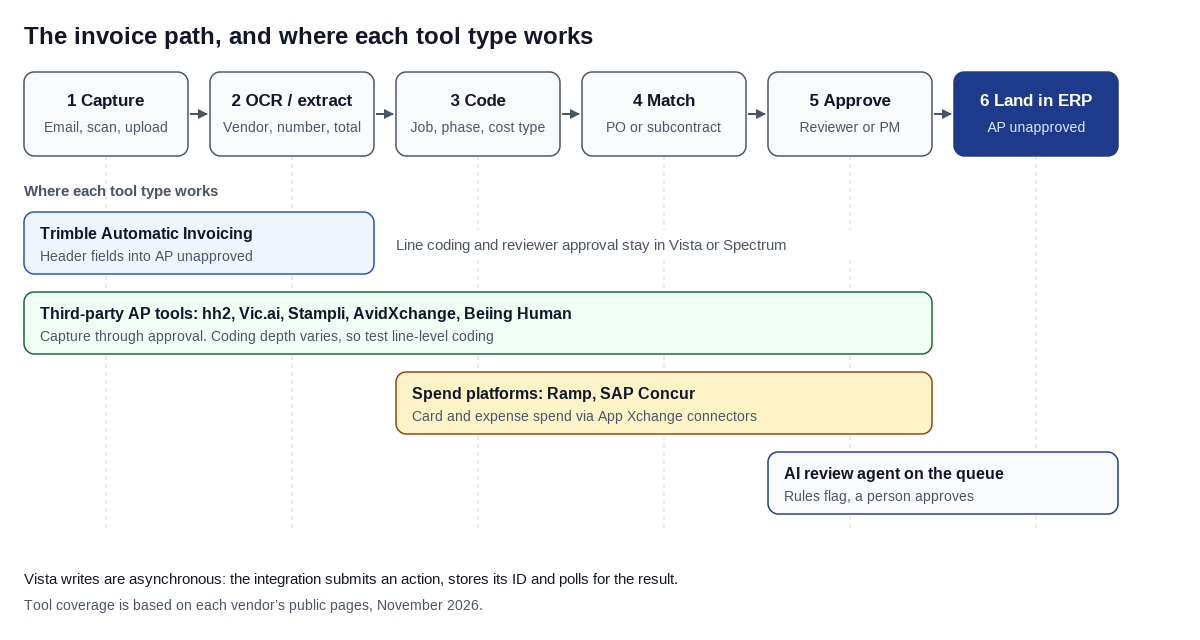 Where each kind of tool sits on the invoice path
Start with what Trimble already ships
Before buying anything, check what your Vista or Spectrum license already covers.
Automatic Invoicing. Trimble announced Automatic Invoicing for Spectrum and Vista in November 2023, using Azure AI Document Intelligence to turn paper and PDF invoices into unapproved invoice entries. Trimble's Vista help page for the feature is titled "for Trimble Construction One users," so check your licensing. The fields it lists are header fields: vendor, invoice number, company, invoice date, month, invoice total, PO number and description. A person reviews each invoice, duplicates for the same vendor and invoice number are blocked, and sent invoices land in the AP Unapproved Invoice Entry form. Line coding to job, phase and cost type still happens in Vista.
Vista's reviewer workflow. Vista already routes unapproved invoices through reviewer groups, with approval sequences and dollar thresholds that can apply to the invoice total or to each line. When every reviewer in the sequence approves, the invoice moves into the current AP batch. Trimble's AP Invoice Review workflow in Viewpoint Financial Controls puts that same review in the Vista Web portal, so approvers don't need the desktop client. Many tools that "add approvals" to Vista are duplicating this. Know what you already have before you pay for it twice.
Spectrum's equivalent. Spectrum has an Invoice Approval screen with the distribution and an imaging pane on screen, and AP is tied to Document Imaging. For subcontractor pay apps, Trimble documents a Trimble Pay integration where approved pay applications export to Spectrum as AP invoices with the billing backup attached.
The native tools are a sensible baseline. The gaps people buy around are line-level coding, PO and subcontract matching before the invoice reaches the queue, and getting PMs to approve somewhere they already work.
Third-party AP automation with Vista or Spectrum integrations
These vendors publish a Vista or Spectrum integration page. We list only what each page states. "Not stated" means the vendor's page doesn't say, which is different from "doesn't do it". Ask them.
| Vendor | Vista | Spectrum | How it connects (per vendor) | Job / phase / cost type coding | Approval routing |
|---|---|---|---|---|---|
| Trimble Automatic Invoicing | Yes | Yes | Built in; lands in AP unapproved | Header fields only; lines coded in the ERP | Vista reviewer groups; Spectrum Invoice Approval |
| hh2 AP automation | Yes | Yes | Syncs to the ERP's AP module | Job and cost code sync stated; phase and cost type not stated | By job, vendor or dollar amount |
| Vic.ai | Yes | No page found | API, with SFTP, EDI and custom options | "Line-level coding to your cost structures" | Thresholds and rules in Vic.ai |
| Stampli | Yes | No page found | File integration | Vendors, GL, open POs with receiving, custom fields; jobs not stated | In Stampli |
| AvidXchange | Yes | Yes | Not described | Not described | In AvidXchange |
| Beiing Human | Yes (Trimble Marketplace certified, 2026) | No page found | Syncs every 15 minutes; delivers to Vista for review | Not stated; matches open Vista receipts | Review and approval in Vista |
| Ramp via ClearSync | Yes (partner) | Yes (partner) | Trimble App Xchange | Jobs, phases, cost types mapped | Vista listing: maps reviewer groups by job |
| SAP Concur via Trimble Data Xchange | Yes | Yes | App Xchange connector | Jobs, GL, equipment, work orders sent to Concur | In Concur |
| BILL, Brex | None found | None found | No Vista or Spectrum connector on their integration pages | n/a | n/a |
A few notes on reading that table.
The coding column is the one that matters most and is the one vendor pages say least about. A connector that syncs "jobs" but not phases and cost types will push an invoice header into Vista and leave AP to finish the distribution by hand. Ask for a demo where the vendor codes a two-line invoice to two phases and two cost types, then show you the record in Vista.
Stampli describes a file integration, which usually means scheduled exports and imports, not a live connection. That is fine for many teams. It means list changes, such as a new phase on a job, reach the AP tool on the file schedule.
AvidXchange's pages are mostly about payments. Its Vista page names GCPay, a separate partner, for subcontractor payments.
There are smaller Vista specialists too. One example, AP Wizard from a Vista consulting firm, is described on its G2 listing as capturing invoices and vendor statements from the AP inbox, matching against open Vista POs and matching vendor statements against Vista. We couldn't find the vendor's own product page, so treat those as listing claims.
Does Ramp sync with Trimble Vista? With Spectrum?
Yes to both, with a qualifier. Ramp's accounting integrations directory lists "Trimble Vista (by ClearPlan Consulting)" and "Trimble Spectrum (by ClearPlan Consulting)" under partner integrations, not native ones. Ramp's Vista support page and Spectrum support page say setup, troubleshooting and documentation are maintained by ClearSync, ClearPlan's product.
What the public pages say it does:
- Both Ramp listings say ClearSync AP connects Ramp to the ERP "via the Trimble App Xchange," moving card transactions, AP invoices, bills and optional payment data into the ERP, with ERP-driven PO sync into Ramp for matching against bills and card transactions.
- Ramp's April 2026 launch post says GL accounts, vendors, jobs, phases, cost types, equipment and employees map between the systems, and that Ramp auto-codes transactions to job, phase and cost type.
- The Vista listing says it maps existing reviewer groups to enforce tiered approvals by job.
What they don't say: whether records land in Vista as AP unapproved invoices or as posted transactions, and which Ramp for Construction features work with Vista or Spectrum. Ramp's construction overview describes retainage on bill and PO lines, lien waiver and COI checks during bill review, PM approval routing and project budgets on Ramp Plus. It also says support for each feature depends on your accounting provider, and doesn't name Vista or Spectrum. Ask ClearPlan directly before you plan around retainage or lien waivers flowing through to the ERP.
Because the connector runs on App Xchange, the behavior in our Vista API integration guide applies: reads come from a cache refreshed on a schedule, and writes run as actions against Vista. A job opened in Vista this morning may not show up as a codable job in Ramp until the next refresh.
SAP Concur, Brex and BILL
SAP Concur. Concur's App Center lists a Construction ERP Connector supported through Trimble's Data Xchange. It names Viewpoint Vista and Viewpoint Spectrum, sends jobs, GL accounts, equipment, work orders, departments and employees to Concur, and creates AP invoices in the ERP once expense reports are approved. The listing covers Concur Expense Professional and Standard, US only.
On approvals, the two products work differently. Concur's cost object approval routes by the cost object on the expense and climbs approvers until one has a high enough limit, per SAP's administrator training. Ramp's construction features route to the project manager assigned to the coded project. Either works for job-based approval if the approver list in the tool matches the PM on the job in Vista. That list drifts, so decide who maintains it.
On accounting platforms: Ramp's directory lists native integrations with QuickBooks Online, NetSuite, Sage Intacct, Acumatica, Microsoft Dynamics, Workday, Oracle Fusion, Xero and Zoho Books, and partner integrations for Vista, Spectrum, Sage 100, Sage 300 and others. For Concur, the construction ERP route is the Trimble connector above. For contractors on Vista or Spectrum, both reach the ERP through Trimble's App Xchange ecosystem, which is the comparison that matters.
Brex and BILL. We found no Vista or Spectrum integration on Brex's integrations page or BILL's integrations page. BILL lists import and export integrations for other ERPs. Whether a file route works for Vista is something to confirm with them. If either is already in place, the usual pattern is a custom flow that brings coded transactions into Vista AP unapproved, which is the shape described in our expense and card to ERP AP pattern.
Where OCR and AI fit
"OCR invoice extraction" and "automate data extraction" are the most solved steps in the chain. Prebuilt invoice models read vendor, invoice number, date and total well. Trimble's own feature uses one. The harder steps sit after extraction, and they're construction-specific:
- Coding. Which job, which phase, which cost type. A model can suggest this from the vendor's history and the PO, but a wrong phase moves cost between budget lines and nobody sees it until the WIP review.
- Matching. Does this invoice belong to an open PO or subcontract, is the vendor the same, and does it exceed what's left on the commitment?
- Holds. Is the sub's insurance current, is the lien waiver for last period in, is retainage being withheld at the right rate?
- Review. Who approves, and what do they see when they do?
Our construction document OCR guide covers extraction accuracy and where human review belongs. For Vista specifically, the pattern we build is a review agent over the AP unapproved queue. Plain rules score each invoice for duplicates, stale dates, amount anomalies and PO or subcontract vendor mismatches. The model explains what fired and builds a review packet. A person approves. Anything that writes to Vista goes through a dry run and an allowlist, and Vista writes are asynchronous: the integration submits an action, stores its ID and polls for the result. The design is written up in AI AP invoice review on Vista.
The custom path makes sense when you want the coding and matching rules to be yours, when you need a check that no vendor offers (vendor statement reconciliation against open AP, for example), or when you want AI review without moving AP into a new platform. It doesn't make sense if a vendor's connector already codes lines correctly in your Vista and your AP team likes the screen.
A checklist for evaluating AP automation for construction
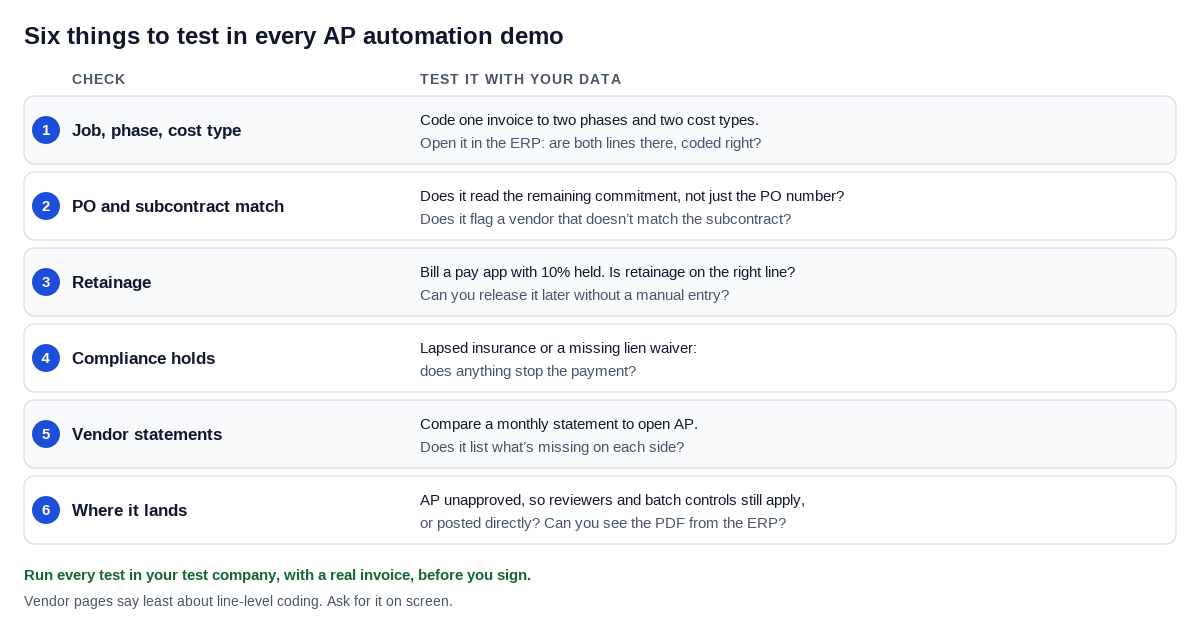 Six things to test in every demo
Run every candidate through the same tests, with your data, in your test company.
- Line-level coding. Code one invoice to two phases and two cost types. Open it in Vista or Spectrum. Are both lines there, with the right phase, cost type and GL? Does an unknown phase get rejected or quietly defaulted?
- List freshness. Add a phase to a job in the ERP. How long until the AP tool offers it? On App Xchange connectors this is the cache cycle. On file integrations it's the file schedule.
- PO and subcontract matching. Does the tool read open commitments and the remaining amount, or only the PO number? Does it flag an invoice from a vendor that doesn't match the subcontract?
- Retainage. Bill a subcontract pay app with 10% retainage held. Does the retainage land on the right line in the ERP, and can you release it later without a manual entry?
- Compliance holds. If a sub's insurance has lapsed or last period's lien waiver is missing, does anything stop the payment? Our compliance tracking write-up lists which gaps we'd treat as a hold and which as a warning.
- Vendor statement reconciliation. Can the tool compare a vendor's monthly statement to open AP and list what's missing on each side? Few vendor pages mention it. Ask.
- Where it lands. AP unapproved, so Vista's reviewers and batch controls still apply? Or posted directly? Who can see the original PDF from inside the ERP?
- Duplicate handling. Upload the same invoice twice from two inboxes. What happens?
- Failure visibility. When a write fails because a job is closed or a vendor is inactive, who gets told, and with what reason?
- Who owns the connector. Vendor-built, partner-built, or Trimble? Who do you call when it breaks at month-end?
For Spectrum, the integration routes differ from Vista's. Our Spectrum ERP integration guide covers Data Exchange, Authorization IDs and the AP invoice services.
How to choose
If most of your volume is material invoices against POs and your Vista reviewer setup works, start with Automatic Invoicing and Financial Controls, then measure how much line coding is left. If PMs won't approve in Vista Web and coding is the bottleneck, a third-party AP tool with proven line-level coding is worth a pilot. If card and field spend is the problem, Ramp or Concur through their Trimble connectors cover that lane. Test retainage and lien waivers separately. If you want AI on the review step and the rules in your hands, build a review agent over the unapproved queue and keep a person on the approve button.
How Build Flows can help
We build and review integrations into Vista and Spectrum AP: card and expense flows into AP unapproved, OCR pipelines with validation against jobs and commitments, and AP review agents that flag and explain while a person approves. If you're comparing vendors, we can run the checklist above against your test company and tell you where each one leaves work for AP. Start a conversation.
Frequently asked questions
What AP automation works with Viewpoint Vista?
Trimble’s Automatic Invoicing (for Trimble Construction One users) reads invoices into AP unapproved. Third-party tools with published Vista integrations include hh2, Vic.ai, Stampli, AvidXchange and Beiing Human. Ramp and SAP Concur connect through Trimble App Xchange connectors. Depth varies, so test line-level job, phase and cost type coding.
Does Ramp sync with Trimble Vista ERP?
Yes. Ramp lists Trimble Vista as a partner integration built by ClearPlan Consulting (ClearSync), connecting through Trimble App Xchange. Ramp says jobs, phases, cost types, vendors and GL accounts map between the systems. Setup and support are handled by ClearSync.
Does Ramp sync with Trimble Spectrum ERP?
Yes, through the same ClearPlan (ClearSync) partner connector on Trimble App Xchange. Card transactions, bills and AP invoices flow into Spectrum and POs sync into Ramp for matching. Confirm with ClearPlan which Ramp for Construction features, such as retainage, carry through to Spectrum.
Can Viewpoint Vista automate data extraction from invoices?
Yes. Trimble’s Automatic Invoicing uses Azure AI Document Intelligence to read PDF invoices into the AP Unapproved Invoice Entry form. Its help page lists header fields such as vendor, invoice number, date, total and PO number, with a person reviewing each invoice before it is sent.
Does Vista by Viewpoint do vendor statement reconciliation automatically?
We found no native Vista feature documented for it. A few third-party tools advertise statement matching, and a custom check can compare a vendor’s statement to open Vista AP and list what is missing on each side. Ask any vendor to show it on your data.
What approval workflow features distinguish SAP Concur from Ramp?
Concur’s cost object approval routes by the cost object and climbs approvers until one has a high enough limit. Ramp’s construction features route to the project manager assigned to the coded project. For Vista users, both work if the approver list matches the PM on each job.
What accounting platforms connect with SAP Concur compared with Ramp?
Ramp lists native integrations with QuickBooks Online, NetSuite, Sage Intacct, Acumatica, Microsoft Dynamics, Workday, Oracle Fusion, Xero and Zoho Books, and partner integrations for Vista, Spectrum and others. Concur reaches Vista and Spectrum through Trimble’s Data Xchange connector.
Next step
Want this workflow automated?
Tell us the handoff, approval, or reminder your team repeats. We'll scope the automation, the approvals it needs, and who owns it.
Prefer email? charley@buildflows.ai
Keep learning
Integrations · October 9, 2026
Viewpoint Vista API Integration Guide for Contractors
A practical primer on integrating Viewpoint Vista: what the Vista API covers, how async write actions and App Xchange caching work, and how to align job, phase, cost type and vendor data so writes land correctly.
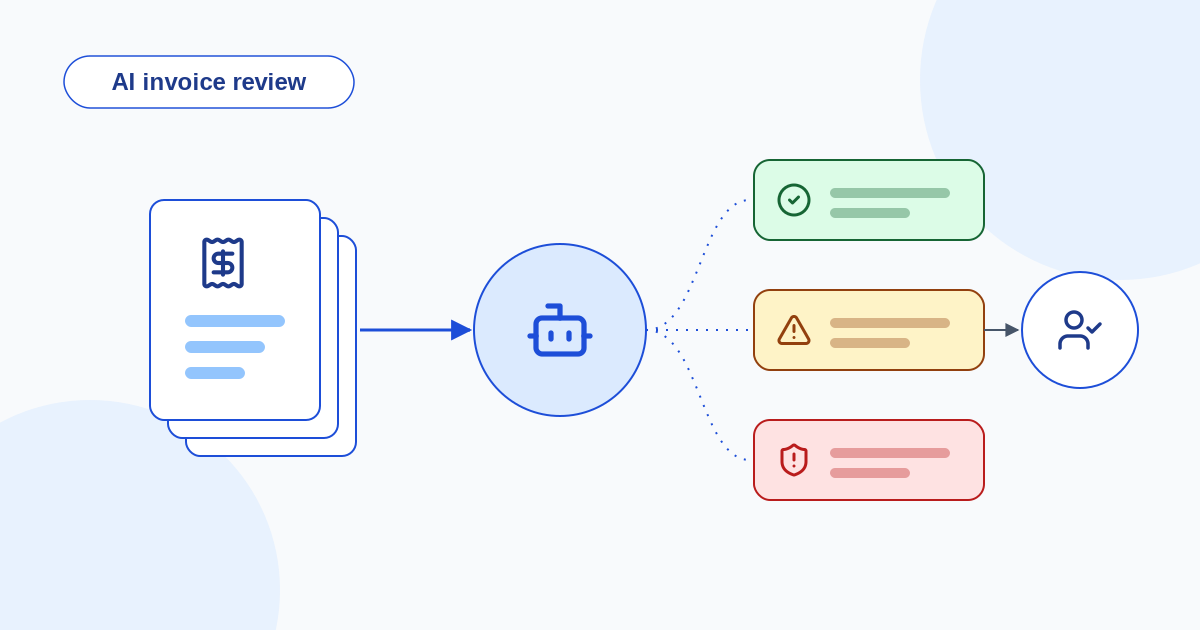
AI agents & MCP · October 9, 2026
AI Invoice Review for Viewpoint Vista AP: Design of a Safe Agent
The design of an AI agent that triages Viewpoint Vista AP unapproved invoices with deterministic risk rules, hands reviewers an evidence packet, and records every human decision. Read-only by default, with dry-run and allowlisted writes.
Integrations · October 9, 2026
Spectrum ERP Integration Guide: Spectrum Data Exchange Explained
A practical primer on integrating Trimble Spectrum through Spectrum Data Exchange: how Authorization IDs and operator codes scope access, Basic vs Enhanced authentication, the 18 modules of web services, Excel templates, and the integrations contractors build most.