The short answer: A multi-agent hierarchy for construction project management puts one orchestrator in front of the user, a thin layer of lead agents that only route, and a set of specialist agents that each own one domain and a short, curated list of tools. We built a 19-agent version over Trimble ProjectSight: a concierge orchestrator, three leads (Document Control, Cost & Procurement, Field & Quality) and fifteen specialists. It uses two tiers because the agent platform capped each agent at ten subagents. What makes it work is not the diagram. It is routing descriptions written as prompts, a playbook per specialist, golden-prompt evals that check which tools were actually called, and scripts that create, validate and tear the whole thing down in one command. And sometimes the right answer is one agent, not nineteen.
Project management platforms are wide. ProjectSight covers RFIs, submittals, drawings, files, contracts, budgets, change orders, pay applications, procurement, forecasts, job cost, daily reports, meetings, quality and safety. Behind that sits an API large enough that the MCP server we built for it exposes 425 tools across 48 API domains. No single agent prompt holds all of that well, and no model picks reliably between 425 tools on every turn.
There are two ways to handle that width. One is a single agent with a smart tool layer, such as an MCP gateway that routes intent to the right few tools; we describe that in the MCP gateway pattern and in our Procore routing work. The other is a hierarchy of agents, each small enough to be good at one thing. This article is about the second, built as work we did while building agents for Trimble products, and about when it is worth it.
The shape: orchestrator, leads, specialists
The hierarchy has three levels.
The orchestrator (the "Concierge"). The only agent a user talks to. It has no ProjectSight tools of its own. Its job is to understand the request, establish which project it is about, pick the right child, pass along all the context, and assemble the answer.
Three leads. Each lead owns a family of work and does nothing but route within it.
| Lead | Specialists it routes to |
|---|---|
| Document Control | RFI; Submittal & Transmittal; Drawing; Files, Folders & Photos |
| Cost & Procurement | Contract; Budget & Cost Codes; Change Order; Pay App & General Invoice; Procurement & ERP; Forecast & Job Cost |
| Field & Quality | Daily Report & Field Work Directive; Meetings; Quality (issues, punch, checklists, action items); Safety & Notices |
Fifteen specialists. Fourteen sit under the leads. The fifteenth, Project Discovery, sits directly under the orchestrator, because almost every request needs a project resolved first ("the Downtown job" to a project ID) before anything else can happen.
That is 1 + 3 + 15 = 19 agents. Most requests travel orchestrator, lead, specialist: three hops. A cross-domain request ("give me a full status on this project") goes to Project Discovery first, then to each lead in sequence, and the orchestrator summarizes.
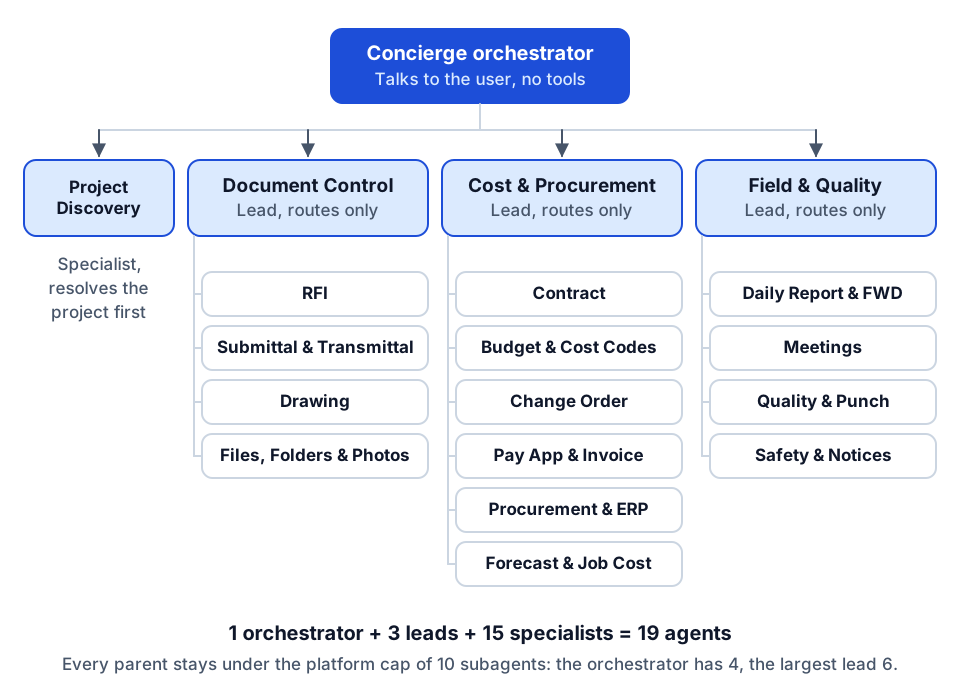 The 19-agent hierarchy: no parent has more than six children, well under the ten-subagent cap.
Why two tiers: the ten-subagent cap
We did not start out wanting a middle layer. The agent platform we built on lets a parent agent list its children as subagents, and each child then appears to the parent's model as a callable tool. That is convenient: no custom routing code. But the platform caps that list at ten subagents per agent. Fifteen specialists do not fit under one orchestrator.
So the leads exist to satisfy a platform limit, and we designed them around that. The orchestrator has four children. The biggest lead, Cost & Procurement, has six. Both leave headroom under the cap for growth.
It turned out to help in other ways:
- Each routing decision is shallow. The orchestrator chooses among four options, not fifteen. Each lead chooses among four to six. Shallow choices are more reliable choices.
- Leads can run on a cheaper, faster model. Our leads ran at temperature zero on a small, fast model because they only route; they never synthesize an answer. The orchestrator and specialists used a stronger model.
- Turn limits step up the hierarchy. Specialists get 12 to 14 turns, leads 10 to 12, and the orchestrator around 20, because it may chain through several specialists in one request.
If your platform has no subagent cap, you might still want leads once you pass about eight specialists, for the shallow-choice reason alone. If you have five specialists, you don't need them.
Routing descriptions are prompts
The single most important text in a hierarchy is not the system prompt. It is each child's description, because that is what the parent's model reads when it decides which child to call.
We wrote every description as "when to call this agent", not as a summary of what the agent is. Compare:
- "The Change Order Specialist manages change orders in ProjectSight." (Describes the agent.)
- "Call for anything about PCOs, CORs, PCCOs or SCCOs: status, dollar impact, ball-in-court, or advancing a change order through its workflow." (Tells the parent when to choose it.)
The second one routes. The orchestrator's own prompt then adds explicit routing rules that we found we needed:
- Establish project context first. If the user hasn't named a project, call Project Discovery to resolve it before delegating anywhere else.
- One intent, one child. Pick the single best match. Only fan out when the user asks for a cross-domain view.
- Chain, don't merge. If one child's output (an ID) feeds another, call them in sequence. Never invent IDs.
- Never answer domain questions yourself. If no child fits, say so and ask.
- Propagate context. Pass project name, project ID, record IDs, date ranges and filters to every child call.
The leads carry the same pattern in miniature, plus domain-specific composition rules. For example, the Cost & Procurement lead knows that "how is this project performing financially" means Budget, then Forecast & Job Cost, then Change Order, summarized with headings.
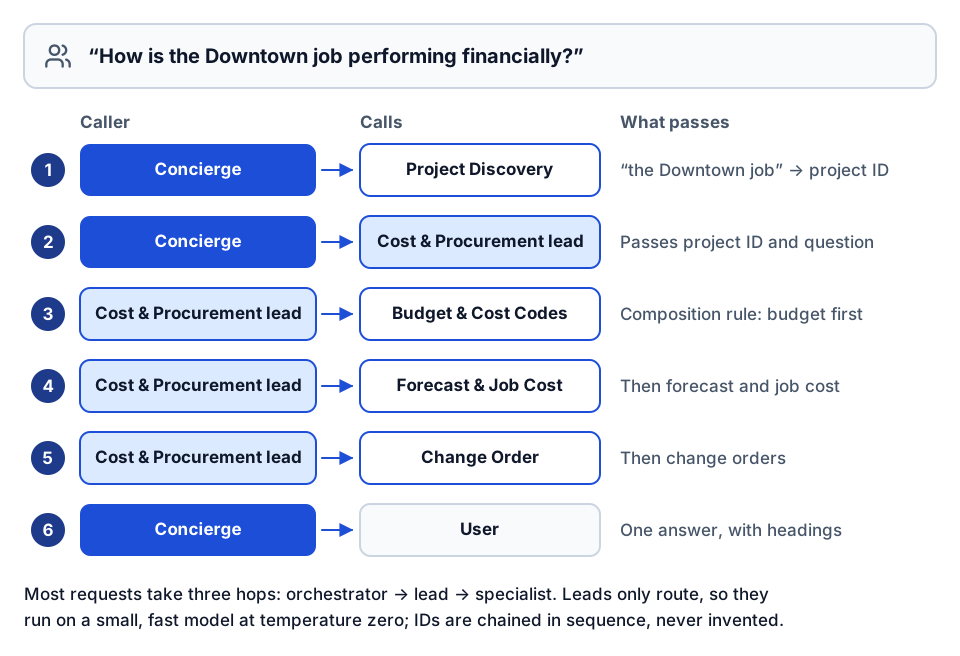 One financial status question, routed: resolve the project, then let the lead chain three specialists.
Trigger words help. The orchestrator's description of the Cost & Procurement lead lists the vocabulary users actually type: contract, subcontract, SOV, budget, cost code, change order, PCO, COR, pay app, AFP, G702, invoice, PO, forecast, EAC, job cost, over budget. Construction has a lot of acronyms, and a router that doesn't know "AFP" means pay application will send it to the wrong place.
Mutation policy at every level
Every agent in the hierarchy carries the same safety rules:
- Deletes are never executed. A request to delete is declined and the user is pointed to the ProjectSight interface.
- Creates and updates are confirmed first. The agent restates the change in one sentence (for a change order: the lifecycle stage, the amount and the contract) and waits for an explicit yes before delegating.
- Financially sensitive domains restate every time. Pay apps and contracts are always read back.
These mirror the policy in the underlying MCP server, so the rule is enforced twice: once in the agents' instructions and once in the tool layer that would refuse the call anyway. Instructions alone are not a control. See governing AI agents in construction for why both layers matter.
Per-specialist tool allowlists and playbooks
Each specialist is attached to the MCP server with an allowlist: only the tools on its curated list are callable; everything else is denied by default. The Change Order specialist gets the list, get, create and workflow-response tools for PCOs, CORs, PCCOs and SCCOs, and nothing for RFIs or budgets. This keeps each specialist's tool menu short, which is what makes its tool choice reliable, and it applies least privilege per domain.
Each specialist also has a playbook: a one-page, human-facing cheat sheet. It lists:
- When to call this specialist.
- Its tool map, with a one-line "when to use" for each tool and which ones need confirmation.
- Required context (almost always a project ID).
- Canonical workflows ("list open PCOs" maps to this tool with this filter).
- Output style (for change orders: one table per change order type, with a one-line count and dollar total).
- Troubleshooting steps.
The playbook is the page an operator opens first when something goes wrong. It also turned out to be the best review artifact: a project manager can read a two-page playbook and tell you whether the specialist's workflows match how the team works. Nobody can review 19 JSON payloads that way.
One source of truth, generated payloads
With 19 agents, hand-editing configuration is how drift starts. We kept one content file as the source of truth for every agent's system prompt, sample prompts, model, temperature, turn limit and tags. Everything else is generated from it:
- The 19 agent payloads the platform accepts.
- The 15 playbooks.
A refresh script regenerates the payloads and cross-checks every curated tool name against a live inventory of the MCP server's tools. A typo in a tool name fails the build instead of shipping a specialist that silently can't do its job.
Create, validate, tear down
Three scripts manage the whole hierarchy:
- Create runs bottom-up. It creates the 15 specialists and records their IDs, then creates the three leads with their children resolved to those IDs, then creates the orchestrator with its four children. It supports a dry run that prints all 19 planned calls without making any. Re-running is safe: an agent that already exists is updated in place instead of duplicated.
- Validate calls the platform's validation endpoint for every agent, so a broken reference or invalid field is caught before a user finds it.
- Tear down runs top-down: orchestrator, then leads, then specialists, so no parent is left pointing at a deleted child. It can remove everything, one tier, or one agent.
This sounds like housekeeping. It is what makes a hierarchy maintainable. If you can't rebuild your agents from source in one command, you will end up with a production configuration that nobody can reproduce.
Golden-prompt evals that check tool use
The hierarchy is tested with a golden set: three prompts per specialist, 45 in total, each run through the orchestrator so the routing layer is tested too. Each prompt carries two assertions:
- Expected tools. Every tool named must appear among the tool calls the run actually made. "How many open RFIs are there across my projects?" must call the RFI list tool. "Fetch an RFI by ID for an open RFI on an active project" must call both list and get.
- Expected phrase. The final answer must contain a short anchor that a correctly routed answer would include ("RFI", "budget", "transmittal").
A pseudo-example of the shape:
change_order:
  - prompt: "What PCCOs were executed on this project in the last 30 days?"
    expected_tools: ["list_prime_contract_cos"]
    expected_phrase: "PCCO"
Checking the tool calls is the important part. An answer can read well and still be wrong because the request was routed to the wrong specialist, which then answered from general knowledge. A phrase check alone would pass that. A tool check fails it.
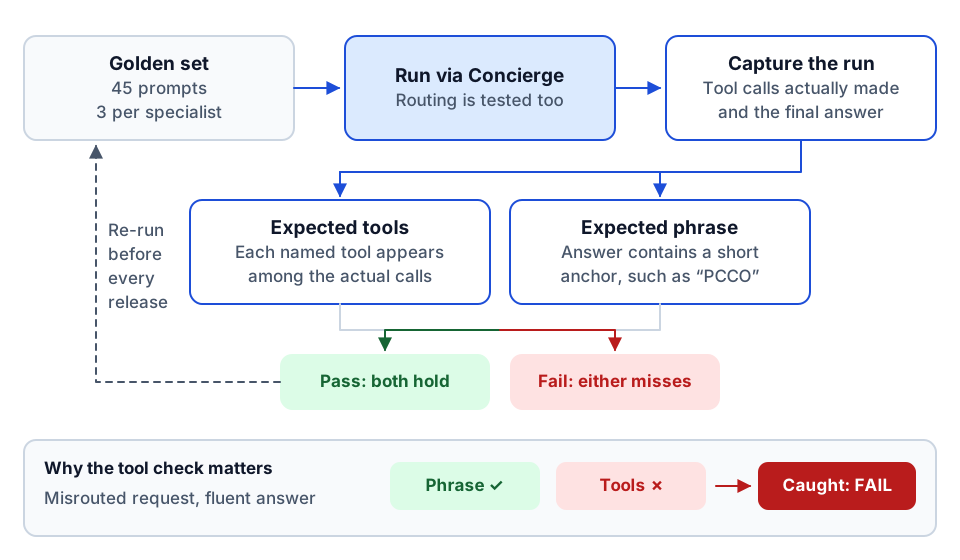 Golden-prompt evals: the tool check catches fluent answers that came from the wrong specialist.
The eval runner prints a pass/fail table, saves results per run, and supports running a subset or skipping the tool check. We ran it before every release and after every prompt or allowlist change. Over time, a proper rubric for answer quality (correct figures, correct project, sensible format) is worth adding on top; the tool check tells you the plumbing worked, the rubric tells you the answer was good.
When not to go multi-agent
A hierarchy is not free. Each hop adds latency and cost, each agent is another prompt to maintain, and errors can compound across levels. Stay with a single agent when:
- The domain is narrow. An agent that only reviews AP invoices, like our Vista AP invoice-review agent, needs one well-designed agent with task-shaped tools, not a team.
- A good tool layer solves the width problem. If an MCP gateway can route intent to the right handful of tools, one agent with one gateway tool may be simpler and faster. We put 425 ProjectSight tools behind a single gateway tool for exactly this reason.
- The workflow is a fixed sequence. If the steps are always the same, write them as a workflow, not as agents deciding what to do next. Our deed-to-COGO pipeline is a fixed pipeline with one model step, not a team of agents.
- You have no evals. Without a golden set, you can't tell whether the routing works, and a hierarchy you can't test is worse than a single agent you can.
Go multi-agent when the domains are genuinely distinct (document control, cost and field really are different jobs with different vocabularies), when each domain has enough tools that one agent's menu gets crowded, and when different domains need different policies.
Agent sprawl is cheaper than MCP sprawl
One principle shaped this design: agent sprawl is cheaper than MCP sprawl.
An agent, on a modern platform, is configuration: a prompt, a model, a description, an allowlist. You can generate 19 of them from one file, validate them in a minute and delete them in another. An MCP server is software: code, auth, hosting, monitoring, security review, upgrades. Every new server is another thing to run.
So we kept the tool layer consolidated (one well-built ProjectSight MCP server, with its policy and auth in one place) and let the agents multiply on top of it, each with its own slice of that server's tools. If you need a new specialist, you add an entry to the content file and an allowlist, not a new service. That is the right way round. The expensive, security-sensitive thing stays singular; the cheap, flexible thing is what you vary.
Where to go next
- Compare this with the single-agent approach in the MCP gateway pattern for construction APIs and routing across 2,755 Procore tools.
- See how tool calls are measured in MCP gateway telemetry and the tool runtime, and how agents act with each user's own permissions in on-behalf-of token exchange for AI agents.
- New to the terms? Start with what MCP is and designing agent tools for construction.
- Before you commit to agents, the AI readiness review checks whether your data and access are ready. To scope a build, plan your build.
- Want to talk through whether your use case needs one agent or many? Start a conversation.
Frequently asked questions
When should a construction AI assistant use multiple agents?
When the domains are genuinely distinct, each has enough tools to crowd a single agent's menu, and they need different policies. For a narrow task or a fixed sequence of steps, one agent or a plain workflow is simpler and faster.
Why add lead agents between the orchestrator and specialists?
Our agent platform capped each agent at ten subagents, and we had fifteen specialists. Leads also keep each routing choice small, can run on a cheaper model because they only route, and group specialists by family of work.
How do you test a multi-agent hierarchy?
Run a golden set of prompts through the orchestrator, three per specialist in our case, and assert that the expected tools were actually called and that the answer contains an expected anchor phrase. Re-run after every prompt or allowlist change.
What does 'agent sprawl is cheaper than MCP sprawl' mean?
An agent is configuration you can generate, validate and delete in minutes. An MCP server is software that needs auth, hosting, monitoring and security review. Keep the tool layer consolidated and let agents multiply on top of it.
Next step
Have a workflow in mind?
Start with a readiness review: the task, the data and tools it needs, the access boundaries, and how a pilot would be evaluated.
Prefer email? charley@buildflows.ai
Get the next guide in your inbox
Field Notes: practical guides and new walkthroughs, about once a month.
Field Notes
Practical guides and new walkthroughs on construction data and automation, roughly monthly.
Keep learning
AI agents & MCP · October 9, 2026
The MCP Gateway Pattern for Large Construction APIs
One tool per endpoint overwhelms agents on large construction APIs. This guide compares a gateway tool over a registry (425 ProjectSight tools behind one tool), progressive discovery meta-tools, and task-first tools, plus the policy, docstring and testing practices that make routing reliable.

AI agents & MCP · January 16, 2026
Building AI Agents for Construction with MCP Tools and Procore
A walkthrough of Construct.Chat: building a Procore financials agent with MCP tools, auditing every tool call, and the structure of a 735-tool Procore MCP server.

AI agents & MCP · October 8, 2026
Governing AI Agents in Construction: A Checklist for IT and Leadership
A practical checklist for putting AI agents into construction systems safely, covering credentials, least privilege, read-first rollout, tool routing, telemetry, evaluation and human approval, drawn from our own builds.