The short answer: You can turn a scanned deed or legal description into COGO lines with a short pipeline: OCR the document to text (we used Mistral OCR), have a fine-tuned language model encode each call into a compact COGO format (bearing, distance, point, description), evaluate any arithmetic with deterministic code, and write both the OCR text and the COGO output back to the document system next to the source file. The rule that makes it trustworthy is simple: the language model never does arithmetic. It writes expressions; code evaluates them. Add idempotency keys so retries don't duplicate work, chunk long documents carefully, and keep a licensed surveyor checking every result. The same split (model reads, code calculates, person approves) is the right pattern for most construction document automation.
Legal descriptions are a good test of whether document AI is ready for real work. They are long, written in dense surveying prose, often scanned from old paper, full of numbers that must be exactly right, and they sometimes contain errors in the original. Typing one into COGO software by hand is slow and careful work. Getting it wrong puts a boundary in the wrong place.
This article walks through a pipeline we built while building integrations and agents on Trimble products: it takes a deed in Trimble Connect, runs OCR, translates the legal description into COGO lines, and puts the results back in Connect for a surveyor to check. We focus on the design decisions, because they transfer to submittals, contracts, pay applications and every other document a contractor wants to turn into data.
What a legal description looks like, and what COGO needs
A metes-and-bounds description reads like directions. It starts at a monument ("beginning at the center quarter corner of said section 14"), then walks the boundary call by call: "thence north 00°21'47" west, coincident with the east line of the northwest quarter, a distance of 612.40 feet; thence south 89°12'06" west, a distance of 2641.18 feet to the west line…" and so on until it returns to the point of beginning. Some calls are curves, described by radius, arc length, chord bearing and chord distance.
COGO (coordinate geometry) software wants the same information as structured lines. The compact encoding our model produced looked like this, written here as an illustration:
SC 0.000, 0.000,, P001, CENTER 1/4 OF SECTION 14
LB N 00 21 47 W, 612.400,, P002, COINCIDENT WITH THE EAST LINE OF THE NW 1/4
LB S 89 12 06 W, 2641.180,, P003, TO THE WEST LINE OF THE NW 1/4
LB S 00 47 52 E, 318.250,, P004, COINCIDENT WITH SAID WEST LINE
One line per call: a code for the kind of call (a start point, a line by bearing, a curve), the bearing in degrees, minutes and seconds, the distance in feet, a point number, and the descriptive text that a surveyor uses to check the call against the deed.
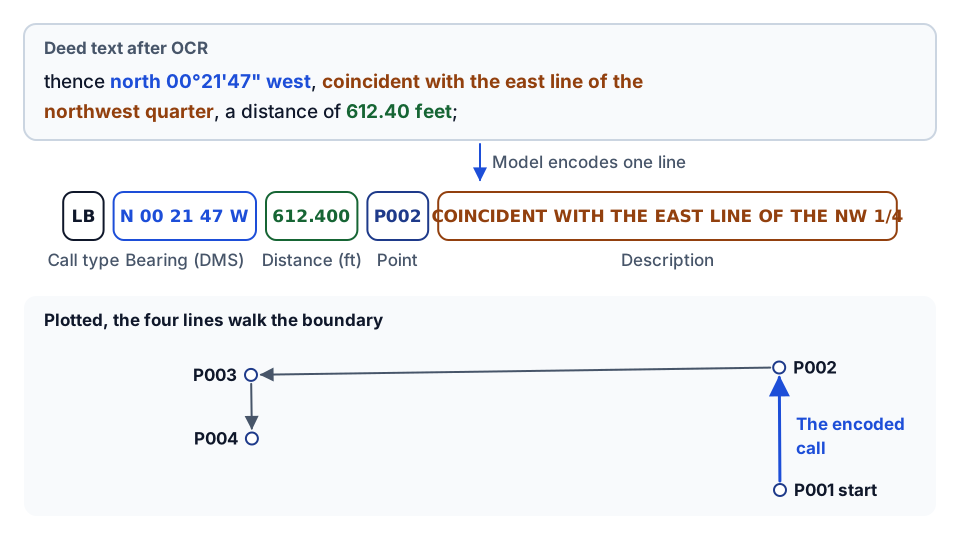 One call, field by field, and the four example lines plotted as boundary legs.
That conversion is mostly reading comprehension, which is what language models are good at. The parts that are not reading comprehension (unit conversion, curve geometry) are arithmetic, which is what they are bad at. The pipeline is built around that difference.
The pipeline, step by step
- Accept a request for a file already stored in Trimble Connect, with an optional idempotency key.
- Download the source file from Connect using the caller's own access token.
- Run OCR with Mistral OCR, which returns the document as Markdown.
- Translate to COGO. Send the OCR Markdown to a model fine-tuned on legal-description-to-COGO examples. Long documents are split into chunks first.
- Evaluate arithmetic deterministically. Any expression the model wrote is evaluated by a small, restricted calculator.
- Upload both outputs back to Connect, next to the source: one file with the OCR text and one with the COGO lines.
- A surveyor checks the COGO output against the deed before it is used for anything.
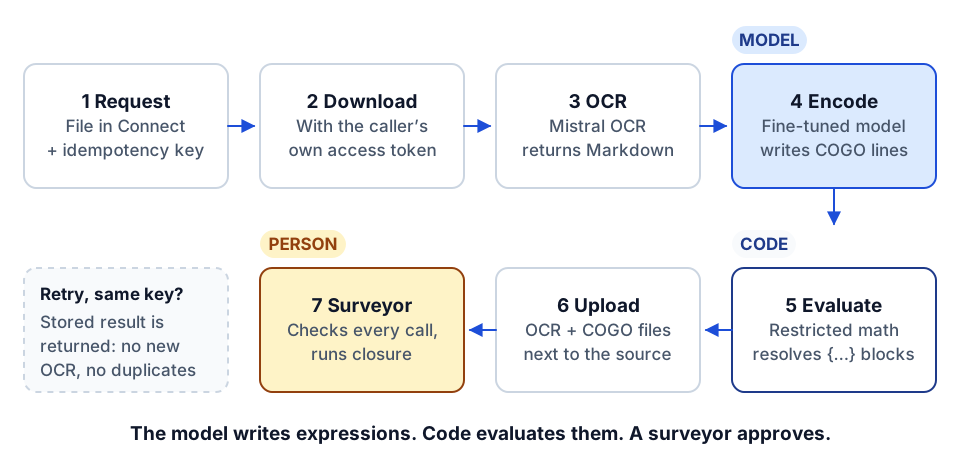 The pipeline: one model step, one code step, one person, and idempotent retries.
It runs as a headless API service with a health endpoint and a single process endpoint, so it can be triggered from a button, a folder watch, a workflow tool or an agent. The COGO translation is also exposed as an MCP server, so an assistant can call it directly on pasted text.
Step 1: OCR is its own step
Keep OCR separate from interpretation. It is tempting to send a scanned PDF straight to a multimodal model and ask for COGO lines. We didn't, for three reasons:
- You can inspect the OCR. When a COGO line is wrong, the first question is whether the OCR read "89°12'06"" correctly. If the OCR text is saved as its own file, a surveyor can answer that in seconds.
- You can swap either side. A better OCR engine or a better translation model can be dropped in without touching the other.
- OCR output is useful on its own. A searchable text version of every deed in the project folder is worth having even if you never generate COGO.
Mistral OCR returns Markdown, which preserves headings, paragraphs and tables reasonably well. That matters for deeds with exhibits, where the parcel heading tells you which description you are reading. Our broader guide to construction document OCR automation covers choosing and evaluating OCR engines.
Step 2: a fine-tuned model encodes the calls
The translation step uses a small model fine-tuned on pairs of legal description text and correct COGO output. Fine-tuning helps here more than prompting alone because the output format is strict and unforgiving: exact field order, exact punctuation, bearings in a fixed "N 00 21 47 W" pattern, point numbers in sequence. A fine-tuned small model learns the format reliably and is cheap to run.
The model's instructions are strict too:
- Output only the encoded lines. No commentary.
- Preserve every number, bearing, punctuation mark and the order of calls exactly as written.
- Do not convert units. All COGO distances are in feet. If the deed uses rods, chains, links, varas or furlongs, write the conversion as an expression in braces, using only the allowed factors (1 rod = 16.5 ft, 1 chain = 66 ft, 1 link = 0.66 ft, 1 furlong = 660 ft, and so on).
- Do not solve curves. If a curve gives a chord length where an arc length is needed, write the formula as an expression, not a number.
So where a deed says "thence north 12 chains", the model writes something like {feet = 12 * 66} in the distance field. Where a curve needs an arc length from a chord, it writes {arc_length = 2 * r * math.asin(chord_length / (2 * r))} with the radius and chord filled in. It never writes 792.
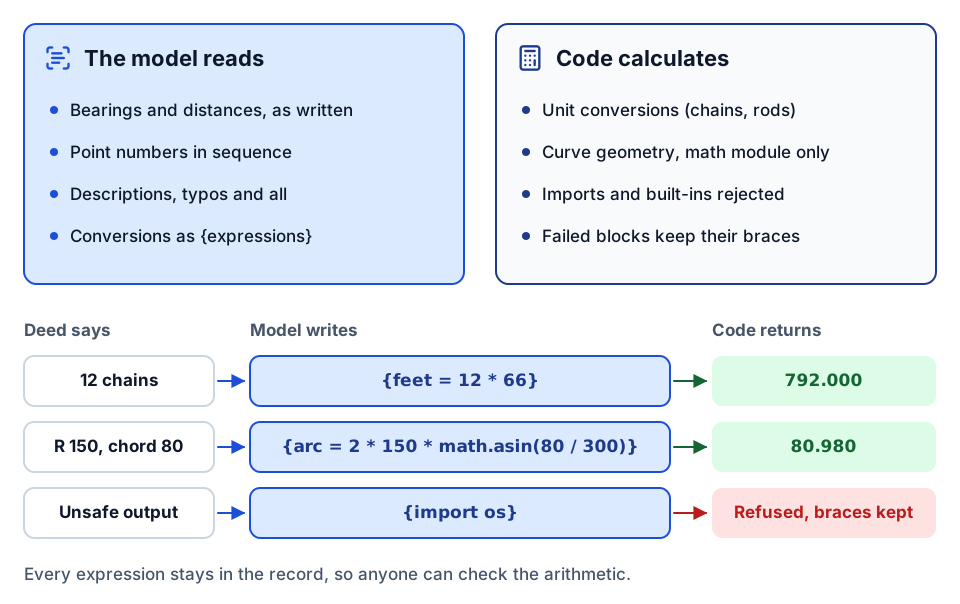 The model writes the formula; deterministic code produces the number or refuses.
Step 3: deterministic, safe math evaluation
After the model responds, a small calculator finds every brace block and evaluates it. The calculator is deliberately narrow:
- It accepts assignments and arithmetic: add, subtract, multiply, divide, powers, modulo, negation.
- The only function calls allowed are from Python's standard
mathmodule (sin,cos,asinand so on). - Anything else, including imports, built-ins and attribute access outside
math, is rejected. - A block that fails to evaluate is left in place, braces and all, and the error is recorded. The output is never silently patched.
That last point is important. A failed calculation stays visible as an unresolved expression that a surveyor will see, rather than becoming a plausible-looking wrong number.
The calculator has its own unit tests: a single multiplication resolves correctly, multiple blocks resolve in order, a multi-line curve calculation returns the right arc length, a failing block keeps its braces and records an error, and an attempt to import a module is refused. That is the kind of small, boring test that lets you trust the one part of the pipeline that touches numbers.
Why go to this trouble? Because language models generate the next likely token; they do not compute. A model asked for 2 × 150 × asin(80 / 300) will usually produce a number that looks right and is sometimes off in the third decimal place. In surveying, that is a boundary in the wrong place. Making the model write the formula and having code evaluate it removes that whole class of error. It also makes the arithmetic auditable: the expression is in the record, and anyone can check it.
Step 4: results go back where the work lives
Both outputs are written back to Trimble Connect, in the same folder as the source, named after it (the source name plus an OCR suffix, and the source name plus a COGO suffix). The surveyor opens the folder they already use and finds the deed, the text and the COGO lines side by side.
This is a small decision with a big effect on adoption. A pipeline whose results live in a separate tool, a database or an email attachment has to win people over. A pipeline whose results show up next to the source file in the system they already work in does not.
Idempotency keys
A process request can carry an idempotency key. The service remembers the result for each key for a period (an hour by default). If the same request arrives again with the same key, because a workflow retried after a timeout or someone clicked twice, the service returns the stored result instead of running OCR and translation again and uploading a second set of files.
Without it, every retry costs another OCR call, another model call and another pair of uploads, and the folder fills with duplicates. With it, retries are safe. Use a key that identifies the work, such as the file ID and its version, so a new version of the deed is processed but a repeated request for the same version is not. An in-memory cache was enough for our volume; if you run several instances, move it to a shared store.
Chunking long documents
Deeds with exhibits can run to many pages, and models have practical limits on input size. The translation step splits long OCR text into chunks (around 8,000 characters by default), preferring to break at line endings, runs each chunk through the model, and joins the results.
Chunking is where this kind of pipeline most often goes wrong, so be careful:
- Never split a call. A call broken across two chunks ("thence north 00°21'47" west, coincident with…" in one, "…a distance of 612.40 feet" in the next) will be mis-encoded in both. Break at paragraph or "thence" boundaries, not at a character count, wherever the text allows.
- Watch point numbering. If each chunk is translated independently, point numbers can restart. Either pass the last point number forward or renumber after joining.
- Keep parcels together. If a document contains several parcels, split by parcel first, then by size only if a single parcel is too long.
The human check: a surveyor signs off
A licensed surveyor checks every result. This is not a formality. Deeds contain errors, and the model will faithfully encode them or, worse, quietly fix them.
In one of our test descriptions, a call gave a bearing with no east or west, along the lines of "thence south 89°12'06"". The model produced a west bearing, which is almost certainly what the author meant given the surrounding calls. But "almost certainly" is a surveyor's judgment, not a model's. Typos in the descriptive text ("said" written as "sad") came through as-is, which is correct: the descriptive text should match the deed.
A sensible review, which the pipeline is designed to support:
- Compare each COGO line against the OCR text and the scanned original, call by call.
- Check that the number of calls matches.
- Look for any unresolved brace expressions, which signal a failed calculation.
- Run a closure check in the COGO software. A description that does not close, or closes with an unusual misclosure, needs a closer look at the source.
- Flag anything the model inferred rather than read, such as a missing bearing direction.
Treat the pipeline output as a well-prepared draft. It saves the transcription time; it does not replace the professional responsibility. This is human-in-the-loop where the human is the licensed professional who would be accountable anyway.
Auth and plumbing, briefly
The service acts with the caller's own Trimble Connect access, so it can only read and write files that person can. It accepts a token on the request (or a refresh token it exchanges), caches tokens for their lifetime, retries Connect downloads with a fallback, and handles Connect's multi-step upload. The model call streams its response, which the service assembles before evaluation. None of this is novel, but all of it is necessary, and it is most of the code. The interesting AI step is a small fraction of a production pipeline. The same is true in our Procore integration guide: the API calls are rarely the hard part.
The general lesson for construction documents
Strip away the surveying and the pattern applies to nearly every document a contractor wants to turn into data:
| Step | Deed to COGO | Same pattern elsewhere |
|---|---|---|
| OCR, saved separately | Deed text as Markdown | Submittal, contract, invoice or pay app text |
| Model reads and structures | Calls encoded as COGO lines | Line items, dates, parties, amounts, spec sections extracted to a schema |
| Code does the arithmetic | Unit conversion and curve geometry evaluated | Totals, retainage, extensions and tax recalculated and compared with the document's own figures |
| Results go back to the source system | COGO and OCR files next to the deed | Extracted fields written to the ERP or project system, document linked |
| Idempotency and chunking | Safe retries, call-aware splits | Same |
| Professional review | Surveyor signs off | AP, project manager or estimator approves |
The arithmetic row is the one people skip. When a model extracts a pay application, don't ask it whether the line totals add up. Have it extract the lines and the stated total, and let code add the lines and compare. When it reads a schedule of values, let code compute percent complete. The model's job is to read; checking numbers is a job for code, the same way data quality rules check numbers in a reporting pipeline.
Two more lessons carry over. First, a narrow, well-defined task (one document type, one output format) is where a small fine-tuned model beats a large general one on cost and consistency. Second, a fixed pipeline with one model step is often better than an agent. Nothing in deed-to-COGO needs a model deciding what to do next; the steps are always the same. Save agents for work that genuinely branches, and see our multi-agent hierarchy for when that is.
Where to go next
- Read construction document OCR automation for choosing and testing OCR on your own documents.
- See designing AI agent tools for construction and what MCP is if you want to expose a step like this to an assistant.
- For the review and approval side, read governing AI agents in construction and the anatomy of a construction integration flow.
- Have a document type you want turned into data? Plan your build, or start with the AI readiness review.
- Want to talk it through first? Start a conversation.
Frequently asked questions
Can AI convert a legal description into COGO?
Yes, as a draft. OCR the document, have a fine-tuned model encode each call as a COGO line, evaluate any arithmetic in code, and have a licensed surveyor check the result against the deed and run a closure check.
Why shouldn't the language model do the math?
Language models predict text; they do not compute. They can produce numbers that look right but are slightly off. Having the model write the formula and code evaluate it removes that error and leaves the calculation auditable.
How do you handle long deeds with many pages?
Split the OCR text into chunks for the model, but break by parcel and at call boundaries, never mid-call, and carry point numbering across chunks or renumber after joining.
Does this pattern apply to other construction documents?
Yes. For pay applications, invoices, contracts and submittals, the model reads and structures the document, code recalculates totals and checks them against the stated figures, results go back to the source system, and a responsible person approves.
Next step
Want this workflow automated?
Tell us the handoff, approval, or reminder your team repeats. We'll scope the automation, the approvals it needs, and who owns it.
Prefer email? charley@buildflows.ai
Get the next guide in your inbox
Field Notes: practical guides and new walkthroughs, about once a month.
Field Notes
Practical guides and new walkthroughs on construction data and automation, roughly monthly.
Keep learning

Workflow automation · October 9, 2026
Construction Document Automation with OCR: A Practical Guide
How to automate construction paperwork with OCR: capture documents at one door, extract defined fields, validate them against your systems, route exceptions to a person and measure accuracy per field.
Reporting & analytics · October 8, 2026
Construction Data Quality: The Rules That Make Reports Trustworthy
A practical checklist of the data-quality rules behind construction reports people can defend, from quality gates and blank-never-zero to cost-code crosswalks, reconciliation and snapshots.
AI agents & MCP · October 9, 2026
Multi-Agent Hierarchies for Construction Project Management
A walkthrough of a 19-agent hierarchy over Trimble ProjectSight: one orchestrator, three routing leads and fifteen specialists, with routing descriptions, per-specialist allowlists and playbooks, tool-checking evals and one-command create, validate and teardown scripts.