The short answer: If you wrap a large construction API as an MCP server by generating one tool per endpoint, the agent drowns: hundreds of near-identical tool definitions in every prompt, poor tool choice, and every write and delete in reach. There are three better shapes. A gateway tool takes a plain-language request and routes it over a server-side registry of tools and named multi-step capabilities (we put 425 ProjectSight tools behind one gateway tool this way). Progressive discovery gives the agent a handful of meta-tools to search, describe, plan, prepare, execute and verify operations on demand (we used seven meta-tools over about 94 endpoints). And task-first tools skip the endpoint mapping entirely and expose the job the user actually does. Whichever you pick, put a policy layer in front of writes, write tool descriptions to a standard, and test intent matching like any other code.
We wrote about routing 2,755 generated Procore tools through search, planning and a single dispatch chokepoint. That article covers one large build in depth. This one steps back and compares the patterns we have used across about twenty MCP servers we built for Trimble products and other construction platforms, so you can pick the right shape before you write the first tool.
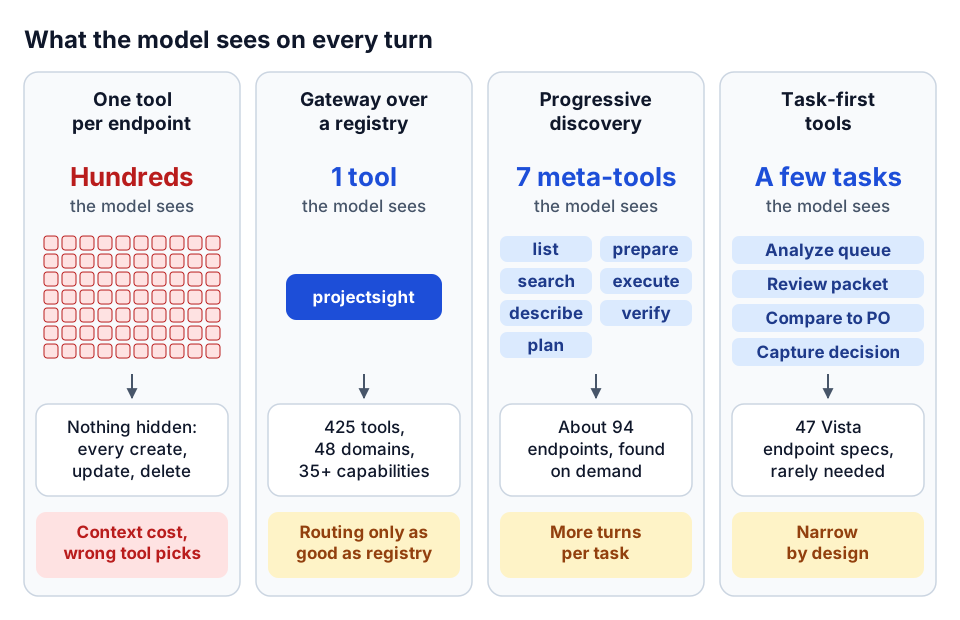 What the model sees under each pattern, and the main risk of each.
Why one tool per endpoint breaks down
An MCP client sends every tool's name, description and input schema to the model on every turn. That is fine for a weather API with five operations. Construction platforms are not that size. A project management platform covers RFIs, submittals, drawings, daily reports, budgets, contracts, change orders at three levels (potential, prime, subcontract), pay applications, punch lists, meetings, users and roles. An ERP adds AP, AR, job cost, payroll, equipment and purchasing.
Generate one tool per endpoint and three things go wrong:
- Context cost. The catalog eats the context window before the user has typed anything, and you pay for it on every call.
- Selection quality. Faced with
list_change_orders,list_potential_change_orders,list_prime_contract_change_ordersandlist_sub_contract_change_orders, a model will often pick the wrong one or invent a parameter. - Blast radius. A flat catalog exposes every create, update and delete to every agent and every prompt, including prompts that were never meant to change data.
There is a deeper problem too. REST APIs are stateless and ID-driven. Users think in names and tasks: "show me the open RFIs on the Riverside job." To answer that, something has to resolve the portfolio, find the project by name, list RFIs with the right filter, and maybe fetch the responses. If every endpoint is a separate tool, the model has to work out that sequence, carry the IDs between calls, and get every step right. That is where most agent failures we have debugged actually happen.
Pattern 1: the gateway tool over a registry
The first pattern hides the whole API behind one tool. In our ProjectSight MCP server, the default configuration exposes a single projectsight tool. Behind it sit 425 tools across 48 API domains, registered as handlers but not shown to the client. A single environment switch exposes all 425 directly, which we use for debugging, never for agents.
The gateway takes three inputs:
user_request: the plain-language request, such as "list submittals for the Downtown project".context: anything already known from earlier turns, such as a project ID, project name or contract ID.prefer_discovery: when true, return the plan without running it.
Inside, the gateway scores the request against a tool registry (a YAML file with one entry per tool) and a set of named capabilities, resolves the project and portfolio from names when IDs are missing, checks policy, runs the handlers, and returns one of a small set of response types.
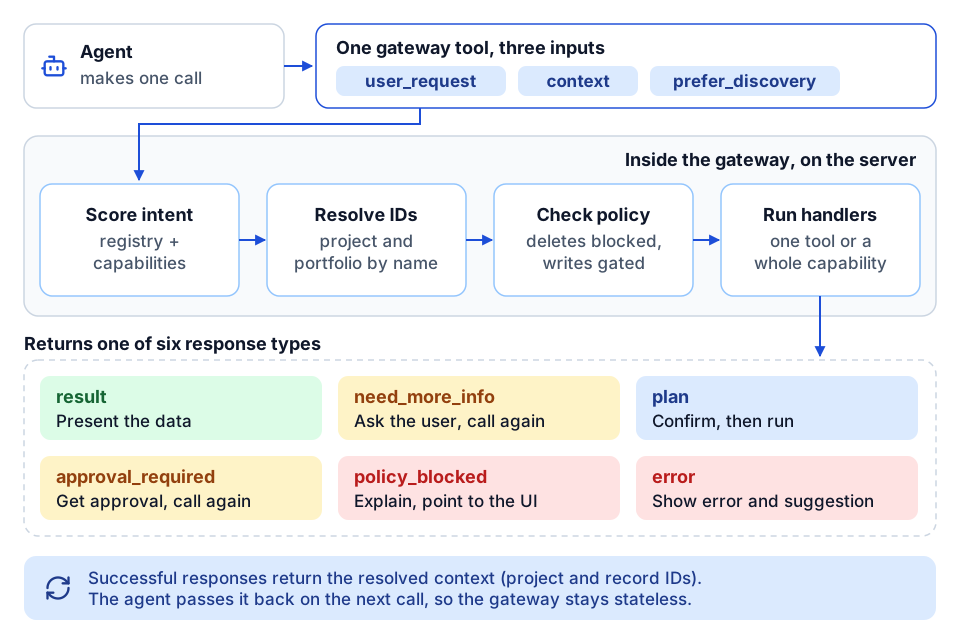 One gateway call: score, resolve, check policy, run, then one of six structured responses.
| Response | What it means | What the agent does next |
|---|---|---|
result | The tools ran and here is the data | Present it |
need_more_info | A required piece of context is missing | Ask the user the returned questions, call again with the answers in context |
plan | Discovery mode: these steps would run | Confirm with the user, then call again without discovery |
approval_required | A create or update needs explicit approval | Get approval, call again with an approval flag |
policy_blocked | The request is not allowed on this server (for example, a delete) | Explain, point the user to the product UI |
error | Something failed, with a suggestion | Show the error and the suggestion |
Successful responses also return the resolved context (project ID, project name, record IDs), so the agent can pass it straight back on the next turn. The gateway itself stays stateless. Continuity lives in the conversation, which keeps the server easy to scale.
Named capabilities do the multi-step work
The registry handles single operations. Most real questions need several. We defined more than 35 named capabilities in a second YAML file: a capability is a name, a description, an ordered list of tools and the context it requires. For example:
project_overview:
  description: Project details plus submittals, RFIs and action items.
  tools: [get_project, list_submittals, list_rfis, list_action_items]
  required_context: [portfolio_guid, project_id]
When a request matches a capability, the gateway runs the whole sequence server-side with shared context. The model never has to chain four calls or carry IDs between them. Capabilities like a contract-and-budget summary or a quality-and-issues rollup turn common questions into one deterministic call. Because they are data, a project controls lead can read them and suggest new ones without touching code.
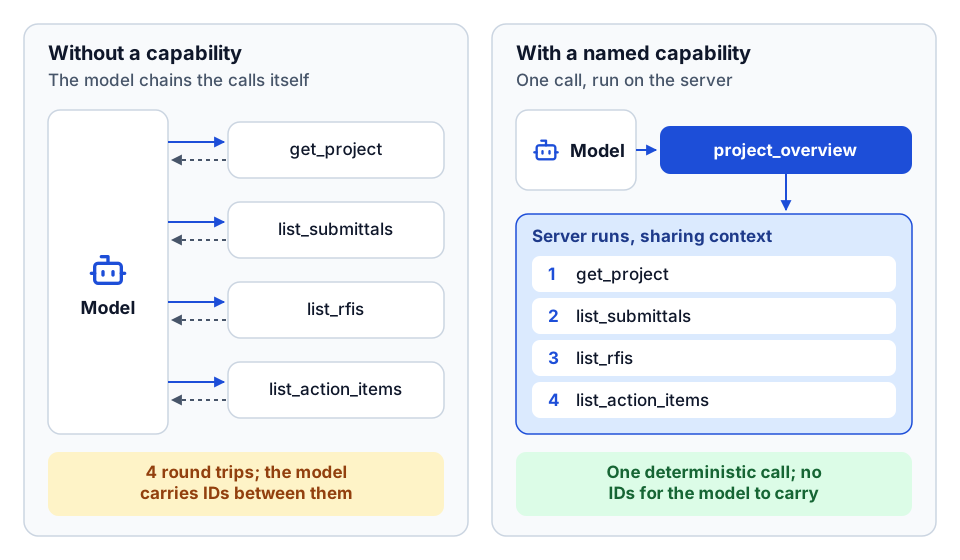 A named capability turns four chained calls into one deterministic call.
Where the gateway fits
The gateway pattern is strongest when the API is large, the users are not developers, and the common questions are predictable. Its weakness is matching. Our gateway uses keyword scoring over registry keywords and example phrases, which is simple, fast and explainable, but it only knows what the registry tells it. If the descriptions are vague, routing is vague. That is why the docstring standard and the tests below matter as much as the gateway code.
Pattern 2: progressive discovery with meta-tools
The second pattern gives the agent a small toolkit for finding and using operations itself. We built this for an agent platform API: seven OpenAPI specifications, about 94 endpoints in total, exposed through seven meta-tools:
| Meta-tool | Job |
|---|---|
list_domains | Show the service domains and how many operations each has |
search_operations | Rank operations for a query (BM25 keyword search, with optional embeddings) |
describe_operation | Load one operation's full schema into context, only when needed |
plan_workflow | Produce a multi-step plan (using MCP sampling, with a deterministic fallback) |
prepare_request | Validate inputs, ask the user for missing required fields (MCP elicitation), and gate destructive operations |
execute_operation | Make the call and validate the response against the declared schema |
verify_outcome | Run a paired read to confirm a write actually took effect |
The model only pays for the schemas it actually looks at. describe_operation is the key move: the full input schema for an endpoint enters the context only after search has narrowed the choice to one or two candidates.
Two of these tools carry most of the safety load. prepare_request is where missing fields become a question to the user instead of a guess, and where a destructive call is stopped until someone confirms it. verify_outcome closes the loop. An API returning 200 does not always mean the record changed the way you expected, especially on platforms where writes are queued and processed later. A paired read after the write turns "the agent says it worked" into evidence.
Where progressive discovery fits
This pattern suits APIs that are broad but not huge, users who are comfortable with a more exploratory agent, and teams that want new endpoints to become usable without hand-written capabilities. It costs more turns per task than a gateway, because the agent searches, describes and then executes. For a few hundred endpoints and above, we prefer hybrid retrieval (keyword plus semantic with rank fusion), as described in the Procore routing article.
Pattern 3: task-first tools
The third pattern is the one we reach for most often now, and it is less about routing than about what you choose to expose. Instead of wrapping endpoints, you design tools around the job a person does.
Our Vista AP invoice review server is the clearest example. It covers 47 Vista endpoint specifications, but the tools an agent leans on are task-shaped: analyze the unapproved invoice queue, list review queues, page through a queue deterministically, build a review packet for one invoice, compare an invoice to its PO or subcontract, capture a reviewer's decision, preflight an approval and export an audit trail. The raw endpoints are still there for edge cases. The agent rarely needs them. We cover that build in the AP invoice review agent article.
The principle behind it is simple. APIs are stateless; agents doing real work need state: which invoices have I already reviewed, what page am I on, what did the reviewer decide. A task-first tool holds that state, or returns it in a form the agent can pass back, so the model is not reconstructing a workflow from primitives on every turn.
Task-first tools also publish more than tools. That server exposes a machine-readable dependency graph as an MCP resource (which tools require which IDs, which produce them, which are safe to retry) and a set of review-workflow prompts. The agent gets a map of the work, not just a list of verbs.
Choosing between them
| Gateway over registry | Progressive discovery | Task-first tools | |
|---|---|---|---|
| Tools the model sees | One (plus optional debug tools) | About seven | A small, curated set |
| Best for | Large API, predictable questions, non-technical users | Broad API, exploratory use, fast coverage of new endpoints | One high-value workflow done well |
| Multi-step work | Named capabilities run server-side | Agent plans, with a planning helper | Built into each tool |
| Main risk | Weak registry descriptions mean weak routing | More turns per task; search quality sets the ceiling | Narrow by design; other work needs another server |
| Upkeep | Regenerate the registry when the API changes | Reload specs; the index rebuilds | Change tools when the workflow changes |
These combine well. A gateway can expose task-first capabilities. A discovery server can treat a capability as one searchable "operation." The Procore server we built offers expanded, hybrid and router modes from one codebase so different clients get different shapes.
One more option is worth knowing: an MCP gateway in front of several servers, which centralizes keys, routing and logging across all of them. That is a different layer from the in-server routing described here, and we cover it in the Tool Runtime telemetry article.
The policy layer for writes and deletes
Every pattern above needs the same thing in front of mutations: a policy check that runs on every call, in one place, before any handler. Ours are deliberately boring:
- Deletes never run by default. In the ProjectSight server, a delete request returns
policy_blockedwith a message that deletions go through the product UI. Deleting a submittal or an RFI response on a live job is rare, high-impact and hard to undo. An agent does not need it. - Creates and updates can require approval. A policy file (overridable by environment variable) sets whether mutations run directly or return
approval_requiredfirst. The agent must call back with an explicit approval flag, which gives you a natural place for a human-in-the-loop confirmation. - Read-only mode and domain allowlists. On the Vista server, a single setting disables every write tool, and a second lists the domains (for example AP but not PO) where writes are allowed at all.
Keep the policy as data, in a file the IT or security owner can read, and keep the server's behavior identical across patterns. We go deeper on write safety, bulk caps and dry runs in hardening MCP servers for production, and on the governance side in governing AI agents in construction.
A docstring standard is a routing feature
In a gateway or discovery server, tool descriptions are not documentation. They are the data the router scores against. We wrote a one-page standard and held every tool to it:
- One-sentence summary that starts with a verb ("List", "Get", "Create or update"), states the scope ("for a project", "portfolio-level") and says whether the tool paginates.
- One line per argument, with type, constraint and default behavior. For any free-form body parameter, list the expected keys or name the schema.
- A returns line, including what an error looks like ("On error: a dict with
errorandsuggestion").
Each registry entry then carries the fields the router needs:
| Field | Purpose |
|---|---|
name, domain | Identity and grouping |
description | Verb plus scope plus pagination, same as the docstring summary |
required_context | IDs the tool cannot run without (portfolio, project, record) |
optional_context | Names, offsets, limits and optional IDs |
keywords | Phrases users actually say: "list RFIs", "show open RFIs" |
examples | One to three realistic requests |
follow_ups | Natural next tools (list leads to get; get leads to workflow) |
We generate the registry from the code with a script, so the docstring and the registry cannot drift. When the API adds endpoints, regenerating the registry is part of the same change. required_context does double duty: it tells the gateway when to return need_more_info instead of guessing an ID.
Testing intent matching
Routing is code, so it gets tests. Ours are plain unit tests that run in seconds:
- Registry loads and is complete. Every registered handler has a registry entry, and every entry points to a real handler.
- Common phrases route correctly. "List submittals" maps to the submittals list tool. "Get projects" maps to the projects tool. "Project overview for Downtown" maps to the capability, not a single tool.
- Missing context asks, not guesses. A project-level request with no project returns
need_more_info. - Policy holds. A delete phrased any way you like returns
policy_blocked. A create with approval required returnsapproval_required.
Then build a golden set from real requests: what superintendents, project engineers and controllers actually type, with the tool or capability that should handle each. Run it on every registry change. When a new phrase misroutes in production, add it to the set before you fix it. For multi-agent setups, we also check that each agent's golden prompts produce the expected tool calls, which catches a misrouted specialist before a user does.
Telemetry closes the loop: log which tool or capability each request resolved to, and look for hallucinated tool names, repeated need_more_info on the same field, and requests that fell through to "no match." Those are your next registry edits.
Practical checklist
- Count the endpoints before choosing a pattern. Under about 30, plain tools may be fine. Above that, pick a gateway, discovery, or task-first design.
- Write down the ten questions users will actually ask, and check that each one maps to one call or one capability.
- Default to a single gateway or a small meta-tool set; expose the full catalog only for debugging.
- Return structured responses (
need_more_info,approval_required,policy_blocked) instead of free-text errors. - Block deletes by default. Require approval for writes until you have evidence the agent gets them right.
- Hold every tool to a docstring standard and generate the registry from code.
- Unit-test intent matching and keep a golden set of real requests.
- Log the resolved tool for every request and review misses weekly.
Where to go next
- See how routing scales to thousands of generated tools in routing 2,755 Procore tools, or start from the basics with what MCP is for construction.
- Read construction AI agents and MCP tools for how agents use these servers day to day.
- For the security and operations side, read hardening MCP servers for production and on-behalf-of token exchange for AI agents.
- If you are deciding whether your data and APIs are ready for agents, the AI readiness review is a fixed-scope starting point.
- Wrapping a construction API for agents? Tell us what you want to build.
Frequently asked questions
How many tools should an MCP server expose to an AI agent?
As few as the task needs. Under roughly 30 well-described tools is usually fine. Beyond that, use a gateway tool, a small set of discovery meta-tools, or task-first tools, and keep the full catalog server-side.
What is the difference between a gateway tool and progressive discovery?
A gateway tool takes a plain-language request and does the routing and multi-step execution on the server. Progressive discovery gives the agent meta-tools to search, inspect and call operations itself, which is more flexible but takes more turns per task.
How do you stop an MCP server from deleting data?
Put a policy check in front of every handler. Block deletes by default, require an explicit approval response for creates and updates, and use read-only mode or per-domain write allowlists until the agent has earned more access.
How do you test that an MCP gateway routes requests correctly?
Unit-test the registry and common phrases, check that missing context returns a request for more information and that deletes are blocked, then keep a golden set of real user requests and rerun it on every registry change.
Next step
Have a workflow in mind?
Start with a readiness review: the task, the data and tools it needs, the access boundaries, and how a pilot would be evaluated.
Prefer email? charley@buildflows.ai
Get the next guide in your inbox
Field Notes: practical guides and new walkthroughs, about once a month.
Field Notes
Practical guides and new walkthroughs on construction data and automation, roughly monthly.
Keep learning

AI agents & MCP · May 10, 2026
Routing 2,755 Procore API Tools Through MCP Without Drowning the Model
A walkthrough of the Procore MCP server architecture: generated tools for every endpoint, router-mode meta-tools, hybrid retrieval, and a single dispatch chokepoint for safety and audit.
AI agents & MCP · October 9, 2026
Hardening MCP Servers for Production: A Checklist
A checklist-style guide to running MCP servers safely in front of ERPs and project platforms, covering auth modes, read-only defaults, write allowlists, approval handshakes, reliability controls, transport security, untrusted content, error envelopes, telemetry and hosting options.
AI agents & MCP · October 9, 2026
On-Behalf-Of Token Exchange for AI Agents (RFC 8693)
A plain-language guide for construction IT to on-behalf-of token exchange: why forwarding the agent platform's token fails, the four auth modes for MCP servers, audience and scope, a symptom-to-cause troubleshooting table, least privilege and audit.