Key takeaways
- Procore handles CRM-style work through its Preconstruction and Bid Management tools; we found no standalone Procore CRM product.
- Salesforce has the most packaged routes to Procore: a Spectrum Distribution app listed by Procore and Procore's MuleSoft connector.
- Unanet CRM and Pipeline CRM publish their own Procore connectors; HubSpot and Dynamics 365 usually connect through Zapier, Workato or custom API work.
- Ask every vendor what triggers project creation, which fields map in which direction, how companies are matched and what happens if the trigger fires twice.
- Create the Procore project once, at won, with the CRM deal ID stamped on it and one system owning each field.
- HubSpot retries webhooks up to 10 times when a response takes over five seconds, so make project creation idempotent on the deal ID.
Short answer: Most general contractors who run Procore track pursuits in a general CRM (HubSpot, Salesforce or Microsoft Dynamics 365), in an AEC CRM such as Unanet CRM (formerly Cosential), or in Procore's own preconstruction and bid tools. Few of these connect to Procore with a ready-made app. Salesforce has a partner app listed by Procore, Unanet and Pipeline CRM publish their own Procore connectors, and HubSpot and Dynamics usually connect through Zapier, Workato, Power Automate or custom code on the Procore API. Whichever CRM you pick, the part that decides success is the same: create the Procore project once, when the deal is won, with one owner per field and a check that stops duplicates.
This is the buyer's view. It compares the options a GC is likely to shortlist, says what each one connects with and how, and then covers the integration pattern that matters more than the logo. If you have already picked HubSpot or Salesforce and want the build detail (trigger, field map, approval step), go to our CRM to Procore integration guide.
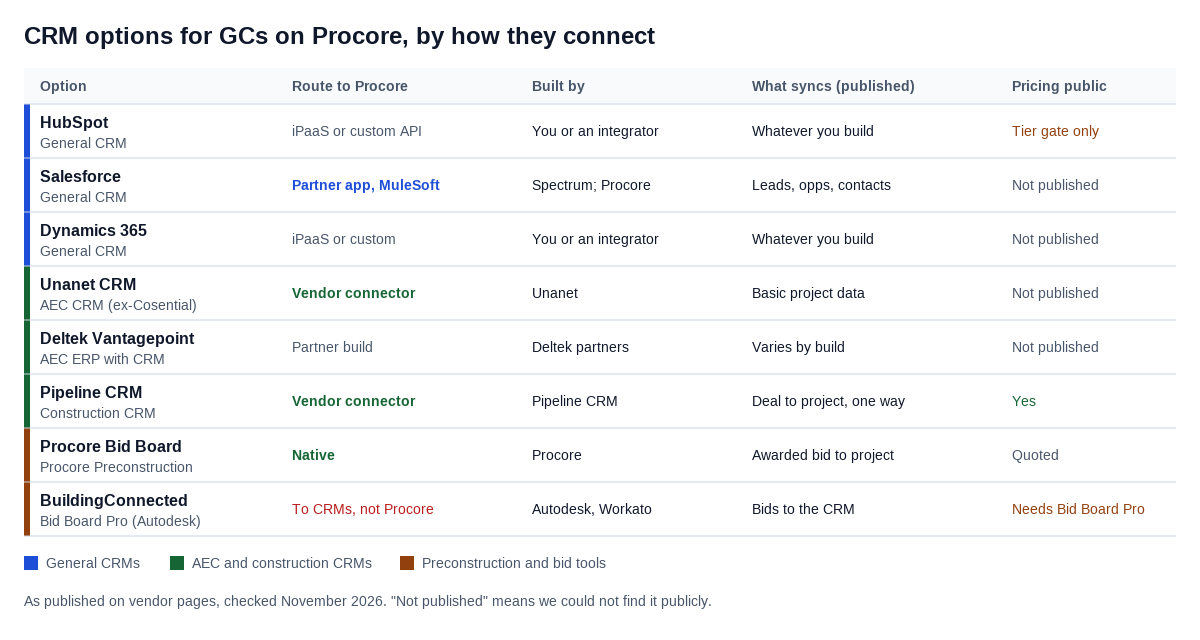 How each CRM option reaches Procore, as published by the vendors in November 2026.
What "pursuit tracking" needs that Procore projects don't
A pursuit starts long before there is a job. BD is tracking a developer relationship, a hospital system's capital plan, or an RFQ that may turn into an interview. The record needs stages, a probability, a go/no-go decision, the people being courted, and the reason you lost if you lose. Most of those pursuits never become projects.
Procore is built around the project. Its directory, budget, commitments and documents assume the work is real. Putting dozens of maybes into Procore as projects clutters the project list and confuses reporting. That is why most GCs keep pursuits somewhere else and hand over to Procore at the win.
So the question to ask of any CRM is short. Does it hold pursuits well, and can it hand a won pursuit to Procore cleanly, once, with the right fields?
Does Procore have its own CRM?
Partly. Procore's construction CRM page says that "Procore manages the CRM lifecycle through its Preconstruction and Bid Management solutions" and talks about pipeline visibility, tracking leads and opportunities, and converting won bids into projects (Procore, construction CRM). It is presented as part of those products. We did not find a standalone Procore CRM product.
The tool that does the handoff in practice is the Bid Board. Procore's documentation describes it as the place to "view and manage all bids that your company has been invited to", and says that after a bid is awarded you can add it to your Portfolio, which creates a new project in Procore (Procore Bid Board documentation). That wording fits a company responding to invitations, which is closer to a specialty contractor's estimating pipeline than a GC's owner pursuits. If you want to keep everything in Procore, ask in a demo how it handles relationship tracking before an invitation exists, go/no-go decisions and lost-reason reporting. Procore does not publish pricing; it is quoted per company.
The options, compared
This table reflects what each vendor published when we checked in November 2026. "Not published" means we could not find it on the vendor's public pages, not that it doesn't exist.
| Option | Type | How it reaches Procore | What the published integration covers | Pricing signal |
|---|---|---|---|---|
| HubSpot | General CRM | No HubSpot or Procore-built app found; iPaaS (Zapier, Workato, Pipedream) or custom API | Whatever you build; Zapier's Procore app includes Create Project, Create Company Vendor and Create Company Contact | Workflow webhooks need a paid Professional tier |
| Salesforce | General CRM | Spectrum Distribution's Salesforce app, listed by Procore; Procore's MuleSoft connector; iPaaS | Leads, opportunities, accounts, contacts and files pushed to a Procore project | Not published |
| Microsoft Dynamics 365 | General CRM | No Microsoft-published Procore connector found; Workato or a custom connector | Whatever you build | Not published |
| Unanet CRM (formerly Cosential) | AEC CRM | Unanet-built connector, announced as bidirectional in November 2024 | "Basic Project data"; field list not published | Not published |
| Deltek Vantagepoint | AEC ERP with CRM | No Deltek-published Vantagepoint connector found; partner builds | Varies by build | Not published |
| Pipeline CRM | Construction-focused CRM | Vendor-managed integration through Pipeline Connect | One way: deal to project, company to directory, contacts | Published per user, plus a connector add-on |
| Procore Bid Board and Preconstruction | Procore's own tools | Native | Awarded bid added to Portfolio creates the project | Quoted |
| BuildingConnected Bid Board Pro | Autodesk bid management | Connects to CRMs, not to Procore | Bid Board opportunities to HubSpot, Salesforce or Dynamics | Requires Bid Board Pro |
General CRMs: HubSpot, Salesforce, Dynamics 365
These are what most mid-size GCs already own, usually because marketing or a previous BD lead chose them. They do pursuit stages, forecasting and email tracking well. None of them knows what a Procore project is out of the box.
HubSpot. We found no HubSpot-built or Procore-built app connecting the two. Teams connect them through an iPaaS. Zapier's Procore app lists actions including Create Project, Create Company Vendor, Create Company Contact and a Show Project search (Zapier, HubSpot and Procore). Workato and Pipedream publish HubSpot and Procore connectors too. One pricing signal: HubSpot's "Send a webhook" workflow action is limited to a paid Professional or Enterprise tier of its operations product (HubSpot's docs name it Operations Hub in one place and Data Hub in another) (HubSpot developer docs, HubSpot knowledge base). Our Zapier and HubSpot sales automation write-up shows the HubSpot side of that kind of flow.
Salesforce. This one has the most ready-made routes. Procore's integration roundup lists Salesforce by Spectrum Distribution in the CRM category and says it lets teams manage leads, opportunities, accounts, contacts and files in Salesforce and "push and create the corresponding Project and related data in Procore" (Procore blog). Procore also documents a MuleSoft connector and gives the example of creating a Procore project when a Salesforce opportunity closes (Procore, MuleSoft overview). MuleSoft is a developer tool, so plan for build time. We could not find a Procore app on Salesforce AppExchange, and the Spectrum app's pricing and trigger rules are not public.
Microsoft Dynamics 365. We found no Microsoft-published Procore connector. Workato lists Dynamics 365 CRM and Procore triggers and actions (Workato), and teams on Power Automate typically call the Procore API through a custom connector. Dynamics makes sense when the company already runs Microsoft 365 and wants approvals in Teams.
AEC CRMs: Unanet, Deltek, Pipeline CRM
AEC CRMs come with construction concepts built in: pursuits tied to project types, proposal content, resumes and project experience for qualifications packages. Their pricing was not published on the pages we checked.
Unanet CRM (formerly Cosential). Unanet announced "bidirectional integrations with Procore, OpenAsset, and Viewpoint Vista" in November 2024 (Unanet). Its partner directory lists the Procore connector as developed by Unanet and says it "helps users avoid double data entry of basic Project data" (Unanet partner directory). We could not find a published field list or a listing on the Procore App Marketplace. Ask for the field map and the trigger in the demo.
Deltek Vantagepoint. Vantagepoint combines CRM with project accounting. Deltek's 2023 Procore partnership announcement covers Deltek ComputerEase, a separate product (Deltek). We could not find a Deltek-published Vantagepoint to Procore connector. Partners describe custom builds that send an approved opportunity to Procore (BCS ProSoft), so treat it as a build.
Pipeline CRM. Pipeline CRM publishes the most detail of any vendor we checked. Its Procore integration creates a project when a deal reaches "the stage you choose (most teams pick Won)", maps deal name, value, close date, address and project number, adds the client company to the Procore directory matched by name, and adds contacts. It runs one way, CRM to Procore. Pipeline CRM lists plans from $25 per user per month and the Pipeline Connect add-on from $99 per month (Pipeline CRM). One caution from our own work: a name-first company match is convenient and also where duplicates come from, so check how it handles near-matches.
Bid management tools: where BuildingConnected fits
Autodesk's BuildingConnected Bid Board Pro is built for subcontractors managing invitations from GCs. BuildingConnected's help centre names HubSpot, Salesforce and Microsoft Dynamics as supported CRMs, through its API and a prebuilt Workato recipe, and requires a Bid Board Pro subscription (BuildingConnected support). It does not create Procore projects, and we could not open that article directly to confirm details beyond the search summary, so confirm with Autodesk.
How to choose
Start from what BD actually does all week, then check the handoff.
- Your BD team already lives in HubSpot or Salesforce. Keep it. Moving pursuits costs more than building a good handoff. Salesforce has more packaged routes to Procore; HubSpot is usually an iPaaS or code build.
- You write a lot of qualifications packages and proposals. An AEC CRM like Unanet earns its cost through proposal content and project experience records. The Procore connector is a bonus; get its field list in writing.
- You want a light, published integration and a small team. Pipeline CRM's connector is documented and priced openly. Check the duplicate rules.
- You want one vendor. Procore's Bid Board and Preconstruction keep the handoff native. Test whether it tracks relationships and pursuits that start before an invitation.
Whatever you choose, ask every vendor the same four questions. What exactly triggers project creation? Which fields map, and in which direction? How are existing companies matched? What happens if the trigger fires twice?
The integration pattern that matters more than the CRM
The handoff is a short sequence. A pursuit moves through your stages, reaches won, and only then does anything touch Procore.
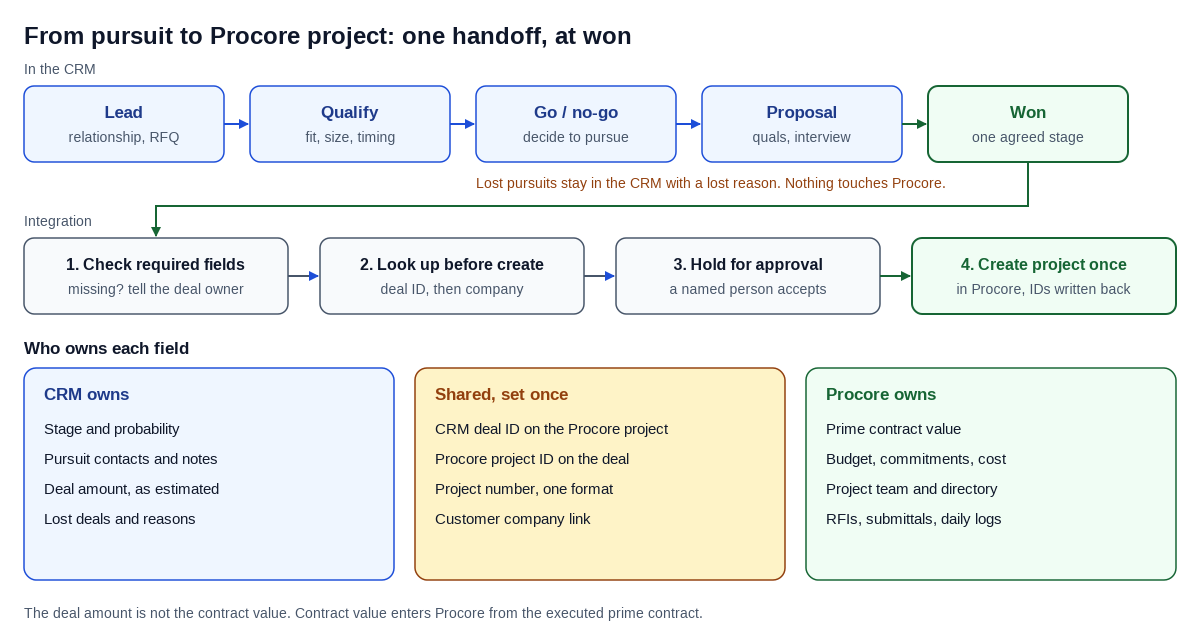 Pursuits stay in the CRM; won deals create one Procore project with each field owned by one system.
Create the project on won, once. Pick one won stage in one pipeline as the trigger. Check required fields first (name, address, customer, project type, office, project manager) and stop with a clear message if any are missing.
Decide which system owns each field. The CRM owns pursuit data: stage, probability, the contacts being courted, the deal amount as estimated. Procore owns delivery data: prime contract value, budget, team, RFIs and cost. A few fields are shared and set once: the CRM deal ID stamped on the Procore project, the Procore project ID written back to the deal, the project number and the customer company link. The deal amount should not become the Procore contract value; that comes from the executed prime contract.
Dedupe before you create. Look for a Procore project that already carries the deal ID. Then match the customer company using a stored link or an exact identifier first, and show name matches to a person as suggestions only. Our source mapping example walks through matching rules on sample records.
The HubSpot webhook retry duplicate trap
This one catches HubSpot builds often enough to call out on its own. HubSpot's webhook documentation says failed notifications are retried "up to 10 times", spread over 24 hours, and that a response slower than five seconds counts as a failure. It also says HubSpot "does not guarantee that you'll only get a single notification for an event", and that the eventId is "not guaranteed to be unique" (HubSpot webhooks guide).
Here is how that becomes two Procore projects. The deal moves to won. Your endpoint receives the notification and starts creating the project, which involves a few Procore API calls and can take longer than five seconds. HubSpot marks the delivery as failed and retries. Your endpoint, seeing a fresh request, creates the project again.
The fixes are simple and should all be in place:
- Respond to HubSpot right away and do the Procore work in a queue or background job.
- Make creation idempotent on the deal ID. Before creating, search Procore for a project with that deal ID, and record "in progress" for the deal so a second request waits or exits.
- Write the Procore project ID back to the deal as soon as it exists, and treat a deal that already has one as done.
- Log every run, including the skipped duplicates, so you can see how often retries happen.
The same guard covers a deal that is moved out of won and back again. Workflow-based webhooks and Zapier have their own retry behaviour, so apply the same check whichever tool sends the event.
Reporting once the link exists
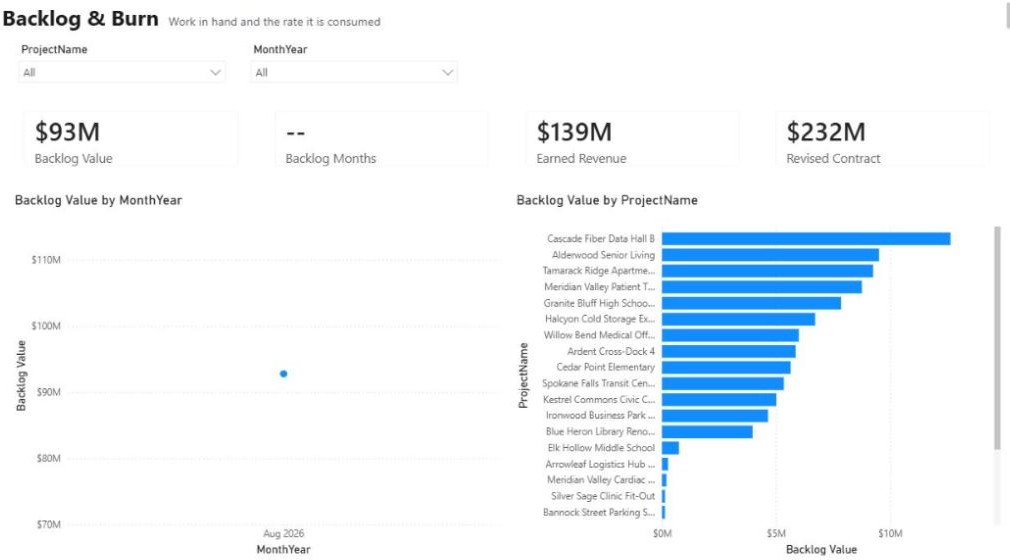
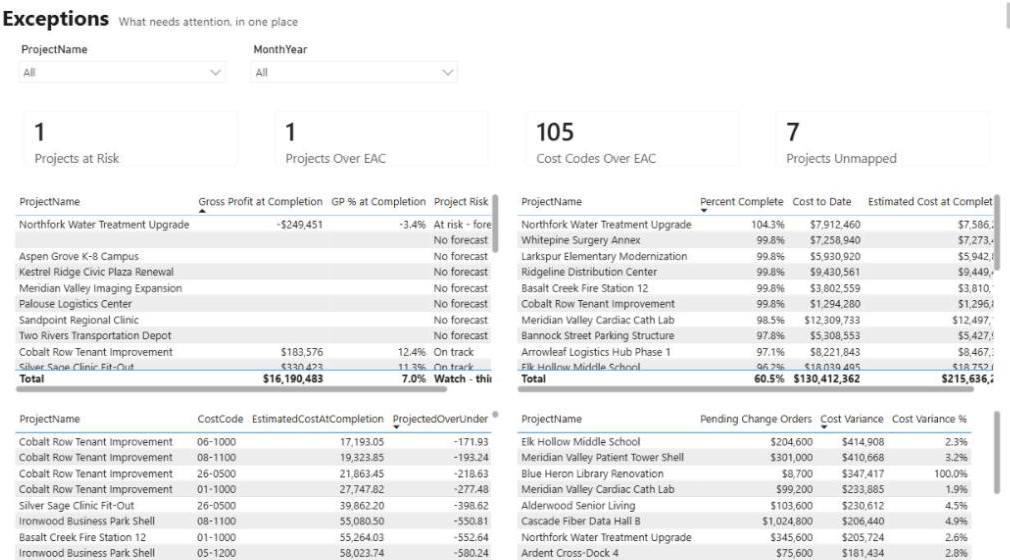
With the deal ID on the project and the project ID on the deal, reporting can show weighted pipeline next to backlog without hand matching, and flag won deals that still have no Procore project. We built that view in production for a GC running Procore, QuickBooks Online and HubSpot; the write-up is in Procore, QuickBooks and HubSpot reporting. Keep pipeline and backlog side by side and never add them together.
How Build Flows can help
We design and build the won-deal handoff for GCs on Procore, whichever CRM BD uses: the field map, the dedupe rules, the approval step and the retry-safe trigger, tested in a Procore sandbox first. The ongoing link is described in our CRM to Procore integration use case. If you are choosing a CRM now, or already have one and keep retyping jobs into Procore, tell us what your handoff looks like today.
Frequently asked questions
Which CRM integrates with Procore for general contractors?
Several do, in different ways. Salesforce has a Spectrum Distribution app listed by Procore and Procore's MuleSoft connector. Unanet CRM and Pipeline CRM publish their own Procore connectors. HubSpot and Microsoft Dynamics 365 usually connect through an iPaaS such as Zapier or Workato, or custom code on the Procore API.
Does Procore have its own CRM?
Procore says it manages the CRM lifecycle through its Preconstruction and Bid Management solutions, and its Bid Board can add an awarded bid to the Portfolio as a new project. We did not find a standalone Procore CRM product. Ask in a demo how it handles pursuits that start before a bid invitation.
What are the top CRM integrations for Procore to manage the sales pipeline before a job starts?
The common shortlist is HubSpot, Salesforce and Dynamics 365 for general CRMs, Unanet CRM, Deltek Vantagepoint and Pipeline CRM for construction-focused CRMs, and Procore's own Bid Board. Keep pursuits in the CRM and create the Procore project only when the deal is won.
Is there a HubSpot app on the Procore App Marketplace?
We could not find a HubSpot-built or Procore-built app connecting the two. Teams use Zapier, Workato or Pipedream, or a custom integration on the HubSpot and Procore APIs. Zapier's Procore app includes Create Project, Create Company Vendor and Create Company Contact actions.
What should sync from the CRM to Procore when a deal is won?
Usually the CRM deal ID, project number, project name, address and customer company. Pipeline stage, probability and sales notes stay in the CRM. The deal amount should not become the Procore contract value; that comes from the executed prime contract.
Why does a HubSpot to Procore integration create duplicate projects?
HubSpot retries a webhook up to 10 times over 24 hours if the endpoint takes longer than five seconds or returns an error, and it does not guarantee a single notification per event. Respond quickly, do the Procore work in a queue, and search for an existing project with the deal ID before creating one.
Next step
Need this connection in your environment?
Scope one integration: the records, direction, timing, and business rules behind the connection.
Prefer email? charley@buildflows.ai
Keep learning
Integrations · October 9, 2026
CRM to Procore Integration: HubSpot and Salesforce Guide
How to connect HubSpot or Salesforce to Procore so a won deal becomes a set-up project: the trigger, field map, approval step, duplicate handling, which system owns what, and why pipeline and backlog stay separate.
Integrations · October 9, 2026
A Worked Source-Mapping Example: Procore, Accounting and CRM
How to link a Procore project, an accounting job and a CRM deal when they share no ID: match rules in order of trust, a sample crosswalk, old-to-new cost codes, and fixing exceptions at the source.

AI agents & MCP · October 9, 2026
AI Sales Automation with Zapier, HubSpot and AI Agents
A breakdown of five Zapier zaps for sales and solutions work: business-card leads, discovery and demo prep, deal updates, and info requests with a human approval before any email is drafted.