Key takeaways
- A subscription is the account Azure bills, a resource group is a folder for one project, a resource is one thing you pay for, and a resource provider is the Azure service that has to be registered on the subscription before you can create that type of resource.
- Register Microsoft.Fabric and check Fabric quota in your region before you open the Create Fabric capacity form. An F2 with overage on needs about 3 capacity units.
- Capacity names must be 3 to 63 lowercase letters and numbers, starting with a letter. Check that Size reads F2, because the form can show F64, which costs about $8,400 a month.
- Capacity overage is on by default, is billed at three times the pay-as-you-go rate only when you'd otherwise be throttled, and its threshold isn't a hard spending cap.
- The capacity administrator must be a member of your tenant. B2B guests, such as an invited consultant, can't hold that role.
- F2 is about $263 a month pay-as-you-go in most US regions (about $292 in West US), about $156 with a 1-year reservation, and every report viewer below F64 needs Power BI Pro at $14 a month.
- Pause the capacity when nobody needs it, tag the capacity itself, and set a budget with actual and forecasted alerts. Budgets warn you but don't stop spending.
33 seconds · From a Build Flows walkthrough
What Fabric costs: F2 capacity plus Power BI viewers
F2 is the entry-level Fabric capacity: about $263 a month pay-as-you-go in most US regions and about $292 in West US, less with a reservation. On capacities below F64, people who view the reports need Power BI Pro, which lists at $14 per user per month. The figures said in the clip are rounded from memory.
Read the clip transcript
You don't need a Power BI Pro license. And so we need two provisions. So this would be, we don't have a fabric license associated to this. Is this something that you were wanting to leverage? a Fabric F2 to host and do all the compute. And so the fabric F2 license is $269 a month. And then the users who would have access to view would need a Power BI license, which is like $16 a month or something like that.
Captions adapted from the source video; proper names may reflect automatic transcription. Original segment: 19:26–19:59. Watch at the source.
Someone has to click Create on the company's first Microsoft Fabric capacity. At most contractors that's the office manager, the controller, or whoever looks after Microsoft 365. Then the Azure portal asks for a subscription, a resource group, a region, a size, an overage threshold and a capacity administrator, and none of those words came up when you bought Office.
This guide explains the four Azure words you need in plain English, then walks through creating an F2 capacity, attaching it to a workspace, pausing it, and setting a budget. Prices were checked against Azure's published retail prices on November 17, 2026.
It's part of our series from a live Fabric and Key Vault setup call. If your deployment already failed with "RegionalQuota: 0", go to the quota fix first.
 Tenant, subscription, resource group, resource
Four Azure words in plain English
Think of renting equipment for a job.
| Azure word | Plain words | Construction version | In our example |
|---|---|---|---|
| Subscription | The account Azure bills, with its own limits and access | Your company's account with the rental company | Pay-as-you-go subscription |
| Resource group | A folder that keeps related things together. Delete it and everything inside goes too. | The job file the rentals are charged to | rg-reporting-analytics |
| Resource | One thing you create and pay for | One piece of rented equipment | kv-reporting-analytics (Key Vault), fabricreporting (F2 capacity) |
| Resource provider | The Azure service that makes a type of resource. It has to be turned on (registered) for each subscription. | The rental yard's department for that equipment, which has to open your account first | Microsoft.KeyVault, Microsoft.Fabric |
Above all of these sits your tenant, the Microsoft Entra directory that holds your company's users. Fabric and the Azure subscription must use the same tenant.
 How the pieces nest, and where each setting lives
Rules from Microsoft worth knowing:
- Each resource lives in exactly one resource group.
- A resource can sit in a different region from its resource group, but Microsoft recommends using the same one.
- Deleting a resource group deletes every resource in it.
- Tags on a resource group aren't inherited by the resources, so tag the capacity itself.
- Resource providers are registered on the subscription, not on the resource group.
Before you start
- An Azure subscription in the same tenant as Fabric. Avoid a free trial subscription, which can't get quota increases.
- Permission to create the capacity. Owner or Contributor works. Microsoft suggests a custom role with just the four
Microsoft.Fabric/capacitiesactions: read, write, suspend and resume. - Fabric quota in the region you'll use. An F2 needs 2 capacity units (CUs), plus a little more if capacity overage stays on. See the quota fix.
- A Fabric capacity administrator who is a member of your tenant. Microsoft says B2B guests can't be capacity administrators, so a consultant invited as a guest can't fill this role.
Create the capacity
 From empty subscription to a workspace running on F2
- Register the resource provider. Search for Subscriptions, open yours, and under Settings select Resource providers. Find
Microsoft.Fabric, select it, and select Register. Microsoft lists this as required before your first capacity. - Check quota. Search for Quotas, select Microsoft Fabric, and filter to your subscription and region. If the limit is 0, request an increase before you go on.
- Create or pick a resource group. Search for Resource groups and select Create. Choose the subscription, name the group (for example
rg-reporting-analytics) and pick a region. If your Key Vault already has a group for reporting, reuse it so everything for this project stays together. - Open the form. Search for Microsoft Fabric, open the service, and select Create Fabric Capacity. You can also start from Create a resource and search the Marketplace for Microsoft Fabric.
- Fill in Basics:
- Subscription and Resource group: the ones from steps 1 to 3.
- Capacity name: 3 to 63 characters, starting with a lowercase letter, using only lowercase letters and numbers.
fabricreportingworks.Fabric-Reportingdoesn't, because capitals and hyphens aren't allowed. - Region: where your Key Vault and other resources are. Quota is per region, and moving Fabric items to another region later is painful.
- Size: check it before you continue. In our session the form showed F64 until the admin changed it. F64 is 32 times the compute of F2, at about $8,400 a month on pay-as-you-go. Select Change size and pick F2. The form then reads "F2, 2 Capacity units".
- Decide on Capacity Overage Protection. See the next section.
- Pick the Fabric capacity administrator. Choose an internal person, ideally two, so the capacity isn't stranded if one leaves.
- Add tags. Select Next: Tags and add a few name/value pairs, such as
project = reporting-analytics,owner = office-manager,costcenter = overhead. - Select Review + create, check the size and region once more, then Create.
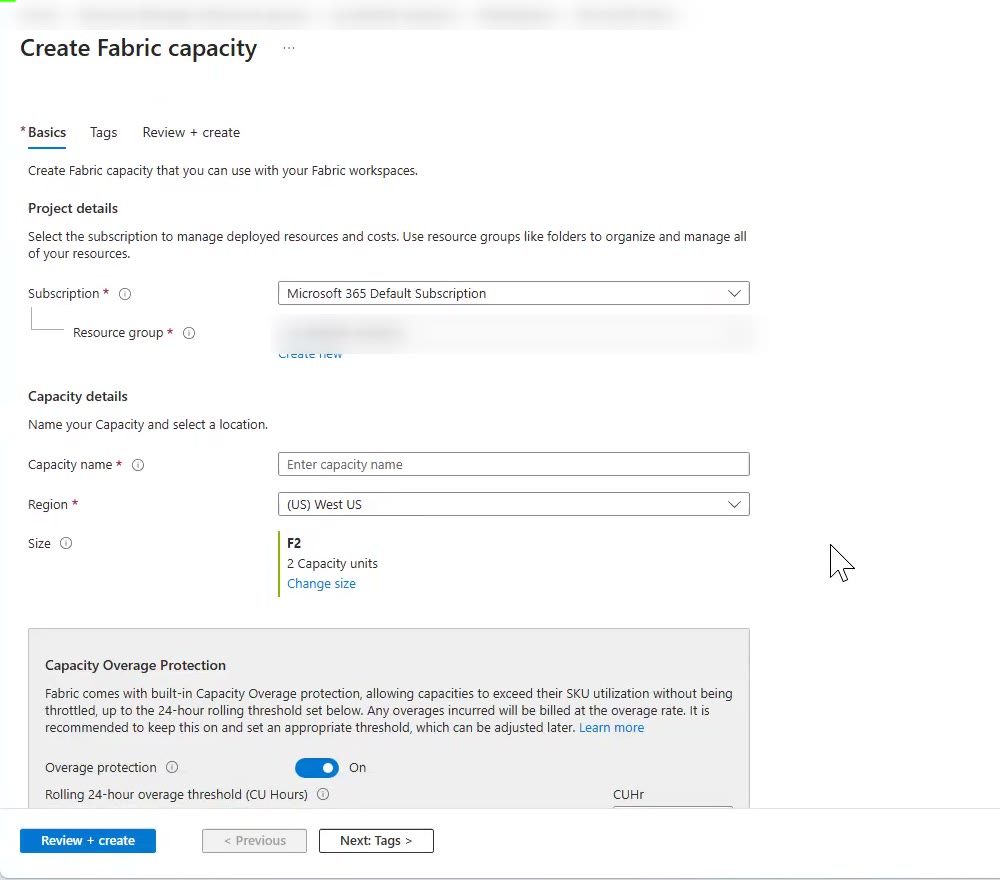 The Basics tab from the session, after switching the size to F2
What Capacity Overage Protection does
When your capacity gets busier than its size allows, Fabric normally slows things down. Microsoft calls that throttling. Capacity overage pays for that extra usage instead, so reports and refreshes keep running. Here's what you need to know:
- It's on by default when you create a capacity. You can switch it off on the form, or change it later in the Fabric admin portal under Capacity settings.
- Overage is billed at three times the pay-as-you-go rate, and only for usage that would otherwise have been throttled. If you never go over, it costs nothing.
- The Rolling 24-hour overage threshold is set in CU hours, and the default is 25%. An F2 has 48 CU hours a day, so 25% is about 12 CU hours. At $0.54 per overage CU hour in most US regions, that's roughly $6.50 a day at most.
- Microsoft says the threshold isn't a hard spending cap. Jobs already running can push charges past it.
- The threshold uses quota: 1/24 of the CU-hour threshold.
Our default for a small contractor: leave it on at the default threshold and add the budget alert below. If a fixed bill matters more than uninterrupted reports, switch it off.
Assign the capacity to a workspace
A capacity does nothing until a workspace runs on it.
- In Fabric, open the workspace and select Workspace settings.
- Select Workspace type. Microsoft renamed this from "license mode", and older guides still use that name.
- Choose the Fabric capacity type, pick your new capacity from the list, and select Apply.
If you've been building on the Fabric trial, this is the same switch. Starting the trial and moving to F2 covers the timing.
Pause it when nobody's using it
F capacities are billed per second with a one-minute minimum, so a paused capacity stops charging for compute.
- In the Azure portal, search for Microsoft Fabric and open your capacity.
- Select Pause, then Yes.
- To start it again, select Resume, then Yes. Billing restarts.
Before you rely on pausing, know what it does:
- Content on a paused capacity isn't available. Reports won't open and scheduled refreshes won't run.
- When you pause, any smoothed usage still owed is added to your bill straight away.
- OneLake storage is a separate charge from compute, so pausing doesn't stop it.
- You can schedule pause and resume with an Azure Automation runbook. Leave a window for your nightly Procore, HubSpot and QuickBooks loads.
What F2 costs
Monthly figures use 730 hours. "Most US regions" covers East US, East US 2, West US 2, Central US and South Central US, which all list $0.18 per CU hour. West US lists $0.20.
| Item | Most US regions | West US |
|---|---|---|
| F2 pay-as-you-go, running all month | about $263 | about $292 |
| F2, weekdays 6 a.m. to 8 p.m. only (about 308 hours) | about $111 | about $123 |
| F2 with a 1-year reservation | about $156 | about $174 |
| F64 pay-as-you-go, for comparison | about $8,410 | about $9,344 |
| Capacity overage, per CU hour | $0.54 | $0.60 |
| OneLake hot storage, per GB per month | $0.026 | $0.026 |
| Power BI Pro, per user per month (paid yearly) | $14 | $14 |
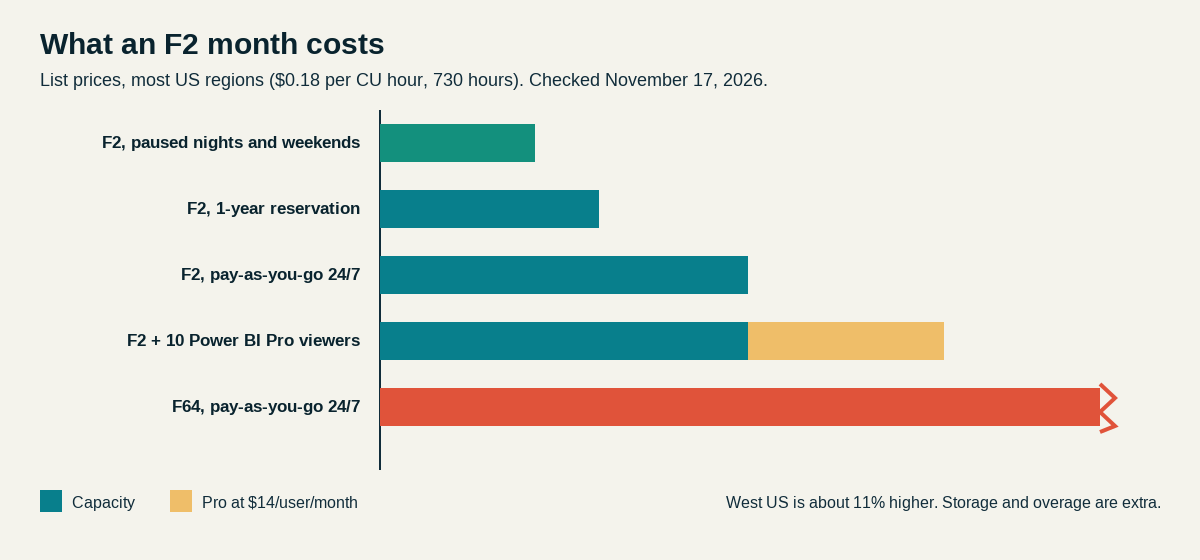 What an F2 month costs, depending on how you run it
Two things decide your real bill:
- Viewers. On any capacity smaller than F64, everyone who views Power BI reports needs Power BI Pro (or Premium Per User), not just the people who build them. An F2 with 10 Pro viewers is about $403 a month on pay-as-you-go. The F2 sizing guide works through when F64 starts to make sense.
- Reservation or pause, not both. A reservation is a one-year commitment at about 41% off. It pays off if the capacity would run more than about 60% of the month. If you pause every night and weekend, pay-as-you-go is cheaper.
Tags and a budget
Tags let you filter cost reports by project or owner. Put them on the capacity and the Key Vault themselves, since resource-group tags aren't passed down.
Then set a budget so someone hears about it before the invoice arrives:
- Open the resource group (or the subscription) and select Budgets.
- Select Add. Name it, choose a Monthly reset period, and enter an amount. For an F2 with a few extras, $350 is a sensible starting point.
- Select Next and add alerts. For example: Actual cost at 80%, and Forecasted cost at 100%, each with an email address.
- Save it.
A budget only sends alerts. Microsoft is clear that resources aren't affected and spending isn't stopped. Cost data usually lands within 8 to 24 hours, and a brand-new subscription can take up to 48 hours before budgets are available.
From the live session
At 19:25 in the session, Charley explained the cost to the client's admin. He estimated F2 at "$269 a month" and Power BI at "like $16 a month" per viewer. Current list prices are about $263 in most US regions and $14 for Pro. The admin agreed, and had already started the setup the day before.
At 20:08, they opened Subscriptions and found the Microsoft 365 Default Subscription. The admin had already created a resource group, and they created a second subscription for Fabric billing. At 24:05, they looked for Resource providers inside the resource group's settings. That setting lives on the subscription. Then they created a resource from the same group, searched for Microsoft Fabric, set the size to F2 and picked West US. The deployment then failed on a regional quota of 0, which the quota fix covers. The client's admin started the Fabric trial so work could continue. Watch the whole call on the video page.
Checklist
- Subscription chosen (not a free trial) in the same tenant as Fabric
-
Microsoft.Fabricregistered under the subscription's Resource providers - Fabric quota of at least 3 CUs in your region
- Resource group created or reused, such as
rg-reporting-analytics - Capacity name in lowercase letters and numbers only
- Region matches your Key Vault and other resources
- Size reads F2, not F64
- Capacity overage decision made, threshold noted
- One or two internal capacity administrators (not guests)
- Tags on the capacity itself
- Workspace switched to the new capacity in Workspace type
- Pause schedule decided, or a reservation if it runs most of the month
- Budget with actual and forecasted alerts
- Power BI Pro planned for every report viewer
Need a hand?
Build Flows sets up Microsoft Fabric reporting for construction companies, from the Azure subscription and capacity through Procore, HubSpot and QuickBooks pipelines to the reports. If you'd like someone to walk your admin through this on a call, email charley@buildflows.ai or tell us what you're building.
References
- Microsoft Learn: What is Azure Resource Manager? (resources, resource groups, scope)
- Microsoft Learn: Azure resource providers and types
- Microsoft Learn: Buy Fabric capacity Azure SKUs
- Microsoft Learn: Fabric Capacities - Create Or Update (capacity name rules)
- Microsoft Learn: Microsoft Fabric quotas
- Microsoft Learn: Capacity overage in Microsoft Fabric
- Microsoft Learn: Enable capacity overage in Microsoft Fabric
- Microsoft Learn: Pause and resume your Fabric capacity
- Microsoft Learn: Understand Microsoft Fabric licenses and capacity (billing, workspace types, viewers below F64)
- Microsoft Learn: Workspaces in Microsoft Fabric (workspace type)
- Microsoft Learn: Create and manage budgets
- Microsoft: Microsoft Fabric pricing
- Microsoft: Azure Retail Prices API, Microsoft Fabric meters
- Microsoft: Power BI pricing
Frequently asked questions
What is the difference between an Azure subscription and a resource group?
A subscription is the account Azure bills, and it carries quota, access and registered resource providers. A resource group is a folder inside a subscription that holds related resources for one project. Each resource lives in exactly one resource group, and deleting the group deletes everything in it.
How much does a Microsoft Fabric F2 capacity cost per month?
About $263 a month on pay-as-you-go in most US regions ($0.18 per capacity unit hour, two units, 730 hours) and about $292 in West US. A 1-year reservation brings it to about $156 a month in most US regions. Storage and capacity overage are billed separately, and report viewers on capacities below F64 need Power BI Pro at $14 per user per month.
How do I create a Fabric capacity in the Azure portal?
Register the Microsoft.Fabric resource provider on your subscription and check your Fabric quota. Then search for Microsoft Fabric, select Create Fabric Capacity, and fill in Basics: subscription, resource group, a lowercase capacity name, region, size F2, capacity overage and a Fabric capacity administrator. Add tags, then select Review + create.
What is Capacity Overage Protection in Microsoft Fabric?
An option, on by default, that pays for usage above your capacity's size instead of throttling it. It's billed at three times the pay-as-you-go rate, only for usage that would otherwise be throttled, up to a rolling 24-hour threshold in CU hours (25% by default). Microsoft says the threshold isn't a hard spending cap.
Does pausing a Fabric capacity stop billing?
Pausing stops compute billing, since F capacities are billed per second with a one-minute minimum. Any smoothed usage still owed is added to your bill when you pause, OneLake storage is a separate charge, and content on the paused capacity isn't available until you resume.
What are the naming rules for a Fabric capacity?
Microsoft's API requires 3 to 63 characters, starting with a lowercase letter, followed by lowercase letters or numbers only. Capitals, hyphens and spaces aren't allowed, so fabricreporting works and Fabric-Reporting doesn't.
Can a guest user be a Fabric capacity administrator?
No. Microsoft says the capacity administrator must belong to the tenant where you create the capacity, and B2B users can't be capacity administrators. Pick an internal member, ideally two.
Next step
Need this connection in your environment?
Scope one integration: the records, direction, timing, and business rules behind the connection.
Prefer email? charley@buildflows.ai
Keep learning
Integrations · November 17, 2026
Fix "RegionalQuota: 0" When Creating a Microsoft Fabric F2 Capacity
What the Microsoft Fabric regional quota error means when an F2 capacity fails to deploy in Azure, how to read TotalCapacityUnits, RegionalQuota, RequestedSku and Param1 to Param3, and the fixes in order: register Microsoft.Fabric, request a quota increase, try another region or subscription, and start the 60-day Fabric trial while you wait.
Reporting & analytics · November 14, 2026
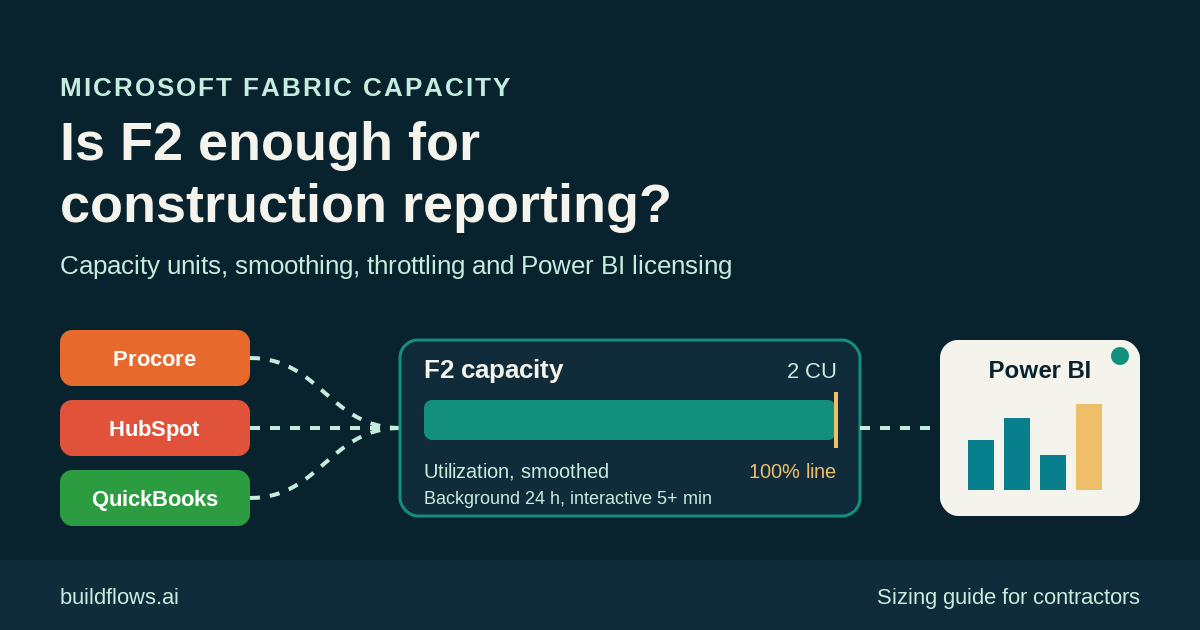
Is Microsoft Fabric F2 Enough for Construction Reporting?
A plain guide to sizing Microsoft Fabric for Procore, HubSpot and QuickBooks reporting: capacity units, pay-as-you-go vs reservation pricing, pausing, Power BI licensing below F64, smoothing and throttling, the signs you need to scale, and lower-cost alternatives.
Integrations · November 17, 2026
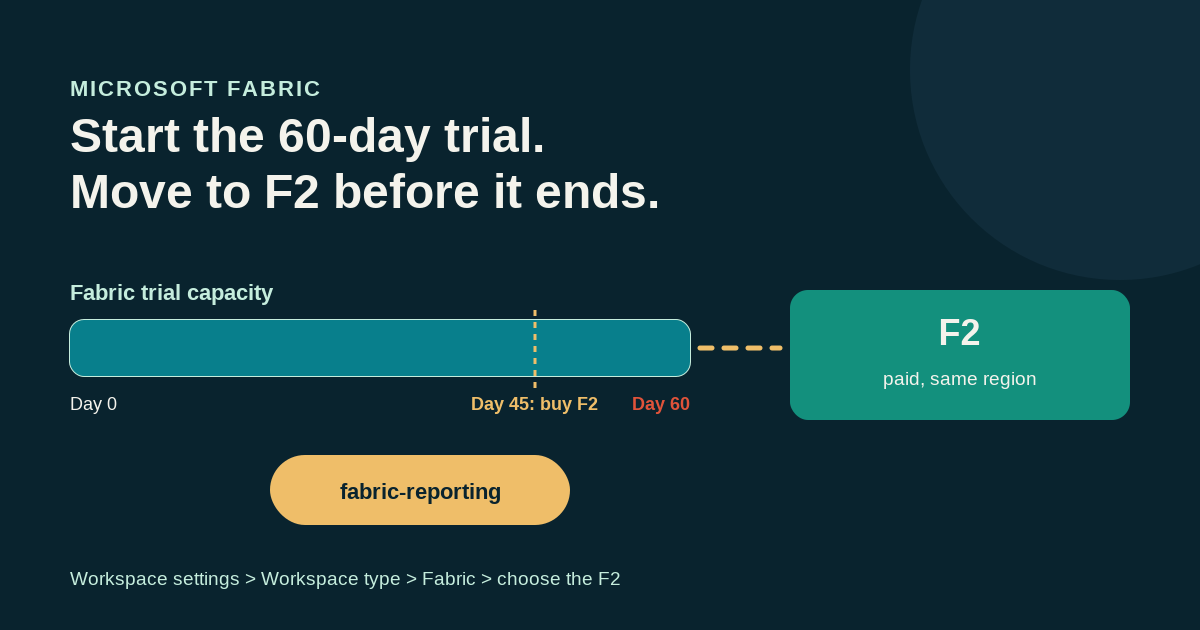
Start the Microsoft Fabric Free Trial (60 Days) and Move to a Paid F2 Before It Ends
How to start the Microsoft Fabric trial from the account manager, what the trial capacity includes and excludes, how to create a workspace on it, what happens on day 60 and in the seven days after, and how to move the workspace to a paid F2 in the same region, with a 60-day plan and a trial vs F2 comparison.