Key takeaways
- Retainage receivable is held by owners on your billings and is an asset; retainage payable is held by you on subcontractors and is a liability.
- Pay application retainage columns are running balances: read the latest issued or approved pay app per contract, never sum across periods.
- Use the PM system for what should be held, the ERP for what has been posted, and report differences as exceptions.
- Age retainage from when it was first held and from its release trigger; the second number is the collections signal.
- Report receivable, payable and net side by side, with flags for completed jobs that still have retainage held.
Short answer: Retainage is the part of each progress billing that is held back until the work is accepted. On a contractor's books it runs in two directions. Retainage receivable is what owners hold back from you, and it is an asset. Retainage payable is what you hold back from your subcontractors, and it is a liability. Track both per contract, read each from the latest issued or approved pay application rather than summing across periods, age them from the date they were first held, and report receivable, payable and net side by side. The most common reporting errors are double counting running balances, mixing gross and net-of-retainage billing, and letting retainage sit uncollected long after a job is finished.
This guide is for controllers, AR and AP leads and project accountants. It covers the definitions, where retainage lives in Procore and in a typical construction ERP, how to age it, what triggers release, the reconciliation checks to run every month, and a report layout you can copy.
Retainage receivable and retainage payable
Retainage (also called retention) is a percentage of each pay application that the paying party keeps until the work is complete and accepted. The rate is set by the contract, commonly 5% or 10%, and some contracts reduce it once the job reaches a milestone such as 50% complete. Public work and many states have their own rules on maximum rates and release timelines, so the contract and local law always win over a rule of thumb.
| Retainage receivable | Retainage payable | |
|---|---|---|
| Who holds it | The owner (or GC, if you are a sub) | You, on your subcontractors |
| Balance sheet | Current asset (often shown separately from AR) | Current liability (often shown separately from AP) |
| Comes from | Owner pay applications you issue | Subcontractor pay applications you approve |
| Released when | The owner accepts the work and the contract's release conditions are met | You accept the sub's scope and the subcontract's release conditions are met |
| Main risk | Cash tied up long after the job is finished | Paying a sub's retainage before the owner releases yours, or before their scope is complete |
A general contractor usually has both on the same job. Net retainage, receivable minus payable, tells you how much cash is tied up on the job overall. A negative net is possible, for example when an owner has reduced retainage after a milestone but your subcontracts still hold the full rate.
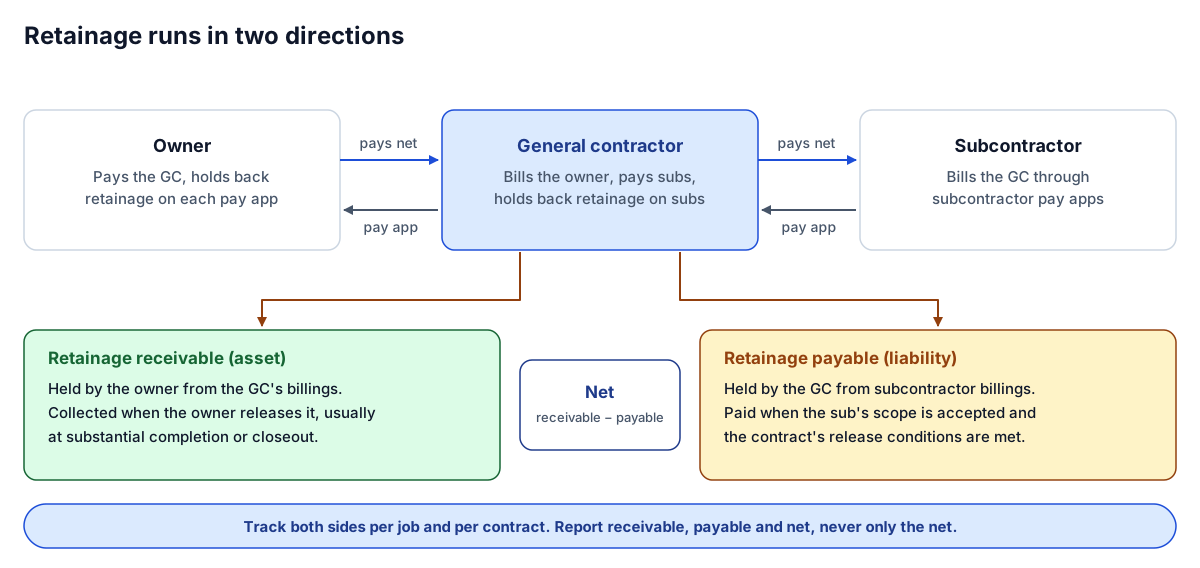 Retainage receivable and payable sit on opposite sides of the balance sheet. Track both per job.
Where retainage lives: Procore versus the ERP
On most jobs, retainage is recorded in two places, and they rarely agree to the dollar without a reconciliation.
In Procore, retainage sits on the pay applications. Owner invoices against the prime contract and subcontractor invoices against commitments carry a retainage rate on the schedule of values, the retainage held this period and to date, and any retainage released. These are running balances: each new pay application carries the cumulative figure forward. Procore is usually the best source for how much should be held on each contract, line by line.
In the ERP, retainage sits on the AR invoice and the AP invoice, and posts to separate GL accounts for retainage receivable and retainage payable. Construction ERPs such as Viewpoint Vista, Sage 300 CRE and Trimble Spectrum track retainage on invoices natively. QuickBooks Online has no dedicated retainage feature, so contractors on it usually handle retainage with a separate item and a separate balance sheet account. The ERP is the source for what has actually been posted and collected or paid.
The practical rule: use the PM system for the contract-level expectation, the ERP for the accounting balance, and report the difference as an exception rather than choosing one silently. Our metric dictionary entry for retainage held writes this definition down, including what to show when a contract has no pay application yet.
Aging retainage
AR aging measures days since invoice date, and for retainage that number is misleading. Retainage is not due when it is invoiced; it is due when the release conditions are met. Age it two ways:
- Age since first held. Days or months since the earliest pay application that held retainage on the contract. This shows how long cash has been tied up.
- Age since the release trigger. Days since the job reached substantial completion, final acceptance or whatever the contract names as the trigger. This is the number that tells you collections is overdue.
A job that has held retainage for 18 months and is still in progress is normal. A job that reached substantial completion five months ago and still has its full retainage outstanding is a collections problem. Keep retainage out of the regular AR aging buckets, or show it in its own column, so it does not make ordinary receivables look older than they are. The AR outstanding definition leaves the treatment to the controller; pick one and apply it to every job.
Release triggers to track
Release is almost always conditional. The conditions differ by contract, but these are the ones worth capturing as dates or flags on each contract:
- Milestone reduction. Some contracts reduce the retainage rate at a percent complete or a stage.
- Substantial completion. Often triggers release of most retainage, sometimes less an amount held for punch list.
- Punch list complete and final acceptance. Releases what remains.
- Closeout documents. Lien waivers, warranties, O&M manuals, as-builts and consent of surety are common conditions. A missing document is the usual reason released retainage is not paid.
- Subcontract scope acceptance. On the payable side, the sub's scope is complete, their closeout documents are in, and, under a pay-when-paid clause, the owner has released yours.
Store these as fields, not as notes. A report can only flag "complete, retainage still held" if completion is a date it can read.
Monthly reconciliation checks
Run these every close, after AP and AR are posted. They are mechanical and worth automating early.
- Latest pay app per contract. Take the retainage to date from the latest issued owner pay app and the latest approved subcontractor pay app. Never sum the retainage column across periods; it is a running balance.
- Exclude drafts. Draft or pending pay applications do not count until they are issued or approved.
- Tie PM to ERP per contract. Retainage to date in Procore should equal retainage receivable or payable in the ERP for the same contract. List every difference with its amount.
- Tie the subledger to the GL. The sum of retainage on open invoices should equal the retainage receivable and payable GL account balances.
- Check the billing convention. If the WIP uses billings gross of retainage, every job must. A job billed net of retainage looks under billed by exactly its retainage.
- Flag releases that do not match. Retainage released in the PM system with no matching ERP invoice, or the reverse.
- Flag completed jobs with retainage held. Substantially complete or closed out, with receivable still open.
- Flag subs paid before the owner released. Retainage payable released on a job where retainage receivable is still fully held, if your subcontracts are pay-when-paid.
The free data quality checker catches the upstream problems that break these checks, such as blank job numbers, duplicate invoice lines and the same job written different ways. Checks against your job master need a second source, which the checker does not have; that comparison is part of the mapping and reconciliation we build into WIP and retainage reporting.
A retainage report layout
One row per job (or per contract on large jobs), with both sides and the net, the age, and the release status:
| Column | Source | Notes |
|---|---|---|
| Job and contract | Job master | Use the crosswalk ID if PM and ERP numbers differ |
| Job status | PM system | In progress, substantially complete, closed out |
| Retainage receivable | Latest issued owner pay app; ERP for posted balance | Show both if they differ |
| Retainage payable | Latest approved sub pay apps, summed per job | Drill down to each subcontract |
| Net | Receivable − payable | Can be negative |
| Age since first held | Earliest pay app with retainage | Months is fine |
| Release trigger and date | Contract fields | Blank means not captured, not "no trigger" |
| Days since trigger | Reporting date − trigger date | The collections number |
| Flag | Rules above | Amber: complete and held. Red: closed out and still open |
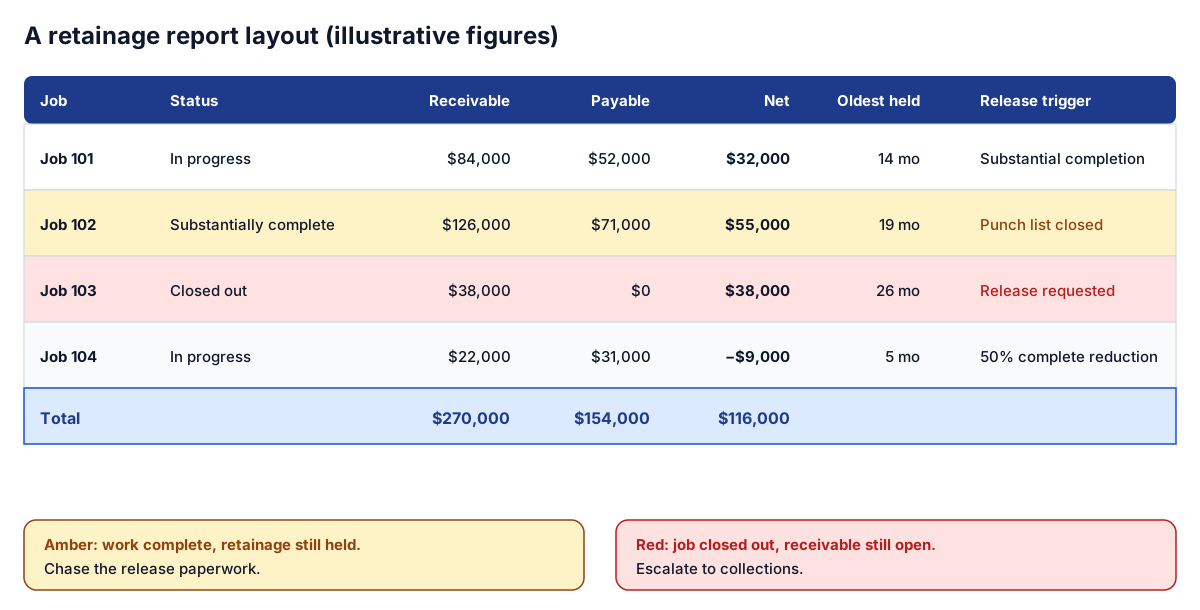 Illustrative figures. Receivable, payable and net side by side, with flags for retainage held after completion.
Put the total row at the bottom, but sort the body by the flag and then by receivable, so the jobs that need a phone call are at the top. Retainage also belongs in the cash forecast: released retainage is one of the larger, more predictable inflows near the end of a job. See it in context on the Cash and AR page of the interactive sample report, and in our guide to a construction cash flow forecast in Power BI.
Common retainage reporting mistakes
| Mistake | Effect | Fix |
|---|---|---|
| Summing retainage across pay apps | Balance doubled or tripled | Use the latest pay app per contract |
| Counting draft pay apps | Retainage overstated | Issued (owner) or approved (sub) only |
| Mixing gross and net billing | WIP over/under distorted by the retainage amount | One convention for every job |
| Retainage inside regular AR aging | Receivables look older than they are | Separate column or separate report |
| Release conditions stored as notes | No way to flag overdue releases | Dates and flags on the contract |
| Reporting only net retainage | Hides a large receivable behind a large payable | Show receivable, payable and net |
Where to go next
- See retainage in a month-end pack: the Cash and AR page of the interactive sample report.
- Read the definitions: retainage held and AR outstanding in the metric dictionary.
- Fit it into the close: the month-end close checklist for construction controllers.
- Retainage in two systems that never agree? Tell us what you run and we will show you how we would reconcile it automatically.
Frequently asked questions
What is the difference between retainage receivable and retainage payable?
Retainage receivable is the amount owners have withheld from your pay applications and will pay when the work is accepted; it is an asset. Retainage payable is the amount you have withheld from subcontractors; it is a liability. A general contractor usually has both on the same job.
How do you track retainage in Procore?
Procore records retainage on owner invoices against the prime contract and on subcontractor invoices against commitments, including retainage held to date and released. These are running balances, so take the figure from the latest issued or approved pay application for each contract and reconcile it to the ERP.
Should retainage be included in AR aging?
It is a policy choice, but retainage is not due when invoiced, so mixing it into regular aging buckets makes receivables look older than they are. Many controllers show it in a separate column or report and age it from the release trigger instead.
When is retainage released?
When the contract's release conditions are met. Common triggers are a milestone reduction, substantial completion, punch list completion and final acceptance, and receipt of closeout documents such as lien waivers and warranties. State law and public contract rules can also set limits and timelines.
Why does my retainage balance look doubled?
Usually because retainage has been summed across pay applications. The retainage to date column is cumulative, so only the latest pay application per contract counts. Including draft pay applications causes a similar overstatement.
Next step
Trying to automate a report like this?
Discuss your current reporting process: what the team does today, which systems are involved, and what you want to change.
Prefer email? charley@buildflows.ai
Keep learning
Playbooks · October 10, 2026
Month-End Close Checklist for Construction Controllers
The nine-step month-end close in the order that keeps the WIP from being rebuilt, who owns each step, what done looks like, and which parts to automate first.
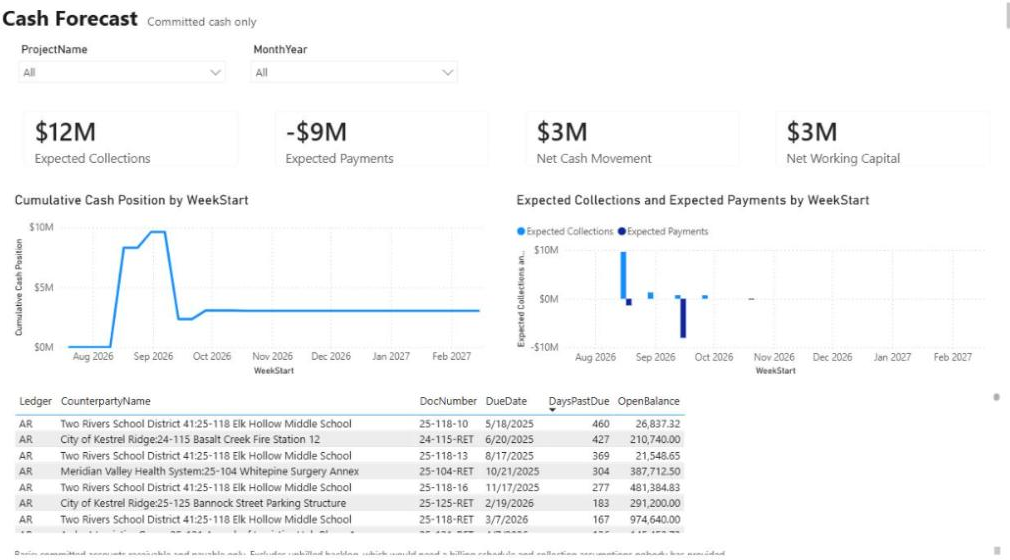
Reporting & analytics · October 9, 2026
Construction Cash Flow Forecasting in Power BI: A Practical Guide
A practical guide to forecasting contractor cash in Power BI: start from committed AR and AP placed by due date, keep retainage separate, and layer scenarios with their assumptions written on the page.
Reporting & analytics · October 10, 2026
Over/Under Billing Explained: How to Read Your WIP Schedule
How over and under billing are calculated, three worked jobs including a stale forecast, the month-end journal entries and balance sheet impact, the usual causes, and a routine to review the WIP schedule every close.