Short answer: Choose your first construction integration by putting a number on the re-keying it removes, then dividing by how hard it is to build. For each candidate workflow, estimate items per month, minutes to key each item into each extra system, and how often a re-keyed entry has to be found and fixed. That gives annual hours and dollars lost. Divide by a complexity score (1 for a simple one-way push, 3 for a two-way sync with approvals) and the highest result is usually your first build. Then sanity-check the winner on two things the math cannot see: whether one system clearly owns the record, and whether the integration lands inside an existing control such as AP review.
Most contractors already know they re-key too much. What they lack is a defensible way to pick which flow to fix first, so the decision goes to whoever complains loudest or whichever vendor demo was most recent. This guide gives you a scoring method you can run in a spreadsheet in an afternoon, three worked examples (job setup, commitments and AP), and the checks we use before committing to a build. Our free integration payback calculator runs the same math with editable defaults.
Step 1: List every re-key
Start with an inventory, not a wish list. For each place the same data is typed into more than one system, write down:
- The workflow: new job setup, commitments, change orders, AP invoices, timecards, vendor onboarding.
- The path: for example CRM to project management to ERP, or Procore to ERP.
- The unit: jobs, commitments, invoices, timecards.
- Who does it today, and roughly how often.
If you are not sure what connects to what, the construction stack mapper lets you pick the systems you run and shows where integrations are usually worth building. The integration mapping workbook has a flow inventory sheet in this exact shape.
Step 2: Put a number on each one
For each workflow you need five inputs. Rough is fine; you are ranking, not budgeting.
| Input | Meaning | How to estimate it |
|---|---|---|
| Volume | Items per month | Count last month's jobs, commitments or invoices in the ERP |
| Minutes per entry | Time to key one item into one additional system | Time someone doing three of them |
| Systems | How many systems the item is keyed into, including the first | 2 means typed twice |
| Error rate | Share of re-keyed entries that need finding and fixing later | Ask AP or the project accountant; start at 3% to 5% if unknown |
| Loaded rate | Hourly cost of the person doing the work | Salary plus burden, divided by working hours |
Then:
- Re-key entries per year = volume × 12 × (systems − 1)
- Errors per year = re-key entries per year × error rate
- Hours per year = (re-key entries × minutes per entry + errors × minutes to fix one error) ÷ 60
- Annual cost = hours per year × loaded rate
The minutes to fix one error matters more than people expect. A transposed amount on a commitment is quick to type and slow to find: someone has to notice the variance, trace it to the entry, correct both systems and explain it to the PM. Our calculator defaults to 30 minutes per error; use your own figure if you have one.
Step 3: Divide by complexity
Hours saved are only half the decision. A two-way sync of commitments with approval rules is a different project from a one-way push of new jobs. Give each workflow a complexity score:
| Score | Shape | Examples |
|---|---|---|
| 1 | One-way push, few fields, no approvals | Vendor records to a second system, status rollups to a report |
| 2 | One-way with mapping, validation or an approval step | New job setup, AP invoices into an approval queue, budget and cost code sync |
| 3 | Two-way, or bound by approvals, payroll or contract rules | Commitments and subcontracts, change orders, timecards to payroll |
Add half a point for each system beyond two that the integration has to keep in step, because every extra system is another set of IDs to match. Then:
- Priority score = annual cost ÷ complexity
The highest priority score is the strongest first candidate: the most manual cost removed per unit of build difficulty.
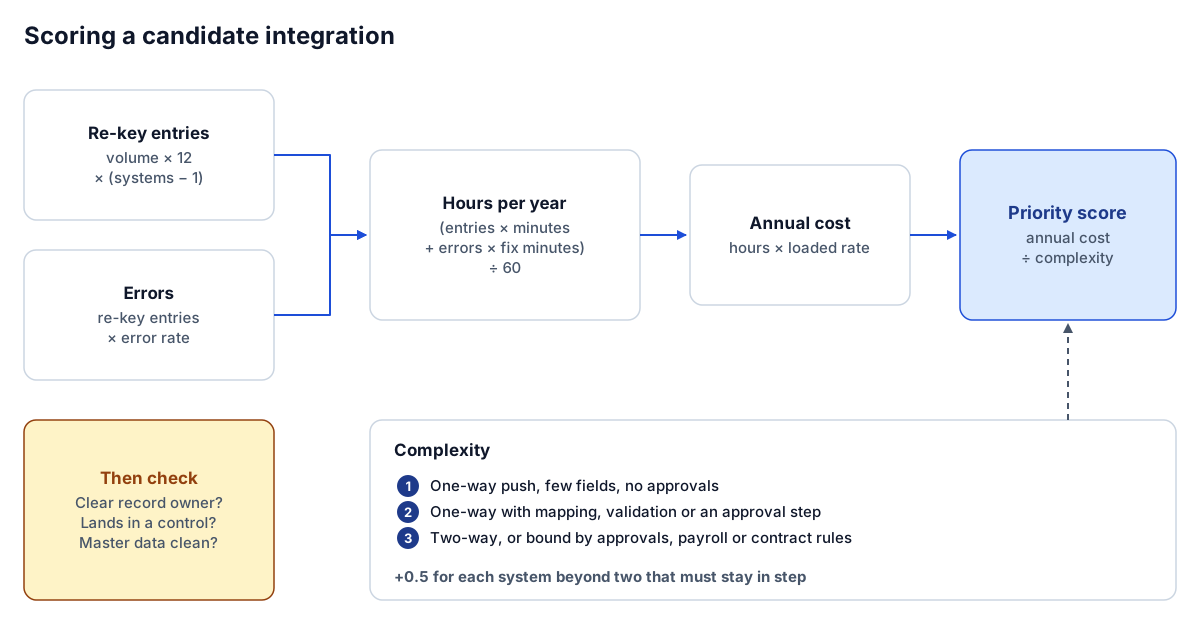 Volume, re-key time and error cost give annual cost; complexity turns it into a priority.
Three worked examples
These use the starting assumptions in our calculator. They are editable defaults, not benchmarks; replace them with your own counts.
New job setup
A contractor sets up 4 new jobs a month. Each one is entered in the CRM, the project management system and the ERP, so it is keyed into two extra systems. Each extra entry takes 45 minutes, 5% need a correction later, and the loaded rate is $55 an hour.
- Re-key entries per year: 4 × 12 × 2 = 96
- Errors per year: 96 × 5% = 4.8
- Hours per year: (96 × 45 + 4.8 × 30) ÷ 60 = 74.4
- Annual cost: 74.4 × $55 = $4,092
- Complexity: 2, plus 0.5 for the third system = 2.5
- Priority score: 4,092 ÷ 2.5 = 1,637
Commitments and subcontracts
20 commitments a month are entered in Procore and re-keyed into the ERP at 15 minutes each, with a 4% error rate at $55 an hour.
- Re-key entries per year: 20 × 12 × 1 = 240
- Hours per year: (240 × 15 + 9.6 × 30) ÷ 60 = 64.8
- Annual cost: $3,564
- Complexity: 3 (two-way, with approval and ownership rules)
- Priority score: 3,564 ÷ 3 = 1,188
AP invoice entry
300 vendor invoices a month are keyed from the inbox or Procore into the ERP at 4 minutes each, with a 3% error rate at $40 an hour.
- Re-key entries per year: 300 × 12 × 1 = 3,600
- Hours per year: (3,600 × 4 + 108 × 30) ÷ 60 = 294
- Annual cost: 294 × $40 = $11,760
- Complexity: 2 (one-way into an approval queue)
- Priority score: 11,760 ÷ 2 = 5,880
| Workflow | Hours per year | Annual cost | Complexity | Priority score |
|---|---|---|---|---|
| AP invoice entry | 294 | $11,760 | 2 | 5,880 |
| New job setup | 74.4 | $4,092 | 2.5 | 1,637 |
| Commitments | 64.8 | $3,564 | 3 | 1,188 |
On these assumptions AP wins clearly: high volume, a simple shape, and it lands in a queue where a person still approves every invoice. Job setup comes second despite low volume, because each job is slow to key into three systems. Commitments score lowest, not because they do not matter, but because the integration is harder and the volume is modest.
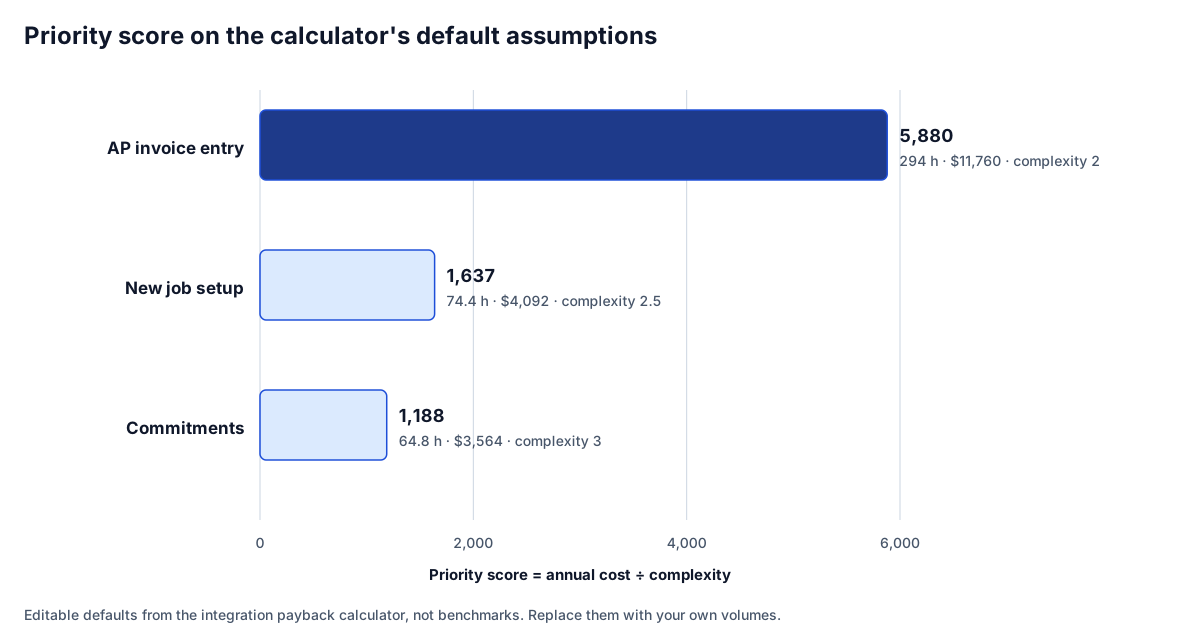 On the default assumptions, AP leads by a wide margin. Your volumes will move the bars.
Step 4: Check what the score cannot see
The score ranks labor. Before you commit, run the top two or three candidates through four questions.
- Does one system clearly own the record? If the PM system and the ERP both claim commitments and nobody has decided, that decision comes before the integration. Write down the owner of jobs, vendors, cost codes, commitments and invoices.
- Does a wrong entry cost more than the fix time? A miscoded invoice moves cost to the wrong job and distorts the WIP schedule until someone finds it. A wrong job number at setup breaks every report that joins the systems. If the downstream cost is high, move that workflow up.
- Does it land inside an existing control? Integrations that write into a review queue, such as AP unapproved invoices, keep your controls intact and are easier to approve internally. Integrations that post straight to the ledger need more design.
- Is the master data clean enough? If job numbers, cost codes or vendor names differ between systems, the integration needs a crosswalk first. Run an export through the data quality checker to see how much clean-up is involved.
A workflow that scores slightly lower but passes all four is often a better first build than the top scorer that fails one. Job setup is the common example: modest hours, but it fixes the job ID that every later integration and report depends on.
Step 5: Estimate payback honestly
Once you have a candidate, payback is straightforward:
- Annual saving = annual cost × share of the work the integration removes − added annual run cost
- Monthly saving = annual saving ÷ 12
- Payback months = build cost ÷ monthly saving
Be conservative about the share removed. An integration rarely removes all the effort: exceptions still need a person, and someone has to watch the sync. Our calculator starts at 60%. For the AP example, 60% of $11,760 is about $7,056 a year, or $588 a month before run costs; divide your quote by that to get payback in months. If payback runs past the useful life of the systems involved, choose a different first build or a cheaper way to build it.
Step 6: Choose how to build it
The same integration can be built several ways: a native connector from one of the vendors, an iPaaS platform, a custom build, or a specialist. The right choice depends on how standard your configuration is, who will maintain it, and how much control you need over error handling. Our comparison of ways to connect construction systems walks through each option with a six-question chooser, and build vs. buy for construction integrations goes deeper on ownership.
Whatever you choose, build the first integration with three things from day one:
- An exception queue where failed records land with a reason and an owner.
- Idempotent writes, carrying the source ID so a retry never creates a duplicate.
- A reconciliation check that compares totals between the systems on a schedule, so you can show the payback rather than estimate it.
Common mistakes
- Starting with two-way sync of everything. It is the integration most often proposed first and the one most likely to stall. Start one-way, with a clear owner.
- Scoring on gut feel. Ten minutes counting last month's volume beats an hour of debate.
- Ignoring error cost. Minutes per entry is visible; minutes per fix is not, and it is often the bigger number.
- Skipping the mapping. Field mapping and cost code crosswalks take longer than configuring the flow. Use a workbook such as the integration mapping template before anyone writes code.
- No owner after go-live. Every integration needs someone who watches the exception queue.
Our playbook on the construction integrations that pay back first describes the six integrations that most often win this scoring, and integration discovery questions for contractors lists what to gather before scoping.
Where to go next
- Run the numbers: the integration payback calculator ranks your workflows and estimates payback.
- See your stack: the construction stack mapper suggests your first three builds.
- Plan the mapping: download the integration mapping workbook.
- Compare build paths: ways to connect construction systems.
- Know your first integration but not the best way to build it? Tell us where your team re-keys data.
Frequently asked questions
Which construction integration should we build first?
The one with the highest annual re-keying cost relative to its complexity, provided one system clearly owns the record and the integration lands inside an existing control. For many contractors that is AP invoices into the ERP or new job setup, but your volumes decide it.
How do you calculate the cost of double entry?
Multiply monthly volume by 12 and by the number of extra systems the item is keyed into to get entries per year. Multiply by minutes per entry, add errors times the minutes to find and fix one, divide by 60 for hours, and multiply by the loaded hourly rate.
How do you estimate integration payback?
Take the annual re-keying cost, multiply by the share of the work the integration realistically removes, subtract any added run cost, and divide by 12 for a monthly saving. Payback in months is the build cost divided by that monthly saving.
Should our first integration be a two-way sync?
Usually not. Two-way syncs need ownership decisions for every field and have many more failure modes. A one-way integration with a clear owner and an exception queue goes live faster and cleans up master data for the next build.
Next step
Need this connection in your environment?
Scope one integration: the records, direction, timing, and business rules behind the connection.
Prefer email? charley@buildflows.ai
Keep learning
Playbooks · October 9, 2026
The Construction Integrations That Pay Back First
A playbook for choosing your first construction integrations: why expense-to-AP, PM-to-ERP, GL/AP/AR, payroll and HR, carrier EDI and reporting feeds pay back first, with an anonymized expense-to-Vista pattern and a prioritization table.
Playbooks · October 9, 2026
Integration Discovery: Questions to Ask Before Automating a Contractor Workflow
A vendor-neutral discovery list for construction integrations, from process mapping and field-level source of truth to error routing, volumes, security, opportunity-cost ROI and phased rollout. Includes a printable checklist.
Integrations · October 10, 2026
Build vs Buy for Construction Integrations: Code, iPaaS or Connector
A vendor-neutral comparison of the five ways to connect construction systems, with the technical questions that decide between them: authentication, webhooks vs changed-data queries, API requirements, error handling and ownership cost.