Key takeaways
- OCR turns a page into text; extraction returns named fields, and validation decides whether those fields can be trusted.
- Vendor-reported benchmarks run in the mid to high 90s on clean test sets; real business documents with line items score lower and unevenly.
- Measure accuracy per field on a hand-checked golden set of your own documents, with precision, recall, document-level accuracy and escape rate.
- Header fields such as invoice number and total tend to hold up; cost codes, retainage, line-item tables and O&M equipment attribution miss more often.
- Deterministic rules catch confident wrong values: sums tie out, the PO or commitment exists, the cost code is active, the invoice is not a duplicate.
- Route blank, low-confidence and failing fields to a person, store every correction, and rerun the golden set when a model or layout changes.
Short answer: On clean, typed documents, modern AI extraction gets most header fields right, and vendor-reported benchmarks put the best tools in the mid to high 90s. On real construction paperwork the number drops, and it drops unevenly. Invoice numbers and totals tend to hold up, while cost codes, retainage, line-item tables and equipment data buried in a 400-page O&M manual miss more often. The only accuracy figure worth trusting is one measured per field on a hand-checked sample of your own documents. Plan for some wrong values, catch them with validation rules and confidence routing, and send what's left to a person.
This article is for project managers, controllers, AP leads and IT people who have been told a tool is "99% accurate" and want to know what that means for their invoices, certificates and closeout documents. It covers the terms, the published numbers and their limits, how to measure accuracy yourself, a worked scoring example, and the pipeline design we use so that a misread number never posts to a job. For the wider build (intake, classification, routing), read our guide to construction document automation with OCR.
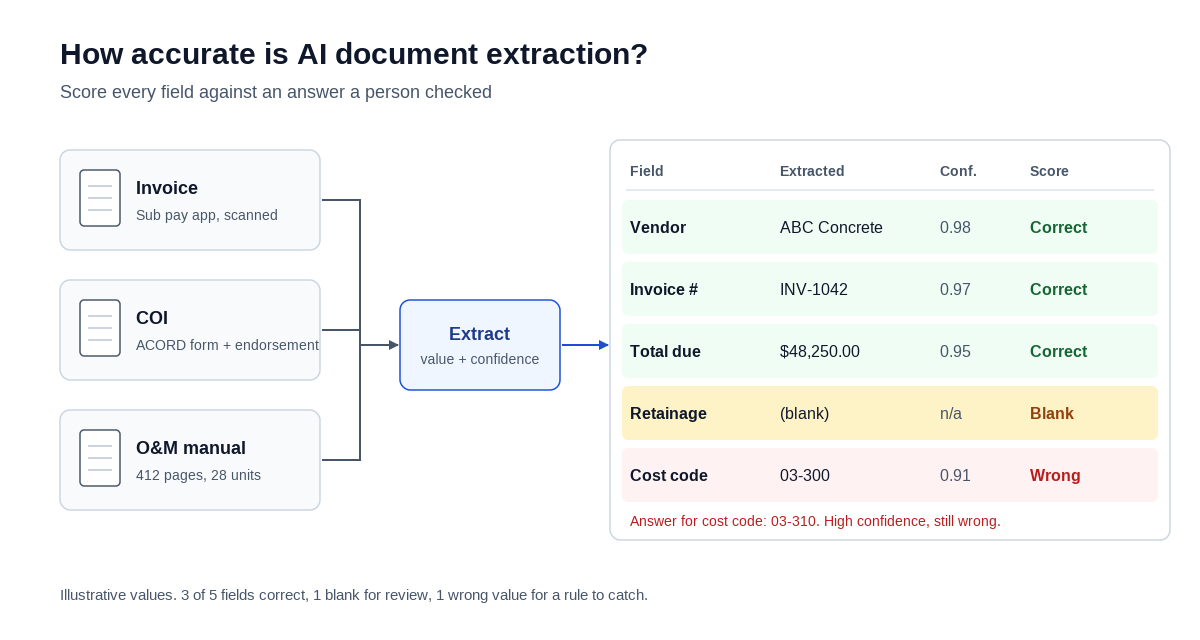 Accuracy is measured per field, against answers a person checked.
OCR, document processing and AI extraction are different things
The terms get used interchangeably in sales decks. They describe different layers.
OCR (optical character recognition) turns an image or PDF into text. In construction, that usually means making scanned invoices, faxed delivery tickets, stamped drawings and old O&M manuals searchable. OCR output is a stream of words and, with better engines, their positions on the page. It has no idea which number is the retainage.
Intelligent document processing (IDP) adds extraction on top of OCR. A model trained on a document type, such as invoices or receipts, returns named fields (vendor, invoice number, total) with a confidence score for each. Prebuilt invoice models from the large cloud providers fall in this group, as do custom models trained on your own layouts.
LLM and vision-model extraction sends the page image, the OCR text or both to a general language model with a schema: return these fields, in this format. It copes with layouts it has never seen, which suits construction, where every sub's invoice looks different. It also brings a new failure mode. A model can return a plausible value that is nowhere on the page.
Most working pipelines mix these. OCR text is kept for search and audit, a model extracts the fields, and code checks the result.
Is OCR enough for invoice processing?
No. Plain OCR gives you text, and AP needs fields. Someone or something still has to find the vendor, the invoice number, the amount due, the retainage held and the job, then check them against the commitment before an approval goes out. That is extraction plus validation, and OCR does neither.
The same answer applies to real estate invoices, purchase orders, lease abstracts and contracts. "OCR invoice extraction" and "purchase order OCR" are both really extraction problems, and the hard part is everything after the text is read: matching the PO, tying out the sums, catching the duplicate.
There is also evidence that a separate OCR step is becoming optional for the strongest models. A study from SAP and Stanford on about 1,000 real supply chain and finance documents found that image-only input matched or beat OCR-based input for the best multimodal models, with OCR-only input producing the most errors. OCR still earns its place as the searchable, inspectable record of what the page said.
What published accuracy numbers say, and what they don't
Here is what we could source. Each figure describes one test set, and your documents will differ.
- Mistral reported that its first OCR model scored 98.96 on scanned documents and 96.12 on tables on its own internal benchmark, ahead of the cloud OCR services it compared. That is vendor-reported, the page does not name the metric, and the test set is described as publication papers and web PDFs. Mistral has since replaced that model.
- OpenRouter published a small scanned-document test in November 2026: 8 degraded pages, 88 key values, three runs per model. The 15 vision models got between 232 and 262 of 264 checks right, and Mistral's OCR model got 258. Tesseract, a common open-source OCR engine, got 46 of 88. Most of the spread came from one faded thermal receipt, where some models invented details that were not on the page, and most models misread at least one O-versus-0 serial number on a fax.
- The SAP and Stanford study above reported a best mean F1 of about 74 to 79 on its two business-document sets, depending on input and prompting. Real documents with line items scored well below clean-benchmark numbers.
- A paper on invoice extraction methods tested about 100 digital and scanned invoices. One open-source pipeline scored 90% on invoice number but 58% on line items, and failed a sum-to-total consistency check on a share of documents. The paper's point is worth repeating: an F1 score can hide errors on the few fields that matter most.
Three things follow. Benchmark scores are usually character or text accuracy, which is not the same as getting the right value into the right field. Clean test sets flatter every tool. And the gap between header fields and table rows shows up in almost every study.
How to measure extraction accuracy
Score each field. A page can be 99% correct by character count and still carry the one wrong digit in the total. These are the measures we use.
Field-level accuracy
For each field on each document, compare the extracted value with the hand-checked answer. Correct, wrong or blank. Report it per field and per document type, never as one blended number.
Precision and recall per field
Precision is the share of returned values that are correct. Recall is the share of values on the page that came back correct. A tool that leaves uncertain fields blank has high precision and lower recall, which is what you want for money fields. A blank is a question for a person. A wrong value that looks right is the expensive failure.
Document-level accuracy
The share of documents with every required field correct. This is always lower than any field score, and it is closer to what AP feels.
Straight-through rate and escape rate
Straight-through rate is the share of documents that pass every check and need no review. Escape rate is the share of those straight-through documents that still had a wrong value. Track both. A high straight-through rate with escapes is worse than a lower rate without them.
Confidence that means something
Check whether low-confidence values really are the wrong ones. Microsoft's guidance for its document field confidence scores is to use them to decide between auto-accepting and human review. In a recent write-up, it describes setting thresholds per document type and per field against a target such as catching at least 80% of known errors, then validating on held-out documents. In one customer case, a calibrated policy sent 41% fewer values to targeted review while still catching more than 80% of known errors. Those figures are vendor-reported. In that case people still checked the values that were not flagged, so confidence narrowed where reviewers looked first.
A golden set
All of the above needs a hand-checked sample of your own documents, including bad scans and odd layouts. We describe how we build and rerun these in LLM evals, golden sets and autopilot.
Worked example: scoring 200 subcontractor invoices
This example is hypothetical. A contractor pulls 200 recent subcontractor invoices, mixed between digital PDFs and scans. An AP clerk records the correct value for seven fields on each. The pipeline runs, and every extracted value is scored.
| Field | Correct | Wrong value | Blank | Field accuracy | Check that catches misses |
|---|---|---|---|---|---|
| Vendor | 198 | 0 | 2 | 99.0% | Vendor exists in the vendor master |
| Invoice number | 195 | 4 | 1 | 97.5% | Not seen before for this vendor |
| Invoice date | 196 | 3 | 1 | 98.0% | Within the billing period |
| Total due | 194 | 2 | 4 | 97.0% | Lines plus tax less retainage equals total |
| Retainage held | 176 | 9 | 15 | 88.0% | Matches the subcontract retainage rate |
| Cost code | 158 | 30 | 12 | 79.0% | Code is active on the job and the commitment |
| Line items (all rows right) | 144 | 41 | 15 | 72.0% | Lines sum to subtotal |
Across all 1,400 field values, 1,261 are correct: 90.1%. That single number hides most of what matters. Vendor and invoice number are close to safe. Retainage has a precision of 176 out of 185 returned values (95.1%) and a recall of 88%, so most of its misses are blanks, which are easy to route. Cost code has 30 confident-looking wrong values, which is why the cost code check against the job and commitment does more work here than any confidence score.
Suppose, still hypothetically, that 118 of the 200 invoices had every field correct (59% document-level accuracy), and that after validation and confidence routing 104 went straight through. If one of those 104 later turned out to carry a wrong value, the escape rate is about 1%. That escape is the number to drive down before anyone talks about skipping review.
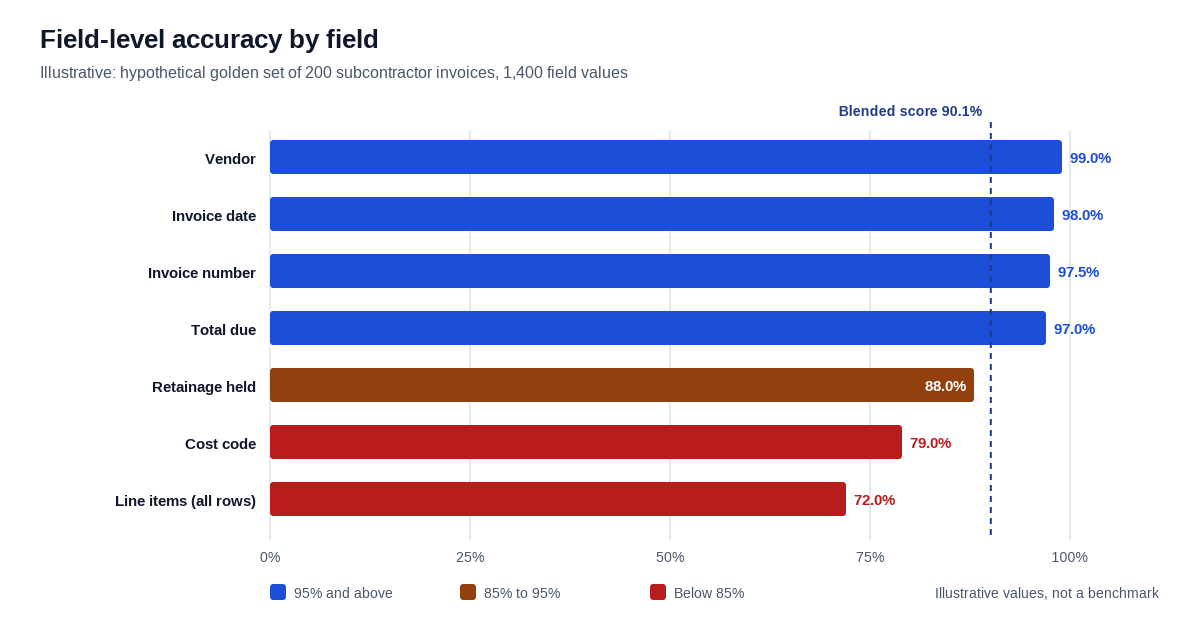 Illustrative: header fields hold up, coded and tabular fields don't.
Why construction documents are harder than benchmarks
Most of the errors we see come from a short list of causes.
- Scans and phone photos. Skewed, faded or low-resolution pages, and thermal-paper tickets that fade.
- Stamps, signatures and handwriting. A "RECEIVED" stamp across the total, a handwritten job number, a PM's initials over the cost code.
- Tables that span pages. Line items and schedules of values that break across pages, with the header row only on page one. Rows get merged, split or attached to the wrong total.
- Retainage and tax lines. Gross, retainage held, retainage released, tax and net due are all dollar amounts in the same area of the page. Reading the right number into the wrong field is a common miss.
- Certificates of insurance. The ACORD form layout is consistent, which helps. The trouble is multiple policies on one certificate, limits in the wrong row, and additional insured wording that lives on a separate endorsement page. A certificate that reads cleanly still has to be checked against contract minimums.
- Look-alike characters. O and 0, I and 1, S and 5 in serial numbers, policy numbers and invoice numbers. The OpenRouter test above found this on most models.
How accurate is AI O&M extraction?
Operation and maintenance manuals are the hardest common case, for subs and GC PMs alike. A single manual can run hundreds of pages and cover dozens of units: air handlers, pumps, panels, each with a manufacturer, model, serial, warranty dates and maintenance tasks with intervals. Cut sheets often list several model options with one circled or highlighted.
The usual failure is attribution. The model reads the serial number correctly and assigns it to AHU-2 when it belongs to AHU-3. A field score that only asks "was this serial found?" will call that correct. Score O&M extraction as equipment-attribute pairs: tag plus field plus value, all three right.
We don't know of a published accuracy figure for O&M extraction specifically, and we would distrust one that didn't say how attribution was scored. What helps most is validation against data you already have:
- Every extracted equipment tag must exist on the equipment schedule or submittal register.
- The model number must match the approved submittal for that tag.
- Warranty start dates should sit near substantial completion, and end dates after start.
- Maintenance intervals must parse into a unit (weekly, quarterly, 2,000 hours) or go to review.
With those checks, an O&M pipeline becomes a fast first draft that a person confirms unit by unit, which is faster than typing it from scratch and leaves a record of who checked each unit.
A design that assumes some values are wrong
Every accuracy number above has a tail of errors. The design goal is to catch them before they reach a system of record.
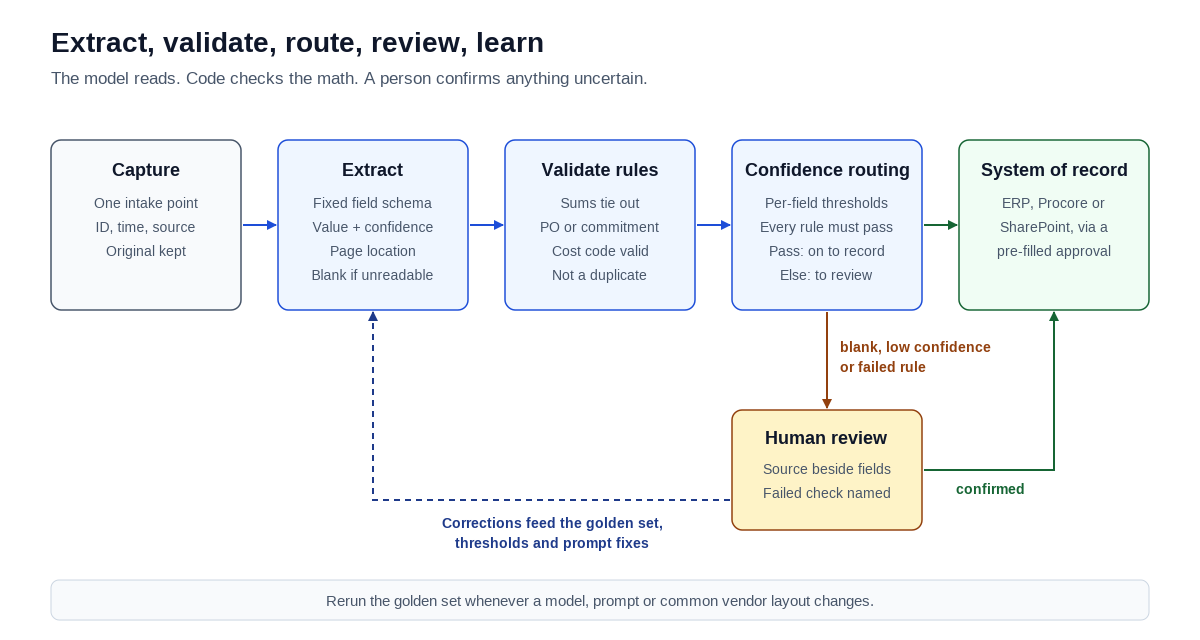 Extract, validate, route, review, and learn from every correction.
- Extract a fixed schema per document type. Each field returns a value, a confidence where available, and the page location it came from. Unreadable fields come back blank, never guessed.
- Validate with rules. Sums tie out (lines to subtotal, subtotal plus tax less retainage to total). The PO or commitment exists and has room. The cost code is active on that job. The invoice number is new for that vendor. Rules are deterministic code. On our deed-to-COGO project the model reads the document and never does the math; code evaluates every expression. The same split works for invoices.
- Route by confidence and rules. A document goes straight through only if every required field is above its own threshold and every rule passes. Set thresholds per field from your golden set.
- Human review. The reviewer sees the original page next to the extracted fields, with the failed check named. For AP, an AI invoice review agent can assemble that packet, but the person decides.
- Learn from corrections. Store every correction, field by field. Corrections feed the golden set, show which vendors and fields cause trouble, and justify threshold changes. Keep that loop gated, as we describe in learning from human corrections. An unreviewed edit should never retrain anything on its own.
Then rerun the golden set whenever a model, prompt or common vendor layout changes. Accuracy is a number that drifts.
How Build Flows can help
We design and build extraction pipelines for invoices, certificates, pay applications and closeout documents, and we start by scoring a sample of your real documents per field before anything goes live. Clean documents pre-fill your existing approval flow in Procore, your ERP or SharePoint, and nothing posts without the approval step you set. See the invoice and document OCR extraction use case for the pattern, or tell us which documents you're retyping and we'll show you what a field-level accuracy test would look like on them.
Frequently asked questions
How accurate is AI extraction for construction documents?
On clean, typed documents the best tools get most header fields right, and vendor-reported benchmarks sit in the mid to high 90s. On real construction paperwork accuracy varies by field: invoice numbers and totals tend to hold up, while cost codes, retainage, line items and O&M equipment data miss more often. Measure it per field on a hand-checked sample of your own documents.
How accurate is AI O&M manual extraction?
There is no reliable published figure for O&M manuals specifically. The common failure is attribution: a serial or model number read correctly but assigned to the wrong unit. Score equipment tag, field and value together, and validate against the equipment schedule and approved submittals before anything is accepted.
Is OCR enough for invoice processing?
No. OCR gives you text, and invoice processing needs fields such as vendor, invoice number, amount, retainage and job, checked against the PO or commitment. You need extraction on top of OCR, validation rules, and a review step for anything blank, low confidence or failing a check. The same applies to real estate invoices and purchase orders.
What does OCR mean in construction?
OCR stands for optical character recognition: software that turns a scanned or photographed page into machine-readable text. In construction it is used on invoices, delivery tickets, certificates of insurance, submittals, drawings and O&M manuals, usually as the first step before fields are extracted and validated.
How can OCR improve document automation?
OCR makes paper and scanned documents searchable and gives extraction models text to work with. The gains come when OCR sits inside a pipeline: one intake point, field extraction, validation rules against your vendors, jobs and commitments, a review queue for exceptions, and a record of every correction.
How should extraction accuracy be measured?
Score each field on each document against a hand-checked answer, and report it per field and per document type. Track precision and recall per field, the share of documents with every field correct, the straight-through rate, and the escape rate of wrong values that passed without review. Check that low confidence really predicts wrong values.
Can AI extraction post straight to accounting?
Not in the first release. Pre-fill the approval workflow that already exists, keep a person approving, and only allow straight-through posting for specific vendors and fields once your golden set and escape rate support it. Keep that change reversible.
Next step
Want this workflow automated?
Tell us the handoff, approval, or reminder your team repeats. We'll scope the automation, the approvals it needs, and who owns it.
Prefer email? charley@buildflows.ai
Keep learning

Workflow automation · October 9, 2026
Construction Document Automation with OCR: A Practical Guide
How to automate construction paperwork with OCR: capture documents at one door, extract defined fields, validate them against your systems, route exceptions to a person and measure accuracy per field.
Workflow automation · October 9, 2026
From Scanned Deed to COGO Lines: An OCR and LLM Pipeline
A pipeline that takes a scanned deed from Trimble Connect, runs Mistral OCR, has a fine-tuned model encode the legal description as COGO lines, evaluates all arithmetic in safe deterministic code, and writes results back for a surveyor to check. The same pattern fits most construction documents.
AI agents & MCP · October 9, 2026
LLM Evals in Production: Judges, Golden Sets, Regression Runs and a Gated Autopilot
How we built evaluation into Connect: a rubric-driven LLM judge on every live turn, a deterministic schedule grader, golden items promoted from the ledger, draft-versus-live regression runs, and an autopilot that publishes only through a regression gate.