AI review agent for Viewpoint Vista AP unapproved invoices
A read-first agent that works the Vista unapproved invoice queue, scores each invoice for risk, compares it with the commitment, and leaves the approval decision to a person.
The problem
AP reviewers work a long list of unapproved invoices in Vista, opening each one and cross-checking the vendor, job, PO or subcontract by hand. Duplicates, stale invoices, amounts that exceed the remaining commitment and vendor mismatches are caught late or not at all, and there is no consistent record of why an invoice was approved or held.
What we build
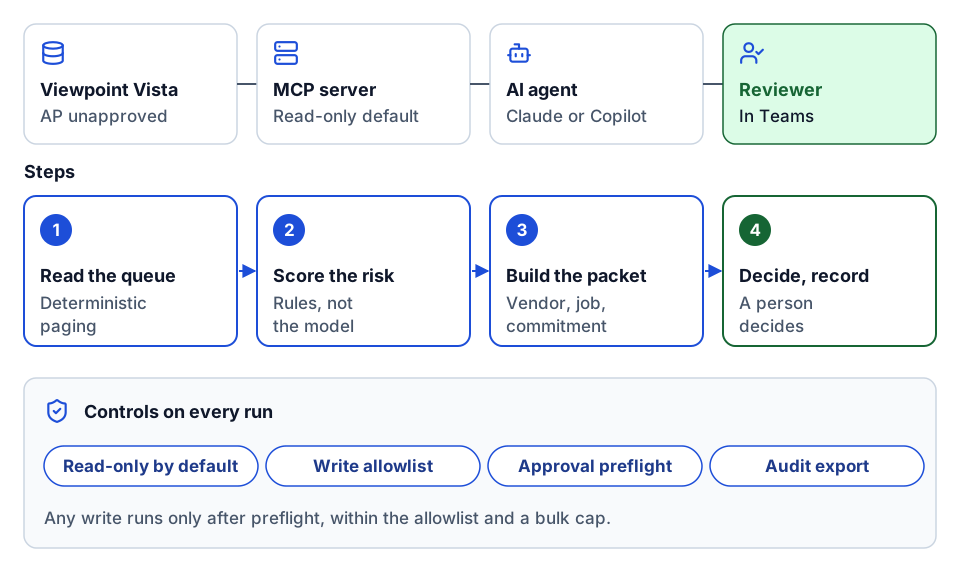
We build an MCP server over the Vista API and an agent that uses it to triage the unapproved invoice queue. Deterministic rules flag missing fields, possible duplicates, stale and high-value invoices, and PO or subcontract mismatches, then the agent assembles a review packet for each invoice. A person makes the decision; the agent captures it, runs a preflight before any approval action, and exports an audit trail.
How it works
- 1
Read the queue
The agent pages through AP unapproved invoices with deterministic paging, so every invoice is seen once and the run can resume if interrupted.
- 2
Score the risk
Rule-based checks, not the model, flag missing vendor, number, amount or date, non-positive amounts, stale invoices, amounts above your threshold, possible duplicates, unusual vendor amounts and vendor mismatches against the PO or subcontract.
- 3
Build the review packet
For each flagged invoice the agent pulls the vendor, job, commitment totals and history into one packet and explains which rules fired and why.
- 4
Decide and record
A reviewer approves, holds or rejects. The decision is captured, any write runs only after a preflight check and within allowlists, and the full trail is exportable for audit.
- Viewpoint Vista
- Trimble App Xchange
- Model Context Protocol
- Claude
- Microsoft Copilot
- Microsoft Teams
The value it creates
Time saved
Reviewers start from a ranked queue with the context already gathered; we compare review time per invoice before and after from reviewer logs.
Cost saved
Duplicates and over-commitment billing are flagged before approval; we count catches against what was previously found after posting.
Early warning
Stale invoices and unusual vendor patterns surface while they can still be acted on.
Standardization
The same risk rules and thresholds apply to every invoice, and every decision has a recorded reason.
Proof
Related use cases
- Built and shown
AI assistant for project drawings, specs and documents
Ask questions of a project's drawings, specs and meeting notes and get answers that cite the file and passage they came from.
- Built and shown
AI sales automation: lead capture, research, follow-ups and proposals
Agents handle the research, scheduling and first drafts around each sales step, a person approves anything customer-facing, and the CRM stays up to date.
- Built and shown
AI schedule builder for CPM schedules with evidence and XER export
Specialized agents draft a CPM schedule from project documents and client answers, show the evidence behind each activity, and export XER for the scheduler to review.
- Built and shown
MCP servers for Procore, Primavera P6 and other construction systems
An MCP server exposes a construction system's API as tools an AI agent can call, with scoped permissions and a log of every call.
- We design and build this
MCP servers for Vista, Spectrum and ProjectSight
An MCP server that exposes your ERP or project management system to AI agents through a small set of governed tools, authenticated as the user.
Frequently asked questions
Does the agent approve invoices on its own?
No. The default is read-only analysis. Approvals stay with a person, and any write the agent can make is limited by an allowlist, a bulk cap and a preflight check that runs before the action is sent.
Does the AI decide which invoices are risky?
The risk flags come from deterministic rules you can read and tune, such as amount thresholds and duplicate checks. The model gathers context and explains the result; it does not invent the score.
Does this work with on-premises Vista?
It depends on how your Vista is reached. Cloud-hosted Vista exposes the API directly; on-premises installations usually need a connector or agent in between. We confirm the route against current Trimble documentation during discovery.
Next step
Which report or workflow would you like to improve?
Tell us what your team does today, which systems are involved, and what you want to change. We'll discuss whether there is a practical fit.
Prefer email? charley@buildflows.ai