Short answer: The DCMA 14-point assessment is a set of schedule quality checks published by the US Defense Contract Management Agency and now used well beyond defense work. It tests a CPM schedule for missing logic, leads, lags, relationship types, hard constraints, high float, negative float, long durations, invalid dates, resource loading, missed tasks, the critical path, the Critical Path Length Index (CPLI) and the Baseline Execution Index (BEI). Most checks pass when fewer than 5% of activities or relationships fail. In Primavera P6, almost every failure is fixed the same way: add or correct logic, remove constraints that override it, break up long activities, and reschedule (F9) against a correct data date.
This guide is for schedulers, project controls leads and the project managers who receive their schedules. For each check it covers what is tested, the commonly published threshold, why it matters, and how to fix it in P6. You can run all of these against your own file with our free P6 schedule health check: drop an XER export and it lists the activities behind every failure, in your browser.
One caveat before we start. A 14-point score is a screening tool, not a verdict. It is not an official DCMA assessment, and a schedule can pass every check and still be a poor plan, or fail several for legitimate reasons. Use it to find questions, then answer them with judgment.
The 14 checks at a glance
| # | Check | Commonly published threshold | What it catches |
|---|---|---|---|
| 1 | Missing logic | ≤ 5% of incomplete activities | Activities without a predecessor or successor |
| 2 | Leads | 0 | Negative lag on relationships |
| 3 | Lags | ≤ 5% of relationships | Positive lag used as hidden duration |
| 4 | Relationship types | ≥ 90% finish-to-start | Overuse of SS, FF and SF ties |
| 5 | Hard constraints | ≤ 5% of incomplete activities | Dates that override logic |
| 6 | High float | ≤ 5% with total float > 44 working days | Missing successors disguised as flexibility |
| 7 | Negative float | 0 | Dates the logic cannot meet |
| 8 | High duration | ≤ 5% with remaining duration > 44 working days | Activities too long to status |
| 9 | Invalid dates | 0 | Actuals in the future, forecasts in the past |
| 10 | Resources | All activities with duration are loaded | Missing resource or cost assignments |
| 11 | Missed tasks | ≤ 5% | Activities that finished late against the baseline |
| 12 | Critical path test | Pass | A broken critical path |
| 13 | CPLI | ≥ 0.95 | A finish date the remaining path cannot meet |
| 14 | BEI | ≥ 0.95 | Work finishing slower than planned |
The 44-working-day limit for checks 6 and 8 is roughly two months of working time. The thresholds above are the commonly published values. Some owners and contracts set their own; where they do, theirs win.
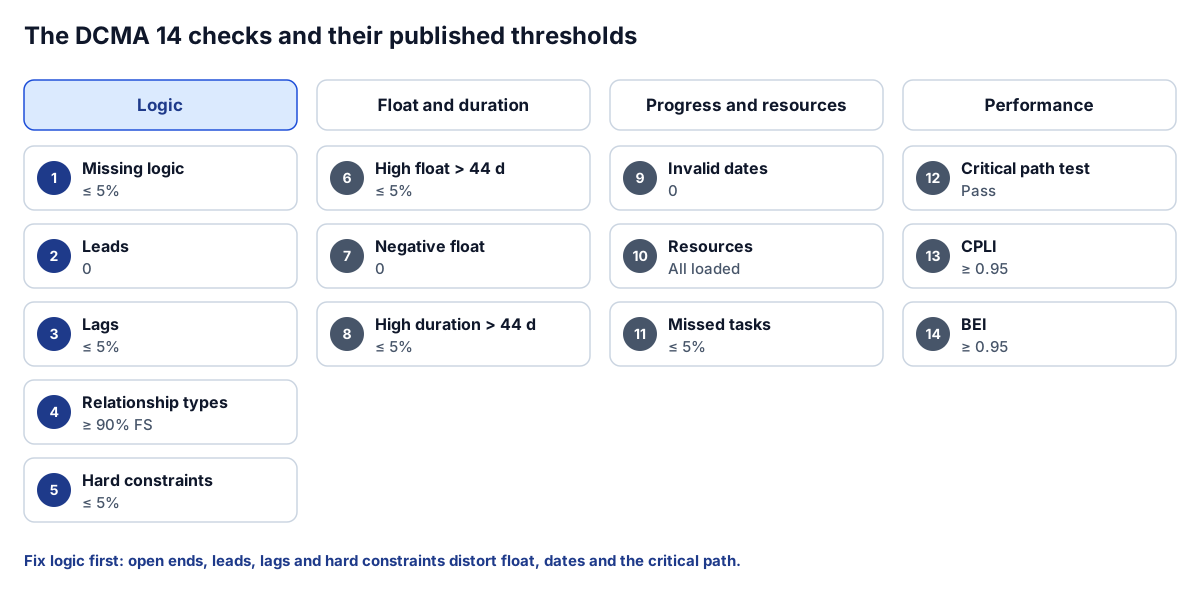 The 14 checks fall into four families; the logic checks fix most of the rest.
Logic checks (1 to 5)
1. Missing logic
What it tests: incomplete activities with no predecessor, no successor, or neither. Project start and finish milestones are the expected exceptions.
Why it matters: an open end breaks the network. An activity without a successor can slip indefinitely without moving anything else, so its delay never reaches the finish date. It also inflates float, which is why check 6 often fails at the same time.
How to fix it in P6: run Schedule (F9) with Log to file ticked. The schedule log lists activities without predecessors and without successors. Add the missing ties on the Relationships tab in Activity Details. Every activity should drive something, even if that is only a finish milestone for its area or phase. Avoid tying everything straight to the project finish; that clears the check without adding real logic.
2. Leads
What it tests: relationships with negative lag.
Why it matters: a lead lets a successor start before its predecessor finishes, by a fixed amount of time, regardless of whether the predecessor is actually progressing. It hides real overlap and distorts the critical path.
How to fix it in P6: add the Lag column to the Predecessors or Successors tab and filter for negative values. Replace each lead with explicit logic. If drywall can start when framing is half done, split framing into two activities and tie drywall to the first half with a finish-to-start relationship.
3. Lags
What it tests: relationships with positive lag, as a share of all relationships.
Why it matters: a lag is time that passes with no activity, no owner and no progress to report. Concrete cure, submittal review and procurement lead time are real, but as lags they are invisible on most layouts and cannot be statused.
How to fix it in P6: convert meaningful lags into activities: "Cure slab, 7 days" or "Fabricate and deliver steel". Use a lag only for short, genuinely fixed waits, and document why.
4. Relationship types
What it tests: the share of relationships that are finish-to-start (FS). The threshold is at least 90%.
Why it matters: FS logic is easy to read and check. Start-to-start and finish-to-finish ties are legitimate, but a schedule built mostly from them is hard to follow, and start-to-finish ties are rarely correct.
How to fix it in P6: group the relationships view by type and review every SF tie first. For SS and FF pairs, consider whether splitting an activity would let you use FS instead. Do not convert ties blindly to pass the check; a correct SS tie is better than a wrong FS one.
5. Hard constraints
What it tests: incomplete activities with a constraint that overrides logic. In P6 terms that means Start On, Finish On, Start On or Before, Finish On or Before, Mandatory Start and Mandatory Finish, as either the primary or secondary constraint.
Why it matters: a hard constraint pins a date. When a predecessor slips, the constrained activity does not move, so the schedule stops showing the real effect of the delay. Mandatory constraints can even break logic outright.
How to fix it in P6: add Primary Constraint and Secondary Constraint columns, then sort. Keep constraints that reflect a genuine external date, such as a permit, an owner-furnished delivery or a contract milestone, and remove the rest. Where you need a target, a soft constraint (Start On or After) or a project must-finish-by date usually does the job without overriding logic.
Float and duration checks (6 to 8)
6. High float
What it tests: activities with total float above 44 working days.
Why it matters: genuine two-month flexibility is unusual. High float almost always means a missing successor, so the activity is only tied to the project finish, far in the future.
How to fix it in P6: create a filter for total float greater than 44 days and check each activity's successors. The fix is nearly always more logic. Also check Schedule Options: the "Compute total float as" and "Calculate float based on finish date of" settings change float values, so keep them the same between updates or the trend means nothing.
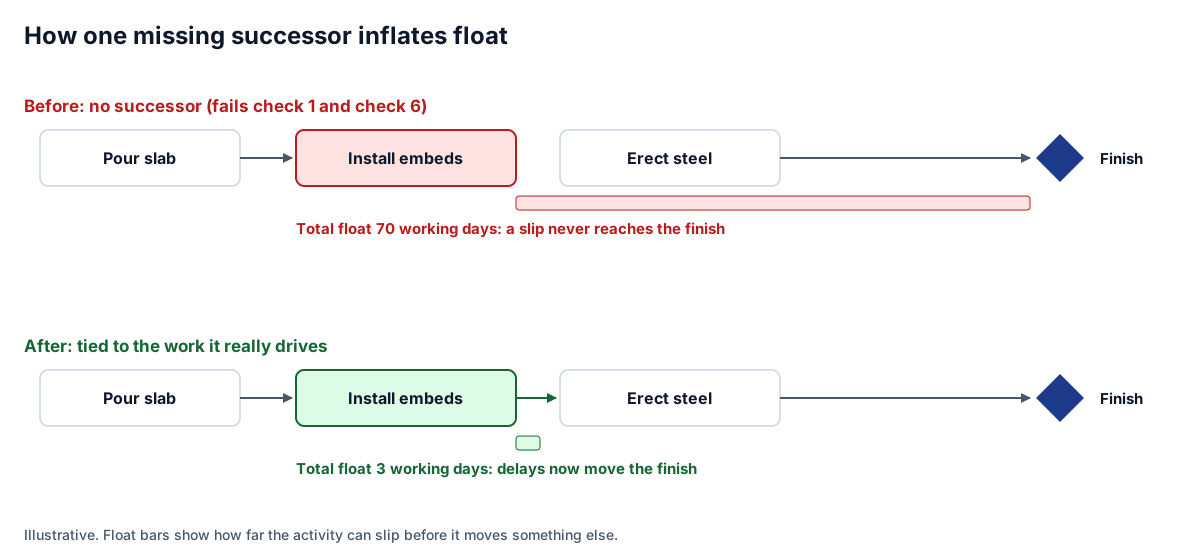 One missing successor fails checks 1 and 6 together; one relationship fixes both.
7. Negative float
What it tests: any activity with total float below zero.
Why it matters: negative float means a constraint or deadline cannot be met by the current logic and durations. Each one is either a real problem needing a recovery plan, or a constraint that should not be there.
How to fix it in P6: sort by total float and walk the negative path backward from the constrained activity or must-finish-by date. Decide with the project team whether to resequence, add resources, shorten durations with justification, or record the delay. Deleting the constraint so the float goes away hides the problem; it does not solve it.
8. High duration
What it tests: incomplete, non-milestone activities with more than 44 working days of remaining duration.
Why it matters: a two-month activity is hard to status. "Install MEP rough-in, 90 days" will be 40% complete for weeks while nobody can say what is left.
How to fix it in P6: break long activities by area, floor or system so each piece can be measured. Level-of-effort and summary activities are normally excluded from this check; make sure they are coded with those activity types rather than as task dependent.
Progress and resource checks (9 to 11)
9. Invalid dates
What it tests: actual dates after the data date, and forecast dates before it.
Why it matters: either progress was entered incorrectly, or the schedule was not recalculated after statusing. Both make the remaining plan unreliable.
How to fix it in P6: confirm the data date in the Schedule dialog, then filter for actual start or finish after it. Correct the actuals, then press F9 so remaining work moves to on or after the data date. If you use retained logic or progress override, know which one is set; it changes how out-of-sequence progress is handled.
10. Resources
What it tests: incomplete activities with duration but no resource or cost assignment.
Why it matters: only if your contract requires a resource-loaded or cost-loaded schedule. If it does, unloaded activities make the cost curve and resource histograms wrong.
How to fix it in P6: filter activities with no assignments on the Resources tab and assign them. If resource loading is not required, note that this check does not apply rather than treating it as a failure.
11. Missed tasks
What it tests: of the activities that the baseline planned to finish by the data date, the share that finished late or not at all.
Why it matters: it measures whether the team is executing to plan. A rising miss rate usually shows up here before it shows up in the finish date.
How to fix it in P6: this is a performance result, not a data error, so the fix is in the field and the plan. Make sure a baseline is assigned (Project, Assign Baselines) so the comparison is meaningful. Our tool uses P6 planned dates from the XER as the baseline, because an XER does not carry a separate baseline project; if planned dates were reset to current dates, ignore this result.
Critical path and performance indices (12 to 14)
12. Critical path test
What it tests: add a large delay to an activity on the critical path and check that the project finish moves by the same amount.
Why it matters: if the finish does not move, something is breaking the path: a constraint, an open end or a lag. A continuous critical path from the data date to the finish is what makes the finish date credible.
How to fix it in P6: on a copy of the project, add 600 days (or any obvious number) to a critical activity's remaining duration and press F9. If the finish moves by less, trace the path forward from that activity until you find what absorbed the delay. Our browser tool does not run this recalculation; it lists the activities P6 reports as critical, in start order, so you can review the path.
13. Critical Path Length Index (CPLI)
What it tests: CPLI = (critical path length + total float to the target finish) ÷ critical path length, where critical path length is the time from the data date to the forecast finish.
Why it matters: a CPLI of 1.0 means the remaining path exactly meets the contract finish. Below 1.0 the plan is late; below 0.95, recovery is unlikely without changes to logic or resources.
How to fix it in P6: set the project's must-finish-by date to the contract completion, so float is measured against it. If CPLI is low, it is the same conversation as negative float: a recovery plan, not a data fix.
14. Baseline Execution Index (BEI)
What it tests: activities completed ÷ activities the baseline planned to be complete by the data date.
Why it matters: BEI below 0.95 means work is finishing more slowly than planned. A schedule can show a healthy finish date while BEI drifts down, because the remaining work has been compressed to absorb the slippage.
How to fix it in P6: like missed tasks, BEI is a performance measure. Use it to ask whether the remaining durations are realistic given the rate of completion so far.
Caveats that matter
- Not an official assessment. The checks and thresholds here follow the commonly published 14-point values. A contract, owner specification or agency may define them differently.
- Thresholds are not targets. Removing every lag or converting every SS tie to pass a check can make a schedule worse. Each change should make the plan more accurate.
- Some checks need context. Resource checks only apply to resource-loaded schedules. Missed tasks and BEI need a real baseline. A brand-new baseline schedule has no actuals, so checks 9, 11 and 14 have little to say.
- A pass is not a good plan. Durations can be wrong, sequences unbuildable and crews double-booked in a schedule that scores perfectly.
A short routine before every submission
- Set the data date and press F9 with the schedule log on.
- Fix open ends and invalid dates first; they distort everything else.
- Review hard constraints and negative float together.
- Run the P6 schedule health check on the exported XER and work through the offender lists.
- Write a one-paragraph narrative for any check that still fails, explaining why.
Our guide to AI for CPM scheduling and Primavera P6 covers how we run checks like these automatically when an AI agent drafts or edits a schedule, and our CPM engine write-up explains how a DCMA-style score is applied to a baseline that has no actuals yet.
Where to go next
- Score your own schedule: the free P6 schedule health check reads an XER in your browser.
- See schedule checks inside an AI workflow: connecting AI agents to CPM scheduling.
- Watch the platform: agentic scheduling with Connect.
- Want these checks run on every schedule update without anyone exporting a file? Tell us how your scheduling team works.
Frequently asked questions
What is the DCMA 14-point assessment?
It is a set of 14 schedule quality checks published by the US Defense Contract Management Agency and widely used on construction CPM schedules. It tests logic, leads, lags, relationship types, constraints, float, durations, dates, resources and schedule performance, using thresholds such as 5% for most percentage checks.
Why is 44 days the limit for high float and high duration?
Forty-four working days is roughly two months of working time. Activities with more float than that usually have a missing successor, and activities longer than that are hard to status. Some contracts set their own limits, which take precedence.
How do I find open ends in Primavera P6?
Run Schedule (F9) with Log to file ticked. The schedule log lists activities without predecessors and without successors. Add the missing relationships on the Relationships tab, tying each activity to the work it really drives rather than straight to the project finish.
What are CPLI and BEI?
The Critical Path Length Index compares the remaining critical path, plus float to the target finish, with the remaining critical path length; below 0.95 the finish is unlikely to be met without changes. The Baseline Execution Index divides activities completed by activities planned to be complete by the data date; below 0.95 means work is finishing slower than planned.
Does passing all 14 checks mean the schedule is good?
No. The checks find structural problems, but a schedule can pass every one with unrealistic durations or an unbuildable sequence. Treat failures as questions to answer and use scheduler judgment for the rest.
Next step
Thinking about a scheduling pilot?
Start with one exported schedule and an agreed set of checks. We'll discuss your format, method, and approval process.
Prefer email? charley@buildflows.ai
Keep learning

Scheduling & P6 · October 8, 2026
AI for CPM Scheduling and Primavera P6: What Works Today
A practical guide to where AI helps CPM schedulers today, from evidence-backed drafts and XER health checks to governed P6 access over MCP, and how to pilot it without risking a live schedule.
Scheduling & P6 · October 10, 2026
CPM Engine, Schedule Health and Monte Carlo Risk
A walkthrough of the deterministic engines behind Connect's schedules: CPM passes across calendars, gut checks, a DCMA-inspired health score, a grader that resists gaming, and seeded Monte Carlo risk, plus why the LLM never does the math.
Scheduling & P6 · October 10, 2026
Verifying Primavera P6 XER Exports Before They Leave
How we write P6 19.12 .xer files and check them before a scheduler downloads them, and why local verification is kept separate from acceptance by the downstream importer.