Connect is the agentic AI platform we built on top of Syncify, a scheduling solution and CPM engine for construction projects. Its users are schedulers and project teams at a scheduling consultancy and the clients they serve. Connect turns the scheduler's standard procedure into a chain of specialized agents: one documents what is being built, one works out how it will be built, one builds and gates a CPM schedule, and one writes the client update. A general chat sits on top and can hand work to any of them. If you want the product story, read how Connect uses AI agents for CPM scheduling or watch the agentic scheduling demo.
This article is the map for everything underneath. Over 23 companion pieces we walk through the platform layer by layer: tenancy and authorization, the Postgres schema, file uploads, retrieval, the agent runtime, safety, tracing, evals, the learning loop, the admin control plane and the deploy pipeline. Here we show how those pieces fit together, the handful of design principles that kept showing up, and what we would change as the platform grows.
The system map
Connect is a TypeScript modular monolith: React and Vite on the client, Fastify on the server, one composition root that wires every capability module. The layers below are how we think about it. Each row links to the article that goes deep on it.
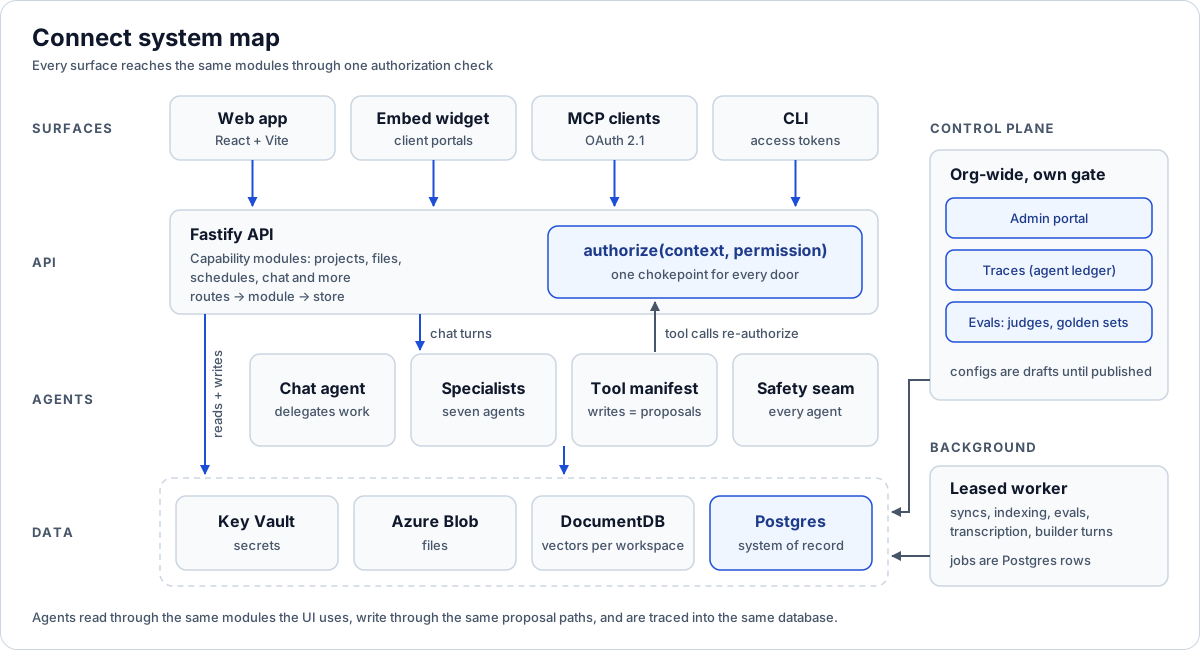
Every door, including agent tools, ends at the same authorization check.
| Layer | What lives there | Key decisions |
|---|---|---|
| Clients and surfaces | The React web app; an embeddable chat widget for client portals; an MCP endpoint for Claude and other agent clients; a CLI using personal access tokens | Every surface reaches the same modules and the same authorization rules. Each credential type gets exactly one route scope. See headless auth, the embed widget and the MCP server. |
| API | Fastify capability modules (projects, files, schedules, info sheets, updates, connections, apps, chat and more), each split into routes, module and store | One authorize(context, permission) chokepoint, a route manifest that tests compare against the live router, and feature packages per workspace. See multi-tenant RBAC. |
| Agents | The chat agent, specialized agents (Info Sheet, Means & Methods, Schedule Builder, Updates, App Builder, alert drafting, job-walk vision), a declared tool manifest, layered safety | Tools are declared and pinned by tests; writes become proposals; safety runs as one seam for every agent. See the tool manifest and safety guardrails. |
| Data | Postgres as the system of record (120+ tables, direct SQL); DocumentDB for per-workspace chunks, vectors and agent working state; Azure Blob for files; Key Vault for secrets | Postgres holds anything that needs transactions, keys or audit. Vectors live one database per workspace. See the schema and the RAG pipeline. |
| Background | A leased worker running syncs, indexing, transcription, update generation, long builder turns and evals | Jobs are Postgres rows claimed with SKIP LOCKED; an expired lease is the whole crash-recovery story. See leased background jobs. |
| Control plane | The executive admin portal, the agent ledger, judges and golden sets, knowledge and config publishing | Org-wide, gated separately from tenant admin; every turn is a row in Postgres; configs are drafts until published. See the admin portal and agent tracing. |
| Delivery | A deploy CLI, CI with real service containers and a browser smoke test, architecture tests, schema-safe rollback | The rules of the codebase are tests. Deploys refuse unverified commits and rollbacks refuse a newer schema. See deploying the monolith and architecture tests. |
Two things about this table matter more than any single row.
First, there are several doors into the same data: the web app, the embed widget, MCP, the CLI, and every agent tool. A lot of the design effort went into making sure each door ends at the same authorization check rather than growing its own.
Second, the AI layer does not sit beside the product. It sits inside it. Agents read through the same modules the UI uses, write through the same proposal and approval paths, and get traced into the same database as the records they touch. That is what lets one small team reason about it.
One codebase, three processes
In production Connect runs as three processes built from the same code. We split them by how they block, not by feature.
| Process | What it runs | Why it is separate |
|---|---|---|
| API server | The Fastify API and the built React client | Request latency must never depend on background work |
| Worker | Syncs, indexing, transcription, update generation, builder turns, evals | A long job is allowed to hold its loop; scale it by adding processes |
| Build and MCP | The MCP endpoint and the builder surfaces | Long-lived MCP sessions and builder traffic stay off the main API |
All three, and the test suite, are wired by one composition root. That function takes a Postgres pool, validated config and optional dependencies, and returns every module already connected. The server and worker cannot disagree about how a module is built, and the connector registry the UI offers is the same one the worker executes, so nothing can be offered that cannot run.
Boot is a gate. Every process loads secrets from Key Vault, validates config, pings Postgres, and checks that the applied migrations exactly match the set the build ships. A process never migrates itself. Migrations run as a deploy step, between install and restart.
We learned the split the honest way. Schedule Builder turns can run for many minutes of model calls and CPM work. When they ran in the build process, they starved its event loop until status calls timed out. Moving them into a leased job the worker claims fixed it, and it is the reason the worker exists in its current form.
The design principles that kept recurring
None of these started as a manifesto. They are patterns we noticed ourselves reaching for across very different parts of the platform, and then started applying on purpose.
One door per credential
A browser session, a personal access token, an embed token and an MCP OAuth token are different credentials with different risks. Each one is confined to exactly one route scope using Fastify's encapsulation, so the confinement is structural rather than a check someone has to remember. Each token resolves to its user, and that user's live memberships and roles are re-checked on every request. A token can never exceed the access of the person behind it, and no token can mint another.
The same idea shows up in agent tools and MCP. They are extra doors into the same data, so they go through the same authorize function, and tools the caller cannot use are hidden before the model ever sees them.
Propose, don't write
Agents in Connect almost never change a system of record directly. Only a small, pinned set of tools mutate data, and the test suite fails if that list changes without review. New write capabilities stage a proposal that a person accepts: a schedule revision, an app, an alert rule, a set of inferred facts. The Info Sheet goes further and splits the whole workflow in two, with a research agent that drafts a cited Profile and a separate, tool-less normalizer that only runs after a person approves it through a server route.
The rule underneath: approval is server code, never a tool the agent can call on itself.
Humans gate learning
The platform learns from corrections, history and field actuals, but nothing an agent observes changes future behavior on its own. Corrections are logged with a classified reason. Recent ones can inform the next build for the same project. The only thing that changes estimates for everyone is a knowledge promotion that a named reviewer approved, which is versioned, scoped to a workspace and reversible. The eval autopilot follows the same rule: off by default, knowledge-only by default, and it publishes only through a regression gate.
Code enforces what prompts suggest
The chat prompt tells the model never to accept a proposal on the user's behalf. That is guidance. The control is that delegation tools accept only a project id and an instruction, while workspace, user and conversation are pinned server-side. The same split runs through the platform. Prompts shape behavior; read-only tool filters, server-pinned scope, role-filtered tool lists and approval routes decide what any message can actually achieve.
Tests as governance
If a rule matters, a test enforces it, with a comment saying why and a failure message naming the fix. Import layering (routes, module, store), the route manifest, client and server catalog parity, the pinned list of mutating agent tools, design tokens, migration hygiene and a rehearsal of the deploy script are all tests. This is how a small team keeps a large codebase coherent, and it is also how AI coding agents working in the repository learn the rules: they read the failing test.
Choose a failure direction for every control
Every control has to fail somewhere, so we decided where, one control at a time. Network moderation fails open, because an outage at a third-party safety service should not take down a working tool. An erroring screen, an admin pause or a failed permission check fails closed. Trace persistence is best-effort: a broken ledger write can never fail a user's turn. Retrieval, MCP and sandbox outages degrade the answer with a visible warning. Authorization failures stop it. Writing these choices down is most of the work.
Read the series
Every article below goes deep on one part of the platform and ends with lessons you can reuse even if you never touch Connect.
Platform and security
- Multi-tenant RBAC with a single authorization chokepoint: workspaces as tenants, an admin flag instead of an admin role, and one
authorizefunction for every door. - Headless auth: personal access tokens, embed tokens and one door per credential: how four credential types stay confined to their own route scopes.
- Building an enterprise MCP server with OAuth 2.1: the app as its own authorization server and one registration gate for about two hundred tools.
- Building a connector framework for Procore and OAuth integrations: sealed credentials, race-safe token rotation and leased sync runs.
- How to safely embed an AI chat widget in a client portal: an isolated iframe and short-lived, admin-minted, hashed embed tokens.
- Sandboxed AI app builder: generated apps in an opaque-origin iframe that reach data only through named, approved queries.
Data and files
- Postgres schema design for an enterprise AI platform: 120+ tables, composite tenant keys, no ORM and migrations verified at boot.
- Resumable large file uploads to Azure Blob: direct-to-blob uploads that survive pauses, reloads and device changes.
- Building a RAG pipeline for construction documents: deterministic chunking, cheap re-ingest and scope filters applied before ranking.
- Leased background jobs in Postgres: a worker that claims, renews and resumes work with no message broker.
Agents and AI runtime
- Anatomy of an AI chat turn: what runs before, alongside and after the model call, ordered by cost.
- Multi-agent delegation that pauses and resumes: how chat hands work to sub-agents and routes the next message back.
- The agent tool manifest: declaring, gating and testing every tool an agent can call.
- Layered AI safety guardrails: four ordered input checks and why structure beats prompts.
- Two-phase AI agents with human approval: a research phase, a human gate and a constrained normalizer.
- Engineering an AI schedule builder: the model edits a build spec, code expands and gates it, repairs are bounded.
Quality, observability and learning
- Tracing LLM agents in Postgres: why we built a ledger instead of adopting OpenTelemetry.
- LLM evals in production: judges, golden sets from real turns, draft-versus-live regression runs and a gated autopilot.
- Building an AI learning loop that humans control: corrections, benchmarks and reviewer-approved knowledge promotions.
- Building an executive admin portal for AI agents: the control plane for every agent across every customer.
Shipping and governance
- Deploying a Node monolith to VMs: systemd units, CI with real services and schema-safe rollback.
- Architecture tests that enforce codebase boundaries: the rules of the codebase, written as tests that small teams and AI agents can follow.
- The enterprise AI platform blueprint: the whole series turned into a phased checklist for planning your own platform.
Deeper dives
- XER round-trip verification for Primavera P6: how we prove an exported schedule will import the way we built it.
- A CPM engine with schedule health and Monte Carlo: why deterministic code, not the model, owns the schedule math.
- Prompt caching strategy for AI agents: prompt layout, cache keys, compaction and effort levels across agents.
- Vector search on Cosmos DB for MongoDB vCore: an operator's field guide to indexes, fallbacks and filters.
- AI job walks: from field capture to schedule actuals: audio, photos and video turned into a confirmed report.
- Means and methods as a system of record: capturing the expert's reasoning as data, not chat.
- Versioned client project updates with AI: drafts, published revisions and share links clients can trust.
- Construction alerts over email, push and SMS: rules, an AI drafter and one notification gate.
What we'd do differently, and what's next
Connect is sized for where it is: professional teams working at human pace, minute-long background jobs, a small engineering team. Most of what we would change is about growing past that point, and the architecture was shaped so those changes are packaging rather than redesign.
Horizontal scale for the build and MCP process. MCP sessions are kept in process memory, which works for one instance or a load balancer with sticky routing. Running several build instances behind round-robin routing would need session state moved into a shared store. We would design for that from day one next time, because retrofitting session state is always more awkward than starting with it.
Zero-downtime deploys. Today a restart is a graceful shutdown with a short window. Blue-green on a second host, or a move to containers, removes that window. The composition root, process layout and boot gate carry straight across, which is why we were comfortable starting on VMs.
More worker capacity per job kind. One worker poll walks every job kind today, with small per-kind limits as the scheduling policy, and throughput scales by starting more worker processes. As volumes grow we expect to dedicate workers to the heaviest kinds, such as indexing, transcription and builder turns, so a burst of one cannot delay the others. Because every claim already uses SKIP LOCKED, splitting workers by kind is a deployment change rather than a queue redesign.
Fewer authorization models. The executive control plane needs org-wide routes, which do not fit the workspace chokepoint, so it has its own narrow gate. That works and is tested, but two models are more to reason about than one. If we started over, we would design the chokepoint with an org scope from the beginning.
Earlier evals. The judge, golden sets and regression gate arrived after the agents were in use. They paid for themselves quickly. Next time we would build the ledger and a small golden set before the second agent ships, so every config change has a delta to look at from the start.
On the roadmap. More connectors feeding the same project context, more of the scheduler's procedure turned into gated agent steps, and more of the platform exposed over MCP so teams can drive Connect from the agent clients they already use.
Why this matters if you're building something similar
You do not need Connect's exact stack to use its shape. The parts that transfer:
- Start with the doors. List every way a person or agent can reach your data, then make each one end at the same authorization function.
- Make agents propose. Let agents draft and stage; let people approve through server code.
- Keep traces next to the data. If your questions are about tenants, users and config versions, put the trace in the database that already knows them.
- Write your rules as tests. It is the cheapest governance a small team can buy, and AI coding tools respect it.
- Decide failure directions on purpose. For every control, write down whether it fails open or closed, and why.
If you are planning your own platform, the blueprint checklist turns this series into phases you can work through, and governing AI agents in construction covers the policy side.
Where to go next
- The enterprise AI platform blueprint: a checklist from Connect
- How specialized AI agents standardize CPM scheduling
- Multi-tenant RBAC with a single authorization chokepoint
- Anatomy of an AI chat turn
- Build vs buy for construction software
Planning an agentic platform of your own? Start with Plan your build, or talk to us about an engagement.
Frequently asked questions
What is Connect?
Connect is an agentic AI platform built on top of Syncify, a CPM scheduling solution. It turns a scheduler's standard procedure into specialized agents for the project info sheet, means and methods, schedule building and client updates, with a general chat that can delegate to each of them.
Why a modular monolith instead of microservices?
A small team can reason about one codebase wired by one composition root, and the platform's traffic is professional teams at human pace. We split processes only where blocking behavior demands it: the API, the background worker, and the MCP and builder process.
How do AI agents stay inside a user's permissions?
Agent tools and MCP go through the same authorize function as the web app. Tools the caller cannot use are hidden before the model sees them, workspace and user are pinned server-side, and access is re-checked on every call.
Can the agents change data on their own?
Only a small, test-pinned set of tools mutate data directly. New write capabilities stage proposals, such as a schedule revision or a set of inferred facts, that a person accepts through a server route the agent cannot call.
Where are agent traces stored?
In Postgres, one row per agent turn, next to the tenant data they describe. That lets cost, quality and audit questions be answered with plain SQL and lets evals and golden sets reference trace rows directly.
What would you change as the platform grows?
Shared session state so the MCP process can scale horizontally, zero-downtime deploys, dedicated workers for the heaviest job kinds, an org scope built into the main authorization chokepoint, and evals from the very first agent.
Next step
Have a workflow in mind?
Start with a readiness review: the task, the data and tools it needs, the access boundaries, and how a pilot would be evaluated.
Prefer email? charley@buildflows.ai
Get the next guide in your inbox
Field Notes: practical guides and new walkthroughs, about once a month.
Field Notes
Practical guides and new walkthroughs on construction data and automation, roughly monthly.
Keep learning
Playbooks · October 9, 2026
The Enterprise AI Platform Blueprint: A Checklist from Connect
A practical, reusable checklist for CTOs and operations leaders planning their own agentic platform, drawn from building Connect, with every item linked to the article that explains it and a recommended sequence for time to value.

Scheduling & P6 · October 8, 2026
How Specialized AI Agents Standardize CPM Scheduling
A walkthrough of Connect, the agentic platform we built on Syncify, where one agent per step turns drawings, specs and client answers into validated, versioned CPM schedules.
Custom applications · October 9, 2026
Multi-Tenant RBAC With a Single Authorization Chokepoint
A walkthrough of Connect's role-based access control: workspaces as tenants, an admin flag instead of an admin role, feature packages, one authorization function, and a route manifest that tests keep honest.