Most multi-agent demos have one thing in common: the sub-agent finishes inside one request. The orchestrator calls a child, the child does its work and returns a string, and the parent sums it up. Real work rarely goes like that. A schedule builder proposes a revision and a person has to accept it. An intake agent finds a fact it can't confirm and needs to ask. An app builder has a dashboard ready for review. In each case the sub-agent has to stop, hand control back to a human, and pick up again when the human answers. That answer might come in ten seconds or the next morning.
This article covers how we built that in Connect, the AI platform we built on top of Syncify for construction scheduling. The chat assistant hands work to specialist agents as tools. Their activity streams into the conversation. When one of them pauses, a small Postgres row makes sure the user's next message goes back to the paused agent and not to a fresh chat turn. The pattern is simple. The edge cases are where the engineering went.
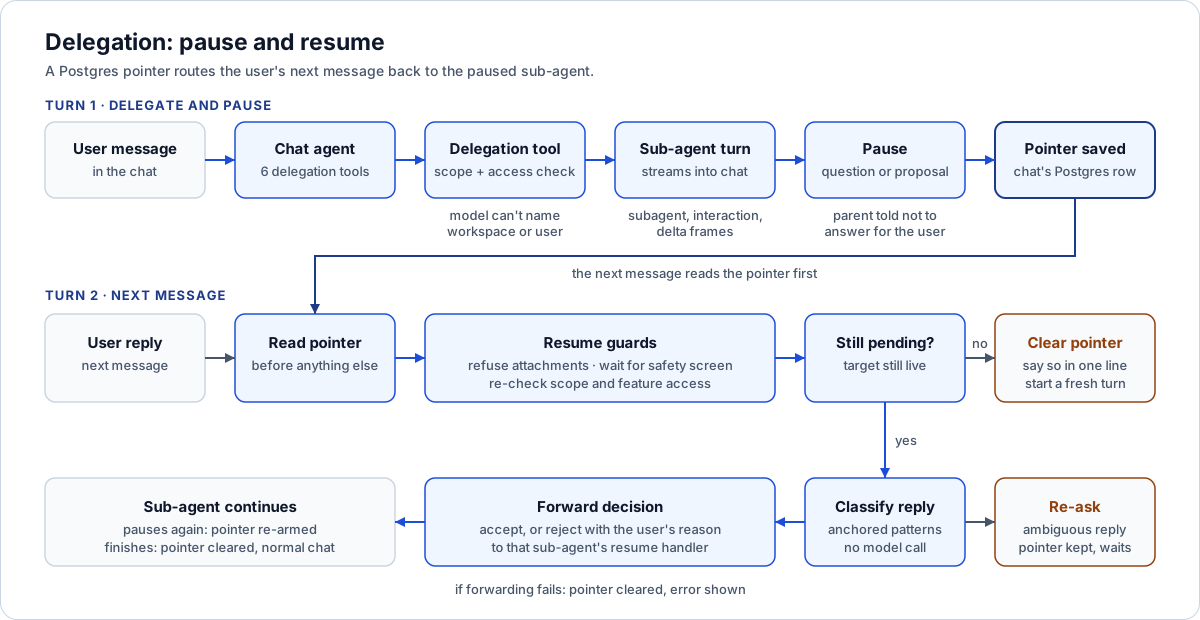
One chat, one pointer row: turn one pauses the sub-agent, turn two routes the reply back to it or clears the pointer.
The shape: one chat, six delegation tools
The chat agent ("Connect AI") is the only agent a user talks to directly. It has a few dozen read tools for projects, schedules, Updates and alerts. On top of those it has six tools that hand work to another agent:
| Delegation tool | Sub-agent | Can it pause? | What the user's next message does |
|---|---|---|---|
| build_project_info_sheet | Project Info Sheet agent | Yes: a question or a fact confirmation | Answers the question, or accepts/rejects the inferred facts |
| run_schedule_builder | Schedule Builder | Yes: a proposed revision | Accept or reject, forwarded to the builder's own conversation |
| run_app_builder | App Builder | Yes: a proposed app, or a clarifying question | Accept/discard the app, or answer the question |
| draft_alert_rule | Alert Drafter | Yes: a valid rule draft | Accept creates the rule, reject discards it |
| run_means_methods | Means & Methods drafter | No | Not applicable. It writes unverified AI drafts for an expert to review |
| generate_project_update | Updates composer | No | Not applicable. It creates an unpublished draft |
Each delegation is offered only when it makes sense for the conversation's scope and the caller's roles. The Info Sheet, Schedule Builder, Means & Methods and Updates tools need a project-scoped or plain workspace conversation. The App Builder and Alert Drafter are workspace-wide, so they are hidden once a user narrows the chat to one project. The App Builder also needs edit-level access to Apps, not just view access.
The ordering logic sits in the chat system prompt: Info Sheet first, then Means & Methods, then the schedule, then Updates. The prompt also tells the model never to accept a proposal for the user. That's an instruction, though, not a control. The controls are in the code below.
The model supplies a project and an instruction. Nothing else.
A delegation tool's schema has two fields: projectId and an optional instruction in the user's words. It has no workspace field, no user field and no conversation id. Those three values are baked into the tool when it's built for the turn, from the authenticated session. The model can't name a different workspace because the schema has nowhere to put one.
The projectId the model does supply is checked twice before any sub-agent runs:
- Is it inside this conversation's scope? A conversation pinned to one project refuses any other project id. A conversation scoped to a program refuses projects outside that program.
- Can this user reach that sub-agent on that project? Each delegation maps to a feature (info-sheet, schedule-builder, means-methods, updates, apps). The check confirms the caller holds that feature and that the project is in their allowed project set.
If either check fails, the tool returns a structured error string to the model rather than throwing. The model then tells the user in plain language, and the turn doesn't crash on a bad argument.
Streaming a sub-agent's work into the chat
A sub-agent turn can run for minutes. A spinner that says "delegating..." for four minutes feels like a hang. So each delegation tool wraps the sub-agent's event stream in a translator. The translator turns that agent's events into the chat's own server-sent event types:
- subagent frames carry a short label of what the child is doing ("reading drawings", "sequencing superstructure"), tagged with which agent it is.
- interaction frames carry a pause: a question, a set of facts to confirm, or a proposal payload the dock shows as a card.
- delta frames carry any prose the sub-agent produces.
The translator also captures a pause as it happens. When the sub-agent's turn ends, the tool knows whether the child finished or stopped to wait. What it returns to the parent model depends on which. A finished Info Sheet turn returns its phase and whether the profile has unreviewed edits, so the parent can report something concrete. A paused turn returns something like: "The agent paused and needs the user's input. The question is shown above. Do not answer on their behalf; tell the user to answer it in their next message."
That return string carries a lot of weight. Without it, the parent model tends to be helpful in the wrong way and answers the sub-agent's question itself.
The pending-delegation pointer
The tricky part is what happens on the next message. The sub-agent's paused state lives in its own store. The Info Sheet runtime keeps its run state in a document database. The Schedule Builder and App Builder keep their proposals on their own conversations. But "this chat conversation is mid-delegation, so the next message is an answer" is a routing fact, and it belongs to chat. So it lives in chat's own Postgres store:
| Column | Purpose |
|---|---|
| conversation_id (primary key) | One pointer per conversation. A conversation answers at most one pending interaction at a time |
| workspace_id | Tenant column, like every tenant table |
| subagent | Which agent is waiting: pis, schedule_builder, app_builder, alert_drafter (a CHECK constraint) |
| target_project_id | Nullable, because the App Builder and Alert Drafter are workspace-scoped |
| interaction_id | The paused interaction or proposal id, or a sentinel for an App Builder question |
| subagent_conversation_id | The child's own conversation, for agents that hold proposals per conversation |
| payload | Nullable JSON, used only by the Alert Drafter |
The payload column came later, in a small migration. The Alert Drafter has no conversation or store of its own. It's a single draft call. When it pauses, nothing exists anywhere to resume from. So the draft rule rides on the pointer itself, and accepting it creates the rule from that payload. The other three agents leave the column null and look up their proposals in their own stores.
The pointer is written when a delegation pauses and cleared when it finishes without pausing. Clearing on a clean finish matters. It removes any stale pointer left by an earlier pause in the same conversation.
How a resume runs
When a message arrives, chat reads the pointer before doing anything else. If a pointer exists:
- Attachments are refused. A message with files attached is rejected with a clear error: remove the files to answer, or finish the decision first. A decision on a schedule proposal is not where a new drawing should go. The message is refused before it is saved, so nothing half-sent lands in the transcript.
- The input safety screen still runs, and on this path the code waits for its verdict before going on. A normal turn overlaps the screen with retrieval. A resume has nothing to overlap, so it blocks and fails closed.
- Permissions are checked again. A pending decision can outlive the permissions that allowed it. The project-scope check and the feature check from delegation time both run again before the answer is forwarded. A user who lost Schedule Builder access overnight can't accept a revision this morning.
- The pointer's subagent field picks the resume path. Each agent has its own handler.
- The answer is forwarded, and the pointer is re-armed or cleared. If the sub-agent pauses again (the Info Sheet agent often asks a follow-up), the pointer is updated to the new interaction. If not, it's cleared and the conversation goes back to normal chat.
Accept, reject, or ask again
For proposals, the handler has to turn free text into a decision. We used two tight regular expressions rather than a model call. "Yes", "accept", "approve", "looks good" and "lgtm" count as acceptance. "No", "reject", "discard" and "that's wrong" count as rejection. The match is anchored to the whole message, so "yes, but move the crane date" is neither.
An ambiguous reply doesn't guess. The handler posts "Please reply 'accept' to apply the proposed revision, or 'reject' to discard it", keeps the pointer, and waits. That's intentional. Installing an app or applying a schedule revision because a model read "sure, why not, but..." as consent is the sort of mistake that ends trust in an agent. A clear rejection passes the user's text along as the reason, so the Schedule Builder or App Builder can revise.
Info Sheet interactions get their own shaping. A project-input question takes the whole message as the answer. A dismissive reply ("skip", "not sure", "n/a") is recorded as no answer, not as the literal text "skip". A fact confirmation takes a whole-message accept or reject for every fact at once. Anything subtler gets sent to the Info Sheet page, where each fact can be decided on its own.
Stale pointers and recovery
A durable pointer will eventually point at something that no longer exists. The sub-agent's question may have been answered in the dedicated Info Sheet view. A proposal may have been withdrawn, or a session may have expired. Every resume path checks that the target is still live before using it:
- The Info Sheet path loads the sheet's current pending interaction and compares ids. No match means the pointer is stale.
- The Schedule Builder and App Builder paths need the child's conversation id. If it's missing, there's nothing to decide against.
- The Alert Drafter path needs its payload.
In every stale case the handler clears the pointer, says so in one line ("That request is no longer pending, starting a fresh turn"), and the conversation goes on. If forwarding throws (a validation error, or a decision against a schedule that has since changed), the pointer is cleared too and the error is shown. The rule is simple: the conversation must never get stuck answering a question that can't be answered.
Playwright recovery suites check this from the user's side. A reloaded mid-build session settles on its final proposal. A failed status read retries without allowing a duplicate turn. A "schedule changed" conflict leaves the decision card usable, and a failed reject keeps the typed reason.
Ten agent kinds, two runtimes
The admin ledger tracks ten agent kinds: chat, the Info Sheet agent and its two children (a section worker and a normalizer), Means & Methods, Schedule Builder, App Builder, Alert Drafter, Updates, and job-walk vision. Six of them have an editable, versioned config (prompt, model, thinking level, tool allow-list). The Info Sheet children are governed by their parent's config. The Alert Drafter and job-walk vision are tracked for cost only.
They run on two runtimes, on purpose:
- A shared pi-agent-core runtime holds one Azure OpenAI provider with a parent and a child model tier. The single-shot and short-loop agents use it: Means & Methods, Updates, alert drafting and job walks. An agent picks a tier, not a deployment name. A published model override that names an unknown model falls back to the tier default instead of failing the turn. Every model call retries transient failures up to six times, with a maximum backoff above a full minute, because an Azure per-minute token throttle needs a full minute to clear. The provider's default cap would have aborted those legitimate cooldowns.
- The OpenAI Agents SDK runs the long-loop agents: chat, the Info Sheet agent (which needs a sandboxed workspace to inspect files), the Schedule Builder (whose passes resume from a saved build spec after a failure) and the App Builder. Chat's tool loop is capped at eight tool turns. If the model is still fetching at the cap, chat answers from retrieved passages instead of returning nothing.
One small detail shows how the delegation design pays off. Chat lets the model make read-only tool calls in parallel. That's safe because every chat tool is read-only except the delegations, and delegations pause the turn, so they never run concurrently with anything.
The same agents over MCP, detached
The same sub-agents can be driven from an external MCP client such as Claude. A build can run for many minutes, and MCP clients have idle timeouts. So agent turns started over MCP run on a signal that never aborts. A dropped transport or a client timeout doesn't cancel a live build. The runtime's own wall clock is the real limit. The client gets progress notifications while it waits, and it collects the result by polling a matching status tool. This mirrors the web chat, where closing the stream never cancels a build.
Why this matters if you're building something similar
- Put the routing fact in the orchestrator's store. The child owns its paused state. The parent owns "the next message belongs to the child". One row per conversation, with a primary key on the conversation, makes "at most one pending decision" a database guarantee.
- Strip scope out of tool schemas. If the model can't name the workspace, it can't widen it. Bake identity and tenancy into the tool when you build it.
- Check permissions again on resume. A pause can last longer than a role assignment. Treat the resume as a new request.
- Use a dumb classifier for consent. Anchored patterns plus "ask again when unsure" are boring, and boring is what you want before an install or a schedule revision.
- Plan for the pointer to go stale. Every resume path should check that its target still exists, clear itself if not, and say so in one sentence.
- Tell the parent model what to do next. The string a paused tool returns is the most effective guardrail against the parent answering for the user.
For the governance view of the same system, see governing AI agents in construction. For a different multi-agent shape (orchestrator, leads and specialists routing over one large API), see how we route agents across thousands of Procore tools. That article is about routing breadth. This one is about pausing and resuming durably.
Where to go next
- The series overview: How we built Connect, an enterprise AI platform
- What happens inside a single turn before any delegation: Anatomy of an AI chat turn
- How each agent's tools are declared and fenced: The agent tool manifest and permissions
- The propose-then-approve pattern the sub-agents follow: Two-phase AI agent workflows with human approval
- Driving the same agents from Claude: Building an enterprise MCP server with OAuth
Planning an agent system that has to wait for people? Tell us what you want to build.
Frequently asked questions
Why store the pending delegation in the chat database instead of the sub-agent's store?
The sub-agent owns its paused run state, but the fact that this conversation's next message is an answer is a routing decision that belongs to chat. One row per conversation, keyed on the conversation id, also guarantees at most one pending decision at a time.
How does the system tell an accept from a reject?
Two anchored regular expressions match whole-message replies such as yes, accept or looks good, and no, reject or discard. Anything else, including 'yes, but...', is treated as ambiguous: the agent re-asks and keeps the pointer.
What happens if permissions change while a decision is pending?
The resume path re-runs the same project-scope and feature checks the original delegation ran. A user who lost access cannot accept a proposal that was made while they still had it.
Why are attachments refused while a decision is pending?
A pending decision expects an answer, not new evidence. Refusing the message before it is stored keeps the transcript clean and avoids feeding files into a resume path that cannot use them.
Do long sub-agent runs get cancelled if an MCP client disconnects?
No. Agent turns started over MCP run on a never-firing abort signal, report progress, and are recovered by polling a status tool; the runtime's own wall clock is the backstop.
Next step
Have a workflow in mind?
Start with a readiness review: the task, the data and tools it needs, the access boundaries, and how a pilot would be evaluated.
Prefer email? charley@buildflows.ai
Get the next guide in your inbox
Field Notes: practical guides and new walkthroughs, about once a month.
Field Notes
Practical guides and new walkthroughs on construction data and automation, roughly monthly.
Keep learning
AI agents & MCP · October 9, 2026
How We Built Connect: Architecture of an Enterprise AI Platform
The pillar of our Connect architecture series: a layer-by-layer map of an enterprise agentic AI platform, the three-process shape it runs as, the design principles that kept recurring, and links to every deep-dive article.
AI agents & MCP · October 9, 2026
Anatomy of an AI Chat Turn: Safety, Retrieval, Prompt Caching and Streaming, Step by Step
A stage-by-stage trace of a single Connect AI chat turn, showing what runs before the model call, what runs in parallel with it, and what must happen after it, with the latency and cost reasoning behind each step.
AI agents & MCP · October 9, 2026
The Agent Tool Manifest: Declaring, Gating and Testing Every Tool an AI Agent Can Call
A look at Connect's tool manifest: one registry pinned by tests, writes as proposals, capability-to-feature RBAC checked at offer and call time, per-agent allow-lists narrowed by published configs, and a read-only proxy for a remote MCP server.