Most RAG write-ups stop at "chunk it, embed it, search it." That is the easy third. The hard parts show up later: a spec gets revised and the old paragraphs keep answering questions, a 150 MB drawing set crashes the worker halfway through, a file linked to three projects gets embedded three times, or a filter that worked on your laptop silently fails on the managed database. We designed against each of them while building the knowledge base under Connect, the agentic scheduling platform we built on top of Syncify.
This article walks through that pipeline end to end: ingestion triggers, chunking, cheap re-ingest, storage and scoping, graceful degradation, and the admin tools that show what agents can actually retrieve. If you want the user-facing view of document assistants (what they are good at, how to pilot one), read AI assistants for construction documents first. This one is the engineering underneath.
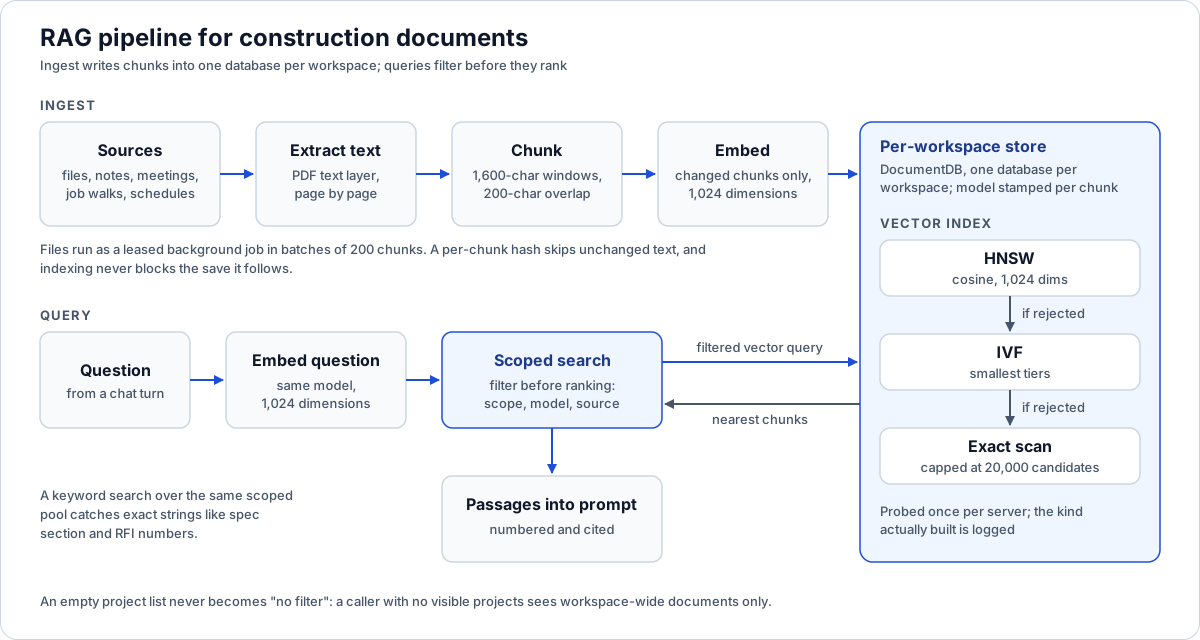
Ingest and query share one store per workspace; the scope filter runs inside the vector search, before ranking.
What feeds the knowledge base
The knowledge base is not just uploaded files. Construction context lives in many places, and the agents need all of it. Five kinds of source write into the same chunk store, each tagged with a source type:
| Source | When it is (re)ingested | Scope |
|---|---|---|
| Files (PDF, DOCX, XLSX, text formats) | Automatically on upload, or on demand; queued as a leased background job | Every project the file is linked to, or workspace-wide if none |
| Project notes | On every create or edit | The note's project |
| Meeting recordings | Once transcribed; the indexed text combines the summary, transcript and speaker labels | The recording's project |
| Job walks | When the walk report is generated, unless the user opted it out | The walk's project |
| Schedules | On every sync, as a generated summary of tasks, dates and status | The schedule's project |
Two design rules hold across all five.
Ingestion never blocks the write it follows. The document tier is optional; without it the ingest module is null and every trigger skips it. With it, a note save or upload succeeds even if embedding fails, because indexing is best-effort and logged. Nobody should lose a note because an embeddings endpoint had a bad minute.
Personal content is not ingested. A recording with no project, visible only to its creator, never enters the shared knowledge base. Scope is enforced at read time, so content with no shared scope is safest not written at all.
Chunking: paragraphs first, words as a fallback
The chunker is small, pure and synchronous, which makes it easy to test on its own. It works like this:
- Split the text on blank lines into paragraphs.
- Pack paragraphs into a window until adding the next one would exceed 1,600 characters.
- When a window closes, seed the next one with the last 200 characters of the closed window, so a sentence that straddles the cut can be retrieved from both sides.
- If a single paragraph is longer than 1,600 characters (long spec sections and spreadsheet extracts often are), hard-split it on word boundaries rather than dropping it or cutting mid-word.
- Drop the overlap seed when it would push a window past the cap, and drop a final window that is only the previous chunk's overlap.
Why characters and not tokens? 1,600 characters sits well inside the embedding model's input window, and a character count is deterministic and free. Determinism matters more than it looks: the file indexer relies on the same text always producing the same chunk list, so a job that dies halfway can rebuild the list and resume at exactly the right chunk.
One limitation worth stating plainly: the file extractor reads the PDF text layer page by page. A page that is only a scanned image yields no text, and a document made entirely of such pages is marked as having no indexable text rather than indexed as empty.
Embeddings: one model, fixed dimensions, validated responses
Chunks are embedded with text-embedding-3-small through Azure OpenAI, requesting 1,024 dimensions. That number is one constant, kept next to the vector index that depends on it.
The client fails the call if the response has the wrong number of vectors or any vector has the wrong length. A malformed response that slipped through would write vectors that still "work": search returns results, they are just wrong.
Every chunk also records which embedding model produced it, and every search filters on that model. Vectors from different models are not comparable. Mixing them produces no error anywhere, only quietly meaningless similarity scores. Stamping the model lets a future model change roll out alongside old vectors safely.
Incremental re-ingest: hash per chunk, trim the tail
Notes, transcripts and schedule summaries are re-ingested on every write. That only works if re-ingest is cheap, so it is incremental by content hash:
- Chunk the new text.
- Load the stored hash for each existing chunk index of this source.
- Compute a SHA-256 hash for each new chunk.
- Embed only the chunks whose hash differs from the stored one at the same index.
- Upsert those chunks.
- If the old version had more chunks than the new one, delete everything from the new length onward.
- If the new text is empty, delete the source entirely.
A re-save of an unchanged note embeds nothing. A small edit re-embeds the chunks that moved. Step 6 is the one people forget: without tail trimming, a document edited down to half its length keeps answering questions from paragraphs that no longer exist.
One detail: a chunk that exists but has no stored hash counts as changed, never as matching, which is why the lookup returns a map of index to hash rather than a set of hashes.
Multi-project fan-out
Files are different. A file can be linked to several projects, and project scope is part of a chunk's identity (the unique key is workspace, project, source type, source id and chunk index). So a file linked to three projects produces three copies of each chunk, one per scope.
The expensive part is the embedding, not the write. The fan-out path embeds the chunk list once, then writes the same vectors into each scope. You pay one embedding pass regardless of how many projects the file belongs to. Duplicating rows instead of storing a project list on one row keeps the read-time filter simple, which matters below.
Large files: leased batches of 200
A 150 MB drawing set must index. Loading it whole, chunking it into a single list and sending one giant embeddings request would not survive. File indexing runs as a background job with three properties:
- Batches of 200 chunks. Small enough to stay inside the embeddings request limit and keep worker memory flat, large enough that a normal file finishes in one or two batches.
- A renewable lease. The worker claims the job with a short lease and extends it after each batch. If the worker dies, the lease lapses and another worker reclaims the job.
- Checkpoint and resume. Progress is recorded after every batch. Because chunking is deterministic and the upsert key includes the chunk index, a reclaimed job rebuilds the same chunk list, skips the batches already done and re-running a batch is idempotent.
Between batches the worker checks that it still owns the job and that nobody cancelled it. At the end it trims chunks a longer previous attempt left behind and re-reads the file's project links; if they changed mid-job, it deletes what it wrote and re-queues itself. Any failure deletes the partial index first: half a document answers confidently from an incomplete source, which is worse than nothing.
Ceilings on bytes, pages and chunks exist only to stop a multi-gigabyte blob loading whole on a worker. For the queue mechanics, see leased background jobs on Postgres.
Storage: one database per workspace
Chunks live in Azure Cosmos DB for MongoDB vCore (now branded DocumentDB), not in Postgres alongside the rest of Connect's data. Each workspace gets its own database. Isolation is the connection itself, not a filter someone could forget. The chunk store is constructed with one workspace's database handle and nothing above it ever sees a raw collection.
Documents still carry the workspace id, re-stamped on the server at write time rather than trusted from the caller, so a misrouted write is detectable rather than silent.
There is no migration runner for this tier. Collections, validators and indexes are ensured idempotently at boot (a background sweep) and on first touch of a workspace, so an index or validator change ships by being deployed.
The collection has a JSON Schema validator that is doing real security work. project_id is required but nullable. In a Mongo query, a missing field and an explicit null look the same. Making the field required means "this chunk is workspace-wide" is always an explicit claim by the writer, and it means a filter for "this project or workspace-wide" cannot accidentally match a document that lost its project field.
Indexes, and a vCore quirk
Cosmos vCore's filtered vector search has two requirements we learned the hard way:
- Every filter path needs its own single-field index. A compound index over the same fields is rejected, and the query fails outright.
- The filter goes inside the
cosmosSearchstage. Atlas's$vectorSearchdocumentation describes a different pipeline shape that does not work on vCore.
So each workspace gets single-field indexes on workspace, project, embedding model, ACL and source type, a unique identity index, one compound full-text index over text and title (Mongo allows one text index per collection), and the vector index.
HNSW, then IVF, then an exact scan
The vector index is created with a fallback chain:
- Try HNSW (cosine, 1,024 dimensions). Tier documentation is inconsistent about where it is available, so a smaller cluster may reject it.
- Fall back to IVF, available on the smallest tiers and fine below roughly ten thousand vectors.
- If both fail, log once and use an exact scan: fetch filtered candidates, score cosine distance in process, take the top results.
Vector index support is a property of the server, not a database, so it is probed once and cached rather than retried per workspace. The kind actually built is logged, because dev and production may disagree and nothing else would reveal it.
The exact scan is capped at 20,000 candidates and warns when it hits the cap, rather than ranking a subset as if it were the corpus. It is a development convenience; production has the index.
Keyword search, drawn from the same pool
Vector search misses exact strings like spec section numbers and RFI numbers. A Mongo $text query covers those, with the same scope filter so both halves draw from the same pool. Two choices are deliberate:
- No text index means no keyword results, not a regex fallback, which would be a table scan pretending to be search.
- Keyword hits do not get a fake cosine distance. The scales differ, so fusion must rank the two lists separately.
Scoping: the filter is the only gate
Because chunks are ingested workspace-wide, the read-time scope filter is the only thing between a question and every document in the workspace. So filters are never assembled inline. They come from one helper with five scope kinds:
| Scope kind | Matches | Used for |
|---|---|---|
| In project | This project plus workspace-wide documents | A project question that should also see company standards |
| In project only | This project's documents only | Strictly project-bound evidence |
| Tenant-wide only | Workspace-wide documents only | Company standards |
| Across projects | Everything in the workspace | The portfolio question, for callers who can see every project |
| In visible projects | The caller's permitted projects plus workspace-wide | Most chat turns |
Filtering happens before ranking. Filtering a top-k result afterwards silently guts it: ask for ten, discard six, return four. Scope, model and source type all narrow candidates inside the vector search itself.
The $in-only quirk
vCore's filtered vector search accepts comparison operators and $in/$nin, but not $or. The local DocumentDB container used in development does accept $or, so no local test would catch a regression. "This project or workspace-wide" is therefore written as project_id $in [projectId, null].
That only works because of the validator. $in with null also matches documents where the field is missing, which would be a leak. Since the field is required, "missing" cannot happen, and the filter matches exactly this project plus workspace-wide. The two decisions were made together, on purpose.
Two more defaults point in the safe direction. A caller with no visible projects sees workspace-wide documents only, never an unfiltered query: an empty project list is not turned into "no filter". And a chunk's ACL is never empty, because $in never matches an empty array, so an empty ACL would make a chunk unretrievable rather than unrestricted.
Per-agent source bindings
The same filter accepts an optional list of source types, applied before ranking. The admin portal stores a per-agent data-source binding (files, meetings, notes, recordings, schedules), and this parameter is where such a binding lands; the Means & Methods drafter, for example, searches only files within its project. An empty list means no restriction, because an empty $in would match nothing.
The admin RAG browser
A knowledge base you cannot inspect is one you cannot trust. The executive admin portal includes a RAG browser that lists each workspace's indexed documents with their indexing state and last error, shows the exact extracted text that gets chunked and embedded (so an admin sees precisely what the agents can retrieve), and offers two actions: reindex a document, which queues a fresh job, and exclude it, which deletes its chunks so no agent can retrieve it. The routes sit behind the executive-admin role. More on that portal in the executive admin portal for AI agents.
Why this matters if you're building something similar
- Make chunking deterministic. It is what lets batch jobs resume from a checkpoint without re-embedding.
- Hash per chunk and trim the tail. Re-ingest on every write is affordable, and edited-down documents stop answering from deleted text.
- Embed once, write many. When a source belongs to several scopes, the cost is the embedding pass, not the rows.
- Stamp the embedding model on every chunk and filter on it. Mixed-model vectors fail silently.
- Filter before ranking, and build filters in one place. If the filter is the only gate, treat it as security code, with tests.
- Test against the managed engine's real constraints. Local emulators accept operators and index shapes that production rejects.
- Degrade loudly. Missing vector index, capped scan, missing text index: each still answers, and each logs exactly what it gave up.
- Give admins a window into the index. Seeing the extracted text resolves most "why did the AI say that?" questions in minutes.
Where to go next
- How we built Connect: architecture of an enterprise AI platform, the series overview.
- Anatomy of an AI chat turn, where these chunks get used.
- Leased background jobs on a Postgres worker, the job engine behind file indexing.
- AI assistants for construction documents, the user-facing view.
- Multi-tenant RBAC with a single authorization chokepoint, where visible projects come from.
Planning a document knowledge base for your own projects? Scope it with us.
Frequently asked questions
What chunk size does Connect use for construction documents?
Paragraphs are packed into windows of at most 1,600 characters with a 200-character overlap carried into the next window. Paragraphs longer than the cap are split on word boundaries rather than dropped.
How does re-ingesting an edited document stay cheap?
Each chunk stores a SHA-256 hash of its text. On re-ingest only chunks whose hash changed are re-embedded, and chunks past the new end of a shortened document are deleted.
Why one database per workspace instead of a tenant filter?
Isolation becomes the connection rather than a filter someone could forget. Documents still carry the workspace id, stamped on the server, so a misrouted write is detectable.
Why use $in instead of $or in the vector search filter?
Cosmos DB for MongoDB vCore's filtered vector search does not accept $or, although the local container does. A required-but-nullable project field makes $in [projectId, null] match exactly this project plus workspace-wide documents.
What happens if the vector index cannot be created?
Connect tries HNSW, then IVF, and if both fail it falls back to an exact in-process cosine scan capped at 20,000 candidates, logging a warning when the cap is hit.
Can admins see what the AI can retrieve?
Yes. An admin RAG browser lists each workspace's indexed documents, shows the exact extracted text that was embedded, and lets an admin reindex or exclude a document.
Next step
Have a workflow in mind?
Start with a readiness review: the task, the data and tools it needs, the access boundaries, and how a pilot would be evaluated.
Prefer email? charley@buildflows.ai
Get the next guide in your inbox
Field Notes: practical guides and new walkthroughs, about once a month.
Field Notes
Practical guides and new walkthroughs on construction data and automation, roughly monthly.
Keep learning
AI agents & MCP · October 9, 2026
How We Built Connect: Architecture of an Enterprise AI Platform
The pillar of our Connect architecture series: a layer-by-layer map of an enterprise agentic AI platform, the three-process shape it runs as, the design principles that kept recurring, and links to every deep-dive article.
AI agents & MCP · October 9, 2026
Anatomy of an AI Chat Turn: Safety, Retrieval, Prompt Caching and Streaming, Step by Step
A stage-by-stage trace of a single Connect AI chat turn, showing what runs before the model call, what runs in parallel with it, and what must happen after it, with the latency and cost reasoning behind each step.
Workflow automation · October 9, 2026
Leased Background Jobs in Postgres: How Connect's Worker Claims, Renews and Resumes Work
How Connect runs syncs, indexing, transcription and AI jobs from Postgres tables using leases, jittered retries and checkpoints, with no message broker.